Mybatis插入数据
对上文-》Mybatis快速入门-《进行代码修改
1.在UserMapper.xml中添加插入操作
<insert id="save" parameterType="com.hao.domain.User">insert into user values(#{id},#{username},#{password})insert>
parameterType意思是从Service业务层传过来的数据封装到了User对象中,该代码中的#{id}等代表占位符,与实体类User中的属性一一对应;
2.测试
public class MybatisTest {@Testpublic void test() throws IOException {User user=new User();user.setUsername("zsh");user.setPassword("hao");
//        加载核心配置文件InputStream stream = Resources.getResourceAsStream("SqlMapConfig.xml");
//        获得工厂对象SqlSessionFactory build = new SqlSessionFactoryBuilder().build(stream);
//        获得session对象SqlSession sqlSession = build.openSession();
//        参数:namespace+idsqlSession.insert("userMapper.save",user);sqlSession.commit();	}
}
mybatis默认事务是不提交的,所以需要手动commit;
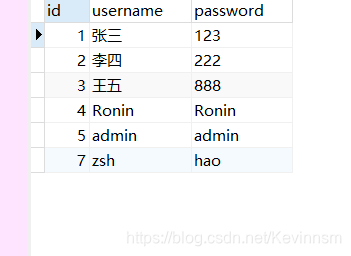
至于这里出现id为7而不是6是因为我第一次没有提交事务,,但是数据已经传入过去
,所有id=6已经被默认使用,第二次再测试时执行commit()提交事务,所以id=7
本文来自互联网用户投稿,文章观点仅代表作者本人,不代表本站立场,不承担相关法律责任。如若转载,请注明出处。 如若内容造成侵权/违法违规/事实不符,请点击【内容举报】进行投诉反馈!