Swift日常开发随笔
1、修改UISearchBar的搜索框底色
使用以下代码:
setSearchFieldBackgroundImage(CommonUseClass._sharedManager.imageFromColor(color: .white, viewSize: CGSize(width: self.bounds.size.width, height: self.bounds.size.height)), for: .normal)//颜色创建图片func imageFromColor(color: UIColor, viewSize: CGSize) -> UIImage{let rect: CGRect = CGRect(x: 0, y: 0, width: viewSize.width, height: viewSize.height)UIGraphicsBeginImageContext(rect.size)let context: CGContext = UIGraphicsGetCurrentContext()!context.setFillColor(color.cgColor)context.fill(rect)let image = UIGraphicsGetImageFromCurrentImageContext()UIGraphicsGetCurrentContext()return image!}
2、修改UITextField的placeholderLabel的默认字体颜色
inputTextField.text = "123"
//备注:因为苹果公司开发过程中使用的是懒加载,所以如果不提前进行设置储值,则不会创建“_placeholderLabel”,仅仅使用以下代码不会进行更改默认字体颜色
inputTextField.setValue(colorWithHexString("0x999999"), forKeyPath: "_placeholderLabel.textColor")
3、为UICollectionView添加headerView
//备注:UICollectionView跟UITableView在设置headerView时有少许的差别。UICollection使用的是一个UICollectionReusableView来进行创建collectionView.register(UICollectionReusableView, forSupplementaryViewOfKind: UICollectionView.elementKindSectionHeader, withReuseIdentifier: "UICollectionReusableView")//实现代理方法
func collectionView(_ collectionView: UICollectionView, viewForSupplementaryElementOfKind kind: String, at indexPath: IndexPath) -> UICollectionReusableView {let headerView = collectionView.dequeueReusableSupplementaryView(ofKind: UICollectionView.elementKindSectionHeader, withReuseIdentifier:"UICollectionReusableView", for: indexPath)headerView.addSubview(contentSearchBar)return headerView}//起初时候使用上面的代理方法不知道为何没有执行,后来设置了以下值发现竟然OK了,也不知道为啥,反正就用了。
layout.headerHeight = 70
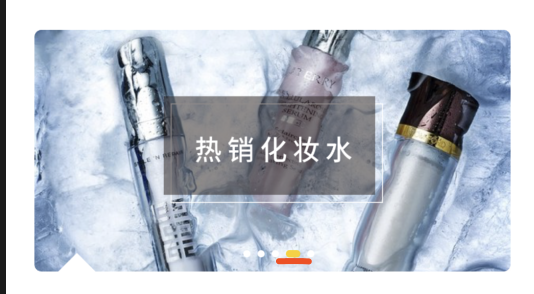
4、自定义轮播图的UIPageControl
//创建轮播视图class NACustomBannerView: UIView, UIScrollViewDelegate {var timeInterval: TimeInterval = 1private var imageUrls: [String] = [String]()private var imageArray: [UIImageView] = [UIImageView]()private var tapAction: (Int) -> Voidprivate var currentIndex: Int = 0private weak var timer: Timer?private lazy var scrollNode: UIScrollView = {let node = UIScrollView()node.scrollsToTop = falsenode.isPagingEnabled = truenode.bounces = falsenode.frame = self.boundsnode.delegate = selfnode.showsHorizontalScrollIndicator = falsenode.decelerationRate = UIScrollView.DecelerationRate(rawValue: 1)node.setContentOffset(CGPoint(x: self.frame.width, y: 0), animated: false)node.contentSize = CGSize(width: self.frame.size.width * 3.0, height: 0)return node}()lazy var pageControl: NACustomBannerPageControl = {let node = NACustomBannerPageControl(frame: CGRect(x: Int(UIScreen.main.bounds.width / 2 - 40), y: Int(self.frame.height - 15), width: 10 * self.imageUrls.count , height: 10))node.numberOfPages = self.imageUrls.countreturn node}()// MARK: - Publicfunc resetCurrentPage(_ page: Int) {currentIndex = pagepageControl.currentPage = pageresetImageView()startTimer()}// MARK: - Initinit(frame: CGRect, imageUrls: [String], tapAction action: @escaping(Int) -> Void) {self.imageUrls = imageUrlsself.tapAction = actionsuper.init(frame: frame)addImageView()addSubview(scrollNode)addSubview(pageControl)startTimer()}required init?(coder aDecoder: NSCoder) {fatalError("init(coder:) has not been implemented")}// MARK: - UIScrollViewDelegatefunc scrollViewDidScroll(_ scrollView: UIScrollView) {let contentOffsetX = scrollView.contentOffset.x// 设置图片信息if contentOffsetX == 2 * scrollView.frame.width {// 左滑currentIndex = getActualCurrentPage(calculatedPage: currentIndex + 1)resetImageView()} else if (contentOffsetX == 0) {// 右滑currentIndex = getActualCurrentPage(calculatedPage: currentIndex - 1)resetImageView()}// 设置 pageControlif contentOffsetX < scrollView.frame.width && contentOffsetX > 0 {if contentOffsetX <= scrollView.frame.width * 0.5 {pageControl.currentPage = getActualCurrentPage(calculatedPage: currentIndex - 1)} else if contentOffsetX > scrollView.frame.width * 0.5 {pageControl.currentPage = getActualCurrentPage(calculatedPage: currentIndex)}} else if contentOffsetX > scrollView.frame.width && contentOffsetX < scrollView.frame.width * 2 {if contentOffsetX >= scrollView.frame.width * 1.5 {pageControl.currentPage = getActualCurrentPage(calculatedPage: currentIndex + 1)} else if contentOffsetX < scrollView.frame.width * 1.5 {pageControl.currentPage = currentIndex}}}func scrollViewDidEndDecelerating(_ scrollView: UIScrollView) {scrollView.setContentOffset(CGPoint(x: self.frame.width, y: 0), animated: true)startTimer()}func scrollViewWillBeginDragging(_ scrollView: UIScrollView) {timer?.invalidate()timer = nil}// MARK: - Action@objc fileprivate func cycleViewDidClick(gesture: UITapGestureRecognizer) {print("点击了第\(currentIndex)张图")let imageView = UIImageView(frame: CGRect(x: 0, y: 0, width: frame.width, height: frame.height))imageView.kf.setImage(with: URL(string: imageUrls[currentIndex]))tapAction(currentIndex)}@objc fileprivate func autoScroll() {if imageUrls.count < 2 {return}scrollNode.setContentOffset(CGPoint(x: self.frame.width * 2, y: 0), animated: true)}func startTimer() {guard imageUrls.count > 0 else { return }if let myTimer = timer {myTimer.invalidate()timer = nil}timer = Timer.scheduledTimer(timeInterval: self.timeInterval, target: self, selector: #selector(autoScroll), userInfo: nil, repeats: true)RunLoop.current.add(timer!, forMode: RunLoop.Mode.common)}func invalidateTimer() {timer?.invalidate()timer = nil}fileprivate func addImageView() {var x: CGFloat = 0var pageIndex: NSInteger = self.imageUrls.count - 1for index in 0..<3 {let imgNode = UIImageView()x = CGFloat(index) * frame.widthimgNode.frame = CGRect(x: x, y: 0, width: frame.width, height: frame.height)imgNode.kf.setImage(with: URL(string: imageUrls.count == 0 ? "" : (imageUrls[pageIndex])))imgNode.contentMode = .scaleAspectFillimgNode.clipsToBounds = truelet gesture = UITapGestureRecognizer(target: self, action: #selector(cycleViewDidClick(gesture:)))imgNode.addGestureRecognizer(gesture)imgNode.isUserInteractionEnabled = trueimageArray.append(imgNode)scrollNode.addSubview(imgNode)if imageUrls.count == 1 {pageIndex = 0scrollNode.isScrollEnabled = false} else {pageIndex = index == 0 ? 0 : 1}}}fileprivate func resetImageView(){let preIndex: NSInteger = getActualCurrentPage(calculatedPage: currentIndex - 1)let nextIndex: NSInteger = getActualCurrentPage(calculatedPage: currentIndex + 1)if imageUrls.count == 0 {return}imageArray[0].kf.setImage(with: URL(string: imageUrls[preIndex]))imageArray[1].kf.setImage(with: URL(string: imageUrls[currentIndex]))imageArray[2].kf.setImage(with: URL(string: imageUrls[nextIndex]))scrollNode.contentOffset = CGPoint(x: self.frame.width, y: 0)}fileprivate func getActualCurrentPage(calculatedPage page: NSInteger) -> NSInteger {if page == imageUrls.count {return 0} else if page == -1 {return imageUrls.count - 1} else {return page}}
}
import UIKitclass NACustomBannerPageControl: UIView {let pageControlDiameter: Float = 5var currentPage: NSInteger = 0 {didSet {if oldValue == currentPage {return}if currentPage < oldValue {// 向右拉伸UIView.animate(withDuration: 0.3, animations: {for dot in self.subviews {var dotFrame = dot.frameif dot.tag == self.currentPage {dotFrame.size.width = CGFloat(self.pageControlDiameter * 2.0)dot.backgroundColor = colorWithHexString("0xfdd000")dot.frame = dotFrame} else if dot.tag <= oldValue && dot.tag > self.currentPage {dotFrame.origin.x += CGFloat(self.pageControlDiameter)dotFrame.size.width = CGFloat(self.pageControlDiameter)dot.backgroundColor = .whitedot.frame = dotFrame}}})} else {UIView.animate(withDuration: 0.3, animations: {for dot in self.subviews {var dotFrame = dot.frameif dot.tag == self.currentPage {dotFrame.size.width = CGFloat(self.pageControlDiameter * 2.0)dotFrame.origin.x -= CGFloat(self.pageControlDiameter)dot.backgroundColor = colorWithHexString("0xfdd000")dot.frame = dotFrame} else if dot.tag > oldValue && dot.tag < self.currentPage {dotFrame.origin.x -= CGFloat(self.pageControlDiameter)dot.frame = dotFrame} else if dot.tag == oldValue {dotFrame.size.width = CGFloat(self.pageControlDiameter)dot.backgroundColor = .whitedot.frame = dotFrame}}})}}}var numberOfPages: NSInteger = 0 {didSet {if self.numberOfPages == 0 {return}if self.subviews.count > 0 {for view in self.subviews {view.removeFromSuperview()}}var dotX: Float = 0;var dotW: Float = pageControlDiameter;var bgColor: UIColorfor i in 0..
func setUpTurnsChangeItem() -> Void {let x = (SCREEN_WIDTH - 335)/2let frame = CGRect(x: x, y: CGFloat(21), width: 335, height: 170)let urls = ["http://p.lrlz.com/data/upload/mobile/special/s252/s252_05471521705899113.png", "http://p.lrlz.com/data/upload/mobile/special/s303/s303_05442007678060723.png", "http://p.lrlz.com/data/upload/mobile/special/s303/s303_05442007587372591.png", "http://p.lrlz.com/data/upload/mobile/special/s303/s303_05442007388249407.png", "http://p.lrlz.com/data/upload/mobile/special/s303/s303_05442007470310935.png"]cycleScrollView = NACustomBannerView(frame: frame, imageUrls: urls) { (index) inprint("当前第\(index)张")}cycleScrollView.layer.masksToBounds = truecycleScrollView.layer.cornerRadius = 5.0container.addSubview(cycleScrollView)}
效果图如下:
5、自定义下拉列表
import UIKitclass NACustomDropListView: UIView,UITableViewDelegate,UITableViewDataSource{fileprivate var cellid = "cellid"lazy  var titleArray = [String]()lazy  var tableArray = [[String]]()var screenWidth = SCREEN_WIDTHvar screenHeight = SCREEN_HEIGHTvar maskViewSS:UIView?var selectClosure:((_ tag:Int,_ row:Int)->Void)?init(frame: CGRect,tableArr:[[String]],selectClosure : @escaping (_ tag:Int,_ row:Int)->Void) {super.init(frame: frame)self.titleArray = tableArr.map({ (arr) -> String inreturn arr[0]})self.tableArray = tableArrself.selectClosure = selectClosureself.backgroundColor = UIColor.whiteself.setTitleButton()setMaskView()setTableView()}required init?(coder aDecoder: NSCoder) {fatalError("init(coder:) has not been implemented")}func setMaskView(){let height = Int(Int(SCREEN_HEIGHT) - 40 - Int(CommonUseClass._sharedManager.navigationBarHeight()))maskViewSS = UIView.init(frame: CGRect(x: 0, y: 40, width: Int(screenWidth), height:height))maskViewSS?.backgroundColor = newColorWithAlpha(0, 0, 0, 0.3)let tap = UITapGestureRecognizer.init(target: self, action: #selector(tapAction))maskViewSS?.alpha = 0maskViewSS?.addGestureRecognizer(tap)}@objc func tapAction(){for i in 0..1{drop.isSelected = falseUIView.animate(withDuration: 0.2, animations: {tableView.frame = CGRect.init(x: 0, y: 40, width: UIScreen.main.bounds.width, height: 1)self.maskViewSS?.alpha = 0}, completion: { (idCom) inself.maskViewSS?.removeFromSuperview()})}}}func setTitleButton(){let totalArry:Array>  = self.tableArraylet width:CGFloat = screenWidth / CGFloat(titleArray.count)for i in 0..Void inself.insertSubview(self.maskViewSS!, at: 0)UIView.animate(withDuration: 0.2, animations: {self.maskViewSS?.alpha = 1})if select {for n in 0.. height1 ? height1 : height2)})}else{UIView.animate(withDuration: 0.2, animations: {tableView.frame = CGRect.init(x: 0, y: 40, width: self.screenWidth, height: 1)})}}}else{let tableView = self.viewWithTag(100+i) as! UITableViewUIView.animate(withDuration: 0.2, animations: {tableView.frame = CGRect.init(x: 0, y: 40, width: self.screenWidth, height: 1)self.maskViewSS?.alpha = 0}, completion: { (idCom) inself.maskViewSS?.removeFromSuperview()})}}self.addSubview(view)}}func setTableView(){let totalArry:Array>  = self.tableArrayfor i in 0.. UIView? {var view = super.hitTest(point, with: event)if view == nil {for subView in self.subviews {let tp = subView.convert(point, from: self)if subView.bounds.contains(tp) {view = subView}}}return view}}
extension NACustomDropListView{func tableView(_ tableView: UITableView, didSelectRowAt indexPath: IndexPath) {let drop = self.viewWithTag(tableView.tag-100+1000) as! NACustomDropListTitleViewlet cell = tableView.cellForRow(at: indexPath)drop.title  = cell?.textLabel?.textif self.selectClosure != nil {self.selectClosure!(tableView.tag,indexPath.row)}drop.isSelected = falseUIView.animate(withDuration: 0.2, animations: {tableView.frame = CGRect.init(x: 0, y: 40, width: self.screenWidth, height: 1)self.maskViewSS?.alpha = 0}, completion: { (idCom) inself.maskViewSS?.removeFromSuperview()})}func tableView(_ tableView: UITableView, numberOfRowsInSection section: Int) -> Int {let drop = self.viewWithTag(tableView.tag-100+1000) as! NACustomDropListTitleViewif drop.isSelected == nil {return 0}else{return  drop.isSelected! ? self.tableArray[tableView.tag-100].count : 0}}func tableView(_ tableView: UITableView, cellForRowAt indexPath: IndexPath) -> UITableViewCell {let cell = tableView.dequeueReusableCell(withIdentifier: cellid, for: indexPath) as UITableViewCellcell.textLabel?.font = UIFont.systemFont(ofSize: 14)cell.textLabel?.text = tableArray[tableView.tag - 100][indexPath.row]return cell}
}
import UIKit
import SnapKit
typealias GesClosure = (_ selected:Bool)->Void
class NACustomDropListTitleView: UIView {var label:UILabel!var downIcon:UIImageView!var topIcon:UIImageView!var ly_width:CGFloat?var title:String?{didSet{self.ly_width = CommonUseClass._sharedManager.getStringRect(text: self.title!,font: UIFont.systemFont(ofSize: 16)).width + 2label.text = self.titleif title == "价格"{centerLayoutConstraints()}else{commponLayoutConstraints()}}}var _isSelect:Bool = falsevar gesClosure:GesClosure?var isSelected:Bool?{didSet{self._isSelect = isSelected!if isSelected! {self.downIcon.image = UIImage.init(named: "ic_down_y")self.label.textColor = colorWithHexString("0xfdd000")}else{self.downIcon.image = UIImage.init(named: "ic_down_f")self.label.textColor = colorWithHexString("0x000000")}}}init(frame: CGRect,title:String) {super.init(frame: frame)self.title = titleself.ly_width = CommonUseClass._sharedManager.getStringRect(text: self.title!,font: UIFont.systemFont(ofSize: 16)).width + 2setUI(title: title)if title == "价格" {centerLayoutConstraints()}else{commponLayoutConstraints()}setGes()}required init?(coder aDecoder: NSCoder) {fatalError("init(coder:) has not been implemented")}func setGes(){let ges = UITapGestureRecognizer.init(target: self, action: #selector(tapAction))self.addGestureRecognizer(ges)}@objc func tapAction(){self._isSelect = !self._isSelectself.isSelected = self._isSelectif (self.gesClosure != nil){self.gesClosure!(self.isSelected!)}}func setUI(title:String){label = UILabel()addSubview(label)label.font = UIFont.systemFont(ofSize: 16)label.textColor = colorWithHexString("0x000000")label.text = self.titledownIcon = UIImageView.init()downIcon.image = UIImage.init(named:"ic_down_f")addSubview(downIcon)topIcon = UIImageView.init()topIcon.image = UIImage.init(named:"ic_down_f")addSubview(topIcon)UIView.animate(withDuration: 0.2, animations: {self.topIcon.transform = CGAffineTransform.init(rotationAngle: CGFloat(Double.pi))})}func labelConstraints() -> Void {label.snp.removeConstraints()downIcon.snp.removeConstraints()label.snp.makeConstraints { (make) inmake.centerY.equalTo(self)make.centerX.equalTo(self)make.height.equalTo(16)make.width.equalTo(ly_width!)}}func commponLayoutConstraints(){labelConstraints()downIcon.snp.makeConstraints { (make) inmake.left.equalTo(label.snp.right).offset(2)make.centerY.equalTo(label)make.width.equalTo(12)make.height.equalTo(6)}}func centerLayoutConstraints() -> Void {labelConstraints()topIcon.snp.makeConstraints { (make) inmake.left.equalTo(label.snp.right).offset(2)make.top.equalTo(label).offset(1)make.width.equalTo(12)make.height.equalTo(6)}downIcon.snp.makeConstraints { (make) inmake.left.equalTo(label.snp.right).offset(2)make.bottom.equalTo(label).offset(-1)make.width.equalTo(12)make.height.equalTo(6)}}}
lazy var dropListView : NACustomDropListView = {let dropListView = NACustomDropListView.init(frame: CGRect(x: CGFloat(0), y: 0, width: SCREEN_WIDTH, height: CGFloat(44)), tableArr: [moneyArray,limitArray,sortArray], selectClosure: { (tag, row) inprint(tag-100,row)})return dropListView}()view.addSubview(dropListView)
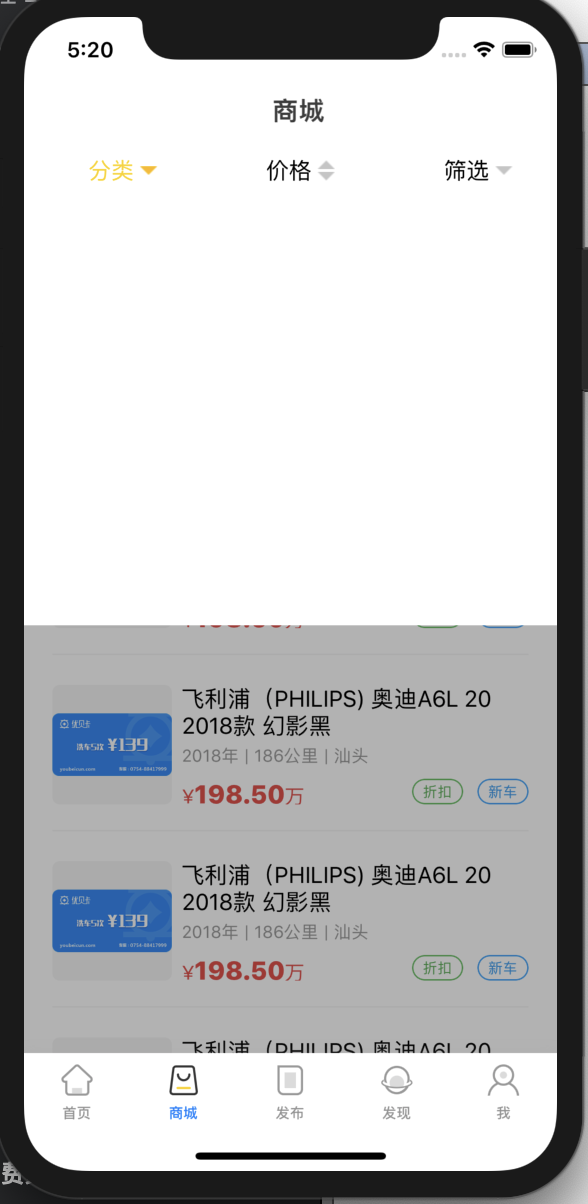
运行效果:
提示:之所以为空白,是因为我把下拉列表中的tableView.reloadData()这行代码屏蔽掉了,加入的数组没有刷新。
6、隐藏navigationBar和tabbar的黑色分割线
//隐藏navigationBar下面的分割线
self.navigationController?.navigationBar.setBackgroundImage(UIImage(), for: .any, barMetrics: .default)
self.navigationController?.navigationBar.shadowImage = UIImage()//隐藏tabbar上面的分割线
self.tabBarController?.tabBar.shadowImage = UIImage.init()
self.tabBarController?.tabBar.backgroundImage = UIImage.init()
7、获取导航栏+状态栏的高度
func navigationBarHeight() -> Float {var navigationBarH: Float = 64if IS_IPHONE_X.boolValue {navigationBarH += 20}else{navigationBarH += 0}return navigationBarH}
8、判断字符串是否为空
func StringIsEmpty(value: AnyObject?) -> Bool {if (nil == value) {return true}else{if let myValue = value as? String{return myValue == "" || myValue == "(null)" || 0 == myValue.count}else{return true}}}
9、判断是否是整数
func isPurnInt(string: String) -> Bool {let scan: Scanner = Scanner(string: string)var val:Int = 0return scan.scanInt(&val) && scan.isAtEnd}
10、添加阴影效果
func setShadow(view:UIView,sColor:UIColor,offset:CGSize,opacity:Float,radius:CGFloat) {view.layer.shadowColor = sColor.cgColorview.layer.shadowOpacity = opacityview.layer.shadowRadius = radiusview.layer.shadowOffset = offset}

使用实例:setShadow(view: groundView, sColor: .black, offset: CGSize(width: 1, height: 1), opacity:0.15, radius: 5)
11、颜色创建图片
func imageFromColor(color: UIColor, viewSize: CGSize) -> UIImage{let rect: CGRect = CGRect(x: 0, y: 0, width: viewSize.width, height: viewSize.height)UIGraphicsBeginImageContext(rect.size)let context: CGContext = UIGraphicsGetCurrentContext()!context.setFillColor(color.cgColor)context.fill(rect)let image = UIGraphicsGetImageFromCurrentImageContext()UIGraphicsGetCurrentContext()return image!}
12、获取字符串的宽度、高度
func getStringRect(text:String, font:UIFont) -> CGRect {let strText: NSString = NSString( string: text )let size:CGSize = CGSize(width: 100, height: 0)let options:NSStringDrawingOptions = NSStringDrawingOptions.usesLineFragmentOriginlet boundRect = strText.boundingRect(with: size, options: options, attributes: [NSAttributedString.Key.font: font], context: nil)return boundRect}
所用代码:均是swift 4.2下运行
本文来自互联网用户投稿,文章观点仅代表作者本人,不代表本站立场,不承担相关法律责任。如若转载,请注明出处。 如若内容造成侵权/违法违规/事实不符,请点击【内容举报】进行投诉反馈!