Android设置ListView的分割线长度
Android设置ListView的分割线长度
前言:在使用ListView时,Android为我们提供个分割线,我们可以设置分割线的高度,但是实际开发中我们需要设置分割线的长度(百分比)、颜色等,这时候就需要我们自定义一个分割线的样式来自定义想要的分割线样式。
在这里我们自定义了一个分割线样式,让它距离左边,右边有一定的距离,效果图:
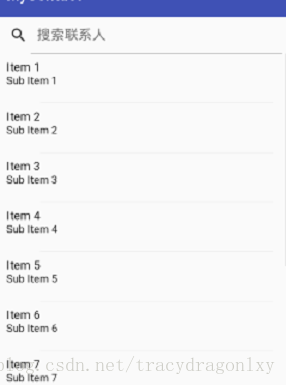
1. 第一步
在/res/drawable下,新建XML文件来定义分割线样式,listview_divider.xml
<layer-list xmlns:android="http://schemas.android.com/apk/res/android" ><item
        android:left="60dp"android:right="20dp"><shape android:shape="rectangle" ><solid android:color="#15000000" />shape>item>
layer-list>
这里我们让分割线距离左边界60,距离右边距20,并为它设置颜色。
2. 第二步
在ListView组件中使用自定义的分割线
<LinearLayout xmlns:android="http://schemas.android.com/apk/res/android"xmlns:tools="http://schemas.android.com/tools"android:orientation="vertical"android:layout_width="match_parent"android:layout_height="match_parent"><ListView
android:id="@+id/listView"android:divider="@drawable/listview_divider"android:dividerHeight="0.6dp"android:layout_width="match_parent"android:layout_height="match_parent" />LinearLayout>总结:就这样我们完成了分割线的样式定义,我们可以任意设置分割线的长度,为分割线设置各种颜色。
本文来自互联网用户投稿,文章观点仅代表作者本人,不代表本站立场,不承担相关法律责任。如若转载,请注明出处。 如若内容造成侵权/违法违规/事实不符,请点击【内容举报】进行投诉反馈!