Spring Cloud 基于OAth2协议与JWT搭建一个简易网关
2019独角兽企业重金招聘Python工程师标准>>> 
网上有很多与此类型相似的文章,但是在我搭建网关集成认证功能时,要么参考的这些文章并不全,要么不是我想要的或者说是比较复杂。因此本篇将会搭建一个简易的网关服务,采用oauth2协议的passowrd模式来进行身份认证,jwt作为token令牌。最终达到需要登录获取AccessToken才能向网关申请服务资源的效果。本篇博文代码已托管至码云。
项目整体的目录结构如下

版本:Spring Cloud Edgware.SR3
Spring Boot 1.5.12.RELEASE
1.首先创建父工程
pom.xml部分如下
UTF-8 UTF-8 1.8 Edgware.SR3 1.5.12.RELEASE org.springframework.boot spring-boot-starter-actuator org.springframework.boot spring-boot-starter-test test org.springframework.cloud spring-cloud-starter-eureka org.springframework.cloud spring-cloud-dependencies ${spring.cloud.version} pom import spring-milestones Spring Milestones https://repo.spring.io/libs-milestone false
2.搭建Eureka服务治理
@EnableEurekaServer
@SpringBootApplication
public class EurekaServerApplication {public static void main(String[] args) {SpringApplication.run(EurekaServerApplication.class, args);}
}
3.搭建一个示例资源服务
提供/test端点用于测试
@RestController
@EnableEurekaClient
@SpringBootApplication
public class ResourceServiceApplication {public static void main(String[] args) {SpringApplication.run(ResourceServiceApplication.class, args);}@GetMapping("/test")public String testAuthentication() {return "authentication permit";}
}
4.搭建认证服务
用到如下依赖
org.springframework.cloud spring-cloud-starter-oauth2
认证服务配置
@Configuration
@EnableAuthorizationServer
public class AuthorizationServerConfig extends AuthorizationServerConfigurerAdapter {@Autowiredprivate AuthenticationManager authenticationManager;@Autowiredprivate UserDetailsService userDetailsService;@Overridepublic void configure(ClientDetailsServiceConfigurer clients) throws Exception {//使用内存存储clients.inMemory()//分配客户端账号.withClient("client").secret("client-secret")//支持的授权类型.authorizedGrantTypes("refresh_token", "password").scopes("server")//token有效时长.accessTokenValiditySeconds(1200)//refreshToken有效时长.refreshTokenValiditySeconds(50000);}@Beanpublic JwtAccessTokenConverter jwtAccessTokenConverter() {JwtAccessTokenConverter jwtAccessTokenConverter = new JwtAccessTokenConverter();//设置签名密钥jwtAccessTokenConverter.setSigningKey("demo");return jwtAccessTokenConverter;}//使用JWT作为token@Beanpublic TokenStore jwtTokenStore() {return new JwtTokenStore(jwtAccessTokenConverter());}@Overridepublic void configure(AuthorizationServerEndpointsConfigurer endpoints) throws Exception {endpoints.tokenStore(jwtTokenStore()).accessTokenConverter(jwtAccessTokenConverter()).reuseRefreshTokens(true)//配置以生效password模式.authenticationManager(authenticationManager).userDetailsService(userDetailsService);}@Overridepublic void configure(AuthorizationServerSecurityConfigurer security) throws Exception {security.allowFormAuthenticationForClients().tokenKeyAccess("permitAll()").checkTokenAccess("isAuthenticated()");}
}
注意:这里需要配置authenticationManager否则无法支持password模式。当获取token时,出现如下响应。
{"error": "unsupported_grant_type","error_description": "Unsupported grant type: password"
}
安全服务配置
@Configuration
@EnableWebSecurity
public class WebSecurityConfig extends WebSecurityConfigurerAdapter {@Autowiredprivate UserDetailsService userDetailsService;@Beanpublic PasswordEncoder passwordEncoder() {return new BCryptPasswordEncoder();}@Overrideprotected void configure(HttpSecurity http) throws Exception {http.formLogin().and().authorizeRequests().anyRequest().authenticated().and().csrf().disable();}@Overrideprotected void configure(AuthenticationManagerBuilder auth) throws Exception {auth.userDetailsService(userDetailsService).passwordEncoder(passwordEncoder());}
}
简单模拟用户校验服务
@Component
public class UserDetailsServiceImpl implements UserDetailsService {@Autowiredprivate PasswordEncoder passwordEncoder;//username:任意 password:123456@Overridepublic UserDetails loadUserByUsername(String username) throws UsernameNotFoundException {return new User(username, passwordEncoder.encode("123456"), AuthorityUtils.commaSeparatedStringToAuthorityList("ROLE_USER"));}
}
application.yml
spring:application:name: auth-server
server:port: 4040
security:oauth2:resource:filter-order: 3
management:security:enabled: false
eureka:client:service-url:defaultZone: http://eureka:pwd@localhost:8761/eureka
5.搭建服务网关
资源服务配置
@Configuration
@EnableResourceServer
public class ResourceServerConfig extends ResourceServerConfigurerAdapter {@Overridepublic void configure(HttpSecurity http) throws Exception {http.csrf().disable().authorizeRequests()//去掉获取token会被拦截.antMatchers("/auth/**").permitAll().anyRequest().authenticated();}
}
注意:这里需要放行/auth/**否则网关会在获取token请求时就对其身份进行校验拦截
添加网关过滤器
@Component
public class AuthFilter extends ZuulFilter {//拦截类型@Overridepublic String filterType() {return PRE_TYPE;}//拦截顺序@Overridepublic int filterOrder() {return SERVLET_DETECTION_FILTER_ORDER - 1;}//开启拦截@Overridepublic boolean shouldFilter() {return true;}//拦截处理逻辑@Overridepublic Object run() {//获取用户认证信息Authentication authentication = SecurityContextHolder.getContext().getAuthentication();System.out.println(authentication);return null;}
}
application.yml
spring:application:name: api-gateway
server:port: 8040
eureka:client:service-url:defaultZone: http://eureka:pwd@localhost:8761/eureka
zuul:ignoredServices: '*'routes:resource-service: /demo/**auth-server: /auth/**sensitive-headers:management:security:enabled: falsesecurity:oauth2:client://在认证服务器中配置的客户端账号clientId: clientclientSecret: client-secretresource:token-info-uri: http://localhost:4040/oauth/check_tokenprefer-token-info: truejwt:key-uri: http://localhost:4040/oauth/token_keysessions: stateless
注意:由于使用token-info-uri,因此需先启动auth-server再启动网关服务,因为网关服务在启动时会调用该端点获取数据。如先启动网关会出现如下报错日志。
I/O error on GET request for "http://localhost:4040/oauth/token_key": Connection refused: connect;
nested exception is java.net.ConnectException: Connection refused: connect
至此,一个简单的网关认证服务就搭建完成了。接下来,让我们来测试一下。
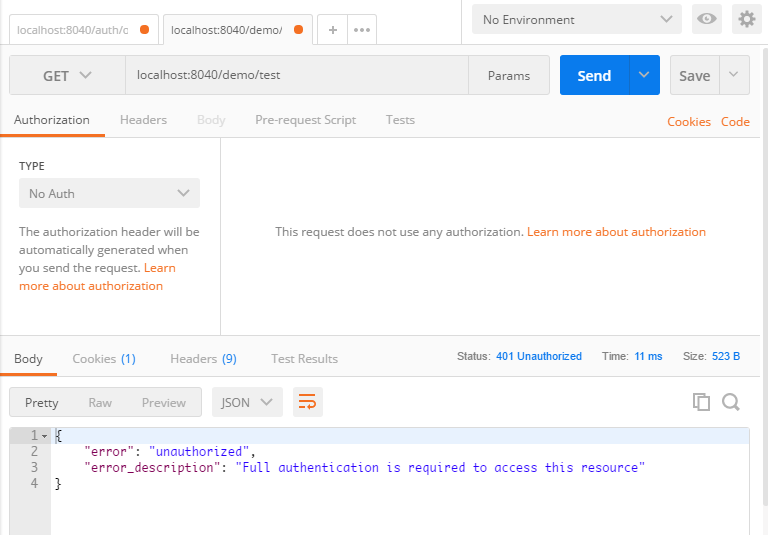
直接通过网关代理请求测试端点,返回结果如下,响应提示需要认证后才可访问资源。
password模式获取jwt token
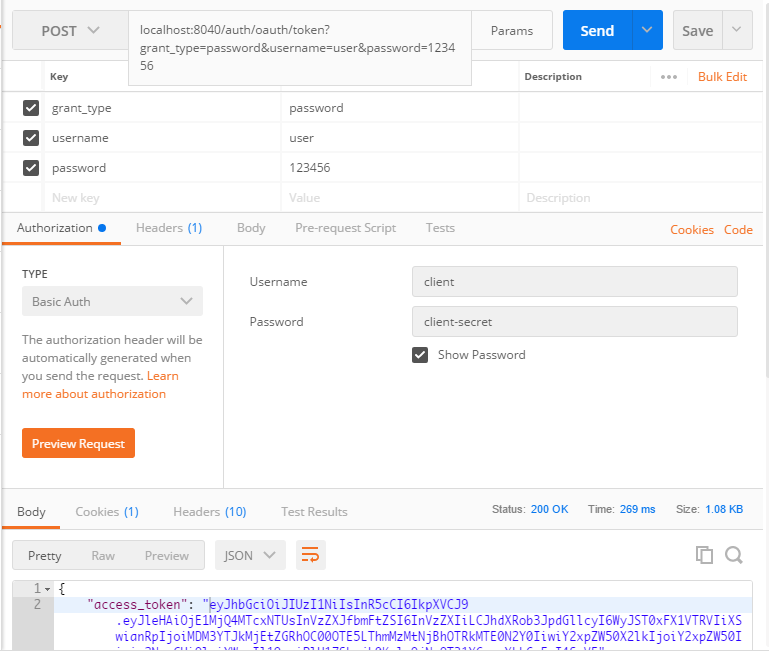
通过获取到的access_token请求资源服务

控制台可见如下输出,可见在过滤器获取到了用户的身份信息
org.springframework.security.oauth2.provider.OAuth2Authentication@407c5f9d: Principal: user;
Credentials: [PROTECTED]; Authenticated: true; Details: remoteAddress=0:0:0:0:0:0:0:1,
tokenType=BearertokenValue=; Granted Authorities: ROLE_USER
本篇博文从PIG项目中简化剥离出来,如有需要进一步拓展的小伙伴们,推荐两个开源项目
冷冷——PIG
老A——AG-Admin(好像换人维护了)
转载于:https://my.oschina.net/u/3773384/blog/1802283
本文来自互联网用户投稿,文章观点仅代表作者本人,不代表本站立场,不承担相关法律责任。如若转载,请注明出处。 如若内容造成侵权/违法违规/事实不符,请点击【内容举报】进行投诉反馈!