Shiro之缓存篇
1、功能实现
1.使用Ehcache作为缓存
2.使用Redis作为缓存
3.清除当前登录人或指定用户的缓存
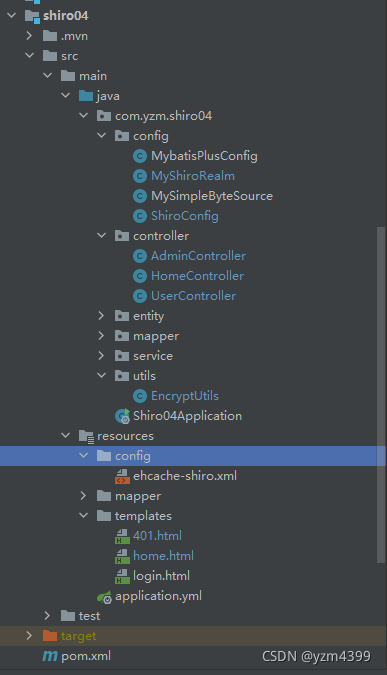
2、shiro04 子工程
本篇以 注解篇 为基础
<?xml version="1.0" encoding="UTF-8"?>
<project xmlns="http://maven.apache.org/POM/4.0.0" xmlns:xsi="http://www.w3.org/2001/XMLSchema-instance"xsi:schemaLocation="http://maven.apache.org/POM/4.0.0 https://maven.apache.org/xsd/maven-4.0.0.xsd"><modelVersion>4.0.0</modelVersion><parent><groupId>com.yzm</groupId><artifactId>shiro</artifactId><version>0.0.1-SNAPSHOT</version><relativePath>../pom.xml</relativePath> <!-- lookup parent from repository --></parent><artifactId>shiro04</artifactId><version>0.0.1-SNAPSHOT</version><packaging>jar</packaging><name>shiro04</name><description>Demo project for Spring Boot</description><dependencies><dependency><groupId>com.yzm</groupId><artifactId>common</artifactId><version>0.0.1-SNAPSHOT</version></dependency><!-- ehcache --><dependency><groupId>org.apache.shiro</groupId><artifactId>shiro-ehcache</artifactId><version>1.5.0</version></dependency><!-- redis --><dependency><groupId>org.crazycake</groupId><artifactId>shiro-redis</artifactId><version>3.2.3</version><exclusions><exclusion><groupId>org.apache.shiro</groupId><artifactId>shiro-core</artifactId></exclusion></exclusions></dependency></dependencies><build><plugins><plugin><groupId>org.springframework.boot</groupId><artifactId>spring-boot-maven-plugin</artifactId></plugin></plugins></build></project>
application.yml
spring:datasource:driver-class-name: com.mysql.cj.jdbc.Driverurl: jdbc:mysql://192.168.192.128:3306/testdb2?useUnicode=true&characterEncoding=utf8&useSSL=false&allowMultiQueries=true&zeroDateTimeBehavior=convertToNull&serverTimezone=Asia/Shanghaiusername: rootpassword: 1234mybatis-plus:mapper-locations: classpath:/mapper/*Mapper.xmltype-aliases-package: com.yzm.shiro04.entityconfiguration:map-underscore-to-camel-case: truelog-impl: org.apache.ibatis.logging.stdout.StdOutImpl
3、认证和授权
package com.yzm.shiro04.config;import com.yzm.shiro04.entity.Permissions;
import com.yzm.shiro04.entity.Role;
import com.yzm.shiro04.entity.User;
import com.yzm.shiro04.service.PermissionsService;
import com.yzm.shiro04.service.RoleService;
import com.yzm.shiro04.service.UserService;
import lombok.extern.slf4j.Slf4j;
import org.apache.shiro.authc.*;
import org.apache.shiro.authz.AuthorizationInfo;
import org.apache.shiro.authz.SimpleAuthorizationInfo;
import org.apache.shiro.realm.AuthorizingRealm;
import org.apache.shiro.subject.PrincipalCollection;
import org.apache.shiro.util.ByteSource;import java.util.Arrays;
import java.util.HashSet;
import java.util.List;
import java.util.Set;
import java.util.stream.Collectors;/*** 自定义Realm,实现认证和授权* AuthorizingRealm 继承 AuthenticatingRealm* AuthorizingRealm 提供 授权方法 doGetAuthorizationInfo* AuthenticatingRealm 提供 认证方法 doGetAuthenticationInfo*/
@Slf4j
public class MyShiroRealm extends AuthorizingRealm {private final UserService userService;private final RoleService roleService;private final PermissionsService permissionsService;public MyShiroRealm(UserService userService, RoleService roleService, PermissionsService permissionsService) {this.userService = userService;this.roleService = roleService;this.permissionsService = permissionsService;}@Overridepublic boolean supports(AuthenticationToken token) {return token instanceof UsernamePasswordToken;}/*** 授权*/@Overrideprotected AuthorizationInfo doGetAuthorizationInfo(PrincipalCollection principalCollection) {log.info("授权");String username = (String) principalCollection.getPrimaryPrincipal();// 查询用户,获取角色idsUser user = userService.lambdaQuery().eq(User::getUsername, username).one();List<Integer> roleIds = Arrays.stream(user.getRIds().split(",")).map(Integer::parseInt).collect(Collectors.toList());// 查询角色,获取角色名、权限idsList<Role> roles = roleService.listByIds(roleIds);Set<String> roleNames = new HashSet<>(roles.size());Set<Integer> permIds = new HashSet<>();roles.forEach(role -> {roleNames.add(role.getRName());Set<Integer> collect = Arrays.stream(role.getPIds().split(",")).map(Integer::parseInt).collect(Collectors.toSet());permIds.addAll(collect);});// 获取权限名称List<Permissions> permissions = permissionsService.listByIds(permIds);List<String> permNames = permissions.stream().map(Permissions::getPName).collect(Collectors.toList());SimpleAuthorizationInfo authorizationInfo = new SimpleAuthorizationInfo();authorizationInfo.addRoles(roleNames);authorizationInfo.addStringPermissions(permNames);return authorizationInfo;}/*** 认证*/@Overrideprotected AuthenticationInfo doGetAuthenticationInfo(AuthenticationToken authenticationToken) throws AuthenticationException {log.info("认证");// 获取用户名跟密码UsernamePasswordToken usernamePasswordToken = (UsernamePasswordToken) authenticationToken;String username = usernamePasswordToken.getUsername();// 查询用户是否存在User user = userService.lambdaQuery().eq(User::getUsername, username).one();if (user == null) {throw new UnknownAccountException();}return new SimpleAuthenticationInfo(user.getUsername(),user.getPassword(),// 用户名 + 盐ByteSource.Util.bytes(user.getUsername() + user.getSalt()),getName());}/*** 重写方法,清除当前用户的的 授权缓存*/@Overridepublic void clearCachedAuthorizationInfo(PrincipalCollection principals) {super.clearCachedAuthorizationInfo(principals);}/*** 重写方法,清除当前用户的 认证缓存*/@Overridepublic void clearCachedAuthenticationInfo(PrincipalCollection principals) {super.clearCachedAuthenticationInfo(principals);}@Overridepublic void clearCache(PrincipalCollection principals) {super.clearCache(principals);}
}
4、ShiroConfig 配置类
package com.yzm.shiro04.config;import com.yzm.shiro04.service.PermissionsService;
import com.yzm.shiro04.service.RoleService;
import com.yzm.shiro04.service.UserService;
import com.yzm.shiro04.utils.EncryptUtils;
import org.apache.shiro.authc.credential.HashedCredentialsMatcher;
import org.apache.shiro.cache.ehcache.EhCacheManager;
import org.apache.shiro.mgt.SecurityManager;
import org.apache.shiro.spring.security.interceptor.AuthorizationAttributeSourceAdvisor;
import org.apache.shiro.spring.web.ShiroFilterFactoryBean;
import org.apache.shiro.web.mgt.CookieRememberMeManager;
import org.apache.shiro.web.mgt.DefaultWebSecurityManager;
import org.apache.shiro.web.servlet.Cookie;
import org.apache.shiro.web.servlet.SimpleCookie;
import org.crazycake.shiro.RedisCacheManager;
import org.crazycake.shiro.RedisManager;
import org.springframework.aop.framework.autoproxy.DefaultAdvisorAutoProxyCreator;
import org.springframework.beans.factory.config.MethodInvokingFactoryBean;
import org.springframework.context.annotation.Bean;
import org.springframework.context.annotation.Configuration;
import org.springframework.web.servlet.handler.SimpleMappingExceptionResolver;import java.util.Properties;@Configuration
public class ShiroConfig {private final UserService userService;private final RoleService roleService;private final PermissionsService permissionsService;public ShiroConfig(UserService userService, RoleService roleService, PermissionsService permissionsService) {this.userService = userService;this.roleService = roleService;this.permissionsService = permissionsService;}/*** 凭证匹配器*/@Beanpublic HashedCredentialsMatcher hashedCredentialsMatcher() {HashedCredentialsMatcher hashedCredentialsMatcher = new HashedCredentialsMatcher();hashedCredentialsMatcher.setHashAlgorithmName(EncryptUtils.ALGORITHM_NAME);hashedCredentialsMatcher.setHashIterations(EncryptUtils.HASH_ITERATIONS);return hashedCredentialsMatcher;}/*** 自定义Realm*/@Beanpublic MyShiroRealm simpleShiroRealm() {MyShiroRealm myShiroRealm = new MyShiroRealm(userService, roleService, permissionsService);myShiroRealm.setCredentialsMatcher(hashedCredentialsMatcher());// 开启缓存myShiroRealm.setCachingEnabled(true);//启用身份验证缓存,即缓存AuthenticationInfo信息,默认falsemyShiroRealm.setAuthenticationCachingEnabled(true);//缓存AuthenticationInfo信息的缓存名称 在ehcache-shiro.xml中有对应缓存的配置myShiroRealm.setAuthenticationCacheName("authenticationCache");//启用授权缓存,即缓存AuthorizationInfo信息,默认falsemyShiroRealm.setAuthorizationCachingEnabled(true);//缓存AuthorizationInfo信息的缓存名称  在ehcache-shiro.xml中有对应缓存的配置myShiroRealm.setAuthorizationCacheName("authorizationCache");return myShiroRealm;}/*** Ehcache缓存*/@Beanpublic EhCacheManager ehCacheManager() {EhCacheManager cacheManager = new EhCacheManager();cacheManager.setCacheManagerConfigFile("classpath:config/ehcache-shiro.xml");return cacheManager;}/*** Redis缓存*/@Beanpublic RedisManager redisManager() {RedisManager redisManager = new RedisManager();redisManager.setHost("127.0.0.1:6379");redisManager.setPassword("1234");redisManager.setDatabase(0);return redisManager;}@Beanpublic RedisCacheManager redisCacheManager() {RedisCacheManager redisCacheManager = new RedisCacheManager();redisCacheManager.setRedisManager(redisManager());// redis中针对不同用户缓存redisCacheManager.setPrincipalIdFieldName("username");// 用户权限信息缓存时间redisCacheManager.setExpire(300);return redisCacheManager;}/*** 安全管理SecurityManager*/@Beanpublic SecurityManager securityManager() {DefaultWebSecurityManager securityManager = new DefaultWebSecurityManager();// 配置单个realmsecurityManager.setRealm(simpleShiroRealm());// 缓存securityManager.setCacheManager(redisCacheManager());return securityManager;}/*** 开启注解*/@Beanpublic DefaultAdvisorAutoProxyCreator defaultAdvisorAutoProxyCreator() {DefaultAdvisorAutoProxyCreator defaultAAP = new DefaultAdvisorAutoProxyCreator();defaultAAP.setProxyTargetClass(true);return defaultAAP;}@Beanpublic AuthorizationAttributeSourceAdvisor authorizationAttributeSourceAdvisor() {AuthorizationAttributeSourceAdvisor authorizationAttributeSourceAdvisor = new AuthorizationAttributeSourceAdvisor();authorizationAttributeSourceAdvisor.setSecurityManager(securityManager());return authorizationAttributeSourceAdvisor;}@Beanpublic ShiroFilterFactoryBean shiroFilter() {ShiroFilterFactoryBean shiroFilterFactoryBean = new ShiroFilterFactoryBean();shiroFilterFactoryBean.setSecurityManager(securityManager());return shiroFilterFactoryBean;}/*** 问题:未登录不会自动跳转到登录页、无权访问页面不跳转* 原因:Shiro注解模式下,登录失败与没有权限都是通过抛出异常,并且默认并没有去处理或者捕获这些异常。* 解决:通过在SpringMVC下配置捕获相应异常来通知用户信息*/@Beanpublic SimpleMappingExceptionResolver simpleMappingExceptionResolver() {SimpleMappingExceptionResolver simpleMappingExceptionResolver = new SimpleMappingExceptionResolver();Properties properties = new Properties();// 未登录访问接口跳转到/login、登录后没有权限跳转到/401properties.setProperty("org.apache.shiro.authz.UnauthenticatedException", "redirect:/login");properties.setProperty("org.apache.shiro.authz.UnauthorizedException", "redirect:/401");simpleMappingExceptionResolver.setExceptionMappings(properties);return simpleMappingExceptionResolver;}
}
5、Ehcache缓存
<!-- ehcache --><dependency><groupId>org.apache.shiro</groupId><artifactId>shiro-ehcache</artifactId><version>1.5.0</version></dependency>
在ShiroConfig.java 中添加内容
/*** Ehcache缓存*/@Beanpublic EhCacheManager ehCacheManager() {EhCacheManager cacheManager = new EhCacheManager();// 读取缓存文件位置cacheManager.setCacheManagerConfigFile("classpath:config/ehcache-shiro.xml");return cacheManager;}/*** 安全管理SecurityManager */@Beanpublic SecurityManager securityManager() {DefaultWebSecurityManager securityManager = new DefaultWebSecurityManager();// 配置单个realmsecurityManager.setRealm(simpleShiroRealm());// 缓存securityManager.setCacheManager(ehCacheManager());return securityManager;}
在resources下创建 config/ehcache-shiro.xml
<?xml version="1.0" encoding="UTF-8"?>
<ehcache name="es"><!--磁盘存储路径,当内存缓存满了的时候,就会往这里面放diskStore:为缓存路径,ehcache分为内存和磁盘 2级,此属性定义磁盘的缓存位置user.home - 用户主目录user.dir - 用户当前工作目录java.io.tmpdir - 默认临时文件路径其它通过命令行指定的系统属性,如“java –DdiskStore.path=D:\\abc ……”.--><diskStore path="java.io.tmpdir"/><!--name:缓存名称。maxElementsOnDisk:硬盘最大缓存个数。0表示不限制maxEntriesLocalHeap:指定允许在内存中存放元素的最大数量,0表示不限制。maxBytesLocalDisk:指定当前缓存能够使用的硬盘的最大字节数,其值可以是数字加单位,单位可以是K、M或者G,不区分大小写,如:30G。当在CacheManager级别指定了该属性后,Cache级别也可以用百分比来表示,如:60%,表示最多使用CacheManager级别指定硬盘容量的60%。该属性也可以在运行期指定。当指定了该属性后会隐式的使当前Cache的overflowToDisk为true。maxEntriesInCache:指定缓存中允许存放元素的最大数量。这个属性也可以在运行期动态修改。但是这个属性只对Terracotta分布式缓存有用。maxBytesLocalHeap:指定当前缓存能够使用的堆内存的最大字节数,其值的设置规则跟maxBytesLocalDisk是一样的。maxBytesLocalOffHeap:指定当前Cache允许使用的非堆内存的最大字节数。当指定了该属性后,会使当前Cache的overflowToOffHeap的值变为true,如果我们需要关闭overflowToOffHeap,那么我们需要显示的指定overflowToOffHeap的值为false。overflowToDisk:boolean类型,默认为false。当内存里面的缓存已经达到预设的上限时是否允许将按驱除策略驱除的元素保存在硬盘上,默认是LRU(最近最少使用)。当指定为false的时候表示缓存信息不会保存到磁盘上,只会保存在内存中。该属性现在已经废弃,推荐使用cache元素的子元素persistence来代替,如:<persistence strategy=”localTempSwap”/>。diskSpoolBufferSizeMB:当往磁盘上写入缓存信息时缓冲区的大小,单位是MB,默认是30。overflowToOffHeap:boolean类型,默认为false。表示是否允许Cache使用非堆内存进行存储,非堆内存是不受Java GC影响的。该属性只对企业版Ehcache有用。copyOnRead:当指定该属性为true时,我们在从Cache中读数据时取到的是Cache中对应元素的一个copy副本,而不是对应的一个引用。默认为false。copyOnWrite:当指定该属性为true时,我们在往Cache中写入数据时用的是原对象的一个copy副本,而不是对应的一个引用。默认为false。timeToIdleSeconds:单位是秒,表示一个元素所允许闲置的最大时间,也就是说一个元素在不被请求的情况下允许在缓存中待的最大时间。默认是0,表示不限制。timeToLiveSeconds:单位是秒,表示无论一个元素闲置与否,其允许在Cache中存在的最大时间。默认是0,表示不限制。eternal:boolean类型,表示是否永恒,默认为false。如果设为true,将忽略timeToIdleSeconds和timeToLiveSeconds,Cache内的元素永远都不会过期,也就不会因为元素的过期而被清除了。diskExpiryThreadIntervalSeconds :单位是秒,表示多久检查元素是否过期的线程多久运行一次,默认是120秒。clearOnFlush:boolean类型。表示在调用Cache的flush方法时是否要清空MemoryStore。默认为true。diskPersistent:是否缓存虚拟机重启期数据 Whether the disk store persists between restarts of the Virtual Machine. The default value is false.maxElementsInMemory:缓存最大数目memoryStoreEvictionPolicy:当达到maxElementsInMemory限制时,Ehcache将会根据指定的策略去清理内存。默认策略是LRU(最近最少使用)。你可以设置为FIFO(先进先出)或是LFU(较少使用)。memoryStoreEvictionPolicy:Ehcache的三种清空策略;FIFO,first in first out,这个是大家最熟的,先进先出。LFU, Less Frequently Used,就是上面例子中使用的策略,直白一点就是讲一直以来最少被使用的。如上面所讲,缓存的元素有一个hit属性,hit值最小的将会被清出缓存。LRU,Least Recently Used,最近最少使用的,缓存的元素有一个时间戳,当缓存容量满了,而又需要腾出地方来缓存新的元素的时候,那么现有缓存元素中时间戳离当前时间最远的元素将被清出缓存。--><defaultCachemaxElementsInMemory="10000"eternal="false"timeToIdleSeconds="0"timeToLiveSeconds="0"overflowToDisk="false"diskPersistent="false"diskExpiryThreadIntervalSeconds="120"/><!-- 认证缓存 --><cache name="authenticationCache"maxEntriesLocalHeap="2000"eternal="false"timeToIdleSeconds="0"timeToLiveSeconds="600"overflowToDisk="false"statistics="true"></cache><!-- 授权缓存 --><cache name="authorizationCache"maxEntriesLocalHeap="2000"eternal="false"timeToIdleSeconds="0"timeToLiveSeconds="600"overflowToDisk="false"statistics="true"></cache></ehcache>
Realm开启认证和授权缓存
/*** 自定义Realm*/@Beanpublic MyShiroRealm simpleShiroRealm() {MyShiroRealm myShiroRealm = new MyShiroRealm(userService, roleService, permissionsService);myShiroRealm.setCredentialsMatcher(hashedCredentialsMatcher());// 开启缓存myShiroRealm.setCachingEnabled(true);//启用身份验证缓存,即缓存AuthenticationInfo信息,默认falsemyShiroRealm.setAuthenticationCachingEnabled(true);//缓存AuthenticationInfo信息的缓存名称 在ehcache-shiro.xml中有对应缓存的配置myShiroRealm.setAuthenticationCacheName("authenticationCache");//启用授权缓存,即缓存AuthorizationInfo信息,默认falsemyShiroRealm.setAuthorizationCachingEnabled(true);//缓存AuthorizationInfo信息的缓存名称 在ehcache-shiro.xml中有对应缓存的配置myShiroRealm.setAuthorizationCacheName("authorizationCache");return myShiroRealm;}
6、测试Ehcache缓存
开启sql语句打印,以便测试缓存效果
mybatis-plus:mapper-locations: classpath:/mapper/*Mapper.xmltype-aliases-package: com.yzm.shiro04.entityconfiguration:map-underscore-to-camel-case: true// 打印sql语句log-impl: org.apache.ibatis.logging.stdout.StdOutImpl
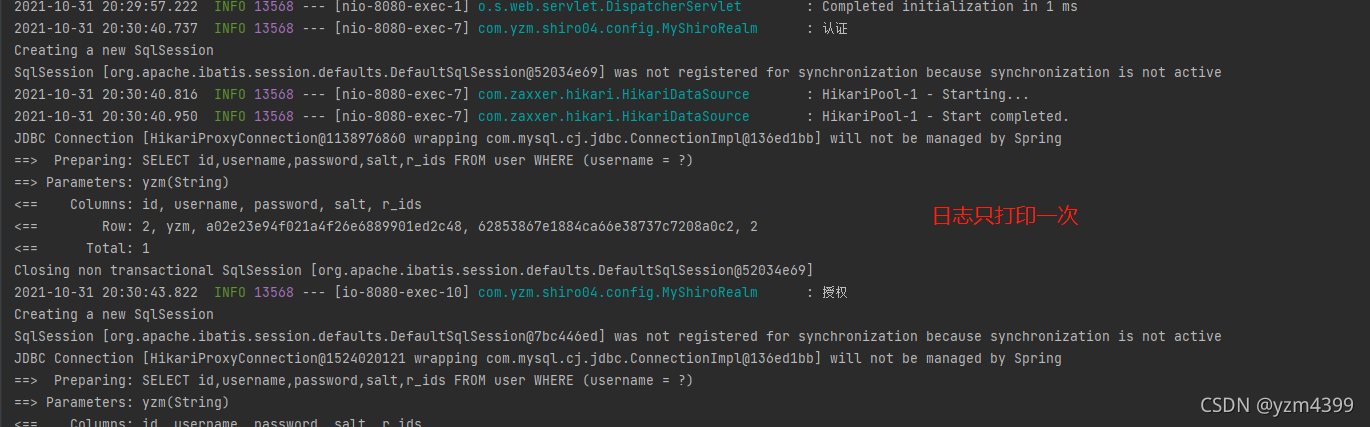
启动项目,yzm登录,调用接口,控制台打印日志,多次请求不再打印日志;关闭浏览器重新登录,也不会打印日志。说明缓存起效果了
可以注释缓存代码,对比查看效果
@Beanpublic SecurityManager securityManager() {DefaultWebSecurityManager securityManager = new DefaultWebSecurityManager();// 配置单个realmsecurityManager.setRealm(simpleShiroRealm());// 缓存//securityManager.setCacheManager(ehCacheManager());return securityManager;}
7、当用户权限发生变更,同时需要删除对应的缓存信息
AuthenticatingRealm extends CachingRealm 这是跟缓存相关的一些方法,你可以重写它们
/*** 清除当前用户的的 授权缓存*/@Overridepublic void clearCachedAuthorizationInfo(PrincipalCollection principals) {super.clearCachedAuthorizationInfo(principals);}/*** 清除当前用户的 认证缓存*/@Overridepublic void clearCachedAuthenticationInfo(PrincipalCollection principals) {super.clearCachedAuthenticationInfo(principals);}// 清除当前用户的认证和授权缓存@Overridepublic void clearCache(PrincipalCollection principals) {super.clearCache(principals);}
在ShiroConfig中,将SecurityManager对象 添加到 SecurityUtils上下文中
/*** 让某个实例的某个方法的返回值注入为Bean的实例*/@Beanpublic MethodInvokingFactoryBean getMethodInvokingFactoryBean() {MethodInvokingFactoryBean factoryBean = new MethodInvokingFactoryBean();factoryBean.setStaticMethod("org.apache.shiro.SecurityUtils.setSecurityManager");//factoryBean.setArguments(new Object[]{securityManager()});factoryBean.setArguments(securityManager());return factoryBean;}
或者在这里设置(二选一)
@Beanpublic SecurityManager securityManager() {DefaultWebSecurityManager securityManager = new DefaultWebSecurityManager();...// 缓存securityManager.setCacheManager(ehCacheManager());// 将securityManager添加到SecurityUtilsSecurityUtils.setSecurityManager(securityManager);return securityManager;}在AdminController 中 新增清除缓存接口
private final RoleService roleService;private final UserService userService;public AdminController(RoleService roleService, UserService userService) {this.roleService = roleService;this.userService = userService;}.../*** admin管理员给user用户添加 user:delete 权限(8)*/@GetMapping("/addPermission")public String addPermission() {String username = "yzm";User yzm = userService.lambdaQuery().eq(User::getUsername, username).one();Role yzmR = roleService.lambdaQuery().eq(Role::getRId, yzm.getRIds()).one();Set<String> perms = Arrays.stream(yzmR.getPIds().split(",")).collect(Collectors.toSet());perms.add("8");yzmR.setPIds(String.join(",", perms));roleService.updateById(yzmR);// 添加成功之后 清除缓存DefaultWebSecurityManager securityManager = (DefaultWebSecurityManager) SecurityUtils.getSecurityManager();MyShiroRealm shiroRealm = (MyShiroRealm) securityManager.getRealms().iterator().next();// 删除指定用户的权限缓存SimplePrincipalCollection collection = new SimplePrincipalCollection(username, shiroRealm.getName());shiroRealm.getAuthorizationCache().remove(collection);// 删除当前登录用户的权限缓存//shiroRealm.clearCachedAuthorizationInfo(SecurityUtils.getSubject().getPrincipals());// 删除当前登录用户的认证和权限缓存// shiroRealm.clearCache(SecurityUtils.getSubject().getPrincipals());return "添加 user:delete 权限成功";}/*** admin管理员给user用户删除 user:delete 权限(8)*/@GetMapping("/delPermission")public String delPermission() {String username = "yzm";User yzm = userService.lambdaQuery().eq(User::getUsername, username).one();Role yzmR = roleService.lambdaQuery().eq(Role::getRId, yzm.getRIds()).one();Set<String> perms = Arrays.stream(yzmR.getPIds().split(",")).collect(Collectors.toSet());perms.remove("8");yzmR.setPIds(String.join(",", perms));roleService.updateById(yzmR);//删除成功之后 清除缓存DefaultWebSecurityManager securityManager = (DefaultWebSecurityManager) SecurityUtils.getSecurityManager();MyShiroRealm shiroRealm = (MyShiroRealm) securityManager.getRealms().iterator().next();shiroRealm.getAuthorizationCache().remove(new SimplePrincipalCollection(username, shiroRealm.getName()));return "删除 user:delete 权限成功";}
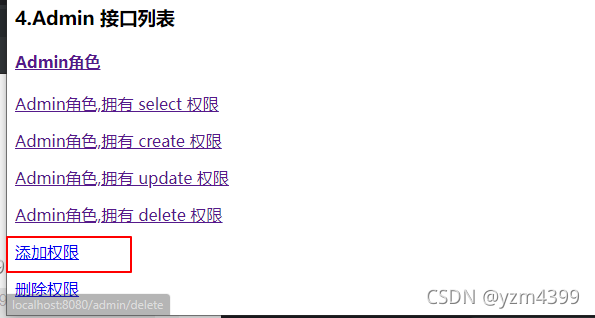
home.html,添加接口
<p><a href="/admin/addPermission">添加权限</a></p>
<p><a href="/admin/delPermission">删除权限</a></p>
测试 admin 给 yzm 添加权限,缓存是否清除
启动项目,打开2个浏览器,火狐跟谷歌
火狐先登录yzm用户,给yzm认证和权限信息缓存起来,访问/user/delete
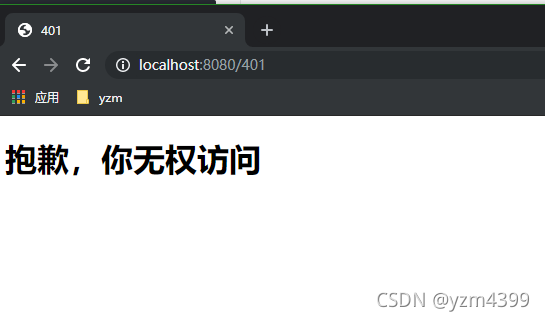
yzm刚开始是没有delete权限的
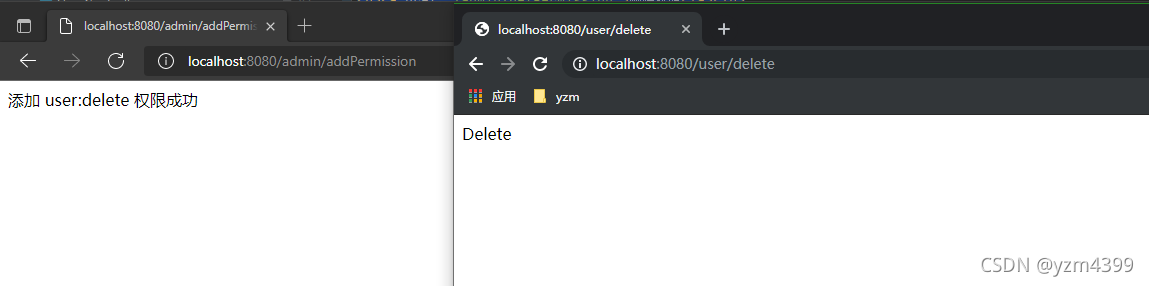
谷歌登录admin,给yzm添加权限
添加成功,yzm能正常访问/user/delete,并且控制台重新打印SQL信息
8、Redis 缓存
<!-- redis --><dependency><groupId>org.crazycake</groupId><artifactId>shiro-redis</artifactId><version>3.2.3</version></dependency>
在 ShiroConfig中
/*** redis缓存*/@Beanpublic RedisManager redisManager() {RedisManager redisManager = new RedisManager();redisManager.setHost("127.0.0.1:6379");redisManager.setPassword("1234");redisManager.setDatabase(0);return redisManager;}@Beanpublic RedisCacheManager redisCacheManager() {RedisCacheManager redisCacheManager = new RedisCacheManager();redisCacheManager.setRedisManager(redisManager());// redis中针对不同用户缓存redisCacheManager.setPrincipalIdFieldName("username");// 用户权限信息缓存时间redisCacheManager.setExpire(300);return redisCacheManager;}/*** 安全管理*/@Beanpublic SecurityManager securityManager() {DefaultWebSecurityManager securityManager = new DefaultWebSecurityManager();// 配置单个realmsecurityManager.setRealm(simpleShiroRealm());// 记住我securityManager.setRememberMeManager(rememberMeManager());// 这里改成redissecurityManager.setCacheManager(redisCacheManager());return securityManager;}
使用redis作为缓存,需要自定义SimpleByteSource,ByteSource默认使用的是SimpleByteSource,
而SimpleByteSource没有实现序列化,在使用redis缓存时会报错,提示SimpleByteSource需要序列化
@Overrideprotected AuthenticationInfo doGetAuthenticationInfo(AuthenticationToken authenticationToken) throws AuthenticationException {UsernamePasswordToken usernamePasswordToken = (UsernamePasswordToken) authenticationToken;String username = usernamePasswordToken.getUsername();User user = userService.lambdaQuery().eq(User::getUsername, username).one();if (user == null) {throw new UnknownAccountException();}return new SimpleAuthenticationInfo(user.getUsername(),user.getPassword(),// 用户名 + 盐// 之前的方式// ByteSource.Util.bytes(user.getUsername() + user.getSalt()),// 使用redis缓存,需要SimpleByteSource实现序列化new MySimpleByteSource(user.getUsername() + user.getSalt()),getName());}
这里重新写一个MySimpleByteSource 内容基本跟SimpleByteSource一样,只是多实现了Serializable
package com.yzm.shiro04.config;import org.apache.shiro.codec.Base64;
import org.apache.shiro.codec.CodecSupport;
import org.apache.shiro.codec.Hex;
import org.apache.shiro.util.ByteSource;import java.io.File;
import java.io.InputStream;
import java.io.Serializable;
import java.util.Arrays;/*** 使用redis缓存,报错SimpleByteSource不可序列化*/
public class MySimpleByteSource implements ByteSource, Serializable {private static final long serialVersionUID = -5810132231246381206L;private final byte[] bytes;private String cachedHex;private String cachedBase64;public MySimpleByteSource(byte[] bytes) {this.bytes = bytes;}public MySimpleByteSource(char[] chars) {this.bytes = CodecSupport.toBytes(chars);}public MySimpleByteSource(String string) {this.bytes = CodecSupport.toBytes(string);}public MySimpleByteSource(ByteSource source) {this.bytes = source.getBytes();}public MySimpleByteSource(File file) {this.bytes = (new BytesHelper()).getBytes(file);}public MySimpleByteSource(InputStream stream) {this.bytes = (new BytesHelper()).getBytes(stream);}public static boolean isCompatible(Object o) {return o instanceof byte[] || o instanceof char[] || o instanceof String || o instanceof ByteSource || o instanceof File || o instanceof InputStream;}public byte[] getBytes() {return this.bytes;}public boolean isEmpty() {return this.bytes == null || this.bytes.length == 0;}public String toHex() {if (this.cachedHex == null) {this.cachedHex = Hex.encodeToString(this.getBytes());}return this.cachedHex;}public String toBase64() {if (this.cachedBase64 == null) {this.cachedBase64 = Base64.encodeToString(this.getBytes());}return this.cachedBase64;}public String toString() {return this.toBase64();}public int hashCode() {return this.bytes != null && this.bytes.length != 0 ? Arrays.hashCode(this.bytes) : 0;}public boolean equals(Object o) {if (o == this) {return true;} else if (o instanceof ByteSource) {ByteSource bs = (ByteSource)o;return Arrays.equals(this.getBytes(), bs.getBytes());} else {return false;}}private static final class BytesHelper extends CodecSupport {private BytesHelper() {}public byte[] getBytes(File file) {return this.toBytes(file);}public byte[] getBytes(InputStream stream) {return this.toBytes(stream);}}
}
9、测试Redis缓存
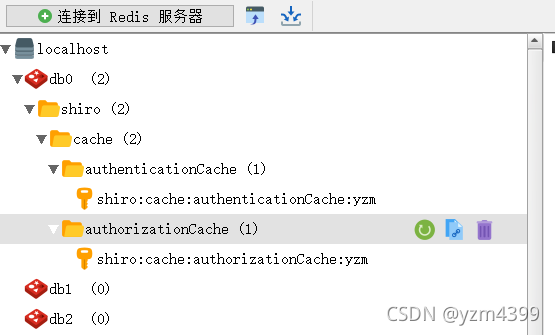
启动项目,还是火狐登录yzm,请求下接口,在redis客户端就可以查看到缓存信息了
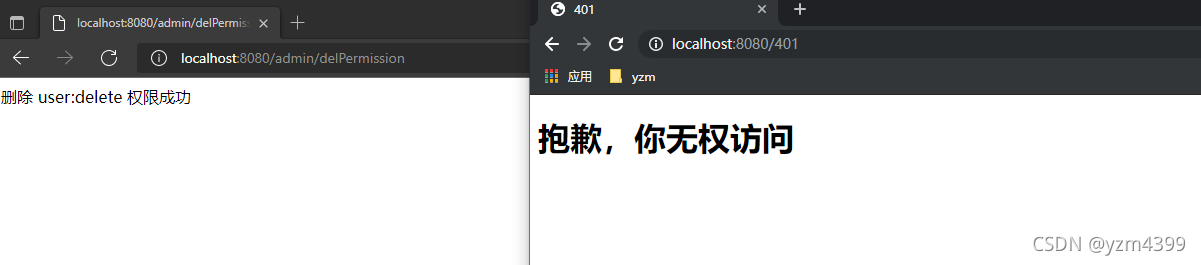
谷歌登录admin,admin请求/admin/delPermission接口删除yzm的权限,yzm访问/user/delete
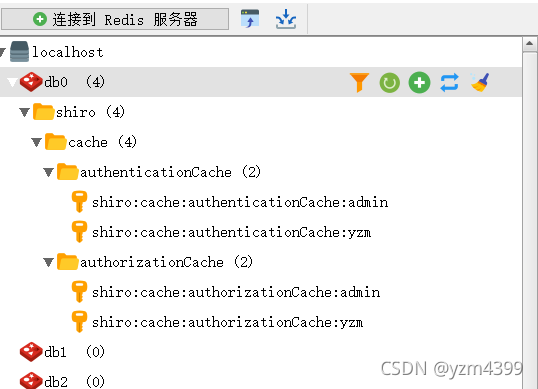
admin跟yzm都有缓存
相关链接
首页
上一篇:注解篇
下一篇:会话篇
本文来自互联网用户投稿,文章观点仅代表作者本人,不代表本站立场,不承担相关法律责任。如若转载,请注明出处。 如若内容造成侵权/违法违规/事实不符,请点击【内容举报】进行投诉反馈!