Unity 使用NPOI,模板替换Excel中的关键字(针对.xlsx)
需求:项目中要用到生成Excel来打印文件,只需要替换其中的值,保留原模板,生成新的Excel
第一步:在unity中导入一下的dll
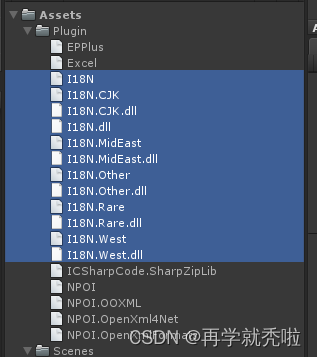
新建一个Plugin的文件夹,把dll全部放进去
以上选中的这些文件在unity的安装目录下Unity\Editor\Data\Mono\lib\mono\unity可以找到
还有一个System.Data.dll,我放进去它会显示重复引用,所以我就没放上去,你要是想试试也可以在安装路径下找到,然后放进去
其他的链接在这里下载:Dll下载地址
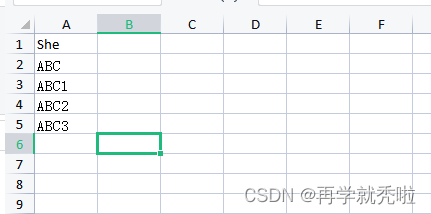
第二步:新建一个Excel,取名为量表.xlsx(这个自己定,后面的代码记得改,但是后缀一定时.xlsx)
放在StreamingAssets下面,作为Excel的模板路径
例如,现在的这个数值是和后面代码相挂钩的
第三步:新建脚本,随便挂载在物体上
using NPOI.SS.UserModel;
using NPOI.XSSF.UserModel;
using System.Collections.Generic;
using System.IO;
using UnityEngine;public class Writing : MonoBehaviour
{/// /// 模板文件路径/// private string filePath = Application.streamingAssetsPath;///目标路径,修改后的文件路径private string targetPath = Application.streamingAssetsPath + "/Print/";/// /// 文件名称/// private string fileName = "量表.xlsx";private string path = "";Dictionary<string, string> userInfo = new Dictionary<string, string>();void Start(){SetFile();//key为要替换的关键词,value为将要替换的值userInfo.Add("ABC", "是我");userInfo.Add("ABC1", "是我1");userInfo.Add("ABC2", "是我2");userInfo.Add("ABC3", "是我3");WriteExcelTest();}public void SetFile(){//获取指定路径下面的所有资源文件 ,每次都删除这个路径下的文件if (Directory.Exists(Application.streamingAssetsPath + "/Print/")){DirectoryInfo direction = new DirectoryInfo(Application.streamingAssetsPath + "/Print/");FileInfo[] files = direction.GetFiles("*", SearchOption.AllDirectories);for (int i = 0; i < files.Length; ++i){if (files[i].Name.Contains(".xlsx")){File.Delete(Application.streamingAssetsPath + "/Print/" + files[i].Name);//删除这个目录下所有的word文档}}}else{Directory.CreateDirectory(Application.streamingAssetsPath + "/Print/");print("创建成功");}}public void WriteExcelTest(){//合并两个路径字符串,整合模板文件的路径path = Path.Combine(filePath, fileName);//打开模板文件FileStream fs = new FileStream(path, FileMode.Open, FileAccess.Read);//新建一个ExcelIWorkbook workbook = new XSSFWorkbook(fs);//根据索引获取第一个表ISheet sheet = workbook.GetSheetAt(0);for (int i = sheet.FirstRowNum; i <= sheet.LastRowNum; i++){IRow row = sheet.GetRow(i);for (int j = row.FirstCellNum; j < row.LastCellNum; j++){ICell cell = row.GetCell(j);//得到原来的值string cellContent = cell.StringCellValue;//替换和字典对应的值foreach (KeyValuePair<string, string> item in userInfo){print(cellContent + " --------------");if (item.Key == cellContent){cell.SetCellValue(item.Value);}}}}targetPath = targetPath + fileName;FileStream output = new FileStream(targetPath, FileMode.Create);//生成指定文件,这里把路径改为目标路径workbook.Write(output);//写入文件//一些列关闭释放操作fs.Close();fs.Dispose();output.Close();output.Dispose();Debug.Log("修改文件成功");System.Diagnostics.Process.Start(targetPath);//打开文档}
}
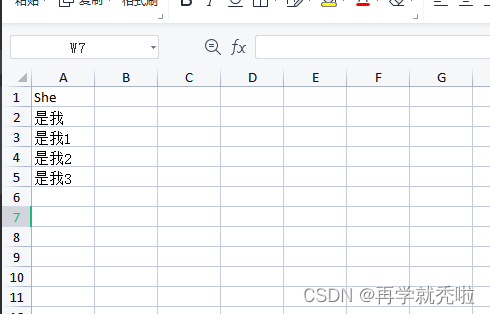
运行结果为

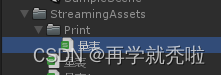
新生成的文件路径为

大功告成,后续再增加其他的Excel内容
补充:当遍历整个excel的时候,如果有为1,2,3这样数值填充的单元格,会报错误InvalidOperationException: Cannot get a text value from a numeric cell NPOI.XSSF.UserModel.XSSFCell.get_RichStringCellValue ()
解决办法:在遍历的时候新添加几行代码
if (row.GetCell(j) != null)
{
row.GetCell(j).SetCellType(CellType.String);
}
本文来自互联网用户投稿,文章观点仅代表作者本人,不代表本站立场,不承担相关法律责任。如若转载,请注明出处。 如若内容造成侵权/违法违规/事实不符,请点击【内容举报】进行投诉反馈!