Vue组件之间的通讯方式(父传子、子传父、兄弟组件间传值、非父子组件间传值)
Vue组件之间的通讯方式(父传子、子传父、兄弟组件间传值)
*引子
- 首先,我们初步建立一个以vue/cli4为基础的项目;
- 在components的文件夹下新建Parent.vue和ChildOne的父组件和子组件;
- 在App.vue和Parent.vue中映射成组件标签。
基本结构如下:
Parent.vue
<template><div><h1>Parent</h1><child-one></child-one></div>
</template><script>
import ChildOne from '@/components/ChildOne'
export default {data () {return {}},components:{ChildOne}
}
</script>
ChildOne.vue
<template><div><h1>ChildOne</h1></div>
</template><script>
export default {
};
</script>
一、父传子
- Props属性传递
父组件通过自定义属性给子组件传值,子组件用props接收
代码如下
Parent.vue
//template
<div><h1>Parent</h1><child-one :msgToChild="msg"></child-one>
</div>//script
data () {return {msg:'i am you father'}
},
ChildOne.vue
//template
<div><h1>ChildOne</h1><div>接收到父亲传来的消息:{{msgToChild}}</div>
</div>//script
export default {//第一种写法// props:['msgToChild']//第二种写法props: {msgToChild: {type: String,}}
};
- 方法传递
通过组件标签进行方法的传递,子组件$emit触发方法
Parent.vue
//template
<!--进行方法的传递-->
<child-one @methodToChild="showMsg"></child-one>//script
methods:{/*定义方法*/showMsg () {alert('i am your father')}
},
ChildOne.vue
//tempalte<div>接收到父亲传来的消息:{{msgToChild}}</div><!--定义一个按钮用来触发方法--><button @click="needFatherMethod">place click me</button>//script props:{/*接收方法*/methodToChild:{type:Function}},methods:{/*触发方法*/needFatherMethod () {this.$emit('methodToChild')}}
- 通过parent获取方法和属性
通过$parent来获取父组件的实例,从而获取父组件的属性和方法
子组件:ChildOne.vue
//template <!--新建一个按钮来触发方法--><button @click="$parentMethod">place $parent</button>/*定义后去父组件实例的方法*/$parentMethod (){// console.log(this.$parent._data.msg)//i am you fatherconsole.log(this.$parent.msg)//i am you fatherthis.$parent.showMsg()//调用方法}
二、子传父
1、 属性传递
通过触发父组件的方法进行传递数据(这等同于父 --> 子 传递方法,方法的参数就是子组件的数据,emit的第二个参数就是父组件想要的数据)
缺点
- 需要一定的触发条件
- 不是响应式数据
- 一般触发条件只能在子组件,因为要得到的是子组件的数据(比如说在父函数定义一个方法通过这种方式来的到子组件数据,似乎比较困难。但是可以通过生命周期函数在子组件触发来传递数据)
父组件:Parent.vue
//template
<div>接收到子组件传来的消息: {{childMsg}}</div>
<!--进行方法的传递-->
<child-one @getChildMsg="getChildMsg"></child-one>//scriptdata () {return {childMsg:''}},/*1.定义得到子组件数据的方法,触发条件只能在子组件* 2.在data中定义一个属性来保存子组件传递过来的数据* */getChildMsg (childMsg){this.childMsg = childMsg},
子组件:ChildOne.vue
//template
<!--定义向父组件信息的触发的条件--><button @click="setParentMsg">place send parent msg</button>
//script   data (){return {/*子组件数据*/msg:'i am your child'}},/*触发父组件的方法,并传递参数*/setParentMsg (){this.$emit('getChildMsg',this.msg)},
- 通过$refs主动获取子组件方法和属性
通过ref得到子组件的实例,进而得到子组件的方法和属性
父组件:Parent.vue
//template
<button @click="getMyChildMsgAndMethod">作为父亲,我要主动拿到孩子的信息</button>
<div>这是孩子的信息: {{childMsg}}</div><!--通过ref得到子组件的实例--><child-one ref="myChild"></child-one>
//scriptdata () {return {childMsg:''}},/*得到子组件的方法和属性*/getMyChildMsgAndMethod (){this.childMsg = this.$refs.myChild.msgthis.$refs.myChild.methodToParent()},
子组件:ChildOne.vue
//script
/*父亲调用的方法*/methodToParent (){alert('i am you child')},
- 通过children主动获取子组件方法和属性
通过this.$ children得到的是一个子组件实例的数组,除此之外,他的用法几乎和$refs相同
父组件:Parent.vue
//template <button @click="$childrenMsg">$children得到孩子信息</button><div>这是孩子的信息: {{childMsg}}</div>
//script$childrenMsg (){/*this.$children得到是一个数组*/const child = this.$children[0]this.childMsg = child.msgchild.methodToParent()},
三、兄弟间的通讯
- 通过共同的父亲进行传递信息
父组件只充当邮递员的角色,他所利用的就是,父子和子父之间的通讯,两者的结合
在components文件夹下,新建ChildTwo.vue文件,代码如下
子组件two:ChildTwo.vue
//template
<template><div><h1>ChildTwo</h1><div>{{commonMsg}}</div></div>
</template>
//script   export default {props:['common-msg'],name: "ChildTwo",}
子组件one:ChildOne.vue
//template <!--向兄弟组件传递数据--><button @click="setBrotherMsg">One send brother Two a msg</button>
//script  data (){return {/*定义数据*/commonMsg:'I miss you ,my brother!'}},props:{//接收父亲传来的方法,主要用于拿到此组件的数据poster:{type:Function},},/*调用方法传递数据*/setBrotherMsg (){//把数据传给父组件this.$emit('poster',this.commonMsg)},
父组件:Parent.vue
//template  <!--进行方法的传递--><child-one @poster="poster">从One拿数据存储到commonMsg</child-one><!--数据传递--><child-two :common-msg="commonMsg">把commonMsg的数据给Two</child-two>
//script   data () {return {//定义保存数据的变量commonMsg:''}},methods:{/*定义拿到数据的方法*/poster (commonMsg){this.commonMsg = commonMsg},}
- 全局事件总线—EventBus
EventBus相当于全局的 $ emit、$ on,我们需要把它放到一个所有组件都能看得到的地方,
eventBus原理就是利用和 emit 并实例化一个全局 vue 实现数据共享
//main.jsVue.prototype.$bus=new Vue()
//传值组件this.$bus.$emit('eventTarget','值')
//接收组件this.$bus.$on('eventTarget',value=> console.log(value))
- 过PubSub通讯
PubSub是一个包,专门用于组件之间的通讯
- 使用PubSub.subsribe()订阅(注册)事件
- 使用PubSub.publish()触发事件
- 他与event-bus的使用差不多,只是参数略有不同,绑定事件的第一个参数必须传(请看下面的例题) 一般在React中用的较多
使用方法
1.下载
npm install pubsub-js --save
2.在ChildOne.vue引入
兄弟组件:ChildOne.vue
//template
<button @click="pubsubBrotherMsg">send brother msg by pubsub</button>
//script
import PubSub from 'pubsub-js'methods: {pubsubBrotherMsg (){PubSub.subscribe('pubsubMsg',this.commonMsg)},}
2.在ChildTwo.vue引入
兄弟组件:ChildTwo.vue
import PubSub from 'pubsub-js'data(){return {pubsubMsg:''}},mounted() {/*msg:回调函数第一个参数,必须传*/PubSub.subscribe('pubsubMsg',(msg,data) => {this.pubsubMsg = data} )}
- 通过Vuex通讯
Vuex 是一个专为 Vue.js 应用程序开发的状态管理模式。vuex使用手册
四、非父子组件间传值
- 通过Vuex通讯
vuex 是通过将 state 作为数据中心、各个组件共享 state 实现跨组件通信的。
vuex 就是一个仓库,仓库里放了很多对象。其中state就是数据源存放地,对应于一般 vue 对象里面的data里面存放的数据是响应式的,vue 组件从store读取数据,若是store中的数据发生改变,依赖这相数据的组件也会发生更新它通过mapState把全局的state和getters映射到当前组件的computed计算属性。vuex 更多地用于解决跨组件通信以及作为数据中心集中式存储数据。
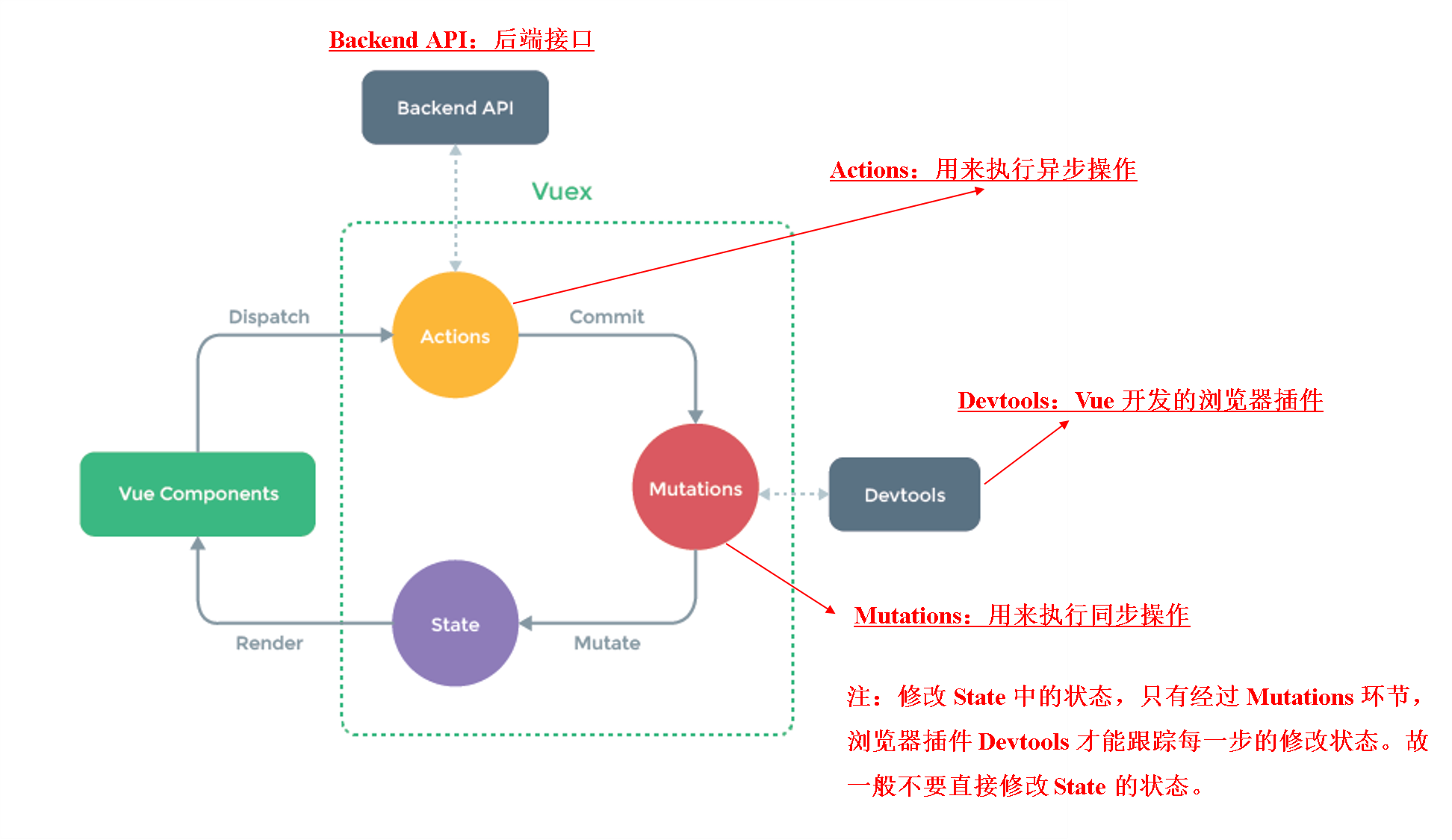
*五个核心概念简单介绍:
- state
Vuex里的state相当于一个全局的state,你可以在component的任何地方获取和修改它。
//获取state
this.$store.state.count//vuex的辅助方法
import { mapState } from 'vuex'
computed:mapState(['count'
])
- getters
Vuex里的getters类似于computed,就像计算属性一样,getter 的返回值会根据它的依赖被缓存起来,且只有当它的依赖值发生了改变才会被重新计算。
//直接使用
this.$store.getters.doneTodosCount//使用辅助方法
import { mapGetters } from 'vuex'
computed:mapGetters({doneCount: 'doneTodosCount'
})
- mutations
更改 Vuex 的 store 中的状态的唯一方法是提交 mutation。一条重要的原则就是要记住 mutation 必须是同步函数。
//触发mutations
this.$store.commit('xxx')//辅助函数
import { mapMutations } from 'vuex'
methods:mapMutations(['increment' ])
在increment函数中调用setTimeout()方法在2s后更新count,这就是一个异步调用。例如:
const store = new Vuex.Store({state: {count: 0},mutations: {increment (state) {setTimeout( () => {state.count++}, 2000)}}
})
Vuex 的 store 中的状态是响应式的,那么当我们变更状态时,监视状态的 Vue 组件也会自动更新。这也意味着 Vuex 中的 mutation 也需要与使用 Vue 一样遵守一些注意事项:
1.最好提前在你的 store 中初始化好所有所需属性。
2.当需要在对象上添加新属性时,你应该:
(1)使用 Vue.set(obj, 'newProp', 123), 或者
(2)以新对象替换老对象。例如,利用对象展开运算符 (opens new window)我们可以这样写:
state.obj = { ...state.obj, newProp: 123 }
- actions
类似于 mutation,不同在于:
Action 提交的是 mutation,而不是直接变更状态,Action 可以包含任意异步操作。
//触发action
store.dispatch('increment')//辅助函数
import { mapActions } from 'vuex'
methods:mapActions(['increment' ])
- Module
由于使用单一状态树,应用的所有状态会集中到一个比较大的对象。Vuex 允许我们将 store 分割成模块(module)。每个模块拥有自己的 state、mutation、action、getter、甚至是嵌套子模块——从上至下进行同样方式的分割。
const moduleA = {state: { ... },mutations: { ... },actions: { ... },getters: { ... }
}const moduleB = {state: { ... },mutations: { ... },actions: { ... }
}const store = new Vuex.Store({modules: {a: moduleA,b: moduleB}
})store.state.a // -> moduleA 的状态
store.state.b // -> moduleB 的状态
详情理解:vuex五个核心概念https://juejin.cn/post/7196924295309213752
对于大型应用,我们会希望把 Vuex 相关代码分割到模块中。下面是项目结构示例:
highlighter- Bash
└── store├── index.js          # 我们组装模块并导出 store 的地方├── actions.js        # 根级别的 action├── mutations.js      # 根级别的 mutation└── modules├── cart.js       # 购物车模块└── products.js   # 产品模块
本文来自互联网用户投稿,文章观点仅代表作者本人,不代表本站立场,不承担相关法律责任。如若转载,请注明出处。 如若内容造成侵权/违法违规/事实不符,请点击【内容举报】进行投诉反馈!