uniapp 完美解决苹果和安卓 input 框遮挡兼容问题
需求描述
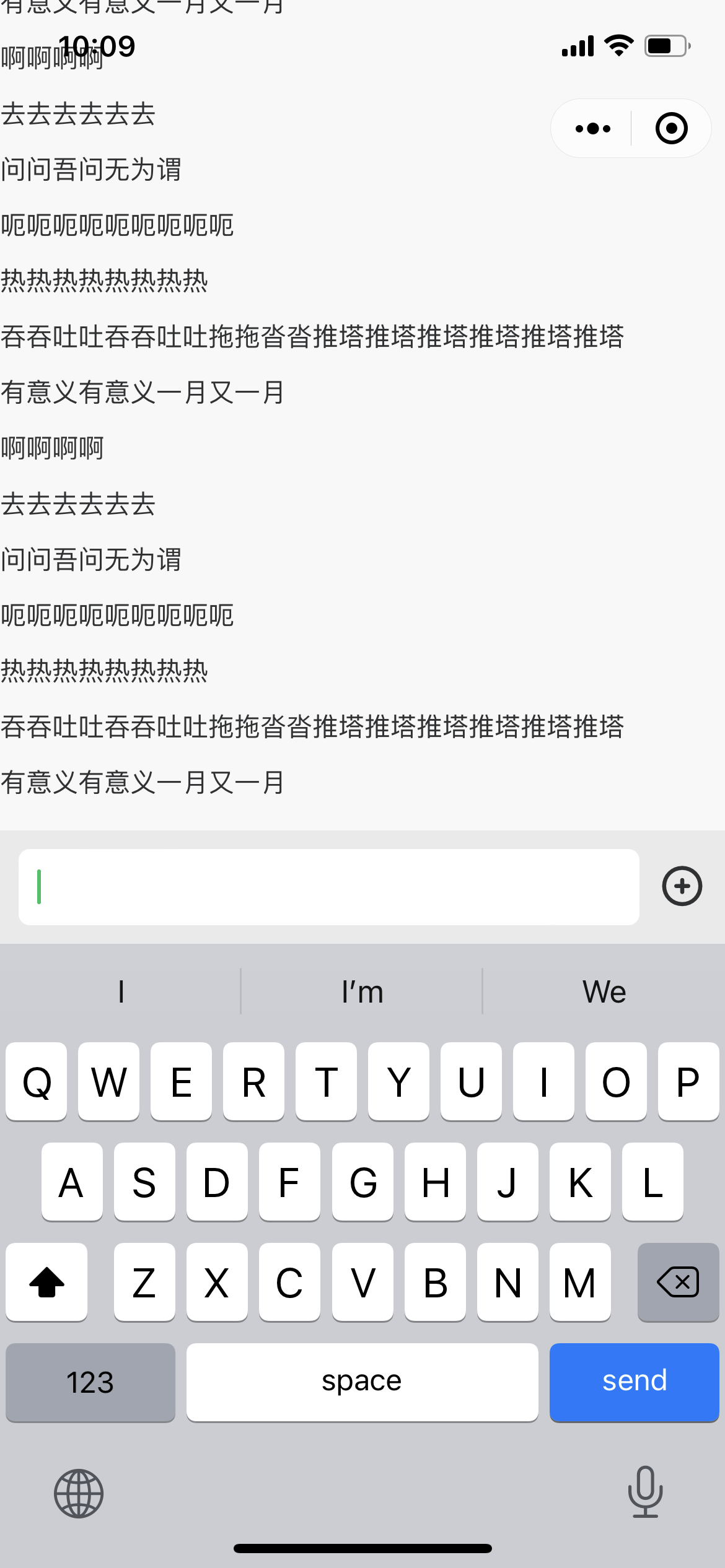
小程序项目用到IM即时通讯功能,苹果和安卓出现input输入框被软键盘遮挡的情况。
效果展示
解决问题
HTML部分(结构很重要)
<template><view class="content"><scroll-view class="scroll-view" scroll-with-animation :scroll-y="true" :scroll-top="scrollTop" refresher-enabled:refresher-triggered="triggered" @refresherrefresh="handleFresh"><view id="page"><view v-for="(item,index) in messageList" :key="index" style="margin-bottom: 20rpx;">{{item}}view><view :class="showFunBtn?'show-fun-btn':'not-show-fun-btn'" />view>scroll-view><view class="input-box"><view class="input-box-flex"><view class="input-box-flex-grow"><input v-if="chatType === 'voice'" type="text" class="content" :adjust-position="true":hold-keyboard="true" v-model="content" :confirm-type="'send'" :confirm-hold="true":cursor-spacing="10" @blur="blurHandle" @focus="focusHandle" @confirm="sendMsg" />view><u-icon class="icon_btn_add" size="50" name="plus-circle" @tap="switchFun">u-icon>view><view class="fun-box" :class="{ 'show-fun-box': showFunBtn }"> view>view>view>
template>
CSS部分
JS 部分
<script>export default {data() {return {scrollTop: 0,chatType: 'voice',showFunBtn: false,triggered: false,content: '',messageList: ['啊啊啊啊','啊啊啊啊', '去去去去去去', '问问吾问无为谓', '呃呃呃呃呃呃呃呃呃', '热热热热热热热热', '吞吞吐吐吞吞吐吐拖拖沓沓推塔推塔推塔推塔推塔推塔', '有意义有意义一月又一月','啊啊啊啊', '去去去去去去', '问问吾问无为谓', '呃呃呃呃呃呃呃呃呃', '热热热热热热热热', '吞吞吐吐吞吞吐吐拖拖沓沓推塔推塔推塔推塔推塔推塔', '有意义有意义一月又一月','啊啊啊啊', '去去去去去去', '问问吾问无为谓', '呃呃呃呃呃呃呃呃呃', '热热热热热热热热', '吞吞吐吐吞吞吐吐拖拖沓沓推塔推塔推塔推塔推塔推塔', '有意义有意义一月又一月','啊啊啊啊', '去去去去去去', '问问吾问无为谓', '呃呃呃呃呃呃呃呃呃', '热热热热热热热热', '吞吞吐吐吞吞吐吐拖拖沓沓推塔推塔推塔推塔推塔推塔', '有意义有意义一月又一月','啊啊啊啊', '去去去去去去', '问问吾问无为谓', '呃呃呃呃呃呃呃呃呃', '热热热热热热热热', '吞吞吐吐吞吞吐吐拖拖沓沓推塔推塔推塔推塔推塔推塔', '有意义有意义一月又一月','啊啊啊啊', '去去去去去去', '问问吾问无为谓', '呃呃呃呃呃呃呃呃呃', '热热热热热热热热', '吞吞吐吐吞吞吐吐拖拖沓沓推塔推塔推塔推塔推塔推塔', '有意义有意义一月又一月','啊啊啊啊', '去去去去去去', '问问吾问无为谓', '呃呃呃呃呃呃呃呃呃', '热热热热热热热热', '吞吞吐吐吞吞吐吐拖拖沓沓推塔推塔推塔推塔推塔推塔', '有意义有意义一月又一月']}},onLoad() {this.scroll()},methods: {switchFun() {this.showFunBtn = !this.showFunBtn;uni.hideKeyboard()this.scroll()},blurHandle() {},focusHandle() {},sendMsg() {this.messageList.push(this.content)this.content = ''this.scroll()},scroll() {this.$nextTick(() => {uni.createSelectorQuery().select('#page').boundingClientRect((rect) => {console.log(rect.height)this.scrollTop = rect.height}).exec()})},handleFresh() {console.log('下拉刷新中')this.triggered = true;setTimeout(() => {console.log('恢复')this.triggered = false}, 2000)}}}
</script>
具体怎么回事,尝试将Demo运行起来就差不多理解了。
点赞 评论 收藏 ~~ 留言讨论,如有错误,也希望大家不吝指出。 ~~ 点赞 评论 收藏
本文来自互联网用户投稿,文章观点仅代表作者本人,不代表本站立场,不承担相关法律责任。如若转载,请注明出处。 如若内容造成侵权/违法违规/事实不符,请点击【内容举报】进行投诉反馈!