mmaction2实验记录1——数据集的准备和处理
1、提取视频帧
目标数据集:UCF101
下载链接:CRCV | Center for Research in Computer Vision at the University of Central Florida
数据集文件路径格式:
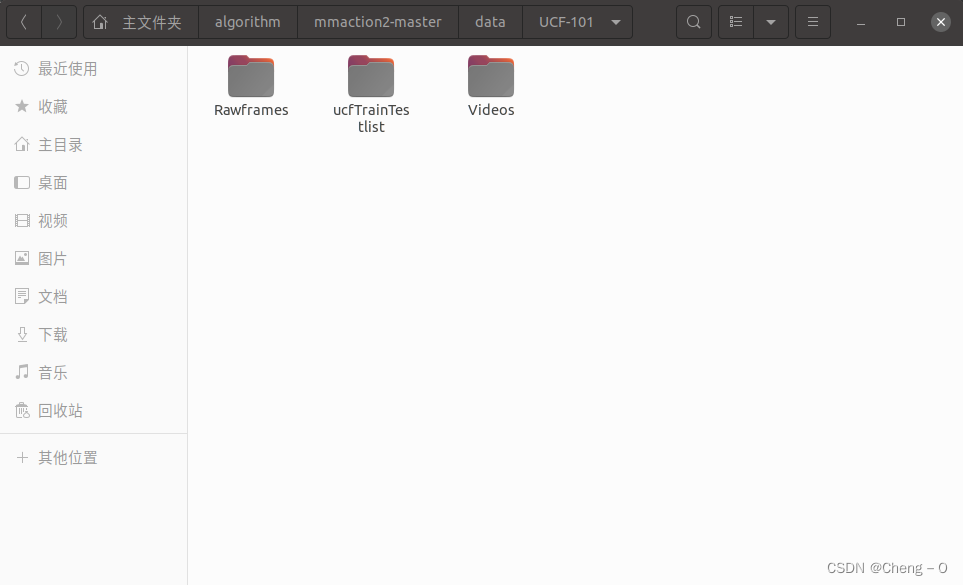
其中Videos文件夹中为原始的ucf101视频
Rawframes文件夹中为要提取的视频帧和光流存放的文件夹
ucfTrainTestlist文件夹中为数据集的train和test的划分信息
使用算法中的/tools/data/build_rawframes.py文件来生成视频帧和光流数据
原始输入为视频的情况:
设置其中的超参数:
--scr_dir 设置为Videos文件夹的绝对或者相对路径
--out_dir 设置为Rawframes文件夹的相对或者绝对路径
--task 设置为‘both’来同时提取视频帧和光流
--flow_type 设置为提取光流所使用的方法‘tvl1’
原始输入为图片的情况:
--scr_dir 设置为图片文件夹的绝对或者相对路径
--out_dir 设置为Rawframes文件夹的相对或者绝对路径
--task 设置为‘flow’来同时提取视频帧和光流
--flow_type 设置为提取光流所使用的方法‘tvl1’
--input-frames 设置成True
在终端中运行脚本build_rawframes.py,来完成视频帧和光流的提取
2、生成文件列表
使用tools/data/build_file_list.py文件来生成训练和测试所需要使用的文件列表
准备类别文件classes.txt,里面的每一行为类别名。
准备训练数据和测试数据文件train.txt和test.txt,合在一起组成整个完整的数据集。里面的每一行的格式为:视频类别/视频名称。

ucf101数据集下载之后会有自带的类别文件和数据文件,其中训练和测试数据按照3种不同的划分被分为01、02、03。其中每一组都能作为一组数据文件。
代码中的超参数解析:
--dataset 设置数据集类型,该代码只支持choices中出现的数据集
['ucf101', 'kinetics400', 'kinetics600', 'kinetics700', 'thumos14','sthv1', 'sthv2', 'mit', 'mmit', 'activitynet', 'hmdb51', 'jester','diving48'
]
如果要对其他数据集处理,例:shanghaitech异常检测数据集,需要自己增加相应的类别‘shanghaitech’。(按照ucf101同样的格式来进行设置)
需要在该文件的代码中if args.dataset的条件语句中增加相应的选择和函数
elif args.dataset == 'shanghaitech':splits = parse_shanghaitech_splits()并在tools/data/build_rawframes.py中增加相应的函数实现。
def parse_shanghaitech_splits(level):class_index_file = '/home/cb/algorithm/mmaction2-master/data/shanghaitech/annotation/classes.txt'train_file_template = '/home/cb/algorithm/mmaction2-master/data/shanghaitech/annotation/train.txt'# 因为目的是只对shanghaitech进行特征提取,所以没有对训练和测试数据进行划分test_file_template = '/home/cb/algorithm/mmaction2-master/data/shanghaitech/annotation/train.txt'# 对class文本文件处理生成class_mapwith open(class_index_file, 'r') as fin:class_index = [x.strip().split() for x in fin]class_mapping = {x[1]: int(x[0]) - 1 for x in class_index}def line_to_map(line):"""A function to map line string to video and label.Args:line (str): A long directory path, which is a text path.Returns:tuple[str, str]: (video, label), video is the video id,label is the video label."""items = line.strip().split()video = osp.splitext(items[0])[0]if level == 1:video = osp.basename(video)label = items[0]elif level == 2:video = osp.join(osp.basename(osp.dirname(video)), osp.basename(video))label = class_mapping[osp.dirname(items[0])]return video, labelsplits = []with open(train_file_template, 'r') as fin:train_list = [line_to_map(x) for x in fin]with open(test_file_template, 'r') as fin:test_list = [line_to_map(x) for x in fin]splits.append((train_list, test_list))return splits--src_folder 提取的帧和光流存放的文件夹
--num-split 为数据集划分类型的数量
--rgb-prefix rgb图片的前缀
--flow-x-prefix 光流x的前缀
--flow-y-prefix 光流y的前缀
生成文件的方式:
使用parse_dataset_splits函数首先将数据列表中的每一条数据加上标签
然后在根据提取的视频帧中的图片来为数据加上帧数信息
本文来自互联网用户投稿,文章观点仅代表作者本人,不代表本站立场,不承担相关法律责任。如若转载,请注明出处。 如若内容造成侵权/违法违规/事实不符,请点击【内容举报】进行投诉反馈!