iOS CoreAnimation详解和使用
前言
最近刚好需要用到一些动画效果,所以对 CoreAnimation 进行了一些研究,在使用过程中,也有产生一些疑问,在此和大家分享。 本文主要是展示对 CoreAnimation 的快速使用,多种动画的集合,每一个动画放在一个独立的VC中,清晰的代码,也有购物车动画,转场动画,弹簧动画等等。CoreAnimation 使用
基础类的熟悉
CAAnimation:核心动画的基类,由属性 timingFunction 控制动画运行的速度变化,由duration控制动画持续时间。CAPropertyAnimation:属性动画的基类。
CAAnimationGroup:动画组,可以将多个动画组合,并行一起执行的一个类。
CATransition:转场动画,在切换一些视图,可以产生较炫丽的动画效果。
CABasicAnimation:基础动画,属性动画,可以直接使用,一般是较简单的动画。
CAKeyframeAnimation:关键帧动画,属性动画,可以直接使用,一般通过描述Point 来进行动画的操作,可以有多个不同的状态变化。
创建基础动画 BaseAnimationVC
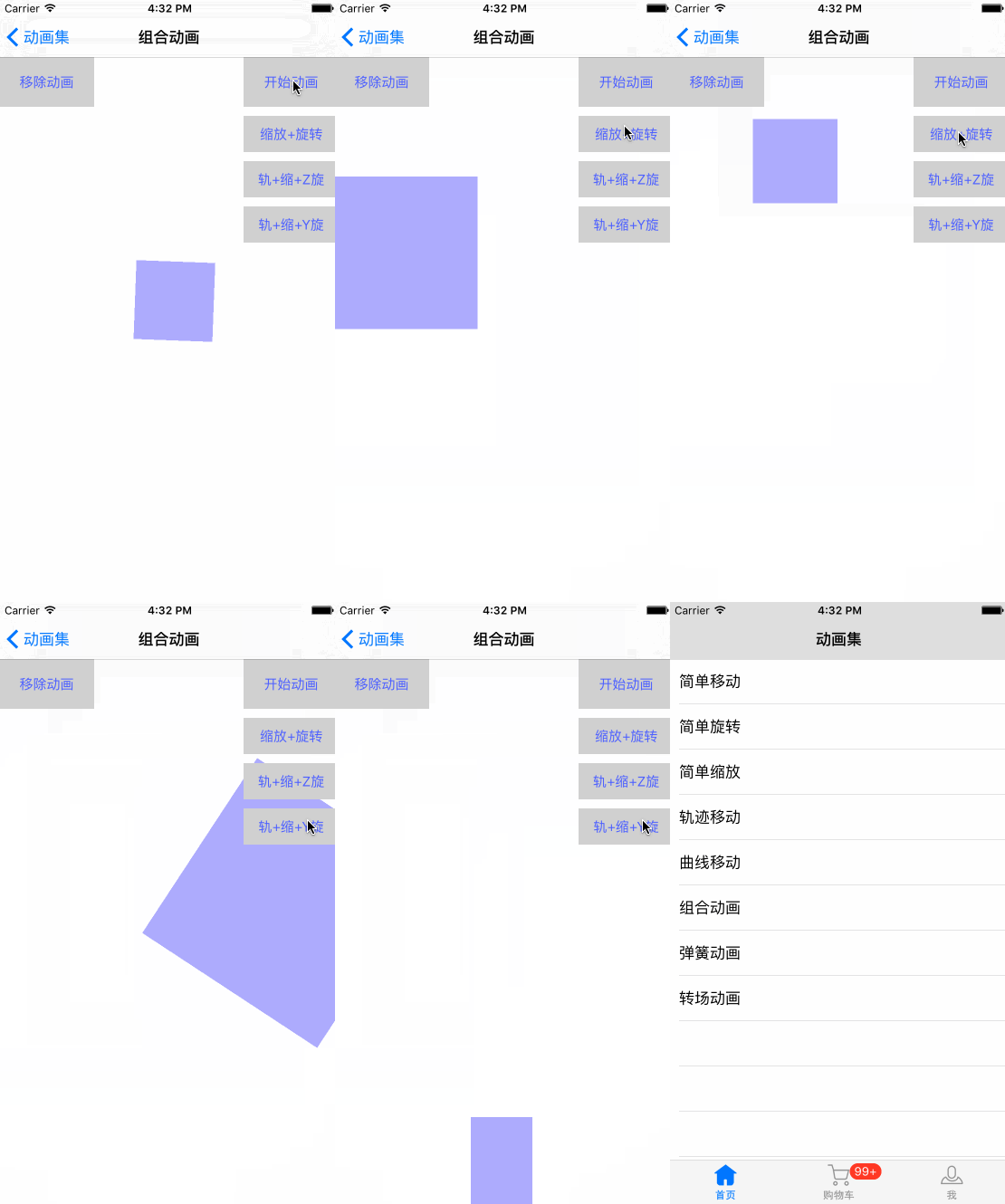
接下来我们创建一个 AnimationSummaryDemo 动画集合的 Demo,基础的 VC 使用 Storyboard , Demo 有简单移动、旋转、缩放、多点轨迹移动、曲线移动、组合动画、弹簧动画、转场动画,并且大部分动画,我们用一个简单的矩形作为直观的动画操作。
既然这么多个动画都有共同的操作 UI , 所以我们创建一个动画基类 WBBaseAnimationVC , 将 UI 放在一起, 在子类中,只展示动画的代码。
#import "ViewController.h"@protocol WBBaseAnimationDelegate - (void)starAnimation;- (void)removeAnimation;@end@interface WBBaseAnimationVC : UIViewController @property (nonatomic, strong) UIView *animationView;
@property (nonatomic, readonly) UIButton *starAnimationButton;
@property (nonatomic, readonly) UIButton *removeAnimationButton;@end
这里是贴上 头文件部分,具体看 Demo 。
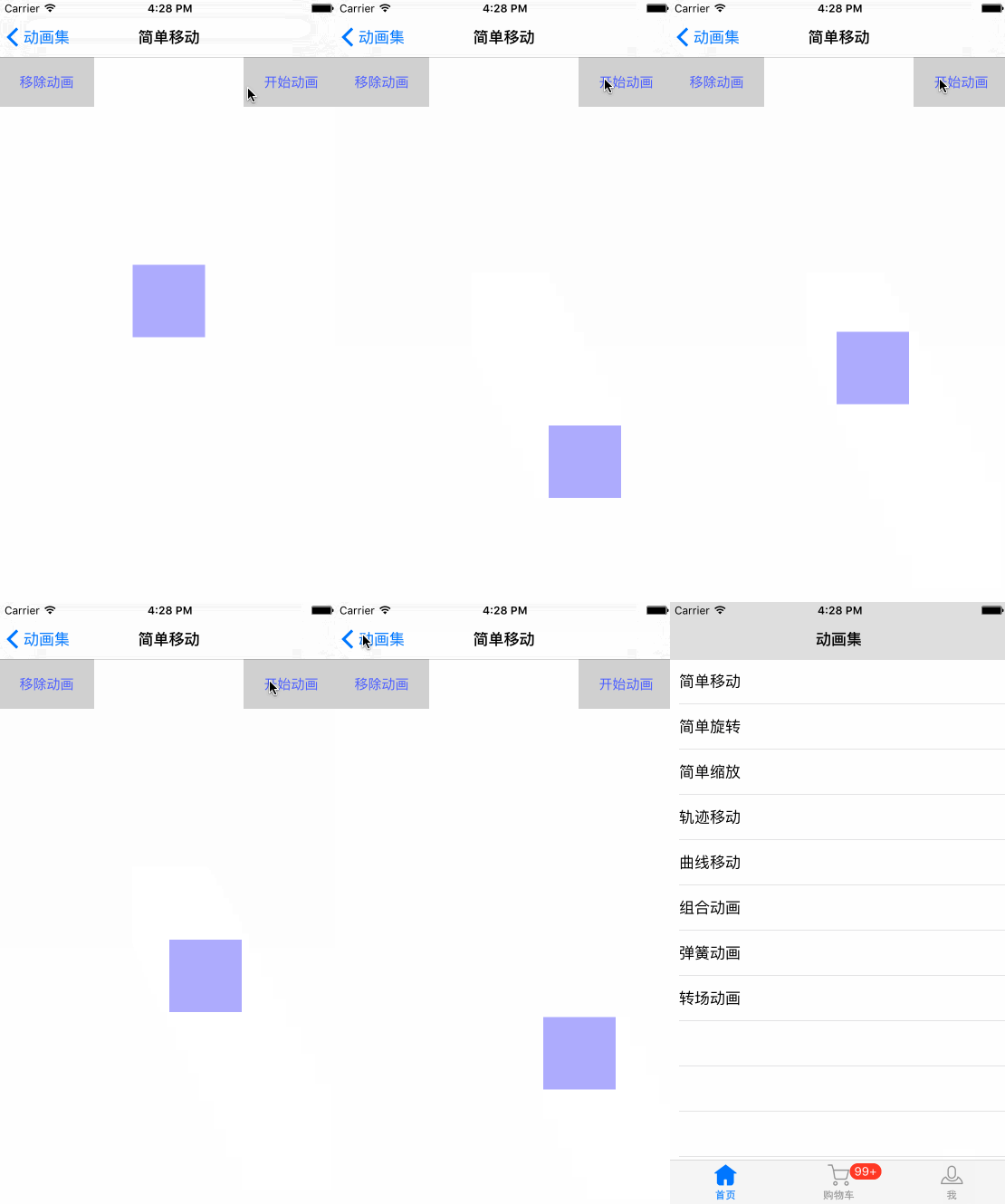
简单移动
创建一个 WBSimpleMovingVC ,继承于 WBBaseAnimationVC 。 .m 如下#pragma mark - WBBaseAnimationDelegate methods- (void)starAnimation {//创建基础动画CABasicAnimation *animation = [CABasicAnimation animationWithKeyPath:@"position"];//动画持续时间animation.duration = 2.0f;//重复次数animation.repeatCount = HUGE_VALF;//是否执行逆动画animation.autoreverses = YES;//动画的速度变化animation.timingFunction = [CAMediaTimingFunction functionWithName:kCAMediaTimingFunctionEaseIn];//动画的起始位置(当前)animation.fromValue = [NSValue valueWithCGPoint:self.animationView.layer.position];//动画的终点位置animation.toValue = [NSValue valueWithCGPoint:CGPointMake(SCREEN_WIDTH - self.animationView.width / 2.0, SCREEN_HEIGHT - self.animationView.height / 2.0)];[self.animationView.layer addAnimation:animation forKey:@"position"];
}- (void)removeAnimation {[self.animationView.layer removeAllAnimations];
}
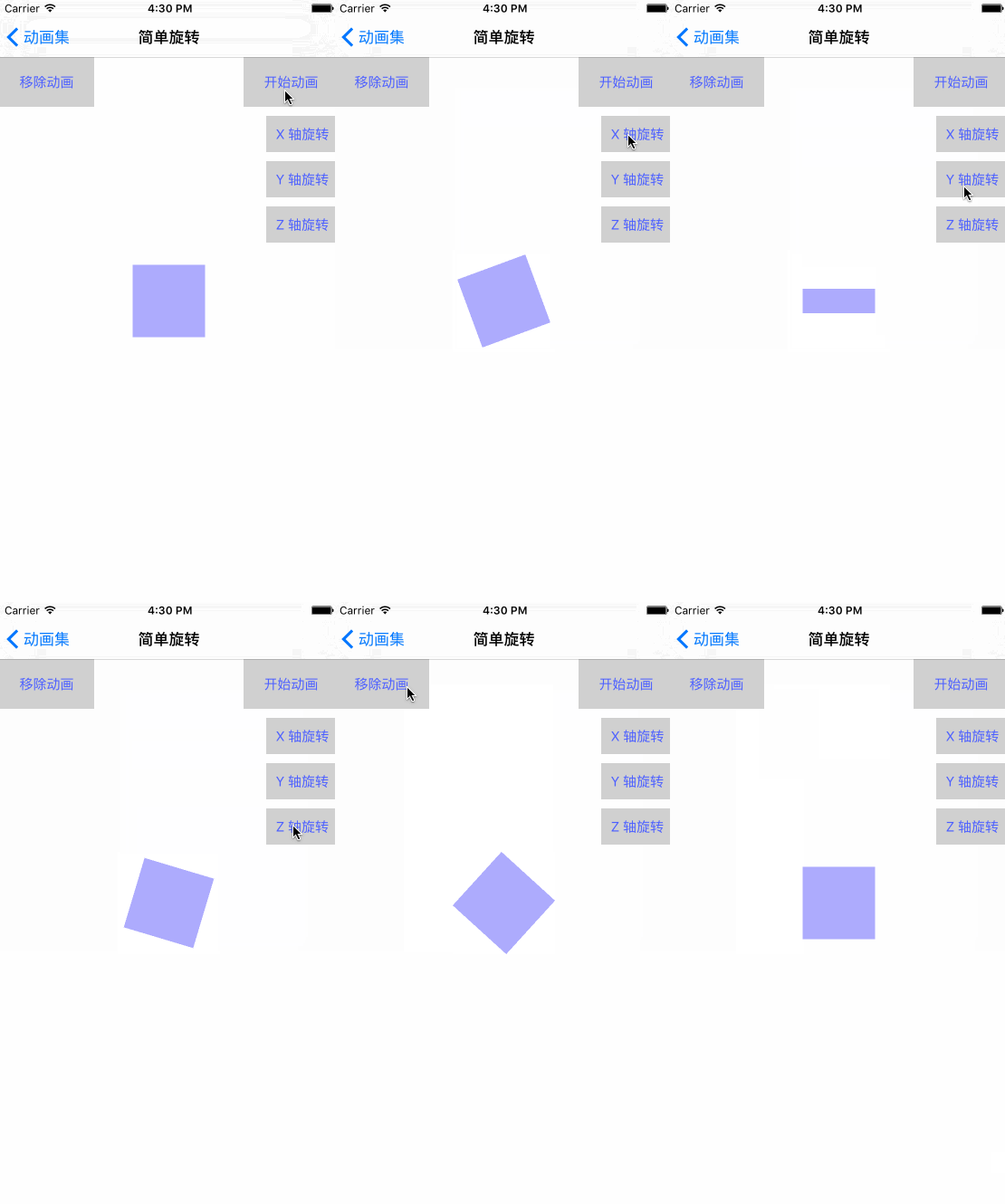
旋转动画
创建 WBRotatingVC ,继承于 WBBaseAnimationVC , .m 如下#import "WBRotatingVC.h"typedef NS_ENUM(NSUInteger, WBRotatingAxis) {WBRotatingAxisNone ,WBRotatingAxisX ,WBRotatingAxisY ,WBRotatingAxisZ
};@interface WBRotatingVC ()@end@implementation WBRotatingVC- (void)viewDidLoad {[super viewDidLoad];UIButton *axisX = [UIButton buttonWithType:UIButtonTypeCustom];axisX.titleLabel.font = [UIFont systemFontOfSize:15];[axisX setTitle:@"X 轴旋转" forState:UIControlStateNormal];[axisX setTitleColor:[UIColor colorWithRed:0.307 green:0.397 blue:1.000 alpha:1.000] forState:UIControlStateNormal];[axisX setBackgroundColor:[UIColor colorWithWhite:0.814 alpha:1.000]];[axisX addTarget:self action:@selector(rotatingWithAxisX:) forControlEvents:UIControlEventTouchUpInside];UIButton *axisY = [UIButton buttonWithType:UIButtonTypeCustom];axisY.titleLabel.font = [UIFont systemFontOfSize:15];[axisY setTitle:@"Y 轴旋转" forState:UIControlStateNormal];[axisY setTitleColor:[UIColor colorWithRed:0.307 green:0.397 blue:1.000 alpha:1.000] forState:UIControlStateNormal];[axisY setBackgroundColor:[UIColor colorWithWhite:0.814 alpha:1.000]];[axisY addTarget:self action:@selector(rotatingWithAxisY:) forControlEvents:UIControlEventTouchUpInside];UIButton *axisZ = [UIButton buttonWithType:UIButtonTypeCustom];axisZ.titleLabel.font = [UIFont systemFontOfSize:15];[axisZ setTitle:@"Z 轴旋转" forState:UIControlStateNormal];[axisZ setTitleColor:[UIColor colorWithRed:0.307 green:0.397 blue:1.000 alpha:1.000] forState:UIControlStateNormal];[axisZ setBackgroundColor:[UIColor colorWithWhite:0.814 alpha:1.000]];[axisZ addTarget:self action:@selector(rotatingWithAxisZ:) forControlEvents:UIControlEventTouchUpInside];[self.view addSubview:axisX];[self.view addSubview:axisY];[self.view addSubview:axisZ];[axisX mas_makeConstraints:^(MASConstraintMaker *make) {make.trailing.equalTo(@0);make.top.equalTo(@129);make.width.equalTo(@80);make.height.equalTo(@40);}];[axisY mas_makeConstraints:^(MASConstraintMaker *make) {make.trailing.equalTo(@0);make.top.equalTo(axisX.mas_bottom).offset(10);make.width.equalTo(@80);make.height.equalTo(@40);}];[axisZ mas_makeConstraints:^(MASConstraintMaker *make) {make.trailing.equalTo(@0);make.top.equalTo(axisY.mas_bottom).offset(10);make.width.equalTo(@80);make.height.equalTo(@40);}];
}- (void)didReceiveMemoryWarning {[super didReceiveMemoryWarning];// Dispose of any resources that can be recreated.
}#pragma mark - Private methods- (IBAction)rotatingWithAxisX:(id)sender {[self rotatingAnimationWithRotatingAxis:WBRotatingAxisX];
}- (IBAction)rotatingWithAxisY:(id)sender {[self rotatingAnimationWithRotatingAxis:WBRotatingAxisY];
}- (IBAction)rotatingWithAxisZ:(id)sender {[self rotatingAnimationWithRotatingAxis:WBRotatingAxisZ];
}- (void)rotatingAnimationWithRotatingAxis:(WBRotatingAxis)rotatingAxis {[self removeAnimation];CABasicAnimation *animation;if (rotatingAxis == WBRotatingAxisNone) {animation = [CABasicAnimation animationWithKeyPath:@"transform.rotation"]; //平面沿着中心点旋转} else if (rotatingAxis == WBRotatingAxisX) {animation = [CABasicAnimation animationWithKeyPath:@"transform.rotation.x"]; //沿 X} else if (rotatingAxis == WBRotatingAxisY) {animation = [CABasicAnimation animationWithKeyPath:@"transform.rotation.y"]; //沿 Y} else if (rotatingAxis == WBRotatingAxisZ) {animation = [CABasicAnimation animationWithKeyPath:@"transform.rotation.z"]; //沿 Z}//起始animation.fromValue = [NSNumber numberWithFloat:0];//旋转角度animation.toValue = [NSNumber numberWithFloat:M_PI * 6];//持续时间animation.duration = 2.0f;//动画的速度变化animation.timingFunction = [CAMediaTimingFunction functionWithName:kCAMediaTimingFunctionLinear];//重复次数animation.repeatCount = HUGE_VALF;[self.animationView.layer addAnimation:animation forKey:@"rotationAnimation"];
}#pragma mark - WBBaseAnimationDelegate methods- (void)starAnimation {[self rotatingAnimationWithRotatingAxis:WBRotatingAxisNone];
}- (void)removeAnimation {[self.animationView.layer removeAllAnimations];
}@end
旋转还有分为 x ,y ,z 轴旋转。
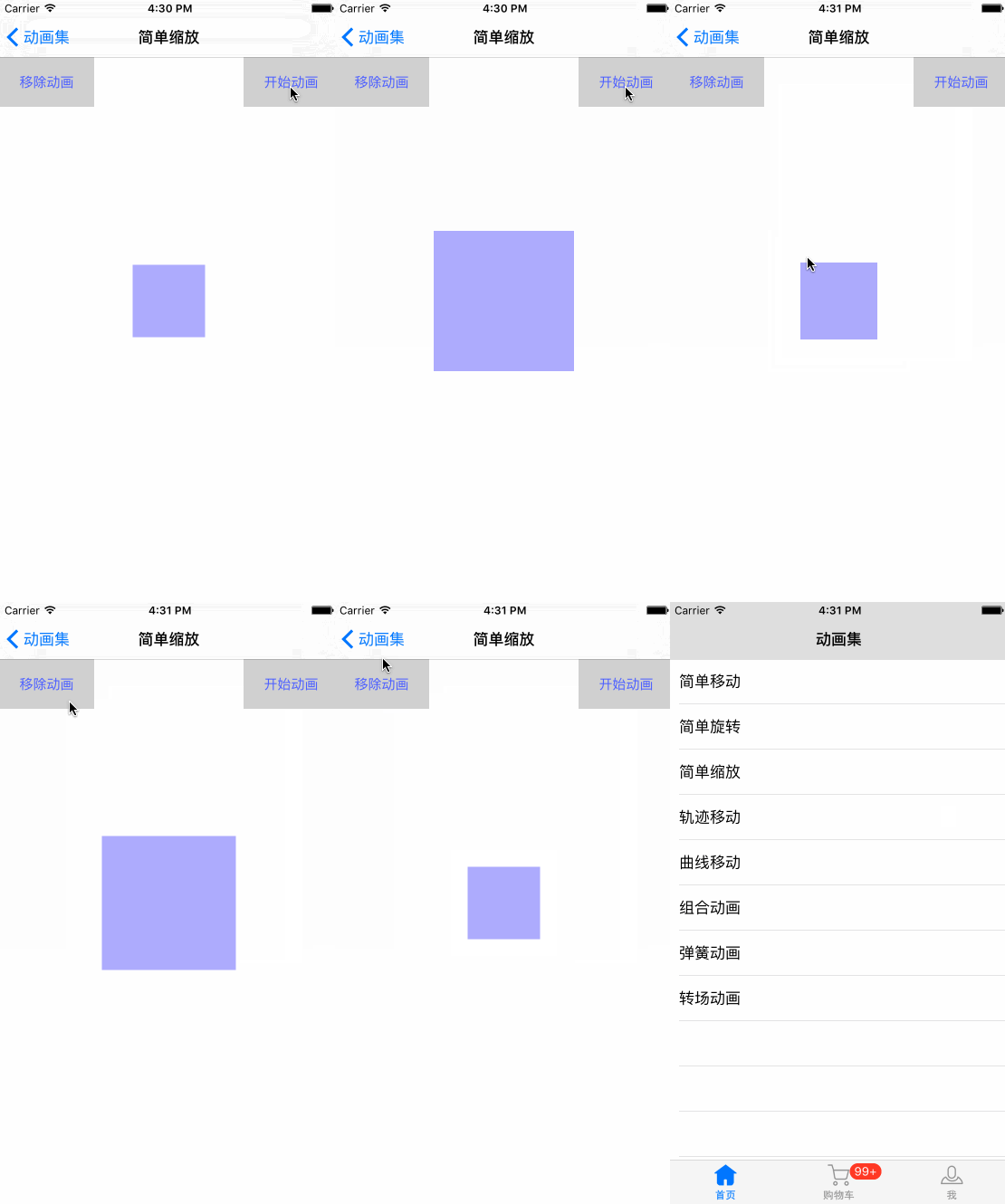
缩放动画
创建 WBZoomingVC , 继承于 WBBaseAnimationVC , .m 如下
#pragma mark - WBBaseAnimationDelegate methods- (void)starAnimation {CABasicAnimation *animation = [CABasicAnimation animationWithKeyPath:@"transform.scale"];animation.duration = 1.5f;animation.repeatCount = HUGE_VALF;animation.autoreverses = YES;           animation.timingFunction = [CAMediaTimingFunction functionWithName:kCAMediaTimingFunctionLinear];//起始倍率animation.fromValue = [NSNumber numberWithFloat:1.0];//结束时倍率animation.toValue = [NSNumber numberWithFloat:2.0];[self.animationView.layer addAnimation:animation forKey:@"scaleAnimation"];
}- (void)removeAnimation {[self.animationView.layer removeAllAnimations];
}
轨迹移动
创建 WBTrajectoryMovingVC ,继承于 WBBaseAnimationVC , .m 如下
#pragma mark - WBBaseAnimationDelegate methods- (void)starAnimation {//创建BezierPath 对象UIBezierPath *path = [UIBezierPath bezierPath];//设定运行的起点[path moveToPoint:self.animationView.layer.position];//添加运动的轨迹直线点[path addLineToPoint:CGPointMake(SCREEN_WIDTH - self.animationView.width / 2.0, SCREEN_HEIGHT / 2.0)];[path addLineToPoint:CGPointMake(SCREEN_WIDTH / 2.0, SCREEN_HEIGHT - self.animationView.width / 2.0)];[path addLineToPoint:CGPointMake(self.animationView.width / 2.0, SCREEN_HEIGHT / 2.0)];[path addLineToPoint:CGPointMake(SCREEN_WIDTH / 2.0, 64 + self.animationView.width / 2.0)];[path closePath];//创建关键帧动画CAKeyframeAnimation *pathAnimation = [CAKeyframeAnimation animationWithKeyPath:@"position"];pathAnimation.path = path.CGPath;           //将路径给予动画pathAnimation.duration = 8.0;               //持续时间pathAnimation.repeatCount = HUGE_VALF;      // 重复次数//    pathAnimation.autoreverses = YES;           // 是否逆动画[self.animationView.layer addAnimation:pathAnimation forKey:@"pathAnimation"];
}- (void)removeAnimation {[self.animationView.layer removeAllAnimations];
}

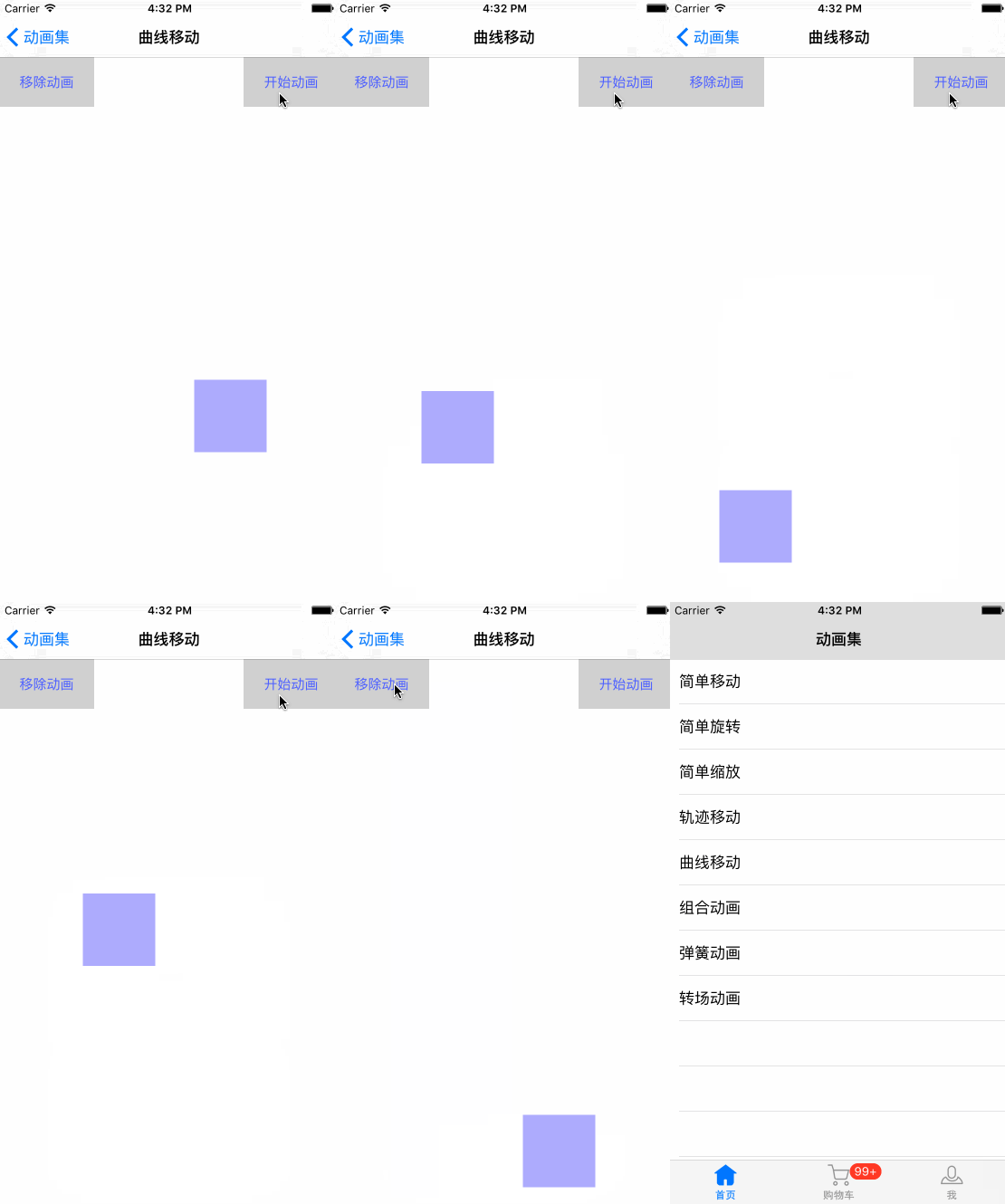
曲线运动
创建 WBCurveMovingVC ,继承于 WBBaseAnimationVC , .m 如下
#pragma mark - WBBaseAnimationDelegate methods- (void)starAnimation {//创建BezierPath 对象UIBezierPath *path = [UIBezierPath bezierPath];//设定运行的起点[path moveToPoint:self.animationView.layer.position];//添加轨迹点// addQuadCurveToPoint 和 addCurveToPoint 都是曲线方法, 区别在于参数,addCurveToPoint 可以有两个基准点 controlPoint 作为划线的依据[path addQuadCurveToPoint:CGPointMake(SCREEN_WIDTH / 2.0, SCREEN_HEIGHT * 0.75) controlPoint:CGPointMake(SCREEN_WIDTH, SCREEN_HEIGHT * 0.625)];[path addQuadCurveToPoint:CGPointMake(SCREEN_WIDTH / 2.0, SCREEN_HEIGHT - self.animationView.height / 2.0) controlPoint:CGPointMake(0, SCREEN_HEIGHT * 0.875)];[path addQuadCurveToPoint:CGPointMake(SCREEN_WIDTH / 2.0, SCREEN_HEIGHT * 0.75) controlPoint:CGPointMake(SCREEN_WIDTH, SCREEN_HEIGHT * 0.875)];[path addQuadCurveToPoint:CGPointMake(SCREEN_WIDTH / 2.0, SCREEN_HEIGHT / 2.0) controlPoint:CGPointMake(0, SCREEN_HEIGHT * 0.625)];// 关键帧动画CAKeyframeAnimation *keyFrameAnimation = [CAKeyframeAnimation animationWithKeyPath:@"position"];keyFrameAnimation.path = path.CGPath;keyFrameAnimation.duration = 4.0f;keyFrameAnimation.repeatCount = HUGE_VALF;[self.animationView.layer addAnimation:keyFrameAnimation forKey:@"pathAnimation"];
}- (void)removeAnimation {[self.animationView.layer removeAllAnimations];
}
组合运动
创建 WBCombinationOneVC , 继承于 WBBaseAnimationVC , .m 如下
#import "WBCombinationOneVC.h"@interface WBCombinationOneVC ()@end@implementation WBCombinationOneVC- (void)viewDidLoad {[super viewDidLoad];UIButton *animation1 = [UIButton buttonWithType:UIButtonTypeCustom];animation1.titleLabel.font = [UIFont systemFontOfSize:15];[animation1 setTitle:@"缩放+旋转" forState:UIControlStateNormal];[animation1 setTitleColor:[UIColor colorWithRed:0.307 green:0.397 blue:1.000 alpha:1.000] forState:UIControlStateNormal];[animation1 setBackgroundColor:[UIColor colorWithWhite:0.814 alpha:1.000]];[animation1 addTarget:self action:@selector(combinationAnimationOne) forControlEvents:UIControlEventTouchUpInside];UIButton *animation2 = [UIButton buttonWithType:UIButtonTypeCustom];animation2.titleLabel.font = [UIFont systemFontOfSize:15];[animation2 setTitle:@"轨+缩+Z旋" forState:UIControlStateNormal];[animation2 setTitleColor:[UIColor colorWithRed:0.307 green:0.397 blue:1.000 alpha:1.000] forState:UIControlStateNormal];[animation2 setBackgroundColor:[UIColor colorWithWhite:0.814 alpha:1.000]];[animation2 addTarget:self action:@selector(animation2Click:) forControlEvents:UIControlEventTouchUpInside];UIButton *animation3 = [UIButton buttonWithType:UIButtonTypeCustom];animation3.titleLabel.font = [UIFont systemFontOfSize:15];[animation3 setTitle:@"轨+缩+Y旋" forState:UIControlStateNormal];[animation3 setTitleColor:[UIColor colorWithRed:0.307 green:0.397 blue:1.000 alpha:1.000] forState:UIControlStateNormal];[animation3 setBackgroundColor:[UIColor colorWithWhite:0.814 alpha:1.000]];[animation3 addTarget:self action:@selector(animation3Click:) forControlEvents:UIControlEventTouchUpInside];[self.view addSubview:animation1];[self.view addSubview:animation2];[self.view addSubview:animation3];[animation1 mas_makeConstraints:^(MASConstraintMaker *make) {make.trailing.equalTo(@0);make.top.equalTo(@129);make.width.equalTo(@105);make.height.equalTo(@40);}];[animation2 mas_makeConstraints:^(MASConstraintMaker *make) {make.trailing.equalTo(@0);make.top.equalTo(animation1.mas_bottom).offset(10);make.width.equalTo(animation1.mas_width);make.height.equalTo(@40);}];[animation3 mas_makeConstraints:^(MASConstraintMaker *make) {make.trailing.equalTo(@0);make.top.equalTo(animation2.mas_bottom).offset(10);make.width.equalTo(animation2.mas_width);make.height.equalTo(@40);}];
}- (void)didReceiveMemoryWarning {[super didReceiveMemoryWarning];// Dispose of any resources that can be recreated.
}#pragma mark - Private methods- (IBAction)animation2Click:(UIButton *)sender {[self combinationAnimationTwoWithAxis:@"Z"];
}- (IBAction)animation3Click:(UIButton *)sender {[self combinationAnimationTwoWithAxis:@"Y"];
}#pragma mark 旋转+缩放
- (void)combinationAnimationOne {//创建旋转动画CABasicAnimation *rotateAnimation = [CABasicAnimation animationWithKeyPath:@"transform.rotation"];rotateAnimation.fromValue = [NSNumber numberWithFloat:0];rotateAnimation.toValue = [NSNumber numberWithFloat:M_PI * 8];rotateAnimation.duration = 1.5f;rotateAnimation.timingFunction = [CAMediaTimingFunction functionWithName:kCAMediaTimingFunctionLinear];rotateAnimation.repeatCount = HUGE_VALF;rotateAnimation.autoreverses = YES;//创建缩放动画CABasicAnimation *scaleAnimation = [CABasicAnimation animationWithKeyPath:@"transform.scale"];scaleAnimation.duration = 1.5f;scaleAnimation.repeatCount = HUGE_VALF;scaleAnimation.autoreverses = YES;scaleAnimation.timingFunction = [CAMediaTimingFunction functionWithName:kCAMediaTimingFunctionLinear];scaleAnimation.fromValue = [NSNumber numberWithFloat:1.0];scaleAnimation.toValue = [NSNumber numberWithFloat:3.0];// 创建的动画组CAAnimationGroup *groups = [CAAnimationGroup animation];groups.animations = @[rotateAnimation, scaleAnimation];groups.duration = 1.5f;groups.repeatCount = HUGE_VALF;groups.autoreverses = YES;[self.animationView.layer addAnimation:groups forKey:@"CombinationAnimation"];
}#pragma mark 移动+旋转+缩放
- (void)combinationAnimationTwoWithAxis:(NSString *)axis {//创建移动轨迹UIBezierPath *path = [UIBezierPath bezierPath];[path moveToPoint:self.animationView.layer.position];[path addLineToPoint:CGPointMake(SCREEN_WIDTH - self.animationView.width / 2.0, SCREEN_HEIGHT / 2.0)];[path addLineToPoint:CGPointMake(SCREEN_WIDTH / 2.0, SCREEN_HEIGHT - self.animationView.width / 2.0)];[path addLineToPoint:CGPointMake(self.animationView.width / 2.0, SCREEN_HEIGHT / 2.0)];[path addLineToPoint:CGPointMake(SCREEN_WIDTH / 2.0, 64 + self.animationView.width / 2.0)];[path closePath];//创建关键帧动画CAKeyframeAnimation *pathAnimation = [CAKeyframeAnimation animationWithKeyPath:@"position"];pathAnimation.path = path.CGPath;           //将路径给予动画pathAnimation.duration = 8.0;               //持续时间pathAnimation.repeatCount = HUGE_VALF;      // 重复次数//创建缩放动画CABasicAnimation *scaleAnimation = [CABasicAnimation animationWithKeyPath:@"transform.scale"];scaleAnimation.duration = 1.5f;scaleAnimation.repeatCount = HUGE_VALF;scaleAnimation.autoreverses = YES;scaleAnimation.timingFunction = [CAMediaTimingFunction functionWithName:kCAMediaTimingFunctionLinear];scaleAnimation.fromValue = [NSNumber numberWithFloat:1.0];scaleAnimation.toValue = [NSNumber numberWithFloat:3.0];//创建旋转动画CABasicAnimation *rotateAnimation = [CABasicAnimation animationWithKeyPath:[axis isEqualToString:@"Z"] ? @"transform.rotation" :  @"transform.rotation.y"];rotateAnimation.fromValue = [NSNumber numberWithFloat:0];rotateAnimation.toValue = [NSNumber numberWithFloat:12];rotateAnimation.duration = 0.5f;rotateAnimation.timingFunction = [CAMediaTimingFunction functionWithName:kCAMediaTimingFunctionLinear];rotateAnimation.repeatCount = 4;rotateAnimation.autoreverses = YES;// 创建的动画组CAAnimationGroup *groups = [CAAnimationGroup animation];groups.animations = @[pathAnimation, rotateAnimation, scaleAnimation];groups.duration = 8.0;groups.repeatCount = HUGE_VALF;groups.autoreverses = YES;[self.animationView.layer addAnimation:groups forKey:@"CombinationAnimation"];
}#pragma mark - WBBaseAnimationDelegate methods- (void)starAnimation {[self combinationAnimationTwoWithAxis:@"Z"];
}- (void)removeAnimation {[self.animationView.layer removeAllAnimations];
}@end
组合动画中,我们会有这样的思考,在创建 缩放动画 或者 旋转动画的时候,已经设置了 动画的持续时间 duration , 那么在创建动画组的时候,也设置了同样的属性,那么这样有什么不同呢? 还是依据时间最长的来呢? 其实我们可以这样想,比如设置了 旋转动画 的时间为 0.5f , 即是单位时间内执行一次动画,所需0.5f ,repeatCount 执行4次 ,那么动画组设置 8.0f, 那么意思就是,旋转的动画会执行 2.0f ,所以像图中, 矩形在运动到最左边的边缘时,就不在旋转了,只执行运动和缩放的动画了,即动画之间,还是可以分开管理的,可以设定在某一个时刻停止或继续执行某个动画 ,时间可以控制的,并不冲突。
弹簧动画
创建 WBSpringAnimationVC ,继承于 WBBaseAnimationVC , .m 如下#pragma mark - Private methods- (void)setupUI {self.animationView.hidden = YES;self.starAnimationButton.hidden = YES;self.removeAnimationButton.hidden = YES;self.basketballImageView = [[UIImageView alloc] initWithImage:[UIImage imageNamed:@"Basketball"]];[self.view addSubview:self.basketballImageView];[self.basketballImageView mas_makeConstraints:^(MASConstraintMaker *make) {make.centerX.equalTo(self.view.mas_centerX);make.centerY.equalTo(self.view.mas_centerY);make.width.height.equalTo(@50);}];
}-(void)touchesBegan:(NSSet *)touches withEvent:(UIEvent *)event{UITouch *touch=touches.anyObject;CGPoint location= [touch locationInView:self.view];/*** 弹性动画* Duration 动画持续时间* delay 动画延迟执行时间* Damping 弹性阻尼,范围0.0~1.0 ,值越小,弹簧振幅越大* Velocity 弹性复位的速度* options 动画类型*- returns:*/[UIView animateWithDuration:5.0 delay:0 usingSpringWithDamping:0.1 initialSpringVelocity:1.0 options:UIViewAnimationOptionCurveLinear animations:^{self.basketballImageView.center = location;} completion:^(BOOL finished) {}];
}

转场动画
创建 WBTransitionsAnimationVC ,继承于 WBBaseAnimationVC , .m 如下
#import "WBTransitionsAnimationVC.h"
#import "WBTransitionsCell.h"@interface WBTransitionsAnimationVC () @property (nonatomic, strong) UICollectionView *collectionView;
@property (nonatomic, strong) NSArray *> *titles;
@property (nonatomic, strong) NSArray *imagesNamed;
@property (nonatomic, strong) UIImageView *imageView;
@property (nonatomic, strong) UILabel *pageLabel;@property (nonatomic, assign) NSInteger currentIndex;           //当前第几张图片
@property (nonatomic, copy) NSString *currentAnimationType;     //当前动画类型@end@implementation WBTransitionsAnimationVC- (void)viewDidLoad {[super viewDidLoad];[self setupUI];
}- (void)didReceiveMemoryWarning {[super didReceiveMemoryWarning];
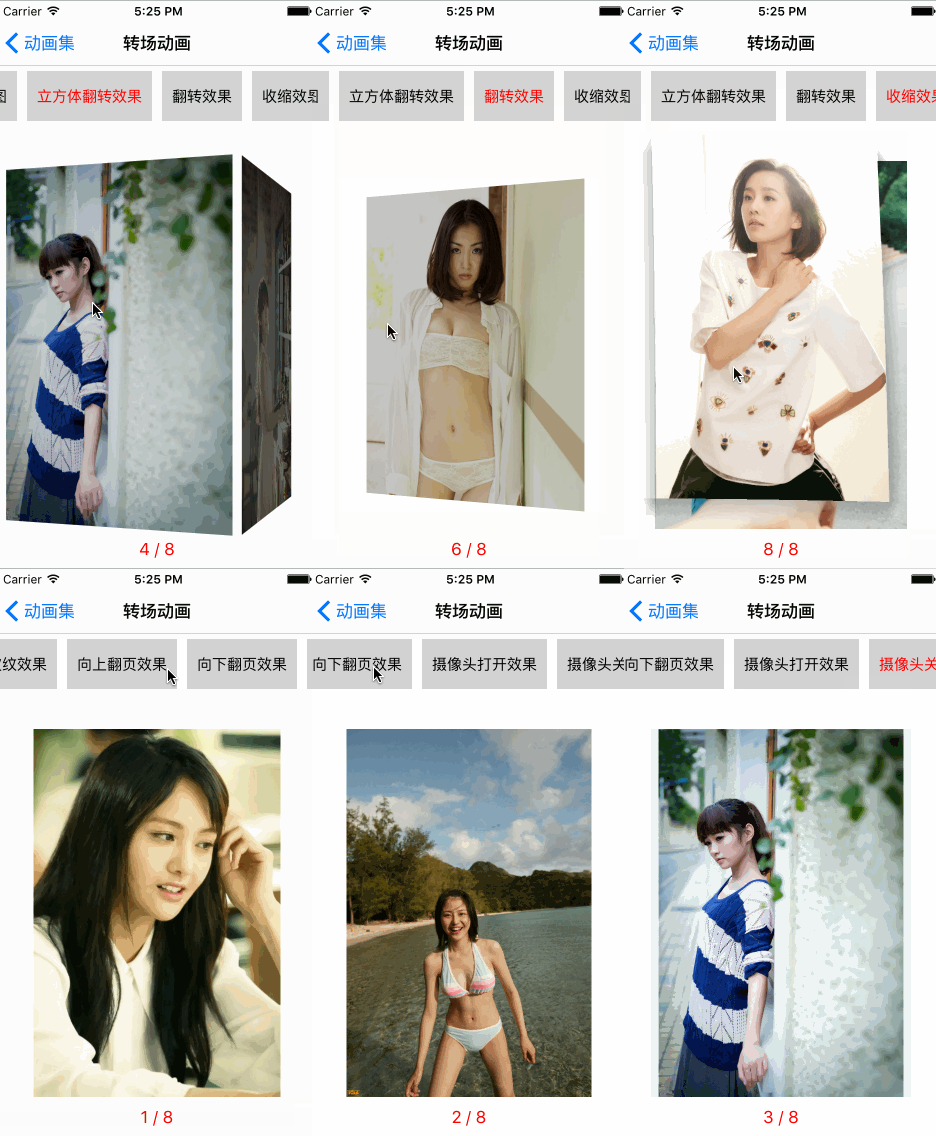
}#pragma mark - Private methods- (void)setupUI {self.animationView.hidden = YES;self.starAnimationButton.hidden = YES;self.removeAnimationButton.hidden = YES;self.titles = @[@{@"fade" : @"淡出效果"} ,@{@"movein" : @"新视图移动到旧视图上"} ,@{@"push" : @"新视图推出旧视图"} ,@{@"reveal" : @"移开旧视图显示新视图"} ,@{@"cube" : @"立方体翻转效果"} ,@{@"oglFlip" : @"翻转效果"} ,@{@"suckEffect" : @"收缩效果"} ,@{@"rippleEffect" : @"水滴波纹效果"} ,@{@"pageCurl" : @"向上翻页效果"} ,@{@"pageUnCurl" : @"向下翻页效果"} ,@{@"cameralIrisHollowOpen" : @"摄像头打开效果"} ,@{@"cameraIrisHollowClose" : @"摄像头关闭效果"}];self.imagesNamed = @[@"picture1" ,@"picture2" ,@"picture3" ,@"picture4" ,@"picture5" ,@"picture6" ,@"picture7" ,@"picture8" ];UICollectionViewFlowLayout *layout = [[UICollectionViewFlowLayout alloc] init];[layout setScrollDirection:UICollectionViewScrollDirectionHorizontal];self.collectionView = [[UICollectionView alloc] initWithFrame:CGRectMake(0, 0, self.view.width, self.view.height) collectionViewLayout:layout];[_collectionView registerClass:[WBTransitionsCell class] forCellWithReuseIdentifier:[WBTransitionsCell reuseIdentifier]];_collectionView.backgroundColor = [UIColor clearColor];_collectionView.alwaysBounceVertical = NO;_collectionView.showsHorizontalScrollIndicator = NO;_collectionView.delegate = self;_collectionView.dataSource = self;[self.view addSubview:self.collectionView];self.imageView = [[UIImageView alloc] init];_imageView.contentMode = UIViewContentModeScaleAspectFit;[self.view addSubview:self.imageView];self.pageLabel = [[UILabel alloc] init];self.pageLabel.textColor = [UIColor redColor];self.pageLabel.textAlignment = NSTextAlignmentCenter;self.pageLabel.font = [UIFont systemFontOfSize:17];[self.view addSubview:self.pageLabel];[self.view setNeedsLayout];[self.collectionView mas_makeConstraints:^(MASConstraintMaker *make) {make.top.equalTo(@70);make.leading.trailing.equalTo(@0);make.height.equalTo(@50);}];[self.imageView mas_makeConstraints:^(MASConstraintMaker *make) {make.top.equalTo(self.collectionView.mas_bottom).offset(40);make.leading.equalTo(@30);make.trailing.equalTo(@(-30));make.bottom.equalTo(@(-40));}];[self.pageLabel mas_makeConstraints:^(MASConstraintMaker *make) {make.top.equalTo(self.imageView.mas_bottom);make.bottom.equalTo(@0);make.centerX.equalTo(self.view.mas_centerX);make.width.equalTo(@200);}];[self.view layoutIfNeeded];UISwipeGestureRecognizer *leftSwipeGesture = [[UISwipeGestureRecognizer alloc] initWithTarget:self action:@selector(leftSwipe:)];leftSwipeGesture.direction = UISwipeGestureRecognizerDirectionLeft;[self.view addGestureRecognizer:leftSwipeGesture];UISwipeGestureRecognizer *rightSwipeGesture = [[UISwipeGestureRecognizer alloc] initWithTarget:self action:@selector(rightSwipe:)];rightSwipeGesture.direction = UISwipeGestureRecognizerDirectionRight;[self.view addGestureRecognizer:rightSwipeGesture];[self setupDefaultValue];
}#pragma mark - Private methods- (void)setupDefaultValue {//默认图self.currentIndex = 0;self.imageView.image = [self fetchCurrentImageWithIndex:self.currentIndex];[self updatePageWithIndex:self.currentIndex];//默认动画类型NSIndexPath *indexPath = [NSIndexPath indexPathForRow:0 inSection:0];[self updateAnimationTypeWithIndexPath:indexPath];
}// 获取image
- (UIImage *)fetchCurrentImageWithIndex:(NSInteger)index {return [UIImage imageNamed:self.imagesNamed[index]];
}// 更新动画类型 及 UI
- (void)updateAnimationTypeWithIndexPath:(NSIndexPath *)indexPath {self.currentAnimationType = self.titles[indexPath.row].allKeys.firstObject;WBTransitionsCell *cell = [self.collectionView dequeueReusableCellWithReuseIdentifier:[WBTransitionsCell reuseIdentifier] forIndexPath:indexPath];cell.selected = YES;
}- (void)leftSwipe:(UISwipeGestureRecognizer *)gesture{[self transitionAnimationDirection:YES];
}- (void)rightSwipe:(UISwipeGestureRecognizer *)gesture{[self transitionAnimationDirection:NO];
}// 执行动画
- (void)transitionAnimationDirection:(BOOL)isNext {CATransition *transition = [[CATransition alloc] init];//设置动画类型transition.type = self.currentAnimationType;//设置动画时常transition.duration = 1.0f;//设置方向if (isNext) {transition.subtype = kCATransitionFromRight;self.currentIndex += 1;} else {transition.subtype = kCATransitionFromLeft;self.currentIndex -= 1;}if (self.currentIndex == -1) {self.currentIndex = self.imagesNamed.count - 1;} else if (self.currentIndex == self.imagesNamed.count) {self.currentIndex = 0;}[self updatePageWithIndex:self.currentIndex];self.imageView.image = [self fetchCurrentImageWithIndex:self.currentIndex];[self.imageView.layer addAnimation:transition forKey:@"transitionAnimation"];
}// 更新 Page
- (void)updatePageWithIndex:(NSInteger)index {self.pageLabel.text = [NSString stringWithFormat:@"%ld / %ld", index + 1, self.imagesNamed.count];
}#pragma mark - UICollectionViewDataSource methods- (NSInteger)numberOfSectionsInCollectionView:(UICollectionView *)collectionView {return 1;
}- (NSInteger)collectionView:(UICollectionView *)collectionView numberOfItemsInSection:(NSInteger)section {return self.titles.count;
}- (UICollectionViewCell *)collectionView:(UICollectionView *)collectionView cellForItemAtIndexPath:(NSIndexPath *)indexPath {WBTransitionsCell *cell = [collectionView dequeueReusableCellWithReuseIdentifier:[WBTransitionsCell reuseIdentifier] forIndexPath:indexPath];[cell setupWithTitle:self.titles[indexPath.row].allValues.firstObject];return cell;
}- (CGSize)collectionView:(UICollectionView *)collectionView layout:(UICollectionViewLayout*)collectionViewLayout sizeForItemAtIndexPath:(NSIndexPath *)indexPath {CGFloat minWidth = getTextWidth([UIFont systemFontOfSize:15], self.titles[indexPath.row].allValues.firstObject, 50).width;return CGSizeMake(minWidth + 20, collectionView.height);
}- (UIEdgeInsets)collectionView:(UICollectionView *)collectionView layout:(UICollectionViewLayout *)collectionViewLayout insetForSectionAtIndex:(NSInteger)section {return UIEdgeInsetsMake(0, 0, 0, 0);
}- (CGSize)collectionView:(UICollectionView *)collectionView layout:(UICollectionViewLayout *)collectionViewLayout referenceSizeForHeaderInSection:(NSInteger)section{return CGSizeMake(0, 0);
}- (CGFloat)collectionView:(UICollectionView *)collectionView layout:(UICollectionViewLayout*)collectionViewLayout minimumLineSpacingForSectionAtIndex:(NSInteger)section {return 0;
}- (CGFloat)collectionView:(UICollectionView *)collectionView layout:(UICollectionViewLayout*)collectionViewLayout minimumInteritemSpacingForSectionAtIndex:(NSInteger)section {return 10;
}- (void)collectionView:(UICollectionView *)collectionView didSelectItemAtIndexPath:(NSIndexPath *)indexPath {[self updateAnimationTypeWithIndexPath:indexPath];
}- (void)collectionView:(UICollectionView *)collectionView didDeselectItemAtIndexPath:(NSIndexPath *)indexPath {WBTransitionsCell *cell = [collectionView dequeueReusableCellWithReuseIdentifier:[WBTransitionsCell reuseIdentifier] forIndexPath:indexPath];cell.selected = NO;
}@end
转场动画中, 上面的选项 可以选择需要的转场动画类型。
添加购物车动画
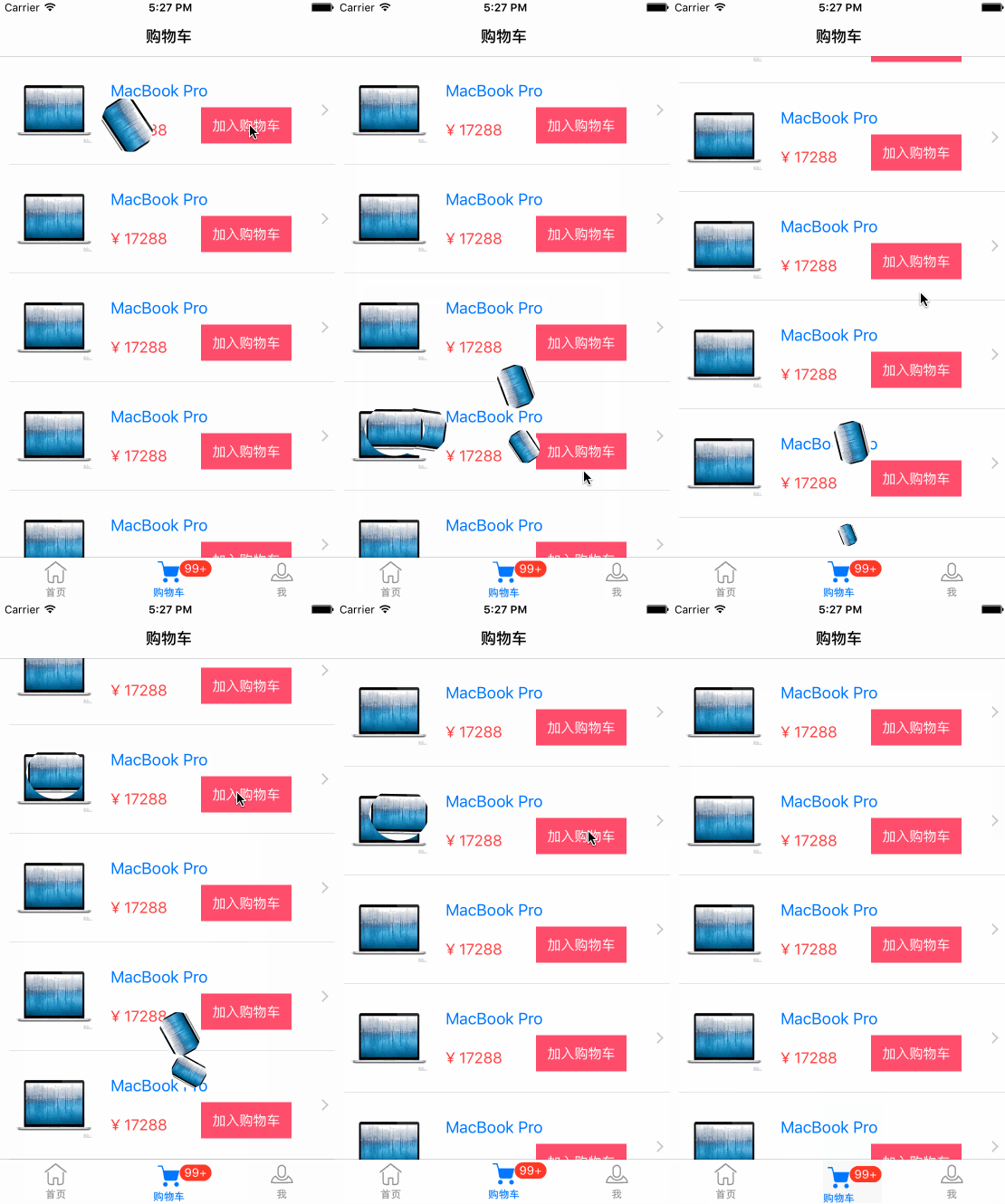
将动画封装在 WBBaseAnimations中. .h 接口如下
#import @interface WBBaseAnimations : NSObject+ (instancetype)sharedInstance;/***  加入购物车 动画**  @param view        需要动画的视图*  @param starRect    动画的起始位置 Rect (相对于window的位置)*  @param finishPoint 动画的终点 Point*  @param completed   动画完成回调*/
- (void)starAnimationWithView:(UIView *)viewstarRect:(CGRect)starRectfinishPoint:(CGPoint)finishPointcompletedBlock:(void (^)(BOOL finish))completed;/***  摇一摇动画**  @param view      需要动画的视图*  @param completed 动画完成回调*/
- (void)shakeAnimationWithView:(UIView *)viewcompletedBlock:(void (^)(BOOL finish))completed;@end
在 WBShoppingCartVC 中使用购物车动画, .m 如下
#import "WBShoppingCartVC.h"
#import "WBShoppingCartCell.h"
#import "WBBaseAnimations.h"@interface WBShoppingCartVC ()@property (strong, nonatomic) IBOutlet UITableView *tableView;@end@implementation WBShoppingCartVC- (void)viewDidLoad {[super viewDidLoad];self.view.backgroundColor = [UIColor whiteColor];
}- (void)didReceiveMemoryWarning {[super didReceiveMemoryWarning];// Dispose of any resources that can be recreated.
}#pragma mark - Private methods- (void)addCartAnimationWithView:(UIView *)view {UIWindow *window = [[UIApplication sharedApplication].delegate window];CGRect goodsImageRect = [view convertRect:view.bounds toView:window];//动画期间禁止交互,可以一次只执行一次动画.
//    window.userInteractionEnabled = NO;WBBaseAnimations *animation = [WBBaseAnimations sharedInstance];[animation starAnimationWithView:view starRect:goodsImageRect finishPoint:CGPointMake(SCREEN_WIDTH / 2.0, SCREEN_HEIGHT - 49) completedBlock:^(BOOL finish) {if (finish) {UIView *tabbarView = self.tabBarController.tabBar.subviews[2];[animation shakeAnimationWithView:tabbarView completedBlock:^(BOOL finish) {if (finish) {
//                    window.userInteractionEnabled = YES;}}];}}];
}#pragma mark - UITableViewDelegate methods- (NSInteger)numberOfSectionsInTableView:(UITableView *)tableView {return 1;
}- (NSInteger)tableView:(UITableView *)tableView numberOfRowsInSection:(NSInteger)section {return 10;
}- (UITableViewCell *)tableView:(UITableView *)tableView cellForRowAtIndexPath:(NSIndexPath *)indexPath {WBShoppingCartCell *cell = [tableView dequeueReusableCellWithIdentifier:@"shoppingCartCell" forIndexPath:indexPath];[cell setAddCartGoodsImageViewBlock:^(UIImageView *imageView) {[self addCartAnimationWithView:imageView];}];return cell;
}- (void)tableView:(UITableView *)tableView didSelectRowAtIndexPath:(NSIndexPath *)indexPath {[tableView deselectRowAtIndexPath:indexPath animated:YES];
}@end
下载地址 :http://download.csdn.net/detail/yutianlong9306/9651449
有什么想法 或者 问题,都可以留言 或者 私信,一起讨论与学习。
本文来自互联网用户投稿,文章观点仅代表作者本人,不代表本站立场,不承担相关法律责任。如若转载,请注明出处。 如若内容造成侵权/违法违规/事实不符,请点击【内容举报】进行投诉反馈!