Bootstrap框架----地址联动--选择地址


我们在之前的文章中已经在SpringMVC基础框架的基础上应用了BootStrap的后台框架,在此基础上记录 地址联动输入用法。

应用bootstrap模板


基础项目源码下载地址为:

SpringMVC+Shiro+MongoDB+BootStrap基础框架


我们在基础项目中已经做好了首页index的访问。
现在就在index.jsp页面和index的路由Controller上做修改,实现 地址联动输入用法。


引用cxselect资源


cxselect是一个jQuery的插件,封装了联动处理的功能,我们这里的城市联动选择也由这个插件来提供,所以需要先引用。

相关网站:

https://www.npmjs.com/package/cxselect

https://github.com/ciaoca/cxSelect


示例:

http://www.jq22.com/yanshi3238


或者在我的资源中直接下载:

http://download.csdn.net/download/q383965374/9977225


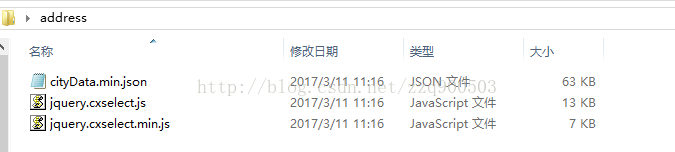
下载到的资源如图:


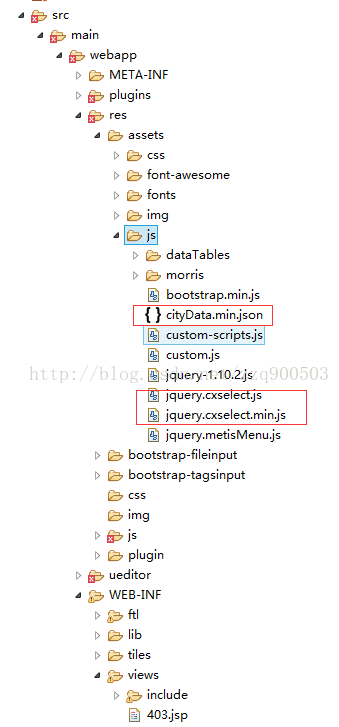
放入项目的res目录下的assets目录的js文件夹中如图:


引用时使用代码:


初始化cxselect


jsp中的占位符


使用代码初始化


示例代码


完整的html

<%@ include file="./include/header.jsp"%>  
<%@ taglib prefix="c" uri="http://java.sun.com/jsp/jstl/core" %>          

新增 示例

<%@ include file="./include/footer.jsp"%>


后端接收代码IndexController.java


package com.test.web.controller;import java.io.IOException;import org.springframework.beans.factory.annotation.Value;
import org.springframework.stereotype.Controller;
import org.springframework.ui.Model;
import org.springframework.web.bind.annotation.RequestMapping;
import org.springframework.web.bind.annotation.RequestMethod;
import org.springframework.web.bind.annotation.RequestParam;/*** IndexController* * */
@Controller
public class IndexController {@Value("${version.name:}")private String version;@RequestMapping("/")public String index(Model model) throws IOException {model.addAttribute("version", version);return "/index";}@RequestMapping(value="/add",method=RequestMethod.POST)    public String login(@RequestParam String province,@RequestParam String city,@RequestParam(defaultValue="") String area){    System.out.println(province+city+area);return "/index";    }  }

需要注意的是 直辖市 北京等 只有到 区  也就是没有 area字段。界面上操作时也只会显示到第二级。


效果如图


本文来自互联网用户投稿,文章观点仅代表作者本人,不代表本站立场,不承担相关法律责任。如若转载,请注明出处。 如若内容造成侵权/违法违规/事实不符,请点击【内容举报】进行投诉反馈!

相关文章

立即
投稿

微信公众账号

微信扫一扫加关注

返回
顶部