JAVA核心编程之实用类
1.枚举
定义:枚举指由一组固定的常量组成的类型
特点:类型安全、易于输入、代码清晰
举例:性别枚举
package cn.bdqn.demo04;public enum Genders {//枚举类是由一组固定的常量组成的类型男,女
}
package cn.bdqn.demo04;public class Student {public String name;public Genders gender;public static void main(String[] args) {Student student = new Student();student.gender=Genders.男;student.name="张三";}
}
2. JAVA API
常用的java API:
-
java.lang
====Enum、包装类、Math、String、StringBuffer、System… …
-
java.util
-
java.io
-
java.sql
-
… …
2.1 包装类
(1)包装类把基本类型数据转换为对象
每个基本类型在java.lang包中都有一个相应的包装类
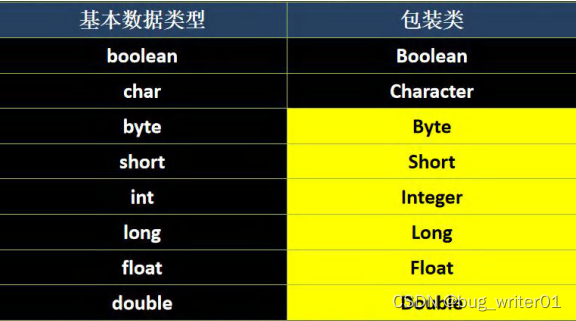
(2)包装类的作用
提供了一系列实用的方法
集合不允许存放基本数据类型数据,存放数字时,要用包装类型
2.1.1 包装类的构造方法
(1)所有包装类都可将与之对应的基本数据类型作为参数,来构造它们的实例
public Type(type value)
如:
Integer i=new Integer(1);
除Character类外,其他包装类可将一个字符串作为参数构造它们的实例
public Type(String value)
如:
Integer i=new Integer("123");
package cn.bdqn.demo07;public class Demo01 {public static void main(String[] args) {// 输出byte类型的最大值和最小值System.out.println(Byte.MIN_VALUE);System.out.println(Byte.MAX_VALUE);System.out.println(Short.MIN_VALUE);System.out.println(Short.MAX_VALUE);}}
package cn.bdqn.demo07;public class Demo02 {public static void main(String[] args) {/** 包装类的构造方法: 1)所有包装类都可将与之对应的基本数据类型作为参数,来构造它们的实例(对象)* 2)除Character类外,其他包装类可将一个字符串作为参数构造它们的实例* ,Number类型包装类使用字符串作为参数构造实例的时候,字符串需要是能够转换为数字的字符串否则就会报NumberFormatException* (数字格式化异常)*/byte num1 = 10;Byte byte1 = new Byte(num1);System.out.println(num1);// 10System.out.println(byte1);// 10short num2 = 100;Short short1 = new Short(num2);System.out.println(num2);System.out.println(short1);int num3 = 200;Integer int1 = new Integer(num3);long num4 = 300L;Long long1 = new Long(num4);float num5 = 12.5F;Float float1 = new Float(num5);double num6 = 25.5;Double double1 = new Double(num6);boolean num7 = true;Boolean boolean1 = new Boolean(num7);char num8 = 'h';Character char1 = new Character(num8);System.out.println("---------------------------");String str1 = "123";Byte byte2 = new Byte(str1);System.out.println(str1);// 123 这是字符串123System.out.println(byte2);// 123 这是数字123String str2 = "100";Short short2 = new Short(str2);System.out.println(short2);// 字符包装类只有一个构造方法,就是传递其对应的基本数据类型char// Character char2 = new Character("a");//布尔类型的包装类创建对象时,传递的字符串除了字符串内容为true(不区分大小写)之外,其它任何字符串内容,得到的结果都为falseBoolean boolean2 = new Boolean("qwe");System.out.println(boolean2);//}}
(2)注意事项
Boolean类构造方法参数为String类型时,若该字符串内容为true(不考虑大小写),则该Boolean对象表示true,否则表示false
当Number包装类构造方法参数为String 类型时,字符串不能为null,且该字符串必须可解析为相应的基本数据类型的数据,否则编译不通过,运行时会抛出NumberFormatException异常
2.1.2 包装类的常用方法
- 包装类转换成基本类型:XXXValue()
Integer integerId=new Integer(25);
int intId=integerId.intValue();
//包装类常用方法:XXXValue():包装类转换成基本类型Byte byte1 = new Byte("12");byte num1 =byte1.byteValue();System.out.println(num1);Boolean bool = new Boolean("True");boolean num2 =bool.booleanValue();System.out.println(num2);Character ch = new Character('a');char num3 =ch.charValue();System.out.println(num3);
- toString():以字符串形式返回包装对象表示的基本类型数据(基本类型->字符串)
//toString():以字符串形式返回包装对象表示的基本类型数据(基本类型->字符串)byte num4 = 10;String str1 =Byte.toString(num4);System.out.println(str1);String str2 =Boolean.toString(false);System.out.println(str2);
- parseXXX():把字符串转换为相应的基本数据类型数据(Character除外)(字符串->基本类型)
//parseXXX():把字符串转换为相应的基本数据类型数据(Character除外)(字符串->基本类型)int num5 = Integer.parseInt("30");System.out.println(num5);boolean num6 =Boolean.parseBoolean("qwe");System.out.println(num6);
-
valueOf()
所有包装类都有如下方法(基本类型->包装类)
public static Type valueOf(type value)
如: Integer intValue = Integer.valueOf(21);
除Character类外,其他包装类都有如下方法(字符串->包装类)
public static Type valueOf(String s)
如: Integer intValue = Integer.valueOf(“21”);
//valueOf():所有包装类都有如下方法(基本类型->包装类)public static Type valueOf(type value)Integer int1 =Integer.valueOf(100);System.out.println(int1);//valueOf():除Character类外,其他包装类都有如下方法(字符串->包装类)public static Type valueOf(String s)Long long1 = Long.valueOf("200");System.out.println(long1);
2.1.3装箱和拆箱
装箱和拆箱:实现的是基本数据类型和包装类类型之间的自动转换
装箱:基本类型转换为包装类的对象
拆箱:包装类对象转换为基本类型的值
package cn.bdqn.demo01;public class Demo02 {public static void main(String[] args) {/** 装箱和拆箱:实现的是基本数据类型和包装类类型之间的自动转换*/byte num1 = 10;// Byte byte1 = new Byte(num1);// 装箱:基本数据类型直接赋值给包装类类型的对象Byte byte1 = num1;// 拆箱:包装类类型数据直接赋值给基本类型的变量Integer int1 = new Integer("123");int num2 = int1;Integer int2 = new Integer("255");int num3 =300;int result=int2+num3;//包装类和基本数据类型可以混合运算Integer int3 =int2+num3;}}2.1.4包装类的特点
-
JDK1.5后,允许基本数据类型和包装类型进行混合数学运算
-
包装类并不是用来取代基本数据类型的
-
在基本数据类型需要用对象表示时使用
2.2 Math类
java.lang.Math类提供了常用的数学运算方法和两个静态常量E(自然对数的底数) 和PI(圆周率)
package cn.bdqn.demo02;public class MathDemo01 {public static void main(String[] args) {//Math类:Math 类包含用于执行基本数学运算的方法,如初等指数、对数、平方根和三角函数。 double pi =Math.PI;System.out.println(pi);System.out.println(Math.max(100, 200));System.out.println(Math.min(99, 199));System.out.println(Math.abs(-10));//求绝对值System.out.println(Math.floor(9.8));//返回最大的(最接近正无穷大)double 值,该值小于等于参数,并等于某个整数。向下取整System.out.println(Math.ceil(-9.1));//返回最小的(最接近负无穷大)double 值,该值大于等于参数,并等于某个整数。System.out.println(Math.round(10.5));//返回最接近参数的 int。四舍五入//随机数方法:Math.random():随机返回一个介于0.0(包括)~1.0(不包括)之间的double类型的数据double num1 =Math.random();System.out.println(num1);/*随机返回一个[num1,num2)之间的int类型的整数(num2>num1)* int num = (int)(Math.random()*(num2-num1)+num1);*/}}2.3 Random类
Random rand=new Random(); //创建一个Random对象
for(int i=0;i<20;i++){//随机生成20个随机整数,并显示int num=rand.nextInt(10);//返回下一个伪随机数,整型的   生成10以内的整数	System.out.println("第"+(i+1)+"个随机数是:"+num);
}
//使用Random类随机获取一个[29,81)之间的整数int num = random.nextInt(81-29)+29;
2.4 String类
package cn.bdqn.demo03;public class StringDemo01 {public static void main(String[] args) {String string1 = "qwertyuiop";//获取字符串的长度int length =string1.length();System.out.println("字符串长度:"+length);/** 获取数组长度:数组名.length* 获取集合长度:集合名.size()* 获取字符串长度:字符串对象名.length()*///比较两个字符串的内容是否相同String str1 = "qwe";String str2 = "qwe";System.out.println(str1.equals(str2));//trueSystem.out.println(str1==str2);//trueString str3 = new String("abc");String str4 = new String("abc");System.out.println(str3.equals(str4));//trueSystem.out.println(str3==str4);//false//其它比较字符串的方法String str5 = "qwert";String str6 = "QWERT";System.out.println(str5.equals(str6));//equalsIgnoreCase()不区分大小写比较System.out.println(str5.equalsIgnoreCase(str6));//trueString result = str6.toLowerCase();System.out.println(str6);//QWERT //字符串对象调用方法后,不会改变自身的内容,相当于是对它的复制品进行了修改System.out.println(result);//qwertSystem.out.println(str5.toUpperCase());}}2.4.1 字符串求长度
length()方法
2.4.2字符串比较
“”和equals()的区别::判断两个字符串在内存中的地址,即判断是否是同一个字符串对象
字符串比较的其他方法
- 使用equalsIgnoreCase()方法 (比较但不区分大小写)
- 使用toLowerCase()方法(将大写字母转换成小写)
- 使用toUpperCase()方法(将小写字母转换成大写字母)
2.4.3字符串连接
- 方法1:使用“+”
- 方法2:使用String类的concat()方法
package cn.bdqn.demo03;public class StringDemo02 {public static void main(String[] args) {System.out.println("qwert");int num = 10;System.out.println(num);//+是一个连接符,连接字符串与变量的值System.out.println("num里面存储的值是:"+num);System.out.println("我的班级是:"+"Java2217");//我的班级是:Java2217System.out.println(10+20+"good");//30goodSystem.out.println(10+"good"+20);//10good20System.out.println("good"+10+20);//good1020String str1 = "qwert";String str2 = "yuiop";String result = str1.concat(str2);System.out.println(str1);//qwertSystem.out.println(str2);//yuiopSystem.out.println(result);//qwertyuiop}}
2.4.4字符串常用的提取方法
| 方法名 | 说明 |
|---|---|
| public int indexOf**(int ch)** | 搜索第一个出现的字符ch(或字符串value),如果没有找到,返回**-1** |
| public int indexOf**(String value)** | |
| public int lastIndexOf**(int ch)** | 搜索最后一个出现的字符ch(或字符串value),如果没有找到,返回**-1** |
| public int lastIndexOf**(String value)** | |
| **public String substring(**int index) | 提取从位置索引开始的字符串部分 |
| public String substring(int beginindex, int endindex**)** | 提取beginindex和endindex之间的字符串部分 |
| public String trim() | 返回一个前后不含任何空格的调用字符串的副本 |
package cn.bdqn.demo03;import java.util.Arrays;public class StringDemo03 {public static void main(String[] args) {//字符串常用提取方法String str1 = "abcdefghijklmnabcd";System.out.println(str1.length());//14//public int indexOf(int ch) 搜索第一个出现的字符ch(或字符串value),如果没有找到,返回-1//public int indexOf(String value) 搜索第一个出现的字符ch(或字符串value),如果没有找到,返回-1int index = str1.indexOf(110);System.out.println(index);System.out.println(str1.indexOf("bc"));//public int lastIndexOf(int ch) 搜索最后一个出现的字符ch(或字符串value),如果没有找到,返回-1//public int lastIndexOf(String value)搜索最后一个出现的字符ch(或字符串value),如果没有找到,返回-1System.out.println(str1.lastIndexOf(97));System.out.println(str1.lastIndexOf("bcd"));//public String substring(int index)提取从位置索引开始的字符串到末尾部分System.out.println(str1);System.out.println(str1.substring(3));//public String substring(int beginindex, int endindex)提取beginindex(包括)和endindex(不包括)之间的字符串部分System.out.println(str1);System.out.println(str1.substring(3, 6));//public String trim()返回一个前后不含任何空格的调用字符串的副本String str2 = " qwert yuiop ";System.out.println(str2);System.out.println(str2.trim());//字符串拆分方法String str3 = "长亭外 古道边 芳草碧连天 晚风拂 柳笛声残 夕阳山外山";String[] strs =str3.split(" ");for (String string : strs) {System.out.println(string);}String str4 = "我爱你但是你不爱我可是我依然爱你";String[] strs2 =str4.split("爱");System.out.println(Arrays.toString(strs2));//判断字符串是否以指定内容结尾String str5 = "HelloWorld.javaa";System.out.println(str5.endsWith(".java"));//判断字符串是否以执行内容开头System.out.println(str5.startsWith("He"));//将字符串变成byte类型的数组byte[] bytes = str5.getBytes();for (byte b : bytes) {System.out.print((char)b);}}}
2.4.5字符串拆分
//字符串拆分方法String str3 = "长亭外 古道边 芳草碧连天 晚风拂 柳笛声残 夕阳山外山";String[] strs =str3.split(" ");for (String string : strs) {System.out.println(string);}String str4 = "我爱你但是你不爱我可是我依然爱你";String[] strs2 =str4.split("爱");System.out.println(Arrays.toString(strs2));
2.5 StringBuffer类
StringBuffer:对字符串频繁修改(如字符串连接)时,使用StringBuffer类可以大大提高程序执行效率
StringBuffer声明:
StringBuffer strb = new StringBuffer();
StringBuffer strb = new StringBuffer("aaa");
StringBuffer的使用:
sb.toString();           //转化为String类型
sb.append("**");      //追加字符串
sb.insert (1, "**");    //插入字符串
String类&StringBuffer类:
String是不可变对象:经常改变内容的字符串最好不要使用String
StringBuffer是可变的字符串
字符串经常改变的情况可使用StringBuffer,更高效
JDK5.0后提供了StringBuilder,等价StringBuffer
String类、StringBuffer类、StringBuilder类的异同点
相同点:都是用来操作字符串的类
不同点:
String是不可变的字符串,StringBuffer和StringBuilder类是可变字符串
StringBuffer是线程安全的类,StringBuilder是线程不安全的类
执行效率:StringBuilder>StringBuffer>String
2.6操作日期时间
2.6.1获取当前日期
-
java.util.Date类:表示日期和时间
提供操作日期和时间各组成部分的方法
-
java.text.SimpleDateFormat类
//创建日期对象
Date date = new Date();
//定制日期格式
SimpleDateFormat formater = new SimpleDateFormat("yyyy- MM-dd HH:mm:ss");
String now = formater.format(date);
System.out.println(now);
Calendar类
抽象类,java.util.Calendar,不能直接实例化,可以通过该类中的一个静态方法创建其引用
用于设置和获取日期/时间数据的特定部分
| 方法或属性 | 说明 |
|---|---|
| int **get(**int field) | 返回给定日历字段的值 |
| MONTH | 指示月 |
| DAY_OF_MONTH | 指示一个月中的某天 |
| DAY_OF_WEEK | 指示一个星期中的某天 |
Calendar cal = Calendar.getInstance();//Cnlendar是抽象类,不能直接实例化,可以通过该类中的一个静态方法创建其引用//获取年int year=cal.get(Calendar.YEAR);//获取月int month=cal.get(Calendar.MONTH);//获取日int day=cal.get(Calendar.DATE);System.out.println(year+"-"+(month+1)+"-"+day);//获取时、分、秒int hour=cal.get(Calendar.HOUR);int min=cal.get(Calendar.MINUTE);int s=cal.get(Calendar.SECOND);System.out.println(hour+":"+min+":"+s);int dayOfWeek=cal.get(Calendar.DAY_OF_WEEK);System.out.println("星期"+(dayOfWeek-1));
本文来自互联网用户投稿,文章观点仅代表作者本人,不代表本站立场,不承担相关法律责任。如若转载,请注明出处。 如若内容造成侵权/违法违规/事实不符,请点击【内容举报】进行投诉反馈!