JavaWeb后端阶段知识点梳理
Tomcat
由Apache、Sun和其他公司及个人共同开发的web服务器。
免费、开源、轻量级,在中小型系统中普遍被使用。
是开发和调试Web项目的首选。
下载
官网https://tomcat.apache.org/
选择合适的版本下载。当前Java版本是1.8,所以选择9.x版本的tomcat下载
下载成功后,无需安装,直接解压到某个盘下即可。
解压后的目录
目录结构
| 目录名称 | 作用 |
|---|---|
| bin | 保存一些tomcat相关的可执行文件,如startup.bat等 |
| conf | 保存tomcat的配置文件,如server.xml中可以修改默认的端口号 |
| lib | 保存tomcat运行时所需的jar文件 |
| logs | 保存tomcat运行日志 |
| temp | 保存tomcat运行时产生的临时文件 |
| webapps | 保存发布在tomcat服务器上的应用程序 |
| work | 保存tomcat运行时产生的编译后的文件 |
Maven
用于结构化管理jar文件的工具。
通过在Maven项目中加入某个jar文件的依赖,让其自动从Maven云仓库中下载对应的jar文件。
使用IDEA创建基于Maven的Web项目
1.新建webapp模板
2.设置项目名称和路径
3.设置Maven配置文件
Maven默认的配置文件会从官网下载jar文件,速度较慢,并且下载的jar文件默认会保存在c盘。
这里在D盘的根目录下新建了一个MavenRepository的本地仓库,用于保存下载的jar文件,并且设置国内的镜像下载。
配置文件
<settings xmlns="http://maven.apache.org/SETTINGS/1.0.0"xmlns:xsi="http://www.w3.org/2001/XMLSchema-instance"xsi:schemaLocation="http://maven.apache.org/SETTINGS/1.0.0 http://maven.apache.org/xsd/settings-1.0.0.xsd"><localRepository>D:\MavenRepository\maven_jarlocalRepository><mirrors><mirror><id>aliyunmavenid><mirrorOf>*mirrorOf><name>阿里云公共仓库name><url>https://maven.aliyun.com/repository/publicurl>mirror>mirrors><profiles>profiles>settings>
如果IDEA版本没有这个选项,暂时跳过,等待项目创建成功后进入主界面进行设置。
主界面进入设置
4.从Maven云仓库中搜索所需的jar文件
选择合适的版本
复制Maven依赖代码
5.粘贴到项目中的pom.xml文件中的dependencies标签中
如果下载失败,修改版本再次刷新尝试,如果一直不成功,删除groupId对应的本地目录后刷新尝试。
6.在src目录下新建编写类的java目录
7.修改项目的web.xml版本为4.0
8.配置tomcat服务器
9.部署创建好的项目到Tomcat服务器中
至此,启动tomcat服务器,会自动打开浏览器访问默认项目路径,项目自动打开会访问位于webapp目录下名为index的页面,如果没有index页面,会出现404页面,表示index页面不存在。
解决Tomcat控制台乱码
在文件的最后加入-Dfile.encoding=utf-8后重启
HTTP状态码
用特定数字表示状态。https://http.cat/
| 常见状态码 | 含义 |
|---|---|
| 200 | 成功 |
| 404 | 资源未找到 |
| 500 | 服务器内部错误 |
| 405 | 方法不允许 |
Servlet
Server+Applet 运行在服务器上的程序
编写Servlet的步骤
1.在项目中导入Servlet相关依赖
<dependency><groupId>javax.servletgroupId><artifactId>javax.servlet-apiartifactId><version>4.0.1version><scope>providedscope>
dependency>
2.在项目的java目录下,创建一个类,继承HttpServlet,重写doGet和doPost方法
通常用户无论发送的是get还是post请求,实际都会执行同一件事情。
为了不将代码重复写两遍,可以在doPost方法中调用doGet方法或在doGet方法中调用doPost方法
package com.hqyj.servlet;import javax.servlet.ServletException;
import javax.servlet.http.HttpServlet;
import javax.servlet.http.HttpServletRequest;
import javax.servlet.http.HttpServletResponse;
import java.io.IOException;/**   Servlet是运行在服务器上的应用程序*   编写一个Servlet的步骤*   1.创建一个类型,继承HttpServlet*   2.重写doGet和doPost方法*   3.在web.xml中设置请求该Servlet的URL地址* */
public class FirstServlet extends HttpServlet {@Overrideprotected void doPost(HttpServletRequest req, HttpServletResponse resp) {//只需编写一遍代码}@Overrideprotected void doGet(HttpServletRequest req, HttpServletResponse resp) {//为了不重复编写代码,在这get中调用post或在post中调用getdoPost(req, resp);}
}
3.在web.xml中设置Servlet的请求映射
<servlet><servlet-name>firstServletservlet-name><servlet-class>com.hqyj.servlet.FirstServletservlet-class>
servlet>
<servlet-mapping><servlet-name>firstServletservlet-name><url-pattern>/firsturl-pattern>
servlet-mapping>
4.访问Servlet
至此,重启tomcat,访问"项目上下文地址/first",就表示访问FirstServlet类。
如果是通过浏览器地址栏访问,相当于get请求,执行servlet中的doGet方法
解决控制台打印中文乱码
三层架构
在软件开发中,并不是将所有功能都交给一个类去实现,而是要将其进行分层,从而达到"高内聚、低耦合"的目的。
低耦合是指降低各个模块之间的关联程度,这样便于开发和维护,每个模块各司其职。
高内聚是指每个模块内的功能不可再分。
比如要用积木拼出来一辆车,不要把所有积木放在一起拼,这样其中一部分出现问题,就会影响到其他地方。
最好的做法是先将车的各个组件拼接完成(解耦),每个组件都是完整的不可再分的整体(高内聚),最终再把各个组件拼接到一起。
这样便于发现问题解决问题,不影响其他模块。
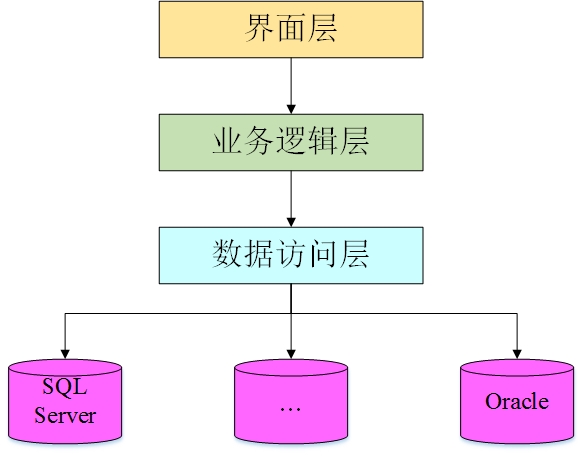
通常所说的三层架构中的三层,是指“数据访问层、业务逻辑层和视图表现层”
- 数据访问层,用于连接数据库,对数据做增删改查的操作
- 业务逻辑层,用于处理业务逻辑,在适当的情况下调用数据访问层中的方法
- 视图表现层,用于展示数据和提供用户输入数据的渠道,在适当的情况下调用业务逻辑层中的方法
访问服务器的某个URL
- 在浏览器的地址栏中输入对应的URL,属于GET提交
- 使用a标签,在href中输入对应的URL,属于GET提交
- 使用form表单,在action中输入对应的URL,通过method修改提交方式为GET或POST
页面向服务端提交数据的方式
-
使用form表单的name属性显示提交
<form action="http://localhost:8080/day1/hero" method="get"><input type="text" name="username"><input type="submit">
form>
提交的数据会暴露在浏览器的地址栏中
-
使用form表单的name属性隐式提交
<form action="http://localhost:8080/day1/hero" method="post"><input type="text" name="username"><input type="submit">
form>
提交的数据不会暴露在浏览器的地址栏中
-
通过"?参数名=值"方式提交
-
在地址栏中输入URL的时候,末尾加入这部分
https://www.baidu.com/s?wd=hello -
在a标签的href属性中加入这部分,如果有多个参数,通过&拼接
<a href="https://www.baidu.com/s?wd=hello&a=1&b=2">访问a>
-
服务器端获取页面传递的数据
以上任何方式提交到服务器的数据,都可以使用以下方式获取。
String str=request.getParameter("name名或?后的参数名");
class TestServlet extends HttpServlet{doGet(HttpServletRequest req,HttpServletResponse resp){//获取表单提交的数据req.getParameter("表单中某个表单元素的name值");String username = req.getParameter("username");}doPost(HttpServletRequest req,HttpServletResponse resp){doGet();}
}
表单提交数据注意事项
-
表单通过action提交设置的路径,如果要在路径中传递参数,只能使用post方式提交
<form action="xxxxx?参数=值" method="post">form> -
使用get方式提交,无法识别action路径中的参数,如果要传递参数,使用隐藏域
<form action="xxxxx" method="get"><input type="hidden" name="参数名" value="参数值">
form>
解决请求和响应的中文乱码
//在servlet的doGet或doPost所有代码之前中加入
req.setCharacterEncoding("utf-8");
resp.setContentType("text/html;charset=utf-8");
使用Servlet实现单表的增删改查
数据库脚本文件
/*Navicat Premium Data TransferSource Server         : localhost_3306Source Server Type    : MySQLSource Server Version : 80029Source Host           : localhost:3306Source Schema         : gamedbTarget Server Type    : MySQLTarget Server Version : 80029File Encoding         : 65001Date: 03/01/2023 14:46:16
*/SET NAMES utf8mb4;
SET FOREIGN_KEY_CHECKS = 0;-- ----------------------------
-- Table structure for hero
-- ----------------------------
DROP TABLE IF EXISTS `hero`;
CREATE TABLE `hero`  (`id` int NOT NULL AUTO_INCREMENT COMMENT '编号',`name` varchar(20) CHARACTER SET utf8mb4 COLLATE utf8mb4_0900_ai_ci NOT NULL COMMENT '姓名',`position` varchar(20) CHARACTER SET utf8mb4 COLLATE utf8mb4_0900_ai_ci NOT NULL COMMENT '定位',`sex` char(1) CHARACTER SET utf8mb4 COLLATE utf8mb4_0900_ai_ci NOT NULL DEFAULT '男' COMMENT '性别',`price` int NOT NULL DEFAULT 4800 COMMENT '价格',`shelf_date` date NULL DEFAULT NULL COMMENT '上架日期',PRIMARY KEY (`id`) USING BTREE,UNIQUE INDEX `name`(`name`) USING BTREE
) ENGINE = InnoDB AUTO_INCREMENT = 16 CHARACTER SET = utf8mb4 COLLATE = utf8mb4_0900_ai_ci ROW_FORMAT = Dynamic;SET FOREIGN_KEY_CHECKS = 1;
实体类entity
实体的属性名保持和表的字段名一致,使用驼峰命名法
package com.hqyj.entity;public class Hero {private int id;private String name;private String position;private String sex;private int price;private String shelfDate;/*全参构造方法用于查询*/public Hero(int id, String name, String position, String sex, int price, String shelfDate) {this.id = id;this.name = name;this.position = position;this.sex = sex;this.price = price;this.shelfDate = shelfDate;}/*不带id的构造方法用于添加*/public Hero(String name, String position, String sex, int price, String shelfDate) {this.name = name;this.position = position;this.sex = sex;this.price = price;this.shelfDate = shelfDate;}//省略get/set/toString
}
数据操作类dao
package com.hqyj.dao;import com.hqyj.entity.Hero;
import com.hqyj.util.DBUtil;import java.sql.Connection;
import java.sql.PreparedStatement;
import java.sql.ResultSet;
import java.sql.SQLException;
import java.util.ArrayList;
import java.util.List;public class HeroDao {Connection conn;PreparedStatement pst;ResultSet rs;/** 查询所有* */public List<Hero> queryAll() {ArrayList<Hero> list = new ArrayList<>();conn = DBUtil.getConn();try {pst = conn.prepareStatement("select * from hero");rs = pst.executeQuery();while (rs.next()) {int id = rs.getInt(1);String name = rs.getString(2);String position = rs.getString(3);String sex = rs.getString(4);int price = rs.getInt(5);String shelfDate = rs.getString(6);Hero hero = new Hero(id, name, position, sex, price, shelfDate);list.add(hero);}} catch (Exception e) {System.out.println("查询所有异常" + e);} finally {DBUtil.release(conn, pst, rs);}return list;}/** 添加* */public boolean addHero(Hero hero) {conn = DBUtil.getConn();String sql = "insert into hero values(null,?,?,?,?,?)";try {pst = conn.prepareStatement(sql);pst.setString(1, hero.getName());pst.setString(2, hero.getPosition());pst.setString(3, hero.getSex());pst.setInt(4, hero.getPrice());pst.setString(5, hero.getShelfDate());return pst.executeUpdate() > 0;} catch (SQLException e) {System.out.println("添加异常" + e);} finally {DBUtil.release(conn, pst, rs);}return false;}/** 删除* */public boolean delete(int id) {conn = DBUtil.getConn();try {pst = conn.prepareStatement("delete from hero where id=?");pst.setInt(1, id);return pst.executeUpdate() > 0;} catch (SQLException e) {System.out.println("删除异常" + e);} finally {DBUtil.release(conn, pst, rs);}return false;}/** 根据id查询* */public Hero findById(int id) {conn = DBUtil.getConn();try {pst = conn.prepareStatement("select * from hero where id=?");pst.setInt(1, id);rs = pst.executeQuery();if (rs.next()) {String name = rs.getString(2);String position = rs.getString(3);String sex = rs.getString(4);int price = rs.getInt(5);String shelfDate = rs.getString(6);Hero hero = new Hero(id, name, position, sex, price, shelfDate);return hero;}} catch (Exception e) {System.out.println("根据id查询异常" + e);} finally {DBUtil.release(conn, pst, rs);}return null;}/** 修改* */public boolean update(Hero updateHero) {conn = DBUtil.getConn();try {pst = conn.prepareStatement("update hero set name=?,position=?,sex=?,price=?,shelf_date=? where id=?");pst.setString(1, updateHero.getName());pst.setString(2, updateHero.getPosition());pst.setString(3, updateHero.getSex());pst.setInt(4, updateHero.getPrice());pst.setString(5, updateHero.getShelfDate());pst.setInt(6, updateHero.getId());return pst.executeUpdate() > 0;} catch (SQLException e) {System.out.println("修改异常" + e);} finally {DBUtil.release(conn, pst, rs);}return false;}
}
控制层/表现层servlet
package com.hqyj.servlet;import com.hqyj.dao.HeroDao;
import com.hqyj.entity.Hero;import javax.servlet.ServletException;
import javax.servlet.http.HttpServlet;
import javax.servlet.http.HttpServletRequest;
import javax.servlet.http.HttpServletResponse;
import java.io.IOException;
import java.io.PrintWriter;
import java.util.List;public class HeroServlet extends HttpServlet {//当前Servlet中需要访问Hero表中的数据,所以加入HeroDao对象HeroDao heroDao = new HeroDao();@Overrideprotected void doGet(HttpServletRequest req, HttpServletResponse resp) throws ServletException, IOException {doPost(req, resp);}@Overrideprotected void doPost(HttpServletRequest req, HttpServletResponse resp) throws ServletException, IOException {//解决请求和响应的中文乱码req.setCharacterEncoding("utf-8");resp.setContentType("text/html;charset=utf-8");//获取op,用一个Servlet,判断不同的op值来执行不同的操作String op = req.getParameter("op");switch (op) {case "queryAll"://调用查询List<Hero> list = heroDao.queryAll();//通过resp响应对象调用getWriter()方法,获取字符输出流对象writer,通过writer打印页面PrintWriter writer = resp.getWriter();writer.println("");writer.println("");writer.println("");writer.println("编号 姓名 定位 性别 价格 上架时间 操作 ");writer.println("" + hero.getId() + " ");writer.println("" + hero.getName() + " ");writer.println("" + hero.getPosition() + " ");writer.println("" + hero.getSex() + " ");writer.println("" + hero.getPrice() + " ");writer.println("" + hero.getShelfDate() + " ");//修改的步骤:1.根据id查询,打印详情页 2.在详情页中修改writer.println(" + hero.getId() + "'>修改 ");//访问某个URL时传递多个参数: URL?参数1=值&参数2=值..writer.println(" + hero.getId() + "'>删除 ");writer.println(" ");}writer.println("
");writer.println("");writer.println("");writer.close();break;case "delete":int id = Integer.parseInt(req.getParameter("id"));if (heroDao.delete(id)) {//跳转到查询所有resp.sendRedirect("http://localhost:8080/day1/hero?op=queryAll");}break;case "findById"://获取要修改的idint findId = Integer.parseInt(req.getParameter("id"));//调用查询Hero byId = heroDao.findById(findId);//打印详情页PrintWriter pw = resp.getWriter();pw.println("");pw.println("");//如果表单要在action中传递数据,只能使用post方式提交//pw.println("//如果表单使用get方式提交,通过隐藏域提交oppw.println(");pw.println("");//使用隐藏域提交idpw.println("");pw.println("姓名:
");pw.println("定位:
");/*if("男".equals(byId.getSex())){pw.println("男");pw.println("女");}else{pw.println("男");pw.println("女");}*/pw.println("性别: + ("男".equals(byId.getSex()) ? "checked" : "") + ">男");pw.println(" + ("女".equals(byId.getSex()) ? "checked" : "") + ">女
");pw.println("价格:
");pw.println("上架时间:
");pw.println("
");pw.println("");pw.println("");pw.println("");break;case "update"://获取参数int updateId = Integer.parseInt(req.getParameter("id"));String updateName = req.getParameter("name");String updateSex = req.getParameter("sex");String updatePosition = req.getParameter("position");int updatePrice = Integer.parseInt(req.getParameter("price"));String updateShelfDate = req.getParameter("shelfDate");//创建待修改的对象,调用修改,跳转到查询所有页面Hero updateHero = new Hero(updateId, updateName, updatePosition, updateSex, updatePrice, updateShelfDate);heroDao.update(updateHero);//跳转到查询所有resp.sendRedirect("http://localhost:8080/day1/hero?op=queryAll");break;case "addHero"://获取页面提交的数据//request.getParameter("name名")String name=req.getParameter("name");String position=req.getParameter("position");String sex=req.getParameter("sex");int price=Integer.parseInt(req.getParameter("price"));String shelfDate=req.getParameter("shelfDate");//创建添加对象,调用添加方法Hero hero = new Hero(name, position, sex, price, shelfDate);if (heroDao.addHero(hero)) {resp.sendRedirect("http://localhost:8080/day1/hero?op=queryAll");}break;}}
}
配置Servlet
<web-app xmlns="http://xmlns.jcp.org/xml/ns/javaee"xmlns:xsi="http://www.w3.org/2001/XMLSchema-instance"xsi:schemaLocation="http://xmlns.jcp.org/xml/ns/javaee http://xmlns.jcp.org/xml/ns/javaee/web-app_4_0.xsd"version="4.0"><servlet><servlet-name>heroservlet-name><servlet-class>com.hqyj.servlet.HeroServletservlet-class>servlet><servlet-mapping><servlet-name>heroservlet-name><url-pattern>/herourl-pattern>servlet-mapping>web-app>
添加页面
DOCTYPE html>
<html lang="en">
<head><meta charset="UTF-8"><title>Titletitle>
head>
<body><form action="http://localhost:8080/day1/hero"><input type="hidden" name="op" value="addHero">角色名:<input type="text" name="name" required><br>定位:<input type="text" name="position" required><br>性别:<input type="radio" name="sex" value="男" checked>男<input type="radio" name="sex" value="女">女<br>价格:<input type="number" min="1" name="price" required><br>上架日期:<input type="date" name="shelfDate" required><br><input type="submit" value="添加">
form>body>
html>
主页
DOCTYPE html>
<html lang="en"><head><meta charset="UTF-8"><title>Titletitle>head><body><a href="http://localhost:8080/day1/hero?op=queryAll">查看所有heroa><a href="http://localhost:8080/day1/pages/addHero.html">添加a>body>
html>
web.xml文件中的常用标签
<web-app xmlns="http://xmlns.jcp.org/xml/ns/javaee"xmlns:xsi="http://www.w3.org/2001/XMLSchema-instance"xsi:schemaLocation="http://xmlns.jcp.org/xml/ns/javaee http://xmlns.jcp.org/xml/ns/javaee/web-app_4_0.xsd"version="4.0"><welcome-file-list><welcome-file>login.htmlwelcome-file>welcome-file-list><error-page><error-code>404error-code><location>/404.htmllocation>error-page><error-page><exception-type>java.lang.NullPointerExceptionexception-type><location>/error.htmllocation>error-page><context-param><param-name>contentParamparam-name><param-value>全局参数param-value>context-param>web-app>
Servlet的生命周期
构造方法**–>init()–>service()/doGet()/doPost()–>**destory()
在访问某servlet时
1.执行构造方法一次
2.初始化一次,调用init()方法
3.调用service()方法,之后每次访问都会调用该方法。有该方法时,doGet和doPost失效。
如果没有该方法,会根据请求方式试图调用doGet或doPost,如果没有相应的方法,会出现405状态码,表示请求方式不允许
4.在当前servlet所在项目从tomcat中停止时,销毁一次,调用destory()方法
使用注解开发Servlet
/** 使用注解开发Servlet* 注解:@特定单词  如@Override** 定义且配置Servlet的注解:@WebServlet("/请求映射")* */
@WebServlet("/sysAdmin")
public class SysAdminServlet extends HttpServlet {@Overrideprotected void service(HttpServletRequest req, HttpServletResponse resp)  {//访问该Servlet时要执行的内容}
}
//@WebServlet("/sysAdmin")相当于在web.xml中进行配置servlet映射
JSP
Java Server Page
使用Java开发、运行在服务器上的页面。
jsp文件的后缀名为".jsp"。
由于最初由servlet渲染页面,在Java代码中加入大量html的内容,使用极不方便。所以Sun公司推出了JSP,可以在页面中加入java代码,让页面成为动态页面。
JSP页面的本质是一个java文件(servlet)。
在访问某个jsp页面时,会让该页面重新编译为.java文件–>.class文件,所以第一次访问某个JSP页面时会慢一些。
JSP的组成
1.HTML元素
2.脚本(java代码)
<%java代码;%>
3.表达式
用于在页面中嵌入变量的值
<%=变量%>
4.指令
<%@ 指令名 属性="值" %>
page指令 用于设置当前页面的属性
include指令 用于引入其他页面
taglib指令 用于引入其他标签库
5.注释
<%-- jsp注释 --%>
在浏览器中可以查看html的注释,无法查看jsp的注释
6.声明
<%! 定义方法 %>
在<%%>中无法定义方法,如果非要在jsp页面中定义方法,需要使用声明。不建议在jsp页面中定义方法。
7.动作
jsp中定义了一些标签,可以代替某些java代码
跳转
页面与页面之间跳转
<a href="另一个页面的地址">超链接a><form action="另一个页面的地址"><input type="submit">
form><button id="btn">跳转button>
<script>$("#btn").click(function(){location.href="另一个页面的地址";location.assign("另一个页面的地址");});
script>
页面跳转至Servlet
<a href="servlet映射名">超链接a><form action="servlet映射名"><input type="submit">
form>
Servlet跳转到页面或另一个Servlet
请求转发(内部跳转)
request.getRequestDispatcher("跳转的地址").forward(request,response);
如A同学问B同学问题,B同学自己去问C同学后得到了答案,将答案告诉给A同学。
-
跳转到目的地时,浏览器的地址栏中的内容是访问时的地址
-
如果在某个Servlet做完增删改的操作后,不要使用请求转发。因为当重新刷新页面时,会重复提交
-
如果在request中保存了数据,只能通过请求转发才能读取request中保存的数据
重定向(外部跳转)
response.sendRedirect("跳转的地址");
如A同学问B同学问题,B同学告诉A同学去问C同学,A同学重新问C同学后得到答案。
- 跳转到目的地时,浏览器的地址栏中的内容是最终的目的路径
- 在做完增删改的操作后,使用重定向,可以保证最终页面与之前页面无关,刷新时不会重新提交
- 如果在request中保存了数据,使用重定向,保存的数据就会丢失
跳转时传递数据
保存
作用域对象.setAttribute(String str,Object obj);
//将一个名为str的对象obj保存到某个作用域中。request就是一个作用域。List<泛型> 集合 = dao.查询();
//将查询到的集合保存到请求中,命名为list
request.setAttribute("list",集合);
获取
Object obj = 作用域对象.getAttribute(String str);
//获取到的数据是Object类型,通常需要转型List<泛型> list =(List<泛型>) request.getAttribute("list");
带有外键字段的实体类设计
图书类型book_type表(主表)
图书详情book_info表(从表)
1.创建主表的实体类
BookType类
package com.hqyj.bookShop.entity;
/*
* 创建主表对应的实体类
* */
public class BookType {private int typeId;private String typeName;//省略get/set/构造方法/toString
}
2.创建从表的实体类
BookInfo类
遇到外键字段,额外添加一个外键对应的主表实体对象属性
package com.hqyj.bookShop.entity;/** 创建带有外键字段的表(从表)对应的实体类* 1.写出所有字段对应的属性* 2.写出外键对应的主表实体对象* */
public class BookInfo {private int bookId;private int typeId;private String bookName;private String bookAuthor;private int bookPrice;private int bookNum;private String publisherDate;//额外添加属性:外键对应的主表实体对象private BookType bookType;/** 用于查询的构造方法* */public BookInfo(int bookId, int typeId, String bookName, String bookAuthor, int bookPrice, int bookNum, String publisherDate, BookType bookType) {this.bookId = bookId;this.typeId = typeId;this.bookName = bookName;this.bookAuthor = bookAuthor;this.bookPrice = bookPrice;this.bookNum = bookNum;this.publisherDate = publisherDate;this.bookType = bookType;}//省略get/set/toString}
3.创建两个实体类的数据访问层对象
BookTypeDao类
package com.hqyj.bookShop.dao;import com.hqyj.bookShop.entity.BookType;
import com.hqyj.bookShop.util.DBUtil;import java.sql.Connection;
import java.sql.PreparedStatement;
import java.sql.ResultSet;
import java.sql.SQLException;public class BookTypeDao {Connection conn;PreparedStatement pst;ResultSet rs;/** 根据类型编号查询类型对象* */public BookType findById(int id) {conn = DBUtil.getConn();try {pst = conn.prepareStatement("select * from book_type where type_id=?");pst.setInt(1, id);rs = pst.executeQuery();if (rs.next()) {BookType bookType = new BookType(rs.getInt(1), rs.getString(2));return bookType;}} catch (SQLException e) {System.out.println("根据ID查询异常" + e);} finally {DBUtil.release(conn, pst, rs);}return null;}}
BookInfoDao类
package com.hqyj.bookShop.dao;import com.hqyj.bookShop.entity.BookInfo;
import com.hqyj.bookShop.entity.BookType;
import com.hqyj.bookShop.util.DBUtil;import java.sql.Connection;
import java.sql.PreparedStatement;
import java.sql.ResultSet;
import java.sql.SQLException;
import java.util.ArrayList;
import java.util.List;public class BookInfoDao {BookTypeDao btDao = new BookTypeDao();/** 查询所有类型* */Connection conn;PreparedStatement pst;ResultSet rs;/** 查询所有* */public List<BookInfo> queryAll() {ArrayList<BookInfo> list = new ArrayList<>();conn = DBUtil.getConn();try {pst = conn.prepareStatement("select * from book_info");rs = pst.executeQuery();while (rs.next()) {int bookId = rs.getInt(1);int typeId = rs.getInt(2);String bookName = rs.getString(3);String bookAuthor = rs.getString(4);int bookPrice = rs.getInt(5);int bookNum = rs.getInt(6);String publisherDate = rs.getString(7);//参数中所需的主表对象实体,需要通过dao对象查询BookInfo bookInfo = new BookInfo(bookId, typeId, bookName, bookAuthor, bookPrice, bookNum, publisherDate, btDao.findById(typeId));list.add(bookInfo);}} catch (SQLException e) {System.out.println("查询所有异常" + e);} finally {DBUtil.release(conn, pst, rs);}return list;}}
4.创建Servlet
这里创建BookInfo的Servlet即可
BookInfoServlet类
package com.hqyj.bookShop.servlet;import com.hqyj.bookShop.dao.BookInfoDao;
import com.hqyj.bookShop.entity.BookInfo;import javax.servlet.ServletException;
import javax.servlet.annotation.WebServlet;
import javax.servlet.http.HttpServlet;
import javax.servlet.http.HttpServletRequest;
import javax.servlet.http.HttpServletResponse;
import java.io.IOException;
import java.util.List;@WebServlet("/bookInfo")
public class BookInfoServlet extends HttpServlet {//创建数据访问层对象BookInfoDao biDao= new BookInfoDao();@Overrideprotected void service(HttpServletRequest req, HttpServletResponse resp) throws ServletException, IOException {req.setCharacterEncoding("utf-8");String op = req.getParameter("op");switch (op) {case "queryAll"://查询所有图书,保存到请求中,跳转到页面List<BookInfo> list = biDao.queryAll();req.setAttribute("list",list);req.getRequestDispatcher("./pages/bookList.jsp").forward(req,resp);break;}}
}
5.创建页面
列表页面位于pages目录下,遍历数据
<%for (BookInfo bookInfo : list) {%>

<%=bookInfo.getBookName()%>
<%=bookInfo.getBookAuthor()%>|<%=bookInfo.getBookType().getTypeName()%>
<%=bookInfo.getBookPrice()%>元起
<% }%>
MySQL分页查询
原理
select * from 表;
-- 查询前N条记录
select * from 表 limit N;
-- 从第N条记录开始查询M条记录
select * from 表 limit N,M;-- 如每页显示8条,第一页
select * from 表 limit 0,8
-- 第二页
select * from 表 limit 8,8-- 公式 size表示每页显示的数量 page表示页数
select * from 表 limit (page-1)*size,size
dao层中分页相关方法
/** 查询总记录数* */
public int getSumCount() {conn = DBUtil.getConn();String sql = "select count(book_id) from book_info ";try {pst = conn.prepareStatement(sql);rs = pst.executeQuery();if (rs.next()) {return rs.getInt(1);}} catch (SQLException e) {System.out.println("查询总记录数异常" + e);} finally {DBUtil.release(conn, pst, rs);}return 0;
}/** 分页查询* */
public List<BookInfo> queryByPage(int page, int size) {ArrayList<BookInfo> list = new ArrayList<>();conn = DBUtil.getConn();String sql = "select * from book_info limit ?,?";try {pst = conn.prepareStatement(sql);pst.setInt(1, (page - 1) * size);pst.setInt(2, size);rs = pst.executeQuery();while (rs.next()) {int bookId = rs.getInt(1);int typeId = rs.getInt(2);String bookName = rs.getString(3);String bookAuthor = rs.getString(4);int bookPrice = rs.getInt(5);int bookNum = rs.getInt(6);String publisherDate = rs.getString(7);String bookImg = rs.getString(8);//参数中所需的主表对象实体,需要通过dao对象查询BookInfo bookInfo = new BookInfo(bookId, typeId, bookName, bookAuthor, bookPrice, bookNum, publisherDate, bookImg, btDao.findById(typeId));list.add(bookInfo);}} catch (SQLException e) {System.out.println("分页查询异常" + e);} finally {DBUtil.release(conn, pst, rs);}return list;
}
servlet中加入分页请求判断
package com.hqyj.bookShop.servlet;import com.hqyj.bookShop.dao.BookInfoDao;
import com.hqyj.bookShop.entity.BookInfo;import javax.servlet.ServletException;
import javax.servlet.annotation.WebServlet;
import javax.servlet.http.HttpServlet;
import javax.servlet.http.HttpServletRequest;
import javax.servlet.http.HttpServletResponse;
import java.io.IOException;
import java.util.List;@WebServlet("/bookInfo")
public class BookInfoServlet extends HttpServlet {//创建数据访问层对象BookInfoDao biDao = new BookInfoDao();@Overrideprotected void service(HttpServletRequest req, HttpServletResponse resp) throws ServletException, IOException {req.setCharacterEncoding("utf-8");String op = req.getParameter("op");switch (op) {//分页查询case "queryByPage"://得到总记录数int sumCount = biDao.getSumCount();//将总记录数保存到请求中req.setAttribute("sumCount",sumCount);//初始第一页int page=1;int size=8;//获取要查询的页数if (req.getParameter("page")!=null) {page=Integer.parseInt(req.getParameter("page"));}//调用分页查询List<BookInfo> list2 = biDao.queryByPage(page,size);//将查询的结果保存、跳转req.setAttribute("list", list2);req.getRequestDispatcher("./pages/bookList.jsp").forward(req, resp);break;}}
}
页面
<%@ page import="com.hqyj.bookShop.entity.BookInfo" %>
<%@ page import="java.util.List" %>
<%@ page contentType="text/html;charset=UTF-8" language="java" %>
list = (List) request.getAttribute("list");
%>
<%for (BookInfo bookInfo : list) {%>%>)
<%=bookInfo.getBookName()%>
<%=bookInfo.getBookType().getTypeName()%>|<%=bookInfo.getBookAuthor()%>
¥<%=bookInfo.getBookPrice()%>
<% }%>
<%/*pno默认1*/int pno = 1;/*从请求中获取当前页数*/if (request.getParameter("page") != null) {pno = Integer.parseInt(request.getParameter("page"));}/*获取总记录数*/int sumCount = (Integer) request.getAttribute("sumCount");//计算最大页数int maxPage=(int)Math.ceil(sumCount/8.0);
%>
<%--在请求分页的servlet时,传递page参数表示当前页--%>上一页第<%=pno%>页共<%=maxPage%>页下一页
条件分页(关键字搜索)
原理
select * from 表 where 字段 like concat('%',keyword,'%') limit (page-1)*size,size
dao
package com.hqyj.bookShop.dao;import com.hqyj.bookShop.entity.BookInfo;
import com.hqyj.bookShop.entity.BookType;
import com.hqyj.bookShop.util.DBUtil;import java.sql.Connection;
import java.sql.PreparedStatement;
import java.sql.ResultSet;
import java.sql.SQLException;
import java.util.ArrayList;
import java.util.List;public class BookInfoDao {BookTypeDao btDao = new BookTypeDao();/** 查询所有类型* */Connection conn;PreparedStatement pst;ResultSet rs;/** 根据关键字查询总记录数* */public int getSumCount(String keyword) {conn = DBUtil.getConn();String sql = "select count(book_id) from book_info where book_name like concat('%',?,'%')";try {pst = conn.prepareStatement(sql);pst.setString(1,keyword);rs = pst.executeQuery();if (rs.next()) {return rs.getInt(1);}} catch (SQLException e) {System.out.println("查询总记录数异常" + e);} finally {DBUtil.release(conn, pst, rs);}return 0;}/** 条件查询(关键字分页)* */public List<BookInfo> queryByCondition(int page,int size,String keyword){ArrayList<BookInfo> list = new ArrayList<>();conn = DBUtil.getConn();String sql = "select * from book_info where book_name like concat('%',?,'%') limit ?,?";try {pst = conn.prepareStatement(sql);pst.setString(1, keyword);pst.setInt(2, (page-1)*size);pst.setInt(3, size);rs = pst.executeQuery();while (rs.next()) {int bookId = rs.getInt(1);int typeId = rs.getInt(2);String bookName = rs.getString(3);String bookAuthor = rs.getString(4);int bookPrice = rs.getInt(5);int bookNum = rs.getInt(6);String publisherDate = rs.getString(7);String bookImg = rs.getString(8);//参数中所需的主表对象实体,需要通过dao对象查询BookInfo bookInfo = new BookInfo(bookId, typeId, bookName, bookAuthor, bookPrice, bookNum, publisherDate, bookImg, btDao.findById(typeId));list.add(bookInfo);}} catch (SQLException e) {System.out.println("关键字分页查询异常" + e);} finally {DBUtil.release(conn, pst, rs);}return list;}}
servlet
package com.hqyj.bookShop.servlet;import com.hqyj.bookShop.dao.BookInfoDao;
import com.hqyj.bookShop.entity.BookInfo;import javax.servlet.ServletException;
import javax.servlet.annotation.WebServlet;
import javax.servlet.http.HttpServlet;
import javax.servlet.http.HttpServletRequest;
import javax.servlet.http.HttpServletResponse;
import java.io.IOException;
import java.util.List;@WebServlet("/bookInfo")
public class BookInfoServlet extends HttpServlet {//创建数据访问层对象BookInfoDao biDao = new BookInfoDao();@Overrideprotected void service(HttpServletRequest req, HttpServletResponse resp) throws ServletException, IOException {req.setCharacterEncoding("utf-8");String op = req.getParameter("op");switch (op) {case "search"://获取搜索关键字,第一次访问时没有关键字,使用""查询String keyword = req.getParameter("keyword")==null?"":req.getParameter("keyword");//得到总记录数int sumCount = biDao.getSumCount(keyword);//将总记录数保存到请求中req.setAttribute("sumCount", sumCount);//初始第一页int page = 1;int size = 8;//获取要查询的页数if (req.getParameter("page") != null) {page = Integer.parseInt(req.getParameter("page"));}//调用条件查询,保存集合,跳转页面List<BookInfo> list = biDao.queryByCondition(page, size, keyword);req.setAttribute("list",list);req.getRequestDispatcher("./pages/bookList.jsp").forward(req, resp);break;}}
}
页面
<%@ page import="com.hqyj.bookShop.entity.BookInfo" %>
<%@ page import="java.util.List" %>
<%@ page contentType="text/html;charset=UTF-8" language="java" %>
list = (List) request.getAttribute("list");
%>当前客户:xxx我的购物车安全退出
<%for (BookInfo bookInfo : list) {%><%=bookInfo.getBookName()%>
<%=bookInfo.getBookType().getTypeName()%>|<%=bookInfo.getBookAuthor()%>
¥<%=bookInfo.getBookPrice()%>
<% }%>
<%/*pno默认1*/int pno = 1;/*从请求中获取当前页数*/if (request.getParameter("page") != null) {pno = Integer.parseInt(request.getParameter("page"));}/*获取总记录数*/int sumCount = (Integer) request.getAttribute("sumCount");//计算最大页数int maxPage=(int)Math.ceil(sumCount/8.0);//获取请求中的关键字,如果没有搜索过,使用空白字符串String keyword= request.getParameter("keyword")==null?"": request.getParameter("keyword");%>
<%--在请求分页的servlet时,传递page参数表示当前页--%>上一页第<%=pno%>页共<%=maxPage%>页下一页
首页
<%@ page contentType="text/html;charset=UTF-8" language="java" %>
Title <%/*访问该页面时,跳转至分页查询*/response.sendRedirect("http://localhost:8080/Web03/bookInfo?op=search");%>
绝对路径
<a href="localhost:8080/system/pages/hello.html">跳转a>
相对路径问题
-
/
表示从根目录(域名+ip)出发
-
./
表示从当前位置出发
-
…/
表示跳向上一层
如有index页面所在路径为
localhost:8080/system/pages/index.html<a href="/hello.html">跳转a>
这种方式,从根目录(localhost:8080)出发,会跳转到localhost:8080/hello.html<a href="./hello.html">跳转a>
这种方式,从当前位置(localhost:8080/system/pages)出发,会跳转到localhost:8080/system/pages/hello.html<a href="../hello.html">跳转a>
这种方式,从当前位置跳向上一层,会跳转到localhost:8080/system/hello.html
- 在jsp页面中,可以使用**${pageContex.request.contextPath}**表示页面上下文路径。
如项目默认上下文访问路径为localhost:8080/system
<a href="${pageContex.request.contextPath}/pages/hello.html">跳转a>
以上路径相当于/system/pages/hello.html,即从根目录出发localhost:8080/system/pages/hello.html
如果在jsp页面中无法识别${},在<%@ page%>中加入isELIgnored=“false”
<%@ page contentType="text/html;charset=UTF-8" language="java" isELIgnored="false" %>
四大作用域对象
作用域:共享数据的区域
pageContext
当前页面对象。共享数据区域范围为当前页面。
如果不在同一个页面,数据无法读取。
request
请求对象。共享数据区域范围为一次请求。
如果跳转中途使用了重定向,数据无法读取。
session
会话对象。会话是用户访问服务器时的某个时间段。
共享数据区域范围在这个时间段内,默认30分钟。
如果在指定时间内没有操作或销毁会话时,数据无法读取。
application
项目对象。共享数据区域范围为整个项目。
作用域范围
application > session > request > pageContext
以上四个作用域对象,都有这几个方法
//将某个对象obj保存到作用域中,命名为str
作用域对象.setAttribute(String str,Object obj);
//从某个作用域中获取保存的某个对象
Object obj = 作用域对象.getAttribute(String str);
//从某个作用域中移除某个保存的对象
作用域对象.removeAttribute(String str);
作用域对象的使用
在JSP页面中
作用域对象也称为内置对象,直接通过对应的单词使用
p1.jsp
<%@ page contentType="text/html;charset=UTF-8" language="java" %>

Title


<%//在jsp中使用pageContext页面上下文对象,跳转到p2时不能使用pageContext.setAttribute("str","保存在pageContext作用域中的字符串");//在jsp中使用request请求对象,请求转发到p2时可以使用,重定向到p2时不能使用request.setAttribute("str","保存在request中的字符串");//在jsp中使用session会话对象,在默认的30分钟内,没有销毁,哪种跳转都能在p2中使用session.setAttribute("str","保存在session中的字符串");//在jsp中使用application应用程序对象,整个项目中任何页面都能使用application.setAttribute("str","保存在application中的字符串");//以上四个作用域对象,也是jsp中的内置对象,无需定义//销毁会话//session.invalidate();//使用请求转发跳转到p2.jsp//request.getRequestDispatcher("p2.jsp").forward(request,response);//使用重定向跳转到p2.jspresponse.sendRedirect("p2.jsp");
%>
<%=pageContext.getAttribute("str")%>
p2.jsp
<%@ page contentType="text/html;charset=UTF-8" language="java" %>
Title <%=pageContext.getAttribute("str")%>
<%=request.getAttribute("str")%>
<%=session.getAttribute("str")%>
<%=application.getAttribute("str")%>
在servlet中使用
-
pageContext
servlet本身就是一个java类,在类中定义成员变量,就能在当前类中使用。
所以在servlet中不会使用pageContext对象
-
request
使用doGet/doPost/service方法中的HttpServletRequest参数req
-
session
//在servlet中使用session,需要通过请求对象request调用getSession()方法 HttpSession session= req.getSession(); -
application
//通过getServletContext()方法获取的ServletContext类型对象,就是当前项目对象
ServletContext application = getServletContext();
总结
- 在jsp页面中使用pageContext保存的数据,只能共享于当前页面
- 通常在servlet中查询后的数据保存在request中,使用请求转发跳转到其他页面,在对应的页面中数据数据
- 通常在登录后,将登录的用户保存在session中,无论用哪种方式跳转,都能从session中获取当时登录的用户。
- 在application中保存一些共享于整个项目中的数据
购物车
添加商品时,如果不存在,直接添加,如果存在,修改数量。
采用HashMap作为核心容器。将商品作为键,将购买数量作为值。
使用Hash相关集合,需要重写实体类中的hashcode和equals方法。
实现过程
1.BookInfo和BookType类重写equals和hashcode方法,选择所有属性
2.创建购物车类Cart类
package com.hqyj.bookShop.util;import com.hqyj.bookShop.entity.BookInfo;import java.util.HashMap;/** 购物车* 使用HashMap作为购物车容器* 添加商品方法* 移除商品方法* 查看购物车* 清空购物车** */
public class Cart {/** 商品作为键,购买数量作为值* */private HashMap<BookInfo, Integer> hm;/** 创建购物车对象时,初始化HashMap* */public Cart() {hm = new HashMap<>();}/** 添加到购物车* */public void addToCart(BookInfo bi, int buyNum) {//判断键是否存在if (hm.containsKey(bi)) {//如果存在,修改数量//获取现有数量Integer oldNum = hm.get(bi);//覆盖原本的值hm.put(bi,oldNum+buyNum);}else{//如果不存在,直接添加hm.put(bi,buyNum);}}/** 获取购物车* */public HashMap<BookInfo, Integer> getCart() {return hm;}/*移除商品*//*清空购物车*/
}
3.在登录成功后,创建购物车Cart对象,将其保存到session中
case "login"://获取登录信息String phone = req.getParameter("phone");String password = req.getParameter("password");//调用登录Customer login = dao.login(phone, password);if (login != null) {//登录成功后,创建购物车对象Cart cart = new Cart();//将购物车保存到session中session.setAttribute("cart",cart);//将登录成功的对象,保存到session中session.setAttribute("customer", login);//使用重定向跳转到查询所有图书的servletresp.sendRedirect("./bookInfo?op=search");} else {System.out.println("登录失败");}
break;
4.在图书详情页中,创建添加商品到购物车的表单
<%--提交到图书servlet--%>
5.在图书servlet中添加新op判断,获取要购买的数据
case "addToCart":
//图书编号
String buyId = req.getParameter("id");
//调用查询
BookInfo byId = biDao.findById(Integer.parseInt(buyId));
//获取购买数量
int buyNum = Integer.parseInt(req.getParameter("buyNum"));
//从session中获取购物车
Cart cart = (Cart) req.getSession().getAttribute("cart");
//调用添加
cart.addToCart(byId, buyNum);
//跳转购物车页面
resp.sendRedirect("./pages/cart.jsp");
break;
6.购物车页面
<%@ page import="com.hqyj.bookShop.util.Cart" %>
<%@ page import="com.hqyj.bookShop.entity.BookInfo" %>
<%@ page contentType="text/html;charset=UTF-8" language="java" %>
<%--防止在未登录的情况下访问该页面--%><%--如果登录成功,session中保存登录的对象customer,如果没有登录或者退出,customer对象就会消失。所以判断customer对象是否存在,决定是否显示该页面--%><%//如果从session中无法获取customer对象,跳转到登录页面if (session.getAttribute("customer") == null) {response.sendRedirect("login.html");return;}//获取session中的购物车对象Cart cart = (Cart) session.getAttribute("cart");%>图书编号 图书名称 图书作者 图书单价 购买数量 小计 <%=bookInfo.getBookId()%> <%=bookInfo.getBookName()%> <%=bookInfo.getBookAuthor()%> <%=bookInfo.getBookPrice()%> <%=cart.getCart().get(bookInfo)%> <%=cart.getCart().get(bookInfo) * bookInfo.getBookPrice()%> 总计 <%=sumPrice%>
EL
Expression Language 表达式语言
是为了使JSP写起来更加简便,替换JSP中的<%=%>,简化了JSP页面中输出数据的操作。
主要输出保存在某个作用域中的数据。
特点
如果通过"某个作用域对象.setAttribute(“cus”,customer)"方法保存的对象,
在JSP页面中如果用表达式,使用<%=cus%>,如果用EL,使用**${cus}**输出。
会依次从pageContext–>reqeust–>session–>application中获取指定对象,
如果一旦从某个作用域中获取到了指定对象,就不再判断后续作用域。
也可以输出指定作用域中的对象。
-
只能输出保存在作用域中的对象
-
减少代码(省去了获取对象、转换的过程)
-
免去非空判断
- 如果某个要输出的对象不存在,不会输出null,而是输出空字符串""。
使用
在页面中输出保存在作用域中的对象
-
从作用域中依次查询并输出对象
${对象名} -
从指定作用域中输出对象
作用域 对应作用域 代码 pageScope 当前页pageContex ${pageScope.对象} requestScope 请求request ${requestScope.对象} sessionScope 会话session ${sessionScope.对象} applicationScope 项目application ${applicationScope.对象} -
输出对象的属性
${对象名.属性名} ${对象名["属性名"]} -
输出对象的方法返回值
${对象名.方法名()}
如在servlet中
Person p = new Person("admin","男",20);
request.setAttribute("p",p);
跳转到某个页面中
<%-- 如果不用EL,先获取对象,向下转型 --%><% Person p =(Person) request.getAttribute("p");%><%-- 如果p为null,会报错,如果name没有赋值,会输出null --%><%=p.getName()%>;
<%--如果使用EL,无需获取对象,无需转型,直接通过保存的对象名.属性名即可--%>${p.name}
<%--使用EL输出对象的属性时,该对象必须要有getXX()方法--%><%--如果没有在任何作用域中获取到对象p,或对象p没有name属性,不会保存,输出空字符串--%>${p["name"]}
在页面中获取请求中的参数
用于获取表单提交的数据或超链接?后传递的数据。
使用${param.参数名}替换request.getParameter(“参数”)。
如有表单或超链接
<form action="page.jsp"><input type="text" name="username"><input type="submit">
form><a href="page.jsp?username=admin">跳转a>
在page.jsp中获取
<%-- 传统写法--%><% String username = request.getParameter("username");%><%=username%>;
<%--如果使用EL--%>${param.username}
用于获取当前项目上下文(根目录+项目名)路径
如http://localhost:8080/Web03/就是一个项目上下文路径,
在JSP中使用**${pageContext.request.contextPath}**获取项目上下文路径
超链接
注意
-
web.xml版本在4.0之后,在JSP中使用EL时,默认可以识别。
-
如果JSP无法识别EL,在指令(<%@ %>)中加入 isELIgnored="false"表示不忽略EL。
<%@ page contentType="text/html;charset=UTF-8" language="java" isELIgnored="false"%> -
如果在使用EL过程中,出现PropertyNotFoundException异常,表示未发现指定属性,原因有
- 缺少指定属性
- 指定属性没有对应的get方法
JSTL
Java Server Page Standarded Tag Library JSP标准标签库
可以使用JSTL中的特定标签,来替换JSP中常见的Java代码。如循环判断等,减少Java代码,提高页面的可读性。
使用
1.导入JSTL对应的依赖
Maven Repository: javax.servlet » jstl » 1.2
<dependency><groupId>javax.servletgroupId><artifactId>jstlartifactId><version>1.2version>
dependency>
2.在JSP页面中,加入标签库指令
<%--在当前页面中使用jstl,加入以下指令--%>
<%@ taglib prefix="c" uri="http://java.sun.com/jsp/jstl/core" %>
这句话可以不写,在使用循环遍历时会自动生成。
3.具体用法
-
定义变量或给变量赋值
如
-
if判断
如在servlet中
request.setAttribute("person",new Person("ez","男"));在Jsp中
-
遍历List集合
如servlet中保存了集合
List<BookInfo> list = dao.queryAll();
request.setAttribute("list",list);
在jsp页面中
<%--判断集合为空--%>${bi.bookName} ${bi.bookAuthor} -
遍历Map集合
如
<%HashMap${kv.key}
${kv.value}
使用EL和JSTL实现商城首页
客户servlet
package com.hqyj.bookShop.servlet;import com.hqyj.bookShop.dao.CustomerDao;
import com.hqyj.bookShop.entity.Customer;
import com.hqyj.bookShop.util.Cart;import javax.servlet.ServletException;
import javax.servlet.annotation.WebServlet;
import javax.servlet.http.HttpServlet;
import javax.servlet.http.HttpServletRequest;
import javax.servlet.http.HttpServletResponse;
import javax.servlet.http.HttpSession;
import java.io.IOException;@WebServlet("/customer")
public class CustomerServlet extends HttpServlet {CustomerDao dao = new CustomerDao();@Overrideprotected void service(HttpServletRequest req, HttpServletResponse resp) throws ServletException, IOException {req.setCharacterEncoding("utf-8");String op = req.getParameter("op");//获取session对象,默认30分钟有效HttpSession session = req.getSession();//设置session有效时间,单位为秒//session.setMaxInactiveInterval(10);switch (op) {case "login"://获取登录信息String phone = req.getParameter("phone");String password = req.getParameter("password");//调用登录Customer login = dao.login(phone, password);if (login != null) {//登录成功后,创建购物车对象Cart cart = new Cart();//将购物车保存到session中session.setAttribute("cart",cart);//将登录成功的对象,保存到session中session.setAttribute("customer", login);//使用重定向跳转到查询所有图书的servletresp.sendRedirect("./bookInfo?op=search");} else {System.out.println("登录失败");}break;case "logout"://从session中移除登录的对象//session.removeAttribute("customer");//销毁sessionsession.invalidate();resp.sendRedirect("./bookInfo?op=search");break;}}
}
商品servlet
package com.hqyj.bookShop.servlet;import com.hqyj.bookShop.dao.BookInfoDao;
import com.hqyj.bookShop.entity.BookInfo;
import com.hqyj.bookShop.util.Cart;import javax.servlet.ServletException;
import javax.servlet.annotation.WebServlet;
import javax.servlet.http.HttpServlet;
import javax.servlet.http.HttpServletRequest;
import javax.servlet.http.HttpServletResponse;
import javax.servlet.http.HttpSession;
import java.io.IOException;
import java.util.List;@WebServlet("/bookInfo")
public class BookInfoServlet extends HttpServlet {//创建数据访问层对象BookInfoDao biDao = new BookInfoDao();@Overrideprotected void service(HttpServletRequest req, HttpServletResponse resp) throws ServletException, IOException {req.setCharacterEncoding("utf-8");String op = req.getParameter("op");switch (op) {case "search"://获取搜索关键字,第一次访问时没有关键字,使用""查询String keyword = req.getParameter("keyword") == null ? "" : req.getParameter("keyword");//得到总记录数int sumCount = biDao.getSumCount(keyword);//将总记录数保存到请求中req.setAttribute("sumCount", sumCount);//初始第一页int page = 1;int size = 8;//获取要查询的页数if (req.getParameter("page") != null) {page = Integer.parseInt(req.getParameter("page"));}//调用条件查询,保存集合,跳转页面List<BookInfo> list = biDao.queryByCondition(page, size, keyword);req.setAttribute("list", list);req.getRequestDispatcher("./pages/bookList.jsp").forward(req, resp);break;case "findById"://获取要查询的id,调用方法,保存查询的结果,跳转详情页面int id = Integer.parseInt(req.getParameter("id"));BookInfo bi = biDao.findById(id);req.setAttribute("bi", bi);req.getRequestDispatcher("./pages/bookInfo.jsp").forward(req, resp);break;//    添加到购物车case "addToCart"://图书编号String buyId = req.getParameter("id");//调用查询BookInfo byId = biDao.findById(Integer.parseInt(buyId));//获取购买数量int buyNum = Integer.parseInt(req.getParameter("buyNum"));//从session中获取购物车Cart cart = (Cart) req.getSession().getAttribute("cart");//调用添加cart.addToCart(byId, buyNum);//跳转购物车页面resp.sendRedirect("./pages/cart.jsp");break;//移除商品case "remove"://图书编号String removeId = req.getParameter("id");//调用查询BookInfo removeBook = biDao.findById(Integer.parseInt(removeId));//调用移除((Cart) req.getSession().getAttribute("cart")).removeFromCart(removeBook);//跳转购物车页面resp.sendRedirect("./pages/cart.jsp");break;case "clear"://调用移除((Cart) req.getSession().getAttribute("cart")).clearCart();//跳转购物车页面resp.sendRedirect("./pages/cart.jsp");break;}}
}
顶部页面
<%@ page import="com.hqyj.bookShop.entity.Customer" %>
<%@ page contentType="text/html;charset=UTF-8" language="java" %>
<%@ taglib prefix="c" uri="http://java.sun.com/jsp/jstl/core" %>
Title <%--这个判断表示customer是否为Null--%>请登录 <%--这个判断表示customer是否不为Null--%>当前客户:${customer.phone}我的购物车安全退出
所有商品页面
<%@ taglib prefix="c" uri="http://java.sun.com/jsp/jstl/core" %>
<%@ page import="com.hqyj.bookShop.entity.BookInfo" %>
<%@ page import="java.util.List" %>
<%@ page contentType="text/html;charset=UTF-8" language="java" %>
--%>未查询到相应图书 
${book.bookName}
${book.bookType.typeName}|${book.bookAuthor}
¥${book.bookPrice}
详情页面
<%@ page import="com.hqyj.bookShop.entity.BookInfo" %>
<%@ page contentType="text/html;charset=UTF-8" language="java" %>
《${bi.bookName}》
"${bi.bookAuthor}"作品
¥${bi.bookPrice}
<%if (session.getAttribute("customer") != null) {%><%--提交到图书servlet--%><%} else {%>请登录后购买
<%}%>
购物车页面
<%@ taglib prefix="c" uri="http://java.sun.com/jsp/jstl/core" %>
<%@ page import="com.hqyj.bookShop.util.Cart" %>
<%@ page import="com.hqyj.bookShop.entity.BookInfo" %>
<%@ page contentType="text/html;charset=UTF-8" language="java" %>
<%--防止在未登录的情况下访问该页面--%><%--如果登录成功,session中保存登录的对象customer,如果没有登录或者退出,customer对象就会消失。所以判断customer对象是否存在,决定是否显示该页面--%><%//如果从session中无法获取customer对象,跳转到登录页面if (session.getAttribute("customer") == null) {response.sendRedirect("login.html");return;}%>图书编号 图书名称 图书作者 图书单价 购买数量 小计 操作 <%--HashMap中,图书对象是键,购买数量是值--%><%--kv.key即是遍历出的图书对象--%>${kv.key.bookId} ${kv.key.bookName} ${kv.key.bookAuthor} ${kv.key.bookPrice} <%--kv.value即是遍历出的购买数量--%>${kv.value} <%--EL中可以进行计算--%>¥${kv.value * kv.key.bookPrice} 移除 <%--将小计累加--%>总计 ¥${sum} 清空购物车
实现下单
数据库中表的设计
流程
本文来自互联网用户投稿,文章观点仅代表作者本人,不代表本站立场,不承担相关法律责任。如若转载,请注明出处。 如若内容造成侵权/违法违规/事实不符,请点击【内容举报】进行投诉反馈!