Unity经典案例之:Fire Balls 多个圆环以及圆环的变速变向
版权申明:
- 本文原创首发于以下网站:
- 博客园『优梦创客』的空间:https://www.cnblogs.com/raymondking123
- 优梦创客的官方博客:https://91make.top
- 优梦创客的游戏讲堂:https://91make.ke.qq.com
- 『优梦创客』的微信公众号:umaketop
- 您可以自由转载,但必须加入完整的版权声明!
目标

- 使用脚本创建不同大小的圆环
- 使用脚本创建多个圆环
- 改变其速度与方向
创建不同大小的圆环
- 我们先在场景里面新建一个GameObject重命名为Disc,把坐标设置到原点(0,0,0),并把Platform底下的脚本去掉,加入到Disc下面,并把Platform脚本打开重命名为Disc,选中创建圆环的代码,并把它提取出来,提取方法的操作如下图所示:
- 选中要提取方法的代码段
- 此时会看见弹出一个方块
- 点击方块,选择“提取方法”菜单项
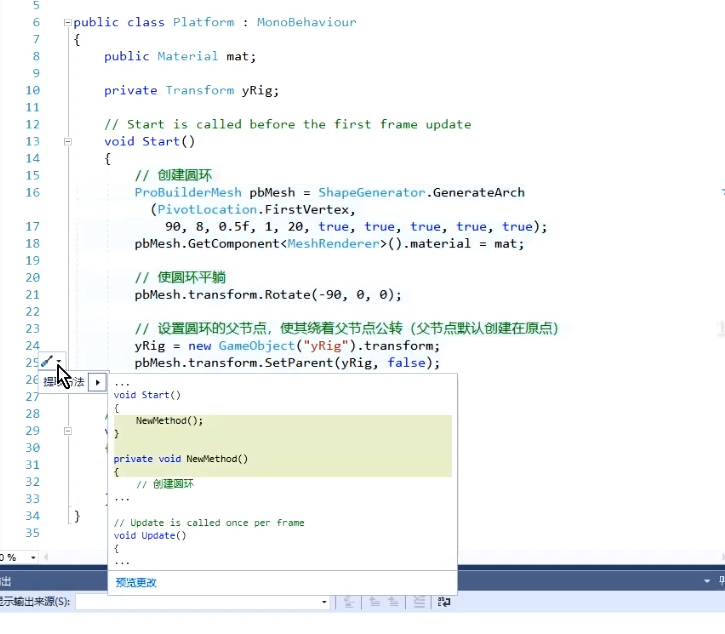
- 提取出来后重命名为CreatArch(方便以后打开项目看到后不会忘记),并把代码修改如下所示:
using System.Collections;
using System.Collections.Generic;
using UnityEngine;
using UnityEngine.ProBuilder;public class Disc : MonoBehaviour
{public Material mat;//圆环的材质public Transform xRig;//// Start is called before the first frame updatevoid Star(){CreatArch(8,Random.Range(20,80),0);}/// /// 创建一个任意大小的圆环/// /// 半径/// 角度/// 初始旋转(绕y轴)private void CreatArch(int radius, int deg, int rot){//创建圆环ProBuilderMesh pbMesh = ShapeGenerator.GenerateArch(PivotLocation.FirstVertex,  deg, radius, 0.5f, 1, 20, true, true, true, true, true);pbMesh.GetComponent().material = mat;//使圆环平躺pbMesh.transform.Rotate(-90, 0, 0);//设置圆环的父节点,使其绕着父节点公转(父节点默认创建在原点)xRig = new GameObject("xRig").transform;pbMesh.transform.SetParent(xRig,false);xRig.SetParent(this.transform,false);}// Update is called once per framevoid Update(){xRig.Rotate(0, 1, 0);}
}
创建多个圆环
打开Disc脚本,并编写更改代码如下所示:
using System.Collections;
using System.Collections.Generic;
using UnityEngine;
using UnityEngine.ProBuilder;public class Disc : MonoBehaviour
{public Material mat;//圆环的材质public int ArchNum = 3;// Start is called before the first frame updatevoid Star(){for(int i = 0;i/// 创建一个任意大小的圆环/// /// 半径/// 角度/// 初始旋转(绕y轴)private void CreatArch(int radius, int deg, int rot){//创建圆环ProBuilderMesh pbMesh = ShapeGenerator.GenerateArch(PivotLocation.FirstVertex,  deg, radius, 0.5f, 1, 20, true, true, true, true, true);pbMesh.GetComponent().material = mat;//使圆环平躺pbMesh.transform.Rotate(-90, 0, 0);//设置圆环的父节点,使其绕着父节点公转(父节点默认创建在原点)Transform xRig = new GameObject("xRig").transform;pbMesh.transform.SetParent(xRig,false);//设置圆环初始在圆盘的旋转角度xRig.Rotate(0,rot,0);Transform yRig = new GameObject("yRig").transform;xRig.SetParent(yRig,false);yRig.SetParent(this.transform,false)}// Update is called once per framevoid Update(){this.transform.Rotate(0, 1, 0);}
}
这样每次启动游戏我们就能看到场景里有多个圆环了
改变圆环的旋转速度以及方向
打开我们的Disc脚本,并添加一个共有变量名为(float类型)rotSpeed = 90,并修改我们Update里面的代码,然后添加一个携程,如下所示:
using System.Collections;
using System.Collections.Generic;
using UnityEngine;
using UnityEngine.ProBuilder;public class Disc : MonoBehaviour
{public Material mat;//圆环的材质public int ArchNum = 3;public float rotSpeed = 90;// Start is called before the first frame updatevoid Star(){for(int i = 0;i/// 创建一个任意大小的圆环/// /// 半径/// 角度/// 初始旋转(绕y轴)private void CreatArch(int radius, int deg, int rot){//创建圆环ProBuilderMesh pbMesh = ShapeGenerator.GenerateArch(PivotLocation.FirstVertex,  deg, radius, 0.5f, 1, 20, true, true, true, true, true);pbMesh.GetComponent().material = mat;//使圆环平躺pbMesh.transform.Rotate(-90, 0, 0);//设置圆环的父节点,使其绕着父节点公转(父节点默认创建在原点)Transform xRig = new GameObject("xRig").transform;pbMesh.transform.SetParent(xRig,false);//设置圆环初始在圆盘的旋转角度xRig.Rotate(0,rot,0);Transform yRig = new GameObject("yRig").transform;xRig.SetParent(yRig,false);yRig.SetParent(this.transform,false)}// Update is called once per framevoid Update(){this.transform.Rotate(0, rotSpeed*Time.deltaTime, 0);}
}
转载于:https://www.cnblogs.com/raymondking123/p/11392431.html
本文来自互联网用户投稿,文章观点仅代表作者本人,不代表本站立场,不承担相关法律责任。如若转载,请注明出处。 如若内容造成侵权/违法违规/事实不符,请点击【内容举报】进行投诉反馈!