最详细的Vue实现日历组件Calendar(日期点击多选,滑动多选)
1. 成果演示
1.1 日期的切换
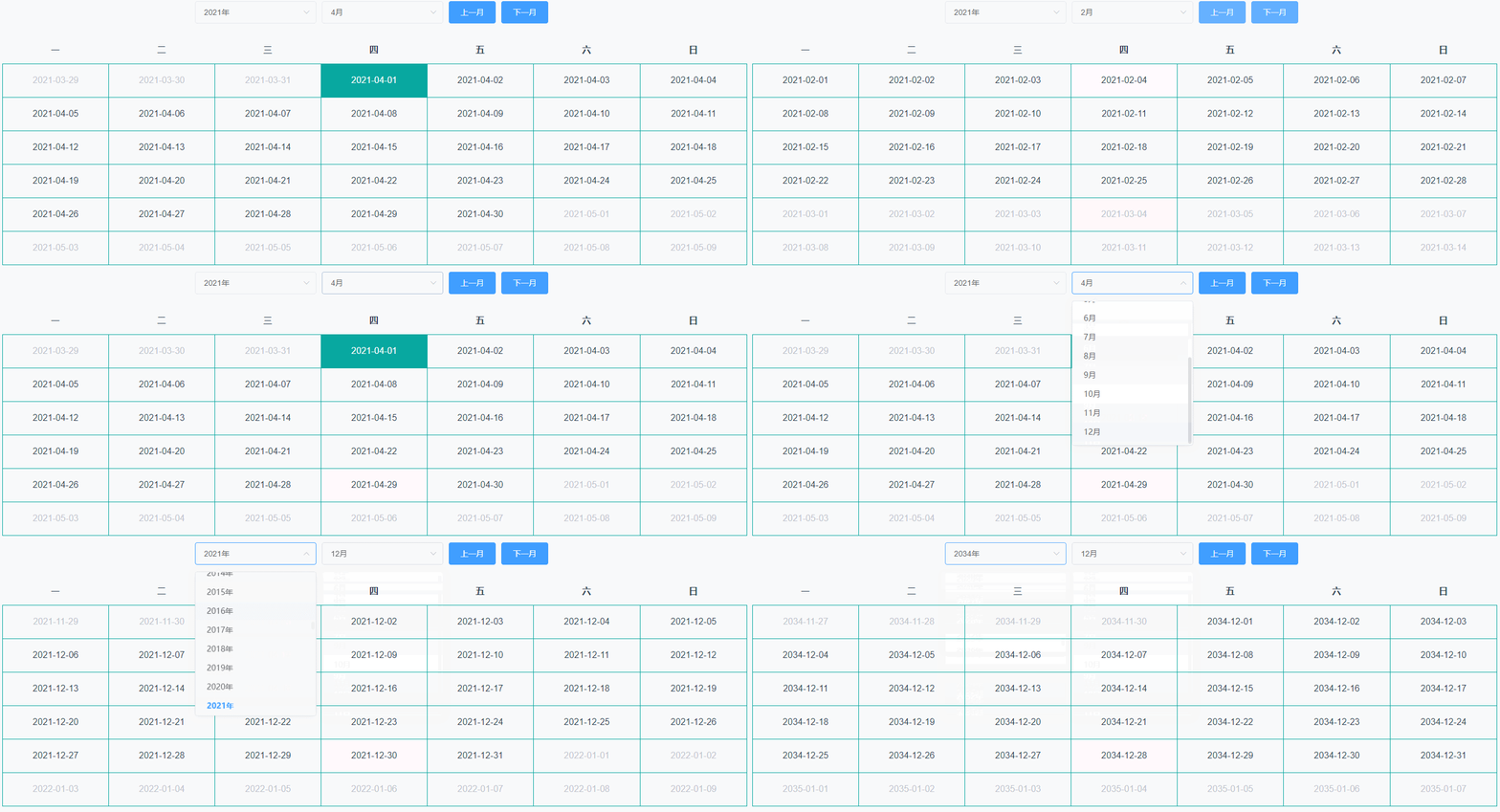
1.2 点击多选
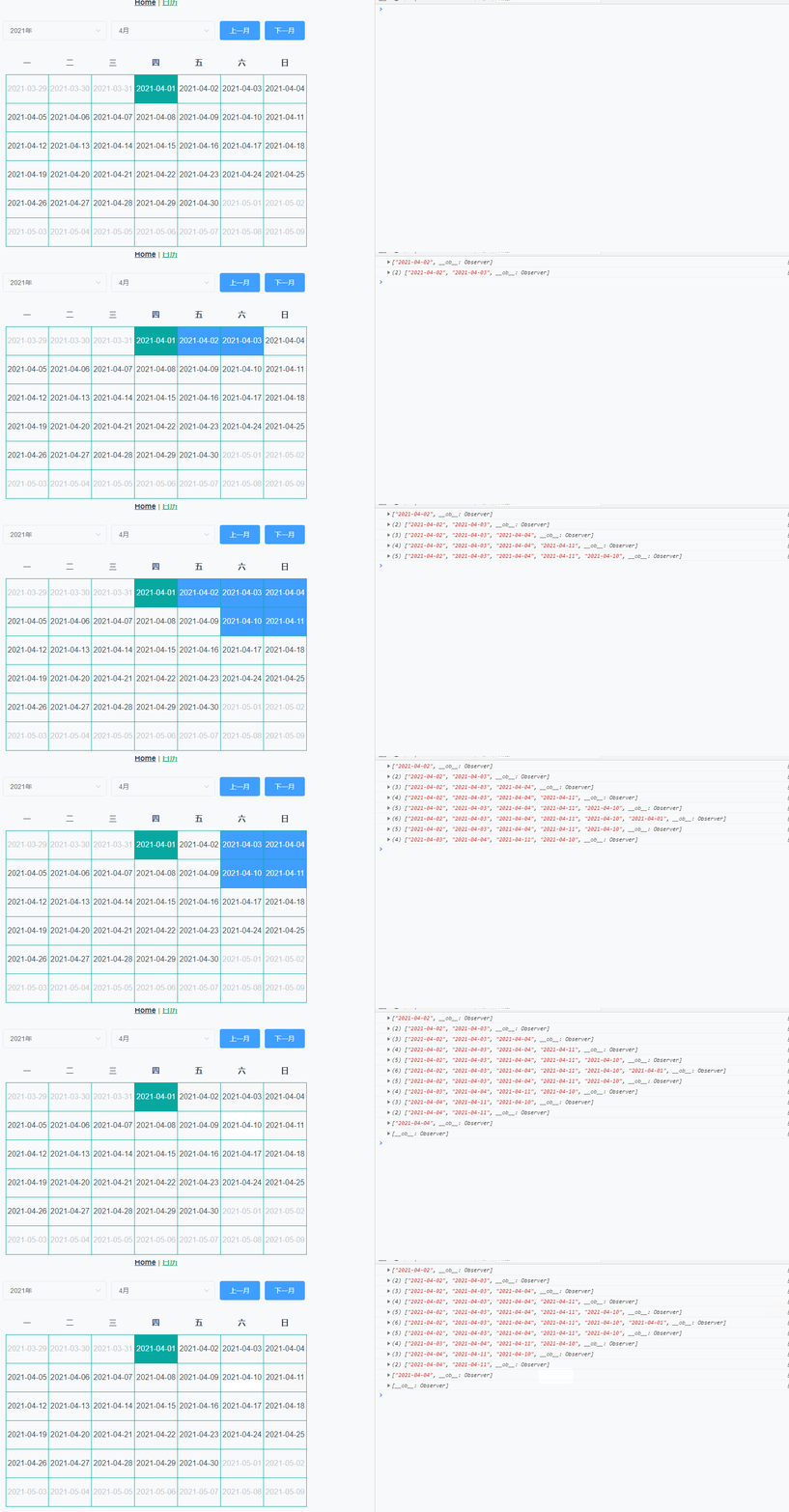
1.3 滑动多选
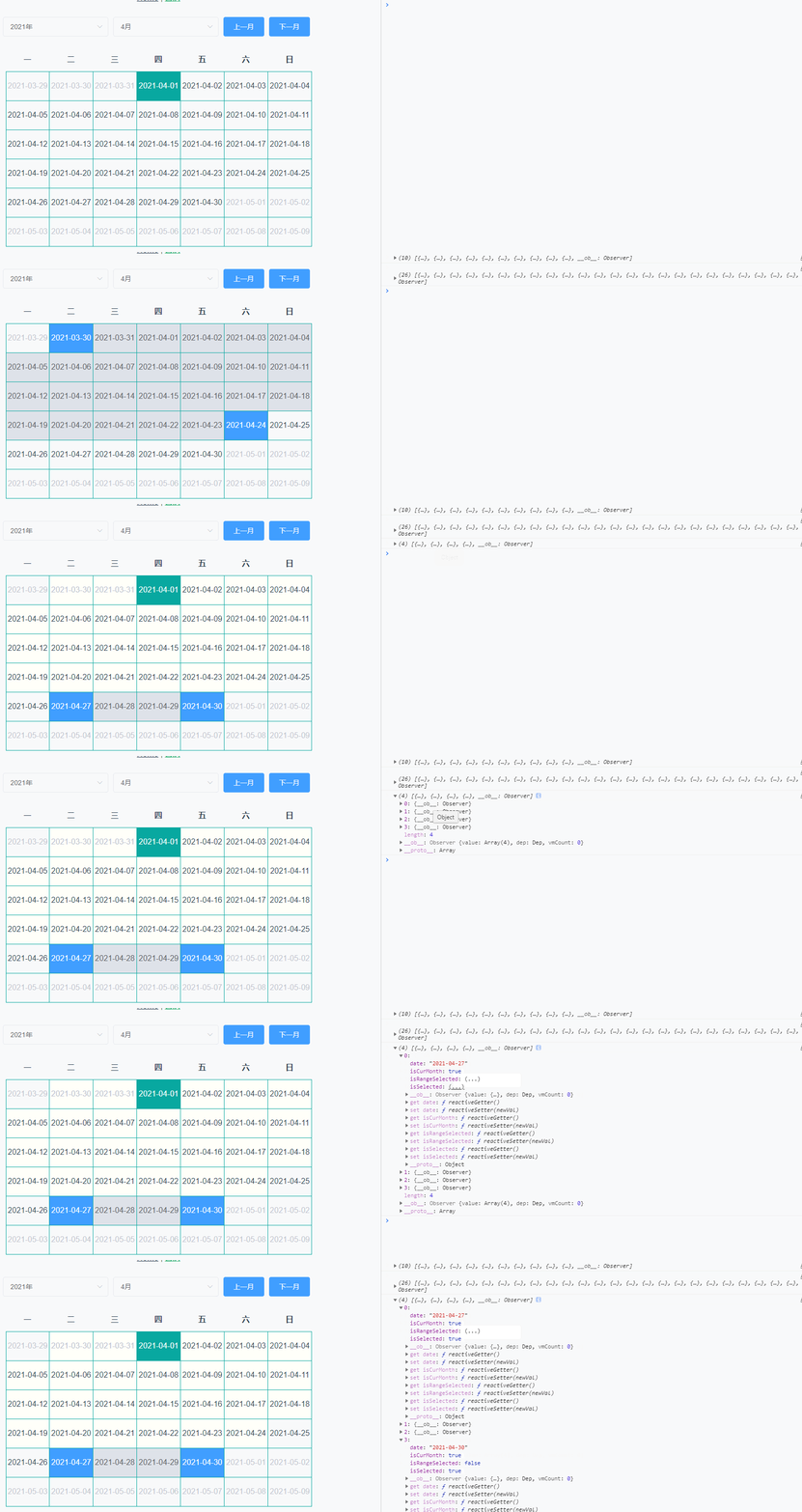
2. 实现基本的日期渲染
2.1 思路
2.1.1 要用到的Date对象方法
new Date(2020, 4, 1).getDay()计算传入的日期是星期几,返回值0表示星期天,1表示星期一,以此类推…new Date(2020, 4, 0).getDate()计算传入月份的该月总天数,第三个参数为0才是计算总天数!!
2.1.2 剖析日历日期结构
- 一个日期表格六行七列,共
42个日期,这个是固定的(重要!)- 一般情况要展示上个月,本月,下个月共三个月的日期,但有种特殊情况是当本月第一天是星期一,那么就只展示本月和下个月的日期。
- 还有注意在每年的1月和12月,它们分别的上一月和下一月的年份都应该
-1或+1
2.1.3 如何计算上个月的日期
当本月第一天不是星期一,那么必然会展示上月的日期
- 计算该月第一天是星期几(
n,0 <= n <= 6),那么上一个月就会展示n-1天,注意当n为0时,n要赋值为7- 计算上一个月有多少天
- 循环添加日期 - 循环起始: 上个月天数 - n + 2,循环结束:<= 上个月天数
2.1.4 如何计算下个月的日期
- 当前日期总共42个减去该月天数再减去
n-1,就得到下个月要展示的天数- 循环添加日期:循环起始:1,循环结束:<= 第一步结果
2.1.5 二维数组渲染生成日历
上面的步骤生成的上个月日期以及下个月日期和本月日期,三个数组组合到一起刚好是一个长度42的一维数组。但我们的table表格是
tr -> td这样的结构,所以我们必须要把一维数组转成二维数组,这样才能遍历生成基础的日历样式。
2.2 实现代码
2.2.1 Calendar.vue
<template><div class="calendar"><table class="calendar-table"><thead><tr><th v-for="(item, i) in weeks" :key="i">{{ item }}th>tr>thead><tbody><tr v-for="(dates, i) in res" :key="i"><tdv-for="(item, index) in dates":key="index":class="{notCurMonth: !item.isCurMonth, currentDay: item.date === curDate}">{ item.date.split('-').slice(1).join('-') }} --><span>{{ item.date }}span><slot :data="item" />td>tr>tbody>table>div>
template>
<script>data() {return {weeks: ['一', '二', '三', '四', '五', '六', '日'],curYear: new Date().getFullYear(), // 当前年curMonth: new Date().getMonth(), // 当前月days: 0, // 当前月总共天数curDate: parseTime(new Date().getTime()), // 当前日期 yyyy-MM-dd 格式,用来匹配是否是当前日期prevDays: [], // 非当前月的上一月展示的日期rearDays: [], // 非当前月的下一月展示的日期curDays: [], // 当前月的日期showDays: [], // 总共展示的42个日期res: [], // 二维数组}},created() {// 默认渲染当前月this.handleGetDays(this.curYear, this.curMonth)},methods() {handleGetDays(year, month) {this.showDays = []this.days = getDaysInMonth(year, month)let firstDayOfWeek = new Date(`${year}-${month + 1}-01`).getDay()if (firstDayOfWeek === 0) { // 星期天为0 星期一为1 ,以此类推firstDayOfWeek = 7}this.prevDays = handleCrateDate(year, month, 1, firstDayOfWeek, 'prev')this.rearDays = handleCrateDate(year, month, 1, 42 - this.days - (firstDayOfWeek - 1), 'rear') this.curDays = handleCrateDate(year, month, 1, this.days)this.showDays.unshift(...this.prevDays)this.showDays.push(...this.curDays)this.showDays.push(...this.rearDays)// console.log(this.showDays)this.res = this.handleFormatDates(this.showDays)},handleFormatDates(arr, size = 7) { // 传入长度42的原数组,最终转换成二维数组const arr2 = []for (let i = 0; i < size; i++) {const temp = arr.slice(i * size, i * size + size)arr2.push(temp)}console.log(arr2)return arr2},}
</script>
2.2.2 index.js
// 获取该月的天数
export const getDaysInMonth = (year, month) => {const day = new Date(year, month + 1, 0)return day.getDate()
}// 创建日期 yyyy-MM-dd 格式, 用于创建非当前月的日期
export const handleCrateDate = (year, month, start, end, type) => {const arr = []if (type === 'prev') { // 上一月if (start === end) return []const daysInLastMonth = getDaysInMonth(year, month - 1) // 获取上一个月有多少天for (let i = daysInLastMonth - end + 2; i <= daysInLastMonth; i++) {arr.push({date: parseTime(new Date(year, month - 1, i)),isCurMonth: false})}} else if (type === 'rear') { // 下一月for (let i = start; i <= end; i++) {arr.push({date: parseTime(new Date(year, month + 1, i)),isCurMonth: false})}} else { // 本月for (let i = start; i <= end; i++) {arr.push({date: parseTime(new Date(year, month, i)),isCurMonth: true})}}return arr
}
export function parseTime(time, cFormat) {if (arguments.length === 0 || !time) {return null}const format = cFormat || '{y}-{m}-{d}'let dateif (typeof time === 'object') {date = time} else {if ((typeof time === 'string')) {if ((/^[0-9]+$/.test(time))) {// support "1548221490638"time = parseInt(time)} else {// support safari// https://stackoverflow.com/questions/4310953/invalid-date-in-safaritime = time.replace(new RegExp(/-/gm), '/')}}if ((typeof time === 'number') && (time.toString().length === 10)) {time = time * 1000}date = new Date(time)}const formatObj = {y: date.getFullYear(),m: date.getMonth() + 1,d: date.getDate(),h: date.getHours(),i: date.getMinutes(),s: date.getSeconds(),a: date.getDay()}const time_str = format.replace(/{([ymdhisa])+}/g, (result, key) => {const value = formatObj[key]// Note: getDay() returns 0 on Sundayif (key === 'a') { return ['日', '一', '二', '三', '四', '五', '六'][value] }return value.toString().padStart(2, '0')})return time_str
}
2.2.3 生成最基本的日历

ps: notCurMonth和currentDay这两个类名自己写,示例没有贴出来,不然就全是一个颜色。
3. 实现年月的切换
3.1 思路
就是监听下拉框的值变化。然后调用
handleGetDays方法。
最后帖完整代码
4. 实现日期的选中(点击,滑动)
4.1 点击选中
4.1.1 思路
td绑定点击事件,传入三个参数:item-> 值、i-> 所在行、j-> 所在列- 通过
res[i][j]可以拿到当前点击的某一项,先把它的isSelected属性取反,然后判断它的isSelected是否为true,如果是,把当前项push进selectedDates数组,进行去重操作(Array.from(new Set(this.selectedDates)))。如果不是,找到该项索引,并且在selectedDates数组里删掉它(this.selectedDates.splice(this.selectedDates.indexOf(item.date), 1))- 最后贴完整代码
4.2 滑动选中
4.2.1 思路
- 滑动模式下,第一次点击是开始,第二次点击是结束,存在
moveIndex数组里面- 建立一个
canMove状态,第一次点击之后,可以滑动,第二次点击之后,不能滑动- 滑动用
mouseover监听,因为触发频率较低,也是传入item,i,j三个参数,并且鼠标停留到的元素的索引计算方法为i * 7 + j- 总共选中的数组为
this.selectedDates = this.showDays.slice(this.moveIndex[0], this.moveIndex[1] + 1)- 遍历循环在第一次点击的索引和第二次点击的索引之间, 给这些元素添加一个
isRangeSelected状态,用以加颜色。第一次点击和最后一次点击的索引是moveIndex[0]和i * 7 + j,可以给他们单独加样式,用以区分。
5. 周起始日的改变
5.1 切换表头的中文
一开始定义的表头是固定的:weeks: ['一', '二', '三', '四', '五', '六', '日']。
当我们拿到传入的周起始日,我们可以使用数组的splice和unshift进行重新排序。
最终实现:
this.weeks.unshift(...this.weeks.splice(this.startOfWeek - 1))
5.2 切换表格内容
5.2.1 思路
- 定义一个对象列举出日期的罗马数字和中文数字
const obj = {1: '一',2: '二',3: '三',4: '四',5: '五',6: '六',0: '日'}
- 获取到月起始日的中文(‘一’,…)
- 再用
indexOf方法拿到该月起始日中文在weeks数组里的索引- 获取出来的索引即使上一个月要展示的日期天数,传入
handleGetDay()函数即可
代码一并贴在后面
6. 父组件中调用
6.1 Attributes
| 参数 | 说明 | 类型 | 可选值 | 默认值 |
|---|---|---|---|---|
| can-select | 是否开启选择日期项 | Boolean | true/false | false |
| selectMode | 选择模式:点击/滑动 | String | click/move | click |
| startOfWeek | 周起始日 | Number | [1,7] | 1 |
| width | 整个日历的宽度 | String | - | 70% |
| tbodyHeight | 日期的高度 | String | - | 60px |
6.2 Events
| 事件名 | 说明 | 参数 |
|---|---|---|
| dateSelected | 当用户开启选择日期触发 | selection |
7. 完整代码
7.1 Calendar.vue
<template><div class="calendar"><div class="select"><el-form inline><el-form-item><el-select v-model="curYear" placeholder="请选择"><el-option v-for="item in yearOptions" :key="item.key" :value="item.value" :label="item.label" /></el-select></el-form-item><el-form-item><el-select v-model="curMonth" placeholder="请选择"><el-option v-for="item in monthOptions" :key="item.key" :value="item.value" :label="item.label" /></el-select></el-form-item><el-form-item><el-button type="primary" @click="handleQuickChange('prev')">上一月</el-button><el-button type="primary" @click="handleQuickChange('next')">下一月</el-button></el-form-item></el-form></div><table class="calendar-table" :style="{width}"><thead><tr><th v-for="(item, i) in weeks" :key="i">{{ item }}</th></tr></thead><tbody><tr v-for="(dates, i) in res" :key="i" :style="{height: tbodyHeight}"><tdv-for="(item, index) in dates":key="index":class="{notCurMonth: !item.isCurMonth, currentDay: item.date === curDate, selectDay: item.isSelected, rangeSelectd: item.isRangeSelected, weekend: item.isWeekend}"@click="handleItemClick(item, i, index)"@mouseover="handleItemMove(item, i, index)"><!-- <span>{{ item.date.split('-').slice(1).join('-') }}</span> --><span>{{ item.date }}</span><slot :data="item" /></td></tr></tbody></table></div>
</template><script>
import { getDaysInMonth, handleCrateDate, handleCreateDatePicker, parseTime } from '../utils/index'
export default {components: {},props: {'selectMode': {type: String,default: 'click'},'startOfWeek': {type: Number,default: 1},canSelect: {type: Boolean,default: false},width: {type: String,default: '70%'},tbodyHeight: {type: String,default: '60px'}},data() {return {monthOptions: [],yearOptions: [],weeks: ['一', '二', '三', '四', '五', '六', '日'],curYear: new Date().getFullYear(), // 当前年curMonth: new Date().getMonth(), // 当前月days: 0, // 当前月总共天数curDate: parseTime(new Date().getTime()), // 当前日期 yyyy-MM-dd 格式,用来匹配是否是当前日期prevDays: [], // 非当前月的上一月展示的日期rearDays: [], // 非当前月的下一月展示的日期curDays: [], // 当前月的日期showDays: [], // 总共展示的42个日期res: [], // 二维数组selectedDates: [], // 选中的日期selectedMode: false, // true表示点击, false表示滑动moveIndex: [], // 两个,第一个是起始,第二个是结束canMove: false // 当moveIndex数组有一个值时,可以触发滑动}},computed: {},watch: {curMonth: {handler(val) {this.handleGetDays(this.curYear, val, this.startOfWeek)}},curYear: {handler(val) {this.handleGetDays(val, this.curMonth, this.startOfWeek)}}},created() {this.weeks.unshift(...this.weeks.splice(this.startOfWeek - 1))this.handleGetDays(this.curYear, this.curMonth, this.startOfWeek)this.selectedMode = this.selectMode === 'click'},mounted() {this.monthOptions = handleCreateDatePicker().monthsthis.yearOptions = handleCreateDatePicker().yearsif (localStorage.selectedDates) this.selectedDates = JSON.parse(localStorage.selectedDates)},methods: {handleGetDays(year, month, startOfWeek) {this.showDays = []this.days = getDaysInMonth(year, month)let firstDayOfWeek = new Date(`${year}-${month + 1}-01`).getDay()// 处理周起始日const obj = {1: '一',2: '二',3: '三',4: '四',5: '五',6: '六',0: '日'}const firstDayInCN = obj[firstDayOfWeek]const index = this.weeks.indexOf(firstDayInCN)console.log(firstDayOfWeek, index)if (firstDayOfWeek === 0) { // 星期天为0 星期一为1 ,以此类推firstDayOfWeek = 7}this.prevDays = handleCrateDate(year, month, 1, index + 1, 'prev')this.rearDays = handleCrateDate(year, month, 1, 42 - this.days - (index), 'rear')this.curDays = handleCrateDate(year, month, 1, this.days)this.showDays.unshift(...this.prevDays)this.showDays.push(...this.curDays)this.showDays.push(...this.rearDays)this.res = this.handleFormatDates(this.showDays)},handleFormatDates(arr, size = 7) { // 传入长度42的原数组,最终转换成二维数组const arr2 = []for (let i = 0; i < size; i++) {const temp = arr.slice(i * size, i * size + size)arr2.push(temp)}// console.log(arr2)return arr2},handleTableHead(start) {const sliceDates = this.weeks.splice(start - 1)this.weeks.unshift(...sliceDates)},handleItemClick(item, i, j) {if (!this.canSelect) returnif (this.selectedMode) {this.$nextTick(() => {// this.$set(this.res[i][j], 'isSelected', )this.res[i][j].isSelected = !this.res[i][j].isSelectedif (this.res[i][j].isSelected) {this.selectedDates.push(this.res[i][j].date)this.selectedDates = Array.from(new Set(this.selectedDates))} else {this.selectedDates.splice(this.selectedDates.indexOf(item.date), 1)}this.$emit('dateSelected', this.selectedDates)})} else {// 滑动模式下,第一次点击是起始,第二次点击是结束const index = i * 7 + jthis.canMove = trueif (this.moveIndex.length === 1) {this.canMove = false}if (this.moveIndex.length === 2) {this.showDays.forEach(item => {item.isSelected = falseitem.isRangeSelected = false})this.canMove = truethis.moveIndex.length = 0}this.moveIndex.push(index)this.moveIndex.sort((a, b) => a - b)this.selectedDates = this.showDays.slice(this.moveIndex[0], this.moveIndex[1] + 1)this.selectedDates.length !== 0 && this.$emit('dateSelected', this.selectedDates)}},handleItemMove(data, i, j) {if (this.canMove && !this.selectedMode) {const index = i * 7 + jthis.showDays.forEach(item => {item.isSelected = falseitem.isRangeSelected = false})// 让第一个日期和最后一个日期显示蓝色高亮this.showDays[index].isSelected = truethis.showDays[this.moveIndex[0]].isSelected = true// 不同情况的判断,当用户的鼠标滑动进日期的索引小于起始日期的索引,要做if else处理if (this.moveIndex[0] < index) {for (let i = this.moveIndex[0] + 1; i < index; i++) {this.showDays[i].isRangeSelected = true}} else {for (let i = index + 1; i < this.moveIndex[0]; i++) {this.showDays[i].isRangeSelected = true}}}},handleQuickChange(type) {if (type === 'prev') {this.curMonth--console.log(this.curMonth)if (this.curMonth === -1) {this.curMonth = 11this.curYear -= 1}} else if (type === 'next') {this.curMonth++if (this.curMonth === 12) {this.curMonth = 0this.curYear += 1}}}}
}
</script><style scoped lang="scss">
.calendar{display: flex;align-items: center;justify-content: center;flex-direction: column;
}
.calendar-table{table-layout: fixed;border-collapse: collapse;transition: .3s;thead tr{height: 50px;}tbody tr {&:first-child td{border-top: 1px solid #08a8a0;}td{cursor: pointer;border-right: 1px solid #08a8a0;border-bottom: 1px solid #08a8a0;&:first-child{border-left: 1px solid #08a8a0;}}}
}.notCurMonth{color: #C0C4CC;
}
.currentDay{color: #fff;background-color: #08a8a0;
}
.selectDay{color: #fff;background-color: #409EFF;
}
.rangeSelectd{color: #606266;background-color: #dee2e9;
}
.weekend{color: #F73131;
}
</style>
7.2 utils/index.js
/* eslint-disable camelcase */
/* eslint-disable no-unused-vars */// 获取该月的天数
export const getDaysInMonth = (year, month) => {const day = new Date(year, month + 1, 0)return day.getDate()
}// 创建日期 yyyy-MM-dd 格式, 用于创建非当前月的日期
export const handleCrateDate = (year, month, start, end, type) => {const arr = []if (type === 'prev') { // 上一月if (start === end) return []const daysInLastMonth = getDaysInMonth(year, month - 1) // 获取上一个月有多少天console.log(`当前月是${month + 1}月, 上一月${month}月的天数是${daysInLastMonth}天`)for (let i = daysInLastMonth - end + 2; i <= daysInLastMonth; i++) {arr.push({// date: `${month === 0 ? year - 1 : year}-${(month + 1) < 10 ? month === 0 ? 12 : `0${month}` : month}-${i < 10 ? `0${i}` : i}`,date: parseTime(new Date(year, month - 1, i)),isCurMonth: false,isSelected: false,isRangeSelected: false})}} else if (type === 'rear') { // 下一月for (let i = start; i <= end; i++) {arr.push({// date: `${month === 11 ? year + 1 : year}-${(month + 1) < 9 ? `0${month + 2}` : month + 2 <= 12 ? month + 2 : (month + 2) % 12 < 10 ? `0${(month + 2) % 12}` : (month + 2) % 12}-${i < 10 ? `0${i}` : i}`,date: parseTime(new Date(year, month + 1, i)),isCurMonth: false,isSelected: false,isRangeSelected: false})}} else { // 本月for (let i = start; i <= end; i++) {arr.push({// date: `${year}-${(month + 1) < 10 ? `0${month + 1}` : month + 1}-${i < 10 ? `0${i}` : i}`,date: parseTime(new Date(year, month, i)),isCurMonth: true,isSelected: false,isRangeSelected: false})}}// console.log(arr)return arr
}export const handleCreateDatePicker = () => {const years = []const months = []for (let i = 1970; i <= 2099; i++) {years.push({label: `${i}年`,value: i})}for (let i = 0; i <= 11; i++) {months.push({label: `${i + 1}月`,value: i})}return {years,months}
}/*** Parse the time to string* @param {(Object|string|number)} time* @param {string} cFormat* @returns {string | null}*/
export function parseTime(time, cFormat) {if (arguments.length === 0 || !time) {return null}const format = cFormat || '{y}-{m}-{d}'let dateif (typeof time === 'object') {date = time} else {if ((typeof time === 'string')) {if ((/^[0-9]+$/.test(time))) {// support "1548221490638"time = parseInt(time)} else {// support safari// https://stackoverflow.com/questions/4310953/invalid-date-in-safaritime = time.replace(new RegExp(/-/gm), '/')}}if ((typeof time === 'number') && (time.toString().length === 10)) {time = time * 1000}date = new Date(time)}const formatObj = {y: date.getFullYear(),m: date.getMonth() + 1,d: date.getDate(),h: date.getHours(),i: date.getMinutes(),s: date.getSeconds(),a: date.getDay()}const time_str = format.replace(/{([ymdhisa])+}/g, (result, key) => {const value = formatObj[key]// Note: getDay() returns 0 on Sundayif (key === 'a') { return ['日', '一', '二', '三', '四', '五', '六'][value] }return value.toString().padStart(2, '0')})return time_str
}
本文来自互联网用户投稿,文章观点仅代表作者本人,不代表本站立场,不承担相关法律责任。如若转载,请注明出处。 如若内容造成侵权/违法违规/事实不符,请点击【内容举报】进行投诉反馈!