html怎么做向下的图标,如何利用前端基础制作html开关图标
如何利用前端基础制作html开关图标
发布时间:2020-11-18 11:08:50
来源:亿速云
阅读:108
作者:小新
小编给大家分享一下如何利用前端基础制作html开关图标,希望大家阅读完这篇文章后大所收获,下面让我们一起去探讨吧!
我们先来看下效果图:
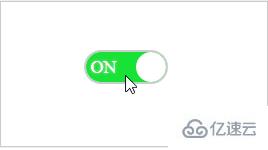
html代码:
开关图标ON
OFF
css样式:
body {
text-align: center
}
.SwitchIcon {
margin: 200px auto;
}
#toggle-button {
display: none;
}
.button-label {
position: relative;
display: inline-block;
width: 80px;
height: 30px;
background-color: #ccc;
box-shadow: #ccc 0px 0px 0px 2px;
border-radius: 30px;
overflow: hidden;
}
.circle {
position: absolute;
top: 0;
left: 0;
width: 30px;
height: 30px;
border-radius: 50%;
background-color: #fff;
}
.button-label .text {
line-height: 30px;
font-size: 18px;
text-shadow: 0 0 2px #ddd;
}
.on {
color: #fff;
display: none;
text-indent: -45px;
}
.off {
color: #fff;
display: inline-block;
text-indent: 34px;
}
.button-label .circle {
left: 0;
transition: all 0.3s;
}
#toggle-button:checked + label.button-label .circle {
left: 50px;
}
#toggle-button:checked + label.button-label .on {
display: inline-block;
}
#toggle-button:checked + label.button-label .off {
display: none;
}
#toggle-button:checked + label.button-label {
background-color: #19e236;
}
.div {
height: 20px;
width: 30px;
background: #51ccee;
}
js逻辑:
//窗体加载
window.onload = function () {
var onoffswitch = document.getElementById("toggle-button");
onoffswitch.checked = true;
}
//测试开始
function SwitchClick() {
var onoffswitch = document.getElementById("toggle-button");
var label = document.getElementById("batteryIconContent");
if (onoffswitch.checked) {
//调用后台
}
else {
//调用后台
}
}
看完了这篇文章,相信你对如何利用前端基础制作html开关图标有了一定的了解,想了解更多相关知识,欢迎关注亿速云行业资讯频道,感谢各位的阅读!
本文来自互联网用户投稿,文章观点仅代表作者本人,不代表本站立场,不承担相关法律责任。如若转载,请注明出处。 如若内容造成侵权/违法违规/事实不符,请点击【内容举报】进行投诉反馈!