Cocos Creator 图片/文字的渐变色实现!
支持 Sprite 和 Label!参数可调!摆地摊的时候学习一波~
效果预览:

如何使用?
在 cc.Sprite 或 cc.Label 添加脚本 ColorAssembler2D 。
调整颜色 colors 参数即可。
每个点的对应位置如下:
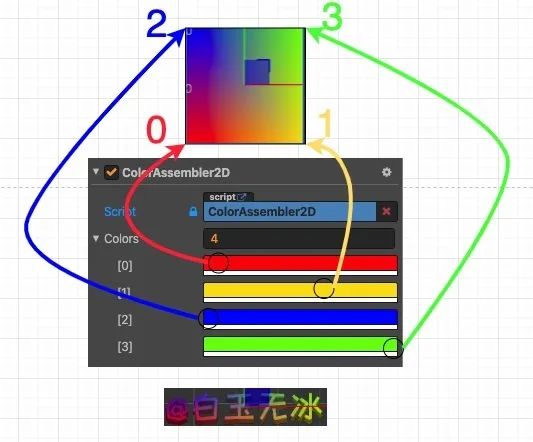
如何实现的呢?
对于 cc.RenderComponent 都有一个 _assembler。
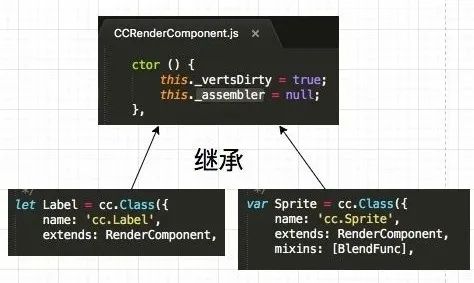
只要这个 _assembler 是继承 cc.Assembler2D , 就有一个 updateColor 的方法。
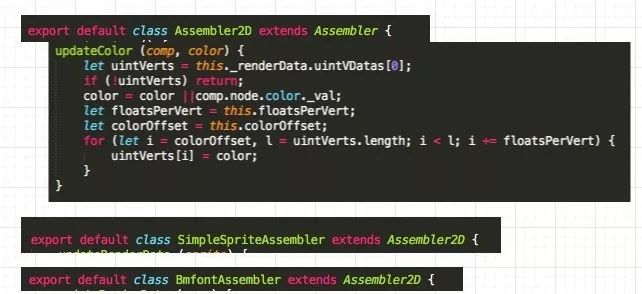
只要依葫芦画瓢,修改一下顶点的颜色值就行了,参考代码如下。
// private _updateColors() {
const cmp = this.getComponent(cc.RenderComponent);
if (!cmp) return;
const _assembler = cmp['_assembler'];
if (!(_assembler instanceof cc['Assembler2D'])) return;
const uintVerts = _assembler._renderData.uintVDatas[0];
if (!uintVerts) return;
const color = this.node.color;
const floatsPerVert = _assembler.floatsPerVert;
const colorOffset = _assembler.colorOffset;
let count = 0;
for (let i = colorOffset, l = uintVerts.length; i < l; i += floatsPerVert) {uintVerts[i] = (this.colors[count++] || color)['_val'];
}
当然这个方法要在引擎渲染之后再修改才有效。
onEnable() {cc.director.once(cc.Director.EVENT_AFTER_DRAW, this._updateColors, this);
}
如果移除了这个组件,还要告诉引擎重新渲染这个颜色。
onDisable() {cc.director.off(cc.Director.EVENT_AFTER_DRAW, this._updateColors, this);this.node['_renderFlag'] |= cc['RenderFlow'].FLAG_COLOR;
}
以上就是白玉无冰使用 Cocos Creator v2.3.3 关于 "图片/文字 的渐变色实现" 的技术分享,再次感谢白玉无冰~
如果您在使用 Cocos Creator 2D/3D 的过程中
get 了独到的开发心得、见解或是方法
欢迎随时向我们投稿
帮助更多开发者们解决技术问题
让游戏开发更简单~
期待您与我们联系~
“在看”是最大的鼓励▼
本文来自互联网用户投稿,文章观点仅代表作者本人,不代表本站立场,不承担相关法律责任。如若转载,请注明出处。 如若内容造成侵权/违法违规/事实不符,请点击【内容举报】进行投诉反馈!