beautifulsoup 解析网页
beautifulsoup 解析网页
前一篇文章讲解了一点用re提取信息的方法,但是这种方法很麻烦,需要去仔细核对多个链接才能总结出规律,而且规律普适性不强,有兴趣的可以参考如下链接:
re模块复习
这里再讲一种特殊的方法,采用Beautiful 模块直接解析网页来获取想要的数据。
什么是Beautiful Soup?接着往下看。
一、介绍
Beautiful Soup 是一个可以从HTML或XML文件中提取数据的Python库.它能够通过你喜欢的转换器实现惯用的文档导航,查找,修改文档的方式.Beautiful Soup会帮你节省数小时甚至数天的工作时间。以下全部使用 Beautiful Soup 4版本。
更多介绍参考其说明文档:https://beautifulsoup.readthedocs.io/zh_CN/v4.4.0/
二、安装调用
安装很简单,直接pip
pip install beautifulsoup4
它的调用很奇怪,因为它封装在bs4中,所以调用如下:
from bs4 import BeautifulSoup
说白了,Beautiful Soup就是通过某种解析方式,把原始的html代码美化成易读的格式,然后才通过其select方法或者直接定位来抽取需要的数据。
1. 其基本语法:
# soup就是美化完的代码
soup = BeautifulSoup(res.text,features="lxml")
soup
原始的res.text是这样的

美化后的是这样的,完全和网页的样式一致:
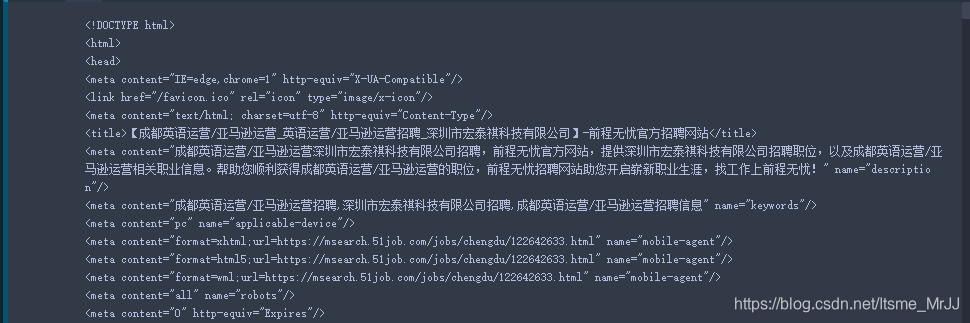
2. 参数详解:
常用的参数就两个
markup:需要解析的对象
features:指定具体的解析方式,如果不指定,Beautiful Soup选择最合适的解析器来解析这段文档。
就目前,Beautiful Soup支持如下几种解析方式
| 解析器 | 使用方法 | 优势 | 劣势 |
|---|---|---|---|
| Python标准库 | BeautifulSoup(markup, “html.parser”) | 内置,速度中等,容错里强 | 之前的版本不好 |
| lxml HTML 解析器 | BeautifulSoup(markup, “lxml”) | 速度快,容错里强 | 需要安装C语言库 |
| lxml XML 解析器 | BeautifulSoup(markup, “xml”) | 速度快,唯一支持XML的解析器 | 需要安装C语言库 |
| html5lib | BeautifulSoup(markup, “html5lib”) | 最好的容错性,以浏览器的方式解析文档 | 速度慢 |
推荐使用lxml作为解析器,因为效率更高。但其他的也可以解析,只是解析的呈现效果有些许差异。
三、 定位、提取数据:
说到定位和提取,就不得不说说HTML的结构了。首先看一个网页的结构

3.1 结构释义
基本标签
-
称为根元素,所有的网页元素都在中
- 元素用于定义文档的头部,定义字体、美化样式、标题等等
-
头部元素含有有:
<link> <script> <style><br /> <title> 标签定义文档的标题<br /> <meta> 标签提供关于 HTML 文档的元数据。元数据不会显示在页面上,meta 元素被用于规定页面的描述、关键词、文档的作者、最后修改时间等。<br /> <link> 元素引入外部样式<br /> <script> 元素该元素可以定义页面的脚本内容<br /> <style> 标签用于为 HTML 文档定义样式信息</p> </li><li> <p><body></body> 元素用于定义网页显示的内容,这个是主要显示东西,我们需要的信息也会在这里面。<br /> 它可用于文档布局、组合其他HTML元素的容器。<br /> <hx> HTML 标题,有六种分别是h1 h2 h3 h4 h5 h6,h1顶级标题,h6末级标题<br /> <p> 定义段落,会自动在其前后创建一些空白。不一定必须是分段,可以只加空格<br /> <br> 会在浏览器插入一个简单的换行符。<br /> <hr> 定义 HTML 页面中的主题变化(比如话题的转移),并显示为一条水平线。<br /> <a> 用来设置超文本链接。点击超链接可以实现跳转。<br /> href属性:描述了链接的目标URL。<br /> target属性:设置链接跳转方式。<br /> <img> 用来申明图像的插入。<br /> src属性:规定显示图像的 URL。URL为图片的相对路径或者绝对路径均可。<br /> alt属性:规定图像的替代文本。<br /> title属性:定义图片的标题,鼠标移动到图片出现。<br /> <span> 用来组合文档中的行内元素,可用作文本的容器。 span 元素没有固定的格式表现,当对它应用样式时,它才会产生视觉上的变化。<br /> <ul> ul 标签作为无序列表,它是一个项目的列表。<br /> <li> 每个列表项始于 <li> 标签<br /> 这个地方说不清楚了,直接上图<br /> <img referrerpolicy="no-referrer" src="https://img-blog.csdnimg.cn/20210602110832403.png?x-oss-process=image/watermark,type_ZmFuZ3poZW5naGVpdGk,shadow_10,text_aHR0cHM6Ly9ibG9nLmNzZG4ubmV0L0l0c21lX01ySko=,size_16,color_FFFFFF,t_70#pic_center" alt="在这里插入图片描述" /><br /> <ol> 有序列表也是一列项目,列表项目使用数字进行标记。 有序列表始于 <ol> 标签。每个列表项始于 <li> 标签<br /> <img referrerpolicy="no-referrer" src="https://img-blog.csdnimg.cn/20210602111206842.png?x-oss-process=image/watermark,type_ZmFuZ3poZW5naGVpdGk,shadow_10,text_aHR0cHM6Ly9ibG9nLmNzZG4ubmV0L0l0c21lX01ySko=,size_16,color_FFFFFF,t_70#pic_center" alt="在这里插入图片描述" /><br /> <!–注释说明–> 用于在源代码中插入注释。注释不会显示在浏览器中。 可使用注释对代码进行解释,这样做有助于在以后的时间对代码的修改,当编写了大量代码时尤其有用</p> </li></ul> <p><strong>文本格式化标签</strong></p> <ul><li><b> 以粗体字体形式展现内容</li><li><strong> strong标签与b标签都表示粗体。 但strong表示强调</li><li><i> 以斜体字体形式展现内容</li><li><pre> pre 标签可定义预格式化的文本。 被包围在 pre 标签 元素中的文本通常会保留空格和换行符。而文本也会呈现为等宽字体</li><li><bdo> 指定文本方向,其dir属性申明文本显示方向</li><li><sub> 定义下标文本。下标文本将会显示在当前文本流中字符高度的一半为基准线的下方</li><li><sup> 定义上标文本。上标文本将会显示在当前文本流中字符高度的一半为基准线的上方</li></ul> <p><strong>标签属性</strong><br /> HTML 元素可以通过设置属性,实现某些特定的效果。属性一般描述于开始标签。属性总是以名称/值对的形式出现,比如:class=“container”。</p> <table><thead><tr><th>属性</th><th>描述</th></tr></thead><tbody><tr><td>class</td><td>为html元素定义一个或多个类名</td></tr><tr><td>id</td><td>定义元素的唯一id</td></tr><tr><td>style</td><td>规定元素的行内样式</td></tr><tr><td>title</td><td>描述元素的额外信息</td></tr></tbody></table> <h6><a id="emsp32____109"></a> 3.2 遍历节点树</h6> <p> 对于soup文档,遍历直接 .name 就可以,这种方式可以一直下钻,这种方法还有一些特殊的属性。</p> <ul><li> .contents属性:可以将tag的子节点以列表的方式输出:</li><li> .children 生成器:可以对tag的子节点进行循环:</li><li> .string:如果tag只有一个 NavigableString 类型子节点,那么这个tag可以使用 .string 得到子节点:</li><li> .parent:获取某个元素的父节点</li><li> .next_element :指向解析过程中下一个被解析的对象(字符串或tag),结果可能与 .next_sibling 相同,但通常是不一样的.</li><li> .previous_element:它指向当前被解析的对象的前一个解析对</li></ul> <p> 示例:</p> <pre><code class="prism language-python">soup <span class="token operator">>></span><span class="token operator">></span> <span class="token operator"><</span>!DOCTYPE html<span class="token operator">></span> <span class="token operator"><</span>html<span class="token operator">></span><span class="token operator"><</span>head<span class="token operator">></span><span class="token operator"><</span>meta content<span class="token operator">=</span><span class="token string">"IE=edge,chrome=1"</span> http<span class="token operator">-</span>equiv<span class="token operator">=</span><span class="token string">"X-UA-Compatible"</span><span class="token operator">/</span><span class="token operator">></span><span class="token operator"><</span>link href<span class="token operator">=</span><span class="token string">"/favicon.ico"</span> rel<span class="token operator">=</span><span class="token string">"icon"</span> <span class="token builtin">type</span><span class="token operator">=</span><span class="token string">"image/x-icon"</span><span class="token operator">/</span><span class="token operator">></span><span class="token operator"><</span>meta content<span class="token operator">=</span><span class="token string">"text/html; charset=utf-8"</span> http<span class="token operator">-</span>equiv<span class="token operator">=</span><span class="token string">"Content-Type"</span><span class="token operator">/</span><span class="token operator">></span><span class="token operator"><</span>title<span class="token operator">></span>【成都英语运营<span class="token operator">/</span>亚马逊运营_英语运营<span class="token operator">/</span>亚马逊运营招聘_深圳市宏泰祺科技有限公司】<span class="token operator">-</span>前程无忧官方招聘网站<span class="token operator"><</span><span class="token operator">/</span>title<span class="token operator">></span> <span class="token operator"><</span><span class="token operator">/</span>head<span class="token operator">></span> <span class="token operator"><</span><span class="token operator">/</span>html<span class="token operator">></span> soup<span class="token punctuation">.</span>head<span class="token punctuation">.</span>title<span class="token punctuation">.</span>string <span class="token operator">>></span><span class="token operator">></span> <span class="token string">'【成都英语运营/亚马逊运营_英语运营/亚马逊运营招聘_深圳市宏泰祺科技有限公司】-前程无忧官方招聘网站'</span> soup<span class="token punctuation">.</span>head<span class="token punctuation">.</span>title<span class="token punctuation">.</span>parent <span class="token operator">>></span><span class="token operator">></span> <span class="token operator"><</span>head<span class="token operator">></span><span class="token operator"><</span>meta content<span class="token operator">=</span><span class="token string">"IE=edge,chrome=1"</span> http<span class="token operator">-</span>equiv<span class="token operator">=</span><span class="token string">"X-UA-Compatible"</span><span class="token operator">/</span><span class="token operator">></span><span class="token operator"><</span>link href<span class="token operator">=</span><span class="token string">"/favicon.ico"</span> rel<span class="token operator">=</span><span class="token string">"icon"</span> <span class="token builtin">type</span><span class="token operator">=</span><span class="token string">"image/x-icon"</span><span class="token operator">/</span><span class="token operator">></span><span class="token operator"><</span>meta content<span class="token operator">=</span><span class="token string">"text/html; charset=utf-8"</span> http<span class="token operator">-</span>equiv<span class="token operator">=</span><span class="token string">"Content-Type"</span><span class="token operator">/</span><span class="token operator">></span><span class="token operator"><</span>title<span class="token operator">></span>【成都英语运营<span class="token operator">/</span>亚马逊运营_英语运营<span class="token operator">/</span>亚马逊运营招聘_深圳市宏泰祺科技有限公司】<span class="token operator">-</span>前程无忧官方招聘网站<span class="token operator"><</span><span class="token operator">/</span>title<span class="token operator">></span> <span class="token operator"><</span><span class="token operator">/</span>head<span class="token operator">></span> <span class="token comment"># 这里为啥输出换行符,其实就是网页信息中换行了,虽然在soup中看不到,可以.contents查看</span> soup<span class="token punctuation">.</span>head<span class="token punctuation">.</span>title<span class="token punctuation">.</span>string<span class="token punctuation">.</span>next_element <span class="token operator">>></span><span class="token operator">></span> <span class="token string">'\n '</span> </code></pre> <p> <font color="Blue" size="5"><strong>但是上述这些当文档存在多个同名节点时,只能获取第一个,要想获取全部,就需要用到下面的搜索文档树</strong></font></p> <h6><a id="emsp33____152"></a> 3.3 搜索文档树</h6> <p> 这里着重介绍find() 和find_all()方法,其他方法使用与之类似。<br /> <font color="Green" size="5"><strong>注意,这里的find_all和正则中的findall写法不一样哦</strong></font></p> <p> 在讲解find_all之前先介绍过滤器。<br /> <img referrerpolicy="no-referrer" src="https://img-blog.csdnimg.cn/20210602195920974.png?x-oss-process=image/watermark,type_ZmFuZ3poZW5naGVpdGk,shadow_10,text_aHR0cHM6Ly9ibG9nLmNzZG4ubmV0L0l0c21lX01ySko=,size_16,color_FFFFFF,t_70#pic_center" alt="在这里插入图片描述" /><br /> <img referrerpolicy="no-referrer" src="https://img-blog.csdnimg.cn/20210602200035244.png?x-oss-process=image/watermark,type_ZmFuZ3poZW5naGVpdGk,shadow_10,text_aHR0cHM6Ly9ibG9nLmNzZG4ubmV0L0l0c21lX01ySko=,size_16,color_FFFFFF,t_70#pic_center" alt="在这里插入图片描述" /></p> <h3><a id="find_all_160"></a><strong>find_all()</strong></h3> <p>主要参数介绍:<br /> name:name 参数可以查找所有tag,字符串对象会被自动忽略掉。如"a"、"p"等。<br /> keyword 参数:可以理解成属性名 如:id=‘link2’、href=re.compile(“elsie”)、class_=“sister”<br /> <font color="Green" size="5"><strong>注意,这里的class因为是python的关键字,所以加了_</strong></font></p> <h5><a id="__166"></a>四、 应用</h5> <p>还是选择和上次re一样的需求,便于比较<br /> 网址:“https://jobs.51job.com/chengdu/132231033.html?s=sou_sou_soulb&t=0=”<br /> 需求:想要获取岗位职责和任职要求数据</p> <pre><code class="prism language-python">test <span class="token operator">=</span> <span class="token punctuation">[</span><span class="token punctuation">]</span> <span class="token keyword">for</span> i <span class="token keyword">in</span> soup<span class="token punctuation">.</span>find_all<span class="token punctuation">(</span>class_<span class="token operator">=</span><span class="token string">"bmsg job_msg inbox"</span><span class="token punctuation">)</span><span class="token punctuation">[</span><span class="token number">0</span><span class="token punctuation">]</span><span class="token punctuation">.</span>find_all<span class="token punctuation">(</span><span class="token punctuation">[</span><span class="token string">'div'</span><span class="token punctuation">,</span><span class="token string">'p'</span><span class="token punctuation">]</span><span class="token punctuation">)</span><span class="token punctuation">:</span><span class="token keyword">if</span> i<span class="token punctuation">.</span>string<span class="token punctuation">:</span>test<span class="token punctuation">.</span>append<span class="token punctuation">(</span>i<span class="token punctuation">.</span>string<span class="token punctuation">)</span> test<span class="token operator">>></span><span class="token operator">></span> <span class="token punctuation">[</span><span class="token string">'岗位职责:'</span><span class="token punctuation">,</span><span class="token string">'1. 负责亚马逊的listing管理,平台账号的管理与维护,上传产品,推广产品;'</span><span class="token punctuation">,</span><span class="token string">'2. 负责客户产品售前、售后所咨询的问题电子邮件回复;'</span><span class="token punctuation">,</span><span class="token string">'3. 保障公司账户的正常运营,处理好客户的中差评;'</span><span class="token punctuation">,</span><span class="token string">'4. 负责公司相关市场的产品文案编辑工作;'</span><span class="token punctuation">,</span><span class="token string">'5. 完成部门领导安排的其他工作。'</span><span class="token punctuation">,</span><span class="token string">'岗位要求:'</span><span class="token punctuation">,</span><span class="token string">'1、大专以上学历,英语专四以上证书,商务信函写作熟练,有一年亚马逊客服经验优先;'</span><span class="token punctuation">,</span><span class="token string">'2、掌握客户服务基本技巧,能灵活、独立解答客户的问题;'</span><span class="token punctuation">,</span><span class="token string">'3、吃苦耐劳,具有团队精神,认真负责,有较强的学习能力,对B2C外贸工作有浓厚兴趣。'</span><span class="token punctuation">]</span> </code></pre> <p><strong>对比两种方法,re要花大量时间去总结规律,相对复杂,但是总结出来的规律匹配精准度相对准确,而Beautiful根据节点提取快速,但有个别网页不遵守规范,导致提取的准确度相对低,但也可以用。<br /> 最好的办法还是两者结合,把正则规则作为find_all 的参数,会大大增加准确性。</strong></p> </p> <p><br /><pre><code style="font-size:16px;">本文来自互联网用户投稿,文章观点仅代表作者本人,不代表本站立场,不承担相关法律责任。如若转载,请注明出处。 如若内容造成侵权/违法违规/事实不符,请点击<a href="https://shimo.im/forms/N2A1gvJRpPh7K9qD/fill" target="_blank" rel="nofollow">【内容举报】</a>进行投诉反馈!</code></pre></p> <!-- E 正文 --> <link href="https://qiniu.techgrow.cn/readmore/dist/readmore.css" type="text/css" rel="stylesheet"> <script src="https://qiniu.techgrow.cn/readmore/dist/readmore.js" type="text/javascript"></script> <script> var regex = /(phone|pad|pod|iPhone|iPod|ios|iPad|Android|Mobile|BlackBerry|IEMobile|MQQBrowser|JUC|Fennec|wOSBrowser|BrowserNG|WebOS|Symbian|Windows Phone)/i var isMobile = navigator.userAgent.match(regex); if (!isMobile) { try { var plugin = new ReadmorePlugin(); plugin.init({ id: "readmore-container", blogId: "55721-7689706765131-406", name: "财经早读", keyword: "666", qrcode: "https://www.imspm.com/assets/img/caijingzaodu.jpg", type: "website", height: "auto", expires: "7", interval: "60", random: "1" }) } catch (e) { console.warn("readmore plugin occurred error: " + e.name + " | " + e.message); } } </script> </div> <!-- S 付费阅读 --> <!-- E 付费阅读 --> <!-- S 点赞 --> <div class="article-donate"> <a href="javascript:" class="btn btn-primary btn-like btn-lg social-share-icon icon-heart addbookbark" data-type="archives" data-aid="696874" data-action="/addons/cms/ajax/collection.html">收藏</a> </div> <!-- E 点赞 --> <div class="entry-meta"> <ul> <!-- S 归档 --> <li>标签:<a href="/dev.html" class="tag" rel="tag" target="_blank">技术</a></li> <!-- S 归档 --> </ul> <ul class="article-prevnext"> <!-- S 上一篇下一篇 --> <li> <span>上一篇 ></span> <a href="/dev/696873.html" target="_blank">2022中国国际眼科医学及眼科医疗设备展览会,中国眼睛健康展</a> </li> <li> <span>下一篇 ></span> <a href="/dev/696875.html" target="_blank">第39届物理竞赛国集金银铜牌完整名单发布,猿辅导144名学员获奖</a> </li> <!-- E 上一篇下一篇 --> </ul> </div> <div class="related-article"> <div class="row" style="margin: 0 -15px;"> <!-- S 相关文章 --> <div class="col-xs-12"> <h3 style="font-size: 1.1em;">相关文章</h5> </div> <div class="col-xs-12"> <p style="margin-top: 17px;margin-bottom: 8.5px;"><a href="/dev/747938.html" target="_blank">Duilib中list控件支持ctrl和shif多行选中的实现</a></p> </div> <div class="col-xs-12"> <p style="margin-top: 17px;margin-bottom: 8.5px;"><a href="/dev/747937.html" target="_blank">[ICML2015]Batch Normalization:Accelerating Deep Network Training by Reducing Internal Covariate Shif</a></p> </div> <div class="col-xs-12"> <p style="margin-top: 17px;margin-bottom: 8.5px;"><a href="/dev/747936.html" target="_blank">win10系统 微软输入法 于eclipse ctrl+shif+f冲突间接处理办法</a></p> </div> <div class="col-xs-12"> <p style="margin-top: 17px;margin-bottom: 8.5px;"><a href="/dev/747935.html" target="_blank">Codeforces Round #259 (Div. 2) B. Little Pony and Sort by Shif</a></p> </div> <div class="col-xs-12"> <p style="margin-top: 17px;margin-bottom: 8.5px;"><a href="/dev/747934.html" target="_blank">读LDD3,内存映射与DMA--PAGE_SHIF…</a></p> </div> <div class="col-xs-12"> <p style="margin-top: 17px;margin-bottom: 8.5px;"><a href="/dev/747933.html" target="_blank">VMware虚拟机安装XP【要先分区,再设置BOOT 启动CD,shif+上移】</a></p> </div> <div class="col-xs-12"> <p style="margin-top: 17px;margin-bottom: 8.5px;"><a href="/dev/747932.html" target="_blank">更换iBus五笔的左与右Shif</a></p> </div> <div class="col-xs-12"> <p style="margin-top: 17px;margin-bottom: 8.5px;"><a href="/dev/747931.html" target="_blank">sublime ctrl+shif+f 没用解决办法</a></p> </div> <div class="col-xs-12"> <p style="margin-top: 17px;margin-bottom: 8.5px;"><a href="/dev/747930.html" target="_blank">idea 对 ctrl + z 的撤销 是 ctrl + shif + z</a></p> </div> <div class="col-xs-12"> <p style="margin-top: 17px;margin-bottom: 8.5px;"><a href="/dev/747929.html" target="_blank">计算机最早的设计师应用于,计算机应用基础选择题doc.doc</a></p> </div> <div class="col-xs-12"> <p style="margin-top: 17px;margin-bottom: 8.5px;"><a href="/dev/747928.html" target="_blank">win10自带截图神器:Win+Shift+S</a></p> </div> <div class="col-xs-12"> <p style="margin-top: 17px;margin-bottom: 8.5px;"><a href="/dev/747927.html" target="_blank">Python基础之文件目录操作</a></p> </div> <div class="col-xs-12"> <p style="margin-top: 17px;margin-bottom: 8.5px;"><a href="/dev/747926.html" target="_blank">python简述目录_Python基础之文件目录操作(示例代码)</a></p> </div> <div class="col-xs-12"> <p style="margin-top: 17px;margin-bottom: 8.5px;"><a href="/dev/747925.html" target="_blank">tp5 如何做数据采集</a></p> </div> <div class="col-xs-12"> <p style="margin-top: 17px;margin-bottom: 8.5px;"><a href="/dev/747924.html" target="_blank">任务2-7(服务器字体+阿里巴巴矢量库)</a></p> </div> <div class="col-xs-12"> <p style="margin-top: 17px;margin-bottom: 8.5px;"><a href="/dev/747923.html" target="_blank">html标签(1):h1~h6,p,br,pre,hr</a></p> </div> <div class="col-xs-12"> <p style="margin-top: 17px;margin-bottom: 8.5px;"><a href="/dev/747922.html" target="_blank">TI 电量计介绍与芯片选型指南</a></p> </div> <div class="col-xs-12"> <p style="margin-top: 17px;margin-bottom: 8.5px;"><a href="/dev/747921.html" target="_blank">几款TI电源芯片简介</a></p> </div> <div class="col-xs-12"> <p style="margin-top: 17px;margin-bottom: 8.5px;"><a href="/dev/747920.html" target="_blank">TI DSP芯片C2000系列读取FLASH数据</a></p> </div> <div class="col-xs-12"> <p style="margin-top: 17px;margin-bottom: 8.5px;"><a href="/dev/747919.html" target="_blank">德州仪器(Ti)平台嵌入式开发基础</a></p> </div> <div class="col-xs-12"> <p style="margin-top: 17px;margin-bottom: 8.5px;"><a href="/dev/747918.html" target="_blank">TI三相电机智能栅极驱动芯片特点分类</a></p> </div> <div class="col-xs-12"> <p style="margin-top: 17px;margin-bottom: 8.5px;"><a href="/dev/747917.html" target="_blank">省选模拟(12.08) T3 圈圈圈圈圈圈圈圈</a></p> </div> <div class="col-xs-12"> <p style="margin-top: 17px;margin-bottom: 8.5px;"><a href="/dev/747916.html" target="_blank">Hadoop生态圈技术栈(上)</a></p> </div> <div class="col-xs-12"> <p style="margin-top: 17px;margin-bottom: 8.5px;"><a href="/dev/747915.html" target="_blank">大数据开发基础入门与项目实战(三)Hadoop核心及生态圈技术栈之6.Impala交互式查询</a></p> </div> <div class="col-xs-12"> <p style="margin-top: 17px;margin-bottom: 8.5px;"><a href="/dev/747914.html" target="_blank">小猿圈之Linux下Mysql 操作命令</a></p> </div> <div class="col-xs-12"> <p style="margin-top: 17px;margin-bottom: 8.5px;"><a href="/dev/747913.html" target="_blank">大数据Hadoop生态圈常用面试题</a></p> </div> <div class="col-xs-12"> <p style="margin-top: 17px;margin-bottom: 8.5px;"><a href="/dev/747912.html" target="_blank">大数据开发基础入门与项目实战(三)Hadoop核心及生态圈技术栈之4.Hive DDL、DQL和数据操作</a></p> </div> <div class="col-xs-12"> <p style="margin-top: 17px;margin-bottom: 8.5px;"><a href="/dev/747911.html" target="_blank">备战Noip2018模拟赛11(B组)T3 Monogatari 物语</a></p> </div> <div class="col-xs-12"> <p style="margin-top: 17px;margin-bottom: 8.5px;"><a href="/dev/747910.html" target="_blank">【智能优化算法-圆圈搜索算法】基于圆圈搜索算法Circle Search Algorithm求解单目标优化问题附matlab代码</a></p> </div> <div class="col-xs-12"> <p style="margin-top: 17px;margin-bottom: 8.5px;"><a href="/dev/747909.html" target="_blank">NYOJ 78 圈水池</a></p> </div> <div class="col-xs-12"> <p style="margin-top: 17px;margin-bottom: 8.5px;"><a href="/dev/747908.html" target="_blank">递归问题 跑道 汽车 绕圈问题 Python实现</a></p> </div> <div class="col-xs-12"> <p style="margin-top: 17px;margin-bottom: 8.5px;"><a href="/dev/747907.html" target="_blank">Hadoop生态圈(三):MapReduce</a></p> </div> <!-- E 相关文章 --> </div> </div> <div class="clearfix"></div> </div> </div> </main> <aside class="col-xs-12 col-md-4"> <!--@formatter:off--> <!--@formatter:on--> <!-- S 内容推荐 --> <div class="panel panel-default hot-article"> <div class="panel-heading"> <h3 class="panel-title">内容推荐</h3> </div> <div class="panel-body"> <div class="media media-number"> <div class="media-left"> <span class="num tag">1</span> </div> <div class="media-body"> <a class="link-dark" href="/jiaohutiyan/753475.html" title="大厂出品!保姆级教程帮你掌握「用户体验要素」" target="_blank">大厂出品!保姆级教程帮你掌握「用户体验要素」</a> </div> </div> <div class="media media-number"> <div class="media-left"> <span class="num tag">2</span> </div> <div class="media-body"> <a class="link-dark" href="/jiaohutiyan/753348.html" title="大厂实战案例!设计师如何助力京东快递业务增长?" target="_blank">大厂实战案例!设计师如何助力京东快递业务增长?</a> </div> </div> <div class="media media-number"> <div class="media-left"> <span class="num tag">3</span> </div> <div class="media-body"> <a class="link-dark" href="/jiaohutiyan/753116.html" title="总监干货!5个常见的UI设计规范创建误区" target="_blank">总监干货!5个常见的UI设计规范创建误区</a> </div> </div> <div class="media media-number"> <div class="media-left"> <span class="num tag">4</span> </div> <div class="media-body"> <a class="link-dark" href="/kaifagongju/752540.html" title="数据库管理利器——Navicat Premium v17.0.4学习版(Windows+MacOS+Linux)" target="_blank">数据库管理利器——Navicat Premium v17.0.4学习版(Windows+MacOS+Linux)</a> </div> </div> <div class="media media-number"> <div class="media-left"> <span class="num tag">5</span> </div> <div class="media-body"> <a class="link-dark" href="/jiaohutiyan/750353.html" title="进阶必学!快速掌握10种国际主流设计模型" target="_blank">进阶必学!快速掌握10种国际主流设计模型</a> </div> </div> <div class="media media-number"> <div class="media-left"> <span class="num tag">6</span> </div> <div class="media-body"> <a class="link-dark" href="/jiaohutiyan/750352.html" title="春节期间,10个大厂的产品细节走心设计" target="_blank">春节期间,10个大厂的产品细节走心设计</a> </div> </div> <div class="media media-number"> <div class="media-left"> <span class="num tag">7</span> </div> <div class="media-body"> <a class="link-dark" href="/jiaohutiyan/747940.html" title="如何帮助用户度过新人期?来看雪球APP的实战总结!" target="_blank">如何帮助用户度过新人期?来看雪球APP的实战总结!</a> </div> </div> <div class="media media-number"> <div class="media-left"> <span class="num tag">8</span> </div> <div class="media-body"> <a class="link-dark" href="/ruanjianzixun/42357.html" title="Sketch 95.3最新版下载 (Sketch矢量绘图应用软件)" target="_blank">Sketch 95.3最新版下载 (Sketch矢量绘图应用软件)</a> </div> </div> <div class="media media-number"> <div class="media-left"> <span class="num tag">9</span> </div> <div class="media-body"> <a class="link-dark" href="/ruanjianzixun/42356.html" title="Axure RP 9 最新正式版安装软件与汉化语言包下载(2023年3月30日更新)" target="_blank">Axure RP 9 最新正式版安装软件与汉化语言包下载(2023年3月30日更新)</a> </div> </div> <div class="media media-number"> <div class="media-left"> <span class="num tag">10</span> </div> <div class="media-body"> <a class="link-dark" href="/chanpinsheji/42343.html" title="嘘!SaaS产品的差异化设计细节,一般人我不告诉他" target="_blank">嘘!SaaS产品的差异化设计细节,一般人我不告诉他</a> </div> </div> </div> </div> <!-- E 内容推荐 --> <div class="panel panel-blockimg"> <script async src="https://pagead2.googlesyndication.com/pagead/js/adsbygoogle.js?client=ca-pub-6421005227861480" crossorigin="anonymous"></script> <!-- 右侧正方形 --> <ins class="adsbygoogle" style="display:block" data-ad-client="ca-pub-6421005227861480" data-ad-slot="1989994359" data-ad-format="auto" data-full-width-responsive="true"></ins> <script> (adsbygoogle = window.adsbygoogle || []).push({}); </script> </div> <div class="panel panel-default lasest-update"> <!-- S 最近更新 --> <div class="panel-heading"> <h3 class="panel-title">最新更新</h3> </div> <div class="panel-body"> <ul class="list-unstyled"> <li> <span><a href="/chanpinjingli.html" target="_blank">[产品经理]</a></span> <a class="link-dark" href="/chanpinjingli/758173.html" title="3分钟绘制流程图!这个AI+绘图工具的神仙组合,学完老板直呼内行" target="_blank">3分钟绘制流程图!这个AI+绘图工具的神仙组合,学完老板直呼内行</a> </li> <li> <span><a href="/chanpinjingli.html" target="_blank">[产品经理]</a></span> <a class="link-dark" href="/chanpinjingli/758172.html" title="商业潜规则:打败你的不是AI,而是人性" target="_blank">商业潜规则:打败你的不是AI,而是人性</a> </li> <li> <span><a href="/chanpinsheji.html" target="_blank">[产品设计]</a></span> <a class="link-dark" href="/chanpinsheji/758171.html" title="DeepSeek+智能派单系统的实践分享" target="_blank">DeepSeek+智能派单系统的实践分享</a> </li> <li> <span><a href="/chanpinjingli.html" target="_blank">[产品经理]</a></span> <a class="link-dark" href="/chanpinjingli/758170.html" title="一文读懂本年实际损益借(贷)方发生额" target="_blank">一文读懂本年实际损益借(贷)方发生额</a> </li> <li> <span><a href="/chuangyexueyuan.html" target="_blank">[创业学院]</a></span> <a class="link-dark" href="/chuangyexueyuan/758169.html" title="大客户 vs 中小企业:需求竟天差地别?以企业培训数字化为例" target="_blank">大客户 vs 中小企业:需求竟天差地别?以企业培训数字化为例</a> </li> <li> <span><a href="/chanpinjingli.html" target="_blank">[产品经理]</a></span> <a class="link-dark" href="/chanpinjingli/758168.html" title="不要将员工的“猴子”背到自己身上:职场管理中的权责划分" target="_blank">不要将员工的“猴子”背到自己身上:职场管理中的权责划分</a> </li> <li> <span><a href="/chanpinjingli.html" target="_blank">[产品经理]</a></span> <a class="link-dark" href="/chanpinjingli/758167.html" title="人工智能的三层架构:从应用层到基础服务层,解密智能革命" target="_blank">人工智能的三层架构:从应用层到基础服务层,解密智能革命</a> </li> <li> <span><a href="/chanpinsheji.html" target="_blank">[产品设计]</a></span> <a class="link-dark" href="/chanpinsheji/758166.html" title="一文讲清楚iOS的SKAN4.0" target="_blank">一文讲清楚iOS的SKAN4.0</a> </li> </ul> </div> <!-- E 最近更新 --> </div> <!-- S 热门标签 --> <div class="panel panel-default hot-tags"> <div class="panel-heading"> <h3 class="panel-title">热门标签</h3> </div> <div class="panel-body"> <div class="tags"> <a href="/channel/数量.html" class="tag" target="_blank"> <span>数量</span></a> <a href="/channel/AI技术趋势.html" class="tag" target="_blank"> <span>AI技术趋势</span></a> <a href="/channel/用户角色.html" class="tag" target="_blank"> <span>用户角色</span></a> <a href="/channel/心智游移.html" class="tag" target="_blank"> <span>心智游移</span></a> <a href="/channel/自然生态系统.html" class="tag" target="_blank"> <span>自然生态系统</span></a> <a href="/channel/会员权益.html" class="tag" target="_blank"> <span>会员权益</span></a> <a href="/channel/AirDrop.html" class="tag" target="_blank"> <span>AirDrop</span></a> <a href="/channel/hashmap.html" class="tag" target="_blank"> <span>hashmap</span></a> <a href="/channel/小龙虾.html" class="tag" target="_blank"> <span>小龙虾</span></a> <a href="/channel/焦虑.html" class="tag" target="_blank"> <span>焦虑</span></a> <a href="/channel/危机处理.html" class="tag" target="_blank"> <span>危机处理</span></a> <a href="/channel/发展.html" class="tag" target="_blank"> <span>发展</span></a> <a href="/channel/微信群折叠.html" class="tag" target="_blank"> <span>微信群折叠</span></a> <a href="/channel/toast.html" class="tag" target="_blank"> <span>toast</span></a> <a href="/channel/测评新算法.html" class="tag" target="_blank"> <span>测评新算法</span></a> <a href="/channel/改版.html" class="tag" target="_blank"> <span>改版</span></a> <a href="/channel/wireshark.html" class="tag" target="_blank"> <span>wireshark</span></a> <a href="/channel/投放方式.html" class="tag" target="_blank"> <span>投放方式</span></a> <a href="/channel/音频播放动效.html" class="tag" target="_blank"> <span>音频播放动效</span></a> <a href="/channel/timer.html" class="tag" target="_blank"> <span>timer</span></a> <a href="/channel/女性商业.html" class="tag" target="_blank"> <span>女性商业</span></a> <a href="/channel/古典自媒体.html" class="tag" target="_blank"> <span>古典自媒体</span></a> <a href="/channel/海外博主.html" class="tag" target="_blank"> <span>海外博主</span></a> <a href="/channel/repeater.html" class="tag" target="_blank"> <span>repeater</span></a> <a href="/channel/转账.html" class="tag" target="_blank"> <span>转账</span></a> <a href="/channel/万能钥匙.html" class="tag" target="_blank"> <span>万能钥匙</span></a> <a href="/channel/秋招.html" class="tag" target="_blank"> <span>秋招</span></a> <a href="/channel/快服务.html" class="tag" target="_blank"> <span>快服务</span></a> <a href="/channel/个人演讲.html" class="tag" target="_blank"> <span>个人演讲</span></a> <a href="/channel/客户共识.html" class="tag" target="_blank"> <span>客户共识</span></a> </div> </div> </div> <!-- E 热门标签 --> </aside> </div> </div> </main> <footer> <div id="footer"> <div class="container"> <div class="row footer-inner"> <div class="col-xs-12"> <div class="footer-logo pull-left mr-4"> <a href="/"><i class="fa fa-bookmark"></i></a> </div> <div class="pull-left"> Copyright © 2025 All rights reserved. 超级产品经理 <a href="https://beian.miit.gov.cn" target="_blank" rel="noopener">浙ICP备14026978号-4</a> <ul class="list-unstyled list-inline mt-2"> <li><a href="/p/aboutus.html" target="_blank">关于网站</a></li> <li><a href="/contactus.html" rel="nofollow" target="_blank">联系我们</a></li> </ul> </div> </div> </div> </div> </div> </footer> <div id="floatbtn"> <!-- S 浮动按钮 --> <a class="hover" href="/index/cms.archives/post.html" target="_blank"> <i class="iconfont icon-pencil"></i> <em>立即<br>投稿</em> </a> <div class="floatbtn-item floatbtn-share"> <i class="iconfont icon-share"></i> <div class="floatbtn-wrapper" style="height:50px;top:0"> <div class="social-share" data-initialized="true" data-mode="prepend"> <a href="#" class="social-share-icon icon-weibo" target="_blank"></a> <a href="#" class="social-share-icon icon-qq" target="_blank"></a> <a href="#" class="social-share-icon icon-qzone" target="_blank"></a> <a href="#" class="social-share-icon icon-wechat"></a> </div> </div> </div> <a href="javascript:;"> <i class="iconfont icon-qrcode"></i> <div class="floatbtn-wrapper"> <div class="qrcode"><img src="https://www.imspm.com/assets/img/gongzhonghao.jpg"></div> <p>微信公众账号</p> <p>微信扫一扫加关注</p> </div> </a> <a id="back-to-top" class="hover" href="javascript:;"> <i class="iconfont icon-backtotop"></i> <em>返回<br>顶部</em> </a> <!-- E 浮动按钮 --> </div> <script type="text/javascript" src="/assets/libs/jquery/dist/jquery.min.js?v=1.0.10"></script> <script type="text/javascript" src="/assets/libs/bootstrap/dist/js/bootstrap.min.js?v=1.0.10"></script> <script type="text/javascript" src="/assets/libs/fastadmin-layer/dist/layer.js?v=1.0.10"></script> <script type="text/javascript" src="/assets/libs/art-template/dist/template-native.js?v=1.0.10"></script> <script type="text/javascript" src="/assets/addons/cms/js/jquery.autocomplete.js?v=1.0.10"></script> <script type="text/javascript" src="/assets/addons/cms/js/swiper.min.js?v=1.0.10"></script> <script type="text/javascript" src="/assets/addons/cms/js/share.min.js?v=1.0.10"></script> <script type="text/javascript" src="/assets/addons/cms/js/cms.js?v=1.0.10"></script> <script type="text/javascript" src="/assets/addons/cms/js/common.js?v=1.0.10"></script> </body> </html>