socket实现网络通信
socket实现网络通信
1.1、网络通信的要素
通信双方的地址:
-
IP
-
端口号
-
例如:127.0.0.1:8080
网络通信的协议:
TCP/IP参考模型
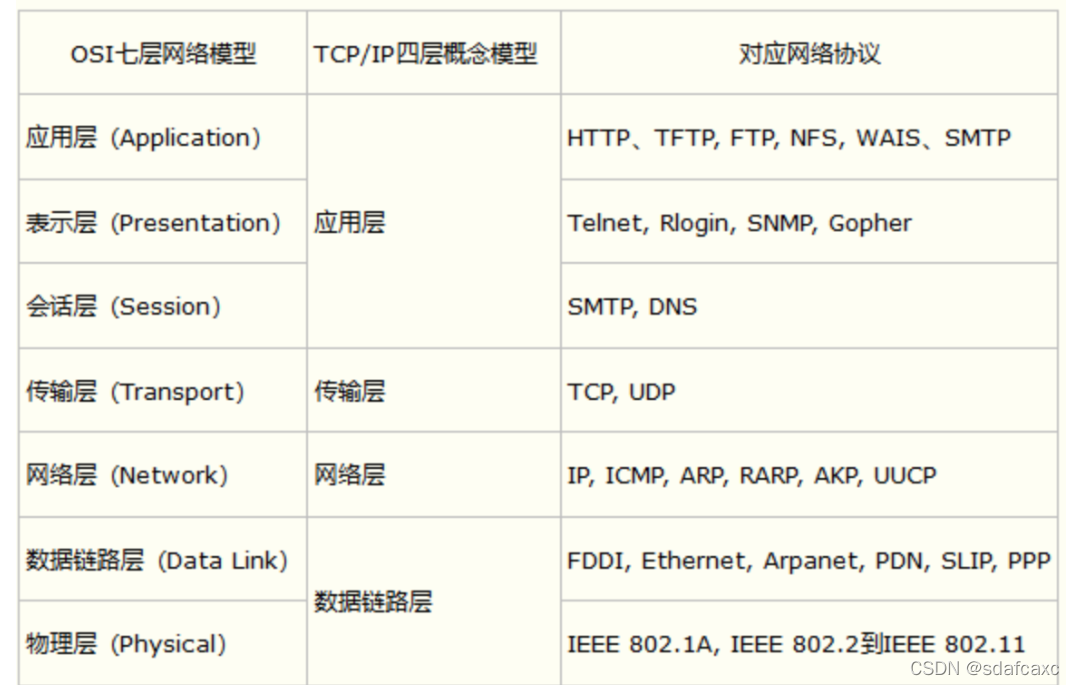
总结:
-
网络编程中有两个问题
-
如何准确的定位到网络上的一台主机
-
找到主机之后如何进行通信
-
-
网络编程中的要素
-
IP和端口号(Port)
-
网络通信协议 UDP、TCP
-
1.2、IP
IP地址:InetAdress类
-
唯一定位一台网络上的计算机
-
127.0.0.1:本机IP(lochost)
-
IP地址分类
-
iPv4/ipv6
-
公网(互联网)-私网(局域网)
-
ADCD类地址
-
192.168.xxx.xxx组织内部专用
-
-
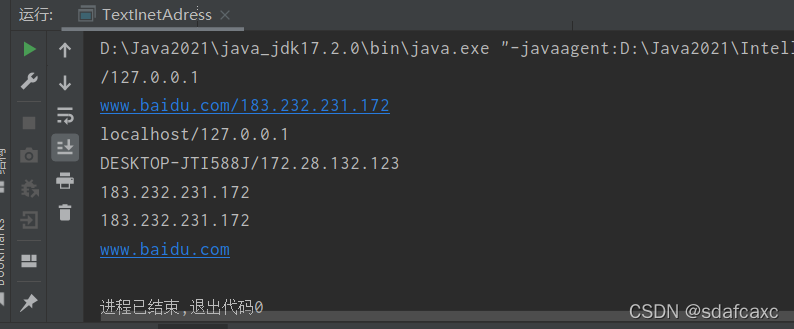
测试ip
import java.net.InetAddress;
import java.net.UnknownHostException;
//测试Ip
public class TextInetAdress {public static void main(String[] args) {try {//通过名字返回本机IPInetAddress inetAdress1 = InetAddress.getByName("127.0.0.1"); System.out.println(inetAdress1);//通过名字查询百度网IP地址InetAddress inetAdress2 = InetAddress.getByName("www.baidu.com");System.out.println(inetAdress2);//通过名字返回本机IPInetAddress inetAdress3 = InetAddress.getByName("localhost"); System.out.println(inetAdress3);//通过名字返回本机IPInetAddress inetAdress4 = InetAddress.getLocalHost();  System.out.println(inetAdress4);//常用方法System.out.println(inetAdress2.getHostAddress());//规范的System.out.println(inetAdress2.getCanonicalHostName());System.out.println(inetAdress2.getHostName());} catch (UnknownHostException e) {e.printStackTrace();}}
}
1.3、端口
端口表示计算机上的一个进程:
-
不同的进程有不同的端口号
-
TCP/UDP端口
-
单个协议下端口号不能冲突
-
端口分类:
-
共有端口 0-1023
-
HTTP : 80
-
HTTPS : 443
-
FTP : 21
-
Telent : 23
-
-
程序注册端口:2014-49151,分配给用户或者程序
-
Tomcat : 8080
-
MySQL : 3306
-
Oracle : 1521
-
-
import java.net.InetSocketAddress;
public class TextInetSocketAddress {public static void main(String[] args) {InetSocketAddress socketAddress1 = new InetSocketAddress("127.0.0.1", 8080);System.out.println(socketAddress1);InetSocketAddress socketAddress2 = new InetSocketAddress("localhost", 8080);System.out.println(socketAddress2);}
}
1.4、通信协议
TCP/IP协议簇
-
TCP:用户传输协议
-
UDP:用户数据报协议
TCP/UDP对比:
TCP
-
连接服务器
-
稳定
-
三次握手,四次挥手
-
客户端-服务器
-
传输完成,释放连接,效率低
UDP
-
不连接服务器
-
不稳定
-
无论另一端有无准备,都能发送
1.5、TCP
1.5.1、消息传输
客户端
-
连接服务器Socket
-
发送消息
import java.io.IOException;
import java.io.OutputStream;
import java.net.InetAddress;
import java.net.Socket;
//客户端
public class TcpClientDemo1 {public static void main(String[] args) {Socket socket=null;OutputStream os=null;try {//要知道服务器的地址,端口号InetAddress serverIp = InetAddress.getByName("127.0.0.1");int port=9999;//创建一个socket链接socket = new Socket(serverIp,port);//发送消息I/O流os = socket.getOutputStream();os.write("你好,欢迎学习".getBytes());} catch (Exception e) {e.printStackTrace();}finally {if (os!=null)try {os.close();} catch (IOException e) {e.printStackTrace();}if (socket!=null)try {socket.close();} catch (IOException e) {e.printStackTrace();}}}
}
服务器
-
建立服务的端口ServerSocket
-
等待用户的连接accept()
-
接受用户的消息
import java.io.ByteArrayOutputStream;
import java.io.IOException;
import java.io.InputStream;
import java.net.ServerSocket;
import java.net.Socket;
//服务器端
public class TcpSeverDemo2 {public static void main(String[] args) {ServerSocket serverSocket=null;Socket accept=null;InputStream is=null;ByteArrayOutputStream baos=null;try {//我得有一个地址serverSocket = new ServerSocket(9999);//等待客户端连接过来while (true) {accept = serverSocket.accept();//读取客户端的内容is = accept.getInputStream();//管道流baos = new ByteArrayOutputStream();byte[] buffer = new byte[1024]; //创建一个缓冲区int len;  //用来判断是否将缓冲区的字节读完,读完则值为-1while ((len = is.read(buffer)) != -1) {baos.write(buffer, 0, len);//从buffer中写出数据到baos写出长度0-len}System.out.println(baos.toString());}} catch (Exception e) {e.printStackTrace();}finally {//关闭流资源if(baos!=null)try {baos.close();} catch (IOException e) {e.printStackTrace();}if (is!=null)try {is.close();} catch (IOException e) {e.printStackTrace();}if (accept!=null)try {accept.close();} catch (IOException e) {e.printStackTrace();}if (serverSocket!=null)try {serverSocket.close();} catch (IOException e) {e.printStackTrace();}}}
}
1.5.2、文件传输
客户端
-
读取文件
-
创建连接
-
发送文件
import java.io.*;
import java.net.InetAddress;
import java.net.Socket;
//读文件发送
public class TcpFileDemo01 {public static void main(String[] args) throws Exception {//1创建一个socket连接获取端口和地址Socket socket=new Socket(InetAddress.getByName("127.0.0.1"),9000);//2获取一个输出流OutputStream os = socket.getOutputStream();//3读文件流FileInputStream fis = new FileInputStream(new File("zhushunsheng.jpg"));byte[] buffered=new byte[1024]; //自定义一个缓冲区int len; //用来判断是否将缓冲区的字节读完while ((len=fis.read(buffered))!=-1){os.write(buffered,0,len); //从buffer中写出数据到baos写出长度0-len}//通知服务器我已经结束了socket.shutdownOutput();//确认服务器接收完毕才能断开连接InputStream inputStream = socket.getInputStream();//String byte[]ByteArrayOutputStream baos=new ByteArrayOutputStream();byte[] buffer2=new byte[2014];int len2;while ((len2=inputStream.read(buffer2))!=-1){baos.write(buffer2,0,len2);}System.out.println(baos.toString());//4关闭资源baos.close();inputStream.close();fis.close();os.close();socket.close();
}
}
服务器
-
创建连接
-
监听连接
-
接收文件
import java.io.*;
import java.net.ServerSocket;
import java.net.Socket;
//接收文件
public class TcpFileDemo02 {public static void main(String[] args) throws Exception {//1创建服务ServerSocket serverSocket = new ServerSocket(9000);//监听客户端的连接Socket accept = serverSocket.accept();//2获取输入流InputStream is = accept.getInputStream();//3输出文件FileOutputStream fos = new FileOutputStream(new File("receive.jpg"));byte[] buffer=new byte[1024];int len;while ((len=is.read(buffer))!=-1){fos.write(buffer,0,len);}//通知客户端我接收完毕了OutputStream os=accept.getOutputStream();os.write("我接收完毕了,你可以断开了".getBytes());//4关闭资源fos.close();is.close();accept.close();serverSocket.close();}
}
注意事项:
如果文件在源文件目录下可以采用相对路径找到文件(这里采用此方式),如果文件不在源目录下则应采用绝对路径传输
1.6、UDP
模拟客户端1给客户端2发送消息
客户端1
-
创建连接
-
创建一个包
-
确认发送对象
-
发送包
import java.net.DatagramPacket;
import java.net.DatagramSocket;
import java.net.InetAddress;
//UDP不需要连接服务器
public class UdpClientDemo1 {public static void main(String[] args) throws Exception {//建立一个socketDatagramSocket socket=new DatagramSocket(9999);//DatagramSocket数据报套接字//建立一个包String msg="你好";//发送给谁InetAddress lochost=InetAddress.getByName("127.0.0.1");int port=9090;//参数分别为数据,数据的长度,发送的地址,端口号DatagramPacket packet = new DatagramPacket(msg.getBytes(), 0, msg.getBytes().length, lochost, port);//发送包socket.send(packet);//关闭流socket.close();}
}
客户端2
-
开放端口
-
接受数据
-
关闭连接
import java.net.DatagramPacket;
import java.net.DatagramSocket;
//还是要等待客户端的连接
public class UdpSeverDemo2 {public static void main(String[] args) throws Exception {//开放端口DatagramSocket socket=new DatagramSocket(9090);//接收数据byte[] buffer= new byte[1024];DatagramPacket packet = new DatagramPacket(buffer, 0, buffer.length);//接收socket.receive(packet);//关闭连接socket.close();System.out.println(packet.getAddress().getHostAddress());System.out.println(new String(packet.getData(),0,packet.getLength()));}
}
本文来自互联网用户投稿,文章观点仅代表作者本人,不代表本站立场,不承担相关法律责任。如若转载,请注明出处。 如若内容造成侵权/违法违规/事实不符,请点击【内容举报】进行投诉反馈!