Oracle Database 12c升级到19c(Redhat Linux12.2.0.1 Upgrade to 19.3.0.0)
目录
0. Check Compatibility Before Upgrading Oracle Database
1. Environment
2. Backup
3. Run preupgrade script
4. View Preupgrade log
5. Verify tablespace sizes for upgrade
6. Update INITIALIZATION PARAMETERS
7. Gather DICTIONARY STATS
8. Purge Recyclebin
9. Refresh MVs
10. Run preupgrade_fixups.sql
11. Verify archive log dest size
12. Stop LISTENER
13. Create Flashback Guaranteed Restore Point
14. Shutdown Database
15. Copy init and password files from 12c to 19c dbs home
16. Startup DB in Upgrade mode from 19c home
17. Run dbupgrade
18. Starup DB from 19c home
19. Run utlrp.sql
20. Run postupgrade_fixups.sql
21. Upgrade Timezone
22. Run utlusts.sql
23. Run catuppst.sql
24. Re-Run postupgrade_fixups.sql
25. Reverify INVALID OBJECTS
26. Drop Restore point
27. Set COMPATIBALE parameter value to 19.0.0
28. Verify DBA_REGISTRY
29. Add TNS Entries in 19c TNS home
30. Password File – orapwCID
31. Edit oratab
32. Back Up the Database
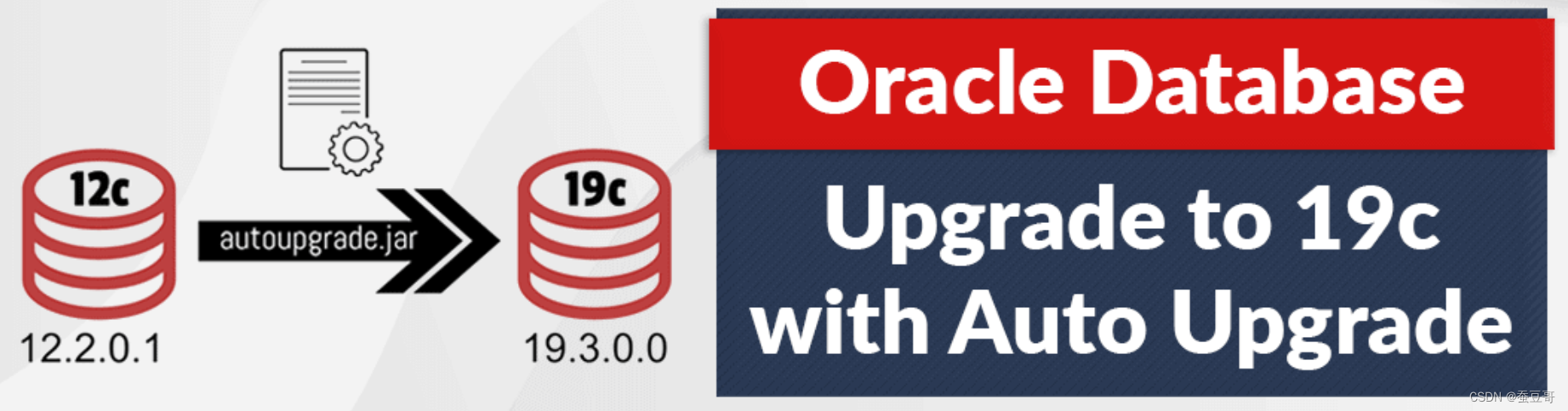
近两天,因为系统维护的需求,我需将原来的12c数据实例升级到19c,版本号12.2.0.1>19.3.0(12.2.0.3),中间花了较多时间来折腾,不过结果不错,毕竟成功了
我的系统环境是小红帽Redhat Linux 7.6,参照一些外文资料,具体操作如下
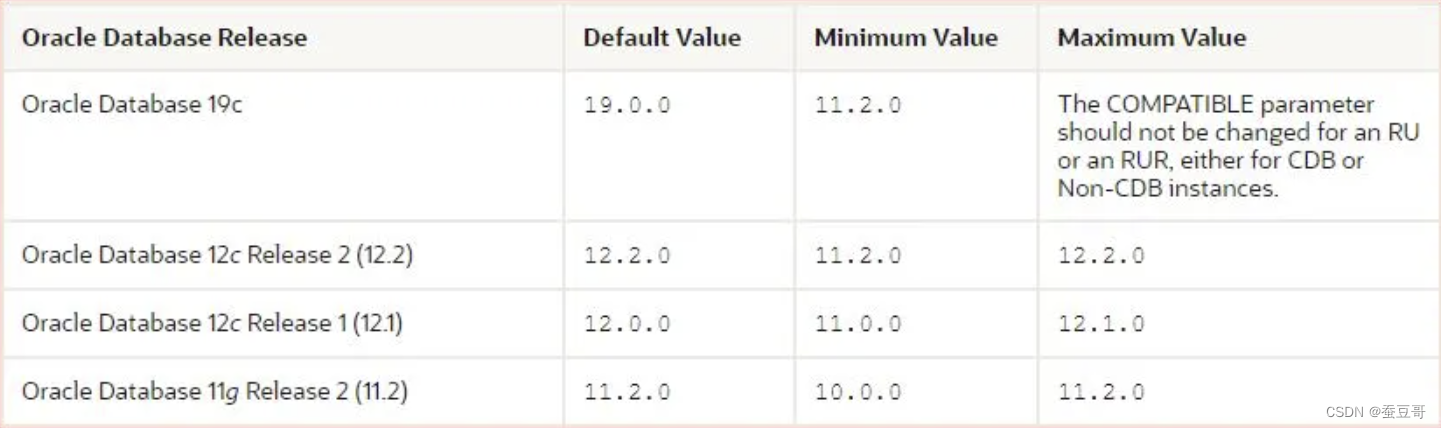
0. Check Compatibility Before Upgrading Oracle Database

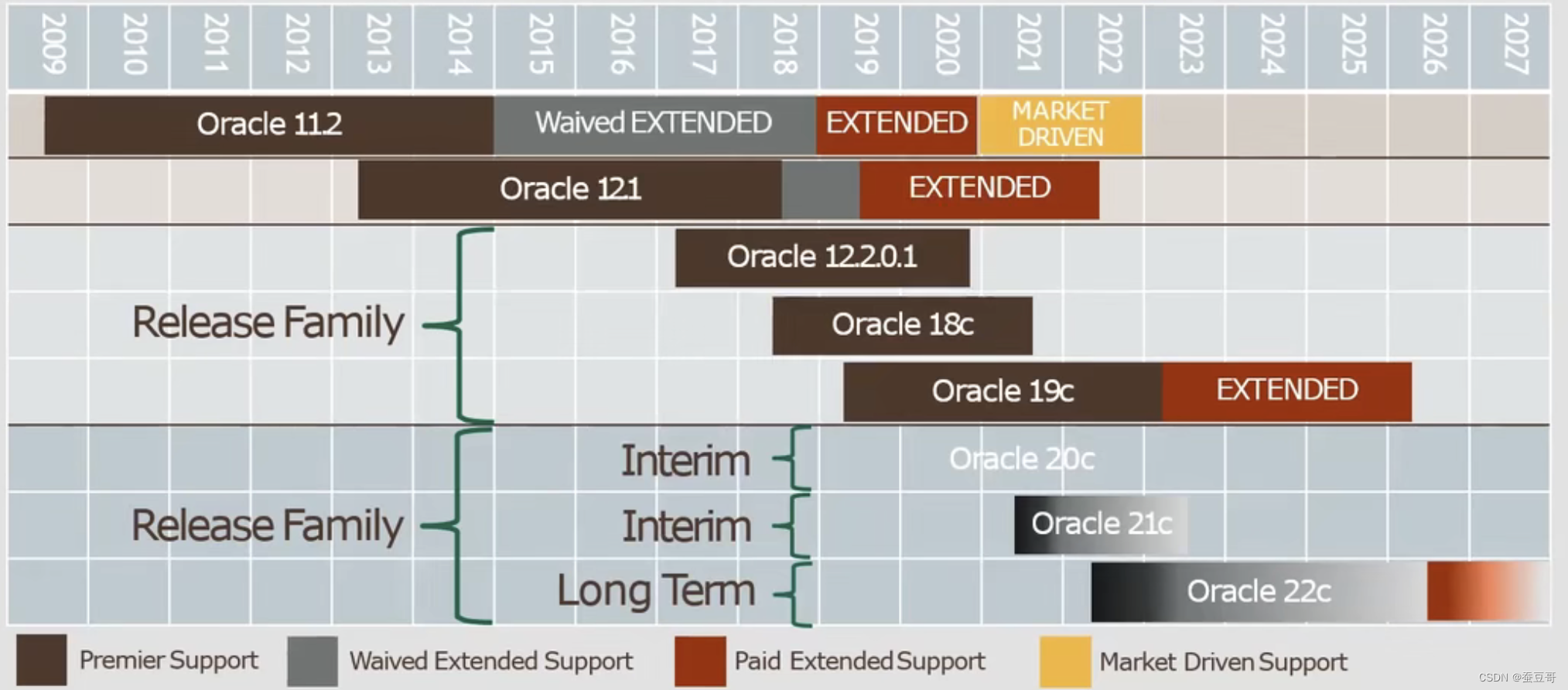
需了解的Oracle数据库产品什么周期
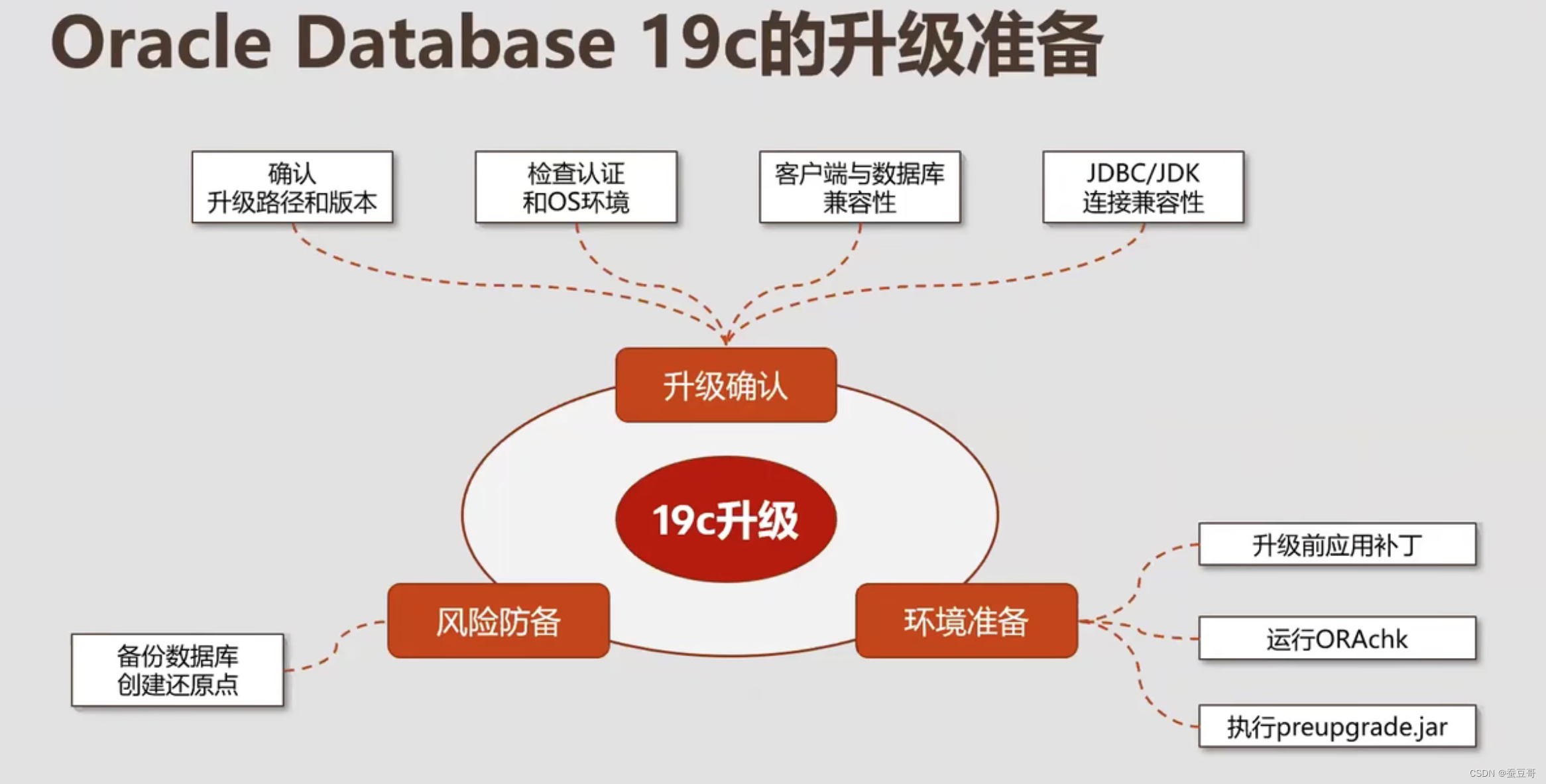
1. Environment
Hostname       		: RAC1.RAJASEKHAR.COM
Database Name  		: CID
DB VERSION		: 12.2.0.1
CDB			: NON-CDB, Single Instance
DB Home Path 		: /u01/app/oracle/product/12.2.0/dbhome_1
Datafile Location 	: /u01/app/oracle/oradata/CIDTarget DB VERSION 	: 19c (19.4.0.0.0)
Target DB Path : /u01/app/oracle/product/19.0.0/dbhome_1Upgrade Method : Manual2. Backup
Database Backup scripts - I have taken alreadySample Backup Database Script: rmanbackup.sh
[oracle@rac1 CID]$
[oracle@rac1 CID]$ chmod 775 rmanbackup.sh
[oracle@rac1 CID]$
[oracle@rac1 CID]$ nohup ./rmanbackup.sh & <--- hit ENTER twice.
TNS Files
[oracle@rac1 ~]$ cd u01/app/oracle/product/12.2.0/dbhome_1/network/admin/
[oracle@rac1 admin]$ cp -p listener.ora sqlnet.ora tnsnames.ora /u01/app/backup/
PFILE/SPFILE/PASSWORD (orapwSID) FILES
[oracle@rac1 dbs]$ pwd
/u01/app/oracle/product/12.2.0/dbhome_1/dbs
[oracle@rac1 dbs]$ cp -p spfileCID.ora orapwCID /u01/app/backup/
INVALID OBJECTS
SQL> select count(*) from dba_objects where status='INVALID';COUNT(*)
----------0 <----SQL>
3. Run preupgrade script
. oraenv (CID)
/u01/app/oracle/product/12.2.0/dbhome_1/jdk/bin/java -jar /u01/app/oracle/product/19.0.0/dbhome_1/rdbms/admin/preupgrade.jar TERMINAL TEXT
--- OR ---
/u01/app/oracle/product/12.2.0/dbhome_1/jdk/bin/java -jar /u01/app/oracle/product/19.0.0/dbhome_1/rdbms/admin/preupgrade.jar FILE DIR /home/oracle/CID/preupgrade[oracle@rac1 ~]$ mkdir -p /home/oracle/CID/preupgrade
[oracle@rac1 ~]$[oracle@rac1 ~]$ . oraenv
ORACLE_SID = [oracle] ? CID
The Oracle base has been set to /u01/app/oracle
[oracle@rac1 ~]$
[oracle@rac1 ~]$ /u01/app/oracle/product/12.2.0/dbhome_1/jdk/bin/java -jar /u01/app/oracle/product/19.0.0/dbhome_1/rdbms/admin/preupgrade.jar FILE DIR /home/oracle/CID/preupgrade
==================
PREUPGRADE SUMMARY
==================/home/oracle/CID/preupgrade/preupgrade.log/home/oracle/CID/preupgrade/preupgrade_fixups.sql/home/oracle/CID/preupgrade/postupgrade_fixups.sqlExecute fixup scripts as indicated below:Before upgrade:Log into the database and execute the preupgrade fixups
@/home/oracle/CID/preupgrade/preupgrade_fixups.sqlAfter the upgrade:
Log into the database and execute the postupgrade fixups
@/home/oracle/CID/preupgrade/postupgrade_fixups.sql
Preupgrade complete: 2020-01-28T20:45:05
[oracle@rac1 ~]$
4. View Preupgrade log
[oracle@rac1 ~]$ cat /home/oracle/CID/preupgrade/preupgrade.log
Report generated by Oracle Database Pre-Upgrade Information Tool Version
19.0.0.0.0 Build: 1 on 2020-01-28T20:45:05Upgrade-To version: 19.0.0.0.0=======================================
Status of the database prior to upgrade
=======================================Database Name:  CIDContainer Name:  CIDContainer ID:  0Version:  12.2.0.1.0DB Patch Level:  No Patch Bundle appliedCompatible:  12.2.0Blocksize:  8192Platform:  Linux x86 64-bitTimezone File:  26Database log mode:  ARCHIVELOGReadonly:  FALSEEdition:  EEOracle Component                       Upgrade Action    Current Status----------------                       --------------    --------------Oracle Server                          [to be upgraded]  VALIDJServer JAVA Virtual Machine           [to be upgraded]  VALIDOracle XDK for Java                    [to be upgraded]  VALIDReal Application Clusters              [to be upgraded]  OPTION OFFOracle Workspace Manager               [to be upgraded]  VALIDOLAP Analytic Workspace                [to be upgraded]  VALIDOracle Label Security                  [to be upgraded]  VALIDOracle Database Vault                  [to be upgraded]  VALIDOracle Text                            [to be upgraded]  VALIDOracle XML Database                    [to be upgraded]  VALIDOracle Java Packages                   [to be upgraded]  VALIDOracle Multimedia                      [to be upgraded]  VALIDOracle Spatial                         [to be upgraded]  VALIDOracle OLAP API                        [to be upgraded]  VALID==============
BEFORE UPGRADE
==============REQUIRED ACTIONS================NoneRECOMMENDED ACTIONS===================1.  (AUTOFIXUP) Gather stale data dictionary statistics prior to databaseupgrade in off-peak time using:EXECUTE DBMS_STATS.GATHER_DICTIONARY_STATS;Dictionary statistics do not exist or are stale (not up-to-date).Dictionary statistics help the Oracle optimizer find efficient SQLexecution plans and are essential for proper upgrade timing. Oraclerecommends gathering dictionary statistics in the last 24 hours beforedatabase upgrade.For information on managing optimizer statistics, refer to the 12.2.0.1Oracle Database SQL Tuning Guide.2.  (AUTOFIXUP) Gather statistics on fixed objects prior the upgrade.None of the fixed object tables have had stats collected.Gathering statistics on fixed objects, if none have been gathered yet, isrecommended prior to upgrading.For information on managing optimizer statistics, refer to the 12.2.0.1Oracle Database SQL Tuning Guide.INFORMATION ONLY================3.  To help you keep track of your tablespace allocations, the followingAUTOEXTEND tablespaces are expected to successfully EXTEND during theupgrade process.Min SizeTablespace                        Size     For Upgrade----------                     ----------  -----------SYSAUX                             460 MB       500 MBSYSTEM                             800 MB       912 MBTEMP                                32 MB       150 MBUNDOTBS1                            70 MB       439 MBMinimum tablespace sizes for upgrade are estimates.4.  Ensure there is additional disk space in LOG_ARCHIVE_DEST_1 for at least4618 MB of archived logs.  Check alert log during the upgrade that thereis no write error to the destination due to lack of disk space.Archiving cannot proceed if the archive log destination is full duringupgrade.Archive Log Destination:Parameter    :  LOG_ARCHIVE_DEST_1Destination  :  /u01/app/archive/CIDThe database has archiving enabled.  The upgrade process will need freedisk space in the archive log destination(s) to generate archived logs to.5.  Check the Oracle Backup and Recovery User's Guide for information on howto manage an RMAN recovery catalog schema.If you are using a version of the recovery catalog schema that is olderthan that required by the RMAN client version, then you must upgrade thecatalog schema.It is good practice to have the catalog schema the same or higher versionthan the RMAN client version you are using.ORACLE GENERATED FIXUP SCRIPT=============================All of the issues in database CIDwhich are identified above as BEFORE UPGRADE "(AUTOFIXUP)" can be resolved byexecuting the followingSQL>@/home/oracle/CID/preupgrade/preupgrade_fixups.sql=============
AFTER UPGRADE
=============REQUIRED ACTIONS================NoneRECOMMENDED ACTIONS===================6.  Upgrade the database time zone file using the DBMS_DST package.The database is using time zone file version 26 and the target 19 releaseships with time zone file version 32.Oracle recommends upgrading to the desired (latest) version of the timezone file.  For more information, refer to "Upgrading the Time Zone Fileand Timestamp with Time Zone Data" in the 19 Oracle DatabaseGlobalization Support Guide.7.  (AUTOFIXUP) Gather dictionary statistics after the upgrade using thecommand:EXECUTE DBMS_STATS.GATHER_DICTIONARY_STATS;Oracle recommends gathering dictionary statistics after upgrade.Dictionary statistics provide essential information to the Oracleoptimizer to help it find efficient SQL execution plans. After a databaseupgrade, statistics need to be re-gathered as there can now be tablesthat have significantly changed during the upgrade or new tables that donot have statistics gathered yet.8.  Gather statistics on fixed objects after the upgrade and when there is arepresentative workload on the system using the command:EXECUTE DBMS_STATS.GATHER_FIXED_OBJECTS_STATS;This recommendation is given for all preupgrade runs.Fixed object statistics provide essential information to the Oracleoptimizer to help it find efficient SQL execution plans.  Thosestatistics are specific to the Oracle Database release that generatesthem, and can be stale upon database upgrade.For information on managing optimizer statistics, refer to the 12.2.0.1Oracle Database SQL Tuning Guide.ORACLE GENERATED FIXUP SCRIPT=============================All of the issues in database CIDwhich are identified above as AFTER UPGRADE "(AUTOFIXUP)" can be resolved byexecuting the followingSQL>@/home/oracle/CID/preupgrade/postupgrade_fixups.sql[oracle@rac1 ~]$
5. Verify tablespace sizes for upgrade
** Tablespace Auto extend ON and max size also set, hence no action taken.DATABASE - Bright DBA
TABLESPACE_NAME   AUT FILE_NAME                                  TOTAL_SPACE FREE_SPACE      Free%  MAX_SPACE
----------------- --- ------------------------------------------ ----------- ---------- ---------- ----------
SYSAUX            YES /u01/app/oracle/oradata/CID/sysaux01.dbf           460         23       5.08 31.9999847
SYSTEM            YES /u01/app/oracle/oradata/CID/system01.dbf           800          4        .48 31.9999847
UNDOTBS1          YES /u01/app/oracle/oradata/CID/undotbs01.dbf           70          3        4.2 31.9999847
USERS             YES /u01/app/oracle/oradata/CID/users01.dbf              5          4         80 31.9999847
*****************                                                ----------- ----------            ----------
sum                                                                     1335         34            127.999939SQL>
6. Update INITIALIZATION PARAMETERS
In this test scenario, noting to update as per preupgrade.log. Hence no action taken.
7. Gather DICTIONARY STATS
SQL> SET ECHO ON;
SQL> SET SERVEROUTPUT ON;
SQL> EXECUTE DBMS_STATS.GATHER_DICTIONARY_STATS;PL/SQL procedure successfully completed.SQL>
8. Purge Recyclebin
SQL> PURGE DBA_RECYCLEBIN;DBA Recyclebin purged.SQL>
9. Refresh MVs
*** Before upgrading Oracle Database, you must wait until all materialized views have completed refreshing.
Run the following SQL query:
SQL> SELECT o.name FROM sys.obj$ o, sys.user$ u, sys.sum$ s WHERE o.type# = 42 AND bitand(s.mflags, 8) =8;no rows selectedSQL>SQL> declare
list_failures integer(3) :=0;
begin
DBMS_MVIEW.REFRESH_ALL_MVIEWS(list_failures,'C','', TRUE, FALSE);
end;
/PL/SQL procedure successfully completed.SQL>
10. Run preupgrade_fixups.sql
SQL> @/home/oracle/CID/preupgrade/preupgrade_fixups.sql
SQL> REM
SQL> REM    Oracle PRE-Upgrade Fixup Script
SQL> REM
SQL> REM    Auto-Generated by:       Oracle Preupgrade Script
SQL> REM                             Version: 19.0.0.0.0 Build: 1
SQL> REM    Generated on:            2020-01-28 20:45:02
SQL> REM
SQL> REM    Source Database:         CID
SQL> REM    Source Database Version: 12.2.0.1.0
SQL> REM    For Upgrade to Version:     19.0.0.0.0
SQL> REM
SQL>
SQL> REM
SQL> REM    Setup Environment
SQL> REM
SQL> SET ECHO OFF SERVEROUTPUT ON FORMAT WRAPPED TAB OFF LINESIZE 200;
Executing Oracle PRE-Upgrade Fixup ScriptAuto-Generated by:       Oracle Preupgrade ScriptVersion: 19.0.0.0.0 Build: 1
Generated on:            2020-01-28 20:45:02For Source Database:     CID
Source Database Version: 12.2.0.1.0
For Upgrade to Version:  19.0.0.0.0Preup                             Preupgrade
Action                            Issue Is
Number  Preupgrade Check Name     Remedied    Further DBA Action
------  ------------------------  ----------  --------------------------------1.  dictionary_stats          YES         None.2.  pre_fixed_objects         YES         None.3.  tablespaces_info          NO          Informational only.Further action is optional.4.  min_archive_dest_size     NO          Informational only.Further action is optional.5.  rman_recovery_version     NO          Informational only.Further action is optional.The fixup scripts have been run and resolved what they can. However,
there are still issues originally identified by the preupgrade that
have not been remedied and are still present in the database.
Depending on the severity of the specific issue, and the nature of
the issue itself, that could mean that your database is not ready
for upgrade.  To resolve the outstanding issues, start by reviewing
the preupgrade_fixups.sql and searching it for the name of
the failed CHECK NAME or Preupgrade Action Number listed above.
There you will find the original corresponding diagnostic message
from the preupgrade which explains in more detail what still needs
to be done.PL/SQL procedure successfully completed.SQL>
11. Verify archive log dest size
*** Please verify free space on ALL LOG_ARCHIVE_DEST_ locations including ALL standby destinations
SQL> archive log list
Database log mode              Archive Mode
Automatic archival             Enabled
Archive destination            /u01/app/archive/CID
Oldest online log sequence     1
Next log sequence to archive   2
Current log sequence           2
SQL>
SQL> !df -h /u01/app/archive/CID
Filesystem      Size  Used Avail Use% Mounted on
/dev/sda5        67G   35G   33G  52% /u01 <----SQL>
12. Stop LISTENER
[oracle@rac1 ~]$ ps -ef | grep tns
root        15     2  0 20:01 ?        00:00:00 [netns]
oracle    3943     1  0 20:08 ?        00:00:00 /u01/app/oracle/product/12.2.0/dbhome_1/bin/tnslsnr LISTENER_CID -inherit
oracle   16771  3093  0 21:03 pts/1    00:00:00 grep --color=auto tns
[oracle@rac1 ~]$ lsnrctl stop LISTENER_CIDLSNRCTL for Linux: Version 12.2.0.1.0 - Production on 28-JAN-2020 21:03:14Copyright (c) 1991, 2016, Oracle.  All rights reserved.Connecting to (DESCRIPTION=(ADDRESS=(PROTOCOL=TCP)(HOST=rac1.rajasekhar.com)(PORT=1524)))
The command completed successfully
[oracle@rac1 ~]$
[oracle@rac1 ~]$ ps -ef | grep tns
root        15     2  0 20:01 ?        00:00:00 [netns]
oracle   16812  3093  0 21:03 pts/1    00:00:00 grep --color=auto tns
[oracle@rac1 ~]$
13. Create Flashback Guaranteed Restore Point
*** NO need to enable Flashback Database from 11.2.0.1 onwards
*** Database MUST be in Archive Log mode
*** MUST NOT change the compatible parameter to higher version
SQL> select flashback_on from v$database;FLASHBACK_ON
------------------
NO <-----SQL> select name,open_mode,log_mode from v$database;NAME      OPEN_MODE            LOG_MODE
--------- -------------------- ------------
CID       READ WRITE           ARCHIVELOGSQL> show parameter compatibleNAME                                 TYPE        VALUE
------------------------------------ ----------- ------------------------------
compatible                           string      12.2.0 <----
noncdb_compatible                    boolean     FALSE
SQL>
SQL> show parameter recoveryNAME                                 TYPE        VALUE
------------------------------------ ----------- ------------------------------
db_recovery_file_dest                string
db_recovery_file_dest_size           big integer 0
recovery_parallelism                 integer     0
remote_recovery_file_dest            string
SQL>
SQL>!mkdir -p /u01/app/oracle/fast_recovery_areaSQL> alter system set db_recovery_file_dest_size=10G;System altered.SQL> alter system set db_recovery_file_dest='/u01/app/oracle/fast_recovery_area';System altered.SQL> show parameter recoveryNAME                                 TYPE        VALUE
------------------------------------ ----------- ------------------------------
db_recovery_file_dest                string      /u01/app/oracle/fast_recovery_area
db_recovery_file_dest_size           big integer 10G
recovery_parallelism                 integer     0
remote_recovery_file_dest            string
SQL>SQL> select * from V$restore_point;no rows selectedSQL>SQL> create restore point pre_upgrade guarantee flashback database;Restore point created.SQL>SQL> col name for a20
col GUARANTEE_FLASHBACK_DATABASE for a10
col TIME for a60
set lines 190
select NAME,GUARANTEE_FLASHBACK_DATABASE,TIME from V$restore_point;NAME                 GUARANTEE_ TIME
-------------------- ---------- ------------------------------------------------------------
PRE_UPGRADE          YES        28-JAN-20 09.05.50.000000000 PMSQL>
UPGRADE TASK
14. Shutdown Database
SQL> SELECT NAME,OPEN_MODE FROM V$DATABASE;NAME                 OPEN_MODE
-------------------- --------------------
CID                  READ WRITESQL> SHUT IMMEDIATE;
Database closed.
Database dismounted.
ORACLE instance shut down.
SQL>
15. Copy init and password files from 12c to 19c dbs home
[oracle@rac1 ~]$ cd /u01/app/oracle/product/12.2.0/dbhome_1/dbs
[oracle@rac1 dbs]$ ls -ltr *CID*
-rw-r-----. 1 oracle oinstall   24 Jan 28 20:08 lkCID
-rw-r-----. 1 oracle oinstall 3584 Jan 28 20:11 orapwCID <---
-rw-r-----. 1 oracle oinstall 3584 Jan 28 21:05 spfileCID.ora <---
-rw-rw----. 1 oracle oinstall 1544 Jan 28 21:07 hc_CID.dat
[oracle@rac1 dbs]$
[oracle@rac1 dbs]$ cp orapwCID spfileCID.ora /u01/app/oracle/product/19.0.0/dbhome_1/dbs/
[oracle@rac1 dbs]$
[oracle@rac1 dbs]$ ls -ltr /u01/app/oracle/product/19.0.0/dbhome_1/dbs/*CID*
-rw-r-----. 1 oracle oinstall 3584 Jan 28 21:10 /u01/app/oracle/product/19.0.0/dbhome_1/dbs/spfileCID.ora
-rw-r-----. 1 oracle oinstall 3584 Jan 28 21:10 /u01/app/oracle/product/19.0.0/dbhome_1/dbs/orapwCID
[oracle@rac1 dbs]$
16. Startup DB in Upgrade mode from 19c home
[oracle@rac1 ~]$ export ORACLE_HOME=/u01/app/oracle/product/19.0.0/dbhome_1
[oracle@rac1 ~]$ export ORACLE_SID=CID
[oracle@rac1 ~]$ PATH=/u01/app/oracle/product/19.0.0/dbhome_1/bin:$PATH; export PATH
[oracle@rac1 ~]$ which sqlplus
/u01/app/oracle/product/19.0.0/dbhome_1/bin/sqlplus
[oracle@rac1 ~]$ sqlplus / as sysdbaSQL*Plus: Release 19.0.0.0.0 - Production on Tue Jan 28 21:13:24 2020
Version 19.4.0.0.0Copyright (c) 1982, 2019, Oracle.  All rights reserved.Connected to an idle instance.SQL> startup upgrade;
ORACLE instance started.Total System Global Area 1560277408 bytes
Fixed Size                  8896928 bytes
Variable Size             939524096 bytes
Database Buffers          603979776 bytes
Redo Buffers                7876608 bytes
Database mounted.
Database opened.
SQL>
SQL> select name,open_mode,cdb,version,status from v$database,v$instance;NAME      OPEN_MODE            CDB VERSION           STATUS
--------- -------------------- --- ----------------- ------------
CID       READ WRITE           NO  19.0.0.0.0        OPEN MIGRATE <---SQL>
17. Run dbupgrade
You can run the upgrade using either of the following commands. The second is actually just a shorthand for the former.# Regular upgrade command
[oracle@rac1 ~]$ mkdir -p /home/oracle/whileupgrade
[oracle@rac1 ~]$ cd /u01/app/oracle/product/19.0.0/dbhome_1/rdbms/admin
[oracle@rac1 ~]$ nohup /u01/app/oracle/product/19.0.0/dbhome_1/perl/bin/perl catctl.pl -l /home/oracle/whileupgrade -n 4 catupgrd.sql &
--- OR ---# Shorthand command
[oracle@rac1 ~]$ cd /u01/app/oracle/product/19.0.0/dbhome_1/bin/
[oracle@rac1 bin]$ ls -ltr dbupgrade
-rwxr-x---. 1 oracle oinstall 3136 Apr 17  2019 dbupgrade
[oracle@rac1 bin]$
[oracle@rac1 bin]$ nohup ./dbupgrade & <--- Hit ENTER twice
[1] 22584
[oracle@rac1 bin]$ nohup: ignoring input and appending output to ânohup.outâ[oracle@rac1 bin]$ jobs -l
[1]+ 22584 Running                 nohup ./dbupgrade & <----
[oracle@rac1 bin]$
[oracle@rac1 bin]$ disown
[oracle@rac1 bin]$
[oracle@rac1 bin]$ ps -ef | grep -i catctl.pl
oracle   22589 22584  0 21:33 pts/1    00:00:03 /u01/app/oracle/product/19.0.0/dbhome_1/perl/bin/perl -I/u01/app/oracle/product/19.0.0/dbhome_1/perl/lib /u01/app/oracle/product/19.0.0/dbhome_1/rdbms/admin/catctl.pl /u01/app/oracle/product/19.0.0/dbhome_1/rdbms/admin/catupgrd.sql
oracle   24991  3093  0 21:40 pts/1    00:00:00 grep --color=auto -i catctl.pl
[oracle@rac1 bin]$
Monitor upgrade log under below location
18. Starup DB from 19c home
[oracle@rac1 ~]$ export ORACLE_HOME=/u01/app/oracle/product/19.0.0/dbhome_1
[oracle@rac1 ~]$ export ORACLE_SID=CID
[oracle@rac1 ~]$ PATH=/u01/app/oracle/product/19.0.0/dbhome_1/bin:$PATH; export PATH
[oracle@rac1 ~]$ which sqlplus
/u01/app/oracle/product/19.0.0/dbhome_1/bin/sqlplus
[oracle@rac1 ~]$ sqlplus / as sysdbaSQL*Plus: Release 19.0.0.0.0 - Production on Tue Jan 28 22:25:18 2020
Version 19.4.0.0.0Copyright (c) 1982, 2019, Oracle.  All rights reserved.Connected to an idle instance.SQL> startup;
ORACLE instance started.Total System Global Area 1560277408 bytes
Fixed Size                  8896928 bytes
Variable Size            1174405120 bytes
Database Buffers          369098752 bytes
Redo Buffers                7876608 bytes
Database mounted.
Database opened.
SQL> select name,open_mode,cdb,version,status from v$database,v$instance;NAME      OPEN_MODE            CDB VERSION           STATUS
--------- -------------------- --- ----------------- ------------
CID       READ WRITE           NO  19.0.0.0.0        OPEN <-----SQL>
SQL> col COMP_ID for a10
col COMP_NAME for a40
col VERSION for a15
set lines 180
set pages 999
select COMP_ID,COMP_NAME,VERSION,STATUS from dba_registry;COMP_ID    COMP_NAME                                VERSION         STATUS
---------- ---------------------------------------- --------------- --------------------------------------------
CATALOG    Oracle Database Catalog Views            19.0.0.0.0      UPGRADED
CATPROC    Oracle Database Packages and Types       19.0.0.0.0      UPGRADED
JAVAVM     JServer JAVA Virtual Machine             19.0.0.0.0      UPGRADED
XML        Oracle XDK                               19.0.0.0.0      UPGRADED
CATJAVA    Oracle Database Java Packages            19.0.0.0.0      UPGRADED
APS        OLAP Analytic Workspace                  19.0.0.0.0      UPGRADED
RAC        Oracle Real Application Clusters         19.0.0.0.0      UPGRADED
XDB        Oracle XML Database                      19.0.0.0.0      UPGRADED
OWM        Oracle Workspace Manager                 19.0.0.0.0      UPGRADED
CONTEXT    Oracle Text                              19.0.0.0.0      UPGRADED
ORDIM      Oracle Multimedia                        19.0.0.0.0      UPGRADED
SDO        Spatial                                  19.0.0.0.0      LOADING
XOQ        Oracle OLAP API                          19.0.0.0.0      UPGRADED
OLS        Oracle Label Security                    19.0.0.0.0      UPGRADED
DV         Oracle Database Vault                    19.0.0.0.0      UPGRADED15 rows selected.SQL>
POST-UPGRADE TASKS WHEN DBUA USING
19. Run utlrp.sql
Run catcon.pl to start utlrp.sql, and to recompile any remaining invalid objects.$ORACLE_HOME/perl/bin/perl catcon.pl -n 1 -e -b utlrp -d '''.''' utlrp.sql-- OR ---
20. Run postupgrade_fixups.sql
SQL> @/home/oracle/CID/preupgrade/postupgrade_fixups.sqlSession altered.PL/SQL procedure successfully completed.
PL/SQL procedure successfully completed.
PL/SQL procedure successfully completed.Package created.
No errors.Package body created.
PL/SQL procedure successfully completed.No errors.
Package created.No errors.
Package body created.No errors.
Executing Oracle POST-Upgrade Fixup ScriptAuto-Generated by:       Oracle Preupgrade ScriptVersion: 19.0.0.0.0 Build: 1
Generated on:            2020-01-28 20:45:05For Source Database:     CID
Source Database Version: 12.2.0.1.0
For Upgrade to Version:  19.0.0.0.0Preup                             Preupgrade
Action                            Issue Is
Number  Preupgrade Check Name     Remedied    Further DBA Action
------  ------------------------  ----------  --------------------------------6.  old_time_zones_exist      NO          Manual fixup recommended.7.  post_dictionary           YES         None.8.  post_fixed_objects        NO          Informational only.Further action is optional.The fixup scripts have been run and resolved what they can. However,
there are still issues originally identified by the preupgrade that
have not been remedied and are still present in the database.
Depending on the severity of the specific issue, and the nature of
the issue itself, that could mean that your database upgrade is not
fully complete.  To resolve the outstanding issues, start by reviewing
the postupgrade_fixups.sql and searching it for the name of
the failed CHECK NAME or Preupgrade Action Number listed above.
There you will find the original corresponding diagnostic message
from the preupgrade which explains in more detail what still needs
to be done.PL/SQL procedure successfully completed.Session altered.SQL>
21. Upgrade Timezone
For releases (18c, 19c), the timezone upgrade scripts are included in the target ORACLE_HOME under rdbms/admin directoryThe following scripts get delivered with Oracle Database 18c onward$ORACLE_HOME/rdbms/admin/utltz_countstats.sqlScript to gives how much TIMESTAMP WITH TIME ZONE data there is in a database using stats info. No restart required.$ORACLE_HOME/rdbms/admin/utltz_countstar.sqlScript to approximate how much TIMESTAMP WITH TIME ZONE data there is in a database using a COUNT(*) for each table that has a TSTZ column. This script is useful when using DBMS_DST package or the scripts of utlz_upg_check.sql and utlz_upg_apply.sql scripts.$ORACLE_HOME/rdbms/admin/utltz_upg_check.sqlTime zone upgrade check script$ORACLE_HOME/rdbms/admin/utltz_upg_apply.sqlTime zone apply script. Warning: This script will restart the database and adjust time zone data.
[oracle@rac1 ~]$ cd /u01/app/oracle/product/19.0.0/dbhome_1/rdbms/admin/
[oracle@rac1 admin]$ ls -ltr utltz_countstats.sql utltz_countstar.sql utltz_upg_check.sql utltz_upg_apply.sql
-rw-r--r--. 1 oracle oinstall  8317 Feb 25  2017 utltz_countstats.sql
-rw-r--r--. 1 oracle oinstall  7423 Feb 25  2017 utltz_countstar.sql
-rw-r--r--. 1 oracle oinstall 33684 Sep  9  2017 utltz_upg_check.sql
-rw-r--r--. 1 oracle oinstall 21526 Sep  9  2017 utltz_upg_apply.sql
[oracle@rac1 admin]$SQL> SELECT version FROM v$timezone_file;VERSION
----------26 <-----SQL>SQL> @/u01/app/oracle/product/19.0.0/dbhome_1/rdbms/admin/utltz_upg_check.sqlSession altered.INFO: Starting with RDBMS DST update preparation.
INFO: NO actual RDBMS DST update will be done by this script.
INFO: If an ERROR occurs the script will EXIT sqlplus.
INFO: Doing checks for known issues ...
INFO: Database version is 19.0.0.0 .
INFO: Database RDBMS DST version is DSTv26 .
INFO: No known issues detected.
INFO: Now detecting new RDBMS DST version.
A prepare window has been successfully started.
INFO: Newest RDBMS DST version detected is DSTv32 .
INFO: Next step is checking all TSTZ data.
INFO: It might take a while before any further output is seen ...
A prepare window has been successfully ended.
INFO: A newer RDBMS DST version than the one currently used is found.
INFO: Note that NO DST update was yet done.
INFO: Now run utltz_upg_apply.sql to do the actual RDBMS DST update.
INFO: Note that the utltz_upg_apply.sql script will
INFO: restart the database 2 times WITHOUT any confirmation or prompt.Session altered.SQL>SQL> @/u01/app/oracle/product/19.0.0/dbhome_1/rdbms/admin/utltz_upg_apply.sqlSession altered.INFO: If an ERROR occurs, the script will EXIT SQL*Plus.
INFO: The database RDBMS DST version will be updated to DSTv32 .
WARNING: This script will restart the database 2 times
WARNING: WITHOUT asking ANY confirmation.
WARNING: Hit control-c NOW if this is not intended.
INFO: Restarting the database in UPGRADE mode to start the DST upgrade.
Database closed.
Database dismounted.
ORACLE instance shut down.
ORACLE instance started.Total System Global Area 1560277408 bytes
Fixed Size                  8896928 bytes
Variable Size            1191182336 bytes
Database Buffers          352321536 bytes
Redo Buffers                7876608 bytes
Database mounted.
Database opened.
INFO: Starting the RDBMS DST upgrade.
INFO: Upgrading all SYS owned TSTZ data.
INFO: It might take time before any further output is seen ...
An upgrade window has been successfully started.
INFO: Restarting the database in NORMAL mode to upgrade non-SYS TSTZ data.
Database closed.
Database dismounted.
ORACLE instance shut down.
ORACLE instance started.Total System Global Area 1560277408 bytes
Fixed Size                  8896928 bytes
Variable Size            1191182336 bytes
Database Buffers          352321536 bytes
Redo Buffers                7876608 bytes
Database mounted.
Database opened.
INFO: Upgrading all non-SYS TSTZ data.
INFO: It might take time before any further output is seen ...
INFO: Do NOT start any application yet that uses TSTZ data!
INFO: Next is a list of all upgraded tables:
Table list: "GSMADMIN_INTERNAL"."AQ$_CHANGE_LOG_QUEUE_TABLE_S"
Number of failures: 0
Table list: "GSMADMIN_INTERNAL"."AQ$_CHANGE_LOG_QUEUE_TABLE_L"
Number of failures: 0
Table list: "MDSYS"."SDO_DIAG_MESSAGES_TABLE"
Number of failures: 0
Table list: "DVSYS"."SIMULATION_LOG$"
Number of failures: 0
Table list: "DVSYS"."AUDIT_TRAIL$"
Number of failures: 0
INFO: Total failures during update of TSTZ data: 0 .
An upgrade window has been successfully ended.
INFO: Your new Server RDBMS DST version is DSTv32 .
INFO: The RDBMS DST update is successfully finished.
INFO: Make sure to exit this SQL*Plus session.
INFO: Do not use it for timezone related selects.Session altered.SQL>
SQL> SELECT version FROM v$timezone_file;VERSION
----------32 <----1 row selected.SQL>
22. Run utlusts.sql
*** Note: utluNNNs.sql is replaced by utlusts.sql in 19c version
*** Note: In 19c Earlier version utluNNNs.sql is replaced by utlusts.sql
*** Run utlusts.sql as many times as you want, at any time after the upgrade is completed.
*** utlusts.sql reads the view called dba_registry_log and displays the upgrade results for the database components.
SQL> @/u01/app/oracle/product/19.0.0/dbhome_1/rdbms/admin/utlusts.sql TEXTOracle Database Release 19 Post-Upgrade Status Tool    01-29-2020 01:41:3
Database Name: CIDComponent                               Current         Full     Elapsed Time
Name                                    Status          Version  HH:MM:SSOracle Server                             VALID      19.4.0.0.0  00:18:01
JServer JAVA Virtual Machine              VALID      19.4.0.0.0  00:02:29
Oracle XDK                                VALID      19.4.0.0.0  00:01:12
Oracle Database Java Packages             VALID      19.4.0.0.0  00:00:13
OLAP Analytic Workspace                   VALID      19.4.0.0.0  00:00:19
Oracle Label Security                     VALID      19.4.0.0.0  00:00:11
Oracle Database Vault                     VALID      19.4.0.0.0  00:00:32
Oracle Text                               VALID      19.4.0.0.0  00:00:43
Oracle Workspace Manager                  VALID      19.4.0.0.0  00:00:37
Oracle Real Application Clusters     OPTION OFF      19.4.0.0.0  00:00:01
Oracle XML Database                       VALID      19.4.0.0.0  00:01:49
Oracle Multimedia                         VALID      19.4.0.0.0  00:00:55
Spatial                                   VALID      19.4.0.0.0  00:07:19
Oracle OLAP API                           VALID      19.4.0.0.0  00:00:14
Datapatch                                                        00:08:34
Final Actions                                                    00:08:43
Post Upgrade                                                     00:00:12
Post Compile                                                     00:04:58Total Upgrade Time: 00:49:07Database time zone version is 32. It meets current release needs.SQL>
23. Run catuppst.sql
/*
In 12c:
Oracle Database Upgrade Utilities
You must run this script, either through DBUA or manually, if you perform a manual upgrade.DBUA automatically runs catuppst.sql. You only must run this script separately for manual upgrades.Do not run this in UPGRADE mode. Run catuppst.sql, located in the ORACLE_HOME/rdbms/admin directory, to perform remaining upgrade actions that do not require the database to be in UPGRADE mode. If an Oracle bundle patch or patch set update (PSU or BP) is installed in the Oracle home, then this script automatically applies that patch set update to the database.Caution: If you perform a manual upgrade, and you do not run catuppst.sql, then your database suffers performance degradation over time.
*/
*** Actually it will run as part of upgrade. We have reviewed catupgrd0.log and below is the output... found catuppst.sql ran and don't see errors.
/*
Rem catuppst.sql
Rem
Rem Copyright (c) 2006, 2018, Oracle and/or its affiliates.
Rem All rights reserved.
Rem
Rem    NAME
Rem      catuppst.sql - CATalog UPgrade PoST-upgrade actions
Rem
Rem    DESCRIPTION
Rem      This post-upgrade script performs remaining upgrade actions that
Rem      do not require that the database be open in UPGRADE mode.
Rem      Automatically apply the latest PSU.
Rem
Rem    NOTES
Rem      You must be connected AS SYSDBA to run this script.
..
..
22:19:59 SQL> -- DBUA_TIMESTAMP: catuppst.sql finished
22:19:59 SQL> SELECT dbms_registry_sys.time_stamp('CATUPPST') as timestamp from dual;TIMESTAMP
--------------------------------------------------------------------------------
COMP_TIMESTAMP CATUPPST 	      2020-01-28 22:19:59
DBUA_TIMESTAMP CATUPPST      FINISHED 2020-01-28 22:19:59
DBUA_TIMESTAMP CATUPPST 	 NONE 2020-01-28 22:19:59
*/ *** If we had no errors, the "catuppst.sql" script would have been run as part of the upgrade. we need to run it manually if did have errors. *** However can run one more time make sure no errors during execution.
SQL> @/u01/app/oracle/product/19.0.0/dbhome_1/rdbms/admin/catuppst.sqlTIMESTAMP
--------------------------------------------------------------------------------
COMP_TIMESTAMP DBRESTART              2020-01-29 02:24:23
DBUA_TIMESTAMP DBRESTART     FINISHED 2020-01-29 02:24:23
DBUA_TIMESTAMP DBRESTART         NONE 2020-01-29 02:24:23TIMESTAMP
--------------------------------------------------------------------------------
DBUA_TIMESTAMP CATUPPST       STARTED 2020-01-29 02:24:23TIMESTAMP
--------------------------------------------------------------------------------
COMP_TIMESTAMP POSTUP_BGN             2020-01-29 02:24:23
DBUA_TIMESTAMP POSTUP_BGN    FINISHED 2020-01-29 02:24:23
DBUA_TIMESTAMP POSTUP_BGN        NONE 2020-01-29 02:24:23TIMESTAMP
--------------------------------------------------------------------------------
COMP_TIMESTAMP CATREQ_BGN             2020-01-29 02:24:23
DBUA_TIMESTAMP CATREQ_BGN    FINISHED 2020-01-29 02:24:23
DBUA_TIMESTAMP CATREQ_BGN        NONE 2020-01-29 02:24:23catrequtlmg: b_StatEvt     = TRUE
catrequtlmg: b_SelProps    = FALSE
catrequtlmg: b_UpgradeMode = FALSE
catrequtlmg: b_InUtlMig    = FALSETIMESTAMP
--------------------------------------------------------------------------------
COMP_TIMESTAMP CATREQ_END             2020-01-29 02:24:23
DBUA_TIMESTAMP CATREQ_END    FINISHED 2020-01-29 02:24:23
DBUA_TIMESTAMP CATREQ_END        NONE 2020-01-29 02:24:23catuppst: Dropping library DBMS_DDL_INTERNAL_LIB
catuppst: Dropping view _CURRENT_EDITION_OBJ_MIG
catuppst: Dropping view _ACTUAL_EDITION_OBJ_MIG
catuppst: Dropping view DBA_PART_KEY_COLUMNS_V$_MIG
catuppst: Dropping view DBA_SUBPART_KEY_COLUMNS_V$_MIG
catuppst: Dropping table OBJ$MIG
catuppst: Dropping table USER$MIG
catuppst: Dropping table COL$MIG
catuppst: Dropping table CLU$MIG
catuppst: Dropping table CON$MIG
catuppst: Dropping table BOOTSTRAP$MIG
catuppst: Dropping table TAB$MIG
catuppst: Dropping table TS$MIG
catuppst: Dropping table IND$MIG
catuppst: Dropping table ICOL$MIG
catuppst: Dropping table LOB$MIG
catuppst: Dropping table COLTYPE$MIG
catuppst: Dropping table SUBCOLTYPE$MIG
catuppst: Dropping table NTAB$MIG
catuppst: Dropping table REFCON$MIG
catuppst: Dropping table OPQTYPE$MIG
catuppst: Dropping table ICOLDEP$MIG
catuppst: Dropping table VIEWTRCOL$MIG
catuppst: Dropping table ATTRCOL$MIG
catuppst: Dropping table TYPE_MISC$MIG
catuppst: Dropping table LIBRARY$MIG
catuppst: Dropping table ASSEMBLY$MIG
catuppst: Dropping table TSQ$MIG
catuppst: Dropping table FET$MIGTIMESTAMP
--------------------------------------------------------------------------------
COMP_TIMESTAMP POSTUP_END             2020-01-29 02:24:24
DBUA_TIMESTAMP POSTUP_END    FINISHED 2020-01-29 02:24:24
DBUA_TIMESTAMP POSTUP_END        NONE 2020-01-29 02:24:24TIMESTAMP
--------------------------------------------------------------------------------
COMP_TIMESTAMP CATUPPST               2020-01-29 02:24:24
DBUA_TIMESTAMP CATUPPST      FINISHED 2020-01-29 02:24:24
DBUA_TIMESTAMP CATUPPST          NONE 2020-01-29 02:24:24SQL>
24. Re-Run postupgrade_fixups.sql
SQL> @/home/oracle/CID/preupgrade/postupgrade_fixups.sql
No errors.
No errors.No errors.
No errors.
Executing Oracle POST-Upgrade Fixup ScriptAuto-Generated by:       Oracle Preupgrade ScriptVersion: 19.0.0.0.0 Build: 1
Generated on:            2020-01-28 20:45:05For Source Database:     CID
Source Database Version: 12.2.0.1.0
For Upgrade to Version:  19.0.0.0.0Preup                             Preupgrade
Action                            Issue Is
Number  Preupgrade Check Name     Remedied    Further DBA Action
------  ------------------------  ----------  --------------------------------6.  old_time_zones_exist      YES         None.7.  post_dictionary           YES         None.8.  post_fixed_objects        NO          Informational only.Further action is optional.The fixup scripts have been run and resolved what they can. However,
there are still issues originally identified by the preupgrade that
have not been remedied and are still present in the database.
Depending on the severity of the specific issue, and the nature of
the issue itself, that could mean that your database upgrade is not
fully complete.  To resolve the outstanding issues, start by reviewing
the postupgrade_fixups.sql and searching it for the name of
the failed CHECK NAME or Preupgrade Action Number listed above.
There you will find the original corresponding diagnostic message
from the preupgrade which explains in more detail what still needs
to be done.
SQL>
25. Reverify INVALID OBJECTS
SQL> select count(*) from dba_objects where status='INVALID';COUNT(*)
----------0 <-----
SQL>
26. Drop Restore point
SQL> col name for a20
col GUARANTEE_FLASHBACK_DATABASE for a10
col TIME for a60
set lines 190
select NAME,GUARANTEE_FLASHBACK_DATABASE,TIME from V$restore_point;NAME                 GUARANTEE_ TIME
-------------------- ---------- ------------------------------------------------------------
PRE_UPGRADE          YES        28-JAN-20 09.05.50.000000000 PM
SQL>
SQL> !ls -ltr /u01/app/oracle/fast_recovery_area/CID/flashback
total 1433680
-rw-r-----. 1 oracle oinstall 209723392 Jan 28 21:39 o1_mf_h30dfg5q_.flb
-rw-r-----. 1 oracle oinstall 209723392 Jan 28 21:52 o1_mf_h30dfkos_.flb
-rw-r-----. 1 oracle oinstall 209723392 Jan 28 21:56 o1_mf_h30gdpcm_.flb
-rw-r-----. 1 oracle oinstall 209723392 Jan 28 22:12 o1_mf_h30h4zjr_.flb
-rw-r-----. 1 oracle oinstall 209723392 Jan 28 22:15 o1_mf_h30hdtcw_.flb
-rw-r-----. 1 oracle oinstall 209723392 Jan 28 22:15 o1_mf_h30jhoxw_.flb
-rw-r-----. 1 oracle oinstall 209723392 Jan 29 02:35 o1_mf_h30jc0ct_.flbSQL>
SQL> drop restore point PRE_UPGRADE;Restore point dropped.SQL> select NAME,GUARANTEE_FLASHBACK_DATABASE,TIME from V$restore_point;no rows selectedSQL>
SQL> !ls -ltr /u01/app/oracle/fast_recovery_area/CID/flashback
total 0  <---SQL>
27. Set COMPATIBALE parameter value to 19.0.0
Warning: If the value of COMPATIBLE parameter is changed to 19.0.0 then if for some reasons database needs to be downgraded to 12.2.0.1 the DBA would not have any option other than export/import to downgrade the database. But if this parameter is left unchanged for sometime to see how the database performs after upgrade then it is very easy and fast to downgrade the database if for some reason it is required to be downgraded.
If you change COMPATIBLE you can directly drop your restore points as they are useless. You can’t use Flashback Database to restore point back across a compatibility change of your database.
SQL> show parameter COMPATIBLENAME                                 TYPE        VALUE
------------------------------------ ----------- ------------------------------
compatible                           string      12.2.0
noncdb_compatible                    boolean     FALSE
SQL>
SQL> ALTER SYSTEM SET COMPATIBLE = '19.0.0' SCOPE=SPFILE;System altered.SQL> shut immediate;
Database closed.
Database dismounted.
ORACLE instance shut down.
SQL>
SQL> startup;
ORACLE instance started.Total System Global Area 1560277408 bytes
Fixed Size                  8896928 bytes
Variable Size            1191182336 bytes
Database Buffers          352321536 bytes
Redo Buffers                7876608 bytes
Database mounted.
Database opened.
SQL>
SQL> show parameter COMPATIBLENAME                                 TYPE        VALUE
------------------------------------ ----------- ------------------------------
compatible                           string      19.0.0 <----
noncdb_compatible                    boolean     FALSE
SQL>
28. Verify DBA_REGISTRY
SQL> col COMP_ID for a10
col COMP_NAME for a40
col VERSION for a15
set lines 180
set pages 999
select COMP_ID,COMP_NAME,VERSION,STATUS from dba_registry;COMP_ID    COMP_NAME                                VERSION         STATUS
---------- ---------------------------------------- --------------- --------------------------------------------
CATALOG    Oracle Database Catalog Views            19.0.0.0.0      VALID
CATPROC    Oracle Database Packages and Types       19.0.0.0.0      VALID
JAVAVM     JServer JAVA Virtual Machine             19.0.0.0.0      VALID
XML        Oracle XDK                               19.0.0.0.0      VALID
CATJAVA    Oracle Database Java Packages            19.0.0.0.0      VALID
APS        OLAP Analytic Workspace                  19.0.0.0.0      VALID
RAC        Oracle Real Application Clusters         19.0.0.0.0      OPTION OFF
XDB        Oracle XML Database                      19.0.0.0.0      VALID
OWM        Oracle Workspace Manager                 19.0.0.0.0      VALID
CONTEXT    Oracle Text                              19.0.0.0.0      VALID
ORDIM      Oracle Multimedia                        19.0.0.0.0      VALID
SDO        Spatial                                  19.0.0.0.0      VALID
XOQ        Oracle OLAP API                          19.0.0.0.0      VALID
OLS        Oracle Label Security                    19.0.0.0.0      VALID
DV         Oracle Database Vault                    19.0.0.0.0      VALID15 rows selected.SQL>
29. Add TNS Entries in 19c TNS home
[oracle@rac1 admin]$ cat listener.ora
# listener.ora Network Configuration File: /u01/app/oracle/product/19.0.0/dbhome_1/network/admin/listener.ora
# Generated by Oracle configuration tools.LISTENER_CID =(DESCRIPTION_LIST =(DESCRIPTION =(ADDRESS = (PROTOCOL = TCP)(HOST = rac1.rajasekhar.com)(PORT = 1524))))SID_LIST_LISTENER_CID =(SID_LIST =(SID_DESC =(GLOBAL_DBNAME = CID.rajasekhar.com)(ORACLE_HOME = /u01/app/oracle/product/19.0.0/dbhome_1)(SID_NAME = CID)))
[oracle@rac1 admin]$[oracle@rac1 admin]$ cat tnsnames.ora
# tnsnames.ora Network Configuration File: /u01/app/oracle/product/19.0.0/dbhome_1/network/admin/tnsnames.ora
# Generated by Oracle configuration tools.LISTENER_CID =(ADDRESS = (PROTOCOL = TCP)(HOST = rac1.rajasekhar.com)(PORT = 1524))CID =(DESCRIPTION =(ADDRESS = (PROTOCOL = TCP)(HOST = rac1.rajasekhar.com)(PORT = 1524))(CONNECT_DATA =(SERVER = DEDICATED)(SERVICE_NAME = CID.rajasekhar.com)))[oracle@rac1 admin]$[oracle@rac1 admin]$ cat sqlnet.ora
# sqlnet.ora Network Configuration File: /u01/app/oracle/product/19.0.0/dbhome_1/network/admin/sqlnet.ora
# Generated by Oracle configuration tools.NAMES.DIRECTORY_PATH= (TNSNAMES, ONAMES, HOSTNAME)[oracle@rac1 admin]$[oracle@rac1 admin]$ lsnrctl start LISTENER_CIDLSNRCTL for Linux: Version 19.0.0.0.0 - Production on 29-JAN-2020 03:16:28Copyright (c) 1991, 2019, Oracle.  All rights reserved.Starting /u01/app/oracle/product/19.0.0/dbhome_1/bin/tnslsnr: please wait...TNSLSNR for Linux: Version 19.0.0.0.0 - Production
System parameter file is /u01/app/oracle/product/19.0.0/dbhome_1/network/admin/listener.ora
Log messages written to /u01/app/oracle/diag/tnslsnr/rac1/listener_cid/alert/log.xml
Listening on: (DESCRIPTION=(ADDRESS=(PROTOCOL=tcp)(HOST=rac1.rajasekhar.com)(PORT=1524)))Connecting to (DESCRIPTION=(ADDRESS=(PROTOCOL=TCP)(HOST=rac1.rajasekhar.com)(PORT=1524)))
STATUS of the LISTENER
------------------------
Alias                     LISTENER_CID
Version                   TNSLSNR for Linux: Version 19.0.0.0.0 - Production
Start Date                29-JAN-2020 03:16:28
Uptime                    0 days 0 hr. 0 min. 10 sec
Trace Level               off
Security                  ON: Local OS Authentication
SNMP                      OFF
Listener Parameter File   /u01/app/oracle/product/19.0.0/dbhome_1/network/admin/listener.ora
Listener Log File         /u01/app/oracle/diag/tnslsnr/rac1/listener_cid/alert/log.xml
Listening Endpoints Summary...(DESCRIPTION=(ADDRESS=(PROTOCOL=tcp)(HOST=rac1.rajasekhar.com)(PORT=1524)))
Services Summary...
Service "CID.rajasekhar.com" has 1 instance(s).Instance "CID", status UNKNOWN, has 1 handler(s) for this service...
The command completed successfully
[oracle@rac1 admin]$
[oracle@rac1 admin]$ tnsping cidTNS Ping Utility for Linux: Version 19.0.0.0.0 - Production on 29-JAN-2020 03:16:50Copyright (c) 1997, 2019, Oracle.  All rights reserved.Used parameter files:
/u01/app/oracle/product/19.0.0/dbhome_1/network/admin/sqlnet.oraUsed TNSNAMES adapter to resolve the alias
Attempting to contact (DESCRIPTION = (ADDRESS = (PROTOCOL = TCP)(HOST = rac1.rajasekhar.com)(PORT = 1524)) (CONNECT_DATA = (SERVER = DEDICATED) (SERVICE_NAME = CID.rajasekhar.com)))
OK (0 msec)
[oracle@rac1 admin]$
30. Password File – orapwCID
*** REMOTE_LOGIN_PASSWORDFILE=EXCLUSIVE
*** Password file orapwCID copied automatically during upgrade process.
No action taken.[oracle@rac1 dbs]$ pwd
/u01/app/oracle/product/19.0.0/dbhome_1/dbs
[oracle@rac1 dbs]$ ls -ltr orapwCID
-rw-r-----. 1 oracle oinstall 3584 Jan 28 22:26 orapwCID <----
[oracle@rac1 dbs]$
SQL> show parameter passwordNAME                                 TYPE        VALUE
------------------------------------ ----------- ------------------------------
remote_login_passwordfile            string      EXCLUSIVE
SQL>
31. Edit oratab
[oracle@rac1 ~]$ cat /etc/oratab | grep -i CID
#CID:/u01/app/oracle/product/12.2.0/dbhome_1:N
CID:/u01/app/oracle/product/19.0.0/dbhome_1:N
[oracle@rac1 ~]$
32. Back Up the Database
cat rmanbackup_19c.shSample Database Backup Script:rmanbackup_19c.sh
[oracle@rac1 AFTER_UPGRADE_19C]$ cat backup_db.log
Recovery Manager: Release 19.0.0.0.0 - Production on Wed Jan 29 03:41:08 2020 Version 19.4.0.0.0 Copyright (c) 1982, 2019, Oracle and/or its affiliates. All rights reserved. RMAN>
connected to target database: CID (DBID=3899729854)RMAN> 2> 3> 4> 5> 6> 7> 8>
using target database control file instead of recovery catalog
allocated channel: t1
channel t1: SID=79 device type=DISKallocated channel: t2
channel t2: SID=82 device type=DISKallocated channel: t3
channel t3: SID=80 device type=DISKStarting backup at 29-JAN-20
channel t1: starting full datafile backup set
channel t1: specifying datafile(s) in backup set
input datafile file number=00001 name=/u01/app/oracle/oradata/CID/system01.dbf
input datafile file number=00003 name=/u01/app/oracle/oradata/CID/sysaux01.dbf
channel t1: starting piece 1 at 29-JAN-20
channel t2: starting full datafile backup set
channel t2: specifying datafile(s) in backup set
input datafile file number=00004 name=/u01/app/oracle/oradata/CID/undotbs01.dbf
input datafile file number=00007 name=/u01/app/oracle/oradata/CID/users01.dbf
channel t2: starting piece 1 at 29-JAN-20
channel t2: finished piece 1 at 29-JAN-20
piece handle=/u01/app/backup/CID/AFTER_UPGRADE_19C/database_CID_02un5nen_2 tag=TAG20200129T034111 comment=NONE
channel t2: backup set complete, elapsed time: 00:00:15
channel t1: finished piece 1 at 29-JAN-20
piece handle=/u01/app/backup/CID/AFTER_UPGRADE_19C/database_CID_01un5nen_1 tag=TAG20200129T034111 comment=NONE
channel t1: backup set complete, elapsed time: 00:00:26
Finished backup at 29-JAN-20Starting Control File and SPFILE Autobackup at 29-JAN-20
piece handle=/u01/app/oracle/fast_recovery_area/CID/autobackup/2020_01_29/o1_mf_s_1030938097_h313ml67_.bkp comment=NONE
Finished Control File and SPFILE Autobackup at 29-JAN-20released channel: t1released channel: t2released channel: t3RMAN>
sql statement: alter system archive log currentRMAN> 2> 3> 4> 5> 6> 7> 8>
allocated channel: a1
channel a1: SID=79 device type=DISKallocated channel: a2
channel a2: SID=82 device type=DISKallocated channel: a3
channel a3: SID=80 device type=DISKStarting backup at 29-JAN-20
current log archived
channel a1: starting archived log backup set
channel a1: specifying archived log(s) in backup set
input archived log thread=1 sequence=1 RECID=1 STAMP=1030914018
input archived log thread=1 sequence=2 RECID=2 STAMP=1030916097
input archived log thread=1 sequence=3 RECID=3 STAMP=1030916252
input archived log thread=1 sequence=4 RECID=4 STAMP=1030916367
input archived log thread=1 sequence=5 RECID=5 STAMP=1030916430
input archived log thread=1 sequence=6 RECID=6 STAMP=1030916704
input archived log thread=1 sequence=7 RECID=7 STAMP=1030916941
input archived log thread=1 sequence=8 RECID=8 STAMP=1030917153
input archived log thread=1 sequence=9 RECID=9 STAMP=1030917188
channel a1: starting piece 1 at 29-JAN-20
channel a2: starting archived log backup set
channel a2: specifying archived log(s) in backup set
input archived log thread=1 sequence=10 RECID=10 STAMP=1030917335
input archived log thread=1 sequence=11 RECID=11 STAMP=1030917430
input archived log thread=1 sequence=12 RECID=12 STAMP=1030917598
input archived log thread=1 sequence=13 RECID=13 STAMP=1030917716
input archived log thread=1 sequence=14 RECID=14 STAMP=1030917786
input archived log thread=1 sequence=15 RECID=15 STAMP=1030917852
input archived log thread=1 sequence=16 RECID=16 STAMP=1030917938
input archived log thread=1 sequence=17 RECID=17 STAMP=1030918034
input archived log thread=1 sequence=18 RECID=18 STAMP=1030918175
channel a2: starting piece 1 at 29-JAN-20
channel a3: starting archived log backup set
channel a3: specifying archived log(s) in backup set
input archived log thread=1 sequence=19 RECID=19 STAMP=1030918283
input archived log thread=1 sequence=20 RECID=20 STAMP=1030918326
input archived log thread=1 sequence=21 RECID=21 STAMP=1030918365
input archived log thread=1 sequence=22 RECID=22 STAMP=1030918454
input archived log thread=1 sequence=23 RECID=23 STAMP=1030918512
input archived log thread=1 sequence=24 RECID=24 STAMP=1030918594
input archived log thread=1 sequence=25 RECID=25 STAMP=1030919293
input archived log thread=1 sequence=26 RECID=26 STAMP=1030927180
input archived log thread=1 sequence=27 RECID=27 STAMP=1030935285
input archived log thread=1 sequence=28 RECID=28 STAMP=1030938102
channel a3: starting piece 1 at 29-JAN-20
channel a1: finished piece 1 at 29-JAN-20
piece handle=/u01/app/backup/CID/AFTER_UPGRADE_19C/arch_CID_04un5nfn_4 tag=TAG20200129T034143 comment=NONE
channel a1: backup set complete, elapsed time: 00:02:16
channel a1: starting archived log backup set
channel a1: specifying archived log(s) in backup set
input archived log thread=1 sequence=29 RECID=29 STAMP=1030938103
channel a1: starting piece 1 at 29-JAN-20
channel a2: finished piece 1 at 29-JAN-20
piece handle=/u01/app/backup/CID/AFTER_UPGRADE_19C/arch_CID_05un5nfn_5 tag=TAG20200129T034143 comment=NONE
channel a2: backup set complete, elapsed time: 00:02:18
channel a3: finished piece 1 at 29-JAN-20
piece handle=/u01/app/backup/CID/AFTER_UPGRADE_19C/arch_CID_06un5nfo_6 tag=TAG20200129T034143 comment=NONE
channel a3: backup set complete, elapsed time: 00:02:17
channel a1: finished piece 1 at 29-JAN-20
piece handle=/u01/app/backup/CID/AFTER_UPGRADE_19C/arch_CID_07un5nk1_7 tag=TAG20200129T034143 comment=NONE
channel a1: backup set complete, elapsed time: 00:00:03
Finished backup at 29-JAN-20Starting Control File and SPFILE Autobackup at 29-JAN-20
piece handle=/u01/app/oracle/fast_recovery_area/CID/autobackup/2020_01_29/o1_mf_s_1030938246_h313rjrj_.bkp comment=NONE
Finished Control File and SPFILE Autobackup at 29-JAN-20released channel: a1released channel: a2released channel: a3RMAN> 2> 3> 4> 5>
allocated channel: c1
channel c1: SID=79 device type=DISKStarting backup at 29-JAN-20
channel c1: starting full datafile backup set
channel c1: specifying datafile(s) in backup set
including standby control file in backup set
channel c1: starting piece 1 at 29-JAN-20
channel c1: finished piece 1 at 29-JAN-20
piece handle=/u01/app/backup/CID/AFTER_UPGRADE_19C/Control_CID_09un5nkm_9 tag=TAG20200129T034422 comment=NONE
channel c1: backup set complete, elapsed time: 00:00:01
Finished backup at 29-JAN-20Starting Control File and SPFILE Autobackup at 29-JAN-20
piece handle=/u01/app/oracle/fast_recovery_area/CID/autobackup/2020_01_29/o1_mf_s_1030938266_h313rv5m_.bkp comment=NONE
Finished Control File and SPFILE Autobackup at 29-JAN-20released channel: c1RMAN>
Recovery Manager complete.
[oracle@rac1 AFTER_UPGRADE_19C]$本文来自互联网用户投稿,文章观点仅代表作者本人,不代表本站立场,不承担相关法律责任。如若转载,请注明出处。 如若内容造成侵权/违法违规/事实不符,请点击【内容举报】进行投诉反馈!