用vue实现todos,todos里面包含了增删改查功能,不会的看过来,保准你会!!!
一.先写静态页面,然后把静态页面分组件划分,最后再写效果,效果有增删改查。
二.效果展示:
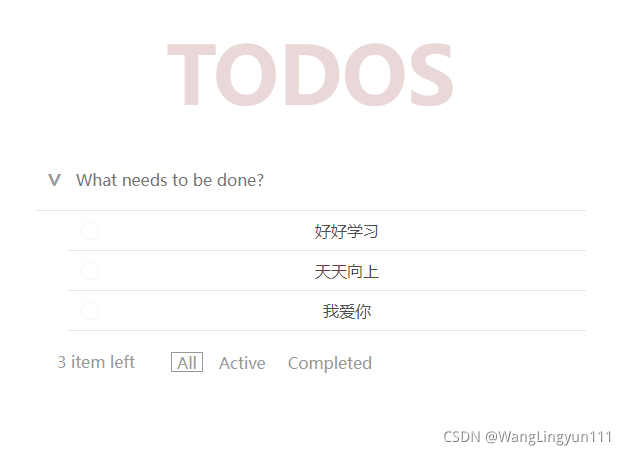
三.代码展示:
todos.css:
*{padding: 0;margin: 0;
}
ul,ol,li{list-style: none;
}
body{background-color: #F5F5F5;
}
#app{width: 550px;margin: 10px auto;}
.title{height: 150px;line-height: 150px;color: #EAD7D7;font-size: 80px;font-weight: bold;text-align: center;width: 100%;
}
.con{width: 100%;background-color: #fff;
}
.top{width: 100%;position: relative;display: flex;background-color: #fff;align-items: center;border-bottom: 1px solid #E6E6E6;
}
#inp{width: 100%;padding-left: 40px;box-sizing: border-box;height: 40px;outline: none;border: 0;margin: 10px 0;color: #E6E6E6;font-size: 16px;
}
.select{position: absolute;width: 40px;height: 40px;margin: 10px 0;color: #999;text-align: center;line-height: 40px;font-weight: 600;font-size: 24px;transform: rotate(90deg);
}
.selbol{color: #333;
}
.center{width: 100%;
}
.list li{width: 100%;height: 40px;border-bottom: 1px solid #E6E6E6;display: flex;align-items: center;background-color: #fff;justify-content: center;border-bottom: 1px solid #E6E6E6;
}
.choose{background: url('data:image/svg+xml;utf8,%3Csvg%20xmlns%3D%22http%3A//www.w3.org/2000/svg%22%20width%3D%2240%22%20height%3D%2240%22%20viewBox%3D%22-10%20-18%20100%20135%22%3E%3Ccircle%20cx%3D%2250%22%20cy%3D%2250%22%20r%3D%2250%22%20fill%3D%22none%22%20stroke%3D%22%23ededed%22%20stroke-width%3D%223%22/%3E%3C/svg%3E') no-repeat center;background-size: 24px 24px;width: 40px;height: 40px;}
.info{height: 40px;line-height: 40px;color: #4d4d4d;font-size: 16px;flex: 1;
}.list .checked .choose{background-image: url('data:image/svg+xml;utf8,%3Csvg%20xmlns%3D%22http%3A//www.w3.org/2000/svg%22%20width%3D%2240%22%20height%3D%2240%22%20viewBox%3D%22-10%20-18%20100%2013
本文来自互联网用户投稿,文章观点仅代表作者本人,不代表本站立场,不承担相关法律责任。如若转载,请注明出处。 如若内容造成侵权/违法违规/事实不符,请点击【内容举报】进行投诉反馈!