SSM BOOT客户管理系统
(一)系统开发及运行环境
- 操作系统:Windows10
- Web服务器:Tomcat8.5
- Java开发包:JDK8
- 开发工具:Eclipse
- 数据库:MySQL5.7
- 浏览器:Firefox或Chrome
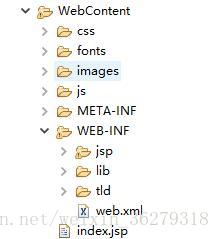
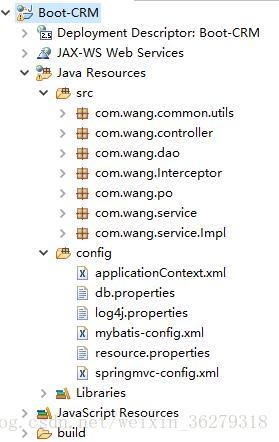
(二)项目结构示意图
如图所示:
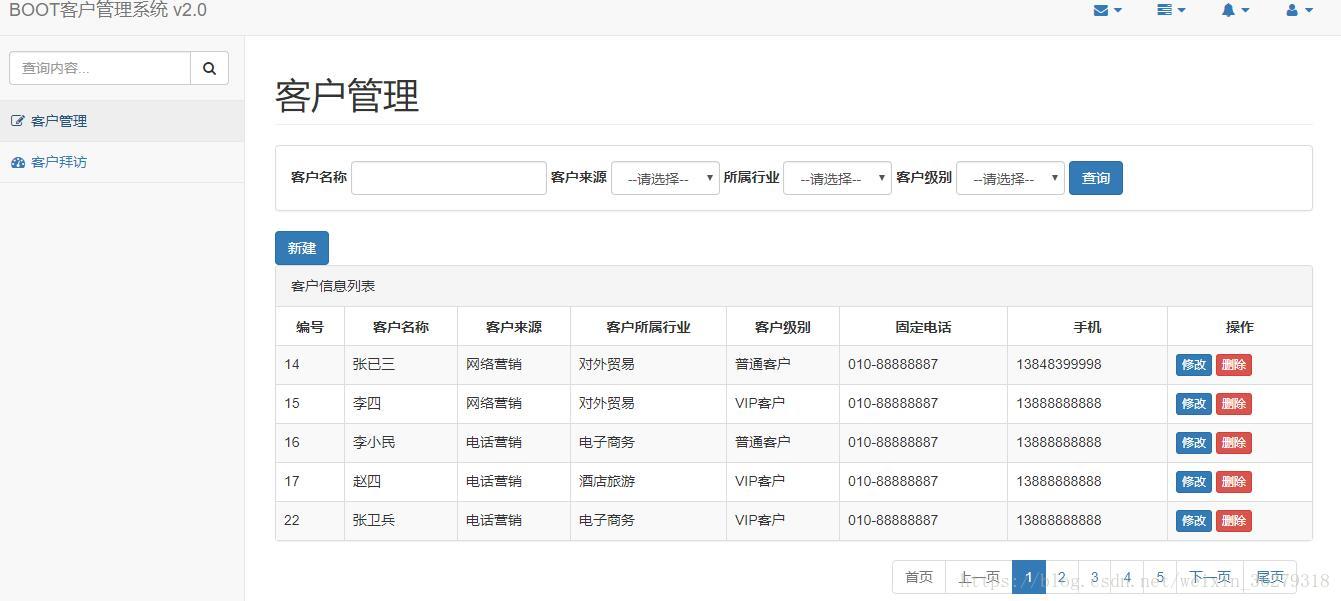
实现CRUD操作界面:
项目源码下载
(三)项目实现步骤
1.编写配置文件
01.applicationContext.xml
<beans xmlns="http://www.springframework.org/schema/beans"xmlns:xsi="http://www.w3.org/2001/XMLSchema-instance" xmlns:mvc="http://www.springframework.org/schema/mvc"xmlns:context="http://www.springframework.org/schema/context"xmlns:aop="http://www.springframework.org/schema/aop" xmlns:tx="http://www.springframework.org/schema/tx"xsi:schemaLocation="http://www.springframework.org/schema/beans http://www.springframework.org/schema/beans/spring-beans-4.3.xsd http://www.springframework.org/schema/mvc http://www.springframework.org/schema/mvc/spring-mvc-4.3.xsd http://www.springframework.org/schema/context http://www.springframework.org/schema/context/spring-context-4.3.xsd http://www.springframework.org/schema/aop http://www.springframework.org/schema/aop/spring-aop-4.3.xsd http://www.springframework.org/schema/tx http://www.springframework.org/schema/tx/spring-tx-4.3.xsd"><context:property-placeholder location="classpath:db.properties"/><bean id="dataSource" class="org.apache.commons.dbcp2.BasicDataSource"><property name="driverClassName" value="${jdbc.driver}" /><property name="url" value="${jdbc.url}" /><property name="username" value="${jdbc.username}" /><property name="password" value="${jdbc.password}" /><property name="maxTotal" value="${jdbc.maxTotal}" /><property name="maxIdle" value="${jdbc.maxIdle}" /><property name="initialSize" value="${jdbc.initialSize}" />bean><bean id="transactionManager" class="org.springframework.jdbc.datasource.DataSourceTransactionManager"><property name="dataSource" ref="dataSource" />bean><tx:advice id="txAdvice" transaction-manager="transactionManager"><tx:attributes><tx:method name="save*" propagation="REQUIRED" /><tx:method name="insert*" propagation="REQUIRED" /><tx:method name="add*" propagation="REQUIRED" /><tx:method name="create*" propagation="REQUIRED" /><tx:method name="delete*" propagation="REQUIRED" /><tx:method name="update*" propagation="REQUIRED" /><tx:method name="find*" propagation="SUPPORTS" read-only="true" /><tx:method name="select*" propagation="SUPPORTS" read-only="true" /><tx:method name="get*" propagation="SUPPORTS" read-only="true" />tx:attributes>tx:advice><aop:config><aop:advisor advice-ref="txAdvice"pointcut="execution(* com.wang.service.*.*(..))" />aop:config>  <bean class="org.mybatis.spring.SqlSessionFactoryBean"><property name="dataSource" ref="dataSource" /><property name="configLocation" value="classpath:mybatis-config.xml" />bean><bean class="org.mybatis.spring.mapper.MapperScannerConfigurer"><property name="basePackage" value="com.wang.dao" />bean><context:component-scan base-package="com.wang.service"/>
beans>
02.db.properties
jdbc.driver=com.mysql.jdbc.Driver
jdbc.url=jdbc:mysql://localhost:3306/boot_crm
jdbc.username=root
jdbc.password=root
jdbc.maxTotal=30
jdbc.maxIdle=10
jdbc.initialSize=5
03.log4j.properties
# Global logging configuration
log4j.rootLogger=ERROR, stdout
# MyBatis logging configuration...
log4j.logger.com.itheima.core=DEBUG
# Console output...
log4j.appender.stdout=org.apache.log4j.ConsoleAppender
log4j.appender.stdout.layout=org.apache.log4j.PatternLayout
log4j.appender.stdout.layout.ConversionPattern=%5p [%t] - %m%n
04.mybatis-config.xml
<configuration><typeAliases><package name="com.wang.po" />typeAliases>
configuration>
05.resource.properties
customer.from.type=002
customer.industry.type=001
customer.level.type=006
06.springmvc-config.xml
<beans xmlns="http://www.springframework.org/schema/beans"xmlns:xsi="http://www.w3.org/2001/XMLSchema-instance" xmlns:mvc="http://www.springframework.org/schema/mvc"xmlns:context="http://www.springframework.org/schema/context"xmlns:aop="http://www.springframework.org/schema/aop" xmlns:tx="http://www.springframework.org/schema/tx"xsi:schemaLocation="http://www.springframework.org/schema/beans http://www.springframework.org/schema/beans/spring-beans-4.3.xsd http://www.springframework.org/schema/mvc http://www.springframework.org/schema/mvc/spring-mvc-4.3.xsd http://www.springframework.org/schema/context http://www.springframework.org/schema/context/spring-context-4.3.xsd http://www.springframework.org/schema/aop http://www.springframework.org/schema/aop/spring-aop-4.3.xsd http://www.springframework.org/schema/tx http://www.springframework.org/schema/tx/spring-tx-4.3.xsd"><context:property-placeholder location="classpath:resource.properties" /><context:component-scan base-package="com.wang.controller" />   <mvc:annotation-driven /><mvc:resources location="/js/" mapping="/js/**" /><mvc:resources location="/css/" mapping="/css/**" /><mvc:resources location="/fonts/" mapping="/fonts/**" /><mvc:resources location="/images/" mapping="/images/**" />  <bean id="viewResolver" class="org.springframework.web.servlet.view.InternalResourceViewResolver"><property name="prefix" value="/WEB-INF/jsp/" /><property name="suffix" value=".jsp" />bean><mvc:interceptors><mvc:interceptor><mvc:mapping path="/**"/><bean class="com.wang.Interceptor.LoginInterceptor"/>mvc:interceptor>mvc:interceptors>
beans>
07.web.xml
<web-app xmlns:xsi="http://www.w3.org/2001/XMLSchema-instance" xmlns="http://java.sun.com/xml/ns/j2ee" xmlns:web="http://xmlns.jcp.org/xml/ns/javaee" xsi:schemaLocation="http://java.sun.com/xml/ns/j2ee http://java.sun.com/xml/ns/j2ee/web-app_2_4.xsd" id="WebApp_ID" version="2.4"><display-name>Spring MVC Applicationdisplay-name><context-param><param-name>contextConfigLocationparam-name><param-value>classpath:applicationContext.xmlparam-value>context-param><listener><listener-class>org.springframework.web.context.ContextLoaderListenerlistener-class>listener><filter><filter-name>characterEncodingFilterfilter-name><filter-class>org.springframework.web.filter.CharacterEncodingFilterfilter-class><init-param><param-name>encodingparam-name><param-value>UTF-8param-value>init-param>filter><filter-mapping><filter-name>characterEncodingFilterfilter-name><url-pattern>*.actionurl-pattern>filter-mapping><servlet><servlet-name>Bootservlet-name><servlet-class>org.springframework.web.servlet.DispatcherServletservlet-class><init-param><param-name>contextConfigLocationparam-name><param-value>classpath:springmvc-config.xmlparam-value>init-param><load-on-startup>1load-on-startup>servlet><servlet-mapping><servlet-name>Bootservlet-name><url-pattern>*.actionurl-pattern>servlet-mapping><welcome-file-list><welcome-file>index.jspwelcome-file>welcome-file-list>
web-app>
2.添加客户的实现步骤
如图所示:
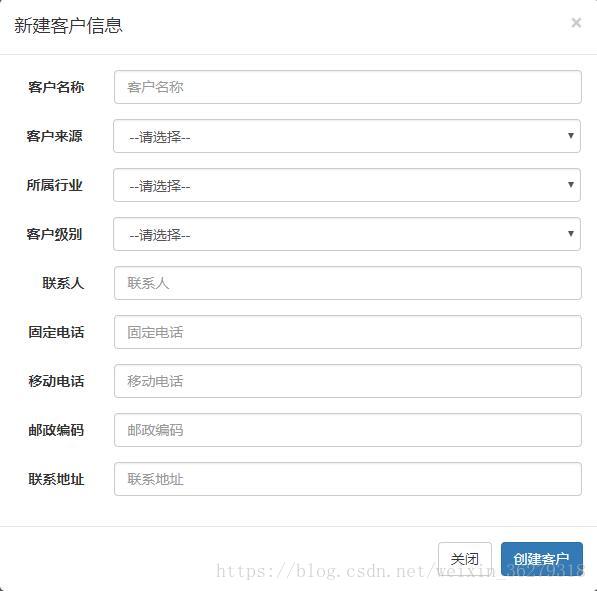
1.弹出输入框的实现
01.customer.jsp中点击新建链接
<a href="#" class="btn btn-primary" data-toggle="modal"
data-target="#newCustomerDialog" onclick="clearCustomer()">新建</a>
02.创建客户信息输入窗口
-- 创建客户模态框 -->
<div class="modal fade" id="newCustomerDialog" tabindex="-1" role="dialog"aria-labelledby="myModalLabel"><div class="modal-dialog" role="document"><div class="modal-content"><div class="modal-header">class="modal-title" id="myModalLabel">新建客户信息
div><div class="modal-body">div><div class="modal-footer">div>div>div>
div>03.弹出新建窗口必须清除窗口中的数据
//清空新建客户窗口中的数据function clearCustomer() {/** 1.$("#new_customerName")是id选择器,获得id为ew_customerName的标签,通过.val(),获得这个标签的value的值,赋值给你声明的变量。2.val(""):清空标签value属性的值。*/$("#new_customerName").val("");$("#new_customerFrom").val("")$("#new_custIndustry").val("")$("#new_custLevel").val("")$("#new_linkMan").val("");$("#new_phone").val("");$("#new_mobile").val("");$("#new_zipcode").val("");$("#new_address").val("");}2.将窗口中输入的数据保存到数据库
01.点击创建客户按钮执行以下代码
1.1customer.jsp中的JS代码如下:
// 创建客户function createCustomer() {//发送post请求$.post("<%=basePath%>customer/create.action", //通过id选择器获取表单数据并序列化,data表示CustomerControlle处理方法返回的结果//serialize() 方法通过序列化表单值,创建 URL 编码文本字符串。$("#new_customer_form").serialize(),function(data){if(data =="OK"){alert("客户创建成功!");window.location.reload();}else{alert("客户创建失败!");window.location.reload();}});}02.通过Ajax的POST请求将id为new_customer_form的表单序列化,并提交给”/create.action”对应的方法处理,如果处理返回结果为OK表示客户创建成功!否则创建失败!
2.1实现DAO层添加客户方法
CustomerDao接口
package com.wang.dao;
import java.util.List;
import com.wang.po.Customer;
//Customer接口
public interface CustomerDao {// 创建客户public int createCustomer(Customer customer);}
CustomerDao.xml
<mapper namespace="com.wang.dao.CustomerDao"><insert id="createCustomer" parameterType="customer">insert into customer(cust_name,cust_user_id,cust_create_id,cust_source,cust_industry,cust_level,cust_linkman,cust_phone,cust_mobile,cust_zipcode,cust_address,cust_createtime)values(#{cust_name},#{cust_user_id},#{cust_create_id},#{cust_source},#{cust_industry},#{cust_level},#{cust_linkman},#{cust_phone},#{cust_mobile},#{cust_zipcode},#{cust_address},#{cust_createtime})insert>
mapper>
2.2实现Service层的创建客户的方法
CustomerService接口
public interface CustomerService {//添加客户public int createCustomer(Customer customer);}
CustomerServiceImpl
package com.wang.service.Impl;
import java.util.List;
import org.apache.commons.lang3.StringUtils;
import org.springframework.beans.factory.annotation.Autowired;
import org.springframework.stereotype.Service;
import org.springframework.transaction.annotation.Transactional;
import com.wang.common.utils.Page;
import com.wang.dao.CustomerDao;
import com.wang.po.Customer;
import com.wang.service.CustomerService;/*** 客户管理*/
@Service("customerService")
@Transactional
public class CustomerServiceImpl implements CustomerService {// 声明DAO属性并注入@Autowiredprivate CustomerDao customerDao;//创建客户@Overridepublic int createCustomer(Customer customer) {return customerDao.createCustomer(customer);}}
2.3实现Controller层创建客户的方法
//创建客户@RequestMapping("/customer/create.action")@ResponseBodypublic String customerCreate(Customer customer,HttpSession session) {// 获取Session中的当前用户信息User user = (User) session.getAttribute("USER_SESSION");// 将当前用户id存储在客户对象中customer.setCust_create_id(user.getUser_id());// 创建Date对象Date date = new Date();// 得到一个Timestamp格式的时间,存入mysql中的时间格式“yyyy/MM/dd HH:mm:ss”Timestamp timeStamp = new Timestamp(date.getTime());customer.setCust_createtime(timeStamp);// 执行Service层中的创建方法,返回的是受影响的行数int rows = customerService.createCustomer(customer);if(rows > 0){//注意:返回的不是逻辑视图//js中的data=OK,表示成功创建return "OK";}else{//js中的data=FAIL,表示失败创建return "FAIL";}}
3.修改客户信息的实现步骤
1.弹出页面修改窗口链接
customer.jsp
<a href="#" class="btn btn-primary btn-xs" data-toggle="modal"
data-target="#customerEditDialog" onclick= "editCustomer(${row.cust_id})">
修改</a>
2.创建弹出窗口代码
customer.jsp
-- 修改客户模态框 --><div class="modal fade" id="customerEditDialog" tabindex="-1"role="dialog" aria-labelledby="myModalLabel"><div class="modal-dialog" role="document"><div class="modal-content"><div class="modal-header">class="modal-title" id="myModalLabel">修改客户信息
div><div class="modal-body">div><div class="modal-footer">div>div>div>div>3.获取要修改的客户信息并显示在弹出修改窗口中
// 通过id获取修改的客户信息function editCustomer(id) {$.ajax({type:"get",url:"<%=basePath%>customer/getCustomerById.action",//请求参数data:{"id":id},//success指的是请求后台并返回的数据,data是JSON格式数据类型success:function(data) {//通过id选择器定位文本框,并设值返回的JSON数据//获取JSON对象中的数据:JSON对象.属性(比如:data.cust_id)$("#edit_cust_id").val(data.cust_id);$("#edit_customerName").val(data.cust_name);$("#edit_customerFrom").val(data.cust_source)$("#edit_custIndustry").val(data.cust_industry)$("#edit_custLevel").val(data.cust_level)$("#edit_linkMan").val(data.cust_linkman);$("#edit_phone").val(data.cust_phone);$("#edit_mobile").val(data.cust_mobile);$("#edit_zipcode").val(data.cust_zipcode);$("#edit_address").val(data.cust_address);}});}3.1在CustomerController类中添加通过id获取客户信息的方法
// 通过id获取客户信息@RequestMapping("/customer/getCustomerById.action")@ResponseBodypublic Customer getCustomerById(Integer id) {Customer customer = customerService.getCustomerById(id);//注意:返回的不是逻辑视图,而是从数据库查询出来的对象return customer;}3.2实现Service层方法
CustomerService接口
// 通过id查询客户public Customer getCustomerById(Integer id);3.3CustomerServiceImpl实现类
//通过id查询客户
public Customer getCustomerById(Integer id) {   Customer customer = customerDao.getCustomerById(id);return customer;        }
3.4CustomerDao接口中根据id查询客户的方法
// 通过id查询客户public Customer getCustomerById(Integer id);3.5CustomerDao.xml配置根据id查询客户的方法
<select id="getCustomerById" parameterType="Integer" resultType="customer">select * from customer where cust_id = #{id}select>4.将修改数据保存带数据库的操作步骤
如图所示
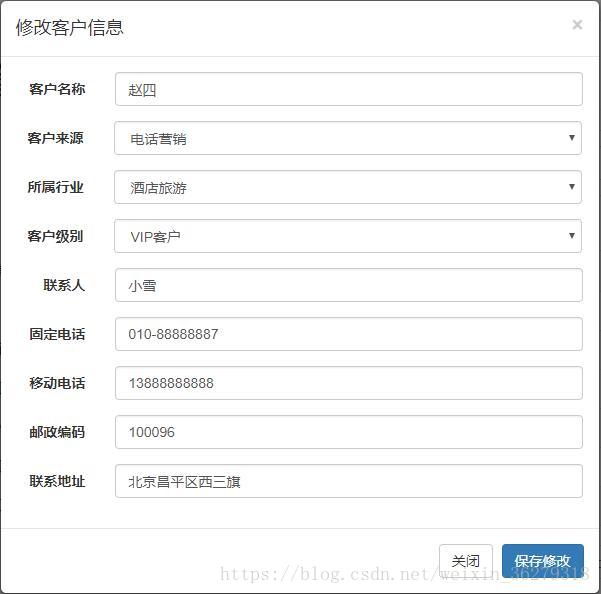
4.1点击修改保存按钮执行以下JS代码
// 执行修改客户操作function updateCustomer() {//以post方式提交表单数据$.post("<%=basePath%>customer/update.action",//通过id选择器获取表单数据并序列化(序列化就是转换为JSON格式数据)//注意:此处data表示CustomerController处理方法返回的结果数据$("#edit_customer_form").serialize(),function(data){if(data =="OK"){alert("客户信息更新成功!");//窗口刷新window.location.reload();}else{alert("客户信息更新失败!");window.location.reload();}});}4.2CustomerController类中的方法接收并处理请求
/*** 更新客户*/@RequestMapping("/customer/update.action")@ResponseBodypublic String customerUpdate(Customer customer) {int rows = customerService.updateCustomer(customer);if(rows > 0){return "OK";}else{return "FAIL";}}
4.3实现Service层方法
CustomerService接口
// 更新客户
public int updateCustomer(Customer customer);
4.4 CustomerServiceImpl实现类
//更新用户
public int updateCustomer(Customer customer) {return customerDao.updateCustomer(customer);}
4.5CustomerDao接口中定义更新客户的方法
// 更新客户信息
public int updateCustomer(Customer customer);
4.6CustomerDao.xml配置中定义更新新SQL语句
-- 更新客户 -->id="updateCustomer" parameterType="customer">update customer<set><if test="cust_name!=null">cust_name=#{cust_name},if><if test="cust_user_id!=null">cust_user_id=#{cust_user_id},if><if test="cust_create_id!=null">cust_create_id=#{cust_create_id},if><if test="cust_source!=null">cust_source=#{cust_source},if><if test="cust_industry!=null">cust_industry=#{cust_industry},if><if test="cust_level!=null">cust_level=#{cust_level},if><if test="cust_linkman!=null">cust_linkman=#{cust_linkman},if><if test="cust_phone!=null">cust_phone=#{cust_phone},if><if test="cust_mobile!=null">cust_mobile=#{cust_mobile},if><if test="cust_zipcode!=null">cust_zipcode=#{cust_zipcode},if><if test="cust_address!=null">cust_address=#{cust_address},if><if test="cust_createtime!=null">cust_createtime=#{cust_createtime},if>set>where cust_id=#{cust_id} 5.删除一条客户记录的操作步骤如下
5.1点击删除客户链接
<-- 通过EL表达式获取表中某一条记录的id值。-->
<a href="#" class="btn btn-danger btn-xs"
onclick="deleteCustomer(${row.cust_id})">删除a>
5.2编写一个JS删除客户的方法
// 删除客户function deleteCustomer(id) {if(confirm('确实要删除该客户吗?')) {$.post("<%=basePath%>customer/delete.action",{"id":id},//data仍然表示处理类方法返回的结果数据function(data){if(data =="OK"){alert("客户删除成功!");window.location.reload();}else{alert("删除客户失败!");window.location.reload();}});}}5.2实现Service层方法
CustomerService接口
// 删除客户
public int deleteCustomer(Integer id);
5.3 CustomerServiceImpl实现类
//删除一条客户记录
public int deleteCustomer(Integer id) {return customerDao.deleteCustomer(id);  }
4.4CustomerDao接口中定义删除方法
// 删除客户
int deleteCustomer (Integer id);
4.5CustomerDao.xml配置中定义删除SQL语句
<delete id="deleteCustomer" parameterType="Integer">delete from customer where cust_id=#{id}delete>本文来自互联网用户投稿,文章观点仅代表作者本人,不代表本站立场,不承担相关法律责任。如若转载,请注明出处。 如若内容造成侵权/违法违规/事实不符,请点击【内容举报】进行投诉反馈!