Linux shell脚本中发起tcp、udp连接
发个好玩的东东。
通过/dev/tcp、/dev/udp可以直接在shell脚本中发起tcp、udp连接,方便又高效,平时用于测试啥的还是挺方便的。
先看下bash man里面的介绍,
/dev/tcp/host/portIf host is a valid hostname or Internet address, and port isan integer port number or service  name,  bash  attempts  toopen a TCP connection to the corresponding socket.
/dev/udp/host/portIf host is a valid hostname or Internet address, and port isan integer port number or service  name,  bash  attempts  toopen a UDP connection to the corresponding socket.
接下来,我们实操一下。在一台机器运行服务端程序,打印客户端消息,具体代码参考:基于TCP通信的简单服务端和客户端程序。
另一端使用上述方法发起tcp连接,并发送消息,
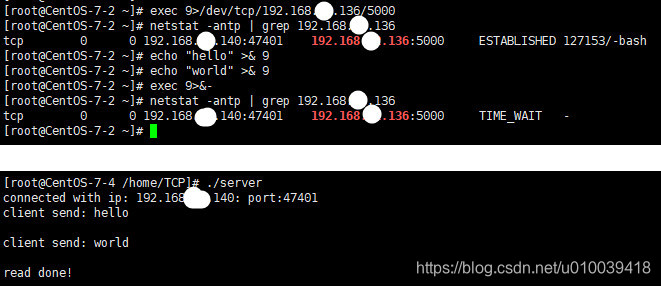
可见,可使用以下shell命令发起tcp连接,
exec 9>/dev/tcp/192.168.0.136/5000
其中9为执行的文件描述符。这里>重定向符表示该文件描述符只能写入,如果想读取,可使用一下命令,
exec 9<>/dev/tcp/192.168.52.136/5000
至于关闭连接,则通过以下命令,
exec 9>&-
其中,9代表刚才创建的描述符。
关于 >&-的解释,可以参考bash的man手册的REDIRECTION章节,
REDIRECTION...Each redirection that may be preceded by a file descriptor number may instead be precededby a word of the form {varname}. In this case, for each redirection operator except >&-and <&-, the shell will allocate a file descriptor greater than 10 and assign it to var‐name. If >&- or <&- is preceded by {varname}, the value of varname defines the filedescriptor to close.
因此,也可以用以下命令关闭连接,
exec 9<&-
本文来自互联网用户投稿,文章观点仅代表作者本人,不代表本站立场,不承担相关法律责任。如若转载,请注明出处。 如若内容造成侵权/违法违规/事实不符,请点击【内容举报】进行投诉反馈!