爬虫笔记4模拟登陆
这次模拟4399的登陆
这篇不难,主要是学到了这几点
requests模块有个session方法可以记录网页的cookie- 模拟登陆的时候有两个请求,第一个是用来登陆的,第二个是用来保存登陆界面的
- 一般的登陆都是
post传参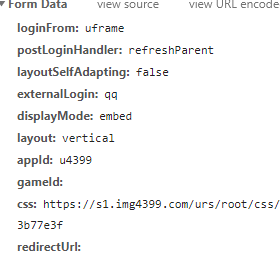
但是我们只需要提供用户名和密码
就可以这样写
data={}
data["username"]="1093533435"
data["password"]="liouyuwen"
先附上源代码
import requests
session=requests.Session()
url="https://ptlogin.4399.com/ptlogin/login.do?v=1"
urlpro="https://u.4399.com/profile/"
headers={"User-Agent":"Mozilla/5.0 (Windows NT 10.0; Win64; x64) AppleWebKit/537.36 (KHTML, like Gecko) Chrome/87.0.4280.88 Safari/537.36"}
data={}
data["username"]="xxxxxx"
data["password"]=xxxxxx"
res=session.post(url=url,data=data,headers=headers)
profile=session.get(url=urlpro,headers=headers).text
with open("4399.html","w",encoding='utf-8') as fp:fp.write(profile)
调用Session方法
import requests
session=requests.Session()
此后所有的请求就不用requests.get/post而使用session.get或session.post
配置爬虫发起请求
url="https://ptlogin.4399.com/ptlogin/login.do?v=1"
urlpro="https://u.4399.com/profile/"
headers={"User-Agent":"Mozilla/5.0 (Windows NT 10.0; Win64; x64) AppleWebKit/537.36 (KHTML, like Gecko) Chrome/87.0.4280.88 Safari/537.36"}
data={}
data["username"]="xxxxxx"
data["password"]=xxxxxx"
res=session.post(url=url,data=data,headers=headers)
profile=session.get(url=urlpro,headers=headers).text
第一个请求不需要在后面加格式,就是用来发起请求,得到cookie并登入进去
第二个请求就是用来获取登入后的界面的
文件保存
with open("4399.html","w",encoding='utf-8') as fp:fp.write(profile)
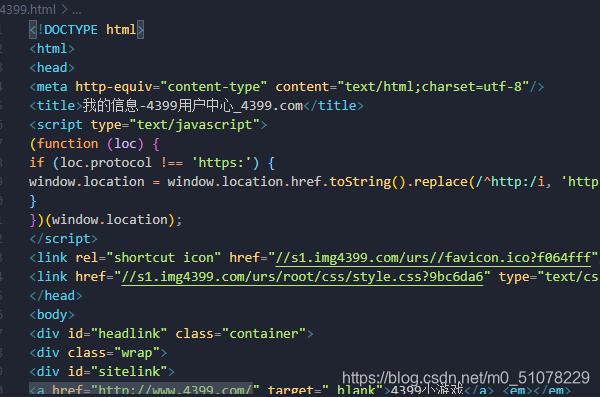
可以看到已经爬出来了
本文来自互联网用户投稿,文章观点仅代表作者本人,不代表本站立场,不承担相关法律责任。如若转载,请注明出处。 如若内容造成侵权/违法违规/事实不符,请点击【内容举报】进行投诉反馈!