操作数据库--mysql
问:python操作mysql数据库,为什么要在执行后加commit(),或者加autocommit=True?
答:因为在操作数据库的时候是先在程序中执行sql语句,这种操作并没有在本地数据库中更新,当我们只想commit时才会真正更新。
问:什么是游标?
答:游标,通俗的解释就是"游动的标志",这是数据库中一个很重要的概念。
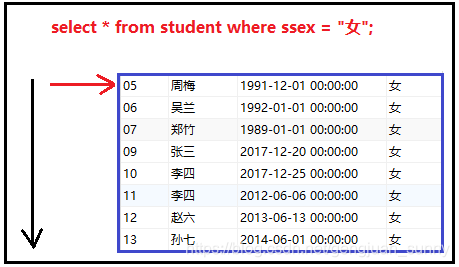
有时候,我们执行一条查询语句的时候,往往会得到N条返回结果,执行sql语句取出这些返回结果的接口(起始点),就是游标。沿着这个游标,我们可以一次取出一行记录。
当不使用游标功能,我们去执行 select * from student where age > 20; 这条语句的时候,如果有1000条返回结果,系统会一次性将1000条记录返回到界面 中,你没有选择,也不能做其他操作。
当我们开启了游标功能,再去执行这条语句的时候,系统会先帮你找到这些行, 先给你存放起来,然后提供了一个游标接口。当你需要数据的时候,就借助这个游标去一行行的取出数据,你每取出一条记录,游标指针就朝前移动一次,一直到取完最后一行数据后。
一张图讲述游标的功能:
特点:
- fetchone()/fetchall(),返回的结果是一个字典
操作数据库 所有常用方法
import pymysql#oracle sqlserver ..host = '118.241.3.40'# ip
user = 'jxz'#用户名
password = '1234561' #密码;字符串
db='jxz2'# 数据库名
port = 3306 #端口号;int类型connect = pymysql.connect(host=host,user=user,password=password,port=port,db=db,autocommit=True #自动提交,就不用每次都写connect.commit())# 连接数据库
cur = connect.cursor(pymysql.cursors.DictCursor) #建立游标,仓库管理员,pymysql.cursors.DictCursor,查出的数据返回是个字典,也可以不用,返回是个元组
# cur.execute('insert into students values (38,"ljl","nan",19,"天马座","北京");')#sql语句
# cur.execute('insert into students values (99,"gj","女",18,"天马座","北京");')# 必须要双引号,引value
# cur.execute('insert into students (name,class) values ("ljj2","天马座");')#可以对部分key-value,进行sql语句插入
# cur.execute('delete from students where id = 99;')
# cur.execute('update students set name="卷" where id=99;')# connect.rollback()#回滚
# connect.commit()#提交
cur.execute('select * from students limit 1;')
print(cur.description) #表的描述
# cur.execute('select * from students where id=1')# print('fetchmany',cur.fetchmany(2))#查前2条数据
# print('fetchone',cur.fetchone())#只查一条数据,并对这个数据进行使用,可以使用cur.fetchone()
# print('fetchall',cur.fetchall())#拿到数据库结果,用select语句;所有的结果# for data in cur:
#     print(data)#查到多条结果,逐条打印查到的数据库结果cur.close()#关闭数据库
connect.close()#关闭数据库连接
查到多条结果,逐条打印查到的数据库结果
import pymysqlhost = '118.241.3.40'# ip
user = 'jxz'#用户名
password = '1234561' #密码;字符串
db='jxz2'# 数据库名
port = 3306 #端口号;int类型connect = pymysql.connect(host=host,user=user,password=password,port=port,db=db,autocommit=True #自动提交,就不用每次都写connect.commit())# 连接数据库cur = connect.cursor(pymysql.cursors.DictCursor) '''建立游标,仓库管理员,
pymysql.cursors.DictCursor,查出的数据返回是个字典,也可以不用,返回是个
元组'''cur.execute('select * from students limit 5;')
for data in cur:#逐条打印查到的数据库结果print(data)输出结果:
{'id': 1, 'name': 'niuhy', 'sex': 'nv', 'age': 20, 'class': '111', 'addr': '河北'}
{'id': 2, 'name': 'Amy', 'sex': '女', 'age': 18, 'class': '天马座', 'addr': '天津'}
{'id': 3, 'name': 'Bob', 'sex': '男', 'age': 18, 'class': '天马座', 'addr': '西北'}
{'id': 6, 'name': 'lzh', 'sex': '男', 'age': 38, 'class': '射手座', 'addr': '北京'}
{'id': 11, 'name': '尹路明', 'sex': '女', 'age': 32, 'class': '31', 'addr': 'shanghai'}
只查一条数据,并对这个数据进行使用,可以使用cur.fetchone()
import pymysqlhost = '118.241.3.40'# ip
user = 'jxz'#用户名
password = '1234561' #密码;字符串
db='jxz2'# 数据库名
port = 3306 #端口号;int类型connect = pymysql.connect(host=host,user=user,password=password,port=port,db=db,autocommit=True #自动提交,就不用每次都写connect.commit())# 连接数据库
cur = con
nect.cursor(pymysql.cursors.DictCursor) '''建立游标,仓库管理
员,pymysql.cursors.DictCursor,查出的数据返回是个字典,也可以不用,返回
是个元组'''cur.execute('select * from students limit 1;')
print('fetchone',cur.fetchone())#只查一条数据,并对这个数据进行使用,
可以使用cur.fetchone()输出结果:
fetchone {'id': 1, 'name': 'niuhy', 'sex': 'nv', 'age': 20, 'class': '111', 'addr': '河北'}
本文来自互联网用户投稿,文章观点仅代表作者本人,不代表本站立场,不承担相关法律责任。如若转载,请注明出处。 如若内容造成侵权/违法违规/事实不符,请点击【内容举报】进行投诉反馈!