关于pytest参数化
在pytest中,当我们要对一个参数进行枚举校验时,就可以用pytest参数化。
1、首先将测试Py 文件与测试数据分离,即在py中写代码,测试数据写在yaml文件中
2、yaml文件
(1)首先要安装:pip install pyyaml
(2)然后建立一个yaml文件来存储数据(yaml的语法可自己学习,相当于字典的键值对。)
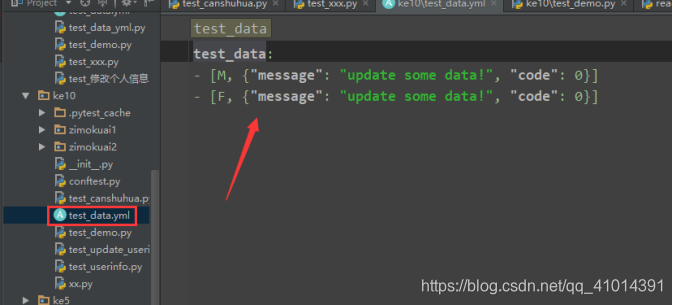
3、写一个读取yaml文件的函数,将PY文件与yaml文件关联起来import yaml
import os
def readyml(yamlPath):'''读取yaml文件内容参数path: 相对路径,起始路径:项目的根目录realPath: 文件的真实路径,绝对路径地址 '''if not os.path.isfile(yamlPath):raise FileNotFoundError("文件路径不存在,请检查路径是否正确:%s" % yamlPath)# open方法打开直接读出来f = open(yamlPath, 'r', encoding='utf-8')cfg = f.read() # 读取出来是yaml文件格式d = yaml.load(cfg)  # 因此我们用load方法转字典     print("读取的测试文件数据:%s"%d)return dif __name__ == '__main__':readyml("test_data.yml") # 传入绝对路径或相对路径
4、在py模块中导入这个方法,读取yaml文件,作为测试数据源传入```python
import pytest
from demo.read_yml import readyml # 这个文件就是上面的读取Yaml的文件
import os
a = os.path.join(os.path.dirname(os.path.realpath(__file__)), "test_data.yml") # 获得真实路径
print(a)
test_data = readyml(a)
print(test_data['test_data'])  # 读取test_data里面的数据@pytest.mark.parametrize("test_input, expect", test_data['test_data'])
def test_updata_info_32(login_fix, test_input, expect):pass5、设置单个字段的参数化
这里的单个参数指的是指枚举passowrd这个字段
import requests
import pytest
host="******"
s = requests.session()  # 相当于浏览器的功能,将token存入浏览器
test_data=[('test@123456',200), # 登录成功,状态码200('test@12345678',400) # 登录失败,状态码400]
@pytest.mark.parametrize('psw,expect',test_data)  # 注意:这里的参数'psw,expect'要用逗号包围起来,不能单独使用逗号分隔开,不然会报错!!
def test_mylogins(psw,expect):url_logins = host + '/connect/token'body = {'username': 'test','password': psw,  # 要做参数化的字段!!'language': 'zh-CN','grant_type': 'password','client_id': '******','client_secret': '*******','smartmoldtenant': '****'}r = s.post(url=url_logins, data=body)print(r.text)print(r.status_code)assert r.status_code==expect  # 判断状态码==============================================================================
collecting ... collected 2 items
test_login.py::test_mylogins[Mn@123456-200]
test_login.py::test_mylogins[Mn@12345678-400] ========================== 2 passed in 0.72 seconds ===========================Process finished with exit code 0
引入外部文件方法获取数据
# logindata.yaml
testdata:-  ['Mn@123456',200]-  ['Mn@12345678',400]
from readyaml import *
import os
data_path = os.path.realpath('D:\code\ERP_Mold\data\login.yaml') # 获取绝对路径
test_data_input=readyml(data_path) # 获取读取的数据@pytest.mark.parametrize('psw,expect',test_data_input['testdata'])
def test_mylogins(psw,expect):url_logins = host + '/connect/token'body = {'username': 'test','password': psw,'language': 'zh-CN','grant_type': 'password','client_id': 'SmartMold_Hosting','client_secret': 'gpMjCowG1cLTDnUc','smartmoldtenant': 'C29EDFCB-4F0D-4D7C-AF88-96582DFB1D20'}r = s.post(url=url_logins, data=body)print(r.text)print(r.status_code)assert r.status_code==expect6、设置多个字段参数化
这里的多个参数指的是指同时枚举username,passowrd这2个字段,当设置多个参数化,期望结果要输出一致。
import requests
import pytest
host="*********"
s = requests.session()  # 相当于浏览器的功能,将token存入浏览器
test_data_username=['test','test02']
test_data_password=['Mn@123456','Mn@123456']下面这里使用2个参数化函数
@pytest.mark.parametrize('usr',test_data_username)
@pytest.mark.parametrize('psw',test_data_password)
def test_mylogins(usr,psw):url_logins = host + '/connect/token'body = {'username': usr,'password': psw,'language': 'zh-CN','grant_type': 'password','client_id': '*****','client_secret': 'gpMjCowG1cLTDnUc','smartmoldtenant': '*****'}r = s.post(url=url_logins, data=body)print(r.text)print(r.status_code)expect=200assert r.status_code==expect================================================================================collecting ... collected 4 itemstest_login_dikaerji.py::test_mylogins[Mn@1234560-test]
test_login_dikaerji.py::test_mylogins[Mn@1234560-test02]
test_login_dikaerji.py::test_mylogins[Mn@1234561-test]
test_login_dikaerji.py::test_mylogins[Mn@1234561-test02] ========================== 4 passed in 1.52 seconds ===========================
多个字段引用外部Yaml文件
# logins.yaml文件
testdata:-test_data_username: ['test','test02']-test_data_password: ['Mn@123456','Mn@123456']
import requests
import pytest
host="*********"
s = requests.session()  # 相当于浏览器的功能,将token存入浏览器
# test_data_username=['test','test02']
# test_data_password=['Mn@123456','Mn@123456']from readyaml import *
import os
testpath = os.path.realpath(r'D:\code\ERP_Mold\data\logins.yaml')
test_data=readyml(testpath)
test_data_username=test_data['testdata'][0]['test_data_username']
test_data_password=test_data['testdata'][1]['test_data_password']@pytest.mark.parametrize('usr',test_data_username)
@pytest.mark.parametrize('psw',test_data_password)
def test_mylogins(usr,psw):url_logins = host + '/connect/token'body = {'username': usr,'password': psw,'language': 'zh-CN','grant_type': 'password','client_id': 'SmartMold_Hosting','client_secret': 'gpMjCowG1cLTDnUc','smartmoldtenant': 'C29EDFCB-4F0D-4D7C-AF88-96582DFB1D20'}r = s.post(url=url_logins, data=body)print(r.text)print(r.status_code)expect=200assert r.status_code==expect
===============================================
collecting ... collected 4 itemstest_login_dikaerji.py::test_mylogins[Mn@1234560-test]
test_login_dikaerji.py::test_mylogins[Mn@1234560-test02]
test_login_dikaerji.py::test_mylogins[Mn@1234561-test]
test_login_dikaerji.py::test_mylogins[Mn@1234561-test02]
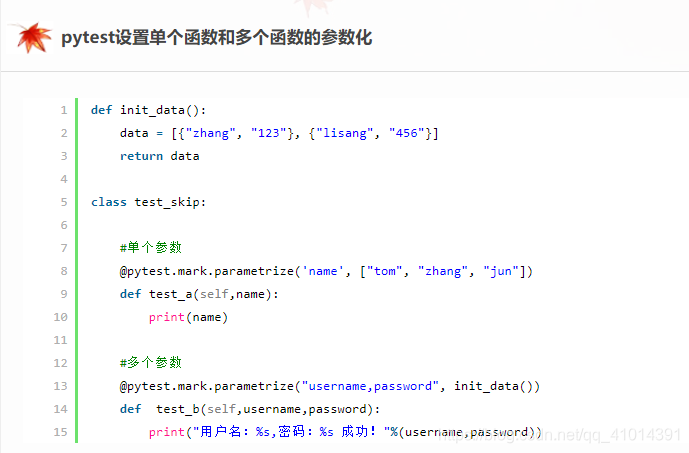
关于多个变量的参数化,在data列表以字典组或以元祖的方式存储变量,list的每个元素都是一个元组,元组里的每个元素和按参数顺序一一对应。
本文来自互联网用户投稿,文章观点仅代表作者本人,不代表本站立场,不承担相关法律责任。如若转载,请注明出处。 如若内容造成侵权/违法违规/事实不符,请点击【内容举报】进行投诉反馈!