Game Optimization
〇、
一、
二、Unity游戏优化
第1章 研究性能问题
1.2.7代码片段的针对性分析
1.Profiler脚本控制
using UnityEngine.Profiling;public class ExampleClass : MonoBehaviour
{void Example(){Profiler.BeginSample("MyPieceOfCode");// Code to measure...Profiler.EndSample();}
}
2.自定义CPU分析
//自定义计时器
using System;
using System.Collections;
using System.Collections.Generic;
using System.Diagnostics;
using UnityEngine;public class CustomTimer : IDisposable
{private string timerName;int numTests;Stopwatch watch;public CustomTimer(string p_timerName, int p_numTests){timerName = p_timerName;numTests = p_numTests;if (numTests <= 0)numTests = 1;watch = Stopwatch.StartNew();}public void Dispose(){watch.Stop();float ms = watch.ElapsedMilliseconds;UnityEngine.Debug.Log(string.Format("{0} finished: {1:00}"+" milliseconds total {2: 0.000000} milliseconds per-test "+ "for {3} tests",timerName,ms,ms/numTests,numTests));}
}
第2章 脚本策略
2.1 使用最快的方法获取组件
GetComponent(string type)
GetComponent<T>()
GetComponent(Type type)
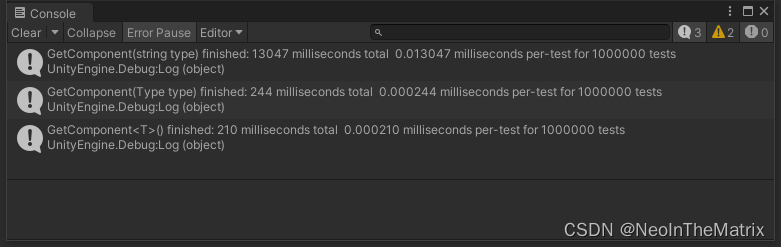
测试结果
2.2移除空的回调定义
2.3
本文来自互联网用户投稿,文章观点仅代表作者本人,不代表本站立场,不承担相关法律责任。如若转载,请注明出处。 如若内容造成侵权/违法违规/事实不符,请点击【内容举报】进行投诉反馈!