阿里云oss使用教程
一,准备工作
1,点击:注册账号账号
输入用户名,密码,手机号

2,实名阿里云账号
点击跳到个人中心,对阿里云账号进行实名,这里我建议选择企业实名
3,购买阿里云OSS
打开OSS入口,选择:OSS资源包,地区:中国大陆,标准 - 本地冗余存储规格和购买时长。

二,阿里云oss简介
阿里云OSS
阿里云OSS是一款由阿里巴巴云计算有限公司开发的基于云端的对象存储服务。它为企业和个人存储海量数据提供了完美的解决方案,本文将详细介绍阿里云OSS的功能与优势。
1、阿里云OSS的功能
1.1. 高可靠性
阿里云OSS基于阿里云自研的分布式系统架构,能自动将数据复制到不同的存储节点,使其具备高可靠性。即使某个存储节点发生故障,阿里云OSS也能自动切换到其他存储节点,保证数据的完整性。
1.2. 数据保密性
阿里云OSS支持多种加密算法,能将用户数据进行加密存储,确保数据的保密性。同时,它还支持身份认证和权限控制功能,可以精确地控制用户对数据的访问权限。
1.3. 高扩展性
阿里云OSS具备高扩展性,用户可以根据自己的需求灵活地扩展存储容量和带宽。它采用了分布式架构和负载均衡技术,能够自动地进行数据水平扩展,保证了高并发负载下的系统稳定性。
1.4. 多种数据处理能力
阿里云OSS具备多种数据处理能力,支持图片、视频、音频等多种格式的数据,可以进行图片缩略图、音视频转码等操作,满足用户对数据的不同需求。
2、阿里云OSS的优势
2.1. 低成本
阿里云OSS的存储费用低廉,按用户实际使用量计费,无需预存款或定期付费,能够节省用户大量的成本。
2.2. 高性能
阿里云OSS的访问速度快,可以为用户提供高性能的服务。它支持全球加速,能够将数据缓存在全球各地,实现全球负载均衡,提升访问速度。
2.3. 易于使用
阿里云OSS的接口简单易用,用户可以轻松地进行数据上传、下载、删除等操作,它还提供了完善的开发工具包和SDK,方便用户快速进行开发和集成。
2.4. 可靠性高
阿里云OSS具备高可靠性,能够自动实现数据备份和容灾,系统故障自动转移,确保数据的安全和完整性。
总之,阿里云OSS作为云端对象存储服务,具备高可靠性、高性能、低成本和易于使用的特点,是企业和个人存储海量数据的最佳选择。
三,使用阿里云OSS控制台管理OSS
打开阿里云OSS控制台,点击:立即创建,然后创建想要的桶

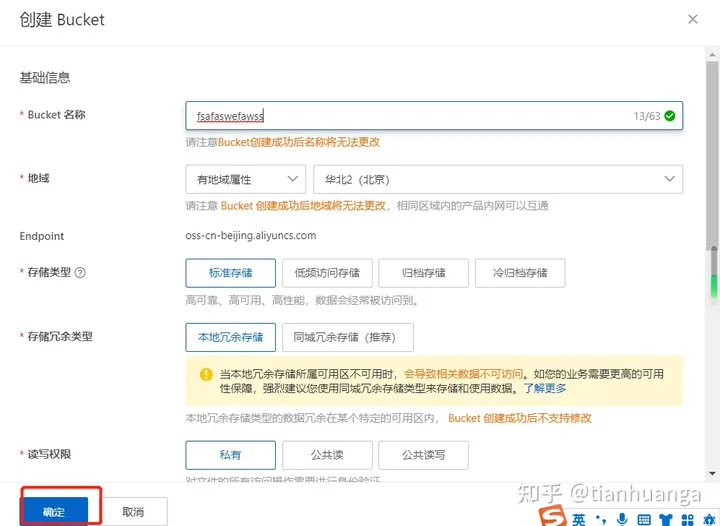
1,上传文件到OSS
创建桶以后,就可以上传到OSS了。打开桶详情,点击上传:

选择:私有,点击:扫描文件,就可以上传文件了。

2,从OSS下载文件
点击到桶详情,看到文件,直接点击下载即可。
四,代码对接阿里云OSSAPI
首先创建AccessKey,具体如何创建,查看文档
1,使用API创建桶(以Java为例)
import com.aliyun.oss.ClientException;
import com.aliyun.oss.OSS;
import com.aliyun.oss.OSSClientBuilder;
import com.aliyun.oss.OSSException;
import com.aliyun.oss.model.CannedAccessControlList;
import com.aliyun.oss.model.CreateBucketRequest;
import com.aliyun.oss.model.DataRedundancyType;
import com.aliyun.oss.model.StorageClass;public class Demo {public static void main(String[] args) throws Exception {// yourEndpoint填写Bucket所在地域对应的Endpoint。以华东1(杭州)为例,Endpoint填写为https://oss-cn-hangzhou.aliyuncs.com。String endpoint = "yourEndpoint";// 阿里云账号AccessKey拥有所有API的访问权限,风险很高。强烈建议您创建并使用RAM用户进行API访问或日常运维,请登录RAM控制台创建RAM用户。String accessKeyId = "yourAccessKeyId";String accessKeySecret = "yourAccessKeySecret";// 填写Bucket名称。String bucketName = "examplebucket";// 填写资源组ID。如果不填写资源组ID,则创建的Bucket属于默认资源组。//String rsId = "rg-aek27tc****";// 创建OSSClient实例。OSS ossClient = new OSSClientBuilder().build(endpoint, accessKeyId, accessKeySecret);try {// 创建CreateBucketRequest对象。CreateBucketRequest createBucketRequest = new CreateBucketRequest(bucketName);// 如果创建存储空间的同时需要指定存储类型、存储空间的读写权限、数据容灾类型, 请参考如下代码。// 此处以设置存储空间的存储类型为标准存储为例介绍。//createBucketRequest.setStorageClass(StorageClass.Standard);// 数据容灾类型默认为本地冗余存储,即DataRedundancyType.LRS。如果需要设置数据容灾类型为同城冗余存储,请设置为DataRedundancyType.ZRS。//createBucketRequest.setDataRedundancyType(DataRedundancyType.ZRS);// 设置存储空间读写权限为公共读,默认为私有。//createBucketRequest.setCannedACL(CannedAccessControlList.PublicRead);// 在支持资源组的地域创建Bucket时,您可以为Bucket配置资源组。//createBucketRequest.setResourceGroupId(rsId);// 创建存储空间。ossClient.createBucket(createBucketRequest);} catch (OSSException oe) {System.out.println("Caught an OSSException, which means your request made it to OSS, "+ "but was rejected with an error response for some reason.");System.out.println("Error Message:" + oe.getErrorMessage());System.out.println("Error Code:" + oe.getErrorCode());System.out.println("Request ID:" + oe.getRequestId());System.out.println("Host ID:" + oe.getHostId());} catch (ClientException ce) {System.out.println("Caught an ClientException, which means the client encountered "+ "a serious internal problem while trying to communicate with OSS, "+ "such as not being able to access the network.");System.out.println("Error Message:" + ce.getMessage());} finally {if (ossClient != null) {ossClient.shutdown();}}}
}
2,使用API删除桶(以Java为例)
import com.aliyun.oss.ClientException;
import com.aliyun.oss.OSS;
import com.aliyun.oss.OSSClientBuilder;
import com.aliyun.oss.OSSException;public class Demo {public static void main(String[] args) throws Exception {// Endpoint以华东1(杭州)为例,其它Region请按实际情况填写。String endpoint = "https://oss-cn-hangzhou.aliyuncs.com";// 阿里云账号AccessKey拥有所有API的访问权限,风险很高。强烈建议您创建并使用RAM用户进行API访问或日常运维,请登录RAM控制台创建RAM用户。String accessKeyId = "yourAccessKeyId";String accessKeySecret = "yourAccessKeySecret";// 填写Bucket名称,例如examplebucket。String bucketName = "examplebucket";// 创建OSSClient实例。OSS ossClient = new OSSClientBuilder().build(endpoint, accessKeyId, accessKeySecret);try {// 删除存储空间。ossClient.deleteBucket(bucketName);} catch (OSSException oe) {System.out.println("Caught an OSSException, which means your request made it to OSS, "+ "but was rejected with an error response for some reason.");System.out.println("Error Message:" + oe.getErrorMessage());System.out.println("Error Code:" + oe.getErrorCode());System.out.println("Request ID:" + oe.getRequestId());System.out.println("Host ID:" + oe.getHostId());} catch (ClientException ce) {System.out.println("Caught an ClientException, which means the client encountered "+ "a serious internal problem while trying to communicate with OSS, "+ "such as not being able to access the network.");System.out.println("Error Message:" + ce.getMessage());} finally {if (ossClient != null) {ossClient.shutdown();}}}
}
3,使用API上传文件(以Java为例)
import com.aliyun.oss.ClientException;
import com.aliyun.oss.OSS;
import com.aliyun.oss.OSSClientBuilder;
import com.aliyun.oss.OSSException;
import com.aliyun.oss.model.PutObjectRequest;
import com.aliyun.oss.model.PutObjectResult;
import java.io.ByteArrayInputStream;public class Demo {public static void main(String[] args) throws Exception {// Endpoint以华东1(杭州)为例,其它Region请按实际情况填写。String endpoint = "https://oss-cn-hangzhou.aliyuncs.com";// 阿里云账号AccessKey拥有所有API的访问权限,风险很高。强烈建议您创建并使用RAM用户进行API访问或日常运维,请登录RAM控制台创建RAM用户。String accessKeyId = "yourAccessKeyId";String accessKeySecret = "yourAccessKeySecret";// 填写Bucket名称,例如examplebucket。String bucketName = "examplebucket";// 填写Object完整路径,完整路径中不能包含Bucket名称,例如exampledir/exampleobject.txt。String objectName = "exampledir/exampleobject.txt";// 创建OSSClient实例。OSS ossClient = new OSSClientBuilder().build(endpoint, accessKeyId, accessKeySecret);try {// 填写字符串。String content = "Hello OSS,你好世界";// 创建PutObjectRequest对象。PutObjectRequest putObjectRequest = new PutObjectRequest(bucketName, objectName, new ByteArrayInputStream(content.getBytes()));// 如果需要上传时设置存储类型和访问权限,请参考以下示例代码。// ObjectMetadata metadata = new ObjectMetadata();// metadata.setHeader(OSSHeaders.OSS_STORAGE_CLASS, StorageClass.Standard.toString());// metadata.setObjectAcl(CannedAccessControlList.Private);// putObjectRequest.setMetadata(metadata);// 上传字符串。PutObjectResult result = ossClient.putObject(putObjectRequest);            } catch (OSSException oe) {System.out.println("Caught an OSSException, which means your request made it to OSS, "+ "but was rejected with an error response for some reason.");System.out.println("Error Message:" + oe.getErrorMessage());System.out.println("Error Code:" + oe.getErrorCode());System.out.println("Request ID:" + oe.getRequestId());System.out.println("Host ID:" + oe.getHostId());} catch (ClientException ce) {System.out.println("Caught an ClientException, which means the client encountered "+ "a serious internal problem while trying to communicate with OSS, "+ "such as not being able to access the network.");System.out.println("Error Message:" + ce.getMessage());} finally {if (ossClient != null) {ossClient.shutdown();}}}
}
4,使用API下载文件到本地(以Java为例)
package com.aliyun.oss.demo;import com.aliyun.oss.ClientException;
import com.aliyun.oss.OSS;
import com.aliyun.oss.OSSClientBuilder;
import com.aliyun.oss.OSSException;
import com.aliyun.oss.model.GetObjectRequest;
import java.io.File;public class Demo {public static void main(String[] args) throws Exception {// Endpoint以华东1(杭州)为例,其它Region请按实际情况填写。String endpoint = "https://oss-cn-hangzhou.aliyuncs.com";// 阿里云账号AccessKey拥有所有API的访问权限,风险很高。强烈建议您创建并使用RAM用户进行API访问或日常运维,请登录RAM控制台创建RAM用户。String accessKeyId = "yourAccessKeyId";String accessKeySecret = "yourAccessKeySecret";// 填写Bucket名称,例如examplebucket。String bucketName = "examplebucket";// 填写不包含Bucket名称在内的Object完整路径,例如testfolder/exampleobject.txt。String objectName = "testfolder/exampleobject.txt";String pathName = "D:\\localpath\\examplefile.txt";// 创建OSSClient实例。OSS ossClient = new OSSClientBuilder().build(endpoint, accessKeyId, accessKeySecret);try {// 下载Object到本地文件,并保存到指定的本地路径中。如果指定的本地文件存在会覆盖,不存在则新建。// 如果未指定本地路径,则下载后的文件默认保存到示例程序所属项目对应本地路径中。ossClient.getObject(new GetObjectRequest(bucketName, objectName), new File(pathName));} catch (OSSException oe) {System.out.println("Caught an OSSException, which means your request made it to OSS, "+ "but was rejected with an error response for some reason.");System.out.println("Error Message:" + oe.getErrorMessage());System.out.println("Error Code:" + oe.getErrorCode());System.out.println("Request ID:" + oe.getRequestId());System.out.println("Host ID:" + oe.getHostId());} catch (ClientException ce) {System.out.println("Caught an ClientException, which means the client encountered "+ "a serious internal problem while trying to communicate with OSS, "+ "such as not being able to access the network.");System.out.println("Error Message:" + ce.getMessage());} finally {if (ossClient != null) {ossClient.shutdown();}}}
}
5,使用API删除文件(以Java为例)
import com.aliyun.oss.ClientException;
import com.aliyun.oss.OSS;
import com.aliyun.oss.OSSClientBuilder;
import com.aliyun.oss.OSSException;public class Demo {public static void main(String[] args) throws Exception {// Endpoint以华东1(杭州)为例,其它Region请按实际情况填写。String endpoint = "https://oss-cn-hangzhou.aliyuncs.com";// 阿里云账号AccessKey拥有所有API的访问权限,风险很高。强烈建议您创建并使用RAM用户进行API访问或日常运维,请登录RAM控制台创建RAM用户。String accessKeyId = "yourAccessKeyId";String accessKeySecret = "yourAccessKeySecret";// 填写Bucket名称,例如examplebucket。String bucketName = "examplebucket";// 填写文件完整路径。文件完整路径中不能包含Bucket名称。String objectName = "exampleobject.txt";// 创建OSSClient实例。OSS ossClient = new OSSClientBuilder().build(endpoint, accessKeyId, accessKeySecret);try {// 删除文件或目录。如果要删除目录,目录必须为空。ossClient.deleteObject(bucketName, objectName);} catch (OSSException oe) {System.out.println("Caught an OSSException, which means your request made it to OSS, "+ "but was rejected with an error response for some reason.");System.out.println("Error Message:" + oe.getErrorMessage());System.out.println("Error Code:" + oe.getErrorCode());System.out.println("Request ID:" + oe.getRequestId());System.out.println("Host ID:" + oe.getHostId());} catch (ClientException ce) {System.out.println("Caught an ClientException, which means the client encountered "+ "a serious internal problem while trying to communicate with OSS, "+ "such as not being able to access the network.");System.out.println("Error Message:" + ce.getMessage());} finally {if (ossClient != null) {ossClient.shutdown();}}}
}
本文来自互联网用户投稿,文章观点仅代表作者本人,不代表本站立场,不承担相关法律责任。如若转载,请注明出处。 如若内容造成侵权/违法违规/事实不符,请点击【内容举报】进行投诉反馈!