React状态管理Redux、Redux-Thunk、Redux-Sagas、React-Redux小结
Redux、Redux-Thunk、Redux-Sagas、React-Redux1
React环境配置
- 安装脚手架工具
$ npm install -g create-react-app
- 创建项目工程
// demo是项目名称,不能有大写字母
$ create-react-app demo
- 安装浏览器调试工具
在FireFox中安装 React Developer Tools 和 Redux DevTools
React Developer Tools能够在工具栏中很方便的看到页面的布局
Redux DevTools能够追踪页面state、action等的变化
Redux
Redux作用
当项目越来越复杂时,组件越来越多的时候,组件之间数据的共享就成为了一个问题,那么Redux就是用来解决各个组件之间数据共享的问题的。
在项目中安装Redux
redux的GitHub地址:https://github.com/reduxjs/redux
// 两种安装方法
$ npm install --save redux
$ yarn add redux
理解Redux工作流程
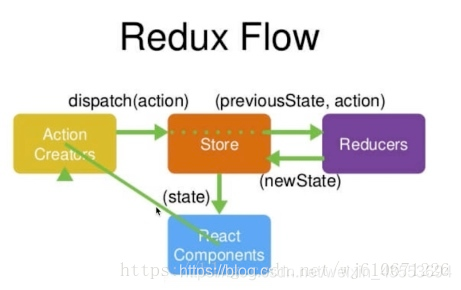
1、Store就是项目中的数据仓库,但是数据是交给Reducer管理的
2、Store向组件提供数据,组件订阅数据后,会根据状态的变化自动更新数据
3、组件要修改Store中的数据,需要创建一个action利用dispatch函数通知Store
4、Stroe把action和数据交给Reducer,Reducer根据action的类型来处理数据
5、Reducer把处理好的数据返回给Store
从Store中读取数据:派发action改变Store中的数据
action是一个字符串,在App组件、reducer文件中都使用了,容易引起难以调试的Bug,也不利于后期维护。
所以使用一个actionType和actionCreator来管理action的类型和action的创建。
代码如下:
// App组件
import React, { Component } from 'react';
import store from './store';
import { changeInputValue } from './store/actionCreators';class App extends Component {constructor(props) {super(props);this.state = store.getState();this.handleChangeInput = this.handleChangeInput.bind(this);this.handleStoreChange = this.handleStoreChange.bind(this);store.subscribe(this.handleStoreChange);}render() {return (<div><inputplaceholder="请输入信息"style={{width: "200px", height: '40px', border: '1px solid red'}}value={this.state.inputValue}onChange={this.handleChangeInput}/></div>);}handleChangeInput (e) {store.dispatch(changeInputValue(e.target.value));}handleStoreChange () {this.setState(store.getState());}
}export default App;------------------------------// actionTypes.js 管理action类型
export const CHANGE_INPUT_VALUE = 'change_input_value';------------------------------// actionCreators.js 管理action的创建import { CHANGE_INPUT_VALUE } from './actionTypes';export const changeInputValue = (value) => ({type: CHANGE_INPUT_VALUE,value: value
})------------------------------// reducer.jsimport { CHANGE_INPUT_VALUE } from './actionTypes';const defaultState = {inputValue: 'zhangsan'
}export default (state = defaultState, action) => {if (action.type === CHANGE_INPUT_VALUE) {const newState = JSON.parse(JSON.stringify(state));newState.inputValue = action.value;return newState;}return state;
}------------------------------// store/index.jsimport { createStore } from 'redux';
import reducer from './reducer';const store = createStore(reducer,window.__REDUX_DEVTOOLS_EXTENSION__ && window.__REDUX_DEVTOOLS_EXTENSION__()
);export default store;
Redux-Thunk
Redux-Thunk的作用
Redux-Thunk是Redux的中间件(并不是React的中间件),用来将组件异步获取数据的操作封装到action中去,以此来减少组件中复杂的异步操作。
使用Redux-Thunk之后action可以返回一个函数(Redux的action默认只能返回对象)。
安装以及配置
$ yarn add redux-thunk
$ npm install --save redux-thunk
使用Redux-Thunk之后的数据流程
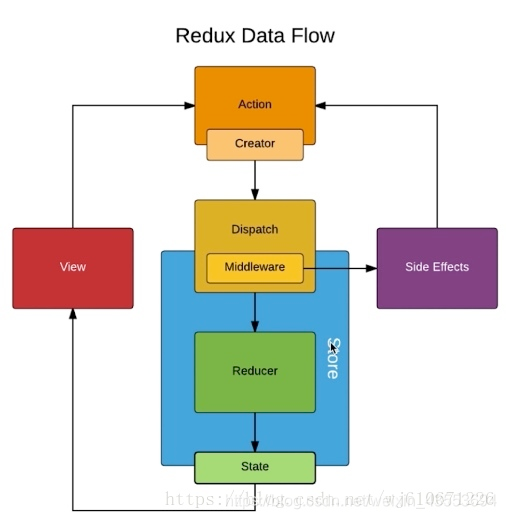
实际上变化就在Dispatch中,使用Redux-Thunk之后action不仅可以返回对象,还可以返回函数,然后将异步操作代码放在action中了。
代码演示
这里采用从服务端获取数据展示一个ul列表
使用Redux-Thunk之后的代码以及配置
// App.js
import React, { Component } from 'react';
import store from './store';
import { getListDataAction } from './store/actionCreators';class App extends Component {constructor(props) {super(props);this.state = store.getState();this.handleStoreChange = this.handleStoreChange.bind(this);store.subscribe(this.handleStoreChange);}render() {return (<div><ul>{this.state.list.map((item, index) => {return <li key={index}>{item}</li>})}</ul></div>);}componentDidMount() {// 着重变化的代码store.dispatch(getListDataAction())}handleStoreChange () {this.setState(store.getState());}
}export default App;-----------------------// actionCreators.js
import { GET_LIST_DATA } from './actionTypes';
import axios from 'axios';export const getListData = (data) => ({type: GET_LIST_DATA,value: data
})// action 返回一个函数,异步操作在这里进行
export const getListDataAction = () => {return (dispatch) => {axios.get('/list.json').then((res) => {if (res.data) {dispatch(getListData(res.data));}}).catch((e) => {console.log(e);})}
}-----------------------// store.js
import { createStore, applyMiddleware, compose } from 'redux';
import thunk from 'redux-thunk';
import reducer from './reducer';const composeEnhancers = window.__REDUX_DEVTOOLS_EXTENSION_COMPOSE__ ? window.__REDUX_DEVTOOLS_EXTENSION_COMPOSE__({}) : compose;const enhancer = composeEnhancers(applyMiddleware(thunk)
);const store = createStore(reducer,enhancer
);export default store;-----------------------// reducer.js无变化
import { GET_LIST_DATA } from './actionTypes';
const defaultState = {list: []
}
export default (state = defaultState, action) => {if (action.type === GET_LIST_DATA) {const newState = JSON.parse(JSON.stringify(state));newState.list = action.value;console.log(action);return newState;}return state;
}
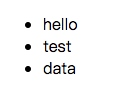
结果:
Redux-saga
作用
redux-saga同样是用来拆分组件异步代码的中间件,它和Redux-Thunk的区别就是将异步代码的操作放到一个单独的文件中去管理。
安装
$ npm install --save redux-saga
$ yarn add redux-saga
代码演示
这里采用上面的例子,同样从服务器获取数据展示在ul列表中。
// App.js
import React, { Component } from 'react';
import store from './store';
import { getListDataSagas } from './store/actionCreators';class App extends Component {constructor(props) {super(props);this.state = store.getState();this.handleStoreChange = this.handleStoreChange.bind(this);store.subscribe(this.handleStoreChange);}render() {return (<div><ul>{this.state.list.map((item, index) => {return <li key={index}>{item}</li>})}</ul></div>);}componentDidMount() {store.dispatch(getListDataSagas());}handleStoreChange () {this.setState(store.getState());}
}export default App;------------------------// actionTypes.js
export const GET_LIST_DATA = 'get_list_data';
export const GET_LIST_DATA_SAGAS = 'get_list_data_sagas';------------------------// actionCreators.js
import { GET_LIST_DATA, GET_LIST_DATA_SAGAS } from './actionTypes';export const getListData = (data) => ({type: GET_LIST_DATA,value: data
})// 这里创建了一个sagas中需要的action
export const getListDataSagas = () => ({type: GET_LIST_DATA_SAGAS,
})
------------------------// reducer.js
import { GET_LIST_DATA } from './actionTypes';const defaultState = {list: []
}export default (state = defaultState, action) => {if (action.type === GET_LIST_DATA) {const newState = JSON.parse(JSON.stringify(state));newState.list = action.value;console.log(action);return newState;}return state;
}
------------------------// store.js
import { createStore, applyMiddleware, compose } from 'redux';
import reducer from './reducer';
import createSagaMiddleware from 'redux-saga';
// 新创建的sagas.js文件用来管理一步操作的代码
import sagas from './sagas';const sagaMiddleware = createSagaMiddleware();
const composeEnhancers = window.__REDUX_DEVTOOLS_EXTENSION_COMPOSE__ ? window.__REDUX_DEVTOOLS_EXTENSION_COMPOSE__({}) : compose;
const enhancer = composeEnhancers(applyMiddleware(sagaMiddleware)
);
const store = createStore(reducer,enhancer
);
sagaMiddleware.run(sagas);
export default store;------------------------
// sagas.js  单独管理异步操作的文件
import { put, takeEvery } from 'redux-saga/effects';
import { GET_LIST_DATA_SAGAS } from './actionTypes';
import axios from 'axios';
import { getListData } from  './actionCreators';function* mySaga() {// 这句代码意思是:当接收到一个名叫GET_LIST_DATA_SAGAS的action的时候//回去调用getDataFromServer方法yield takeEvery(GET_LIST_DATA_SAGAS, getDataFromServer);
}// 获取数据的异步操作
function* getDataFromServer() {try {const res = yield axios.get('/list.json');yield put(getListData(res.data));} catch (e) {console.log('请求错误');}
}
export default mySaga;
React-Redux
作用
React-Redux的作用是为了在项目中使用Redux更加方便。
安装
$ npm install --save react-redux
$ yarn add react-redux
代码演示
代码演示的例子是改变input输入框中的内容
// index.js 项目的入口文件
import React from 'react';
import ReactDOM from 'react-dom';
import App from './App';
import { Provider } from  'react-redux';
import store from  './store';const AppRoot = (// 重点把store提供给每一个组件<Provider store={store}><App></App></Provider>
);
ReactDOM.render(AppRoot, document.getElementById('root'));------------------------
// actiionTypes.js
export const INPUT_CHANGE = 'input_change';------------------------
// actionCreators.js
import { INPUT_CHANGE } from './actionTypes';export const inputChange = (data) => ({type: INPUT_CHANGE,value: data
}) ------------------------
// store.js
import { INPUT_CHANGE } from './actionTypes';
const defaultState = {inputValue: ''
}
export default (state = defaultState, action) => {if (action.type === INPUT_CHANGE) {const newState = JSON.parse(JSON.stringify(state));newState.inputValue = action.value;return newState;}return state;
}------------------------
// App.js
import React, { Component } from 'react';
import { inputChange } from './store/actionCreators';
import { connect } from 'react-redux';class App extends Component {render() {return (<div><inputplaceholder="请输入信息"style={{width: "200px", height: '40px', border: '1px solid red'}}value={this.props.inputValue}onChange={this.props.handleChangeInput}/></div>);}
}// 将store中存储的数据映射到当前组件的props中
const mapStateToProps = (state) => {return {inputValue: state.inputValue}
}const mapDispatchToProps = (dispatch) => {return {handleChangeInput (e) {dispatch(inputChange(e.target.value));}}
}
// 利用connect将组件和store连接(连接规则mapStateToProps、mapDispatchToProps)
export default connect(mapStateToProps, mapDispatchToProps)(App);
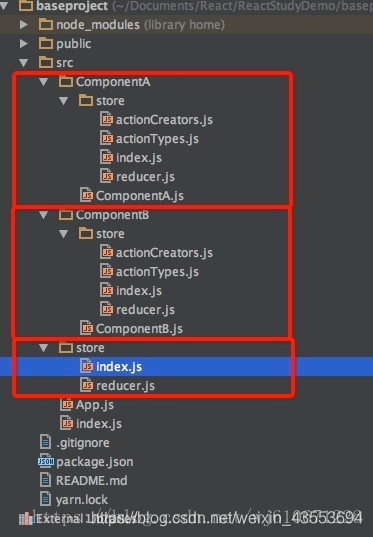
react推崇的是组件化开发
下面就是一个有两个组件的demo演示基本骨架的搭建。
总结
Redux: 就是用来管理项目中状态或者数据的
Redux-Thunk: Redux的中间件,用来将异步操作的代码拆分到action中去的
Redux-Sagas: Redux的中间件,用来将异步操作的代码拆分到单独的文件中管理
React-Redux: 更能方便的管理和使用Redux
转自:https://blog.csdn.net/wj610671226/article/details/82730051#t4
稍加修改 ↩︎
本文来自互联网用户投稿,文章观点仅代表作者本人,不代表本站立场,不承担相关法律责任。如若转载,请注明出处。 如若内容造成侵权/违法违规/事实不符,请点击【内容举报】进行投诉反馈!