系统学习iOS动画 —— Stroke和路径动画
这是要完成的动画:
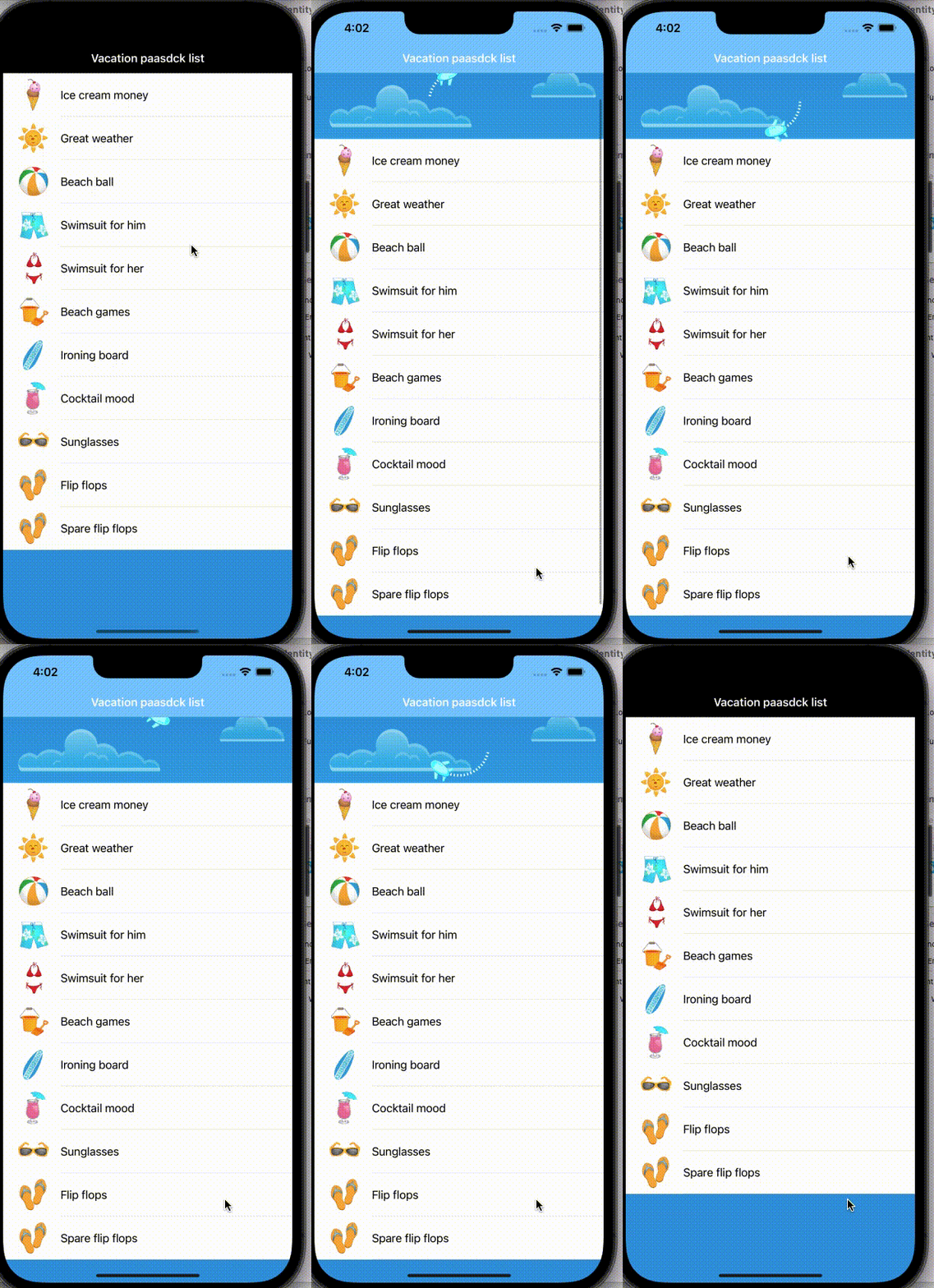
先添加需要的代码,这里需要将storyboard的ViewController换成TableViewController,将Under Top Bars 和 Under Bottom Bars 取消到,然后为其Embed in Navigation Controller,
import UIKitfunc delay(seconds: Double, completion: @escaping ()-> Void) {DispatchQueue.main.asyncAfter(deadline: .now() + seconds, execute: completion)
}class ViewController: UITableViewController {let packItems = ["Ice cream money", "Great weather", "Beach ball", "Swimsuit for him", "Swimsuit for her", "Beach games", "Ironing board", "Cocktail mood", "Sunglasses", "Flip flops", "Spare flip flops"]override func viewDidLoad() {super.viewDidLoad()// Do any additional setup after loading the view.self.tableView.register(UITableViewCell.self, forCellReuseIdentifier: "Cell")self.title = "try"self.navigationController?.navigationBar.titleTextAttributes = [.foregroundColor: UIColor.white]self.tableView.rowHeight = 64.0self.view.backgroundColor = UIColor(red: 0.0, green: 154.0/255.0, blue: 222.0/255.0, alpha: 1.0)}// MARK: Table View methodsoverride func numberOfSections(in tableView: UITableView) -> Int {return 1}override func tableView(_ tableView: UITableView, numberOfRowsInSection section: Int) -> Int {return 11}override func tableView(_ tableView: UITableView, cellForRowAt indexPath: IndexPath) -> UITableViewCell {let cell = tableView.dequeueReusableCell(withIdentifier: "Cell", for: indexPath) as UITableViewCellcell.accessoryType = .nonecell.textLabel!.text = packItems[indexPath.row]cell.imageView!.image = UIImage(named: "summericons_100px_\(indexPath.row).png")return cell}override func tableView(_ tableView: UITableView, didSelectRowAt indexPath: IndexPath) {tableView.deselectRow(at: indexPath, animated: true)}
}
然后创建一个文件,创建一个MyRefreshView类并且init需要传进来frame和UIScrollView,UIScrollView用来监听外界的拉取动作。
class MyRefreshView: UIView, UIScrollViewDelegate {var scrollView: UIScrollViewinit(frame: CGRect, scrollView: UIScrollView) {self.scrollView = scrollViewsuper.init(frame: frame)//add the background imagelet imgView = UIImageView(image: UIImage(named: "refresh-view-bg.png"))imgView.frame = boundsimgView.contentMode = .scaleAspectFillimgView.clipsToBounds = trueaddSubview(imgView)}required init(coder aDecoder: NSCoder) {fatalError("init(coder:) has not been implemented")}
}
接下来使用ShapeLayer 和 layer来创建圆形的点和 飞机图片。
//声明属性let ovalShapeLayer: CAShapeLayer = CAShapeLayer()let airplaneLayer: CALayer = CALayer()
然后设置好相关属性,这里圆的半径设置为view高度 * 0.8 的一半,这里lineDashPattern是创建路径的描边版本时应用的虚线图案(NSNumbers数组)。默认为nil,设置为[2, 3]之后就会把之前的一条线切割成一条一条的了。然后这里飞机先设置为隐藏的状态。
ovalShapeLayer.strokeColor = UIColor.white.cgColorovalShapeLayer.fillColor = UIColor.clear.cgColorovalShapeLayer.lineWidth = 4.0ovalShapeLayer.lineDashPattern = [2, 3]let refreshRadius = frame.size.height/2 * 0.8ovalShapeLayer.path = UIBezierPath(ovalIn: CGRect(x: frame.size.width/2 - refreshRadius,y: frame.size.height/2 - refreshRadius,width: 2 * refreshRadius,height: 2 * refreshRadius)).cgPathlayer.addSublayer(ovalShapeLayer)let airplaneImage = UIImage(named: "airplane.png")!airplaneLayer.contents = airplaneImage.cgImageairplaneLayer.bounds = CGRect(x: 0.0, y: 0.0,width: airplaneImage.size.width,height: airplaneImage.size.height)airplaneLayer.position = CGPoint(x: frame.size.width/2 + frame.size.height/2 * 0.8,y: frame.size.height/2)layer.addSublayer(airplaneLayer)airplaneLayer.opacity = 0.0
这里使用UIScrollViewDelegate,然后调用scrollViewDidScroll和scrollViewWillEndDragging来监听拉取的动作以及高度。
func scrollViewDidScroll(_ scrollView: UIScrollView) {}func scrollViewWillEndDragging(_ scrollView: UIScrollView, withVelocity velocity: CGPoint, targetContentOffset: UnsafeMutablePointer) {}
然后在viewController里面添加refreshVie。声明一个RefreshView属性。
var refreshView: RefreshView!
然后,在viewDidLoad里面设置好属性并且添加为子View。
let refreshRect = CGRect(x: 0.0, y: -kRefreshViewHeight, width: view.frame.size.width, height: kRefreshViewHeight)refreshView = RefreshView(frame: refreshRect, scrollView: self.tableView)refreshView.delegate = selfview.addSubview(refreshView)
在viewController里面重写scrollViewDidScroll 和 scrollViewWillEndDragging方法,然后在里面相对应调用refreshView里面的方法,并且把参数传进去。
// MARK: Scroll view methodsoverride func scrollViewDidScroll(_ scrollView: UIScrollView) {refreshView.scrollViewDidScroll(scrollView)}override func scrollViewWillEndDragging(_ scrollView: UIScrollView, withVelocity velocity: CGPoint, targetContentOffset: UnsafeMutablePointer) {refreshView.scrollViewWillEndDragging(scrollView, withVelocity: velocity, targetContentOffset: targetContentOffset)}
然后在refreshView里面的scrollViewDidScroll 和 scrollViewWillEndDragging方法进行对应的处理。
这里需要根据滚动的高度来进行判断进度,先声明一个progress的CGFloat属性。
var progress: CGFloat = 0.0
在scrollViewDidScroll 里面算出向上滚动的高度,然后处理本身view的大小和1比较取最小值,然后根据得到的progress设置ovalShapeLayer的strokeEnd和airplaneLayer的opacity。
func scrollViewDidScroll(_ scrollView: UIScrollView) {let offsetY = max(-(scrollView.contentOffset.y + scrollView.contentInset.top), 0.0)progress = min(max(offsetY / frame.size.height, 0.0), 1.0)redrawFromProgress(self.progress)}func redrawFromProgress(_ progress: CGFloat) {ovalShapeLayer.strokeEnd = progressairplaneLayer.opacity = Float(progress)}
接下来再为ovalShapeLayer和airplaneLayer添加动画。这里改变了scrollView的contentInset来显示这个view,再为ovalShapeLayer添加上strokeStart和strokeEnd的动画,然后为airplaneLayer添加上绕圆的位置的变化以及图片角度的变化。
func beginRefreshing() { UIView.animate(withDuration: 0.3) {var newInsets = self.scrollView.contentInsetnewInsets.top += self.frame.size.heightself.scrollView.contentInset = newInsets}let strokeStartAnimation = CABasicAnimation(keyPath: "strokeStart")strokeStartAnimation.fromValue = -0.5strokeStartAnimation.toValue = 1.0let strokeEndAnimation = CABasicAnimation(keyPath: "strokeEnd")strokeEndAnimation.fromValue = 0.0strokeEndAnimation.toValue = 1.0let strokeAnimationGroup = CAAnimationGroup()strokeAnimationGroup.duration = 1.5strokeAnimationGroup.repeatDuration = 5.0strokeAnimationGroup.animations = [strokeStartAnimation, strokeEndAnimation]ovalShapeLayer.add(strokeAnimationGroup, forKey: nil)let flightAnimation = CAKeyframeAnimation(keyPath: "position")flightAnimation.path = ovalShapeLayer.pathflightAnimation.calculationMode = .pacedlet airplaneOrientationAnimation = CABasicAnimation(keyPath: "transform.rotation")airplaneOrientationAnimation.fromValue = 0airplaneOrientationAnimation.toValue = 2.0 * .pilet flightAnimationGroup = CAAnimationGroup()flightAnimationGroup.duration = 1.5flightAnimationGroup.repeatDuration = 5.0flightAnimationGroup.animations = [flightAnimation, airplaneOrientationAnimation]airplaneLayer.add(flightAnimationGroup, forKey: nil)}
动画结束后需要把scrollView的contentInset调整回去。
func endRefreshing() {UIView.animate(withDuration: 0.3, delay:0.0, options: .curveEaseOut,animations: {var newInsets = self.scrollView.contentInsetnewInsets.top -= self.frame.size.heightself.scrollView.contentInset = newInsets},completion: {_ in//finished})}
然后声明一个属性 isRefreshing来判断是否正在动画
isRefreshing = true
在beginRefreshing里面设为true,在endRefreshing设为false。然后在scrollViewDidScroll里面判断,如果正在执行动画就不调用redrawFromProgress。
if !isRefreshing {redrawFromProgress(self.progress)}
再scrollViewWillEndDragging里面判断,如果没有正在执行动画并且progress大于等于1,那么就执行动画。
func scrollViewWillEndDragging(_ scrollView: UIScrollView, withVelocity velocity: CGPoint, targetContentOffset: UnsafeMutablePointer) {if !isRefreshing && self.progress >= 1.0 {beginRefreshing()}}
这里由外界决定什么时候结束刷新,那么就可以用delegate 或者 闭包来通知外界开始动画了。
这里声明一个闭包
var refreshViewDidRefresh :(() -> Void)?
在scrollViewWillEndDragging里面判断不为空则调用
func scrollViewWillEndDragging(_ scrollView: UIScrollView, withVelocity velocity: CGPoint, targetContentOffset: UnsafeMutablePointer) {if !isRefreshing && self.progress >= 1.0 {if (refreshViewDidRefresh != nil) {refreshViewDidRefresh!()}beginRefreshing()}}
在ViewController 里面使用
func scrollViewWillEndDragging(_ scrollView: UIScrollView, withVelocity velocity: CGPoint, targetContentOffset: UnsafeMutablePointer) {if !isRefreshing && self.progress >= 1.0 {if (refreshViewDidRefresh != nil) {refreshViewDidRefresh!()}beginRefreshing()}}
这样动画就完成啦。
完整代码
import UIKitfunc delay(seconds: Double, completion: @escaping ()-> Void) {DispatchQueue.main.asyncAfter(deadline: .now() + seconds, execute: completion)
}
let kRefreshViewHeight: CGFloat = 110.0class ViewController: UITableViewController {let packItems = ["Ice cream money", "Great weather", "Beach ball", "Swimsuit for him", "Swimsuit for her", "Beach games", "Ironing board", "Cocktail mood", "Sunglasses", "Flip flops", "Spare flip flops"]var refreshView: MyRefreshView!override func viewDidLoad() {super.viewDidLoad()// Do any additional setup after loading the view.self.view.backgroundColor = .clearself.tableView.register(UITableViewCell.self, forCellReuseIdentifier: "Cell")self.title = "try"self.navigationController?.navigationBar.titleTextAttributes = [.foregroundColor: UIColor.white]self.tableView.rowHeight = 64.0self.view.backgroundColor = UIColor(red: 0.0, green: 154.0/255.0, blue: 222.0/255.0, alpha: 1.0)let refreshRect = CGRect(x: 0.0, y: -kRefreshViewHeight, width: view.frame.size.width, height: kRefreshViewHeight)refreshView = MyRefreshView(frame: refreshRect, scrollView: self.tableView)refreshView.refreshViewDidRefresh = { [weak self] indelay(seconds: 4) {self?.refreshView.endRefreshing()}}view.addSubview(refreshView)}// MARK: Table View methodsoverride func numberOfSections(in tableView: UITableView) -> Int {return 1}override func tableView(_ tableView: UITableView, numberOfRowsInSection section: Int) -> Int {return 11}override func scrollViewDidScroll(_ scrollView: UIScrollView) {refreshView.scrollViewDidScroll(scrollView)}override func scrollViewWillEndDragging(_ scrollView: UIScrollView, withVelocity velocity: CGPoint, targetContentOffset: UnsafeMutablePointer) {refreshView.scrollViewWillEndDragging(scrollView, withVelocity: velocity, targetContentOffset: targetContentOffset)}override func tableView(_ tableView: UITableView, cellForRowAt indexPath: IndexPath) -> UITableViewCell {let cell = tableView.dequeueReusableCell(withIdentifier: "Cell", for: indexPath) as UITableViewCellcell.accessoryType = .nonecell.textLabel!.text = packItems[indexPath.row]cell.imageView!.image = UIImage(named: "summericons_100px_\(indexPath.row).png")return cell}override func tableView(_ tableView: UITableView, didSelectRowAt indexPath: IndexPath) {tableView.deselectRow(at: indexPath, animated: true)}
}
import UIKit
import QuartzCore
protocol MyRefreshViewDelegate: class {func refreshViewDidRefresh(_ refreshView: MyRefreshView)
}
class MyRefreshView: UIView, UIScrollViewDelegate {var scrollView: UIScrollViewweak var delegate: MyRefreshViewDelegate?let ovalShapeLayer: CAShapeLayer = CAShapeLayer()let airplaneLayer: CALayer = CALayer()var progress: CGFloat = 0.0var isRefreshing = falsevar refreshViewDidRefresh :(() -> Void)?init(frame: CGRect, scrollView: UIScrollView) {self.scrollView = scrollViewsuper.init(frame: frame)//add the background imagelet imgView = UIImageView(image: UIImage(named: "refresh-view-bg.png"))imgView.frame = boundsimgView.contentMode = .scaleAspectFillimgView.clipsToBounds = trueaddSubview(imgView)ovalShapeLayer.strokeColor = UIColor.white.cgColorovalShapeLayer.fillColor = UIColor.clear.cgColorovalShapeLayer.lineWidth = 4.0ovalShapeLayer.lineDashPattern = [2, 3]let refreshRadius = frame.size.height/2 * 0.8ovalShapeLayer.path = UIBezierPath(ovalIn: CGRect(x: frame.size.width/2 - refreshRadius,y: frame.size.height/2 - refreshRadius,width: 2 * refreshRadius,height: 2 * refreshRadius)).cgPathlayer.addSublayer(ovalShapeLayer)let airplaneImage = UIImage(named: "airplane.png")!airplaneLayer.contents = airplaneImage.cgImageairplaneLayer.bounds = CGRect(x: 0.0, y: 0.0,width: airplaneImage.size.width,height: airplaneImage.size.height)airplaneLayer.position = CGPoint(x: frame.size.width/2 + frame.size.height/2 * 0.8,y: frame.size.height/2)layer.addSublayer(airplaneLayer)airplaneLayer.opacity = 0.0}// MARK: Scroll View Delegate methodsfunc scrollViewDidScroll(_ scrollView: UIScrollView) {let offsetY = max(-(scrollView.contentOffset.y + scrollView.contentInset.top), 0.0)progress = min(max(offsetY / frame.size.height, 0.0), 1.0)if !isRefreshing {redrawFromProgress(self.progress)}}func scrollViewWillEndDragging(_ scrollView: UIScrollView, withVelocity velocity: CGPoint, targetContentOffset: UnsafeMutablePointer) {if !isRefreshing && self.progress >= 1.0 {if (refreshViewDidRefresh != nil) {refreshViewDidRefresh!()}beginRefreshing()}}func redrawFromProgress(_ progress: CGFloat) {ovalShapeLayer.strokeEnd = progressairplaneLayer.opacity = Float(progress)}func beginRefreshing() {isRefreshing = trueUIView.animate(withDuration: 0.3) {var newInsets = self.scrollView.contentInsetnewInsets.top += self.frame.size.heightself.scrollView.contentInset = newInsets}let strokeStartAnimation = CABasicAnimation(keyPath: "strokeStart")strokeStartAnimation.fromValue = -0.5strokeStartAnimation.toValue = 1.0let strokeEndAnimation = CABasicAnimation(keyPath: "strokeEnd")strokeEndAnimation.fromValue = 0.0strokeEndAnimation.toValue = 1.0let strokeAnimationGroup = CAAnimationGroup()strokeAnimationGroup.duration = 1.5strokeAnimationGroup.repeatDuration = 5.0strokeAnimationGroup.animations = [strokeStartAnimation, strokeEndAnimation]ovalShapeLayer.add(strokeAnimationGroup, forKey: nil)let flightAnimation = CAKeyframeAnimation(keyPath: "position")flightAnimation.path = ovalShapeLayer.pathflightAnimation.calculationMode = .pacedlet airplaneOrientationAnimation = CABasicAnimation(keyPath: "transform.rotation")airplaneOrientationAnimation.fromValue = 0airplaneOrientationAnimation.toValue = 2.0 * .pilet flightAnimationGroup = CAAnimationGroup()flightAnimationGroup.duration = 1.5flightAnimationGroup.repeatDuration = 5.0flightAnimationGroup.animations = [flightAnimation, airplaneOrientationAnimation]airplaneLayer.add(flightAnimationGroup, forKey: nil)}func endRefreshing() {isRefreshing = falseUIView.animate(withDuration: 0.3, delay:0.0, options: .curveEaseOut,animations: {var newInsets = self.scrollView.contentInsetnewInsets.top -= self.frame.size.heightself.scrollView.contentInset = newInsets},completion: {_ in//finished})}required init(coder aDecoder: NSCoder) {fatalError("init(coder:) has not been implemented")}
} 本文来自互联网用户投稿,文章观点仅代表作者本人,不代表本站立场,不承担相关法律责任。如若转载,请注明出处。 如若内容造成侵权/违法违规/事实不符,请点击【内容举报】进行投诉反馈!