Revit二次开发之实现局部三位
最近在学习有关Revit二次开发的有关窗体的内容,所以根据唐曾老师的Revit二次开发课程中的实现局部三位的部分实现了一个带窗口的局部三位工具。插件的主界面如下:
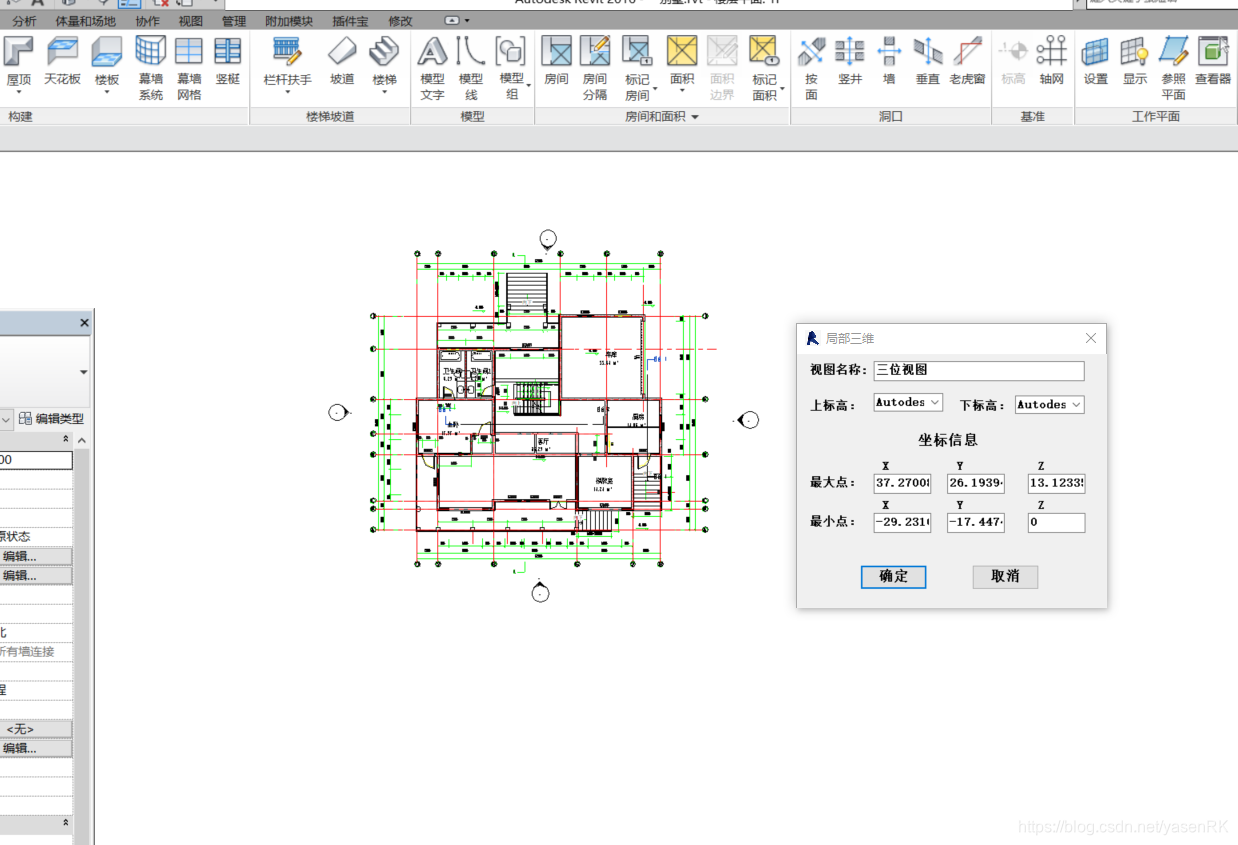
首先,需要用户先框选,然后会弹出操作界面,用户可以选择两个标高作为局部视图的显示范围。点击确定就可以生成局部三位视图。
因为能力有限,再窗体之间传值的时候我的方法略显的比较麻烦,所以后面的部分没有完全实现。本例只作为我的学习笔记,做为真正的插件还有待完善。
using System;
using System.Collections.Generic;
using System.Linq;
using System.Text;
using System.Threading.Tasks;
using Autodesk.Revit.UI;
using Autodesk.Revit.DB;
using Autodesk.Revit.UI.Selection;
using Autodesk.Revit.Attributes;namespace 局部_三位.cs
{///
/// 实现一个用户选择方框,然后生成一个局部的三位功能
/// [TransactionAttribute(TransactionMode.Manual)][RegenerationAttribute(RegenerationOption.Manual)]public class Partical_3D_View : IExternalCommand{/// /// 判断元素是否是标高/// /// /// /// 把元素转换为标高/// /// /// getLevel(List elems){List lists = new List();foreach(Element el in elems){if(IsLevel(el)){Level temp_level = el as Level;lists.Add(temp_level);}}return lists;}/// /// 给标高排序,按标高从下到上的循序排/// /// /// sortedLevel(List levels){for(int i=0;i levels[j].Elevation){Level temp = levels[i];levels[i] = levels[j];levels[j] = temp;}}}//levels.RemoveAt(0);return levels;}/// ///获取所有的标高/// /// /// getAllLevels(Document doc){FilteredElementCollector collector = new FilteredElementCollector(doc);List element = collector.OfCategory(BuiltInCategory.OST_Levels).WhereElementIsNotElementType().ToList();List lists = getLevel(element);return lists;}/// /// 获取生成局部三维视图所需的包围框/// /// /// /// 设置局部三位视图/// /// /// /// ().Where(x => x.ViewFamily == ViewFamily.ThreeDimensional).First().Id);view.SetSectionBox(bb);ts.Commit();return view;}}public Middle_Data passData(Document doc,Selection selection){Middle_Data data = new Middle_Data();data.view_name = "三位视图1";List lists = sortedLevel(getAllLevels(doc));data.shang_level = lists;data.xia_level = lists;data.min = getBoundingBox(selection).Min;data.max = getBoundingBox(selection).Max;return data;}public Result Execute(ExternalCommandData commandData, ref string message, ElementSet elements){UIDocument uidoc = commandData.Application.ActiveUIDocument;Document doc = uidoc.Document;Selection selection = uidoc.Selection;Middle_Data data = passData(doc, selection);BoundingBoxXYZ bbox = getBoundingBox(selection);mainWindow window = new mainWindow(data,uidoc,bbox);window.Show();return Result.Succeeded;}}
}//mainwindow
using System;
using System.Collections.Generic;
using System.ComponentModel;
using System.Data;
using System.Drawing;
using System.Linq;
using System.Text;
using System.Threading.Tasks;
using System.Windows.Forms;
using Autodesk.Revit.DB;
using Autodesk.Revit.UI;
using Autodesk.Revit.UI.Selection;
using Autodesk.Revit;
using Autodesk.Revit.Attributes;namespace 局部_三位.cs
{[TransactionAttribute(TransactionMode.Manual)][RegenerationAttribute(RegenerationOption.Manual)]public partial class mainWindow : System.Windows.Forms.Form{UIDocument _uidoc;BoundingBoxXYZ _bb;public mainWindow(Middle_Data data,UIDocument uidoc,BoundingBoxXYZ bbx){InitializeComponent();textBox2.Text = data.view_name;cmb_First.DataSource = data.shang_level;cmb_second.DataSource = data.xia_level;//最小点txb_min_X.Text = data.min.X.ToString();txb_min_Y.Text = data.min.Y.ToString();txb_min_Z.Text = data.min.Z.ToString();//最大点txb_max_X.Text = data.max.X.ToString();txb_max_Y.Text = data.max.Y.ToString();txb_max_Z.Text = data.max.Z.ToString();//字段赋值this._uidoc = uidoc;this._bb = bbx;}private void mainWindow_Load(object sender, EventArgs e){textBox2.Text = "三位视图";}private void textBox2_TextChanged(object sender, EventArgs e){}private void btn_OK_Click(object sender, EventArgs e){View3D view= GenerateView(_uidoc, _bb);_uidoc.ActiveView = view;}public View3D GenerateView(UIDocument uidoc, BoundingBoxXYZ bb){using (Transaction ts = new Transaction(uidoc.Document)){ts.Start("局部三位");View3D view = View3D.CreateIsometric(uidoc.Document, new FilteredElementCollector(uidoc.Document).OfClass(typeof(ViewFamilyType)).Cast().Where(x => x.ViewFamily == ViewFamily.ThreeDimensional).First().Id);view.SetSectionBox(bb);ts.Commit();return view;}}}
}//middle_data
using System;
using System.Collections.Generic;
using System.Linq;
using System.Text;
using System.Threading.Tasks;
using Autodesk.Revit.DB;
using Autodesk.Revit.UI;
using Autodesk.Revit.UI.Selection;
using Autodesk.Revit;
namespace 局部_三位.cs
{/// /// 存储从程序的主入口向窗体传递的所有数据/// public class Middle_Data{//字段private string Name;private List Shang_Level;private List Xia_Level;private XYZ Max;private XYZ Min;//属性public string view_name { get; set; }//视图名称public List shang_level { get; set; }//上标高public List xia_level { get; set; }//下标高public XYZ max { get; set; }//最大点的坐标public XYZ min { get; set; }//最小点的坐标//constructor//public Middle_Data(string n,Level[] s,Level[] x,XYZ mi,)}
} 参考文章:唐曾课堂实现局部三维的部分
本文来自互联网用户投稿,文章观点仅代表作者本人,不代表本站立场,不承担相关法律责任。如若转载,请注明出处。 如若内容造成侵权/违法违规/事实不符,请点击【内容举报】进行投诉反馈!