vue Element-ui 表格多选 修改选中行背景色
转自:https://www.cnblogs.com/Amerys/p/14688342.html
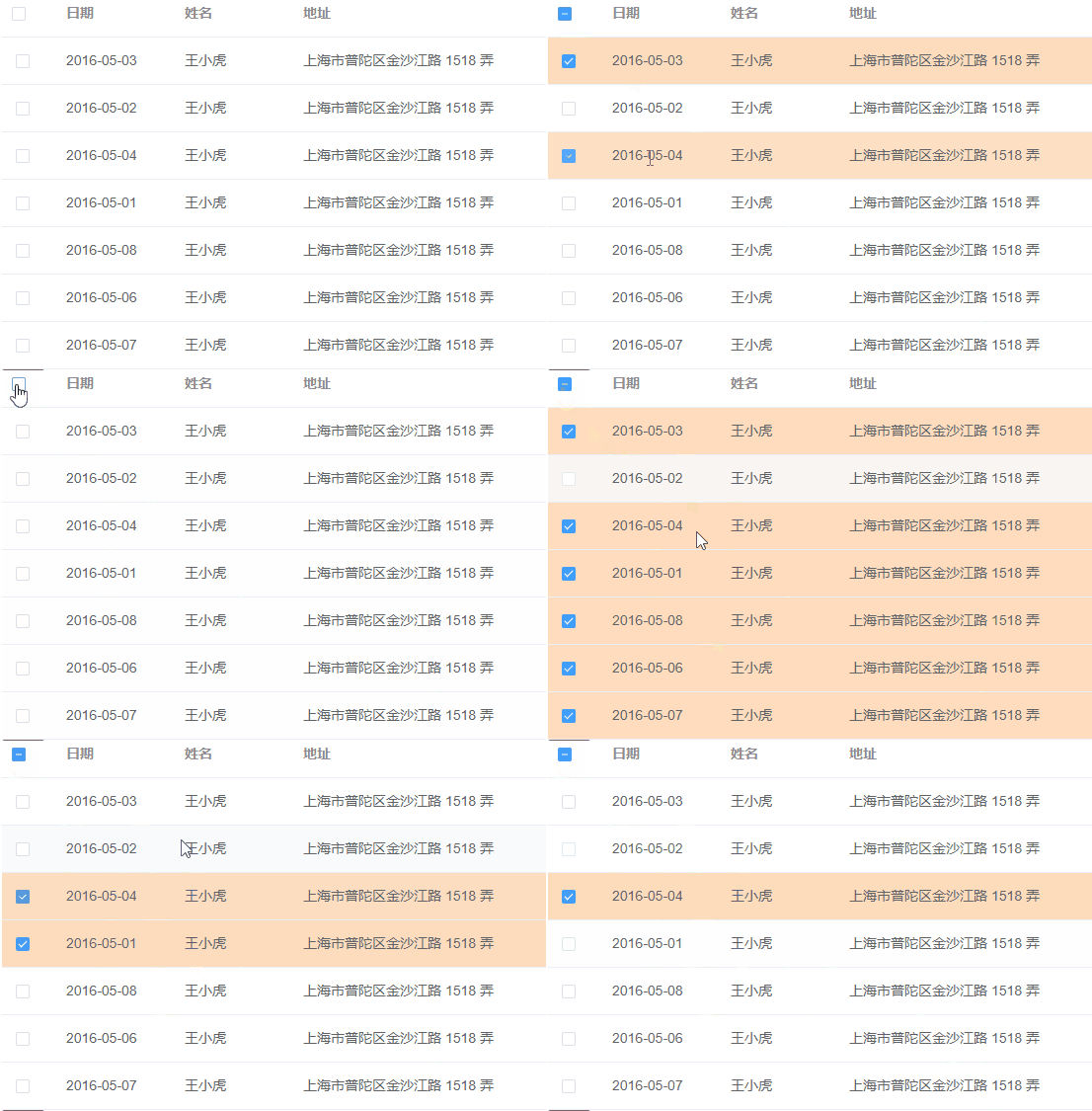
整体思路方式:
1、给获取到的数据添加自定义的className
2、在点击行(row-click)和手动点击勾选框的事件(select-all)中获取到当前的row的className,直接修改className即可 点击查看事件说明
3、在行的 className 的回调方法中(row-class-name)直接返回className
注:还有另一种方式通过获取row进行循环,判断当前点击row的id或者index与数据的是否相等,然后存放点击后的row到新的数组中,这种方式因为触及到遍历。当我有500行数据或者很多行数据,可想而知这里要遍历多少次,还有另一个就是连续点行的颜色发生变化会有延迟,相对来说性能就不好了。
步骤如下:
1、给数据添加自定义className, 由于这里演示的是本地数据,是直接添加的className; 真实开发是通过接口去加载数据,获取到的数据 直接遍历 赋值就可以,后面就不用管遍历了
data() {return {tableData: [{date: "2016-05-03",name: "王小虎",address: "上海市普陀区金沙江路 1518 弄",className: "normal",},{date: "2016-05-02",name: "王小虎",address: "上海市普陀区金沙江路 1518 弄",className: "normal",},{date: "2016-05-04",name: "王小虎",address: "上海市普陀区金沙江路 1518 弄",className: "normal",},{date: "2016-05-01",name: "王小虎",address: "上海市普陀区金沙江路 1518 弄",className: "normal",},{date: "2016-05-08",name: "王小虎",address: "上海市普陀区金沙江路 1518 弄",className: "normal",},{date: "2016-05-06",name: "王小虎",address: "上海市普陀区金沙江路 1518 弄",className: "normal",},{date: "2016-05-07",name: "王小虎",address: "上海市普陀区金沙江路 1518 弄",className: "normal",},],};
2、点击行和点击勾选框的事件
methods: { // 手动点击勾选框触发的事件handleSelect(selection, row) {// selection,row 传递两个参数,row直接是对象// 只传一个参数得到的是数组if (row.className === "normal") {row.className = "tableSelectedRowBgColor";} else {row.className = "normal";}},// select-all 手动点击全选触发的事件handleSelectAll(selection) {if (selection.length > 0) {selection.forEach((item) => {if (item.className === "normal") {item.className = "tableSelectedRowBgColor";}});} else {// 空数组初始化classNamethis.tableData.forEach((item) => {if (item.className === "tableSelectedRowBgColor") {item.className = "normal";}});}},//点击行触发,切换复选框状态handleRowClick(row) {this.$refs.multipleTable.toggleRowSelection(row);if (row.className === "normal") {row.className = "tableSelectedRowBgColor";} else {row.className = "normal";}},}
3、className的回调方法
methods: {// 选中背景色tableRowClassName({ row }) {return row.className;},
}
4、最后不要忘了写颜色类名喔
<style>
.tableSelectedRowBgColor td {background-color: #fedcbd !important;
}
</style>
完整代码:
<template><el-tableref="multipleTable":data="tableData"tooltip-effect="dark"style="width: 100%"@row-click="handleRowClick"@select="handleSelect"@select-all="handleSelectAll":row-class-name="tableRowClassName"><el-table-column type="selection" width="55"> </el-table-column><el-table-column label="日期" width="120"><template slot-scope="scope">{{ scope.row.date }}</template></el-table-column><el-table-column prop="name" label="姓名" width="120"> </el-table-column><el-table-column prop="address" label="地址" show-overflow-tooltip></el-table-column></el-table>
</template><script>
export default {data() {return {tableData: [{date: "2016-05-03",name: "王小虎",address: "上海市普陀区金沙江路 1518 弄",className: "normal",},{date: "2016-05-02",name: "王小虎",address: "上海市普陀区金沙江路 1518 弄",className: "normal",},{date: "2016-05-04",name: "王小虎",address: "上海市普陀区金沙江路 1518 弄",className: "normal",},{date: "2016-05-01",name: "王小虎",address: "上海市普陀区金沙江路 1518 弄",className: "normal",},{date: "2016-05-08",name: "王小虎",address: "上海市普陀区金沙江路 1518 弄",className: "normal",},{date: "2016-05-06",name: "王小虎",address: "上海市普陀区金沙江路 1518 弄",className: "normal",},{date: "2016-05-07",name: "王小虎",address: "上海市普陀区金沙江路 1518 弄",className: "normal",},],};},methods: {// 手动点击勾选框触发的事件handleSelect(selection, row) {// selection,row  传递两个参数,row直接是对象// 只传一个参数得到的是数组if (row.className === "normal") {row.className = "tableSelectedRowBgColor";} else {row.className = "normal";}},// select-all 手动点击全选触发的事件handleSelectAll(selection) {if (selection.length > 0) {selection.forEach((item) => {if (item.className === "normal") {item.className = "tableSelectedRowBgColor";}});} else {// 空数组初始化classNamethis.tableData.forEach((item) => {if (item.className === "tableSelectedRowBgColor") {item.className = "normal";}});}},// 选中背景色tableRowClassName({ row }) {return row.className;},//点击行触发,切换复选框状态handleRowClick(row) {this.$refs.multipleTable.toggleRowSelection(row);if (row.className === "normal") {row.className = "tableSelectedRowBgColor";} else {row.className = "normal";}},},
};
</script><style>
.tableSelectedRowBgColor td {background-color: #fedcbd !important;
}
</style>
本文来自互联网用户投稿,文章观点仅代表作者本人,不代表本站立场,不承担相关法律责任。如若转载,请注明出处。 如若内容造成侵权/违法违规/事实不符,请点击【内容举报】进行投诉反馈!