TensorFlow学习(一)——常用方法
笔者是一个痴迷于挖掘数据中的价值的学习人,希望在平日的工作学习中,挖掘数据的价值,找寻数据的秘密,笔者认为,数据的价值不仅仅只体现在企业中,个人也可以体会到数据的魅力,用技术力量探索行为密码,让大数据助跑每一个人,欢迎直筒们关注我的公众号,大家一起讨论数据中的那些有趣的事情。
我的公众号为:livandata

一、tensorflow的常用函数:
import tensorflow as tf
import numpy as np
1.1、数据的呈现(Variable():定义变量):
x=np.array([[1,1,1],[1,-8,1],[1,1,1]])
w=tf.Variable(initial_value=x)
w=tf.Variable(tf.zeros([3,3]))
init=tf.global_variables_initializer()
withtf.Session() as sess:
sess.run(init)
print(sess.run(w))
1.2、数据的加减运算(add():加;multiply():乘):
a=tf.placeholder(tf.int16)
b=tf.placeholder(tf.int16)
add=tf.add(a,b)
mul=tf.multiply(a,b)
withtf.Session() as sess:
print("a+b=", sess.run(add,feed_dict={a:2, b:3}))
print("a*b=", sess.run(mul,feed_dict={a:2, b:3}))
1.3、矩阵相乘(matmul)运算:
a=tf.Variable(tf.ones([3,3]))
b=tf.Variable(tf.ones([3,3]))
product=tf.matmul(tf.multiply(5.0,a),tf.multiply(4.0,b))
init=tf.initialize_all_variables()
withtf.Session() as sess:
sess.run(init)
print(sess.run(product))
1.4、argmax的练习:获取最大值的下标向量
a=tf.get_variable(name='a',shape=[3,4],dtype=tf.float32,initializer=tf.random_uniform_initializer(minval=-1,maxval=1))
# 最大值所在的下标向量
b=tf.argmax(input=a,axis=0)
c=tf.argmax(input=a,dimension=1)
sess=tf.InteractiveSession()
sess.run(tf.initialize_all_variables())
print(sess.run(a))
print(sess.run(b))
print(sess.run(c))
1.5、创建全一/全零矩阵:
tf.ones(shape,type=tf.float32,name=None)
tf.ones([2, 3], int32) ==> [[1, 1, 1], [1, 1, 1]]
tf.zeros(shape,type=tf.float32,name=None)
tf.zeros([2, 3], int32) ==> [[0, 0, 0],[0, 0, 0]]
1.7、tf.ones_like(tensor,dype=None,name=None)
新建一个与给定的tensor类型大小一致的tensor,其所有元素为1。
# 'tensor' is [[1, 2, 3], [4, 5, 6]]
tf.ones_like(tensor) ==> [[1, 1, 1], [1, 1, 1]]
1.8、tf.zeros_like(tensor,dype=None,name=None)
新建一个与给定的tensor类型大小一致的tensor,其所有元素为0。
# 'tensor' is [[1, 2, 3], [4, 5, 6]]
tf.ones_like(tensor) ==> [[0, 0, 0],[0, 0, 0]]
1.9、tf.fill(dim,value,name=None)
创建一个形状大小为dim的tensor,其初始值为value
# Output tensor has shape [2, 3].
fill([2, 3], 9) ==> [[9, 9, 9]
[9, 9, 9]]
1.10、tf.constant(value,dtype=None,shape=None,name='Const')
创建一个常量tensor,先给出value,可以设定其shape
# Constant 1-D Tensor populated with value list.
tensor = tf.constant([1, 2, 3, 4, 5, 6, 7]) => [1 2 3 4 5 67]
# Constant 2-D tensor populated with scalarvalue -1.
tensor = tf.constant(-1.0, shape=[2, 3]) => [[-1. -1. -1.] [-1.-1. -1.]
1.11、tf.linspace(start,stop,num,name=None)
返回一个tensor,该tensor中的数值在start到stop区间之间取等差数列(包含start和stop),如果num>1则差值为(stop-start)/(num-1),以保证最后一个元素的值为stop。
其中,start和stop必须为tf.float32或tf.float64。num的类型为int。
tf.linspace(10.0, 12.0, 3, name="linspace") => [ 10.011.0 12.0]
1.12、tf.range(start,limit=None,delta=1,name='range')
返回一个tensor等差数列,该tensor中的数值在start到limit之间,不包括limit,delta是等差数列的差值。
start,limit和delta都是int32类型。
# 'start' is 3
# 'limit' is 18
# 'delta' is 3
tf.range(start, limit, delta) ==> [3, 6, 9, 12, 15]
# 'limit' is 5 start is 0
tf.range(start, limit) ==> [0, 1, 2, 3, 4]
1.13、tf.random_normal(shape,mean=0.0,stddev=1.0,dtype=tf.float32,seed=None,name=None)
返回一个tensor其中的元素的值服从正态分布。
seed: A Python integer. Used to create a random seed for thedistribution.See set_random_seed forbehavior。
1.14、tf.truncated_normal(shape, mean=0.0, stddev=1.0, dtype=tf.float32,seed=None, name=None)
返回一个tensor其中的元素服从截断正态分布(?概念不懂,留疑)
1.15、tf.random_uniform(shape,minval=0,maxval=None,dtype=tf.float32,seed=None,name=None)
返回一个形状为shape的tensor,其中的元素服从minval和maxval之间的均匀分布。
1.16、tf.random_shuffle(value,seed=None,name=None)
对value(是一个tensor)的第一维进行随机化。
[[1,2], [[2,3],
[2,3], ==> [1,2],
[3,4]] [3,4]]
1.17、tf.set_random_seed(seed)
设置产生随机数的种子。
二、常规神经网络(NN):
import tensorflow as tf
import tensorflow.examples.tutorials.mnist.input_data as input_data
mnist=input_data.read_data_sets("Mnist_data/", one_hot=True)
# val_data=mnist.validation.images
# val_label=mnist.validation.labels
#print("______________________________")
# print(mnist.train.images.shape)
# print(mnist.train.labels.shape)
# print(mnist.validation.images.shape)
# print(mnist.validation.labels.shape)
# print(mnist.test.images.shape)
# print(mnist.test.labels.shape)
# print(val_data)
# print(val_label)
# print("==============================")
x = tf.placeholder(tf.float32, [None,784])
y_actual = tf.placeholder(tf.float32, shape=[None,10])
W = tf.Variable(tf.zeros([784,10]))
b = tf.Variable(tf.zeros([10]))
y_predict = tf.nn.softmax(tf.matmul(x, W)+b)
cross_entropy=tf.reduce_mean(-tf.reduce_sum(y_actual*tf.log(y_predict),reduction_indices=1))
train_step=tf.train.GradientDescentOptimizer(0.01).minimize(cross_entropy)
correct_prediction=tf.equal(tf.argmax(y_predict,1),tf.argmax(y_actual, 1))
accuracy=tf.reduce_mean(tf.cast(correct_prediction,"float"))
init = tf.initialize_all_variables()
with tf.Session() assess:
sess.run(init)
fori in range(1000):
batch_xs, batch_ys = mnist.train.next_batch(100)
sess.run(train_step, feed_dict={x:batch_xs, y_actual:batch_ys})
if(i%100==0):
print("accuracy:" ,sess.run(accuracy, feed_dict={x:mnist.test.images,y_actual:mnist.test.labels}))
三、线性网络模型:
import tensorflow as tf
import numpy as np
# 用numpy随机生成100个数:
x_data=np.float32(np.random.rand(2,100))
y_data=np.dot([0.100,0.200], x_data)+0.300
# 构造一个线性模型:
b=tf.Variable(tf.zeros([1]))
W=tf.Variable(tf.random_uniform([1,2],-1.0, 1.0))
y=tf.matmul(W, x_data)+b
# 最小化方差
loss=tf.reduce_mean(tf.square(y-y_data))
optimizer=tf.train.GradientDescentOptimizer(0.5)
train = optimizer.minimize(loss)
# 初始化变量
init=tf.initialize_all_variables()
# 启动图
sess=tf.Session()
sess.run(init)
# 拟合平面
for step inrange(0, 201):
sess.run(train)
ifstep % 20 == 0:
print(step,sess.run(W), sess.run(b))
四、CNN卷积神经网络:
# -*- coding: utf-8 -*-
"""
Created on ThuSep 8 15:29:48 2016
@author: root
"""
import tensorflow as tf
import tensorflow.examples.tutorials.mnist.input_data asinput_data
mnist = input_data.read_data_sets("MNIST_data/", one_hot=True)
x = tf.placeholder(tf.float32, [None,784])
y_actual = tf.placeholder(tf.float32, shape=[None,10])
# 定义实际x与y的值。
# placeholder中shape是参数的形状,默认为none,即一维数据,[2,3]表示为两行三列;[none,3]表示3列,行不定。
def weight_variable(shape):
initial = tf.truncated_normal(shape, stddev=0.1)
returntf.Variable(initial)
# 截尾正态分布,保留[mean-2*stddev, mean+2*stddev]范围内的随机数。用于初始化所有的权值,用做卷积核。
def bias_variable(shape):
initial = tf.constant(0.1,shape=shape)
returntf.Variable(initial)
# 创建常量0.1;用于初始化所有的偏置项,即b,用作偏置。
def conv2d(x,W):
returntf.nn.conv2d(x, W, strides=[1,1, 1,1], padding='SAME')
# 定义一个函数,用于构建卷积层;
# x为input;w为卷积核;strides是卷积时图像每一维的步长;padding为不同的卷积方式;
def max_pool(x):
returntf.nn.max_pool(x, ksize=[1,2, 2,1], strides=[1,2, 2,1], padding='SAME')
# 定义一个函数,用于构建池化层,池化层是为了获取特征比较明显的值,一般会取最大值max,有时也会取平均值mean。
# ksize=[1,2,2,1]:shape为[batch,height,width, channels]设为1个池化,池化矩阵的大小为2*2,有1个通道。
# strides是表示步长[1,2,2,1]:水平步长为2,垂直步长为2,strides[0]与strides[3]皆为1。
x_image = tf.reshape(x, [-1,28,28,1])
# 在reshape方法中-1维度表示为自动计算此维度,将x按照28*28进行图片转换,转换成一个大包下一个小包中28行28列的四维数组;
W_conv1 = weight_variable([5,5, 1,32])
# 构建一定形状的截尾正态分布,用做第一个卷积核;
b_conv1 = bias_variable([32])
# 构建一维的偏置量。
h_conv1 = tf.nn.relu(conv2d(x_image, W_conv1)+ b_conv1)
# 将卷积后的结果进行relu函数运算,通过激活函数进行激活。
h_pool1 = max_pool(h_conv1)
# 将激活函数之后的结果进行池化,降低矩阵的维度。
W_conv2 = weight_variable([5,5, 32,64])
# 构建第二个卷积核;
b_conv2 = bias_variable([64])
# 第二个卷积核的偏置;
h_conv2 = tf.nn.relu(conv2d(h_pool1, W_conv2)+ b_conv2)
# 第二次进行激活函数运算;
h_pool2 = max_pool(h_conv2)
# 第二次进行池化运算,输出一个2*2的矩阵,步长是2*2;
W_fc1 = weight_variable([7* 7 * 64,1024])
# 构建新的卷积核,用来进行全连接层运算,通过这个卷积核,将最后一个池化层的输出数据转化为一维的向量1*1024。
b_fc1 = bias_variable([1024])
# 构建1*1024的偏置;
h_pool2_flat = tf.reshape(h_pool2, [-1,7*7*64])
# 对 h_pool2第二个池化层结果进行变形。
h_fc1 = tf.nn.relu(tf.matmul(h_pool2_flat,W_fc1) + b_fc1)
# 将矩阵相乘,并进行relu函数的激活。
keep_prob = tf.placeholder("float")
# 定义一个占位符。
h_fc1_drop = tf.nn.dropout(h_fc1, keep_prob)
# 是防止过拟合的,使输入tensor中某些元素变为0,其他没变为零的元素变为原来的1/keep_prob大小,
# 形成防止过拟合之后的矩阵。
W_fc2 = weight_variable([1024,10])
b_fc2 = bias_variable([10])
y_predict=tf.nn.softmax(tf.matmul(h_fc1_drop,W_fc2) + b_fc2)
# 用softmax进行激励函数运算,得到预期结果;
# 在每次进行加和运算之后,需要用到激活函数进行转换,激活函数是用来做非线性变换的,因为sum出的线性函数自身在分类中存在有限性。
cross_entropy =-tf.reduce_sum(y_actual*tf.log(y_predict))
# 求交叉熵,用来检测运算结果的熵值大小。
train_step =tf.train.GradientDescentOptimizer(1e-3).minimize(cross_entropy)
# 通过训练获取到最小交叉熵的数据,训练权重参数。
correct_prediction =tf.equal(tf.argmax(y_predict,1),tf.argmax(y_actual,1))
accuracy =tf.reduce_mean(tf.cast(correct_prediction, "float"))
# 计算模型的精确度。
sess=tf.InteractiveSession()
sess.run(tf.initialize_all_variables())
for i inrange(20000):
batch = mnist.train.next_batch(50)
ifi%100 == 0:
train_acc = accuracy.eval(feed_dict={x:batch[0],y_actual: batch[1], keep_prob: 1.0})
# 用括号中的参数,带入accuracy中,进行精确度计算。
print('step',i,'training accuracy',train_acc)
train_step.run(feed_dict={x: batch[0],y_actual: batch[1], keep_prob: 0.5})
# 训练参数,形成最优模型。
test_acc=accuracy.eval(feed_dict={x:mnist.test.images, y_actual: mnist.test.labels, keep_prob: 1.0})
print("test accuracy",test_acc)
Ø 解析:
1)卷积层运算:
# -*- coding: utf-8 -*-
importtensorflow as tf
# 构建一个两维的数组,命名为k。
k=tf.constant([[1,0,1],[2,1,0],[0,0,1]],dtype=tf.float32, name='k')
# 构建一个两维的数组,命名为i。
i=tf.constant([[4,3,1,0],[2,1,0,1],[1,2,4,1],[3,1,0,2]],dtype=tf.float32, name='i')
# 定义一个卷积核,将上面的k形状转化为[3,3,1,1]:长3宽3,1个通道,1个核。
kernel=tf.reshape(k,[3,3,1,1],name='kernel')
# 定义一个原始图像,将上面的i形状转化为[1,4,4,1]:1张图片,长4宽4,1个通道。
image=tf.reshape(i, [1,4,4,1],name='image')
# 用kernel对image做卷积,[1,1,1,1]:每个方向上的滑动步长,此时为四维,故四个方向上的滑动步长全部为1,
sss=tf.nn.conv2d(image, kernel, [1,1,1,1],"VALID")
# 从数组的形状中删除单维条目,即把shape为1的维度去掉,一个降维的过程,得到一个二维的。
res=tf.squeeze(sss)
with tf.Session() assess:
print(sess.run(k))
print(sess.run(sss))
print(sess.run(res))
五、LSTM & GRU
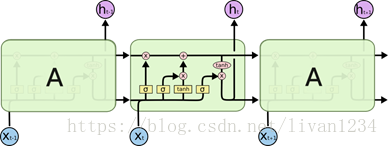
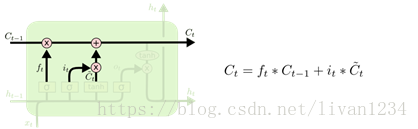
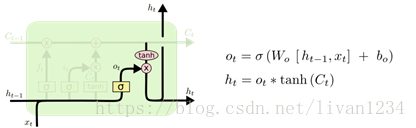
tensorflow提供了LSTM实现的一个basic版本,不包含lstm的一些高级扩展,同时也提供了一个标准接口,其中包含了lstm的扩展。分别为:tf.nn.rnn_cell.BasicLSTMCell(), tf.nn.rnn_cell.LSTMCell()
盗用一下Understanding LSTM Networks上的图
图一
图二
图三
tensorflow中的BasicLSTMCell()是完全按照这个结构进行设计的
#tf.nn.rnn_cell.BasicLSTMCell(num_units,forget_bias, input_size, state_is_tupe=Flase, activation=tanh)
cell =tf.nn.rnn_cell.BasicLSTMCell(num_units, forget_bias=1.0, input_size=None,state_is_tupe=Flase, activation=tanh)
#num_units:图一中ht的维数,如果num_units=10,那么ht就是10维行向量
#forget_bias:还不清楚这个是干嘛的
#input_size:[batch_size,max_time, size]。假设要输入一句话,这句话的长度是不固定的,max_time就代表最长的那句话是多长,size表示你打算用多长的向量代表一个word,即embedding_size(embedding_size和size的值不一定要一样)
#state_is_tuple:true的话,返回的状态是一个tuple:(c=array([[]]), h=array([[]]):其中c代表Ct的最后时间的输出,h代表Ht最后时间的输出,h是等于最后一个时间的output的
#图三向上指的ht称为output
#此函数返回一个lstm_cell,即图一中的一个A
如果你想要设计一个多层的LSTM网络,你就会用到tf.nn.rnn_cell.MultiRNNCell(cells, state_is_tuple=False),这里多层的意思上向上堆叠,而不是按时间展开
lstm_cell = tf.nn.rnn_cell.MultiRNNCells(cells,state_is_tuple=False)
#cells:一个cell列表,将列表中的cell一个个堆叠起来,如果使用cells=[cell]*4的话,就是四曾,每层cell输入输出结构相同
#如果state_is_tuple:则返回的是 n-tuple,其中n=len(cells): tuple:(c=[batch_size, num_units],h=[batch_size,num_units])
这是,网络已经搭好了,tensorflow提供了一个非常方便的方法来生成初始化网络的state
initial_state =lstm_cell.zero_state(batch_size, dtype=)
#返回[batch_size, 2*len(cells)],或者[batch_size, s]
#这个函数只是用来生成初始化值的
现在进行时间展开,有两种方法:
法一:
使用现成的接口:
tf.nn.dynamic_rnn(cell, inputs,sequence_length=None, initial_state=None,dtype=None,time_major=False)
#此函数会通过,inputs中的max_time将网络按时间展开
#cell:将上面的lstm_cell传入就可以
#inputs:[batch_size,max_time, size]如果time_major=Flase. [max_time,batch_size, size]如果time_major=True
#sequence_length:是一个list,如果你要输入三句话,且三句话的长度分别是5,10,25,那么sequence_length=[5,10,25]
#返回:(outputs, states):output,[batch_size, max_time, num_units]如果time_major=False。 [max_time,batch_size,num_units]如果time_major=True。states:[batch_size, 2*len(cells)]或[batch_size,s]
#outputs输出的是最上面一层的输出,states保存的是最后一个时间输出的states
法二
outputs = []
states = initial_states
with tf.variable_scope("RNN"):
fortime_step in range(max_time):
if time_step>0:tf.get_variable_scope().reuse_variables()#LSTM同一曾参数共享,
(cell_out, state) = lstm_cell(inputs[:,time_step,:], state)
outputs.append(cell_out)
已经得到输出了,就可以计算loss了,根据你自己的训练目的确定loss函数
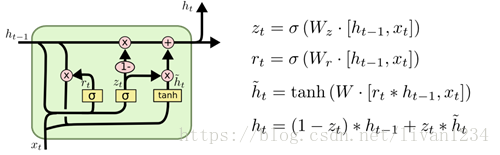
GRU结构图
来自Understanding LSTM Networks
图四
tenforflow提供了tf.nn.rnn_cell.GRUCell()构建一个GRU单元
cell = tenforflow提供了tf.nn.rnn_cell.GRUCell(num_units, input_size=None, activation=tanh)
#参考lstm cell 使用
六、常用方法补充:
tf.unstack()
将给定的R维张量拆分成R-1维张量
将value根据axis分解成num个张量,返回的值是list类型,如果没有指定num则根据axis推断出!
DEMO:
| 1 2 3 4 5 6 7 8 9 10 11 12 13 | import tensorflow as tf a = tf.constant([3,2,4,5,6]) b = tf.constant([1,6,7,8,0]) c = tf.stack([a,b],axis=0) d = tf.stack([a,b],axis=1) e = tf.unstack([a,b],axis=0) f = tf.unstack([a,b],axis=1)
with tf.Session() as sess: print(sess.run(c)) print(sess.run(d)) print(sess.run(e)) print(sess.run(f)) |
输出:
[[3 2 4 5 6]
[1 6 7 8 0]]
--------------------
[[3 1]
[2 6]
[4 7]
[5 8]
[6 0]]
----------------------
[array([3, 2, 4, 5, 6]), array([1, 6, 7, 8, 0])]
----------------------
[array([3, 1]), array([2, 6]), array([4, 7]), array([5, 8]), array([6, 0])]
七、tf.nn.softmax_cross_entropy_with_logits的用法:
在计算loss的时候,最常见的一句话就是tf.nn.softmax_cross_entropy_with_logits,那么它到底是怎么做的呢?
首先明确一点,loss是代价值,也就是我们要最小化的值.
tf.nn.softmax_cross_entropy_with_logits(logits,labels, name=None)
除去name参数用以指定该操作的name,与方法有关的一共两个参数:
第一个参数logits:就是神经网络最后一层的输出,如果有batch的话,它的大小就是[batchsize,num_classes],单样本的话,大小就是num_classes
第二个参数labels:实际的标签,大小同上
具体的执行流程大概分为两步:
第一步是先对网络最后一层的输出做一个softmax,这一步通常是求取输出属于某一类的概率,对于单样本而言,输出就是一个num_classes大小的向量([Y1,Y2,Y3...]其中Y1,Y2,Y3...分别代表了是属于该类的概率)
至于为什么是用的这个公式?这里不介绍了,涉及到比较多的理论证明
第二步是softmax的输出向量[Y1,Y2,Y3...]和样本的实际标签做一个交叉熵,公式如下:
其中,指代实际的标签中第i个的值(用mnist数据举例,如果是3,那么标签是[0,0,0,1,0,0,0,0,0,0],除了第4个值为1,其他全为0)
就是softmax的输出向量[Y1,Y2,Y3...]中,第i个元素的值
显而易见,预测越准确,结果的值越小(别忘了前面还有负号),最后求一个平均,得到我们想要的loss
注意!!!这个函数的返回值并不是一个数,而是一个向量,如果要求交叉熵,我们要再做一步tf.reduce_sum操作,就是对向量里面所有元素求和,最后才得到 ,如果求loss,则要做一步tf.reduce_mean操作,对向量求均值!
最后上代码:
import tensorflow as tf
#our NN's output
logits=tf.constant([[1.0,2.0,3.0],[1.0,2.0,3.0],[1.0,2.0,3.0]])
#step1:do softmax
y=tf.nn.softmax(logits)
#true label
y_=tf.constant([[0.0,0.0,1.0],[0.0,0.0,1.0],[0.0,0.0,1.0]])
#step2:do cross_entropy
cross_entropy =-tf.reduce_sum(y_*tf.log(y))
#do cross_entropy just one step
cross_entropy2=tf.reduce_sum(tf.nn.softmax_cross_entropy_with_logits(logits,y_))#dont forget tf.reduce_sum()!!
with tf.Session() as sess:
softmax=sess.run(y)
c_e = sess.run(cross_entropy)
c_e2 = sess.run(cross_entropy2)
print("step1:softmax result=")
print(softmax)
print("step2:cross_entropy result=")
print(c_e)
print("Function(softmax_cross_entropy_with_logits)result=")
print(c_e2)
输出结果是:
step1:softmax result=
[[ 0.09003057 0.24472848 0.66524094]
[0.09003057 0.24472848 0.66524094]
[0.09003057 0.24472848 0.66524094]]
step2:cross_entropy result=
1.22282
Function(softmax_cross_entropy_with_logits)result=
1.2228
最后大家可以试试e^1/(e^1+e^2+e^3)是不是0.09003057,发现确实一样!!这也证明了我们的输出是符合公式逻辑的
八、RNN应用:
Ø RNN案例(一)
# -*- coding: utf-8 -*-
import tensorflow as tf
importtensorflow.examples.tutorials.mnist.input_data as input_data
mnist =input_data.read_data_sets("MNIST_data/", one_hot=True)
lr = 0.001
training_iters = 100000
batch_size = 128
n_inputs = 28
n_steps = 28
n_hidden_units = 128
n_classes = 10
# 生成两个占位符;
x = tf.placeholder(tf.float32, [None,n_steps, n_inputs])
y = tf.placeholder(tf.float32, [None,n_classes])
weights = {
# 随机生成一个符合正态图形的矩阵,作为in和out的初始值。
'in':tf.Variable(tf.random_normal([n_inputs, n_hidden_units])),
'out':tf.Variable(tf.random_normal(n_hidden_units, n_classes)),
}
biases = {
'in':tf.Variable(tf.constant(0.1, shape=[n_hidden_units, ])),
'out':tf.Variable(tf.constant(0.1, shape=[n_classes, ])),
}
def RNN(X, weights, biases):
# 第一步:输入的x为三维数据,因此需要进行相应的维度变换;转换成2维,然后与w、b进行交易,运算完成后,再将x转换成三维;
X=tf.reshape(X, [-1, n_inputs])
X_in = tf.matmul(X, weights['in'])+biases['in']
X_in = tf.reshape(X_in, [-1, n_steps, n_hidden_units])
# 第二步:即构建cell的初始值,并进行建模运算;
#n_hidden_units:是ht的维数,表示128维行向量;state_is_tuple表示tuple形式,返回一个lstm的单元,即一个ht。
lstm_cell = tf.contrib.rnn.BasicLSTMCell(n_hidden_units,forget_bias=1.0, state_is_tuple=True)
# 将LSTM的状态初始化全为0数组,batch_size给出一个batch大小。
init_state = lstm_cell.zero_state(batch_size, dtype=tf.float32)
# 运算一个神经单元的输出值与状态,动态构建RNN模型,在这个模型中实现ht与x的结合。
outputs, final_state = tf.nn.dynamic_rnn(lstm_cell, X_in,initial_state=init_state, time_major=False)
# 第三步:将输出值进行格式转换,然后运算输出,即可。
# 矩阵的转置,[0,1,2]为正常顺序[高,长,列],想要更换哪个就更换哪个的顺序即可,并实现矩阵解析。
outputs = tf.unstack(tf.transpose(outputs, [1,0,2]))
results = tf.matmul(outputs[-1], weights['out']) + biases['out']
return results
# 创建一个模型,然后进行测试。
pred = RNN(x, weights, biases)
# softmax_cross_entropy_with_logits:将神经网络最后一层的输出值pred与实际标签y作比较,然后计算全局平均值,即为损失。
cost =tf.reduce_mean(tf.nn.softmax_cross_entropy_with_logits(pred, y))
# 用梯度下降优化,下降速率为0.001。
train_op =tf.train.AdamOptimizer(lr).minimize(cost)
# 计算准确度。
correct_pred = tf.equal(tf.argmax(pred, 1),tf.argmax(y, 1))
accuracy =tf.reduce_mean(tf.cast(correct_pred, tf.float32))
init = tf.global_variables_initializer()
with tf.Session() as sess:
sess.run(init)
step = 0
while step*batch_size < training_iters:
batch_xs, batch_ys = mnist.train.next_batch(batch_size)
batch_xs = batch_xs.reshape([batch_size, n_steps, n_inputs])
sess.run([train_op], feed_dict={
x:batch_xs,
y:batch_ys,
})
if step % 20 ==0:
print(sess.run(accuracy, feed_dict={
x:batch_xs,
y:batch_ys,
}))
step += 1
Ø RNN案例(二)
# num_epochs = 100
# total_series_length = 50000
# truncated_backprop_length = 15
# state_size = 4
# num_classes = 2
# echo_step = 3
# batch_size = 5
# num_batches =total_series_length//batch_size//truncated_backprop_length
#
# def generateData():
# x= np.array(np.random.choice(2, total_series_length, p=[0.5, 0.5]))
# y= np.roll(x, echo_step)
# y[0:echo_step] = 0
#
# x= x.reshape((batch_size, -1)) # Thefirst index changing slowest, subseries as rows
# y= y.reshape((batch_size, -1))
#
# return (x, y)
#
# batchX_placeholder =tf.placeholder(tf.float32, [batch_size, truncated_backprop_length])
# batchY_placeholder =tf.placeholder(tf.int32, [batch_size, truncated_backprop_length])
#
# init_state = tf.placeholder(tf.float32,[batch_size, state_size])
#
# W =tf.Variable(np.random.rand(state_size+1, state_size), dtype=tf.float32)
# b = tf.Variable(np.zeros((1,state_size)),dtype=tf.float32)
#
# W2 = tf.Variable(np.random.rand(state_size,num_classes),dtype=tf.float32)
# b2 = tf.Variable(np.zeros((1,num_classes)),dtype=tf.float32)
#
# # Unpack columns
# inputs_series =tf.unstack(batchX_placeholder, axis=1)
# labels_series =tf.unstack(batchY_placeholder, axis=1)
#
# # Forward pass
# current_state = init_state
# states_series = []
# for current_input in inputs_series:
# current_input = tf.reshape(current_input, [batch_size, 1])
# input_and_state_concatenated = tf.concat(1, [current_input,current_state]) # Increasing number ofcolumns
#
# next_state = tf.tanh(tf.matmul(input_and_state_concatenated, W) +b) # Broadcasted addition
# states_series.append(next_state)
# current_state = next_state
#
# logits_series = [tf.matmul(state, W2) + b2for state in states_series] #Broadcasted addition
# predictions_series = [tf.nn.softmax(logits)for logits in logits_series]
#
# losses =[tf.nn.sparse_softmax_cross_entropy_with_logits(logits, labels) for logits,labels in zip(logits_series,labels_series)]
# total_loss = tf.reduce_mean(losses)
#
# train_step =tf.train.AdagradOptimizer(0.3).minimize(total_loss)
# def plot(loss_list, predictions_series,batchX, batchY):
# plt.subplot(2, 3, 1)
# plt.cla()
# plt.plot(loss_list)
#
# for batch_series_idx in range(5):
# one_hot_output_series = np.array(predictions_series)[:, batch_series_idx,:]
# single_output_series = np.array([(1 if out[0] < 0.5 else 0) for outin one_hot_output_series])
#
# plt.subplot(2, 3, batch_series_idx + 2)
# plt.cla()
# plt.axis([0, truncated_backprop_length, 0, 2])
# left_offset = range(truncated_backprop_length)
# plt.bar(left_offset, batchX[batch_series_idx, :], width=1,color="blue")
# plt.bar(left_offset, batchY[batch_series_idx, :] * 0.5, width=1,color="red")
# plt.bar(left_offset, single_output_series * 0.3, width=1,color="green")
#
# plt.draw()
# plt.pause(0.0001)
#
# with tf.Session() as sess:
# sess.run(tf.initialize_all_variables())
# plt.ion()
# plt.figure()
# plt.show()
# loss_list = []
#
# for epoch_idx in range(num_epochs):
# x,y = generateData()
# _current_state = np.zeros((batch_size, state_size))
# print("New data, epoch", epoch_idx)
#
# for batch_idx in range(num_batches):
# start_idx = batch_idx * truncated_backprop_length
# end_idx = start_idx + truncated_backprop_length
#
# batchX = x[:,start_idx:end_idx]
# batchY = y[:,start_idx:end_idx]
#
# _total_loss, _train_step, _current_state, _predictions_series =sess.run(
# [total_loss, train_step, current_state, predictions_series],
# feed_dict={
# batchX_placeholder:batchX,
# batchY_placeholder:batchY,
# init_state:_current_state
# })
# loss_list.append(_total_loss)
# if batch_idx%100 == 0:
# print("Step",batch_idx, "Loss", _total_loss)
# plot(loss_list, _predictions_series, batchX, batchY)
# plt.ioff()
# plt.show()
Ø LSTM_RNN案例(三):
# -*-coding: utf-8 -*-
import numpy as np
import tensorflow as tf
import matplotlib.pyplot as plt
from asn1crypto._ffi import null
BATCH_START=0 #建立batch data的时候的index
TIME_STEPS=20 #backpropagation throughtime的time_steps
BATCH_SIZE=50 #
INPUT_SIZE=1 #sin数据输入size
OUTPUT_SIZE=1 #cos数据输入size
CELL_SIZE=10 #RNN的hiden unit size
LR=0.006 #学习率
# 定义一个生成数据的get_batch的function:
def get_batch():
global BATCH_START, TIME_STEPS
xs=np.arange(BATCH_START,BATCH_START+TIME_STEPS*BATCH_SIZE)
.reshape((BATCH_SIZE,TIME_STEPS))/(10*np.pi)
seq=np.sin(xs)
res=np.cos(xs)
BATCH_START+=TIME_STEPS
# np.newaxis:在功能上等价于none;
return [seq[:,:,np.newaxis],res[:,:,np.newaxis],xs]
class LSTMRNN(object):
def __init__(self, n_steps, input_size, output_size, cell_size,batch_size):
self.n_steps=n_steps
self.input_size=input_size
self.output_size=output_size
self.cell_size=cell_size
self.batch_size=batch_size
# 构建命名空间,在inputs命名空间下的xs和ys与其他空间下的xs和ys是不冲突的,一般与variable一起用。
with tf.name_scope('inputs'):
self.xs=tf.placeholder(tf.float32,[None, n_steps, input_size], name='xs')
self.ys=tf.placeholder(tf.float32,[None, n_steps, output_size], name='ys')
# variable_scope与get_variable()一起用,实现变量共享,指向同一个内存空间。
with tf.variable_scope('in_hidden'):
self.add_input_layer()
with tf.variable_scope('LSTM_cell'):
self.add_cell()
with tf.variable_scope('out_hidden'):
self.add_output_layer()
with tf.name_scope('cost'):
self.compute_cost()
with tf.name_scope('train'):
self.train_op=tf.train.AdamOptimizer(LR).minimize(self.cost)
def add_input_layer(self,):
l_in_x = tf.reshape(self.xs, [-1, self.input_size], name='2_2D')
Ws_in=self._weight_variable([self.input_size, self.cell_size])
bs_in=self._bias_variable([self.cell_size,])
with tf.name_scope('Wx_plus_b'):
l_in_y=tf.matmul(l_in_x,Ws_in)+bs_in
self.l_in_y=tf.reshape(l_in_y,[-1, self.n_steps, self.cell_size],name='2_3D')
def add_cell(self):
lstm_cell=tf.contrib.rnn.BasicLSTMCell(self.cell_size,forget_bias=1.0, state_is_tuple=True)
with tf.name_scope('initial_state'):
self.cell_init_state=lstm_cell.zero_state(self.batch_size,dtype=tf.float32)
self.cell_outputs,self.cell_final_state=tf.nn.dynamic_rnn(lstm_cell, self.l_in_y,initial_state=self.cell_init_state, time_major=False)
def add_output_layer(self):
l_out_x=tf.reshape(self.cell_outputs,[-1, self.cell_size], name='2_2D')
Ws_out=self._weight_variable([self.cell_size,self.output_size])
bs_out=self._bias_variable([self.output_size,])
with tf.name_scope('Wx_plus_b'):
self.pred=tf.matmul(l_out_x,Ws_out)+bs_out
# 求交叉熵
def compute_cost(self):
losses=tf.contrib.legacy_seq2seq.sequence_loss_by_example(
[tf.reshape(self.pred, [-1], name='reshape_pred')],
[tf.reshape(self.ys, [-1], name='reshape_target')],
[tf.ones([self.batch_size*self.n_steps],dtype=tf.float32)],
average_across_timesteps=True,
softmax_loss_function=self.ms_error,
name='losses'
)
with tf.name_scope('average_cost'):
self.cost=tf.div(
tf.reduce_sum(losses, name='losses_sum'),
self.batch_size,
name='average_cost',
)
tf.summary.scalar('cost',self.cost)
def ms_error(self,labels,logits):
#求方差
return tf.square(tf.subtract(labels,logits))
def _weight_variable(self, shape, name='weights'):
initializer=tf.random_normal_initializer(mean=0, stddev=1.,)
return tf.get_variable(shape=shape,initializer=initializer, name=name)
def _bias_variable(self, shape, name='biases'):
initializer=tf.constant_initializer(0, 1)
return tf.get_variable(name=name, shape=shape,initializer=initializer)
if __name__=='__main__':
model=LSTMRNN(TIME_STEPS, INPUT_SIZE,OUTPUT_SIZE, CELL_SIZE, BATCH_SIZE)
sess=tf.Session()
sess.run(tf.global_variables_initializer())
state=null
for i in range(200):
seq, res, xs=get_batch()
if i == 0:
feed_dict={
model.xs:seq,
model.ys:res,
}
else:
feed_dict={
model.xs:seq,
model.ys:res,
model.cell_init_state:state
}
_, cost, state, pred=sess.run(
[model.train_op, model.cost,model.cell_final_state, model.pred],
feed_dict=feed_dict)
if i%20==0:
print('cost:',round(cost, 4))
九、使用flags定义命令行参数
import tensorflow as tf
第一个是参数名称,第二个参数是默认值,第三个是参数描述
tf.app.flags.DEFINE_string('str_name', 'def_v_1',"descrip1")
tf.app.flags.DEFINE_integer('int_name', 10,"descript2")
tf.app.flags.DEFINE_boolean('bool_name', False, "descript3")
FLAGS = tf.app.flags.FLAGS
#必须带参数,否则:'TypeError: main() takes no arguments (1given)'; main的参数名随意定义,无要求
defmain(_):
# 在这个函数中添加脚本所需要处理的内容。
print(FLAGS.str_name)
print(FLAGS.int_name)
print(FLAGS.bool_name)
if __name__ == '__main__':
tf.app.run() #执行main函数
注:
FLAGS命令是指编写一个脚本文件,在执行这个脚本时添加相应的参数;
如(上面文件叫tt.py):
python tt.py --str_name test_str--int_name 99 --bool_name True
十、tensor变换:
#对于2-D
# Tensor变换主要是对矩阵进行相应的运算工作,包涵的方法主要有:reduce_……(a, axis)系列;如果不加axis的话都是针对整个矩阵进行运算。
tf.reduce_sum(a, 1)#对axis1
tf.reduce_mean(a,0) #每列均值
第二个参数是axis,如果为0的话,res[i]=∑ja[j,i]res[i]=∑ja[j,i]即(res[i]=∑a[:,i]res[i]=∑a[:,i]), 如果是1的话,res[i]=∑ja[i,j]res[i]=∑ja[i,j]
NOTE:返回的都是行向量,(axis等于几,就是对那维操作,i.e.:沿着那维操作, 其它维度保留)
#关于concat,可以用来进行降维 3D->2D , 2D->1D
tf.concat(concat_dim, data)
#arr = np.zeros([2,3,4,5,6])
In [6]: arr2.shape
Out[6]: (2, 3, 4, 5)
In [7]: np.concatenate(arr2, 0).shape
Out[7]: (6, 4, 5) :(2*3, 4, 5)
In [9]: np.concatenate(arr2, 1).shape
Out[9]: (3, 8, 5) :(3, 2*4, 5)
#tf.concat()
t1 = [[1, 2, 3], [4, 5, 6]]
t2 = [[7, 8, 9], [10, 11, 12]]
# 将t1, t2进行concat,axis为0,等价于将shape=[2,2, 3]的Tensor concat成
#shape=[4, 3]的tensor。在新生成的Tensor中tensor[:2,:]代表之前的t1
#tensor[2:,:]是之前的t2
tf.concat(0, [t1, t2]) ==> [[1, 2, 3], [4, 5, 6], [7, 8, 9], [10, 11, 12]]
# 将t1, t2进行concat,axis为1,等价于将shape=[2,2, 3]的Tensor concat成
#shape=[2, 6]的tensor。在新生成的Tensor中tensor[:,:3]代表之前的t1
#tensor[:,3:]是之前的t2
tf.concat(1, [t1, t2]) ==> [[1, 2, 3, 7, 8, 9], [4, 5, 6, 10, 11, 12]]
concat是将list中的向量给连接起来,axis表示将那维的数据连接起来,而其他维的结构保持不变
#squeeze 降维维度为1的降掉
tf.squeeze(arr, [])
降维,将维度为1的降掉
arr = tf.Variable(tf.truncated_normal([3,4,1,6,1], stddev=0.1))
arr2 = tf.squeeze(arr, [2,4])
arr3 = tf.squeeze(arr) #降掉所以是1的维
# split(dimension, num_split, input):dimension的意思就是输入张量的哪一个维度,如果是0就表示对第0维度进行切割。num_split就是切割的数量,如果是2就表示输入张量被切成2份,每一份是一个列表。
tf.split(split_dim, num_split, value, name='split')
# 'value' is a tensor with shape [5, 30]
# Split 'value' into 3 tensors along dimension 1
split0, split1, split2 = tf.split(1, 3, value)
tf.shape(split0) ==> [5, 10]
#embedding: embedding_lookup是按照向量获取矩阵中的值,[0,2,3,1]是取第0,2,3,1个向量。
mat = np.array([1,2,3,4,5,6,7,8,9]).reshape((3,-1))
ids = [[1,2], [0,1]]
res = tf.nn.embedding_lookup(mat, ids)
res.eval()
array([[[4, 5, 6],
[7, 8, 9]],
[[1, 2, 3],
[4, 5, 6]]])
# expand_dims:扩展维度,如果想用广播特性的话,经常会用到这个函数
# 't' is a tensor of shape [2]
#一次扩展一维
shape(tf.expand_dims(t, 0)) ==> [1, 2]
shape(tf.expand_dims(t, 1)) ==> [2, 1]
shape(tf.expand_dims(t, -1)) ==> [2, 1]
# 't2' is a tensor of shape [2, 3, 5]
shape(tf.expand_dims(t2, 0)) ==> [1, 2, 3, 5]
shape(tf.expand_dims(t2, 2)) ==> [2, 3, 1, 5]
shape(tf.expand_dims(t2, 3)) ==> [2, 3, 5, 1]
tf.slice(input_, begin, size, name=None)
这个函数的作用是从输入数据input中提取出一块切片
o 切片的尺寸是size,切片的开始位置是begin。
o 切片的尺寸size表示输出tensor的数据维度,其中size[i]表示在第i维度上面的元素个数。
o 开始位置begin表示切片相对于输入数据input_的每一个偏移量
import tensorflow as tf
import numpy as np
sess = tf.Session()
input=tf.constant([[[1, 1, 1], [2, 2, 2]], [[3, 3, 3], [4, 4, 4]], [[5, 5, 5], [6, 6, 6]]])
data = tf.slice(input, [1, 0, 0], [1, 1, 3])
print(sess.run(data))
"""[1,0,0]表示第一维偏移了1 则是从[[[3, 3, 3],[4, 4, 4]],[[5, 5, 5], [6, 6, 6]]]中选取数据然后选取第一维的第一个,第二维的第一个数据,第三维的三个数据"""
# [[[3 3 3]]]
#array([[ 6, 7],
# [11, 12]])
理解tf.slice()最好是从返回值上去理解,现在假设input的shape是[a1, a2, a3], begin的值是[b1, b2, b3],size的值是[s1, s2, s3],那么tf.slice()返回的值就是 input[b1:b1+s1,b2:b2+s2, b3:b3+s3]。
如果 si=−1si=−1 ,那么 返回值就是 input[b1:b1+s1,...,bi: ,...]
注意:input[1:2] 取不到input[2]
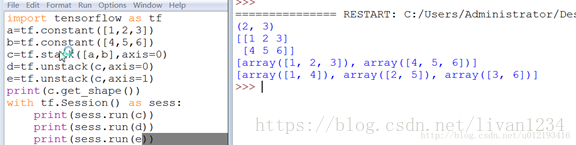
tf.stack()
tf.stack(values, axis=0, name=’stack’)
tf.stack()这是一个矩阵拼接的函数,tf.unstack()则是一个矩阵分解的函数
将 a list of R 维的Tensor堆成 R+1维的Tensor。
Given a list of length N of tensors of shape (A, B, C);
if axis == 0 then the output tensor will have the shape (N, A, B, C)
这时 res[i,:,:,:] 就是原 list中的第 i 个 tensor
if axis == 1 thenthe output tensor will have the shape (A, N, B, C).
这时 res[:,i,:,:] 就是原list中的第 i 个 tensor
Etc.
# 'x' is [1, 4]
# 'y' is [2, 5]
# 'z' is [3, 6]
stack([x, y, z]) => [[1, 4], [2, 5], [3, 6]] # Pack along first dim.
stack([x, y, z], axis=1) => [[1, 2, 3], [4, 5, 6]]
tf.gather():按照指定的下标集合从axis=0中抽取子集
tf.gather(params, indices, validate_indices=None,name=None)
· tf.slice(input_,begin, size, name=None):按照指定的下标范围抽取连续区域的子集
· tf.gather(params,indices, validate_indices=None, name=None):按照指定的下标集合从axis=0中抽取子集,适合抽取不连续区域的子集
input = [[[1, 1, 1], [2, 2, 2]], [[3, 3, 3], [4, 4, 4]], [[5, 5, 5], [6, 6, 6]]]tf.slice(input, [1, 0, 0], [1, 1, 3]) ==> [[[3, 3, 3]]]tf.slice(input, [1, 0, 0], [1, 2, 3]) ==> [[[3, 3, 3], [4, 4, 4]]]tf.slice(input, [1, 0, 0], [2, 1, 3]) ==> [[[3, 3, 3]], [[5, 5, 5]]]tf.gather(input, [0, 2]) ==> [[[1, 1, 1], [2, 2, 2]], [[5, 5, 5], [6, 6, 6]]]indices must be an integer tensor of any dimension(usually 0-D or 1-D).
Produces an output tensor with shape indices.shape +params.shape[1:]
# Scalar indices, 会降维
output[:, ..., :] = params[indices, :, ... :]
# Vector indices
output[i, :, ..., :] = params[indices[i], :, ... :]
# Higher rank indices,会升维
output[i, ..., j, :, ... :] = params[indices[i, ..., j],:, ..., :]
tf.pad
tf.pad(tensor, paddings, mode="CONSTANT", name=None)
· tensor: 任意shape的tensor,维度 Dn
· paddings: [Dn, 2] 的 Tensor, Padding后tensor的某维上的长度变为padding[D,0]+tensor.dim_size(D)+padding[D,1]
· mode: CONSTANT表示填0, REFLECT表示反射填充,SYMMETRIC表示对称填充。
· 函数原型:
tf.pad
pad(tensor, paddings, mode=’CONSTANT’, name=None)
(输入数据,填充的模式,填充的内容,名称)
· 这里紧紧解释paddings的含义:
它是一个Nx2的列表,
在输入维度n上,则paddings[n,0] 表示该维度内容前面加0的个数, 如对矩阵来说,就是行的最上面或列最左边加几排0
paddings[n, 1] 表示该维度内容后加0的个数。
· 举个例子:
输入 tensor 形如
[[ 1, 2],
[1, 2]]
而paddings = [[1, 1], [1, 1]] ([[上,下],[左,右]])
Tensor=[[1,2],[1,2]]
Paddings=[[1,1],[1,1]]
Init=tf.global_variables_initializer()
Withtf.Session() as sess:
Sess.run(init)
Print(sess.run(tf.pad(tensor,paddings, mode=’CONSTANT’)))
则结果为:
[[0, 0, 0, 0],
[0, 1, 2, 0],
[0, 1, 2, 0],
[0, 0, 0, 0]]
十一、损失函数:
损失函数的运算规则:
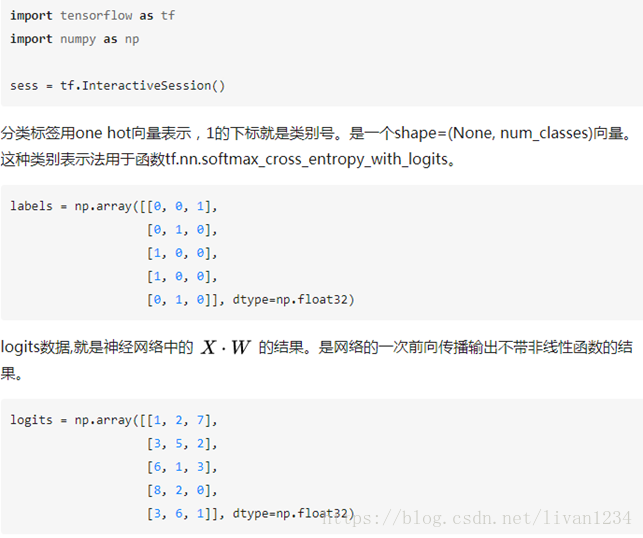
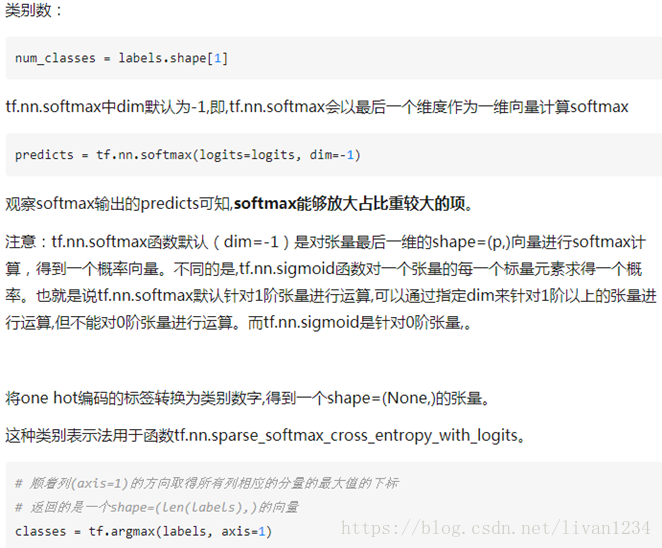
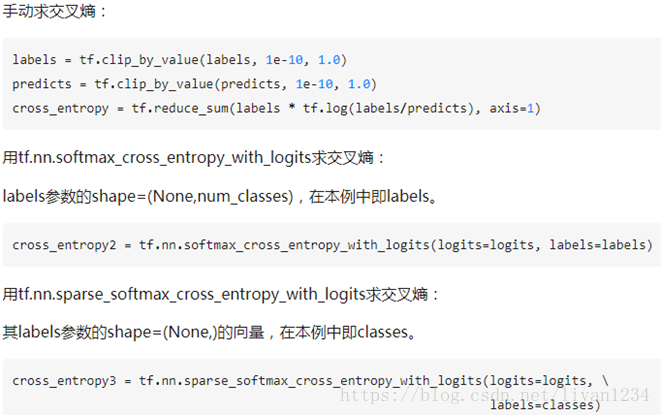
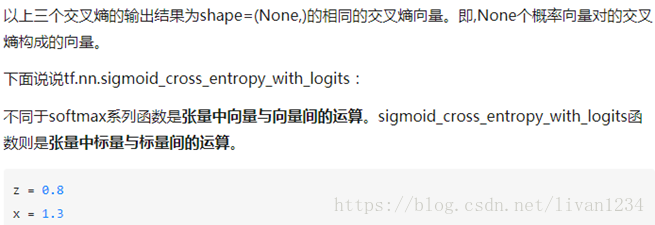

tf.nn.softmax_cross_entropy_with_logits(logits, labels, name=None)除去name参数用以指定该操作的name,与方法有关的一共两个参数:第一个参数logits:就是神经网络最后一层的输出,如果有batch的话,它的大小就是[batchsize,num_classes],单样本的话,大小就是num_classes第二个参数labels:实际的标签,大小同上具体的执行流程大概分为两步:第一步是先对网络最后一层的输出做一个softmax,这一步通常是求取输出属于某一类的概率,对于单样本而言,输出就是一个num_classes大小的向量([Y1,Y2,Y3...]其中Y1,Y2,Y3...分别代表了是属于该类的概率)。第二步是softmax的输出向量[Y1,Y2,Y3...]和样本的实际标签做一个交叉熵。第三步是求一个平均,得到我们想要的loss最后上代码:import tensorflow as tf #our NN's output logits=tf.constant([[1.0,2.0,3.0],[1.0,2.0,3.0],[1.0,2.0,3.0]]) #step1:do softmax y=tf.nn.softmax(logits) #true label y_=tf.constant([[0.0,0.0,1.0],[0.0,0.0,1.0],[0.0,0.0,1.0]]) #step2:do cross_entropy cross_entropy = -tf.reduce_sum(y_*tf.log(y)) #do cross_entropy just one step cross_entropy2=tf.reduce_sum(tf.nn.softmax_cross_entropy_with_logits(logits, y_))#dont forget tf.reduce_sum()!! with tf.Session() as sess: softmax=sess.run(y) c_e = sess.run(cross_entropy) c_e2 = sess.run(cross_entropy2) print("step1:softmax result=") print(softmax) print("step2:cross_entropy result=") print(c_e) print("Function(softmax_cross_entropy_with_logits) result=") print(c_e2) 输出结果是:step1:softmax result= [[ 0.09003057 0.24472848 0.66524094] [ 0.09003057 0.24472848 0.66524094] [ 0.09003057 0.24472848 0.66524094]] step2:cross_entropy result= 1.22282 Function(softmax_cross_entropy_with_logits) result= 1.2228 交叉熵可在神经网络(机器学习)中作为损失函数,p表示真实标记的分布,q则为训练后的模型的预测标记分布,交叉熵损失函数可以衡量p与q的相似性。交叉熵作为损失函数还有一个好处是使用sigmoid函数在梯度下降时能避免均方误差损失函数学习速率降低的问题,因为学习速率可以被输出的误差所控制。tensorflow中自带的函数可以轻松的实现交叉熵的计算。tf.nn.softmax_cross_entropy_with_logits(_sentinel=None, labels=None, logits=None, dim=-1, name=None)Computes softmax cross entropy between logits and labels.注意:如果labels的每一行是one-hot表示,也就是只有一个地方为1,其他地方为0,可以使用tf.sparse_softmax_cross_entropy_with_logits()警告:1. 这个操作的输入logits是未经缩放的,该操作内部会对logits使用softmax操作2. 参数labels,logits必须有相同的形状 [batch_size, num_classes] 和相同的类型(float16, float32, float64)中的一种参数:_sentinel: 一般不使用labels: labels的每一行labels[i]必须为一个概率分布logits: 未缩放的对数概率dims: 类的维度,默认-1,也就是最后一维name: 该操作的名称返回值:长度为batch_size的一维Tensor下面用个小例子来看看该函数的用法import tensorflow as tflabels = [[0.2,0.3,0.5], [0.1,0.6,0.3]]logits = [[2,0.5,1], [0.1,1,3]]logits_scaled = tf.nn.softmax(logits)result1 = tf.nn.softmax_cross_entropy_with_logits(labels=labels, logits=logits)result2 = -tf.reduce_sum(labels*tf.log(logits_scaled),1)result3 = tf.nn.softmax_cross_entropy_with_logits(labels=labels, logits=logits_scaled)with tf.Session() as sess: print sess.run(result1) print sess.run(result2) print sess.run(result3)>>>[ 1.41436887 1.66425455]>>>[ 1.41436887 1.66425455]>>>[ 1.17185783 1.17571414]上述例子中,labels的每一行是一个概率分布,而logits未经缩放(每行加起来不为1),我们用定义法计算得到交叉熵result2,和套用tf.nn.softmax_cross_entropy_with_logits()得到相同的结果, 但是将缩放后的logits_scaled输tf.nn.softmax_cross_entropy_with_logits(), 却得到错误的结果,所以一定要注意,这个操作的输入logits是未经缩放的下面来看tf.nn.sparse_softmax_cross_entropy_with_logits(_sentinel=None, labels=None, logits=None, name=None)这个函数与上一个函数十分类似,唯一的区别在于labels.注意:对于此操作,给定标签的概率被认为是排他的。labels的每一行为真实类别的索引警告:1. 这个操作的输入logits同样是是未经缩放的,该操作内部会对logits使用softmax操作2. 参数logits的形状 [batch_size, num_classes] 和labels的形状[batch_size]返回值:长度为batch_size的一维Tensor, 和label的形状相同,和logits的类型相同import tensorflow as tflabels = [0,2]logits = [[2,0.5,1], [0.1,1,3]]logits_scaled = tf.nn.softmax(logits)result1 = tf.nn.sparse_softmax_cross_entropy_with_logits(labels=labels, logits=logits)with tf.Session() as sess: print sess.run(result1)>>>[ 0.46436879 0.17425454]tf.nn.sparse_softmax_cross_entropy_with_logits(logits,labels, name=None)
def sparse_softmax_cross_entropy_with_logits(logits, labels, name=None):#logits是最后一层的z(输入)#A common use case is to have logits of shape `[batch_size, num_classes]` and#labels of shape `[batch_size]`. But higher dimensions are supported.#Each entry in `labels` must be an index in `[0, num_classes)`#输出:loss [batch_size]tf. nn.softmax_cross_entropy_with_logits(logits,targets, dim=-1, name=None)
def softmax_cross_entropy_with_logits(logits, targets, dim=-1, name=None):#`logits` and `labels` must have the same shape `[batch_size, num_classes]`#return loss:[batch_size], 里面保存是batch中每个样本的cross entropytf.nn.sigmoid_cross_entropy_with_logits(logits,targets, name=None)
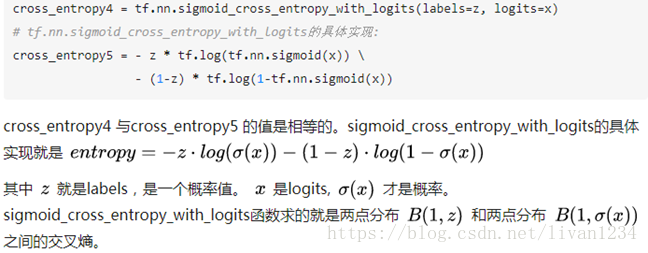
def sigmoid_cross_entropy_with_logits(logits, targets, name=None):#logits:[batch_size, num_classes],targets:[batch_size, size].logits作为用最后一层的输入就好,不需要进行sigmoid运算,函数内部进行了sigmoid操作。#输出loss [batch_size, num_classes]。。。说的是logits,其实内部实现是relutf.nn.nce_loss(nce_weights,nce_biases, embed, train_labels, num_sampled, vocabulary_size)
def nce_loss(nce_weights, nce_biases, embed, train_labels, num_sampled, vocabulary_size):#word2vec中用到了这个函数#weights: A `Tensor` of shape `[num_classes, dim]`, or a list of `Tensor`# objects whose concatenation along dimension 0 has shape# [num_classes, dim]. The (possibly-partitioned) class embeddings.#biases: A `Tensor` of shape `[num_classes]`. The class biases.#inputs: A `Tensor` of shape `[batch_size, dim]`. The forward# activations of the input network.#labels: A `Tensor` of type `int64` and shape `[batch_size,# num_true]`. The target classes.#num_sampled: An `int`. The number of classes to randomly sample per batch.#num_classes: An `int`. The number of possible classes.#num_true: An `int`. The number of target classes per training example.tf.nn.sequence_loss_by_example(logits,targets, weights, average_across_timesteps=True, softmax_loss_function=None,name=None):
def sequence_loss_by_example(logits, targets, weights, average_across_timesteps=True, softmax_loss_function=None, name=None):#logits: List of 2D Tensors of shape [batch_size x num_decoder_symbols].#targets: List of 1D batch-sized int32 Tensors of the same length as logits.#weights: List of 1D batch-sized float-Tensors of the same length as logits.#return:log_pers 形状是 [batch_size].forlogit, target, weightinzip(logits, targets, weights):
ifsoftmax_loss_functionisNone:
# TODO(irving,ebrevdo): This reshape is needed because # sequence_loss_by_example is called with scalars sometimes, which # violates our general scalar strictness policy.target = array_ops.reshape(target, [-1])
"""变量声明,运算声明 例:w = tf.get_variable(name="vari_name", shape=[], dtype=tf.float32)初始化op声明"""#创建saver对象,它添加了一些op用来save和restore模型参数#后缀可加可不加现在,训练好的模型参数已经存储好了,我们来看一下怎么调用训练好的参数
变量保存的时候,保存的是 变量名:value,键值对。restore的时候,也是根据key-value来进行的(详见)
importtensorflowastf
"""变量声明,运算声明初始化op声明"""#创建saver 对象#想要实现这个功能的话,必须从Saver的构造函数下手# Pass the variables as a dict:saver = tf.train.Saver({'v1': v1,'v2': v2})
# Or pass them as a list.# Passing a list is equivalent to passing a dict with the variable op names# as keys:saver = tf.train.Saver({v.op.name: vforvin[v1, v2]})
#注意,如果不给Saver传var_list 参数的话, 他将已 所有可以保存的 variable作为其var_list的值。这里使用了三种不同的方式来创建 saver 对象, 但是它们内部的原理是一样的。我们都知道,参数会保存到 checkpoint 文件中,通过键值对的形式在 checkpoint中存放着。如果 Saver 的构造函数中传的是 dict,那么在 save 的时候,checkpoint文件中存放的就是对应的 key-value。如下:
importtensorflowastf
# Create some variables.v1 = tf.Variable(1.0, name="v1")
v2 = tf.Variable(2.0, name="v2")
saver = tf.train.Saver({"variable_1":v1,"variable_2": v2})
# Use the saver object normally after that.withtf.Session()assess:
# 输出:#tensor_name: variable_1#1.0#tensor_name: variable_2#2.0如果构建saver对象的时候,我们传入的是 list, 那么将会用对应 Variable 的 variable.op.name 作为 key。
importtensorflowastf
# Create some variables.v1 = tf.Variable(1.0, name="v1")
v2 = tf.Variable(2.0, name="v2")
# Use the saver object normally after that.withtf.Session()assess:
1.02.0如果我们现在想将 checkpoint 中v2的值restore到v1 中,v1的值restore到v2中,我们该怎么做?
这时,我们只能采用基于 dict 的 saver
importtensorflowastf
# Create some variables.v1 = tf.Variable(1.0, name="v1")
v2 = tf.Variable(2.0, name="v2")
saver = tf.train.Saver({"variable_1":v1,"variable_2": v2})
# Use the saver object normally after that.withtf.Session()assess:
# Create some variables.v1 = tf.Variable(1.0, name="v1")
v2 = tf.Variable(2.0, name="v2")
#restore的时候,variable_1对应到v2,variable_2对应到v1,就可以实现目的了。saver = tf.train.Saver({"variable_1":v2,"variable_2": v1})
# Use the saver object normally after that.withtf.Session()assess:
# 输出的结果是 2.0 1.0,如我们所望我们发现,其实 创建 saver对象时使用的键值对就是表达了一种对应关系:
· save时,表示:variable的值应该保存到 checkpoint文件中的哪个 key下
· restore时,表示:checkpoint文件中key对应的值,应该restore到哪个variable
其它
一个快速找到ckpt文件的方式
进行候选采样的时候,每次只评估所有类别的一个很小的子集,这样可以提高运算效率,在这样的方式下,计算函数的对应损失需要用到tf.sampled_softmax_loss()。tf.sampled_softmax_loss()中调用了_compute_sampled_logits() #此函数和nce_loss是差不多的, 取样求lossdef sampled_softmax_loss(weights, #[num_classes, dim] biases, #[num_classes] inputs, #[batch_size, dim] labels, #[batch_size, num_true] num_sampled, num_classes, num_true=1, sampled_values=None, remove_accidental_hits=True, partition_strategy="mod", name="sampled_softmax_loss"):#return: [batch_size]关于参数labels:一般情况下,num_true为1, labels的shpae为[batch_size, 1]。假设我们有1000个类别, 使用one_hot形式的label的话, 我们的labels的shape是[batch_size,num_classes]。显然,如果num_classes非常大的话,会影响计算性能。所以,这里采用了一个稀疏的方式,即:使用3代表了[0,0,0,1,0….]
Ø tf.nn.seq2seq.embedding_attention_seq2seq()
创建了input embedding matrix 和 output embedding matrix
def embedding_attention_seq2seq(encoder_inputs, #[T, batch_size] decoder_inputs, #[out_T, batch_size] cell, num_encoder_symbols, num_decoder_symbols, embedding_size, num_heads=1, #只采用一个read head output_projection=None, feed_previous=False, dtype=None, scope=None, initial_state_attention=False):#output_projection: (W, B) W:[output_size, num_decoder_symbols]#B: [num_decoder_symbols] (1)这个函数创建了一个inputs 的 embeddingmatrix.
(2)计算了encoder的 output,并保存起来,用于计算attention
# Decoder. output_size = Noneifoutput_projectionisNone:
class EmbeddingWrapper(RNNCell): def __init__(self, cell, embedding_classes, embedding_size, initializer=None): def __call__(self, inputs, state, scope=None):#生成embedding矩阵[embedding_classes,embedding_size] #inputs: [batch_size, 1] #return : (output, state)tf.nn.rnn_cell.OutputProgectionWrapper()
将rnn_cell的输出映射成想要的维度
class OutputProjectionWrapper(RNNCell):def __init__(self, cell, output_size):# output_size:映射后的size
def __call__(self, inputs, state, scope=None):#init 返回一个带output projection的 rnn_celltf.nn.seq2seq.embedding_attention_decoder()
#生成embedding matrix :[num_symbols, embedding_size]def embedding_attention_decoder(decoder_inputs, # T*batch_size initial_state, attention_states, cell, num_symbols, embedding_size, num_heads=1, output_size=None, output_projection=None, feed_previous=False, update_embedding_for_previous=True, dtype=None, scope=None, initial_state_attention=False):#核心代码embedding = variable_scope.get_variable("embedding",
[num_symbols, embedding_size]) #output embeddingdef attention_decoder(decoder_inputs, #[T, batch_size, input_size] initial_state, #[batch_size, cell.states] attention_states, #[batch_size , attn_length , attn_size] cell, output_size=None, num_heads=1, loop_function=None, dtype=None, scope=None, initial_state_attention=False):论文中,在计算attention distribution的时候,提到了三个公式
(1)uti=vT∗tanh(W1∗hi+W2∗dt)(1)uit=vT∗tanh(W1∗hi+W2∗dt)
(2)sti=softmax(ati)(2)sit=softmax(ait)
(3)d′=∑i=1TAsti∗hi(3)d′=∑i=1TAsit∗hi
其中,W1W1维度是[attn_vec_size, size], hihi:[size,1],我们日常表示输入数据,都是用列向量表示,但是在tensorflow中,趋向用行向量表示。在这个函数中,为了计算 W1∗hiW1∗hi,使用了卷积的方式。
def rnn(cell, inputs, initial_state=None, dtype=None, sequence_length=None, scope=None):#inputs: A length T list of inputs, each a `Tensor` of shape`[batch_size, input_size]`#sequence_length: [batch_size], 指定sample 序列的长度#return : (outputs, states), outputs: T*batch_size*output_size. states:batch_size*stateseq2seqModel
· 创建映射参数 proj_w, proj_b
· 声明:sampled_loss,看了word2vec的就会理解
· 声明:seq2seq_f(),构建了inputs的embedding和outputs的embedding,进行核心计算
· 使用model_with_buckets(),model_with_buckets中调用了seq2seq_f和 sampled_loss
model_with_buckets()
调用方法tf.nn.seq2seq.model_with_buckets()
def model_with_buckets(encoder_inputs, decoder_inputs, targets, weights, buckets, seq2seq, softmax_loss_function=None, per_example_loss=False, name=None):"""Create a sequence-to-sequence model with support for bucketing.The seq2seq argument is a function that defines a sequence-to-sequence model,e.g., seq2seq = lambda x, y: basic_rnn_seq2seq(x, y, rnn_cell.GRUCell(24))Args:encoder_inputs: A list of Tensors to feed the encoder; first seq2seq input.decoder_inputs: A list of Tensors to feed the decoder; second seq2seq input.targets: A list of 1D batch-sized int32 Tensors (desired output sequence).weights: List of 1D batch-sized float-Tensors to weight the targets.buckets: A list of pairs of (input size, output size) for each bucket.seq2seq: A sequence-to-sequence model function; it takes 2 input that agree with encoder_inputs and decoder_inputs, and returns a pair consisting of outputs and states (as, e.g., basic_rnn_seq2seq).softmax_loss_function: Function (inputs-batch, labels-batch) -> loss-batchto be used instead of the standard softmax (the default if this is None).per_example_loss: Boolean. If set, the returned loss will be a batch-sizedtensor of losses for each sequence in the batch. If unset, it will bea scalar with the averaged loss from all examples.name: Optional name for this operation, defaults to "model_with_buckets".Returns:A tuple of the form (outputs, losses), where:outputs: The outputs for each bucket. Its j'th element consists of a listof 2D Tensors. The shape of output tensors can be either[batch_size x output_size] or [batch_size x num_decoder_symbols]depending on the seq2seq model used.losses: List of scalar Tensors, representing losses for each bucket, or,if per_example_loss is set, a list of 1D batch-sized float Tensors.Raises:ValueError: If length of encoder_inputsut, targets, or weights is smallerthan the largest (last) bucket."""记住,tensorflow的编码方法是:先构图,再训练。训练是根据feed确定的
十九、word2vec方法:
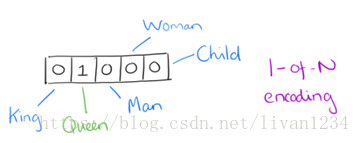
用词向量来表示词并不是word2vec的首创,在很久之前就出现了。最早的词向量是很冗长的,它使用是词向量维度大小为整个词汇表的大小,对于每个具体的词汇表中的词,将对应的位置置为1。比如我们有下面的5个词组成的词汇表,词"Queen"的序号为2,那么它的词向量就是(0,1,0,0,0)(0,1,0,0,0)。同样的道理,词"Woman"的词向量就是(0,0,0,1,0)(0,0,0,1,0)。这种词向量的编码方式我们一般叫做1-of-N representation或者one hot representation.
One hot representation用来表示词向量非常简单,但是却有很多问题。最大的问题是我们的词汇表一般都非常大,比如达到百万级别,这样每个词都用百万维的向量来表示简直是内存的灾难。这样的向量其实除了一个位置是1,其余的位置全部都是0,表达的效率不高,能不能把词向量的维度变小呢?
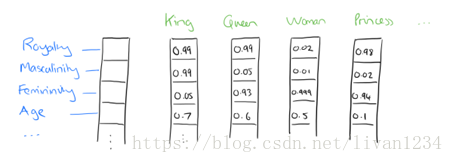
Dristributed representation可以解决One hot representation的问题,它的思路是通过训练,将每个词都映射到一个较短的词向量上来。所有的这些词向量就构成了向量空间,进而可以用普通的统计学的方法来研究词与词之间的关系。这个较短的词向量维度是多大呢?这个一般需要我们在训练时自己来指定。
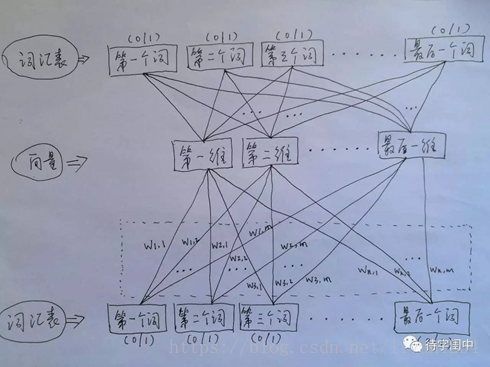
比如下图我们将词汇表里的词用"Royalty","Masculinity","Femininity"和"Age"4个维度来表示,King这个词对应的词向量可能是(0.99,0.99,0.05,0.7)(0.99,0.99,0.05,0.7)。当然在实际情况中,我们并不能对词向量的每个维度做一个很好的解释。
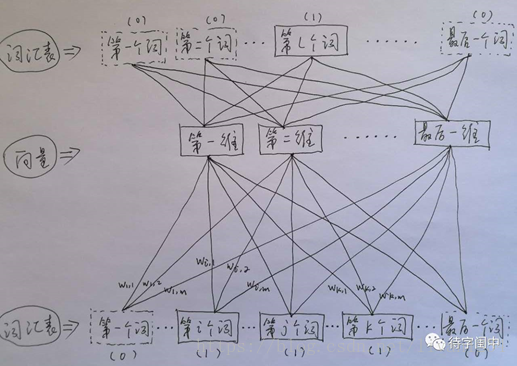
训练 Word2Vec 的思想,是利用一个词和它在文本中的上下文的词,这样就省去了人工去标注。论文中给出了 Word2Vec 的两种训练模型,CBOW (Continuous Bag-of-Words Model) 和 Skip-gram (Continuous Skip-gram Model)。
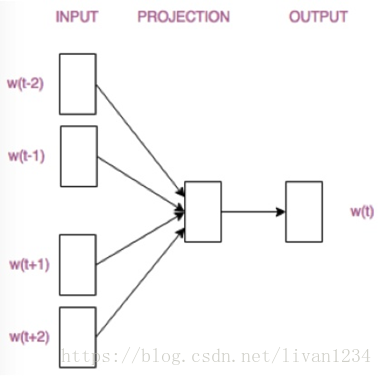
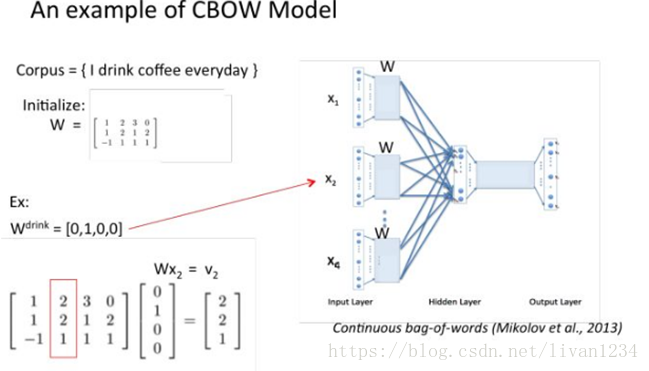
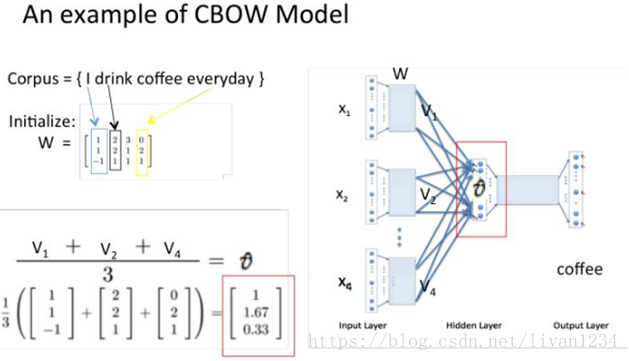
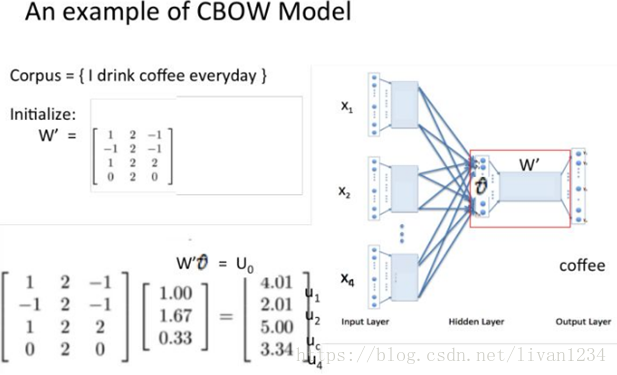
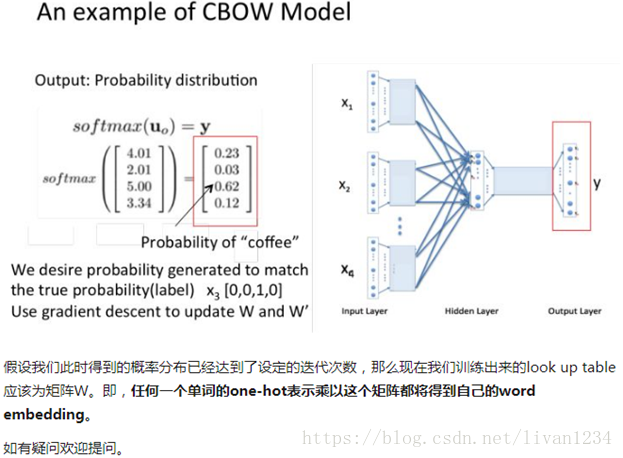
首先看CBOW,它的做法是,将一个词所在的上下文中的词作为输入,而那个词本身作为输出,也就是说,看到一个上下文,希望大概能猜出这个词和它的意思。通过在一个大的语料库训练,得到一个从输入层到隐含层的权重模型。如下图所示,第l个词的上下文词是i,j,k,那么i,j,k作为输入,它们所在的词汇表中的位置的值置为1。然后,输出是l,把它所在的词汇表中的位置的值置为1。训练完成后,就得到了每个词到隐含层的每个维度的权重,就是每个词的向量。
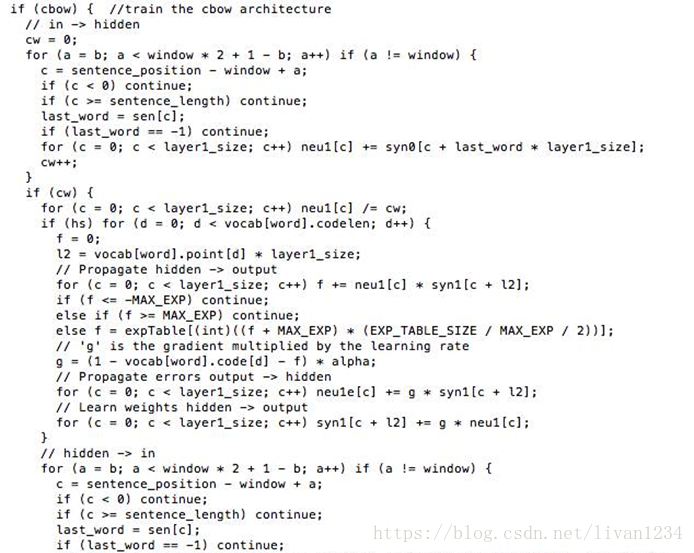
Word2Vec 代码库中关于CBOW训练的代码,其实就是神经元网路的标准反向传播算法。

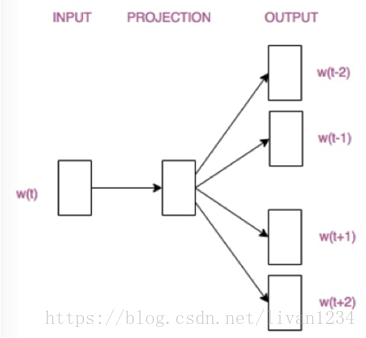
接着,看看Skip-gram,它的做法是,将一个词所在的上下文中的词作为输出,而那个词本身作为输入,也就是说,给出一个词,希望预测可能出现的上下文的词。通过在一个大的语料库训练,得到一个从输入层到隐含层的权重模型。如下图所示,第l个词的上下文词是i,j,k,那么i,j,k作为输出,它们所在的词汇表中的位置的值置为1。然后,输入是l,把它所在的词汇表中的位置的值置为1。训练完成后,就得到了每个词到隐含层的每个维度的权重,就是每个词的向量。
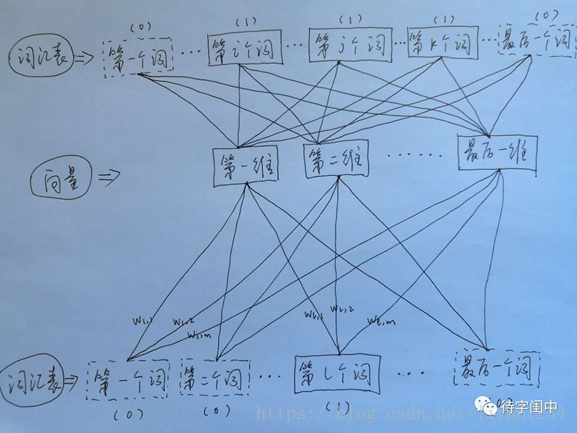
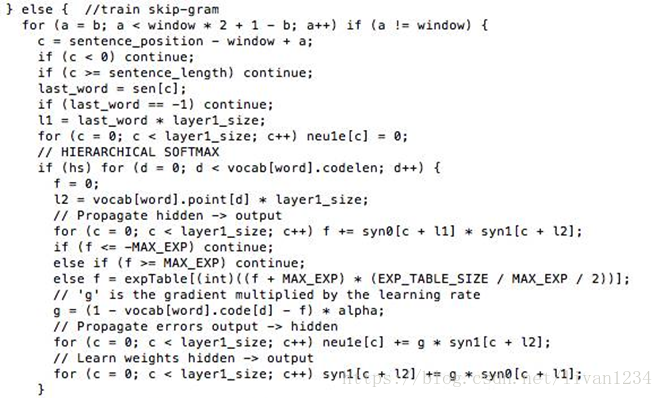
Word2Vec 代码库中关于Skip-gram训练的代码,其实就是神经元网路的标准反向传播算法。

一个人读书时,如果遇到了生僻的词,一般能根据上下文大概猜出生僻词的意思,而 Word2Vec 正是很好的捕捉了这种人类的行为,利用神经元网络模型,发现了自然语言处理的一颗原子弹。
Ø 用图标来表示word2vec模型:
CBOW模型
Skip-gram模型
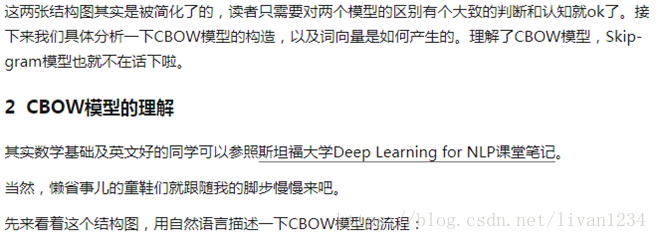
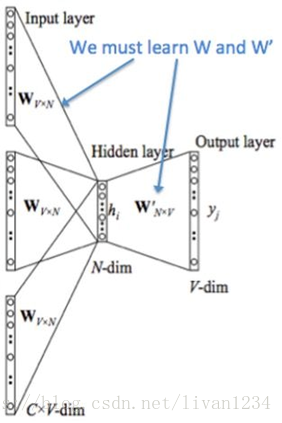
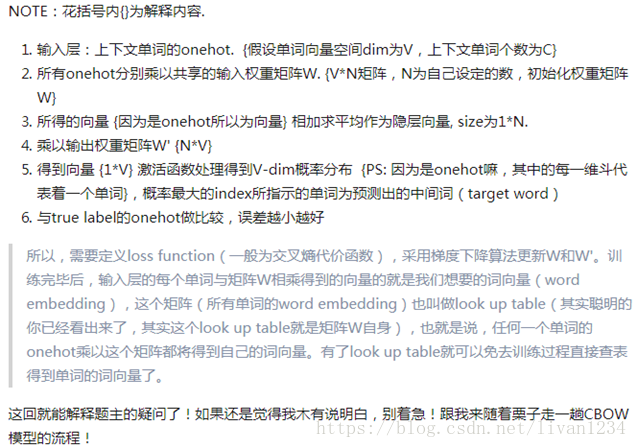
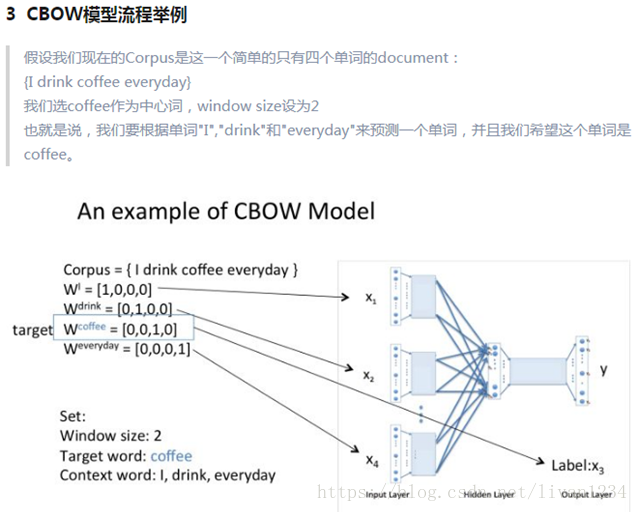
二十、梯度递减优化(gradient-clip):
tensorflow中操作gradient-clip:
在训练深度神经网络的时候,我们经常会碰到梯度消失和梯度爆炸问题,scientists提出了很多方法来解决这些问题,本篇就介绍一下如何在tensorflow中使用clip来address这些问题
train_op =tf.train.GradientDescentOptimizer(learning_rate=0.1).minimize(loss)
在调用minimize方法的时候,底层实际干了两件事:
· 计算所有 trainablevariables 梯度
· apply them to variables
随后, 在我们 sess.run(train_op) 的时候, 会对 variables 进行更新
Clip:
那我们如果想处理一下计算完的 gradients ,那该怎么办呢?
官方给出了以下步骤
1. Compute the gradients withcompute_gradients(). 计算梯度
2. Process the gradients as you wish. 处理梯度
3. Apply the processed gradients withapply_gradients(). apply处理后的梯度给variables
这样,我们以后在train的时候就会使用 processed gradient去更新 variable
框架:
# Create an optimizer.optimizer必须和variable在一个设备上声明
opt = GradientDescentOptimizer(learning_rate=0.1)
# Compute the gradients for a list of variables.
grads_and_vars = opt.compute_gradients(loss, )
# grads_and_vars is a list of tuples (gradient,variable). Do whatever you
# need to the 'gradient' part, for example cap them, etc.
capped_grads_and_vars = [(MyCapper(gv[0]), gv[1]) for gv in grads_and_vars]
# Ask the optimizer to apply the capped gradients.
opt.apply_gradients(capped_grads_and_vars)
例子:
#return a list of trainable variable in you model
params = tf.trainable_variables()
#create an optimizer
opt = tf.train.GradientDescentOptimizer(self.learning_rate)
#compute gradients for params
gradients = tf.gradients(loss, params)
#process gradients
clipped_gradients, norm =tf.clip_by_global_norm(gradients,max_gradient_norm)
train_op = opt.apply_gradients(zip(clipped_gradients,params)))
这时, sess.run(train_op) 就可以进行训练了
二十一、共享变量:
为什么要共享变量?我举个简单的例子:例如,当我们研究生成对抗网络GAN的时候,判别器的任务是,如果接收到的是生成器生成的图像,判别器就尝试优化自己的网络结构来使自己输出0,如果接收到的是来自真实数据的图像,那么就尝试优化自己的网络结构来使自己输出1。也就是说,生成图像和真实图像经过判别器的时候,要共享同一套变量,所以TensorFlow引入了变量共享机制,在做卷积神经网络的时候多个卷积层有可能使用同一个权重矩阵,这时就用到了共享矩阵。
变量共享主要涉及到两个函数: tf.get_variable(
先来看第一个函数: tf.get_variable。
tf.get_variable 和tf.Variable不同的一点是,前者拥有一个变量检查机制,会检测已经存在的变量是否设置为共享变量,如果已经存在的变量没有设置为共享变量,TensorFlow 运行到第二个拥有相同名字的变量的时候,就会报错。
例如如下代码:
def my_image_filter(input_images):
conv1_weights =tf.Variable(tf.random_normal([5, 5, 32, 32]),
name="conv1_weights")
conv1_biases =tf.Variable(tf.zeros([32]), name="conv1_biases")
conv1 =tf.nn.conv2d(input_images, conv1_weights,
strides=[1,1, 1, 1], padding='SAME')
return tf.nn.relu(conv1 + conv1_biases)
有两个变量(Variables)conv1_weighs, conv1_biases和一个操作(Op)conv1,如果你直接调用两次,不会出什么问题,但是会生成两套变量;
# First call creates one set of 2 variables.
result1 = my_image_filter(image1)
# Another set of 2 variables is created in the secondcall.
result2 = my_image_filter(image2)
如果把 tf.Variable 改成tf.get_variable,直接调用两次,就会出问题了:
result1 = my_image_filter(image1)
result2 = my_image_filter(image2)
# Raises ValueError(... conv1/weights already exists ...)
为了解决这个问题,TensorFlow 又提出了 tf.variable_scope函数:它的主要作用是,在一个作用域 scope 内共享一些变量,可以有如下几种用法:
1)
with tf.variable_scope("image_filters") asscope:
result1 =my_image_filter(image1)
scope.reuse_variables() # or
#tf.get_variable_scope().reuse_variables()
result2 =my_image_filter(image2)
需要注意的是:最好不要设置 reuse 标识为False,只在需要的时候设置 reuse 标识为True。
2)
with tf.variable_scope("image_filters1") asscope1:
result1 =my_image_filter(image1)
with tf.variable_scope(scope1, reuse = True)
result2 =my_image_filter(image2)
通常情况下,tf.variable_scope 和tf.name_scope 配合,能画出非常漂亮的流程图,但是他们两个之间又有着细微的差别,那就是 name_scope 只能管住操作 Ops的名字,而管不住变量 Variables 的名字,看下例:
with tf.variable_scope("foo"):
withtf.name_scope("bar"):
v = tf.get_variable("v", [1])
x = 1.0 + v
assert v.name == "foo/v:0"
assert x.op.name == "foo/bar/add"
在tensorflow中,有两个scope, 一个是name_scope一个是variable_scope,这两个scope到底有什么区别呢?
先看第一个程序:
withtf.name_scope("hello")asname_scope:
arr1 = tf.get_variable("arr1", shape=[2,10],dtype=tf.float32)
# 输出var1/w:0name1/var1/Add:0可以看出:
· variable scope和name scope都会给op的name加上前缀
· 这实际上是因为创建 variable_scope 时内部会创建一个同名的 name_scope
对比三个个程序可以看出:
· name_scope 返回的是 string, 而 variable_scope 返回的是对象. 这也可以感觉到, variable_scope 能干的事情比 name_scope 要多.
· name_scope对 get_variable()创建的变量的名字不会有任何影响,而创建的op会被加上前缀.
· tf.get_variable_scope() 返回的只是 variable_scope,不管 name_scope. 所以以后我们在使用tf.get_variable_scope().reuse_variables()时可以无视name_scope
其它
withtf.name_scope("scope1")asscope1:
withtf.name_scope("scope2")asscope2:
scope2
#输出:scope1/scope2/importtensorflowastf
withtf.variable_scope("scope1")asscope1:
withtf.variable_scope("scope2")asscope2:
scope2.name
#输出:scope1/scope2name_scope可以用来干什么
典型的 TensorFlow 可以有数以千计的节点,如此多而难以一下全部看到,甚至无法使用标准图表工具来展示。为简单起见,我们为op/tensor名划定范围,并且可视化把该信息用于在图表中的节点上定义一个层级。默认情况下, 只有顶层节点会显示。下面这个例子使用tf.name_scope在hidden命名域下定义了三个操作:
importtensorflowastf
withtf.name_scope('hidden')asscope:
a = tf.constant(5, name='alpha')
W = tf.Variable(tf.random_uniform([1,2], -1.0,1.0), name='weights')
b = tf.Variable(tf.zeros([1]), name='biases')
a.name
W.name
b.name
结果是得到了下面三个操作名:
hidden/alpha
hidden/weights
hidden/biases
name_scope 是给op_name加前缀,variable_scope是给get_variable()创建的变量的名字加前缀。
tf.variable_scope有时也会处理命名冲突
importtensorflowastf
def test(name=None):withtf.variable_scope(name, default_name="scope")asscope:
w = tf.get_variable("w", shape=[2,10])
#scope/w:0#scope_1/w:0#可以看出,如果只是使用default_name这个属性来创建variable_scope#的时候,会处理命名冲突其它
· tf.name_scope(None) 有清除name scope的作用
importtensorflowastf
withtf.name_scope("hehe"):
w1 = tf.Variable(1.0)
withtf.name_scope(None):
w2 = tf.Variable(2.0)
#hehe/Variable:0#Variable:0总结
简单来看
1. 使用tf.Variable()的时候,tf.name_scope()和tf.variable_scope() 都会给 Variable 和 op 的 name属性加上前缀。
2. 使用tf.get_variable()的时候,tf.name_scope()就不会给 tf.get_variable()创建出来的Variable加前缀。但是 tf.Variable() 创建出来的就会受到 name_scope 的影响.
二十二、run_cell常用方法:
主要是神经网络cell中的内容:
Ø run_cell._linear()
def_linear(args,output_size, bias, bias_start=0.0, scope=None):
· args: list of tensor [batch_size, size]. 注意,list中的每个tensor的size 并不需要一定相同,但batch_size要保证一样.
· output_size : 一个整数
· bias: bool型, True表示加bias,False表示不加
· return : [batch_size, output_size]
注意: 这个函数的atgs 不能是 _ref 类型(tf_getvariable(), tf.Variables()返回的都是 _ref),但这个 _ref类型经过任何op之后,_ref就会消失
PS: _ref referente-typed is mutable
Ø rnn_cell.BasicLSTMCell()
classBasicLSTMCell(RNNCell):
def__init__(self,num_units, forget_bias=1.0,input_size=None,
state_is_tuple=True, activation=tanh):
"""
为什么被称为 Basic
It does not allow cell clipping, a projection layer, anddoes not
use peep-hole connections: it is the basic baseline.
"""
· num_units: lstm单元的output_size
· input_size: 这个参数没必要输入, 官方说马上也要禁用了
· state_is_tuple: True的话, (c_state,h_state)作为tuple返回
· activation: 激活函数
注意: 在我们创建 cell=BasicLSTMCell(…) 的时候, 只是初始化了cell的一些基本参数值. 这时,是没有variable被创建的, variable在我们 cell(input, state)时才会被创建, 下面所有的类都是这样
rnn_cell.GRUCell()
classGRUCell(RNNCell):
def__init__(self,num_units, input_size=None, activation=tanh):
创建一个GRUCell
rnn_cell.LSTMCell()
classLSTMCell(RNNCell):
def__init__(self,num_units, input_size=None,
use_peepholes=False, cell_clip=None,
initializer=None, num_proj=None, proj_clip=None,
num_unit_shards=1, num_proj_shards=1,
forget_bias=1.0, state_is_tuple=True,
activation=tanh):
· num_proj: python Innteger ,映射输出的size, 用了这个就不需要下面那个类了
rnn_cell.OutputProjectionWrapper()
classOutputProjectionWrapper(RNNCell):
def__init__(self,cell, output_size):
· output_size: 要映射的 size
· return: 返回一个带有 OutputProjection Layer的 cell(s)
rnn_cell.InputProjectionWrapper():
classInputProjectionWrapper(RNNCell):
def__init__(self,cell, num_proj, input_size=None):
· 和上面差不多,一个输出映射,一个输入映射
rnn_cell.DropoutWrapper()
classDropoutWrapper(RNNCell):
def__init__(self,cell, input_keep_prob=1.0,output_keep_prob=1.0,
seed=None):
· dropout
rnn_cell.EmbeddingWrapper():
classEmbeddingWrapper(RNNCell):
def__init__(self,cell, embedding_classes, embedding_size, initializer=None):
· 返回一个带有 embedding 的cell
rnn_cell.MultiRNNCell():
classMultiRNNCell(RNNCell):
def__init__(self,cells, state_is_tuple=True):
· 用来增加 rnn 的层数
· cells : list of cell
· 返回一个多层的 cell
二十三、tensorboard可视化:
tensorflow的可视化是使用summary和tensorboard合作完成的.
基本用法
首先明确一点,summary也是op.
输出网络结构
with tf.Session() as sess:
writer =tf.summary.FileWriter(your_dir, sess.graph)
命令行运行tensorboard--logdir your_dir,然后浏览器输入127.0.1.1:6006注:tf1.1.0 版本的tensorboard端口换了(0.0.0.0:6006)
这样你就可以在tensorboard中看到你的网络结构图了
可视化参数
#ops
loss = ...
tf.summary.scalar("loss", loss)
merged_summary = tf.summary.merge_all()
init = tf.global_variable_initializer()
with tf.Session() as sess:
writer= tf.summary.FileWriter(your_dir, sess.graph)
sess.run(init)
for i in xrange(100):
_,summary =sess.run([train_op,merged_summary], feed_dict)
writer.add_summary(summary, i)
这时,打开tensorboard,在EVENTS可以看到loss随着i的变化了,如果看不到的话,可以在代码最后加上writer.flush()试一下,原因后面说明。
函数介绍
· tf.summary.merge_all: 将之前定义的所有summary op整合到一起
· FileWriter: 创建一个filewriter用来向硬盘写summary数据,
· tf.summary.scalar(summary_tags,Tensor/variable, collections=None): 用于标量的 summary
· tf.summary.image(tag, tensor, max_images=3,collections=None, name=None):tensor,必须4维,形状[batch_size, height, width, channels],max_images(最多只能生成3张图片的summary),觉着这个用在卷积中的kernel可视化很好用.max_images确定了生成的图片是[-max_images: ,height, width, channels],还有一点就是,TensorBord中看到的imagesummary永远是最后一个global step的
· tf.summary.histogram(tag, values,collections=None, name=None):values,任意形状的tensor,生成直方图summary
· tf.summary.audio(tag, tensor, sample_rate,max_outputs=3, collections=None, name=None)
解释collections参数:它是一个list,如果不指定collections, 那么此summary会被添加到f.GraphKeys.SUMMARIES中,如果指定了,就会放在的collections中。
FileWriter
注意:add_summary仅仅是向FileWriter对象的缓存中存放event data。而向disk上写数据是由FileWrite对象控制的。下面通过FileWriter的构造函数来介绍这一点!!!
tf.summary.FileWriter.__init__(logdir, graph=None, max_queue=10,flush_secs=120, graph_def=None)
Creates a FileWriter and an eventfile.
# max_queue: 在向disk写数据之前,最大能够缓存event的个数
# flush_secs: 每多少秒像disk中写数据,并清空对象缓存
注意
1. 如果使用writer.add_summary(summary,global_step)时没有传global_step参数,会使scarlar_summary变成一条直线。
2. 只要是在计算图上的Summary op,都会被merge_all捕捉到, 不需要考虑变量生命周期问题!
3. 如果执行一次,disk上没有保存Summary数据的话,可以尝试下file_writer.flush()
小技巧
如果想要生成的summary有层次的话,记得在summary外面加一个name_scope
with tf.name_scope("summary_gradients"):
tf.summary.histgram("name", gradients)
这样,tensorboard在显示的时候,就会有一个sumary_gradients一级目录。
最近在研究tensorflow自带的例程speech_command,顺便学习tensorflow的一些基本用法。
其中tensorboard 作为一款可视化神器,可以说是学习tensorflow时模型训练以及参数可视化的法宝。
而在训练过程中,主要用到了tf.summary()的各类方法,能够保存训练过程以及参数分布图并在tensorboard显示。
tf.summary有诸多函数:
1、tf.summary.scalar
用来显示标量信息,其格式为:
tf.summary.scalar(tags, values, collections=None,name=None)
例如:tf.summary.scalar('mean', mean)
一般在画loss,accuary时会用到这个函数。
2、tf.summary.histogram
用来显示直方图信息,其格式为:
tf.summary.histogram(tags, values, collections=None,name=None)
例如: tf.summary.histogram('histogram',var)
一般用来显示训练过程中变量的分布情况
3、tf.summary.distribution
分布图,一般用于显示weights分布
4、tf.summary.text
可以将文本类型的数据转换为tensor写入summary中:
例如:
text ="""/a/b/c\\_d/f\\_g\\_h\\_2017"""
summary_op0 = tf.summary.text('text',tf.convert_to_tensor(text))
5、tf.summary.image
输出带图像的probuf,汇总数据的图像的的形式如下: ' tag /image/0',' tag /image/1'...,如:input/image/0等。
格式:tf.summary.image(tag, tensor, max_images=3, collections=None, name=Non
6、tf.summary.audio
展示训练过程中记录的音频
7、tf.summary.merge_all
merge_all 可以将所有summary全部保存到磁盘,以便tensorboard显示。如果没有特殊要求,一般用这一句就可一显示训练时的各种信息了。
格式:tf.summaries.merge_all(key='summaries')
8、tf.summary.FileWriter
指定一个文件用来保存图。
格式:tf.summary.FileWritter(path,sess.graph)
可以调用其add_summary()方法将训练过程数据保存在filewriter指定的文件中
Tensorflow Summary 用法示例:
tf.summary.scalar('accuracy',acc) #生成准确率标量图
merge_summary = tf.summary.merge_all()
train_writer = tf.summary.FileWriter(dir,sess.graph)#定义一个写入summary的目标文件,dir为写入文件地址
......(交叉熵、优化器等定义)
for step in xrange(training_step): #训练循环
train_summary =sess.run(merge_summary,feed_dict = {...})#调用sess.run运行图,生成一步的训练过程数据
train_writer.add_summary(train_summary,step)#调用train_writer的add_summary方法将训练过程以及训练步数保存
此时开启tensorborad:
tensorboard --logdir=/summary_dir
便能看见accuracy曲线了。
另外,如果我不想保存所有定义的summary信息,也可以用tf.summary.merge方法有选择性地保存信息:
9、tf.summary.merge
格式:tf.summary.merge(inputs, collections=None,name=None)
一般选择要保存的信息还需要用到tf.get_collection()函数
示例:
tf.summary.scalar('accuracy',acc) #生成准确率标量图
merge_summary =tf.summary.merge([tf.get_collection(tf.GraphKeys.SUMMARIES,'accuracy'),...(其他要显示的信息)])
train_writer = tf.summary.FileWriter(dir,sess.graph)#定义一个写入summary的目标文件,dir为写入文件地址
......(交叉熵、优化器等定义)
for step in xrange(training_step): #训练循环
train_summary =sess.run(merge_summary,feed_dict = {...})#调用sess.run运行图,生成一步的训练过程数据
train_writer.add_summary(train_summary,step)#调用train_writer的add_summary方法将训练过程以及训练步数保存
使用tf.get_collection函数筛选图中summary信息中的accuracy信息,这里的
tf.GraphKeys.SUMMARIES 是summary在collection中的标志。
当然,也可以直接:
acc_summary = tf.summary.scalar('accuracy',acc) #生成准确率标量图
merge_summary = tf.summary.merge([acc_summary ,...(其他要显示的信息)]) #这里的[]不可省
二十四、tensorflow configProto
tf.ConfigProto一般用在创建session的时候。用来对session进行参数配置
with tf.Session(config = tf.ConfigProto(...),...)
#tf.ConfigProto()的参数
log_device_placement=True : 是否打印设备分配日志
allow_soft_placement=True:如果你指定的设备不存在,允许TF自动分配设备
tf.ConfigProto(log_device_placement=True,allow_soft_placement=True)
Ø 控制GPU资源使用率
#allow growth
config = tf.ConfigProto()
config.gpu_options.allow_growth = True
session = tf.Session(config=config, ...)
# 使用allow_growthoption,刚一开始分配少量的GPU容量,然后按需慢慢的增加,由于不会释放
#内存,所以会导致碎片
# per_process_gpu_memory_fraction
gpu_options=tf.GPUOptions(per_process_gpu_memory_fraction=0.7)
config=tf.ConfigProto(gpu_options=gpu_options)
session = tf.Session(config=config, ...)
#设置每个GPU应该拿出多少容量给进程使用,0.4代表 40%
Ø 控制使用哪块GPU
~/ CUDA_VISIBLE_DEVICES=0 python your.py#使用GPU0
~/ CUDA_VISIBLE_DEVICES=0,1 pythonyour.py#使用GPU0,1
#注意单词不要打错
#或者在程序开头
os.environ['CUDA_VISIBLE_DEVICES'] = '0'#使用 GPU 0
os.environ['CUDA_VISIBLE_DEVICES'] = '0,1'# 使用 GPU 0,1
二十五、如何构建TF代码
batch_size: batch的大小
mini_batch: 将训练样本以batch_size分组
epoch_size: 样本分为几个min_batch
num_epoch : 训练几轮
读代码的时候应该关注的几部分
1. 如何处理数据
2. 如何构建计算图
3. 如何计算梯度
4. 如何Summary,如何save模型参数
5. 如何执行计算图
写一个将数据分成训练集,验证集和测试集的函数
train_set, valid_set, test_set = split_set(data)
最好写一个管理数据的对象,将原始数据转化成mini_batch
classDataManager(object):
#raw_data为train_set, valid_data或test_set
def__init__(self,raw_data, batch_size):
self.raw_data =raw_data
self.batch_size= batch_size
self.epoch_size= len(raw_data)/batch_size
self.counter = 0#监测batch index
defnext_batch(self):
...
self.counter +=1
return batched_x,batched_label, ...
计算图的构建在Model类中的__init__()中完成,并设置is_training参数
优点:
1. 因为如果我们在训练的时候加dropout的话,那么在测试的时候是需要把这个dropout层去掉的。这样的话,在写代码的时候,你就可以创建两个对象。这就相当于建了两个模型,然后让这两个模型参数共享,就可以达到训练和测试一起运行的效果了。具体看下面代码。
classModel(object):
def__init__(self,is_training, config, scope,...):#scope可以使你正确的summary
self.is_training = is_training
self.config =config
#placeholder:用于feed数据
# 一个train op
self.graph(self.is_training) #构建图
self.merge_op =tf.summary.merge(tf.get_collection(tf.GraphKeys.SUMMARIES,scope))
defgraph(self,is_training):
...
#定义计算图
self.predict =...
self.loss = ...
写个run_epoch函数
batch_size: batch的大小
mini_batch: 将训练样本以batch_size分组
epoch_size: 样本分为几个min_batch
num_epoch : 训练几轮
如何编写run_epoch函数
#eval_op是用来指定是否需要训练模型,需要的话,传入模型的eval_op
#draw_ata用于接收train_data,valid_data或test_data
defrun_epoch(raw_data ,session, model, is_training_set, ...):
data_manager =DataManager(raw_data, model.config.batch_size)
#通过is_training_set来决定fetch哪些Tensor
#add_summary,saver.save(....)
如何组织main函数
1. 分解原始数据为train,valid,test
2. 设置默认图
3. 建图 trian, test 分别建图
4. 一个或多个Saver对象,用来保存模型参数
5. 创建session,初始化变量
6. 一个summary.FileWriter对象,用来将summary写入到硬盘中
7. run epoch
FileWriter 和 Saver对象,一个计算图只需要一个就够了,所以放在Model类的外面
附录
本篇博文总结下面代码写成, 有些地方和源码之间有不同。
下面是截取自官方代码:
classPTBInput(object):
"""Theinput data."""
def__init__(self,config, data, name=None):
self.batch_size= batch_size = config.batch_size
self.num_steps= num_steps = config.num_steps
self.epoch_size= ((len(data) // batch_size) - 1) // num_steps
self.input_data, self.targets = reader.ptb_producer(
data,batch_size, num_steps, name=name)
classPTBModel(object):
"""ThePTB model."""
def__init__(self,is_training, config, input_):
self._input =input_
batch_size =input_.batch_size
num_steps =input_.num_steps
size =config.hidden_size
vocab_size =config.vocab_size
# Slightlybetter results can be obtained with forget gate biases
#initialized to 1 but the hyperparameters of the model would need to be
# different than reported in thepaper.
lstm_cell =tf.contrib.rnn.BasicLSTMCell(
size,forget_bias=0.0, state_is_tuple=True)
if is_trainingand config.keep_prob < 1:
lstm_cell =tf.contrib.rnn.DropoutWrapper(
lstm_cell, output_keep_prob=config.keep_prob)
cell =tf.contrib.rnn.MultiRNNCell(
[lstm_cell]* config.num_layers, state_is_tuple=True)
self._initial_state = cell.zero_state(batch_size, data_type())
with tf.device("/cpu:0"):
embedding =tf.get_variable(
"embedding",[vocab_size, size], dtype=data_type())
inputs =tf.nn.embedding_lookup(embedding, input_.input_data)
if is_trainingand config.keep_prob < 1:
inputs =tf.nn.dropout(inputs, config.keep_prob)
#Simplified version of models/tutorials/rnn/rnn.py's rnn().
# Thisbuilds an unrolled LSTM for tutorial purposes only.
# Ingeneral, use the rnn() or state_saving_rnn() from rnn.py.
#
# Thealternative version of the code below is:
#
# inputs =tf.unstack(inputs, num=num_steps, axis=1)
# outputs,state = tf.nn.rnn(cell, inputs,
# initial_state=self._initial_state)
outputs = []
state =self._initial_state
withtf.variable_scope("RNN"):
for time_step inrange(num_steps):
if time_step> 0: tf.get_variable_scope().reuse_variables()
(cell_output, state) = cell(inputs[:, time_step, :], state)
outputs.append(cell_output)
output =tf.reshape(tf.concat_v2(outputs, 1), [-1, size])
softmax_w =tf.get_variable(
"softmax_w", [size,vocab_size], dtype=data_type())
softmax_b =tf.get_variable("softmax_b", [vocab_size],dtype=data_type())
logits =tf.matmul(output, softmax_w) + softmax_b
loss =tf.contrib.legacy_seq2seq.sequence_loss_by_example(
[logits],
[tf.reshape(input_.targets, [-1])],
[tf.ones([batch_size * num_steps], dtype=data_type())])
self._cost =cost = tf.reduce_sum(loss) / batch_size
self._final_state = state
ifnotis_training:
return
self._lr =tf.Variable(0.0, trainable=False)
tvars =tf.trainable_variables()
grads, _ =tf.clip_by_global_norm(tf.gradients(cost, tvars),
config.max_grad_norm)
optimizer =tf.train.GradientDescentOptimizer(self._lr)
self._train_op= optimizer.apply_gradients(
zip(grads,tvars),
global_step=tf.contrib.framework.get_or_create_global_step())
self._new_lr =tf.placeholder(
tf.float32,shape=[], name="new_learning_rate")
self._lr_update= tf.assign(self._lr, self._new_lr)
defassign_lr(self,session, lr_value):
session.run(self._lr_update, feed_dict={self._new_lr: lr_value})
defrun_epoch(session,model, eval_op=None, verbose=False):
"""Runsthe model on the given data."""
start_time =time.time()
costs = 0.0
iters = 0
state =session.run(model.initial_state)
fetches = {
"cost":model.cost,
"final_state":model.final_state,
}
if eval_op isnotNone:
fetches["eval_op"] = eval_op
for step inrange(model.input.epoch_size):
feed_dict = {}
for i, (c, h) inenumerate(model.initial_state):
feed_dict[c]= state[i].c
feed_dict[h]= state[i].h
vals =session.run(fetches, feed_dict)
cost = vals["cost"]
state = vals["final_state"]
costs += cost
iters +=model.input.num_steps
if verbose and step %(model.input.epoch_size // 10) == 10:
print("%.3fperplexity: %.3f speed: %.0f wps" %
(step *1.0 / model.input.epoch_size, np.exp(costs /iters),
iters* model.input.batch_size / (time.time() - start_time)))
returnnp.exp(costs / iters)
defmain(_):
ifnotFLAGS.data_path:
raise ValueError("Mustset --data_path to PTB data directory")
raw_data =reader.ptb_raw_data(FLAGS.data_path)
train_data,valid_data, test_data, _ = raw_data
config =get_config()
eval_config =get_config()
eval_config.batch_size = 1
eval_config.num_steps = 1
withtf.Graph().as_default():
initializer =tf.random_uniform_initializer(-config.init_scale,
config.init_scale)
withtf.name_scope("Train"):
train_input =PTBInput(config=config, data=train_data, name="TrainInput")
withtf.variable_scope("Model", reuse=None,initializer=initializer):
m =PTBModel(is_training=True, config=config,input_=train_input)
tf.contrib.deprecated.scalar_summary("TrainingLoss", m.cost)
tf.contrib.deprecated.scalar_summary("LearningRate", m.lr)
withtf.name_scope("Valid"):
valid_input =PTBInput(config=config, data=valid_data, name="ValidInput")
withtf.variable_scope("Model", reuse=True,initializer=initializer):
mvalid =PTBModel(is_training=False,config=config, input_=valid_input)
tf.contrib.deprecated.scalar_summary("ValidationLoss", mvalid.cost)
withtf.name_scope("Test"):
test_input =PTBInput(config=eval_config, data=test_data, name="TestInput")
withtf.variable_scope("Model", reuse=True,initializer=initializer):
mtest =PTBModel(is_training=False,config=eval_config,
input_=test_input)
sv =tf.train.Supervisor(logdir=FLAGS.save_path)
withsv.managed_session() as session:
for i inrange(config.max_max_epoch):
lr_decay =config.lr_decay ** max(i + 1 - config.max_epoch, 0.0)
m.assign_lr(session, config.learning_rate * lr_decay)
print("Epoch:%d Learning rate: %.3f" % (i + 1,session.run(m.lr)))
train_perplexity = run_epoch(session, m, eval_op=m.train_op,
verbose=True)
print("Epoch:%d Train Perplexity: %.3f" % (i + 1,train_perplexity))
valid_perplexity = run_epoch(session, mvalid)
print("Epoch:%d Valid Perplexity: %.3f" % (i + 1,valid_perplexity))
test_perplexity = run_epoch(session, mtest)
print("TestPerplexity: %.3f" % test_perplexity)
ifFLAGS.save_path:
print("Savingmodel to %s." % FLAGS.save_path)
sv.saver.save(session, FLAGS.save_path, global_step=sv.global_step)
if __name__ == "__main__":
tf.app.run()
二十六、collection全局存储
tensorflow的collection提供一个全局的存储机制,不会受到变量名生存空间的影响。一处保存,到处可取。
接口介绍
#向collection中存数据
tf.Graph.add_to_collection(name, value)
#Stores value in the collection with the given name.
#Note that collections are not sets, so it is possible toadd a value to a collection
#several times.
# 注意,一个‘name’下,可以存很多值; add_to_collection("haha",[a,b]),这种情况下
#tf.get_collection("haha")获得的是 [[a,b]], 并不是[a,b]
tf.add_to_collection(name, value)
#这个和上面函数功能上没有区别,区别是,这个函数是给默认图使用的
#从collection中获取数据
tf.Graph.get_collection(name, scope=None)
二十七、merge_all的应用
不要用merge_all而是用merge。
1. 在训练深度神经网络的时候,我们经常会使用Dropout,然而在test的时候,需要把dropout撤掉.为了应对这种问题,我们通常要建立两个模型,让他们共享变量。详情.也可以通过设置 train_flag, 这里只讨论第一个方法可能会碰到的问题.
2. 为了使用Tensorboard来可视化我们的数据,我们会经常使用Summary,最终都会用一个简单的merge_all函数来管理我们的Summary
错误示例
当这两种情况相遇时,bug就产生了,看代码:
importtensorflowastf
importnumpyasnp
class Model(object): def __init__(self):def run_epoch(session, model):x = np.random.rand(1000).reshape(-1,1)
label = x*3def main():withtf.Graph().as_default():
withtf.name_scope("train"):
withtf.variable_scope("var1",dtype=tf.float32):
class Model(object): def __init__(self):class Model(object): def __init__(self,scope):def multi_gpu_model(num_gpus=1):def generate_feed_dic(model, feed_dict, batch_generator):#这里的scope是用来区别 train 还是 testdef run_epoch(session, data_set, scope, train_op=None, is_training=True):# 建图完毕,开始执行运算withtf.Session()assess:
def average_gradients(grads):#grads:[[grad0, grad1,..], [grad0,grad1,..]..]def average_gradients(grads):#grads:[[grad0, grad1,..], [grad0,grad1,..]..]# 以 w 当作 key, 获取 shadow value 的值ema_val = ema.average(w)#参数不能是list,有点蛋疼withtf.Session()assess:
# 创建一个时间序列 1 2 3 4#输出:#1.1 =0.9*1 + 0.1*2#1.29 =0.9*1.1+0.1*3#1.561 =0.9*1.29+0.1*4你可能会奇怪,明明 只执行三次循环, 为什么产生了 4 个数?
这是因为,当程序执行到 ema_op = ema.apply([w]) 的时候,如果 w 是 Variable, 那么将会用 w 的初始值初始化 ema 中关于 w 的 ema_value,所以 emaVal0=1.0emaVal0=1.0。如果 w 是 Tensor的话,将会用 0.0 初始化。
官网中的示例:
# Create variables.# ... use the variables to build a training model...# Create an op that applies the optimizer. This is what we usually# would use as a training op.# Create an ExponentialMovingAverage objectema = tf.train.ExponentialMovingAverage(decay=0.9999)
# Create the shadow variables, and add ops to maintain moving averages# of var0 and var1.# Create an op that will update the moving averages after each training# step. This is what we will use in place of the usual training op.with tf.control_dependencies([opt_op]):
# Create a Saver that loads variables from their saved shadow values.# var0 and var1 now hold the moving average values方法二:
#Returns a map of names to Variables to restore.# Pass the variables as a dict:saver = tf.train.Saver({'v1': v1,'v2': v2})
# Or pass them as a list.# Passing a list is equivalent to passing a dict with the variable op names# as keys:saver = tf.train.Saver({v.op.name: vforvin[v1, v2]})
#注意,如果不给Saver传var_list 参数的话, 他将已 所有可以保存的 variable作为其var_list的值。这里使用了三种不同的方式来创建 saver 对象, 但是它们内部的原理是一样的。我们都知道,参数会保存到 checkpoint 文件中,通过键值对的形式在 checkpoint中存放着。如果 Saver 的构造函数中传的是 dict,那么在 save 的时候,checkpoint文件中存放的就是对应的 key-value。如下:
importtensorflowastf
# Create some variables.v1 = tf.Variable(1.0, name="v1")
v2 = tf.Variable(2.0, name="v2")
saver = tf.train.Saver({"variable_1":v1,"variable_2": v2})
# Use the saver object normally after that.withtf.Session()assess:
# 输出:#tensor_name: variable_1#1.0#tensor_name: variable_2#2.0如果构建saver对象的时候,我们传入的是 list, 那么将会用对应 Variable 的 variable.op.name 作为 key。
importtensorflowastf
# Create some variables.v1 = tf.Variable(1.0, name="v1")
v2 = tf.Variable(2.0, name="v2")
# Use the saver object normally after that.withtf.Session()assess:
1.02.0如果我们现在想将 checkpoint 中v2的值restore到v1 中,v1的值restore到v2中,我们该怎么做?
这时,我们只能采用基于 dict 的 saver
importtensorflowastf
# Create some variables.v1 = tf.Variable(1.0, name="v1")
v2 = tf.Variable(2.0, name="v2")
saver = tf.train.Saver({"variable_1":v1,"variable_2": v2})
# Use the saver object normally after that.withtf.Session()assess:
# Create some variables.v1 = tf.Variable(1.0, name="v1")
v2 = tf.Variable(2.0, name="v2")
#restore的时候,variable_1对应到v2,variable_2对应到v1,就可以实现目的了。saver = tf.train.Saver({"variable_1":v2,"variable_2": v1})
# Use the saver object normally after that.withtf.Session()assess:
# 输出的结果是 2.0 1.0,如我们所望我们发现,其实 创建 saver对象时使用的键值对就是表达了一种对应关系:
· save时,表示:variable的值应该保存到 checkpoint文件中的哪个 key下
· restore时,表示:checkpoint文件中key对应的值,应该restore到哪个variable
其它
一个快速找到ckpt文件的方式
# sess.run(group)和sess.run(tuple)都会求Tensor(add)#Tensor(mul)的值。区别是,tf.group()返回的是`op`#tf.tuple()返回的是list of tensor。#这样就会导致,sess.run(tuple)的时候,会返回 Tensor(mul),Tensor(add)的值.#而 sess.run(group)不会tf.identity()
http://stackoverflow.com/questions/34877523/in-tensorflow-what-is-tf-identity-used-for
tf.while_loop()
tf.while_loop(cond, body, loop_vars,shape_invariants=None, parallel_iterations=10, back_prop=True,swap_memory=False, name=None)
while_loop可以这么理解
# Definition of condition and bodydef cond(a, b, f):returna <3
def body(a, b, f): # do some stuff with a, b a = a + 1returna, b, f
# Loop, 返回的tensor while 循环后的 a,b,f;[a,b,f]是返回值。# ....多层双向rnn
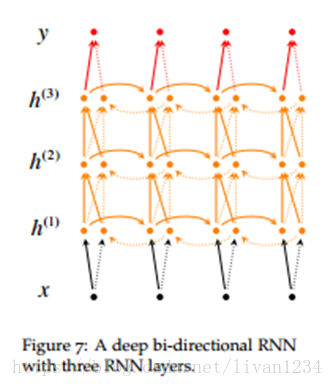
多层双向rnn(cs224d)
单层双向rnn可以通过上述方法简单的实现,但是多层的双向rnn就不能使将MultiRNNCell传给bidirectional_dynamic_rnn了.
想要知道为什么,我们需要看一下bidirectional_dynamic_rnn的源码片段.
withvs.variable_scope(scopeor"bidirectional_rnn"):
# Forward directionwithvs.variable_scope("fw")asfw_scope:
def _reverse(input_, seq_lengths, seq_dim, batch_dim):ifseq_lengthsisnotNone:
returnarray_ops.reverse_sequence(
# Given this:batch_dim = 0seq_dim = 1input.dims = (4,8, ...)
seq_lengths = [7,2,3,5]
# then slices of input are reversed on seq_dim, but only up to seq_lengths:output[0,0:7, :, ...] = input[0,7:0:-1, :, ...]
output[1,0:2, :, ...] = input[1,2:0:-1, :, ...]
output[2,0:3, :, ...] = input[2,3:0:-1, :, ...]
output[3,0:5, :, ...] = input[3,5:0:-1, :, ...]
# while entries past seq_lens are copied through:output[0,7:, :, ...] = input[0,7:, :, ...]
output[1,2:, :, ...] = input[1,2:, :, ...]
output[2,3:, :, ...] = input[2,3:, :, ...]
output[3,2:, :, ...] = input[3,2:, :, ...]
例二:
# Given this:batch_dim = 2seq_dim = 0input.dims = (8, ?,4, ...)
seq_lengths = [7,2,3,5]
# then slices of input are reversed on seq_dim, but only up to seq_lengths:output[0:7, :,0, :, ...] = input[7:0:-1, :,0, :, ...]
output[0:2, :,1, :, ...] = input[2:0:-1, :,1, :, ...]
output[0:3, :,2, :, ...] = input[3:0:-1, :,2, :, ...]
output[0:5, :,3, :, ...] = input[5:0:-1, :,3, :, ...]
# while entries past seq_lens are copied through:output[7:, :,0, :, ...] = input[7:, :,0, :, ...]
output[2:, :,1, :, ...] = input[2:, :,1, :, ...]
output[3:, :,2, :, ...] = input[3:, :,2, :, ...]
output[2:, :,3, :, ...] = input[2:, :,3, :, ...]
三十八、control dependencies
tf.control_dependencies()设计是用来控制计算流图的,给图中的某些计算指定顺序。比如:我们想要获取参数更新后的值,那么我们可以这么组织我们的代码。
#这段代码出现在Variable类定义文件中第287行,# 在创建Varible时,tensorflow是移除了dependencies了的#所以会出现 control 不住的情况withops.control_dependencies(None):
# 第一行: 引包fromtensorflow.pythonimportdebugastf_debug
# 初始化的 sess 没必要加上 debug wrapper# 第二行,给 session 加个 wrapper# 或者# enqueue_many 的写法,两个元素放在两个列表里。en_m = queue.enqueue_many([['hello','world'], [1,2]])
# enqueue 的写法en = queue.enqueue(['hello',1])
deq = queue.dequeue()withtf.Session()assess:
sess.run(en_m) print(sess.run(deq))四十二、session.run()的解释
当我们训练自己的神经网络的时候,无一例外的就是都会加上一句 sess.run(tf.global_variables_initializer()) ,这行代码的官方解释是 初始化模型的参数。那么,它到底做了些什么?
在执行tensor的时候,你可以使用sess.run()在同一步获取多个tensor中的值,使用Tensor.eval()时只能在同一步当中获取一个tensor值,并且每次使用 eval 和 run时,都会执行整个计算图。
一步步看源代码:(代码在后面)
· global_variables_initializer 返回一个用来初始化计算图中所有globalvariable的 op。
· 这个op 到底是啥,还不清楚。
· 函数中调用了 variable_initializer() 和 global_variables()
· global_variables() 返回一个 Variable list ,里面保存的是 gloabalvariables。
· variable_initializer() 将 Variable list 中的所有 Variable 取出来,将其 variable.initializer 属性做成一个 op group。
· 然后看 Variable 类的源码可以发现, variable.initializer 就是一个 assign op。
所以: sess.run(tf.global_variables_initializer()) 就是 run了 所有globalVariable 的 assign op,这就是初始化参数的本来面目。
defglobal_variables_initializer():
"""Returnsan Op that initializes global variables.
Returns:
An Op thatinitializes global variables in the graph.
"""
returnvariables_initializer(global_variables())
defglobal_variables():
"""Returnsglobal variables.
Returns:
A list of`Variable` objects.
"""
returnops.get_collection(ops.GraphKeys.GLOBAL_VARIABLES)
defvariables_initializer(var_list,name="init"):
"""Returnsan Op that initializes a list of variables.
Args:
var_list: Listof `Variable` objects to initialize.
name: Optionalname for the returned operation.
Returns:
An Op that runthe initializers of all the specified variables.
"""
if var_list:
returncontrol_flow_ops.group(*[v.initializer for v in var_list],name=name)
returncontrol_flow_ops.no_op(name=name)
classVariable(object):
def_init_from_args(self,...):
self._initializer_op = state_ops.assign(
self._variable, self._initial_value,
validate_shape=validate_shape).op
@property
definitializer(self):
"""Theinitializer operation for this variable."""
returnself._initializer_op
本文来自互联网用户投稿,文章观点仅代表作者本人,不代表本站立场,不承担相关法律责任。如若转载,请注明出处。 如若内容造成侵权/违法违规/事实不符,请点击【内容举报】进行投诉反馈!