搭建一个Struts2工程
1、使用Eclipse创建一个Dynamic Web Project功能。
2、从Struts2官网上下载Struts2 struts-2.3.30-all.zip
3、向工程中导入Struts2所必须的jar包:
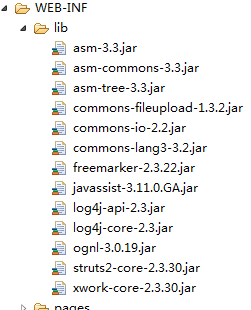
4、在web.xml文件中加入Struts2的配置信息
<filter><filter-name>struts2filter-name><filter-class>org.apache.struts2.dispatcher.ng.filter.StrutsPrepareAndExecuteFilterfilter-class>filter><filter-mapping><filter-name>struts2filter-name><url-pattern>/*url-pattern>filter-mapping>5、在src目录下创建struts.xml配置文件
<struts><package name="helloWorld" extends="struts-default"><action name="product-input"><result>/WEB-INF/pages/input.jspresult>action><action name="product-save" class="com.zjp.domain.Product" method="save"><result name="details">/WEB-INF/pages/details.jspresult>action>package>struts>
在struts.xml中配置一个action,与之对应的class类为Product
package com.zjp.domain;public class Product {private int productId;private String productName;private String productDesc;private String productPrice;public int getProductId() {return productId;}public void setProductId(int productId) {this.productId = productId;}public String getProductName() {return productName;}public void setProductName(String productName) {this.productName = productName;}public String getProductDesc() {return productDesc;}public void setProductDesc(String productDesc) {this.productDesc = productDesc;}public String getProductPrice() {return productPrice;}public void setProductPrice(String productPrice) {this.productPrice = productPrice;}@Overridepublic String toString() {return "Product [productId=" + productId + ", productName="+ productName + ", productDesc=" + productDesc+ ", productPrice=" + productPrice + "]";}public String save(){System.out.println("保存product"+this);return "details";}
}
配置文件中method对应的方法与product类中的save必须一一对应,在result中当save方法返回detail字符串,将跳转到/WEB-INF/pages/details.jsp
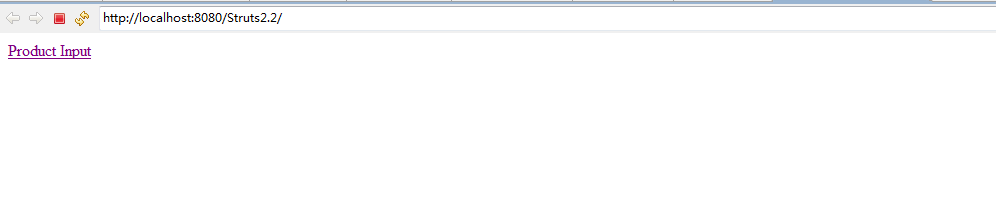
Product参数需要从一个表中输入,在index.jsp页面中:
<%@ page language="java" contentType="text/html; charset=ISO-8859-1"pageEncoding="ISO-8859-1"%>

<html>
<head>
<meta http-equiv="Content-Type" content="text/html; charset=ISO-8859-1">
<title>Insert title heretitle>
head>
<body><a href="product-input.action">Product Inputa>
body>
html>
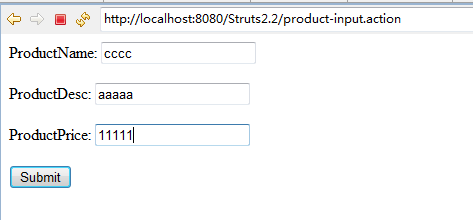
当用户点击Product Input时,在struts.xml中配置其跳转到/WEB-INF/pages/input.jsp中提供用户输入。
<%@ page language="java" contentType="text/html; charset=UTF-8"pageEncoding="UTF-8"%>

<html>
<head>
<meta http-equiv="Content-Type" content="text/html; charset=UTF-8">
<title>Insert title heretitle>
head>
<body><form action="product-save.action" method="post">ProductName: <input type="text" name="productName"/><br><br>ProductDesc: <input type="text" name="productDesc"/><br><br>ProductPrice: <input type="text" name="productPrice" /><br><br><input type="submit" value="Submit"/><br><br>form>body>
html>
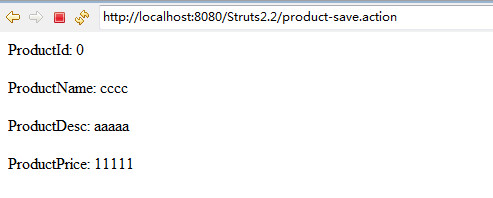
当用户提交该表格,product-save.action设置跳转到detail页面。
<%@ page language="java" contentType="text/html; charset=UTF-8"pageEncoding="UTF-8"%>
<%@ taglib prefix="s" uri="/struts-tags" %>
<html>
<head>
<meta http-equiv="Content-Type" content="text/html; charset=UTF-8">
<title>Insert title heretitle>
head>
<body>ProductId: ${productId }<br><br>ProductName: ${productName }<br><br>ProductDesc: ${productDesc }<br><br>ProductPrice: ${productPrice }<br><br>body>
html>
测试结果:
本文来自互联网用户投稿,文章观点仅代表作者本人,不代表本站立场,不承担相关法律责任。如若转载,请注明出处。 如若内容造成侵权/违法违规/事实不符,请点击【内容举报】进行投诉反馈!