Android 垃圾分类APP(二)垃圾分类之手动输入
前言
在上一篇文章中进行了项目的搭建和网络请求的测试,还不错相信你一定可以完成。
正文
这篇文章要做的就是手动输入物品去完成垃圾分类的结果显示,也不会很难,我会讲的细一点。
一、修改样式
先配置一些资源,找到你的res下的styles.xml,改成NoActionBar。
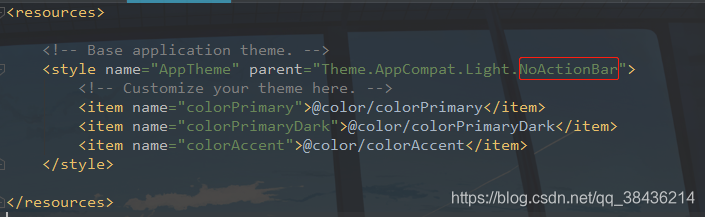
然后打开colors.xml,里面的代码如下:
"1.0" encoding="utf-8"?>
"colorPrimary">#505F98 "colorPrimaryDark">#505F98 "colorAccent">#D81B60 "white">#FFF "white_50">#50FFFFFF "black">#000 "search_bg_color">#F9F9FB "line_color">#EEEEEE "hint_color">#929299 "blue_top">#4B649C "blue">#00A6D9 然后在values文件夹下新建一个dimen.xml,里面的代码如下:
"1.0" encoding="utf-8"?>
xmlns:tools="http://schemas.android.com/tools">"alert_width">290dp "common_circle_width">3dp "progress_circle_radius">34dp "font_9sp">9sp "font_10sp">10sp "font_11sp">11sp "font_12sp">12sp "font_13sp">13sp "font_14sp">14sp "font_15sp">15sp "font_16sp">16sp "font_17sp">17sp "font_18sp">18sp "font_20sp">20sp "font_21sp">21sp "font_23sp">23sp "font_24sp">24sp "font_27sp">27sp "font_28sp">28sp "font_33sp">33sp "activity_horizontal_margin">16dp "activity_vertical_margin">16dp "titil_view_height">50dp "dp_0">0dp "dp_0_1">0.1dp "dp_0_5">0.5dp "dp_1">1dp "dp_1_5">1.5dp "dp_2">2dp "dp_2_5">2.5dp "dp_3">3dp "dp_3_5">3.5dp "dp_4">4dp "dp_4_5">4.5dp "dp_5">5dp "dp_6">6dp "dp_7">7dp "dp_8">8dp "dp_9">9dp "dp_10">10dp "dp_11">11dp "dp_12">12dp "dp_13">13dp "dp_14">14dp "dp_15">15dp "dp_16">16dp "dp_17">17dp "dp_18">18dp "dp_19">19dp "dp_20">20dp "dp_21">21dp "dp_22">22dp "dp_23">23dp "dp_24">24dp "dp_25">25dp "dp_26">26dp "dp_27">27dp "dp_28">28dp "dp_29">29dp "dp_30">30dp "dp_31">31dp "dp_32">32dp "dp_33">33dp "dp_34">34dp "dp_35">35dp "dp_36">36dp "dp_37">37dp "dp_38">38dp "dp_39">39dp "dp_40">40dp "dp_41">41dp "dp_42">42dp "dp_43">43dp "dp_44">44dp "dp_45">45dp "dp_46">46dp "dp_47">47dp "dp_48">48dp "dp_49">49dp "dp_50">50dp "dp_51">51dp "dp_52">52dp "dp_53">53dp "dp_54">54dp "dp_55">55dp "dp_56">56dp "dp_57">57dp "dp_58">58dp "dp_59">59dp "dp_60">60dp "dp_61">61dp "dp_62">62dp "dp_63">63dp "dp_64">64dp "dp_65">65dp "dp_66">66dp "dp_67">67dp "dp_68">68dp "dp_69">69dp "dp_70">70dp "dp_71">71dp "dp_72">72dp "dp_73">73dp "dp_74">74dp "dp_75">75dp "dp_76">76dp "dp_77">77dp "dp_78">78dp "dp_79">79dp "dp_80">80dp "dp_81">81dp "dp_82">82dp "dp_83">83dp "dp_84">84dp "dp_85">85dp "dp_86">86dp "dp_87">87dp "dp_88">88dp "dp_89">89dp "dp_90">90dp "dp_91">91dp "dp_92">92dp "dp_93">93dp "dp_94">94dp "dp_95">95dp "dp_96">96dp "dp_97">97dp "dp_98">98dp "dp_99">99dp "dp_100">100dp "dp_101">101dp "dp_102">102dp "dp_103">103dp "dp_104">104dp "dp_105">105dp "dp_106">106dp "dp_107">107dp "dp_108">108dp "dp_109">109dp "dp_110">110dp "dp_111">111dp "dp_112">112dp "dp_113">113dp "dp_114">114dp "dp_115">115dp "dp_116">116dp "dp_117">117dp "dp_118">118dp "dp_119">119dp "dp_120">120dp "dp_121">121dp "dp_122">122dp "dp_123">123dp "dp_124">124dp "dp_125">125dp "dp_126">126dp "dp_127">127dp "dp_128">128dp "dp_129">129dp "dp_130">130dp "dp_131">131dp "dp_132">132dp "dp_133">133dp "dp_134">134dp "dp_135">135dp "dp_136">136dp "dp_137">137dp "dp_138">138dp "dp_139">139dp "dp_140">140dp "dp_141">141dp "dp_142">142dp "dp_143">143dp "dp_144">144dp "dp_145">145dp "dp_146">146dp "dp_147">147dp "dp_148">148dp "dp_149">149dp "dp_150">150dp "dp_151">151dp "dp_152">152dp "dp_153">153dp "dp_154">154dp "dp_155">155dp "dp_156">156dp "dp_157">157dp "dp_158">158dp "dp_159">159dp "dp_160">160dp "dp_161">161dp "dp_162">162dp "dp_163">163dp "dp_164">164dp "dp_165">165dp "dp_166">166dp "dp_167">167dp "dp_168">168dp "dp_169">169dp "dp_170">170dp "dp_171">171dp "dp_172">172dp "dp_173">173dp "dp_174">174dp "dp_175">175dp "dp_176">176dp "dp_177">177dp "dp_178">178dp "dp_179">179dp "dp_180">180dp "dp_181">181dp "dp_182">182dp "dp_183">183dp "dp_184">184dp "dp_185">185dp "dp_186">186dp "dp_187">187dp "dp_188">188dp "dp_189">189dp "dp_190">190dp "dp_191">191dp "dp_192">192dp "dp_193">193dp "dp_194">194dp "dp_195">195dp "dp_196">196dp "dp_197">197dp "dp_198">198dp "dp_199">199dp "dp_200">200dp "dp_201">201dp "dp_202">202dp "dp_203">203dp "dp_204">204dp "dp_205">205dp "dp_206">206dp "dp_207">207dp "dp_208">208dp "dp_209">209dp "dp_210">210dp "dp_211">211dp "dp_212">212dp "dp_213">213dp "dp_214">214dp "dp_215">215dp "dp_216">216dp "dp_217">217dp "dp_218">218dp "dp_219">219dp "dp_220">220dp "dp_221">221dp "dp_222">222dp "dp_223">223dp "dp_224">224dp "dp_225">225dp "dp_226">226dp "dp_227">227dp "dp_228">228dp "dp_229">229dp "dp_230">230dp "dp_231">231dp "dp_232">232dp "dp_233">233dp "dp_234">234dp "dp_235">235dp "dp_236">236dp "dp_237">237dp "dp_238">238dp "dp_239">239dp "dp_240">240dp "dp_241">241dp "dp_242">242dp "dp_243">243dp "dp_244">244dp "dp_245">245dp "dp_246">246dp "dp_247">247dp "dp_248">248dp "dp_249">249dp "dp_250">250dp "dp_251">251dp "dp_252">252dp "dp_253">253dp "dp_254">254dp "dp_255">255dp "dp_256">256dp "dp_257">257dp "dp_258">258dp "dp_259">259dp "dp_260">260dp "dp_261">261dp "dp_262">262dp "dp_263">263dp "dp_264">264dp "dp_265">265dp "dp_266">266dp "dp_267">267dp "dp_268">268dp "dp_269">269dp "dp_270">270dp "dp_271">271dp "dp_272">272dp "dp_273">273dp "dp_274">274dp "dp_275">275dp "dp_276">276dp "dp_277">277dp "dp_278">278dp "dp_279">279dp "dp_280">280dp "dp_281">281dp "dp_282">282dp "dp_283">283dp "dp_284">284dp "dp_285">285dp "dp_286">286dp "dp_287">287dp "dp_288">288dp "dp_289">289dp "dp_290">290dp "dp_291">291dp "dp_292">292dp "dp_293">293dp "dp_294">294dp "dp_295">295dp "dp_296">296dp "dp_297">297dp "dp_298">298dp "dp_299">299dp "dp_300">300dp "dp_301">301dp "dp_302">302dp "dp_303">303dp "dp_304">304dp "dp_305">305dp "dp_306">306dp "dp_307">307dp "dp_308">308dp "dp_309">309dp "dp_310">310dp "dp_311">311dp "dp_312">312dp "dp_313">313dp "dp_314">314dp "dp_315">315dp "dp_316">316dp "dp_317">317dp "dp_318">318dp "dp_319">319dp "dp_320">320dp "dp_321">321dp "dp_322">322dp "dp_323">323dp "dp_324">324dp "dp_325">325dp "dp_326">326dp "dp_327">327dp "dp_328">328dp "dp_329">329dp "dp_330">330dp "dp_331">331dp "dp_332">332dp "dp_333">333dp "dp_334">334dp "dp_335">335dp "dp_336">336dp "dp_337">337dp "dp_338">338dp "dp_339">339dp "dp_340">340dp "dp_341">341dp "dp_342">342dp "dp_343">343dp "dp_344">344dp "dp_345">345dp "dp_346">346dp "dp_347">347dp "dp_348">348dp "dp_349">349dp "dp_350">350dp "dp_351">351dp "dp_352">352dp "dp_353">353dp "dp_354">354dp "dp_355">355dp "dp_356">356dp "dp_357">357dp "dp_358">358dp "dp_359">359dp "dp_360">360dp "dp_365">365dp "dp_370">370dp "dp_399">399dp "dp_400">400dp "dp_410">410dp "dp_420">420dp "dp_412">412dp "dp_422">422dp "dp_472">472dp "dp_500">500dp "dp_520">520dp "dp_550">550dp "dp_560">560dp "dp_600">600dp "dp_640">640dp "dp_720">720dp "sp_6">6sp "sp_7">7sp "sp_8">8sp "sp_9">9sp "sp_10">10sp "sp_11">11sp "sp_12">12sp "sp_13">13sp "sp_14">14sp "sp_15">15sp "sp_16">16sp "sp_17">17sp "sp_18">18sp "sp_19">19sp "sp_20">20sp "sp_21">21sp "sp_22">22sp "sp_23">23sp "sp_24">24sp "sp_25">25sp "sp_26">26sp "sp_27">27sp "sp_28">28sp "sp_29">29sp "sp_30">30sp "sp_31">31sp "sp_32">32sp "sp_33">33sp "sp_34">34sp "sp_35">35sp "sp_36">36sp "sp_37">37sp "sp_38">38sp "sp_40">40sp "sp_42">42sp "sp_48">48sp "crumb_view_padding">12dp
二、修改布局
在修改布局之前,先准备好需要的资源,首先是两个图标


在drawable中新建search_et_bg.xml,里面的代码如下:
"1.0" encoding="utf-8"?>
xmlns:android="http://schemas.android.com/apk/res/android">android:color="@color/search_bg_color"/>android:radius="8dp"/>
这是设置输入框的背景
然后再新建一个cursor_style.xml,里面的代码如下:
"1.0" encoding="utf-8"?>
xmlns:android="http://schemas.android.com/apk/res/android"android:shape="rectangle">android:width="@dimen/dp_1" />android:color="@color/black" />
这是设置输入框的光标颜色。
下面可以写布局了。
"1.0" encoding="utf-8"?>
xmlns:android="http://schemas.android.com/apk/res/android"xmlns:app="http://schemas.android.com/apk/res-auto"xmlns:tools="http://schemas.android.com/tools"android:layout_width="match_parent"android:layout_height="match_parent"android:fitsSystemWindows="true"android:orientation="vertical"tools:context=".MainActivity">android:id="@+id/toolbar"android:layout_width="match_parent"android:layout_height="?attr/actionBarSize"android:background="@color/colorPrimaryDark">android:layout_width="wrap_content"android:layout_height="wrap_content"android:layout_gravity="center"android:text="垃圾分类"android:textColor="@color/white"android:textSize="18sp" />android:layout_width="match_parent"android:layout_height="wrap_content"android:background="@color/white">android:layout_width="match_parent"android:layout_height="36dp"android:layout_marginStart="@dimen/sp_16"android:layout_marginTop="@dimen/dp_12"android:layout_marginEnd="@dimen/dp_16"android:layout_marginBottom="@dimen/dp_12"android:background="@drawable/search_et_bg"android:orientation="horizontal">android:id="@+id/iv_search"android:layout_width="@dimen/dp_16"android:layout_height="@dimen/dp_16"android:layout_centerVertical="true"android:layout_marginStart="@dimen/dp_12"android:layout_marginEnd="@dimen/dp_8"app:srcCompat="@mipmap/icon_search" />android:id="@+id/et_goods"android:layout_width="wrap_content"android:layout_height="match_parent"android:layout_toStartOf="@+id/iv_clear"android:layout_toEndOf="@+id/iv_search"android:background="@null"android:hint="请输入物品"android:imeOptions="actionSearch"android:singleLine="true"android:textColor="@color/black"android:textColorHint="@color/hint_color"android:textCursorDrawable="@drawable/cursor_style"android:textSize="@dimen/sp_14" />android:id="@+id/iv_clear"android:layout_width="@dimen/dp_36"android:layout_height="@dimen/dp_36"android:layout_alignParentEnd="true"android:padding="@dimen/dp_10"android:src="@mipmap/icon_clear"android:visibility="invisible" /> android:id="@+id/rv_result"android:layout_width="match_parent"android:layout_height="match_parent"android:overScrollMode="never"android:scrollbars="none" />
三、使用Mvp框架
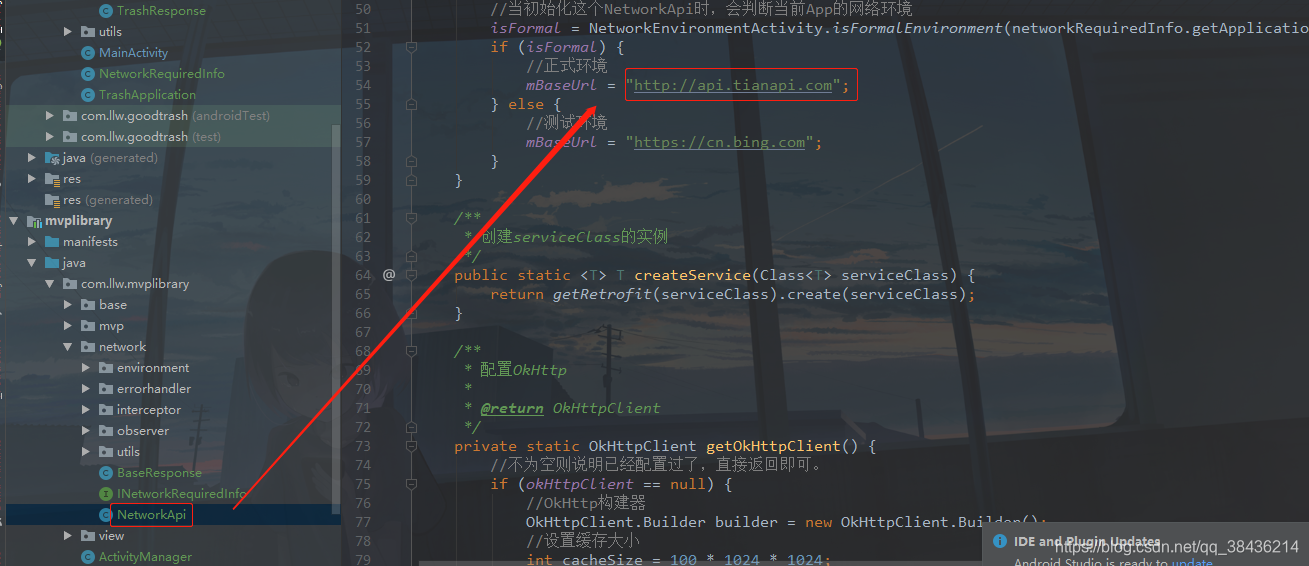
下面设置接口的访问地址,打开mvplibrary下的NetworkApi类,修改正式环境的访问地址
mBaseUrl = "http://api.tianapi.com";
如下图所示
下面回到app模块,在com.llw.goodtrash包下新建NetworkRequiredInfo类,里面代码如下;
package com.llw.goodtrash;import android.app.Application;import com.llw.mvplibrary.BuildConfig;
import com.llw.mvplibrary.network.INetworkRequiredInfo;/*** 网络访问信息* @author llw*/
public class NetworkRequiredInfo implements INetworkRequiredInfo {private Application application;public NetworkRequiredInfo(Application application){this.application = application;}/*** 版本名*/@Overridepublic String getAppVersionName() {return BuildConfig.VERSION_NAME;}/*** 版本号*/@Overridepublic String getAppVersionCode() {return String.valueOf(BuildConfig.VERSION_CODE);}/*** 是否为debug*/@Overridepublic boolean isDebug() {return BuildConfig.DEBUG;}/*** 应用全局上下文*/@Overridepublic Application getApplicationContext() {return application;}
}
之后再新建一个TrashApplication类,代码如下:
package com.llw.goodtrash;import com.llw.mvplibrary.BaseApplication;
import com.llw.mvplibrary.network.NetworkApi;/*** 自定义Application*/
public class TrashApplication extends BaseApplication {@Overridepublic void onCreate() {super.onCreate();//初始化网络框架NetworkApi.init(new NetworkRequiredInfo(this));}
}
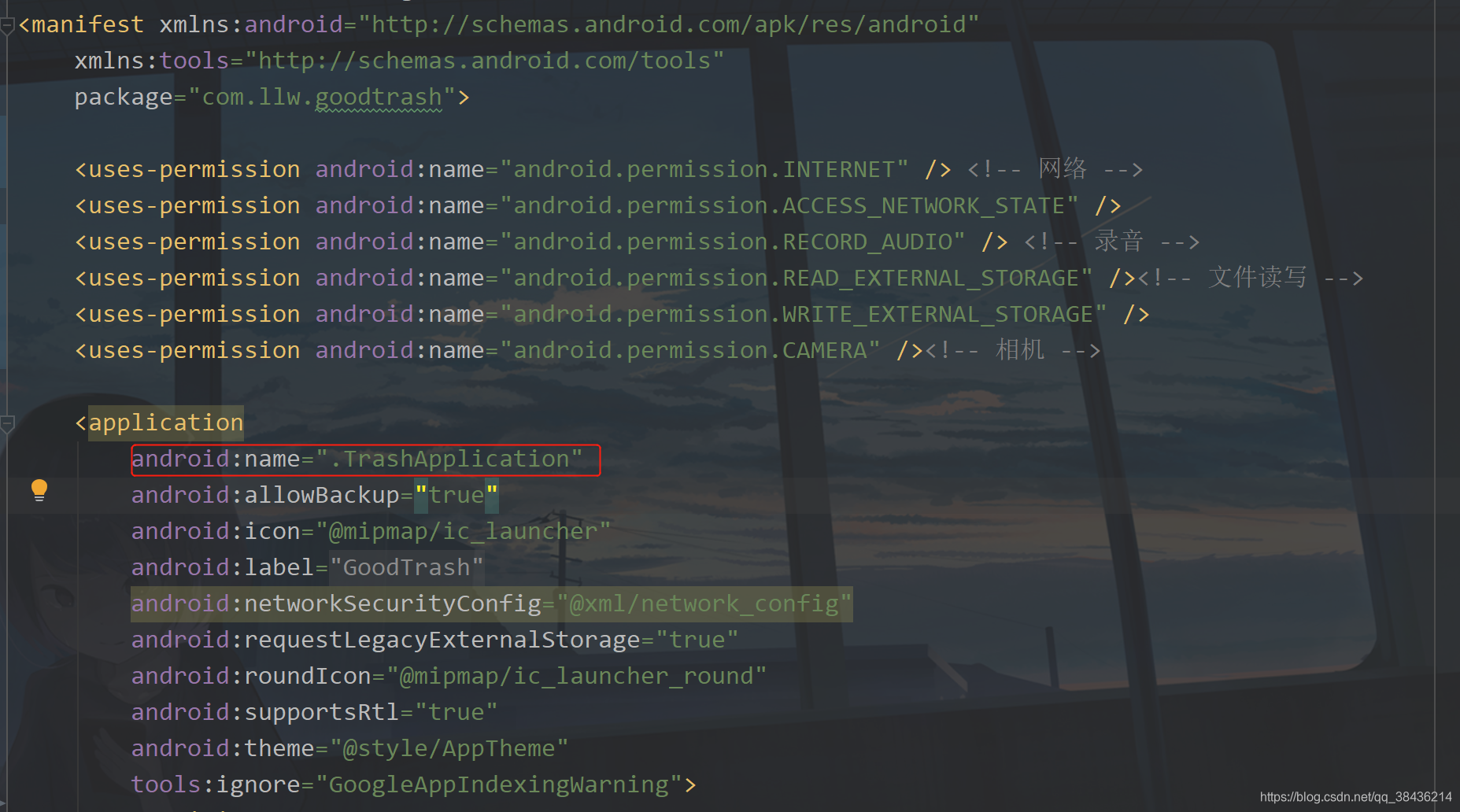
自定义的Application需要到AndroidManifest.xml中去配置才会生效,如下图所示:
现在你就可以访问网络了,这虽然看起来是单独使用Okhttp要麻烦,但实际上是要方便很多的,你可能现在不明白,以后你会懂得。
我在天行API中请求接口使用的KEY,这里我新建了一个全局常量类,放在里面,在com.llw.goodtrash包下新建一个utils包。包下的代码如下:
package com.llw.goodtrash.utils;/*** 全局常量** @author llw* @date 2021/3/30 15:14*/
public class Constant {/*** 垃圾分类的key  请替换为自己的*/public static final String KEY = "783da68c7ea7e10fcd259db651cc550b";/*** 请求成功码*/public static final int SUCCESS_CODE = 200;}
之前通过返回的数据可以生成一个返回数据实体,在com.llw.goodtrash包下新建一个model包,包下新建一个TrashResponse类,代码如下:
package com.llw.goodtrash.model;import java.util.List;/*** 垃圾分类返回数据*/
public class TrashResponse {/*** code : 200* msg : success* newslist : [{"name":"羽毛球","type":3,"aipre":0,"explain":"干垃圾即其它垃圾,指除可回收物、有害垃圾、厨余垃圾(湿垃圾)以外的其它生活废弃物。","contain":"常见包括砖瓦陶瓷、渣土、卫生间废纸、猫砂、污损塑料、毛发、硬壳、一次性制品、灰土、瓷器碎片等难以回收的废弃物","tip":"尽量沥干水分;难以辨识类别的生活垃圾都可以投入干垃圾容器内"},{"name":"羽毛球拍","type":0,"aipre":0,"explain":"可回收垃圾是指适宜回收、可循环利用的生活废弃物。","contain":"常见包括各类废金属、玻璃瓶、易拉罐、饮料瓶、塑料玩具、书本、报纸、广告单、纸板箱、衣服、床上用品、电子产品等","tip":"轻投轻放;清洁干燥,避免污染,费纸尽量平整;立体包装物请清空内容物,清洁后压扁投放;有尖锐边角的、应包裹后投放"}]*/private int code;private String msg;private List<NewslistBean> newslist;public int getCode() {return code;}public void setCode(int code) {this.code = code;}public String getMsg() {return msg;}public void setMsg(String msg) {this.msg = msg;}public List<NewslistBean> getNewslist() {return newslist;}public void setNewslist(List<NewslistBean> newslist) {this.newslist = newslist;}public static class NewslistBean {/*** name : 羽毛球* type : 3* aipre : 0* explain : 干垃圾即其它垃圾,指除可回收物、有害垃圾、厨余垃圾(湿垃圾)以外的其它生活废弃物。* contain : 常见包括砖瓦陶瓷、渣土、卫生间废纸、猫砂、污损塑料、毛发、硬壳、一次性制品、灰土、瓷器碎片等难以回收的废弃物* tip : 尽量沥干水分;难以辨识类别的生活垃圾都可以投入干垃圾容器内*/private String name;private int type;private int aipre;private String explain;private String contain;private String tip;public String getName() {return name;}public void setName(String name) {this.name = name;}public int getType() {return type;}public void setType(int type) {this.type = type;}public int getAipre() {return aipre;}public void setAipre(int aipre) {this.aipre = aipre;}public String getExplain() {return explain;}public void setExplain(String explain) {this.explain = explain;}public String getContain() {return contain;}public void setContain(String contain) {this.contain = contain;}public String getTip() {return tip;}public void setTip(String tip) {this.tip = tip;}}
}
下面设置api接口,在com.llw.goodtrash包下新建一个api包,包下新建一个ApiService接口。
package com.llw.goodtrash.api;import com.llw.goodtrash.model.TrashResponse;import io.reactivex.Observable;
import retrofit2.http.GET;
import retrofit2.http.Query;import static com.llw.goodtrash.utils.Constant.KEY;/*** API接口** @author llw* @date 2021/3/30 15:13*/
public interface ApiService {/*** 垃圾分类* @param word 物品名* @return TrashResponse 结果实体*/@GET("/txapi/lajifenlei/index?key=" + KEY)Observable<TrashResponse> searchGoods(@Query("word") String word);
}
这里通过Observable观察TrashResponse,当获取到返回数据时,会解析成TrashResponse,就不需要手动去转了,而searchGoods标识方法名,后面的@Query(“word”) String word表示请求API时会把word作为参数拼接到请求地址后面。
下面构建页面访问网络的订阅类
在com.llw.goodtrash包下新建一个contract包,这个包下新建一个MainContract类。
package com.llw.goodtrash.contract;import android.annotation.SuppressLint;import com.llw.goodtrash.api.ApiService;
import com.llw.goodtrash.model.TrashResponse;
import com.llw.mvplibrary.base.BasePresenter;
import com.llw.mvplibrary.base.BaseView;
import com.llw.mvplibrary.network.NetworkApi;
import com.llw.mvplibrary.network.observer.BaseObserver;/*** 主页面访问网络*/
public class MainContract {public static class MainPresenter extends BasePresenter<MainView> {/*** 搜索物品** @param word 物品名*/@SuppressLint("CheckResult")public void searchGoods(String word) {ApiService service = NetworkApi.createService(ApiService.class);service.searchGoods(word).compose(NetworkApi.applySchedulers(new BaseObserver<TrashResponse>() {@Overridepublic void onSuccess(TrashResponse groupResponse) {if (getView() != null) {getView().getSearchResponse(groupResponse);}}@Overridepublic void onFailure(Throwable e) {if (getView() != null) {getView().getSearchResponseFailed(e);}}}));}}public interface MainView extends BaseView {/*** 搜索物品返回** @param response*/void getSearchResponse(TrashResponse response);/*** 搜索物品异常返回** @param throwable*/void getSearchResponseFailed(Throwable throwable);}
}
下面回到MainActivity,先删掉上一篇添加的代码,然后修改代码如下图所示:

之后你需要重写五个方法。
@Overridepublic void initData(Bundle savedInstanceState) {}@Overridepublic int getLayoutId() {return 0;}@Overrideprotected MainContract.MainPresenter createPresenter() {return null;}@Overridepublic void getSearchResponse(TrashResponse response) {}@Overridepublic void getSearchResponseFailed(Throwable throwable) {}
下面会一一修改这五个方法。
四、列表适配器
在上一篇文章中说到返回的是一个可变数组数据,那么是采用列表来显示,有列表,自然要有列表适配器,而列表适配器里面使用了item的布局。在layout下创建item_search_rv.xml,里面的代码如下:
"1.0" encoding="utf-8"?>
xmlns:android="http://schemas.android.com/apk/res/android"android:id="@+id/item_search_goods"android:layout_width="match_parent"android:layout_height="wrap_content"android:layout_marginTop="@dimen/dp_1"android:background="@color/white"android:foreground="?attr/selectableItemBackground"android:orientation="vertical"android:padding="@dimen/dp_12">android:id="@+id/tv_name"android:layout_width="wrap_content"android:layout_height="wrap_content"android:text="物品名称"android:textColor="@color/black"android:textSize="@dimen/sp_16" />android:id="@+id/tv_type"android:layout_width="wrap_content"android:layout_height="wrap_content"android:layout_alignParentEnd="true"android:text="垃圾类型"android:textColor="@color/black"android:textSize="@dimen/sp_14" />android:id="@+id/tv_explain"android:layout_width="wrap_content"android:layout_height="wrap_content"android:layout_below="@+id/tv_name"android:layout_marginTop="@dimen/dp_8"android:text="解释"android:textColor="@color/hint_color"android:textSize="@dimen/sp_14" />
然后写适配器,在com.llw.goodtrash包下新建一个adapter包,包下新建一个SearchGoodsAdapter类,代码如下:
package com.llw.goodtrash.adapter;import android.widget.TextView;import androidx.annotation.Nullable;import com.chad.library.adapter.base.BaseQuickAdapter;
import com.chad.library.adapter.base.BaseViewHolder;
import com.llw.goodtrash.R;
import com.llw.goodtrash.model.TrashResponse;import java.util.List;/*** 搜索物品结果列表适配器*/
public class SearchGoodsAdapter extends BaseQuickAdapter<TrashResponse.NewslistBean, BaseViewHolder> {public SearchGoodsAdapter(int layoutResId, @Nullable List<TrashResponse.NewslistBean> data) {super(layoutResId, data);}@Overrideprotected void convert(BaseViewHolder helper, TrashResponse.NewslistBean item) {helper.setText(R.id.tv_name, item.getName()).setText(R.id.tv_explain, item.getExplain()).addOnClickListener(R.id.item_search_goods);TextView tvType = helper.getView(R.id.tv_type);switch (item.getType()) {case 0:tvType.setText("可回收垃圾");break;case 1:tvType.setText("有害垃圾");break;case 2:tvType.setText("厨余垃圾");break;case 3://干垃圾即其他垃圾tvType.setText("干垃圾");break;default:break;}}
}
五、页面初始化
当我们进入这个页面时要完成页面的初始化,之前是写在onCreate中完成的,现在用initData中完成。而布局id在getLayoutId中返回。
@Overridepublic int getLayoutId() {return R.layout.activity_main;}
你的onCreate方法可以删掉了,之后创建变量
private static final String TAG = "MainActivity";private EditText etGoods;//输入框private ImageView ivClear;//清空输入框private RecyclerView rvResult;//结果显示列表private List<TrashResponse.NewslistBean> newslistBeanList = new ArrayList<>();//数据列表private SearchGoodsAdapter searchGoodsAdapter;//结果列表适配器
然后创建一个initView方法。
/*** 页面初始化*/private void initView() {etGoods = findViewById(R.id.et_goods);ivClear = findViewById(R.id.iv_clear);rvResult = findViewById(R.id.rv_result);//配置适配器 设置布局和数据源searchGoodsAdapter = new SearchGoodsAdapter(R.layout.item_search_rv, newslistBeanList);//设置列表的布局管理器rvResult.setLayoutManager(new LinearLayoutManager(this));//列表item点击事件searchGoodsAdapter.setOnItemChildClickListener((adapter, view, position) -> {showMsg("点击了" + newslistBeanList.get(position).getName());});//设置列表适配器rvResult.setAdapter(searchGoodsAdapter);//设置输入监听etGoods.addTextChangedListener(new TextWatcher() {@Overridepublic void beforeTextChanged(CharSequence s, int start, int count, int after) {}@Overridepublic void onTextChanged(CharSequence s, int start, int before, int count) {if (s.toString().length() < 1) {ivClear.setVisibility(View.INVISIBLE);} else {ivClear.setVisibility(View.VISIBLE);}}@Overridepublic void afterTextChanged(Editable s) {}});//设置动作监听etGoods.setOnEditorActionListener((v, actionId, event) -> {if (actionId == EditorInfo.IME_ACTION_SEARCH) {String word = etGoods.getText().toString().trim();if (word.isEmpty()) {showMsg("请输入物品名");} else {//显示加载弹窗showLoadingDialog();//控制输入法controlInputMethod();//请求接口mPresenter.searchGoods(word);}return true;}return false;});//清空输入框内容ivClear.setOnClickListener(v -> {controlInputMethod();etGoods.setText("");});}
这里面有一个方法controlInputMethod,用于控制输入法是否显示,代码如下:
/*** 控制输入法* 当输入法打开时关闭,关闭时弹出*/private void controlInputMethod() {InputMethodManager inputMethodManager = (InputMethodManager) getSystemService(Context.INPUT_METHOD_SERVICE);inputMethodManager.toggleSoftInput(0, InputMethodManager.HIDE_NOT_ALWAYS);}
别忘记在initData()方法中调用initView();

六、数据显示
返回新的订阅
@Overrideprotected MainContract.MainPresenter createPresenter() {return new MainContract.MainPresenter();}
/*** 搜索物品返回数据** @param response*/@Overridepublic void getSearchResponse(TrashResponse response) {//隐藏加载弹窗hideLoadingDialog();if (response.getCode() == Constant.SUCCESS_CODE) {//请求成功 进行数据的渲染if (response.getNewslist() != null && response.getNewslist().size() > 0) {newslistBeanList.clear();newslistBeanList.addAll(response.getNewslist());//刷新适配器searchGoodsAdapter.notifyDataSetChanged();} else {showMsg("触及到了知识盲区");}} else {//显示请求接口失败的原因showMsg(response.getMsg());}}/*** 搜索物品失败返回** @param throwable 异常信息*/@Overridepublic void getSearchResponseFailed(Throwable throwable) {hideLoadingDialog();Log.e(TAG, throwable.toString());}
运行一下:
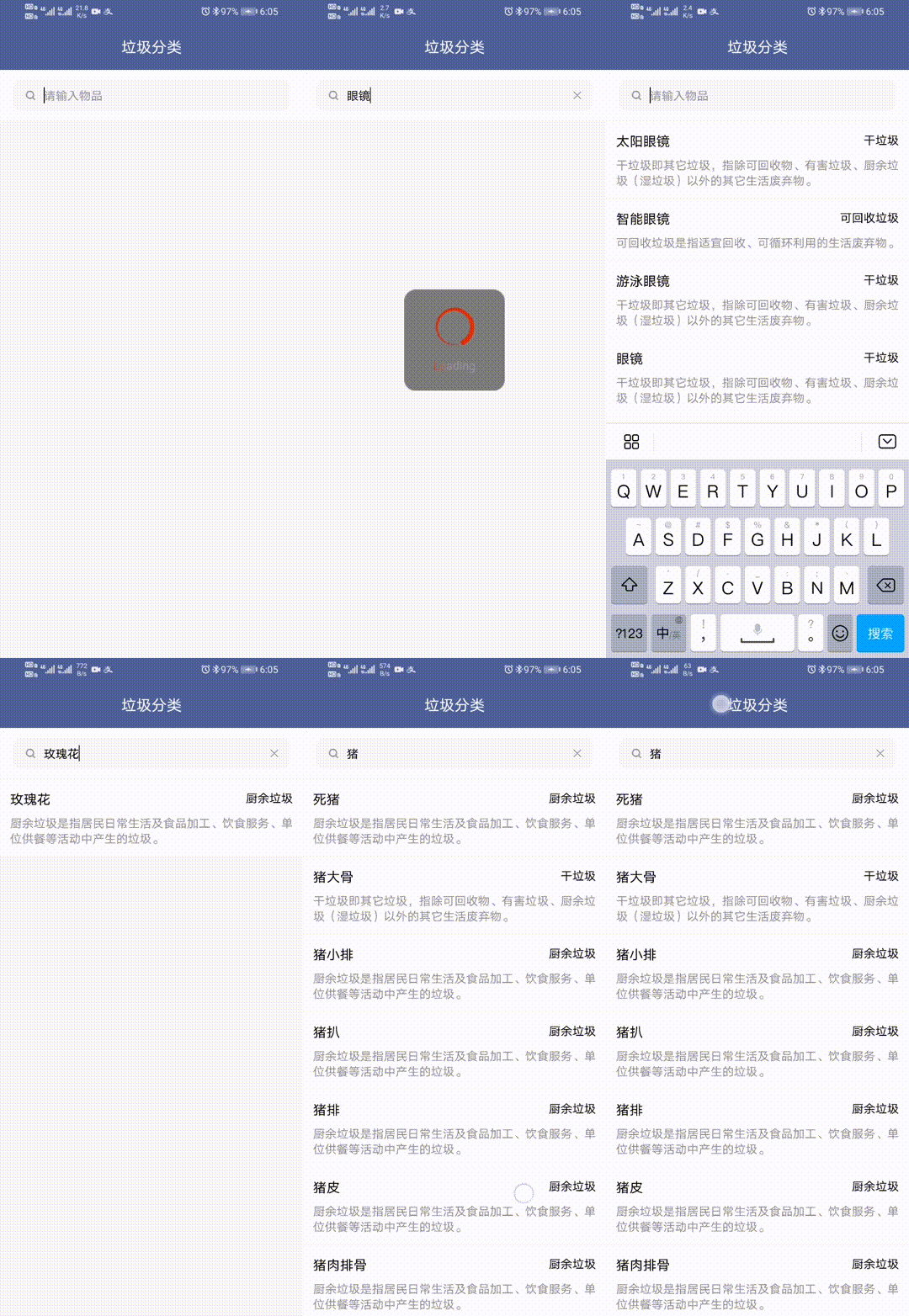
OK,就是这样。
七、源码
GitHub源码地址如下:GoodTrash
下一篇:垃圾分类APP(三)垃圾分类之语音输入
本文来自互联网用户投稿,文章观点仅代表作者本人,不代表本站立场,不承担相关法律责任。如若转载,请注明出处。 如若内容造成侵权/违法违规/事实不符,请点击【内容举报】进行投诉反馈!