YouCompeletMe Install On Linux
1.安装必要的支持文件(目前<2022/6/6>通过apt-get即可获得支持的版本)
sudo apt-get install mercurial python-dev python3-dev ruby ruby-dev libx11-dev libxt-dev libgtk2.0-dev libncurses5 ncurses-dev libtool libtool-bin -y
安装依赖文件 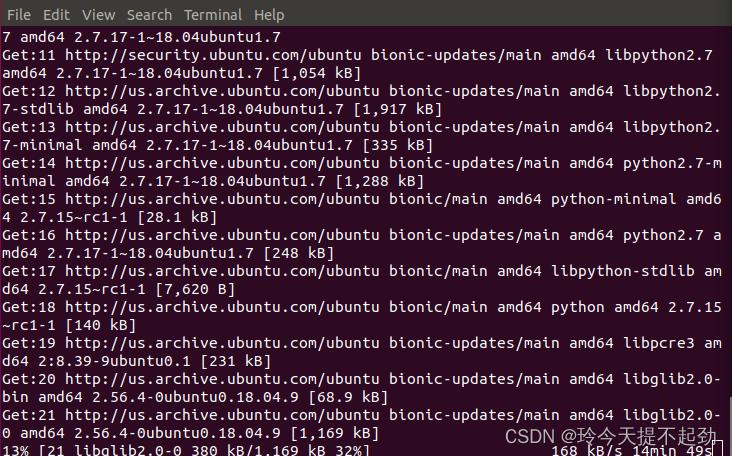
过程比较漫长
2.确保python版本大于3.6
Python3 -version
Python -version
//安装python3.6及以上版本
在上述支持文件中
3.确保vim版本不低于8.2(8.2及以上才支持python3)
//检查vim版本
vim --version
//安装在家目录
cd
//检查git工具
git --version
//git获取方式一
git官网下载git
git-scm.com https://git-scm.com///git获取方式二
sudo apt-get install git
//克隆vim源代码
git clone https://github.com/vim/vim.git
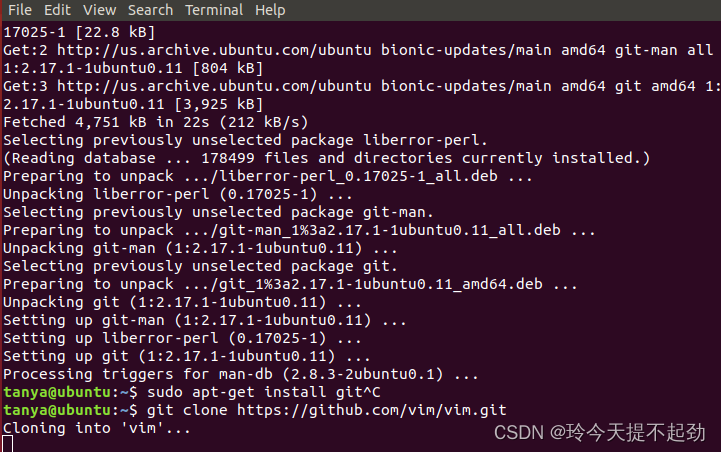 git克隆工具一般不显示剩余时间
git2.17.1貌似可以显示vim源码克隆进度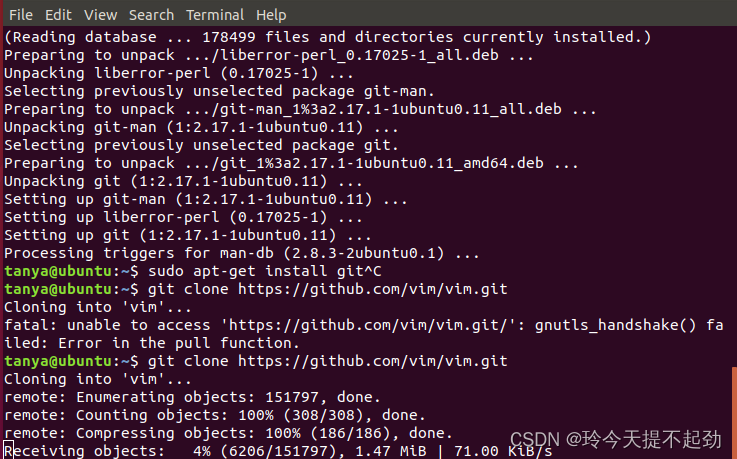
这也是一个漫长的过程
//克隆源代码后手动安装vim来配置其支持的拓展包
//先看看配置好的vim所支持的内容
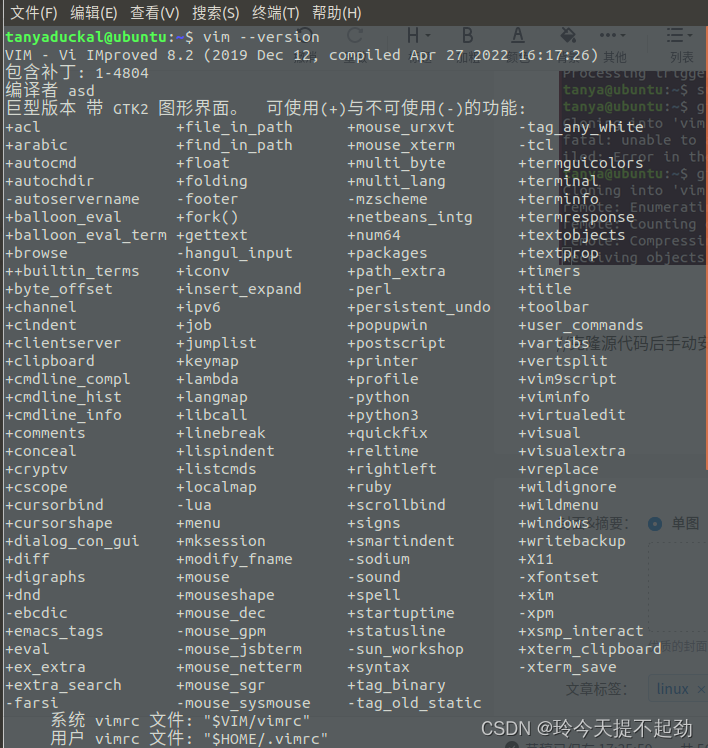 看见python3前面的+号就成功了一小步了
//现在开始配置vim
sudo ./configure --enable-perlinterp --enable-python3interp --enable-rubyinterp --enable-cscope --enable-gui=auto --enable-gtk2-check --with-features=huge --enable-multibyte --with-x --with-compiledby="asd" --with-python3-config-dir=/usr/lib/python3.6/config-3.6m-x86_64-linux-gnu --prefix=/opt/vim82
//如果找不到python3的路径,就使用find命令找一下
find /usr/lib/python* -name python*
找到并复制/usr/lib/python3.6/config-3.6m-x86_64-linux-gnu该目录
替换--with-python3-config-dir=的内容
//可以使用如下命令查看一下各个配置选项的含义
./configure --help
//配置完成后编译即可
make
make install
//把可执行文件连接到/usr/bin目录
sudo ln -s /opt/vim82/bin/vim /usr/bin/vim
//如果命令vim仍不是刚刚编译好的那个,就使用如下命令看看现在的vim命令是连接到哪里的吧
which vim
//如果不是连接到/usr/bin/vim的,就重新把/opt/vim82/bin/vim连接过去,不过需要先删除已有的连接
//最后看看vim的版本信息
vim --version
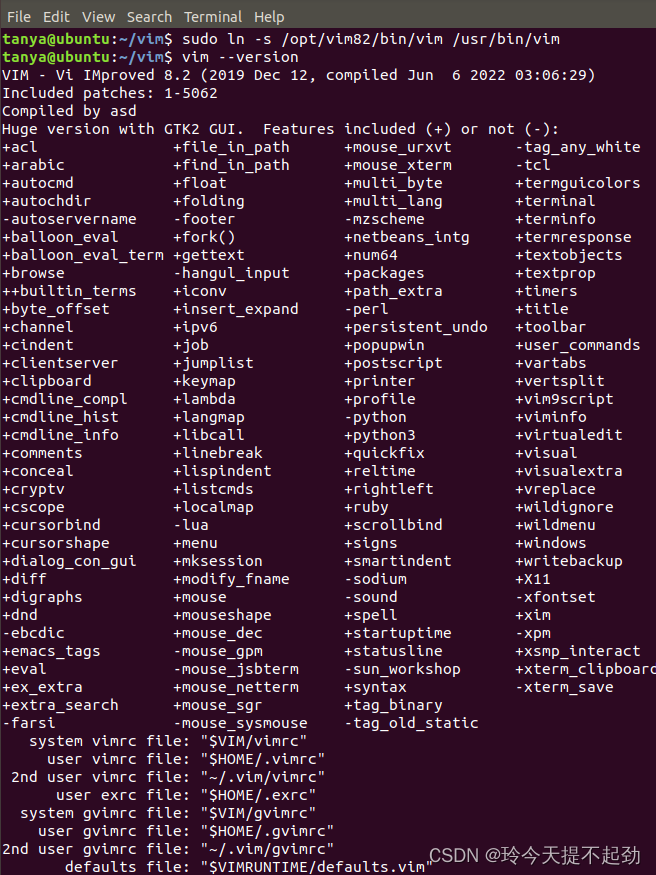
4.安装vim插件管理工具(vimbundle为例)
//还是安装在家目录下面(强烈建议)
cd
git clone https://github.com/VundleVim/Vundle.vim.git ~/.vim/bundle/Vundle.vim
//查看.vim隐藏文件夹是否克隆成功
ls-a
//配置.vimrc(vim启动时会读取的配置文件),以便加载Vundle
vim ~/.vimrc
//建议直接打开vimbundle的说明,找到3.配置插件,然后复制到.vimrc
vim .vim/bundle/Vundle.vim/README_ZH_CN.md
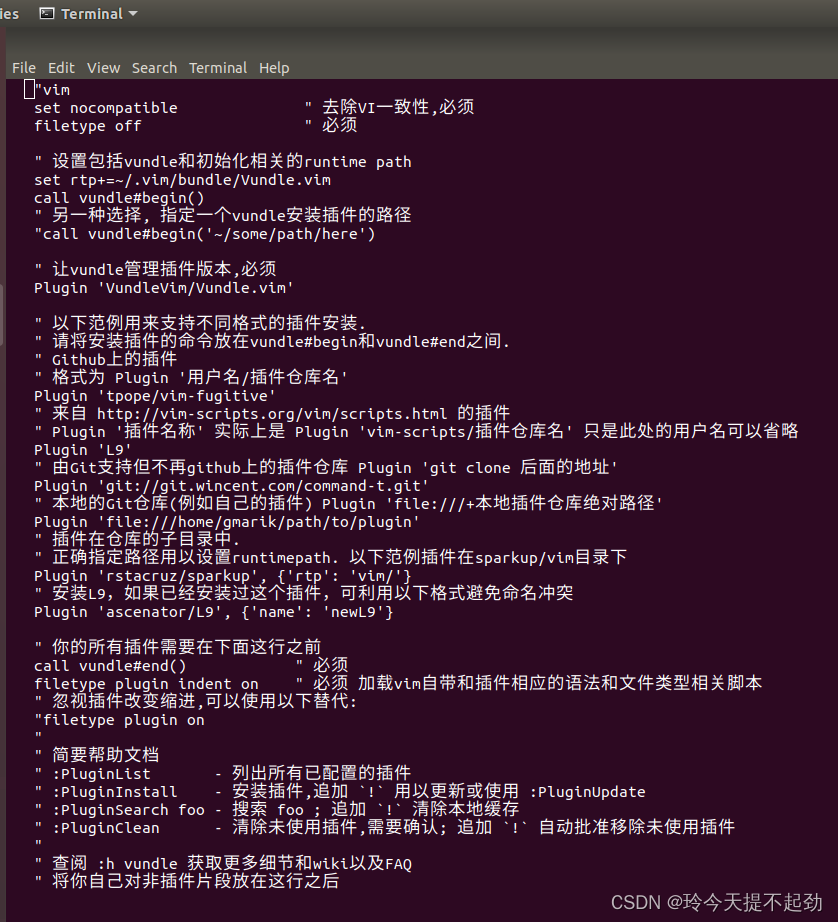
5.安装ycm补全插件(终于到插件的安装了)
//参考vimbundled的说明中的第4项,在.vimrc中添加如下内容
Bundle 'Valloric/YouCompleteMe'
//vim命令行模式
:VundleInstall
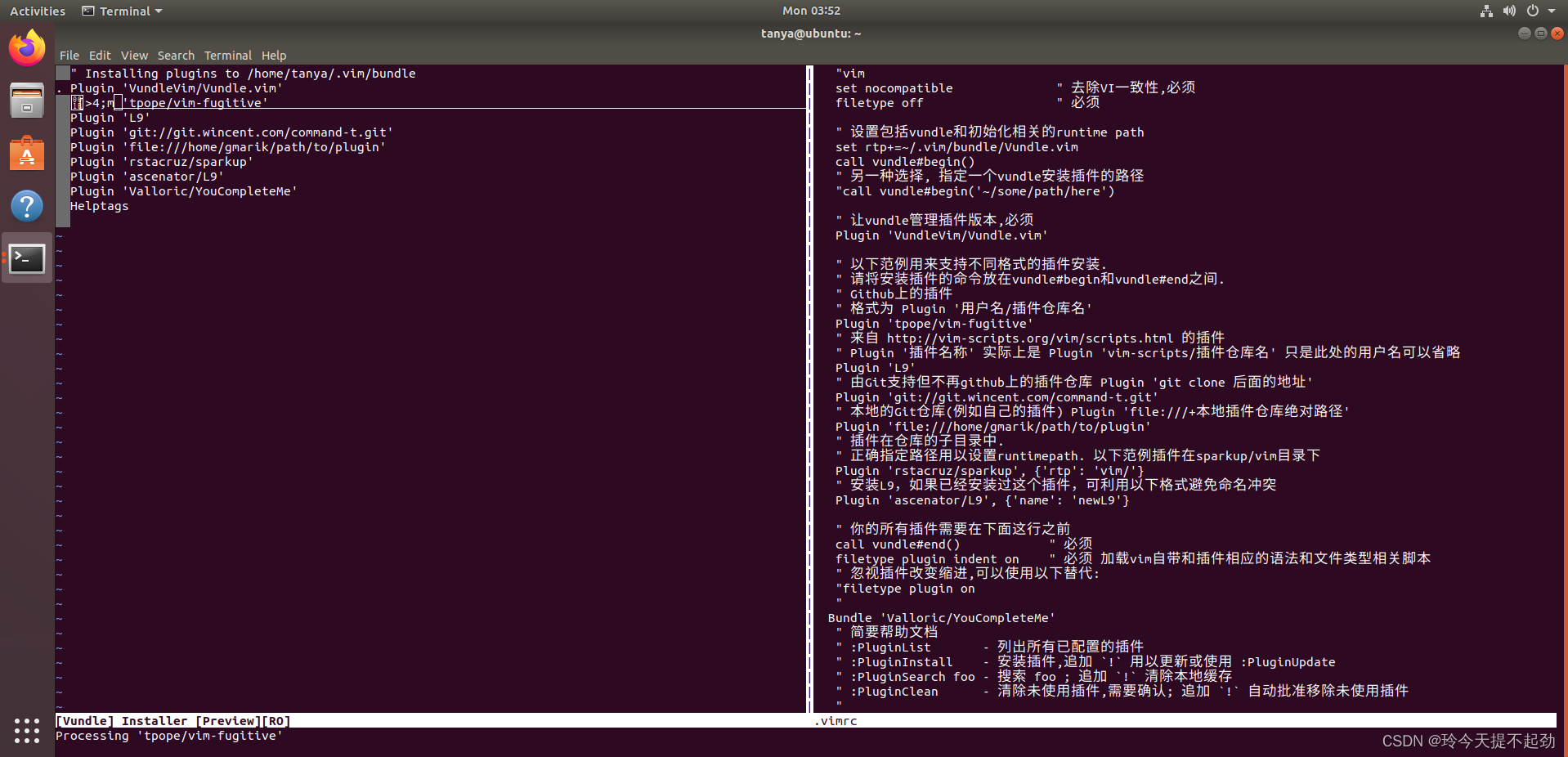
这个过程极度缓慢且没有任何进度显示(都怪ycm太大了)并且容易出现错误
//你也可以使用说明手册中的PluginList而不是Bundle
//如果VundleInstall太慢或者总是丢包也可以直接克隆源代码,当然.vimrc中该加的还是要加
git clone https://github.com/Valloric/YouCompleteMe.git
6.结束了,看看效果
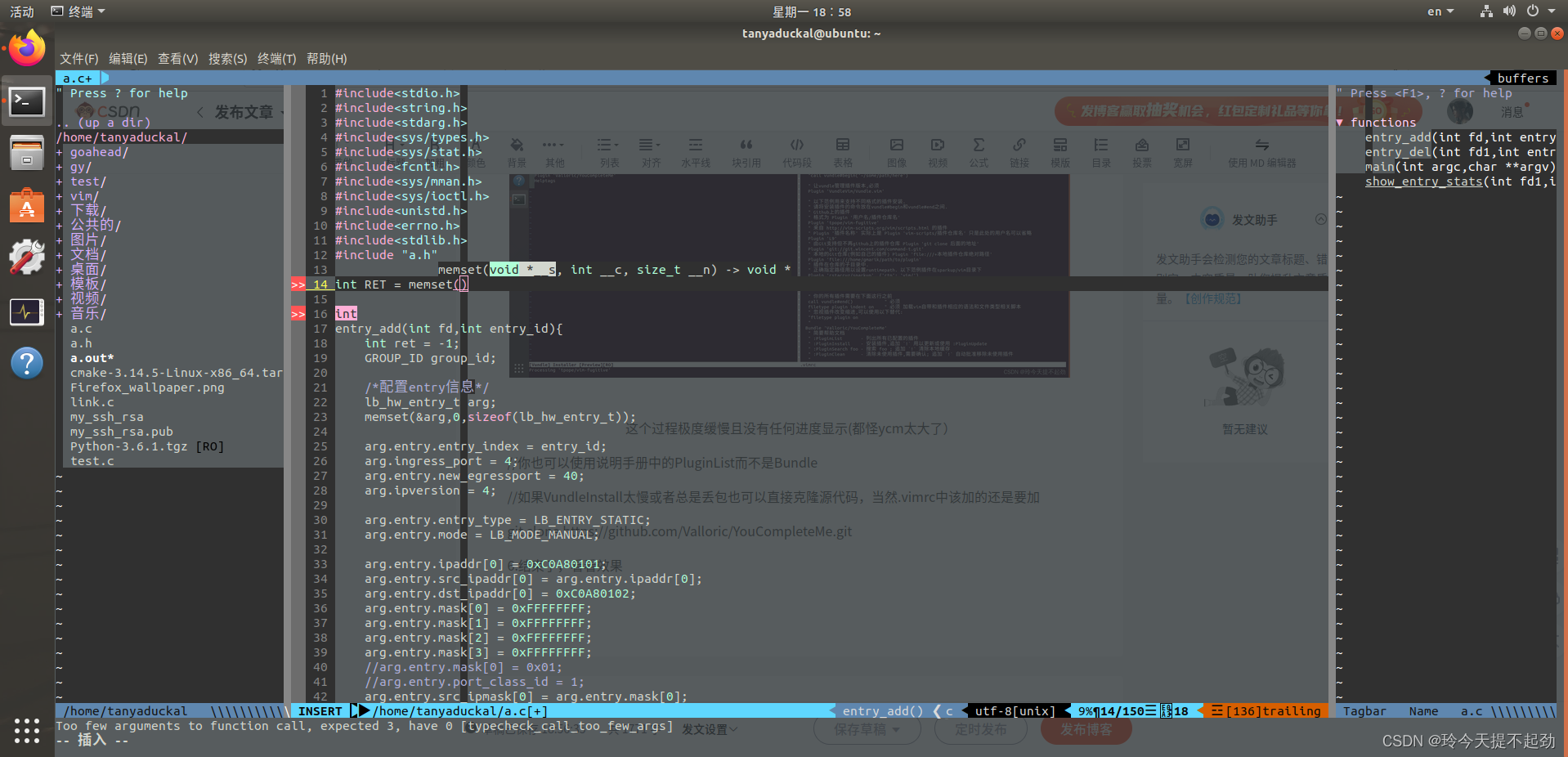
TIPS:如果你的某一个步骤出现了问题,看终端上提示什么就去完善什么就好了
END:个人vimrc(仅供参考)
"set nocompatible               " be iMproved
"filetype off                   " required!
set rtp+=~/.vim/bundle/vundle/
call vundle#rc()
" let Vundle manage Vundle
" required!
Bundle 'gmarik/vundle'
" My Bundles here:
"
" original repos on github
Bundle 'tpope/vim-fugitive'
Bundle 'rstacruz/sparkup', {'rtp': 'vim/'}
Bundle 'Yggdroot/indentLine'
let g:indentLine_char = '┊'
"ndle 'tpope/vim-rails.git'
" vim-scripts repos
Bundle 'L9'
Bundle 'FuzzyFinder'
" non github repos
Bundle 'https://github.com/wincent/command-t.git'
Bundle 'https://github.com/sickill/vim-monokai.git'
Bundle 'https://github.com/soft-aesthetic/soft-era-vim.git'
Bundle 'https://github.com/beikome/cosme.vim.git'
Bundle 'https://github.com/sainnhe/lightline_foobar.vim.git'
Bundle 'https://github.com/rakr/vim-two-firewatch.git'
Bundle 'Auto-Pairs'
Bundle 'python-imports.vim'
Bundle 'CaptureClipboard'
Bundle 'ctrlp-modified.vim'
Bundle 'last_edit_marker.vim'
Bundle 'synmark.vim'
"Bundle 'Python-mode-klen'
Bundle 'SQLComplete.vim'
"Bundle 'Javascript-OmniCompletion-with-YUI-and-j'
"Bundle 'JavaScript-Indent'
"Bundle 'Better-Javascript-Indentation'
"Bundle 'jslint.vim'
Bundle "pangloss/vim-javascript"
Bundle 'Vim-Script-Updater'
Bundle 'ctrlp.vim'
Bundle 'tacahiroy/ctrlp-funky'
Bundle 'jsbeautify'
Bundle 'The-NERD-Commenter'
Bundle 'scrooloose/nerdtree'
Bundle 'vim-airline/vim-airline'
Bundle 'vim-airline/vim-airline-themes'
Bundle 'taglist.vim'
Bundle 'majutsushi/tagbar'
"Bundle 'scrooloose/syntastic'
Bundle 'Valloric/YouCompleteMe'
"django
Bundle 'django_templates.vim'
Bundle 'Django-Projects'
"Bundle 'FredKSchott/CoVim'
"Bundle 'djangojump'
Plugin 'flazz/vim-colorschemes'
" ...
let g:html_indent_inctags = "html,body,head,tbody"
let g:html_indent_script1 = "inc"
let g:html_indent_style1 = "inc"
filetype plugin indent on     " required!"vim base set
set sw=4
set ts=4
set et
set smarttab
set smartindent
set lbr
set fo+=mB
set sm
set selection=inclusive
set wildmenu
set mousemodel=popup
"au FileType php setlocal dict+=~/.vim/dict/php_funclist.dict
au FileType css setlocal dict+=~/.vim/dict/css.dict
au FileType c setlocal dict+=~/.vim/dict/c.dict
au FileType cpp setlocal dict+=~/.vim/dict/cpp.dict
au FileType scale setlocal dict+=~/.vim/dict/scale.dict
au FileType javascript setlocal dict+=~/.vim/dict/javascript.dict
au FileType html setlocal dict+=~/.vim/dict/javascript.dict
au FileType html setlocal dict+=~/.vim/dict/css.dict
"
if 0
"syntastic相关
execute pathogen#infect()
let g:syntastic_python_checkers=['pylint']
let g:syntastic_php_checkers=['php', 'phpcs', 'phpmd']
"golang
"Processing... % (ctrl+c to stop)
let g:fencview_autodetect=0
set rtp+=$GOROOT/misc/vim
endif
"""""""""""""""""""""""""""""""""""""""""""""""""""""""""""""""""""""""""""""""""""""""
" 显示相关
""""""""""""""""""""""""""""""""""""""""""""""""""""""""""""""""""""""""""""""""""""""""""
syntax on
set cul "高亮光标所在行
set cuc
set shortmess=atI   " 启动的时候不显示那个援助乌干达儿童的提示
set go=             " 不要图形按钮
"color desert     " 设置背景主题
"color ron     " 设置背景主题
"color torte     " 设置背景主题
"set guifont=Courier_New:h10:cANSI   " 设置字体
"autocmd InsertLeave * se nocul  " 用浅色高亮当前行
autocmd InsertEnter * se cul    " 用浅色高亮当前行
set ruler           " 显示标尺
set showcmd         " 输入的命令显示出来,看的清楚些
"set whichwrap+=<,>,h,l   " 允许backspace和光标键跨越行边界(不建议)
set scrolloff=5     " 光标移动到buffer的顶部和底部时保持n行距离
set statusline=%F%m%r%h%w\ [FORMAT=%{&ff}]\ [TYPE=%Y]\ [POS=%l,%v][%p%%]\ %{strftime(\"%d/%m/%y\ -\ %H:%M\")}   "状态行显示的内容
set laststatus=2    " 启动显示状态行(1),总是显示状态行(2)
"set foldenable      " 允许折叠
""set foldmethod=manual   " 手动折叠
set nocompatible  "去掉讨厌的有关vi一致性模式,避免以前版本的一些bug和局限
" 显示中文帮助
if version >= 603set helplang=cnset encoding=utf-8
endif
" 自动缩进
set autoindent
set cindent
" Tab键的宽度
set tabstop=4
" 统一缩进为4
set softtabstop=4
set shiftwidth=4
" 使用空格代替制表符
set expandtab
" 在行和段开始处使用制表符
set smarttab
" 显示行号
set number
" 历史记录数
set history=1000
"搜索逐字符高亮
set hlsearch
set incsearch
"语言设置
set langmenu=zh_CN.UTF-8
set helplang=cn
" 总是显示状态行
set cmdheight=2
" 侦测文件类型
filetype on
" 载入文件类型插件
filetype plugin on
" 为特定文件类型载入相关缩进文件
filetype indent on
" 保存全局变量
set viminfo+=!
" 带有如下符号的单词不要被换行分割
set iskeyword+=_,$,@,%,#,-
" 字符间插入的像素行数目
"markdown配置
au BufRead,BufNewFile *.{md,mdown,mkd,mkdn,markdown,mdwn}   set filetype=mkd
au BufRead,BufNewFile *.{go}   set filetype=go
au BufRead,BufNewFile *.{js}   set filetype=javascript
"rkdown to HTML
nmap md :!~/.vim/markdown.pl % > %.html
nmap fi :!firefox %.html &
nmap \ \cc
vmap \ \cc
"将tab替换为空格
nmap tt :%s/\t/    /g
"""""""""""""""""""""""""""""""""""""""""""""""""""""""""""""""""""""""""""""""""""""""""""""""""
"""""新文件标题
""""""""""""""""""""""""""""""""""""""""""""""""""""""""""""""""""""""""""""""""""""""""""""""""
"新建.c,.h,.sh,.java文件,自动插入文件头
autocmd BufNewFile *.cpp,*.[ch],*.sh,*.rb,*.java,*.py exec ":call SetTitle()"
""定义函数SetTitle,自动插入文件头
func SetTitle() "如果文件类型为.sh文件 if &filetype == 'sh' call setline(1,"\#!/bin/bash") call append(line("."), "") elseif &filetype == 'python'call setline(1,"#!/usr/bin/env python")call append(line("."),"# coding=utf-8")call append(line(".")+1, "") elseif &filetype == 'ruby'call setline(1,"#!/usr/bin/env ruby")call append(line("."),"# encoding: utf-8")call append(line(".")+1, "")
"    elseif &filetype == 'mkd'
"        call setline(1,"")else call setline(1, "/*************************************************************************") call append(line("."), "	> File Name: ".expand("%")) call append(line(".")+1, "	> Author: TanyaDuckal") call append(line(".")+2, "	> Mail: TanyaDuckal.MuYL@protonmail.com") call append(line(".")+3, "	> Created Time: ".strftime("%c")) call append(line(".")+4, "  > Desrible:NerdTree;TarBar")call append(line(".")+5, " ************************************************************************/") "call append(line(".")+6, "")endifif expand("%:e") == 'cpp'call append(line(".")+6, "#include")call append(line(".")+7, "using namespace std;")call append(line(".")+8, "")endifif &filetype == 'c'call append(line(".")+6, "#include")call append(line(".")+7, "#include")call append(line(".")+8, "#include")call append(line(".")+9, "")call append(line(".")+10, "#define _STR(x) _VAL(x)")call append(line(".")+11, "#define _VAL(x) #x")call append(line(".")+12, "#define _CAT(A,B,...) A##B##__VA_ARGS__")call append(line(".")+13, "#define _Error_Line(X) do{char str[8]={0};strcat(str,_STR(__LINE__));puts(_STR(__LINE__));perror(X);}while(0)")call append(line(".")+14, "")endifif expand("%:e") == 'h'call append(line(".")+6, "#ifndef _".toupper(expand("%:r"))."_H")call append(line(".")+7, "#define _".toupper(expand("%:r"))."_H")"call append(line(".")+8, "#ifdef __cplusplus")"call append(line(".")+9, "extern "C" {")"call append(line(".")+10, "#endif")call append(line(".")+8, "")"call append(line(".")+12, "#ifdef __cplusplus")"call append(line(".")+13, "}")"call append(line(".")+14, "#endif")call append(line(".")+9, "#endif")call append(line(".")+10, "")endifif &filetype == 'java'call append(line(".")+6,"public class ".expand("%:r"))call append(line(".")+7,"")endif"新建文件后,自动定位到文件末尾
endfunc
autocmd BufNewFile * normal G
""""""""""""""""""""""""""""""""""""""""""""""""""""""""""""""""""""""""""""""""""""""""""""""""""""""
"键盘命令
""""""""""""""""""""""""""""""""""""""""""""""""""""""""""""""""""""""""""""""""""""""""""""""""""""""
:nmap   :Tlist
" shift tab pages
map  :tabp
map  :tabn
map!  zzi
map!  ,
map  ggVG$"+y
map  :w
map  gg=G
"map  w
map  j
map  k
map  h
map  l
"imap  ,
imap
"imap
" 选中状态下 Ctrl+c 复制
"map  "*pa
imap  "*pa
imap  ^
imap  $
vmap  "+y
"set mouse=v
"set clipboard=unnamed
"去空行
nnoremap  :g/^\s*$/d
"比较文件
nnoremap  :vert diffsplit
"nnoremap fu :CtrlPFunky
"nnoremap  :CtrlPFunky
"列出当前目录文件
map  :NERDTreeToggle
imap   :NERDTreeToggle
"打开树状文件目录
map  \be
:autocmd BufRead,BufNewFile *.dot map  :w:!dot -Tjpg -o %<.jpg % && eog %<.jpg   && exec "redr!"
"C,C++ 按F5编译运行
map  :call CompileRunGcc()
func! CompileRunGcc()exec "w"if &filetype == 'c'exec "!g++ % -o %<"exec "!time ./%<"elseif &filetype == 'cpp'exec "!g++ % -std=c++11 -o %<"exec "!time ./%<"elseif &filetype == 'java' exec "!javac %" exec "!time java %<"elseif &filetype == 'sh':!time bash %elseif &filetype == 'python'exec "!time python2.7 %"elseif &filetype == 'html'exec "!firefox % &"elseif &filetype == 'go'
"        exec "!go build %<"exec "!time go run %"elseif &filetype == 'mkd'exec "!~/.vim/markdown.pl % > %.html &"exec "!firefox %.html &"endif
endfunc
"C,C++的调试
map  :call Rungdb()
func! Rungdb()exec "w"exec "!g++ % -std=c++11 -g -o %<"exec "!gdb ./%<"
endfunc
"代码格式优化化
map  :call FormartSrc()
"定义FormartSrc()
func FormartSrc()exec "w"if &filetype == 'c'exec "!astyle --style=ansi -a --suffix=none %"elseif &filetype == 'cpp' || &filetype == 'hpp'exec "r !astyle --style=ansi --one-line=keep-statements -a --suffix=none %> /dev/null 2>&1"elseif &filetype == 'perl'exec "!astyle --style=gnu --suffix=none %"elseif &filetype == 'py'||&filetype == 'python'exec "r !autopep8 -i --aggressive %"elseif &filetype == 'java'exec "!astyle --style=java --suffix=none %"elseif &filetype == 'jsp'exec "!astyle --style=gnu --suffix=none %"elseif &filetype == 'xml'exec "!astyle --style=gnu --suffix=none %"elseexec "normal gg=G"returnendifexec "e! %"
endfunc
"结束定义FormartSrc
""""""""""""""""""""""""""""""""""""""""""""""""""""""""""""""""""""""""""""""""""""""""""""""""""""""
""实用设置
"""""""""""""""""""""""""""""""""""""""""""""""""""""""""""""""""""""""""""""""""""""""""""""""""""""
if has("autocmd")autocmd BufReadPost *\ if line("'\"") > 0 && line("'\"") <= line("$") |\   exe "normal g`\"" |\ endif
endif
" 设置当文件被改动时自动载入
set autoread
" quickfix模式
autocmd FileType c,cpp map   :w:make
"代码补全
set completeopt=preview,menu
"允许插件
filetype plugin on
"共享剪贴板
set clipboard+=unnamed
"自动保存
set autowrite
"set ruler                   " 打开状态栏标尺
"set cursorline              " 突出显示当前行
set magic                   " 设置魔术
set guioptions-=T           " 隐藏工具栏
set guioptions-=m           " 隐藏菜单栏
""set foldcolumn=0
""set foldmethod=indent
""set foldlevel=3
" 不要使用vi的键盘模式,而是vim自己的
set nocompatible
" 去掉输入错误的提示声音
set noeb
" 在处理未保存或只读文件的时候,弹出确认
set confirm
"禁止生成临时文件
set nobackup
set noswapfile
"搜索忽略大小写
set ignorecase
set linespace=0
" 增强模式中的命令行自动完成操作
set wildmenu
" 使回格键(backspace)正常处理indent, eol, start等
set backspace=2
" 允许backspace和光标键跨越行边界
set whichwrap+=<,>,h,l
" 可以在buffer的任何地方使用鼠标(类似office中在工作区双击鼠标定位)
set mouse=a
set selection=exclusive
set selectmode=mouse,key
" 通过使用: commands命令,告诉我们文件的哪一行被改变过
set report=0
" 在被分割的窗口间显示空白,便于阅读
set fillchars=vert:\ ,stl:\ ,stlnc:\
" 高亮显示匹配的括号
set showmatch
" 匹配括号高亮的时间(单位是十分之一秒)
set matchtime=1
" 光标移动到buffer的顶部和底部时保持3行距离
set scrolloff=3
" 为C程序提供自动缩进
"自动补全
"":inoremap ( ()i
"":inoremap ) =ClosePair(')')
":inoremap { {}O
":inoremap } =ClosePair('}')
"":inoremap [ []i
"":inoremap ] =ClosePair(']')
"":inoremap " ""i
"":inoremap ' ''i
""function! ClosePair(char)
""	if getline('.')[col('.') - 1] == a:char
""		return "\"
""	else
""		return a:char
""	endif
""endfunction
filetype plugin indent on
"打开文件类型检测, 加了这句才可以用智能补全
set completeopt=longest,menu
"""""""""""""""""""""""""""""""""""""""""""""""""""""""""""""""""""""""""""""""""""""""""""""""""
" CTags的设定
"""""""""""""""""""""""""""""""""""""""""""""""""""""""""""""""""""""""""""""""""""""""""""""""""
let Tlist_Auto_Open = 1		"自动打开taglist
let Tlist_Sort_Type = "name"    " 按照名称排序
let Tlist_Use_Right_Window = 1  " 在右侧显示窗口
let Tlist_Compart_Format = 1    " 压缩方式
let Tlist_Exist_OnlyWindow = 1  " 如果只有一个buffer,kill窗口也kill掉buffer
""let Tlist_File_Fold_Auto_Close = 0  " 不要关闭其他文件的tags
""let Tlist_Enable_Fold_Column = 0    " 不要显示折叠树
"let Tlist_Show_One_File=1            "不同时显示多个文件的tag,只显示当前文件的
"设置tags
set tags=tags;
set autochdir
""""""""""""""""""""""""""""""""""""""""""""""""""""""""""""""""""""""""""""""""""""""""""""""""""""""""""""""""""
"其他东东
"""""""""""""""""""""""""""""""""""""""""""""""""""""""""""""""""""""""""""""""""""""""""""""""""""""""""""""""""
"默认打开Taglist
""""""""""""""""""""""""""""""
" Tag list (ctags)
let Tlist_Auto_Open=0
""""""""""""""""""""""""""""""""
let Tlist_Show_One_File = 1 "不同时显示多个文件的tag,只显示当前文件的
let Tlist_File_Fold_Auto_Close = 1
let Tlist_Exit_OnlyWindow = 1 "如果taglist窗口是最后一个窗口,则退出vim
let Tlist_Use_Right_Window = 1 "在右侧窗口中显示taglist窗口
" minibufexpl插件的一般设置
let g:miniBufExplMapWindowNavVim = 1
let g:miniBufExplMapWindowNavArrows = 1
let g:miniBufExplMapCTabSwitchBufs = 1
let g:miniBufExplModSelTarget = 1
let Tlist_Show_One_File=1     "不同时显示多个文件的tag,只显示当前文件的
let Tlist_Ctags_Cmd = '/usr/local/bin/ctags'
nmap tl :Tlist
"python补全
let g:pydiction_location = '~/.vim/after/complete-dict'
let g:pydiction_menu_height = 20
let Tlist_Ctags_Cmd='/usr/local/bin/ctags'
let g:miniBufExplMapWindowNavVim = 1
let g:miniBufExplMapWindowNavArrows = 1
let g:miniBufExplMapCTabSwitchBufs = 1
let g:miniBufExplModSelTarget = 1
set iskeyword+=.
set termencoding=utf-8
set encoding=utf8
set fileencodings=utf8,ucs-bom,gbk,cp936,gb2312,gb18030
autocmd FileType python set omnifunc=pythoncomplete#Complete
"
"ctrlp设置
"
set wildignore+=*/tmp/*,*.so,*.swp,*.zip,*.pyc,*.png,*.jpg,*.gif     " MacOSX/Linux
set wildignore+=*\\tmp\\*,*.swp,*.zip,*.exe,*.pyc,*.png,*.jpg,*.gif  " Windows
let g:ctrlp_custom_ignore = '\v[\/]\.(git|hg|svn)$'
let g:ctrlp_custom_ignore = '\v\.(exe|so|dll)$'
let g:ctrlp_extensions = ['funky']
let NERDTreeIgnore=['\.pyc']"Taglist Set"NERDTree Set
filetype on
" Start NERDTree and put the cursor back in the other window.
"autocmd VimEnter * NERDTree | wincmd p
" Start NERDTree when Vim is started without file arguments.
autocmd StdinReadPre * let s:std_in=1
autocmd VimEnter * if argc() == 0 && !exists('s:std_in') | NERDTree | endif
" Exit Vim if NERDTree is the only window remaining in the only tab.
autocmd BufEnter * if tabpagenr('$') == 1 && winnr('$') == 1 && exists('b:NERDTree') && b:NERDTree.isTabTree() | quit | endif
" Close the tab if NERDTree is the only window remaining in it.
"autocmd BufEnter * if winnr('$') == 1 && exists('b:NERDTree') && b:NERDTree.isTabTree() | quit | endif
let g:NERDTreeDirArrowExpandable = '+'
let g:NERDTreeDirArrowCollapsible = '-'
let g:NERDTreeWinPos='left'
let g:NERDTreeSize=30
let g:NERDTreeShowLineNumbers=0
let g:NERDTreeHidden=0
nmap  :NERDTreeToggle"Tagbar Set
let g:tagbar_ctags_bin = 'ctags' " tagbar 依赖 ctags 插件
let g:tagbar_width = 30 " 设置 tagbar 的宽度为 30 列,默认 40 列
let g:tagbar_autofocus = 1 " 打开 tagbar 时光标在 tagbar 页面内,默认在 vim 打开的文件内
"let g:tagbar_left = 1 " 让 tagbar 在页面左侧显示,默认右边
"let g:tagbar_sort = 0 " 标签不排序,默认排序
" tb 打开 tagbar 窗口
"map tb :TagbarToggle
" F8 打开 tagbar 窗口
nmap  :TagbarToggle"Airline Set
set laststatus=2  "永远显示状态栏
let g:airline_powerline_fonts = 1  " 支持 powerline 字体
let g:airline#extensions#tabline#enabled = 1 "显示窗口tab和buffer
let g:airline_theme='molokai'  " murmur配色不错
"let g:airline_theme='murmur'
if !exists('g:airline_symbols')
let g:airline_symbols = {}
endif
let g:airline_left_sep = '▶'
let g:airline_left_alt_sep = '❯'
let g:airline_right_sep = '◀'
let g:airline_right_alt_sep = '❮'
let g:airline_symbols.linenr = '¶'
let g:airline_symbols.branch = '⎇'"colorthemes Seting
syntax enable
"colorscheme colored_dark
colorscheme soft-era
"colorscheme monokai
"colorscheme 1989
"hi Normal ctermfg=NONE
hi Normal ctermbg=NONEset ff=unix""""""""""""""""""""""""""""""""""""""""""""""""""""""""""""""""""""""""""""""""
" CSCOPE settings for vim
""""""""""""""""""""""""""""""""""""""""""""""""""""""""""""""""""""""""""""""""
"
" This file contains some boilerplate settings for vim's cscope interface,
" plus some keyboard mappings that I've found useful.
"
" USAGE:
" -- vim 6:     Stick this file in your ~/.vim/plugin directory (or in a
"               'plugin' directory in some other directory that is in your
"               'runtimepath'.
"
" -- vim 5:     Stick this file somewhere and 'source cscope.vim' it from
"               your ~/.vimrc file (or cut and paste it into your .vimrc).
"
" NOTE:
" These key maps use multiple keystrokes (2 or 3 keys).  If you find that vim
" keeps timing you out before you can complete them, try changing your timeout
" settings, as explained below.
"
" Happy cscoping,
"
" Jason Duell       jduell@alumni.princeton.edu     2002/3/7
""""""""""""""""""""""""""""""""""""""""""""""""""""""""""""""""""""""""""""""""" This tests to see if vim was configured with the '--enable-cscope' option
" when it was compiled.  If it wasn't, time to recompile vim...
if has("cscope")""""""""""""" Standard cscope/vim boilerplate" use both cscope and ctag for 'ctrl-]', ':ta', and 'vim -t'set cscopetag" check cscope for definition of a symbol before checking ctags: set to 1" if you want the reverse search order.set csto=0" add any cscope database in current directoryif filereadable("cscope.out")cs add cscope.out  " else add the database pointed to by environment variable elseif $CSCOPE_DB != ""cs add $CSCOPE_DBendif" show msg when any other cscope db addedset cscopeverbose  """"""""""""" My cscope/vim key mappings"" The following maps all invoke one of the following cscope search types:""   's'   symbol: find all references to the token under cursor"   'g'   global: find global definition(s) of the token under cursor"   'c'   calls:  find all calls to the function name under cursor"   't'   text:   find all instances of the text under cursor"   'e'   egrep:  egrep search for the word under cursor"   'f'   file:   open the filename under cursor"   'i'   includes: find files that include the filename under cursor"   'd'   called: find functions that function under cursor calls"" Below are three sets of the maps: one set that just jumps to your" search result, one that splits the existing vim window horizontally and" diplays your search result in the new window, and one that does the same" thing, but does a vertical split instead (vim 6 only)."" I've used CTRL-\ and CTRL-@ as the starting keys for these maps, as it's" unlikely that you need their default mappings (CTRL-\'s default use is" as part of CTRL-\ CTRL-N typemap, which basically just does the same" thing as hitting 'escape': CTRL-@ doesn't seem to have any default use)." If you don't like using 'CTRL-@' or CTRL-\, , you can change some or all" of these maps to use other keys.  One likely candidate is 'CTRL-_'" (which also maps to CTRL-/, which is easier to type).  By default it is" used to switch between Hebrew and English keyboard mode."" All of the maps involving the  macro use '^$': this is so" that searches over '#include " return only references to" 'time.h', and not 'sys/time.h', etc. (by default cscope will return all" files that contain 'time.h' as part of their name)." To do the first type of search, hit 'CTRL-\', followed by one of the" cscope search types above (s,g,c,t,e,f,i,d).  The result of your cscope" search will be displayed in the current window.  You can use CTRL-T to" go back to where you were before the search.  "nmap s :cs find s =expand("")	nmap g :cs find g =expand("")	nmap c :cs find c =expand("")	nmap t :cs find t =expand("")	nmap e :cs find e =expand("")	nmap f :cs find f =expand("")	nmap i :cs find i ^=expand("")$nmap d :cs find d =expand("")	" Using 'CTRL-spacebar' (intepreted as CTRL-@ by vim) then a search type" makes the vim window split horizontally, with search result displayed in" the new window."" (Note: earlier versions of vim may not have the :scs command, but it" can be simulated roughly via:"    nmap s  :cs find s =expand("")	nmap s :scs find s =expand("")	nmap g :scs find g =expand("")	nmap c :scs find c =expand("")	nmap t :scs find t =expand("")	nmap e :scs find e =expand("")	nmap f :scs find f =expand("")	nmap i :scs find i ^=expand("")$	nmap d :scs find d =expand("")	" Hitting CTRL-space *twice* before the search type does a vertical " split instead of a horizontal one (vim 6 and up only)"" (Note: you may wish to put a 'set splitright' in your .vimrc" if you prefer the new window on the right instead of the leftnmap s :vert scs find s =expand("")nmap g :vert scs find g =expand("")nmap c :vert scs find c =expand("")nmap t :vert scs find t =expand("")nmap e :vert scs find e =expand("")nmap f :vert scs find f =expand("")	nmap i :vert scs find i ^=expand("")$	nmap d :vert scs find d =expand("")""""""""""""" key map timeouts"" By default Vim will only wait 1 second for each keystroke in a mapping." You may find that too short with the above typemaps.  If so, you should" either turn off mapping timeouts via 'notimeout'.""set notimeout "" Or, you can keep timeouts, by uncommenting the timeoutlen line below," with your own personal favorite value (in milliseconds):""set timeoutlen=4000"" Either way, since mapping timeout settings by default also set the" timeouts for multicharacter 'keys codes' (like ), you should also" set ttimeout and ttimeoutlen: otherwise, you will experience strange" delays as vim waits for a keystroke after you hit ESC (it will be" waiting to see if the ESC is actually part of a key code like ).""set ttimeout "" personally, I find a tenth of a second to work well for key code" timeouts. If you experience problems and have a slow terminal or network" connection, set it higher.  If you don't set ttimeoutlen, the value for" timeoutlent (default: 1000 = 1 second, which is sluggish) is used.""set ttimeoutlen=100endifif 1" add any cscope database in current directoryset nocsverb         "// 这一行是新加入的。if filereadable("cscope.out")cs add cscope.out  " else add the database pointed to by environment variableelseif $CSCOPE_DB != ""cs add $CSCOPE_DBendif" show msg when any other cscope db addedset cscopeverbose elseif has("cscope")if filereadable("cscope.out")cs add cscope.outcs add cscope.in.outcs add cscope.po.outendif
endifendifnmap g :cs find g