Vim 配置以及插件管理
Vim 配置以及插件管理
基本vim配置
在用户目录下新建.vimrc文件
cd ~
gedit .vimrc
我的基本配置如下:
部分来源于sources以及关于光标配置这里
 let mapleader = ","  nnoremap <silent> <leader>n :NERDTreeToggle<CR>"sources: http://www.ruanyifeng.com/blog/2018/09/vimrc.html:
set number
set nocompatible
syntax on
set showmode
set showcmd
set mouse=a
set encoding=utf-8
set t_Co=256
filetype indent onset autoindent
set tabstop=4
set shiftwidth=4set expandtab" cursor setting sources: https://zhuanlan.zhihu.com/p/24898976
" https://vim.fandom.com/wiki/Configuring_the_cursor
set cursorline cursorcolumn
set guicursor=n-v-c:block-Cursor
set guicursor+=n-v-c:blinkon0set textwidth=80set wrap
set linebreakset scrolloff=5
set sidescrolloff=15
set laststatus=2set rulerset showmatch
set hlsearch
set incsearch
set ignorecase
set smartcaseset spell spelllang=en_us
set noswapfile
set undofileset backupdir=~/.vim/.backup//
set directory=~/.vim/.swp//
set undodir=~/.vim/.undo//set history=2000set autoread
set wildmenu
set wildmode=longest:list,full
安装vim 插件管理器
我使用的是vim-plug这款适合新手的插件管理器
安装方式:
curl -fLo ~/.vim/autoload/plug.vim --create-dirs \https:/r/raw.githubusercontent.com/junegunn/vim-plug/master/plug.vim
这是官方文档给出的安装方式,不知道为什么,我用curl下载始终下不下来

所以只能通过这种方式下载了下载了:
Download plug.vim and put it in the “autoload” directory.
git clone https://github.com/junegunn/vim-plug.git
cp vim-plug/plug.vim ~/.vim/autoload/
安装插件和主题
在.vimrc中插入如下命令
call plug#begin('~/.vim/plugged')call plug#end()
中间放入需要下载的插件,一下是我下载的插件
call plug#begin('~/.vim/plugged')" Make sure you use single quotes" Shorthand notation; fetches https://github.com/junegunn/vim-easy-align
Plug 'junegunn/vim-easy-align'" Any valid git URL is allowed
Plug 'https://github.com/junegunn/vim-github-dashboard.git'" Multiple Plug commands can be written in a single line using | separators
Plug 'SirVer/ultisnips' | Plug 'honza/vim-snippets'" On-demand loading
Plug 'scrooloose/nerdtree', { 'on':  'NERDTreeToggle' }
Plug 'tpope/vim-fireplace', { 'for': 'clojure' }" Using a non-master branch
Plug 'rdnetto/YCM-Generator', { 'branch': 'stable' }" Using a tagged release; wildcard allowed (requires git 1.9.2 or above)
Plug 'fatih/vim-go', { 'tag': '*' }" Plugin options
Plug 'nsf/gocode', { 'tag': 'v.20150303', 'rtp': 'vim' }" colorscheme
Plug 'rakr/vim-one'
Plug 'hzchirs/vim-material'
Plug 'rakr/vim-two-firewatch'Plug 'scrooloose/nerdtree'
Plug 'mhinz/vim-startify'" Initialize plugin system
call plug#end()
进入到vim界面,normal 模式下输入:PlugInstall,
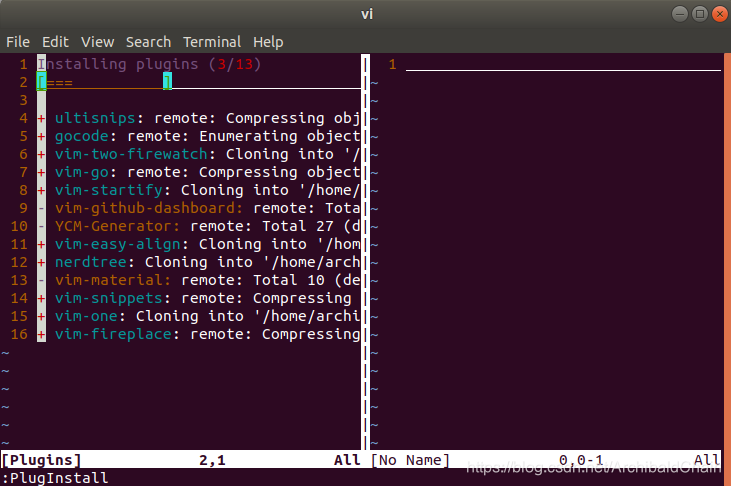
等待插件工具下载完成。
及下来是我的主题配置
""""""""""""""""""""""""Color theme"""""""""""""""""""""""""""""""""""
"""""""""""vim-material
" Dark
syntax enable
"set background=dark
"colorscheme vim-material" Palenight
"let g:material_style='palenight'
"set background=dark
"colorscheme vim-material""""""""""""""vim-one
"colorscheme one
"set background=dark " for the dark version
"set background=light " for the light version"let g:one_allow_italics = 1 " I love italic for comments""""""""""""""vim-two-firewatch
set background=light" or light if you prefer the light version
let g:two_firewatch_italics=1
colo two-firewatch"let g:airline_theme='twofirewatch' " if you have Airline installed and want the associated theme""""""""""""""""""""""""""""""""""""""""""""""""""""""""""""""""""""""
本文来自互联网用户投稿,文章观点仅代表作者本人,不代表本站立场,不承担相关法律责任。如若转载,请注明出处。 如若内容造成侵权/违法违规/事实不符,请点击【内容举报】进行投诉反馈!