无线终端应用平台的搭建(物联网)
本博文记录自己的一个完整的无线终端应用平台的搭建过程,持续更新!
使用到的技术:Netty,MQTT,JAVA
使用到的硬件:Lora网关,无线烟感设备
作者环境:JDK1.8,Springboot,Maven,MSP服务器一台
概述
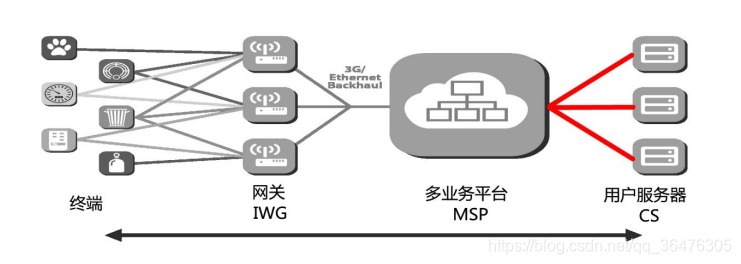
CS 用户物联网应用服务器,其上运行用户应用进程,用于接收和处理终端 上报给指定应用的数据,或者下发数据给隶属该应用的终端。
MSP 多业务平台。负责汇集终端上报数据,加解密,分发给对应 CS;
通信链路
MSP 与 CS 之间通过 TCP 长连接进行通信,MSP 为服务端,CS 为客户端。MSP 部署 在公网,提供固定 IP
地址/域名和端口。CS 既可以部署在公网,也可部署在客户自己的私 网环境,通过 NAT 连接到公网上的 MSP,TCP 链路由 CS
发起建立。CS 与 MSP 之间的接口定义了一系列的消息,消息分为“上行消息”和“下行消息” 两种,MSP 发给 CS
的消息为“上行消息“,CS 发给 MSP 的消息为”下行消息“。
MSP服务器是会提供给开发使用的,不用去太在意代码的逻辑,只需要IP和端口就可以连接。本博文主要讲解CS平台的搭建
文章目录
- 1、技术讲解与难点
- 1.1 Netty
- 1.2 MQTT
- 2、起步
1、技术讲解与难点
1.1 Netty
什么是Netty?
Netty 是一个利用 Java 的高级网络的能力,隐藏其背后的复杂性而提供一个易于使用的 API 的客户端/服务器框架。
不了解Netty的可以看一下这边的介绍:(转载) Nett入门介绍
服务端搭建
public class Server {//指定绑定的端口,进行监听public void run(int port) throws Exception {EventLoopGroup bossGroup = new NioEventLoopGroup();EventLoopGroup workerGroup = new NioEventLoopGroup();System.out.println("准备运行端口:" + port);try {ServerBootstrap b = new ServerBootstrap();b = b.group(bossGroup, workerGroup).channel(NioServerSocketChannel.class).option(ChannelOption.SO_BACKLOG, 128)                .childHandler(new ChildChannelHandler());//绑定端口,同步等待成功ChannelFuture f = b.bind(port).sync();//等待服务监听端口关闭f.channel().closeFuture().sync();} finally {//退出,释放线程资源workerGroup.shutdownGracefully();bossGroup.shutdownGracefully();}}public static void main(String[] args) throws Exception {//Testnew Server().run(8080);}
}
ChildChannelHandler
childHandler会在客户端成功connect后才执行
public class ChildChannelHandler extends ChannelInitializer<SocketChannel> {protected void initChannel(SocketChannel socketChannel) throws Exception {//new DiscardServerHandler()有和客户端建立连接后的代码socketChannel.pipeline().addLast(new DiscardServerHandler());}
}
DiscardServerHandler
DiscardServerHandler类里面有建立连接后的操作
public class DiscardServerHandler extends ChannelHandlerAdapter {//读取客户端传输数据@Overridepublic void channelRead(ChannelHandlerContext ctx, Object msg) {try {ByteBuf in = (ByteBuf) msg;System.out.println("传输内容是"+in.toString(CharsetUtil.UTF_8));ByteBuf resp= Unpooled.copiedBuffer("收到信息$".getBytes());//writeAndFlush();将内容写给客户端ctx.writeAndFlush(resp);} finally {.....}}// 出现异常就关闭@Overridepublic void exceptionCaught(ChannelHandlerContext ctx, Throwable cause) throws Exception {cause.printStackTrace();ctx.close();}}
客户端搭建
public class Client {public void connect(int port,String host)throws Exception{//配置客户端EventLoopGroup eventLoopGroup=new NioEventLoopGroup();try {Bootstrap b=new Bootstrap();b.group(eventLoopGroup).channel(NioSocketChannel.class).option(ChannelOption.TCP_NODELAY,true).handler(new ChannelInitializer<SocketChannel>() {protected void initChannel(SocketChannel socketChannel) throws Exception {socketChannel.pipeline().addLast(new TimeClientHandler());}});//绑定端口,同步等待成功ChannelFuture f = b.connect(host,port).sync();//等待服务监听端口关闭f.channel().closeFuture().sync();}finally {//优雅退出,释放线程资源eventLoopGroup.shutdownGracefully();}}public static void main(String[] args) throws Exception {new Client().connect(8090,"localhost");}
}
TimeClientHandler
childHandler会在客户端成功connect后才执行
public class TimeClientHandler extends ChannelHandlerAdapter {private byte[] req;public TimeClientHandler(){req="$tmb00035ET3318/08/22 11:5704026.75,027.31,20.00,20.00$".getBytes();}//初始化连接调用@Overridepublic void channelActive(ChannelHandlerContext ctx) throws Exception {ByteBuf message=null;for(int i=0;i<100;i++){message=Unpooled.buffer(req.length);message.writeBytes(req);ctx.writeAndFlush(message);}}@Overridepublic void channelRead(ChannelHandlerContext ctx, Object msg) {try {ByteBuf in = (ByteBuf) msg;System.out.println(in.toString(CharsetUtil.UTF_8));} finally {....}}@Overridepublic void exceptionCaught(ChannelHandlerContext ctx, Throwable cause) throws Exception {// 出现异常就关闭cause.printStackTrace();ctx.close();}}先启动服务端,再启动客户端测试
服务端:传输内容是
t m b 00035 E T 3318 / 08 / 2211 : 5704026.75 , 027.31 , 20.00 , 20.00 tmb00035ET3318/08/22 11:5704026.75,027.31,20.00,20.00 tmb00035ET3318/08/2211:5704026.75,027.31,20.00,20.00 t m b 00035 E T 3318 / 08 / 2211 : 5704026.75 , 027.31 , 20.00 , 20.00 tmb00035ET3318/08/22 11:5704026.75,027.31,20.00,20.00 tmb00035ET3318/08/2211:5704026.75,027.31,20.00,20.00 t m b 00035 E T 3318 / 08 / 2211 : 5704026.75 , 027.31 , 20.00 , 20.00 tmb00035ET3318/08/22 11:5704026.75,027.31,20.00,20.00 tmb00035ET3318/08/2211:5704026.75,027.31,20.00,20.00 t m b 00035 E T 3318 / 08 / 2211 : 5704026.75 , 027.31 , 20.00 , 20.00 tmb00035ET3318/08/22 11:5704026.75,027.31,20.00,20.00 tmb00035ET3318/08/2211:5704026.75,027.31,20.00,20.00 t m b 00035 E T 3318 / 08 / 2211 : 5704026.75 , 027.31 , 20.00 , 20.00 tmb00035ET3318/08/22 11:5704026.75,027.31,20.00,20.00 tmb00035ET3318/08/2211:5704026.75,027.31,20.00,20.00 t m b 00035 E T 3318 / 08 / 2211 : 5704026.75 , 027.31 , 20.00 , 20.00 tmb00035ET3318/08/22 11:5704026.75,027.31,20.00,20.00 tmb00035ET3318/08/2211:5704026.75,027.31,20.00,20.00$tmb00035ET3318/08/22…
客户端:8080–localhost
收到信息收到信息收到信息收到信息收到信息收到信息…
解决粘包,拆包的问题
方法:
1.消息定长,固定每个消息的固定长度
2.在消息末尾使用换行符对消息进行分割,或者使用其他特殊字符来对消息进行分割
3.将消息分为消息头和消息体,消息头中包含标识消息总长度
选择第二种方法,只需要在服务端的DiscardServerHandler中和客户端的ChannelInitializer中添加几行相同的代码就行了
服务端
public class ChildChannelHandler extends ChannelInitializer<SocketChannel> {protected void initChannel(SocketChannel socketChannel) throws Exception {ByteBuf byteBuf= Unpooled.copiedBuffer("$".getBytes());socketChannel.pipeline().addLast(new DelimiterBasedFrameDecoder(1024,byteBuf));socketChannel.pipeline().addLast(new DiscardServerHandler());}
}
客户端
new ChannelInitializer<SocketChannel>() {protected void initChannel(SocketChannel socketChannel) throws Exception {ByteBuf byteBuf= Unpooled.copiedBuffer("$".getBytes());socketChannel.pipeline().addLast(new DelimiterBasedFrameDecoder(1024,byteBuf));socketChannel.pipeline().addLast(new TimeClientHandler());}});
1.2 MQTT
百度简述:
MQTT(Message Queuing Telemetry Transport,消息队列遥测传输协议),是一种基于发布/订阅(publish/subscribe)模式的"轻量级"通讯协议,该协议构建于TCP/IP协议上,由IBM在1999年发布。MQTT最大优点在于,可以以极少的代码和有限的带宽,为连接远程设备提供实时可靠的消息服务。作为一种低开销、低带宽占用的即时通讯协议,使其在物联网、小型设备、移动应用等方面有较广泛的应用。
Install
(转载简书) 认为比较好的安装教程:https://www.jianshu.com/p/d09a70a5c4a3
- MQTT分为服务器端和客户端,本篇博文使用Topic模式发布和订阅消息
客户端
客户端指定服务器的地址,负责订阅消息
/*** 模拟一个客户端接收消息** @author Unclue_liu*/
public class ClientMQTT {//@Value("${mqtt.host}")public static String HOST = "tcp://ip:1883";private MqttClient client;private MqttConnectOptions options;//private String userName = "mqtt";    //非必须//private String passWord = "mqtt";  //非必须private void start() {try {// host为主机名,clientid即连接MQTT的客户端ID,一般以唯一标识符表示,MemoryPersistence设置clientid的保存形式,默认为以内存保存client = new MqttClient(HOST, MQTTConfig.CLIENT_ID, new MemoryPersistence());// MQTT的连接设置options = new MqttConnectOptions();// 设置是否清空session,这里如果设置为false表示服务器会保留客户端的连接记录,设置为true表示每次连接到服务器都以新的身份连接options.setCleanSession(false);// 设置超时时间 单位为秒options.setConnectionTimeout(10);// 设置会话心跳时间 单位为秒 服务器会每隔1.5*20秒的时间向客户端发送个消息判断客户端是否在线,但这个方法并没有重连的机制options.setKeepAliveInterval(20);//设置断开后重新连接options.setAutomaticReconnect(true);// 设置回调client.setCallback(new PushCallback());MqttTopic topic = client.getTopic(MQTTConfig.SMOKE_TOPIC);//setWill方法,如果项目中需要知道客户端是否掉线可以调用该方法。设置最终端口的通知消息//遗嘱options.setWill(topic, "close".getBytes(), 1, true);client.connect(options);//订阅消息int[] Qos = {1};//0:最多一次 、1:最少一次 、2:只有一次String[] topic1 = {MQTTConfig.SMOKE_TOPIC};client.subscribe(topic1, Qos);} catch (Exception e) {e.printStackTrace();}}public static void main(String[] args) {ClientMQTT client = new ClientMQTT();client.start();}
}
服务端
/*** Title:Server 这是发送消息的服务端* Description: 服务器向多个客户端推送主题,即不同客户端可向服务器订阅相同主题** @author Unclue_liu*/
public class ServerMQTT {private static final Logger log = LoggerFactory.getLogger(ServerMQTT.class);//tcp://MQTT安装的服务器地址:MQTT定义的端口号//@Value("${mqtt.host}")public static String HOST = "tcp://ip:1883";private MqttClient client;private static MqttTopic mqttTopic;private static MqttMessage message;private String userName = "admin";  //非必须private String passWord = "password";  //非必须/*** 构造函数** @throws MqttException*/public ServerMQTT(String topic) {// MemoryPersistence设置clientid的保存形式,默认为以内存保存try {client = new MqttClient(HOST, MQTTConfig.SERVER_ID, new MemoryPersistence());} catch (MqttException e) {e.printStackTrace();//todo}connect(topic);}/*** 用来连接服务器*/private void connect(String topic) {MqttConnectOptions options = new MqttConnectOptions();options.setCleanSession(false);options.setUserName(userName);options.setPassword(passWord.toCharArray());// 设置超时时间options.setConnectionTimeout(10);// 设置会话心跳时间options.setKeepAliveInterval(20);try {client.setCallback(new PushCallback());client.connect(options);mqttTopic = client.getTopic(topic);} catch (Exception e) {e.printStackTrace();}}/*** @param topic* @param message* @throws MqttPersistenceException* @throws MqttException*/public static void publish(MqttTopic topic, MqttMessage message) throws MqttPersistenceException,MqttException {//发布MqttDeliveryToken token = topic.publish(message);token.waitForCompletion();log.info("message is published completely! " + token.isComplete());}public static void sendMessage(byte[] msg, String topic) {ServerMQTT server = new ServerMQTT(topic);server.message = new MqttMessage();server.message.setQos(1);  //保证消息能到达一次server.message.setRetained(true);server.message.setPayload(msg);try {publish(server.mqttTopic, server.message);//断开连接//server.client.disconnect();} catch (Exception e) {e.printStackTrace();}}/*** 启动入口** @param args* @throws MqttException*/public static void main(String[] args) throws Exception {String str="test0000000000";sendMessage(str.getBytes(),"test");}
}
MQTT的使用其实是很简单的,大家看看代码多研究就会了
2、起步
新建Springboot项目,首先在pom.xml中导入Netty依赖:
<!-- https://mvnrepository.com/artifact/io.netty/netty-all --><dependency><groupId>io.netty</groupId><artifactId>netty-all</artifactId><version>5.0.0.Alpha1</version></dependency>
修改Netty客户端TimeClientHandler代码
CS与MSP服务器通过TCP长连接进行通讯,CS首先要发出【join】请求给MSP,MSP验证了之后才会进行消息通讯,因此这种可以写在连接初始化代码里面。
public class TimeClientHandler extends SimpleChannelInboundHandler<ByteBuf> {private static final Logger log = LoggerFactory.getLogger(TimeClientHandler.class);private DeviceMsgHandler deviceMsgHandler = new DeviceMsgHandler();public TimeClientHandler() {log.info("TimeClientHandler");}//CS首先要发出【join】请求给MSP@Overridepublic void channelActive(ChannelHandlerContext ctx) throws Exception {byte[] data2send = null;String body = null;String cmd = "join";CSJoinReq jq = new CSJoinReq();AesCmacTool aes = new AesCmacTool();jq.setAppEUI(Configure.DEFAULT_APPEUI);jq.setAppNonce(Integer.parseInt(Configure.DEFAULT_NOPNCE));//返回一个加密码jq.setChallenge(aes.genChallengeKey(Configure.DEFAULT_APPKEY, Configure.DEFAULT_APPEUI, Integer.parseInt(Configure.DEFAULT_NOPNCE)));jq.setCmdSeq(Configure.cmdseq_counter);jq.setCMD(cmd.toLowerCase());body = Encapsulator.encapsulateContent(jq);log.info(body);jq.setHeader(Integer.toString(body.length()));jq.setContent(body);data2send = Encapsulator.composeMessage(body);ctx.writeAndFlush(Unpooled.copiedBuffer(data2send));log.info(Unpooled.copiedBuffer(data2send) + "\n");}//读取MSP上传的消息@Overrideprotected void channelRead0(ChannelHandlerContext ctx, ByteBuf msg) throws Exception {String str = msg.toString(CharsetUtil.UTF_8).trim();BasePackage aPackage = new BasePackage();aPackage.setPayload(TimeClientHandler.strUtil(str));//System.out.print("channelRead0中的"+aPackage.getPayload());log.info(TimeClientHandler.strUtil(str));if (msg != null) {Gson gson = new Gson();BaseCmd baseMsg = (BaseCmd) gson.fromJson(aPackage.getPayload(), BaseCmd.class);if (baseMsg.getCmd().equals("heartbeat")) {HeartAckMsg heartAckMsg = new HeartAckMsg();heartAckMsg.setCMD("heartbeat_ack");String body = Encapsulator.encapsulateContent(heartAckMsg);log.info(body);heartAckMsg.setHeader(Integer.toString(body.length()));heartAckMsg.setContent(body);byte[] data2send = Encapsulator.composeMessage(body);ctx.writeAndFlush(Unpooled.copiedBuffer(data2send));} else {deviceMsgHandler.addMsg(aPackage);}}}public static void main(String[] args) {//String s = "Y{\"cmd\":\"join_ack\",\"cmdseq\":1,\"appeui\":\"2c26c50065000002\",\"code\":200,\"msg\":\"JOIN ACCEPT\"}";//System.out.println(TimeClientHandler.strUtil(s));}public static String strUtil(String str) {int indexOf = str.indexOf("{");return str.substring(indexOf);}@Overridepublic void exceptionCaught(ChannelHandlerContext ctx, Throwable cause) throws Exception {// 出现异常就关闭cause.printStackTrace();ctx.close();}}
这里贴出了DeviceMsgHandler类的所有方法,有用到直接复制即可。
DeviceMsgHandler 类里面封装了方法,将接收到的消息进行区分,然后将数据封装进设备对象里面。
public class DeviceMsgHandler {private static final Logger log = LoggerFactory.getLogger(DeviceMsgHandler.class);//LinkedBlockingDeque是一个由链表结构组成的双向阻塞队列private static BlockingQueue<BasePackage> blockingQueue = new LinkedBlockingDeque(500);final Base64.Decoder decoder = Base64.getDecoder();public DeviceMsgHandler(){new Consumer().start();}class Consumer extends Thread {Consumer() {}public void run() {try {for (; ; ) {//System.out.println("run");BasePackage msg = DeviceMsgHandler.this.blockingQueue.take();handlerQueueMsg(msg);}} catch (InterruptedException e) {e.printStackTrace();}}private void handlerQueueMsg(BasePackage msg) {if ((msg == null) || (msg.getPayload() == null)) {log.info("msg is null");return;}try {Gson gson = new Gson();BaseCmd baseMsg = (BaseCmd) gson.fromJson(msg.getPayload(), BaseCmd.class);if ((baseMsg == null) || (baseMsg.getCmd() == null)) {log.info("msg format is error:" + msg.getPayload());return;}DeviceMsgHandler.this.handlerCmdMsg(baseMsg.getCmd(), msg.getPayload());} catch (Exception localException) {}}}private void handlerCmdMsg(String cmd, String payload) {log.info("cmd:" + cmd + " payload:" + payload);//msp-->csif (CMD.isAck(cmd)) {handlerAckMsg(cmd, payload);} else {handlerUploadMsg(cmd, payload);}}private void handlerAckMsg(String cmd, String payload) {Gson gson = new Gson();AckMsg ack = (AckMsg) gson.fromJson(payload, AckMsg.class);if ("join_ack".equalsIgnoreCase(cmd)) {handlerJoinAck(ack);}}private void handlerJoinAck(AckMsg msg) {if ((msg.getCode() == 200) ||(msg.getCode() == 203)) {log.info("join success");} else {log.warn("join error:" + msg.getCode());}}private void handlerUploadMsg(String cmd, String payload) {Gson gson = new Gson();String str = cmd;switch (str) {case "updata":UpdataMsg updata = gson.fromJson(payload, UpdataMsg.class);//System.out.println("hadleruploadmag------》");handlerUpdata(updata);//handerlAlarm(updata);break;case "dev_state_ack":DevStaNotify devStaNotify = (DevStaNotify) gson.fromJson(payload, DevStaNotify.class);handlerDevStaNotify(devStaNotify);break;}}//告警,可不看代码,和心跳是一样的private void handerlAlarm(UpdataMsg msg) {//BaseDevice device = DeviceManager.getInstance().getDevice(msg.getDeveui());SmokeDevice device = new SmokeDevice();device.setSerial(msg.getDeveui());device.setType("02");byte[] payload;if (device == null) {log.warn("can't find this device :" + msg.getDeveui());return;}payload = Base64.getDecoder().decode(msg.getPayload());System.out.print(payload);device.hanadleAlarm(payload);}private void handlerUpdata(UpdataMsg msg) {//todo//BaseDevice device = DeviceManager.getInstance().getDevice(msg.getDeveui());SmokeDevice device = new SmokeDevice();if (device == null) {log.warn("can't find this device :" + msg.getDeveui());return;}//byte[] payload = Base64.getDecoder().decode(msg.getPayload());try {String str = new String(decoder.decode(msg.getPayload()), "utf-8");device.handleData(str,msg.getDeveui());System.err.println(str);} catch (UnsupportedEncodingException e) {e.printStackTrace();}}public static void addMsg(BasePackage baseMsg) {try {blockingQueue.put(baseMsg);System.err.println("blockingQueue.put --> " + baseMsg);} catch (InterruptedException e) {e.printStackTrace();}}
}
BasePackage类封装了MSP上传CS的消息
消息分为消息头和消息体,BasePackage封装消息后进行下一步判断
public class BasePackage{private Head head;private String payload;public Head getHead(){return this.head;}public void setHead(Head head){this.head = head;}public String getPayload(){return this.payload;}public void setPayload(String payload){this.payload = payload;}public String toString(){return "payload" + this.payload;}}
UpdataMsg类为封装消息的类
public class UpdataMsg extends BaseMsg {private String deveui;private String payload;private int port;public UpdataMsg() {super("updata");}public String getDeveui() {return this.deveui;}public void setDeveui(String deveui) {this.deveui = deveui;}public String getPayload() {return this.payload;}public void setPayload(String payload) {this.payload = payload;}public int getPort() {return this.port;}public void setPort(int port) {this.port = port;}
}
private void handlerUpdata(UpdataMsg msg){}方法会将上一步解析到的数据封装到设备对象
SmokeData
public class SmokeData extends BaseData{private int DSOC;private int BSOC;private int SM;public int getDSOC() {return DSOC;}public void setDSOC(int DSOC) {this.DSOC = DSOC;}public int getBSOC() {return BSOC;}public void setBSOC(int BSOC) {this.BSOC = BSOC;}public int getSM() {return SM;}public void setSM(int SM) {this.SM = SM;}
}
BaseData
由于MQTT服务器订阅方对数据格式有要求,将SmokeData继承BaseData即可有父类的非Private属性
public class BaseData {private String devui;private int devtype = 1;//物联平台的唯一编码(配置文件取)private String iotDevcode = WLPTConfig.IOT_DEVCODE;//物联平台的类型(配置文件取)private String iotDevtype = WLPTConfig.IOT_DEVTYPE;private String time;public String getDevui() {return devui;}public void setDevui(String devui) {this.devui = devui;}public int getDevtype() {return devtype;}public void setDevtype(int devtype) {this.devtype = devtype;}public String getIotDevcode() {return iotDevcode;}public void setIotDevcode(String iotDevcode) {this.iotDevcode = iotDevcode;}public String getIotDevtype() {return iotDevtype;}public void setIotDevtype(String iotDevtype) {this.iotDevtype = iotDevtype;}public String getTime() {return time;}public void setTime(String time) {this.time = time;}
}
SmokeDevice
无线传感设备的上报数据分为告警数据和心跳数据。告警数据为传感器检测到的指定测值超过阀值就会报警,心跳数据为传感器实时上报自身电量,安装地址等数据。
public class SmokeDevice extends BaseDevice {private static final Logger log = LoggerFactory.getLogger(SmokeDevice.class);private SmokeData smokeData = new SmokeData();private BaseAlarm baseAlarm = new BaseAlarm();private StringUtil stringUtil = new StringUtil();@Overridepublic String getData() {Gson gson = new Gson();return gson.toJson(this.smokeData);}@Overridepublic String getAlarmData() {Gson gson = new Gson();return gson.toJson(this.baseAlarm);}public void setData(SmokeData data) {this.smokeData = data;}@Overridepublic void handleData(String paramString, String devUi) {this.smokeData.setDevui(devUi);if ((paramString == null)) {log.info("data is error");return;}log.info("新山鹰无线烟雾设备data:" + paramString);if (paramString.split(",").length < 3) {this.smokeData.setBSOC(0);this.smokeData.setDSOC(0);this.smokeData.setSM(0);this.smokeData.setTime(TimeUtil.UTC());} else {HashMap<String, Integer> hashMap = stringUtil.strSplit(paramString);this.smokeData.setBSOC(hashMap.get("bsoc".toUpperCase()));this.smokeData.setDSOC(hashMap.get("dsoc".toUpperCase()));this.smokeData.setSM(hashMap.get("sm".toUpperCase()));this.smokeData.setTime(TimeUtil.UTC());}setOnline(true);DeviceDataUtils.sendDeviceData(this);}@Overridepublic void handleData(byte[] data) {}@Overridepublic void hanadleAlarm(byte[] data) {log.info("新山鹰无线烟雾设备告警数据:" + ByteUtil.bytes2HexStr(data));baseAlarm.setDescp(String.valueOf(UUID.randomUUID()));baseAlarm.setAlarmlevel(0);baseAlarm.setCodetype(1);baseAlarm.setAlarmcode(0);DeviceDataUtils.sendAlarmData(this);}@Overridepublic void hanadleAlarm(String paramString, String devUi) {this.smokeData.setDevui(devUi);if ((paramString == null)) {log.info("data is error");return;}log.info("新山鹰无线烟雾设备告警数据:" + paramString);if (paramString.split(",").length < 3) {baseAlarm.setDescp("Alarm");baseAlarm.setAlarmlevel(0);baseAlarm.setCodetype(1);baseAlarm.setAlarmcode(0);}DeviceDataUtils.sendAlarmData(this);}public static void main(String[] args) {new SmokeDevice().handleData("DET:,NORMAL,-DSOC/100,-BSOC/100,-SM/030", "0222");// new SmokeDevice().hanadleAlarm("2".getBytes());}public void setOnline(boolean online) {super.setOnline(online);if (online != this.online) {DeviceDataUtils.sendLogin(this);}}
}
StringUtil工具类
心跳数据格式为Json 例:{cmd:update,payload:{DET:,NORMAL,-DSOC/100,-BSOC/100,-SM/030}}
public class StringUtil {HashMap<String, Integer> hashMap = new HashMap<>();public HashMap<String, Integer> strSplit(String paramString) {String s=paramString.substring(paramString.indexOf("-")+1);String[] str = s.split(",-");for (int i = 0; i < str.length; i++) {String[] str2 = str[i].split("/");hashMap.put(str2[0], Integer.valueOf(str2[1]));}return hashMap;}public static void main(String[] args) {String str = "DET:,NORMAL,-DSOC/100,-BSOC/100,-SM/030";StringUtil util = new StringUtil();System.out.println(util.strSplit(str));}
}
DeviceDataUtils
DeviceDataUtils封装一层公共的属性,将数据上传至MQTT
public class DeviceDataUtils {private static long sn = 0L;private static long getSn() {return System.currentTimeMillis();}public static void sendDeviceData(BaseDevice device) {DeviceDataBean dataBean = new DeviceDataBean();dataBean.setToken(String.valueOf(UUID.randomUUID()));dataBean.setEsn(String.valueOf(UUID.randomUUID()));dataBean.setTimestamp(TimeUtil.UTC());dataBean.setBody(device.getData());MqttMsgPutHandler.getInstance().sendDeviceData(dataBean);}
}
MqttMsgPutHandler
public class MqttMsgPutHandler {private static final Logger log = LoggerFactory.getLogger(MqttMsgPutHandler.class);private static ServerMQTT serverMQTT;private static MqttMsgPutHandler mqttMsgPutHandler;public static synchronized MqttMsgPutHandler getInstance() {if (mqttMsgPutHandler == null) {mqttMsgPutHandler = new MqttMsgPutHandler();}return mqttMsgPutHandler;}public void sendDeviceData(DeviceDataBean dataBean) {//发布设备数据Gson gson = new Gson();String data = gson.toJson(dataBean);log.info("data:" + data);this.serverMQTT.sendMessage(data.getBytes(), MQTTConfig.SMOKE_TOPIC);}public void sendDeviceData(BaseAlarm baseAlarm) {//发布告警数据Gson gson = new Gson();String data = gson.toJson(baseAlarm);log.info("Alarmdata:" + data);this.serverMQTT.sendMessage(data.getBytes(), MQTTConfig.SMOKE_TOPIC);}public void sendDeviceLogin(DeviceLoginBean loginBean) {Gson gson = new Gson();String data = gson.toJson(loginBean);log.info("login:" + data);this.serverMQTT.sendMessage(data.getBytes(), MQTTConfig.SMOKE_TOPIC);}
}
本文来自互联网用户投稿,文章观点仅代表作者本人,不代表本站立场,不承担相关法律责任。如若转载,请注明出处。 如若内容造成侵权/违法违规/事实不符,请点击【内容举报】进行投诉反馈!