Java微信扫码支付模式二Demo ,整合官网直接运行版本
概述
场景介绍 扫码支付模式二,用于web网站。用户点击支付后,根据商品生成的二维码,用户扫码完成支付,手机提示支付成功,微信支付系统把交易结果发送到回调接口中。
详细
功能演示
本地版本:

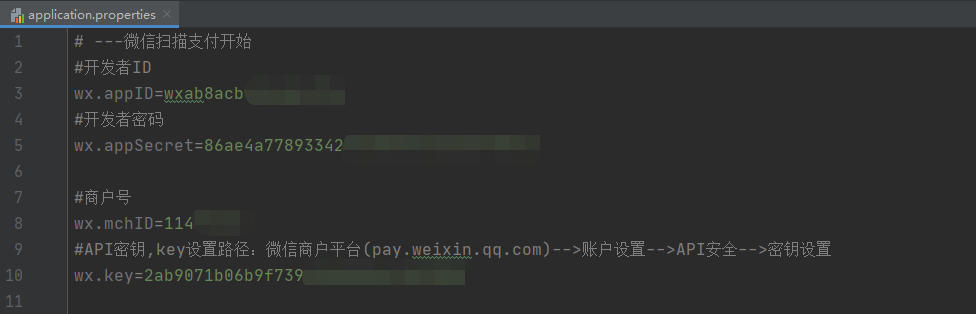
一、相关配置
微信公众号AppID(登录微信公众平台-->开发-->基本设置-->开发者ID(AppID))
微信公众号AppSecret(登录微信公众平台-->开发-->基本设置-->开发者密码(AppSecret))
微信支付商户号(登录微信商户平台-->账户中心-->商户信息-->基本账户信息-->微信支付商户号)
微信支付商户API密钥(登录微信商户平台-->账户中心-->API安全-->API密钥-->设置API密钥)
application.properties 文件 (Demo上都有官网的默认值,不需要修改直接使用,省心!)
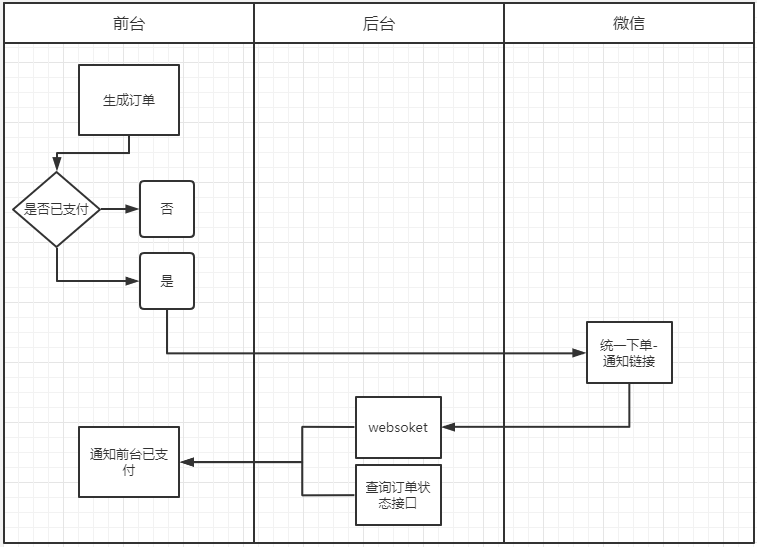
支付扫码模式二,流程图
https://pay.weixin.qq.com/wiki/doc/api/native.php?chapter=6_5
SDK与DEMO下载
https://pay.weixin.qq.com/wiki/doc/api/native.php?chapter=11_1
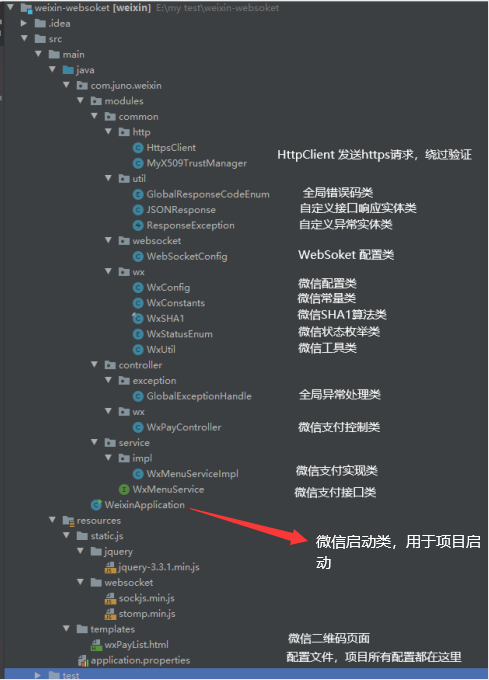
二、目录结构
三、准备工作
(1)内网穿透工具
让外网能直接访问,你本地的服务,场景用于,接口调试,支付方面等等。
为了大家找了一个,免费配置简单的。绝对不是卖广告,之前用过花生壳,麻烦到要死坑哇~,现在的所有穿透都要身份证登记,很正常国家出了对应的法规。下载地址:NATAPP-内网穿透 基于ngrok的国内高速内网映射工具
配置和使用说明:外网映射---内网穿透工具NATAPP---灵感源自QQ浏览器微信调试工具_natapp+xampp_kingrome2009的博客-CSDN博客
四、功能演示
本地版本:请看最上面视频及流程图,访问链接 http://127.0.0.1:8080
穿透版本:请看最上面视频及流程图,访问链接 必须使用穿透工具,步骤请看视频~
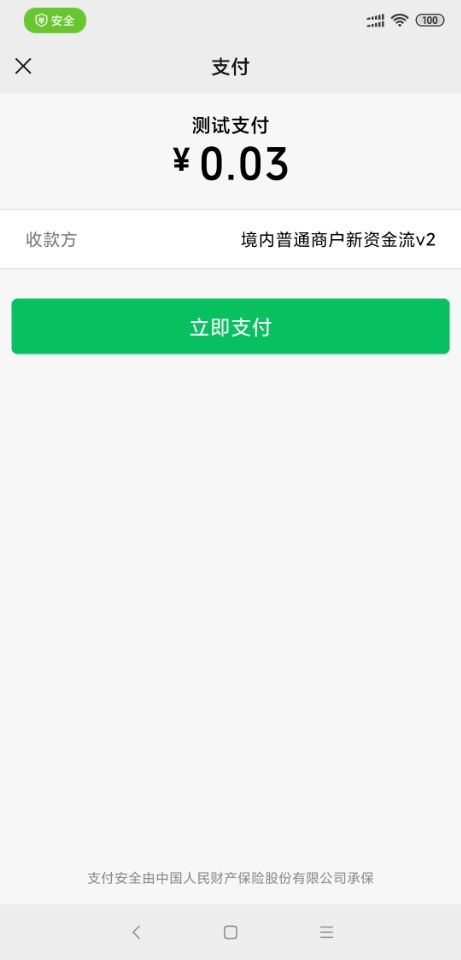
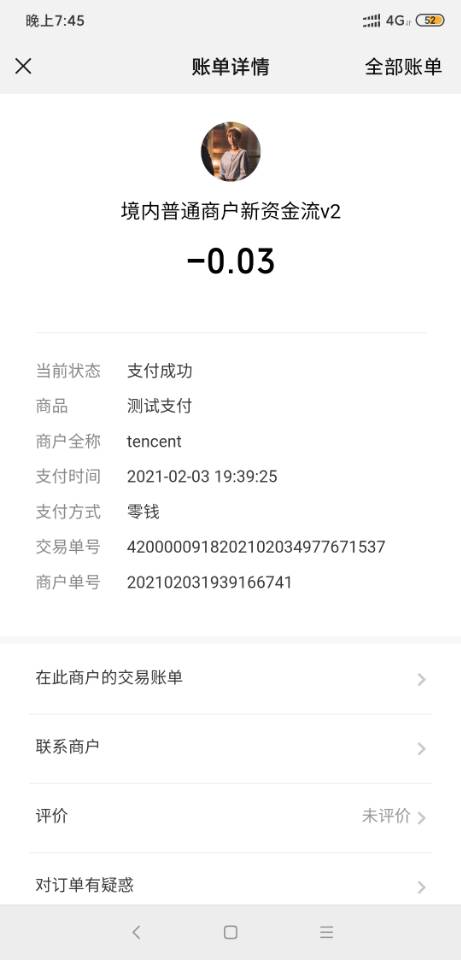
支付流程:
五、前端代码
微信支付二维码生成
订单流水号:
支付金额:
![]()
六、后端代码
pom.xml
4.0.0 com.juno weixin-websoket 0.0.1-SNAPSHOT jar weixin-websoket Demo project for Spring Boot org.springframework.boot spring-boot-starter-parent 2.4.0 UTF-8 UTF-8 1.8 3.7 3.2.2 3.3.3 1.2.46 org.springframework.boot spring-boot-starter-web org.springframework.boot spring-boot-starter-thymeleaf org.springframework.boot spring-boot-devtools true org.springframework.boot spring-boot-starter-test test org.apache.commons commons-lang3 ${commons-lang3.version} commons-collections commons-collections ${commons-collections.version} com.google.zxing javase ${com.google.zxing.version} com.alibaba fastjson ${fastjson.version} org.springframework.boot spring-boot-starter-websocket junit junit test org.springframework.boot spring-boot-maven-plugin true WxPayController.java
package com.juno.weixin.modules.controller.wx;import com.juno.weixin.modules.common.util.JSONResponse;
import com.juno.weixin.modules.common.wx.WxConfig;
import com.juno.weixin.modules.common.wx.WxConstants;
import com.juno.weixin.modules.common.wx.WxUtil;
import com.juno.weixin.modules.service.WxMenuService;
import org.apache.commons.lang3.StringUtils;
import org.springframework.beans.factory.annotation.Autowired;
import org.springframework.messaging.simp.SimpMessagingTemplate;
import org.springframework.stereotype.Controller;
import org.springframework.ui.Model;
import org.springframework.web.bind.annotation.RequestMapping;
import org.springframework.web.bind.annotation.RequestMethod;
import org.springframework.web.bind.annotation.RequestParam;
import org.springframework.web.bind.annotation.ResponseBody;import javax.servlet.http.HttpServletRequest;
import javax.servlet.http.HttpServletResponse;
import java.text.SimpleDateFormat;
import java.util.Date;
import java.util.HashMap;
import java.util.Map;/*** 微信支付控制类* @author lujunjie* @date 2020/12/31*/
@Controller
public class WxPayController {@Autowiredprivate WxMenuService wxMenuService;/*** 二维码首页*/@RequestMapping(value = {"/"}, method = RequestMethod.GET)public String wxPayList(Model model){return "/wxPayList";}/*** 获取流水号*/@RequestMapping(value = {"/wxPay/outTradeNo"})@ResponseBodypublic JSONResponse getOutTradeNo(){//商户订单号return JSONResponse.success(WxUtil.mchOrderNo());}final private String signType = WxConstants.SING_MD5;/*** 统一下单-生成二维码*/@RequestMapping(value = {"/wxPay/payUrl"})public void payUrl(HttpServletRequest request, HttpServletResponse response,@RequestParam(value = "totalFee")Double totalFee,@RequestParam(value = "outTradeNo")String outTradeNo) throws Exception{WxUtil.writerPayImage(response,wxMenuService.wxPayUrl(totalFee,outTradeNo,signType));}/*** 查询订单状态*/@RequestMapping(value = {"/wxPay/payStatus"})@ResponseBodypublic JSONResponse payStatus(HttpServletRequest request, HttpServletResponse response,@RequestParam(value = "outTradeNo")String outTradeNo) throws Exception{return this.wxMenuService.queryOrder(outTradeNo,signType);}@Autowiredprivate SimpMessagingTemplate simpMessagingTemplate;/*** 统一下单-通知链接*/@RequestMapping(value = {"/wxPay/unifiedorderNotify"})public void unifiedorderNotify(HttpServletRequest request, HttpServletResponse response) throws Exception{//商户订单号String outTradeNo = null;String xmlContent = "" +" ";try{String requstXml = WxUtil.getStreamString(request.getInputStream());Map map = WxUtil.xmlToMap(requstXml);String returnCode= map.get(WxConstants.RETURN_CODE);//校验一下 ,判断是否已经支付成功if(StringUtils.isNotBlank(returnCode) && StringUtils.equals(returnCode,"SUCCESS") && WxUtil.isSignatureValid(map, WxConfig.key,signType)){System.out.println("------------"+"统一下单-通知链接:支付成功"+"------------");System.out.println("统一下单-通知链接:"+"requstXml : " + requstXml);//商户订单号outTradeNo = map.get("out_trade_no");System.out.println("统一下单-通知链接 "+"outTradeNo : "+ outTradeNo);//微信支付订单号String transactionId = map.get("transaction_id");System.out.println("统一下单-通知链接 "+"transactionId : "+ transactionId);//支付完成时间SimpleDateFormat payFormat= new SimpleDateFormat("yyyyMMddHHmmss");Date payDate = payFormat.parse(map.get("time_end"));SimpleDateFormat systemFormat= new SimpleDateFormat("yyyy-MM-dd HH:mm:ss");String payDateStr = systemFormat.format(payDate);System.out.println("统一下单-通知链接 "+"支付时间:" + payDateStr);HashMap returnMap = new HashMap<>();returnMap.put("outTradeNo",outTradeNo);returnMap.put("transactionId",transactionId);returnMap.put("payDateStr",payDateStr);//通知前台,我完成支付了simpMessagingTemplate.convertAndSendToUser(outTradeNo,"/send/message",JSONResponse.success(returnMap));xmlContent = "" +" ";}}catch (Exception e){e.printStackTrace();}//返回信息给微信WxUtil.responsePrint(response,xmlContent);}} 本文来自互联网用户投稿,文章观点仅代表作者本人,不代表本站立场,不承担相关法律责任。如若转载,请注明出处。 如若内容造成侵权/违法违规/事实不符,请点击【内容举报】进行投诉反馈!