Springboot-主线7-Shiro学习
Shiro
引言:
权限管理
权限管理包括用户身份认证和授权两部分,简称认证授权,对于需要访问控制的资源用户首先经过身份认证,认证同构后用户具有对该资源的访问权限方可访问。
身份认证
就是判断一个用户是否为合法用户的处理过程,
什么是授权
授权即访问控制,控制什么人具有访问什么资源的权力。
shiro
结构图
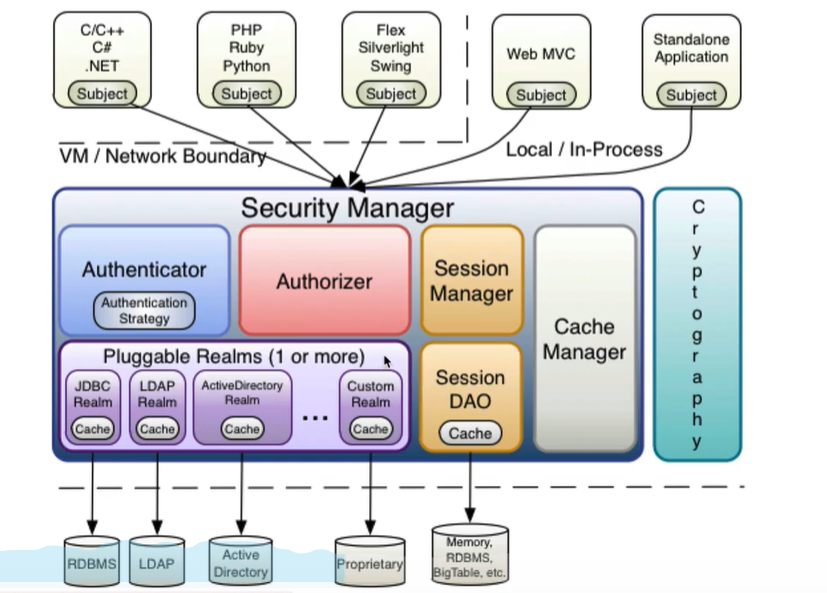
shiro的认证
关键对象
- Subject:主体
访问系统的用户,主题可以是用户、程序等,进行认证的都被称为主体。
- Principal:身份信息
是主体进行身份认证的表示,标识必须具有唯一性,一个主体可以具有多个身份。
- credential:凭证信息
是只有主体自己知道的安全信息,如密码,证书等。
认证流程
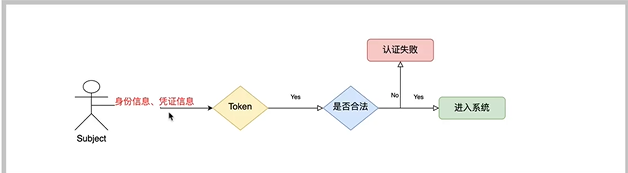
操作实例
添加依赖:
<dependency><groupId>org.apache.shirogroupId><artifactId>shiro-coreartifactId><version>1.5.3version>dependency>
我们可以查看securityManager的结构图:
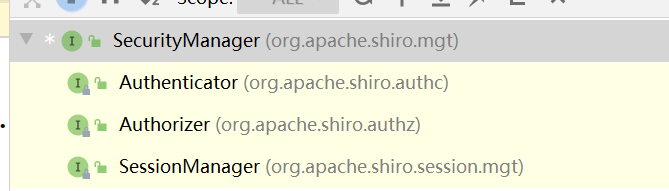
我们可以选择一个单机java测试一下:
前提需要创建一个shiro.ini文件:
[users]
wangyun=123
zhangsan=123
lisi=789
public static void main(String[] args) {// 创建安全管理七对象DefaultSecurityManager securityManager = new DefaultSecurityManager();// 给安全管理器设置realmsecurityManager.setRealm(new IniRealm("classpath:shiro.ini"));// SecurityUtils 全局安全工具类SecurityUtils.setSecurityManager(securityManager);// 关键对象 主体Subject subject = SecurityUtils.getSubject();// 创建tokenUsernamePasswordToken token = new UsernamePasswordToken("wangyun","123");try{subject.login(token); // 用户认证System.out.println("认证状态"+subject.isAuthenticated());}catch (UnknownAccountException e){e.printStackTrace();System.out.println("认证失败:用户名不存在");}catch (IncorrectCredentialsException e){e.printStackTrace();System.out.println("认证失败:密码错误");}}
认证的源码分析!!!
我们通过debug进入login方法中,

发现起作用的还是securityManage的login的方法,
最终验证用户名是simpleAccountRealm中的doGetAuthenticationInfo方法中。
密码校验是在AuthenticatingRealm中的assertCredentialsMatch。
所以,追溯源码,可以发现
AuthenticatingRealm ->认证realm doGetAuthenticationInfo
AuthorizingRealm — 授权realm doGetAuthorizationInfo
自定义realm
public class SelfRealm extends AuthorizingRealm {@Override// 授权protected AuthorizationInfo doGetAuthorizationInfo(PrincipalCollection principalCollection) {return null;}@Override// 认证protected AuthenticationInfo doGetAuthenticationInfo(AuthenticationToken authenticationToken) throws AuthenticationException {Object principal = authenticationToken.getPrincipal();System.out.println(principal);if("wangyun".equals(principal)){/*** 参数1:正确的数据库的用户名* 参数2 :正确密码* 参数3:提供当前realm的名字*/SimpleAuthenticationInfo info = new SimpleAuthenticationInfo(principal,"123",this.getName());return info;}return null;}
}
加盐
我们可以发现,没有做到绝对的安全,
实际应用过程中是将盐和散列后的值存在数据库中,自动realm从数据库取出盐和加密后 的值由shiro完成密码校验。
测试md5加密
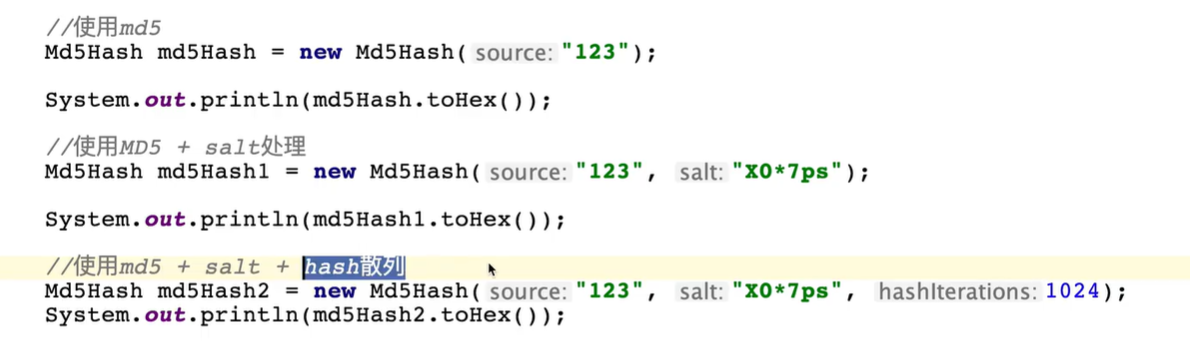
realm设置hash凭证匹配器
// 设置realm使用hash凭证匹配器HashedCredentialsMatcher matcher = new HashedCredentialsMatcher();// 设置md5算法matcher.setHashAlgorithmName("md5");// 散列次数//matcher.setHashIterations(1024);realm.setCredentialsMatcher(matcher);manager.setRealm(realm);
自定义realm中的代码:
// md5加密// 参数三:加随机盐,日后应从数据库中获取SimpleAuthenticationInfo info = new SimpleAuthenticationInfo(principal,"b39a5b268ace2b76d989c09a2766a4cd",ByteSource.Util.bytes("qt*"),this.getName());return info;
shiro的授权
关键对象
Who ,即主体(Subject), 主体需要访问系统中的资源。
What,即资源(Resource),包括资源类型和资源实例。
How,权限/许可(Permission),规定了主体对资源的操作许可。
授权过程
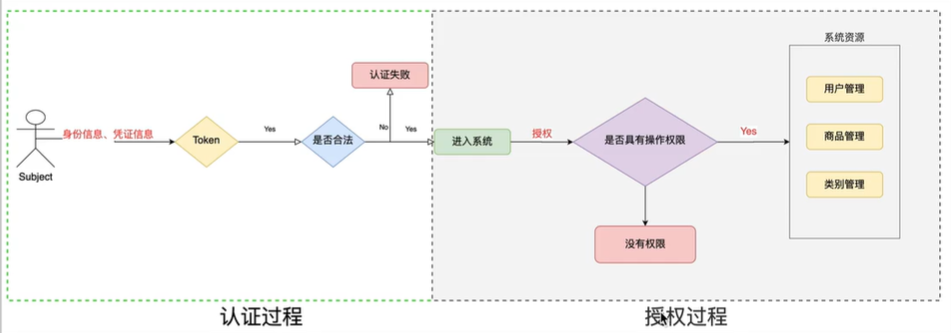
授权方式
- 基于角色的访问控制,是以角色为中心进行访问控制。
if(Subject.hasRole("admin")){// TODO
}
- 基于资源的访问控制,是以资源为中心进行访问控制。
if(Subject.isPermission("user:create")){// TODO
}
权限字符串
权限字符串的规则是:资源操作符:``操作:资源实例标识符,意思是对哪个资源的哪个实例具有什么操作。
例如:
-
用户创建权限:user:create,或者user:create.*
-
用户修改实例001的权限:user:update:001
-
用户实例001的所有权限:user:*:001
// 认证用户进行授权if (subject.isAuthenticated()) {// 1. 基于角色权限控制System.out.println(subject.hasRole("admin"));// 2. 基于多角色权限控制System.out.println(subject.hasAllRoles(Arrays.asList("admin", "user")));// 3. 是否具有其中一个角色boolean[] roles = subject.hasRoles(Arrays.asList("user", "admin"));for (boolean role : roles) {System.out.println(role);}// 4, 基于权限字符创的访问控制 资源操作符:操作:资源实例标识符System.out.println("权限--->" + subject.isPermitted("admin:create:*"));}
@Override// 授权protected AuthorizationInfo doGetAuthorizationInfo(PrincipalCollection principalCollection) {log.info("-----进入授权-------");// 获取主身份信息String principal = (String) principalCollection.getPrimaryPrincipal();log.info("身份信息---->{}",principal);SimpleAuthorizationInfo info = new SimpleAuthorizationInfo();info.addRole("admin");info.addStringPermission("admin:*:*");return info;}
shiro与Springboot
流程图
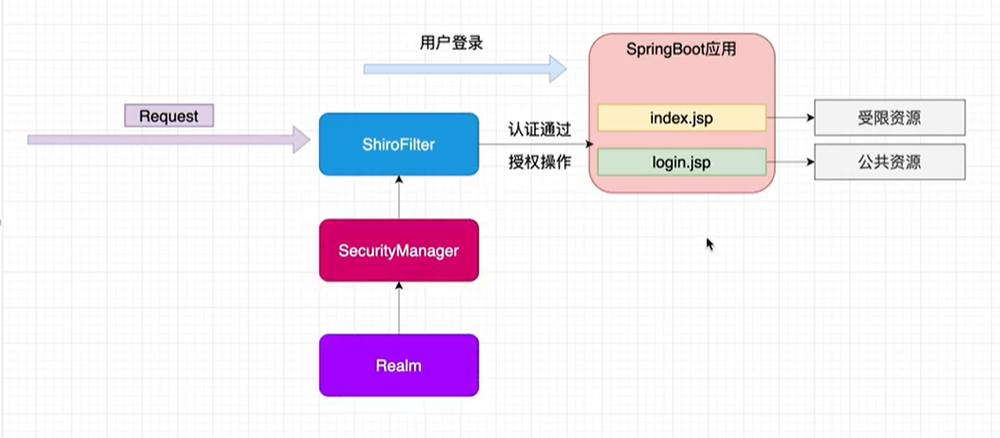
实例:
首先我们要使用Shiro,我们肯定需要先导入依赖:
<dependency><groupId>org.springframework.bootgroupId><artifactId>spring-boot-starter-thymeleafartifactId><version>2.2.0.RELEASEversion>dependency><dependency><groupId>org.apache.shirogroupId><artifactId>shiro-coreartifactId><version>1.5.3version>dependency><dependency><groupId>com.auth0groupId><artifactId>java-jwtartifactId><version>3.4.0version>dependency><dependency><groupId>org.apache.shirogroupId><artifactId>shiro-spring-boot-starterartifactId><version>1.5.2version>dependency><dependency><groupId>org.apache.shirogroupId><artifactId>shiro-springartifactId><version>1.5.3version>dependency><dependency><groupId>org.apache.shirogroupId><artifactId>shiro-webartifactId><version>1.5.3version>dependency><dependency><groupId>org.mybatis.spring.bootgroupId><artifactId>mybatis-spring-boot-starterartifactId><version>2.1.1version>dependency><dependency><groupId>mysqlgroupId><artifactId>mysql-connector-javaartifactId><version>8.0.22version>dependency><dependency><groupId>com.alibabagroupId><artifactId>druid-spring-boot-starterartifactId><version>1.1.22version>dependency><dependency><groupId>com.baomidougroupId><artifactId>mybatis-plus-annotationartifactId><version>3.3.2version>dependency>dependencies>
接下来,创建ShiroConfig的配置项以及自定义的realm。
/** ShrioConfig **/
@Configuration
public class ShiroConfig{//1. 创建shiroFilter@Bean(name = "shiroFilter")public ShiroFilterFactoryBean getShiroFilterFactoryBean(DefaultWebSecurityManager defaultWebSecurityManager){ShiroFilterFactoryBean factoryBean = new ShiroFilterFactoryBean();// 1. 给filter设置安全管理器factoryBean.setSecurityManager(defaultWebSecurityManager);// 4. 配置系统的受限资源Map<String, String> map = new HashMap<>();map.put("/user/login","anon");map.put("/to/register","anon");map.put("/register","anon");map.put("/**","authc");  //authc:请求这个资源需要认证和授权// 5. 默认认证界面factoryBean.setLoginUrl("/login.html");factoryBean.setFilterChainDefinitionMap(map);//return factoryBean;}// 2. 创建安全管理器@Beanpublic DefaultWebSecurityManager securityManager() {DefaultWebSecurityManager defaultSecurityManager = new DefaultWebSecurityManager();defaultSecurityManager.setRealm(getRealm());return defaultSecurityManager;}// 3. 创建自定义realm@Beanpublic Realm getRealm(){SPRealm realm = new SPRealm();// 修改凭证校验匹配器HashedCredentialsMatcher matcher = new HashedCredentialsMatcher();matcher.setHashAlgorithmName("MD5");// 设置散列数matcher.setHashIterations(1024);realm.setCredentialsMatcher(matcher);return realm;}}
/** Realm 认证**/
@Overrideprotected AuthenticationInfo doGetAuthenticationInfo(AuthenticationToken authenticationToken) throws AuthenticationException {System.out.println("----------");// 根据身份信息String principal = (String) authenticationToken.getPrincipal();User user = userService.findByUserName(principal);System.out.println(user.toString());if (principal.equals("zhangsan")) {return new SimpleAuthenticationInfo(principal, user.getPassword(),ByteSource.Util.bytes(user.getSalt()),this.getName());}return null;}
依次创建Controller,Service,mapper,这里只展示Controller
public class LoginController {@Autowiredprivate UserService userService;static Map<String,String> userMap=new HashMap<>();static{userMap.put("zhangsan","123");userMap.put("zhangsan","321");userMap.put("wangyun","123");}@RequestMapping(value = {"/","/index"},method = RequestMethod.GET)public String index(){return "login";}@PostMapping("/user/login")public String tologin(@RequestParam(value = "username",required = false) String username,@RequestParam(value="password",required = false) String password){log.info("登录执行->{},{}",username,password);Subject subject = SecurityUtils.getSubject();try {subject.login(new UsernamePasswordToken(username,password));return "main";}catch (UnknownAccountException e){System.out.println("用户名错误");}catch (IncorrectCredentialsException e){System.out.println("密码错误");}return "login";}@RequestMapping(value = "/loginout",method = RequestMethod.GET)public String logout(){Subject subject = SecurityUtils.getSubject();subject.logout();return "login";}@RequestMapping("register")public String register(User user){try{System.out.println(user.getUsername()+user.getPassword());userService.register(user);}catch (Exception e){e.printStackTrace();System.out.println("注册失败");return "register";}System.out.println("注册成功");return "login";}@RequestMapping("to/register")public String toRegister(User user){return "register";}}
此时为了完成MD5+加盐的操作,我们还需要一个加盐工具类。
public class SaltUtils {public static String getSalt(int n){char[] chars = "!#$%^&*$#$%^&*^%$##@$%^&*%#$%^@#$".toCharArray();StringBuilder sb = new StringBuilder();for (int i = 0; i < n; i++) {char aChar=chars[new Random().nextInt(chars.length)];sb.append(aChar);}return sb.toString();}public static void main(String[] args) {System.out.println(SaltUtils.getSalt(8));}}
到这里为止,已初步完成shiro的认证环节。
授权操作
@RequestMapping("save")@RequiresRoles("admin") // 用来判断角色@RequiresPermissions("admin:update:*")public String save(){Subject subject = SecurityUtils.getSubject();System.out.println("保存");return "main";}
授权
shiro整合redis
首先我们需要先启动redis的服务器,在application配置文件中,加上redis的相关配置
导入依赖
<dependency><groupId>org.springframework.bootgroupId><artifactId>spring-boot-starter-data-redisartifactId>
dependency>
修改实体类,继承Serializable接口,实现序列化
并且在shrio中,由于SimpleAuthenticationInfo没有继承父类的无参构造,导致在对盐进行转化的时候不能实现反序列化。我们只能自己手写一个类,
public class MyByteSource implements ByteSource, Serializable {/*这里将final去掉了,去掉后要在后面用getter和setter赋、取值*/private byte[] bytes;private String cachedHex;private String cachedBase64;/*添加了一个无参构造方法*/public MyByteSource(){}public MyByteSource(byte[] bytes) {this.bytes = bytes;}public MyByteSource(char[] chars) {this.bytes = CodecSupport.toBytes(chars);}public MyByteSource(String string) {this.bytes = CodecSupport.toBytes(string);}public MyByteSource(ByteSource source) {this.bytes = source.getBytes();}public MyByteSource(File file) {this.bytes = (new MyByteSource.BytesHelper()).getBytes(file);}public MyByteSource(InputStream stream) {this.bytes = (new MyByteSource.BytesHelper()).getBytes(stream);}public static boolean isCompatible(Object o) {return o instanceof byte[] || o instanceof char[] || o instanceof String || o instanceof ByteSource || o instanceof File || o instanceof InputStream;}/*这里加了getter和setter*/public void setBytes(byte[] bytes) {this.bytes = bytes;}public byte[] getBytes() {return this.bytes;}public boolean isEmpty() {return this.bytes == null || this.bytes.length == 0;}public String toHex() {if (this.cachedHex == null) {this.cachedHex = Hex.encodeToString(this.getBytes());}return this.cachedHex;}public String toBase64() {if (this.cachedBase64 == null) {this.cachedBase64 = Base64.encodeToString(this.getBytes());}return this.cachedBase64;}public String toString() {return this.toBase64();}public int hashCode() {return this.bytes != null && this.bytes.length != 0 ? Arrays.hashCode(this.bytes) : 0;}public boolean equals(Object o) {if (o == this) {return true;} else if (o instanceof ByteSource) {ByteSource bs = (ByteSource)o;return Arrays.equals(this.getBytes(), bs.getBytes());} else {return false;}}private static final class BytesHelper extends CodecSupport {private BytesHelper() {}public byte[] getBytes(File file) {return this.toBytes(file);}public byte[] getBytes(InputStream stream) {return this.toBytes(stream);}}/*取代原先加盐的工具类*/public static class Util{public static ByteSource bytes(byte[] bytes){return new MyByteSource(bytes);}public static ByteSource bytes(String arg0){return new MyByteSource(arg0);}}
}
自定义RedisCacheManager
public class RedisCacheManager implements CacheManager {@Overridepublic <K, V> Cache<K, V> getCache(String s) throws CacheException {System.out.println("RedisCacheManager.getCache被调用:" + s);return new RedisCache<K,V>(s);}
}
自定义RedisCache,实现Cache接口
@Component
public class RedisCache<k,v> implements Cache<k,v> {private String cacheName;public RedisCache(String cacheName) {this.cacheName = cacheName;}public RedisCache() {}@Overridepublic v get(k k) throws CacheException {RedisTemplate redisTemplate = getRedistemplate();return (v) redisTemplate.opsForHash().get(this.cacheName, k.toString());}@Overridepublic v put(k k, v v) throws CacheException {System.out.println("put key:" + k);System.out.println("put value:" + v);RedisTemplate redisTemplate = getRedistemplate();redisTemplate.opsForHash().put(this.cacheName, k.toString(), v);return null;}@Overridepublic v remove(k k) throws CacheException {return null;}@Overridepublic void clear() throws CacheException {}@Overridepublic int size() {return 0;}@Overridepublic Set<k> keys() {return null;}@Overridepublic Collection<v> values() {return null;}private RedisTemplate getRedistemplate(){RedisTemplate redisTemplate = (RedisTemplate) ApplicationContextUtils.getBean("redisTemplate");redisTemplate.setKeySerializer(new StringRedisSerializer());redisTemplate.setHashKeySerializer(new StringRedisSerializer());return redisTemplate;}
}
不过这里需要注意的事,这里RedisTemplate方法,不能自动注入,因为该类此时还没有交给Spring容器所管理,需要我们自己创建一个工具类
@Component
public class ApplicationContextUtils implements ApplicationContextAware {private static ApplicationContext context;@Overridepublic void setApplicationContext(ApplicationContext applicationContext) throws BeansException {System.out.println("setApplicationContext 方法执行了");this.context = applicationContext;System.out.println(context);}//通过ApplicationContext获取对应的beanpublic static Object getBean(String beanName){return context.getBean(beanName);}
}
开启缓存管理器
@Beanpublic Realm getRealm(){HashedCredentialsMatcher hashedCredentialsMatcher = new HashedCredentialsMatcher();hashedCredentialsMatcher.setHashAlgorithmName("MD5");hashedCredentialsMatcher.setHashIterations(1024);CustomerRealm customerRealm = new CustomerRealm();customerRealm.setCredentialsMatcher(hashedCredentialsMatcher);//设置缓存管理器
//        customerRealm.setCacheManager(new EhCacheManager());customerRealm.setCacheManager(new RedisCacheManager());//开启缓存管理customerRealm.setCachingEnabled(true);customerRealm.setAuthenticationCachingEnabled(true);customerRealm.setAuthorizationCachingEnabled(true);customerRealm.setAuthenticationCacheName("authenticationCache");customerRealm.setAuthorizationCacheName("authorizationCache");return customerRealm;}
图片验证码功能
import java.awt.Color;
import java.awt.Font;
import java.awt.Graphics;
import java.awt.Graphics2D;
import java.awt.RenderingHints;
import java.awt.geom.AffineTransform;
import java.awt.image.BufferedImage;
import java.io.File;
import java.io.FileOutputStream;
import java.io.IOException;
import java.io.OutputStream;
import java.util.Arrays;
import java.util.Random;import javax.imageio.ImageIO;public class VerifyCodeUtils{//使用到Algerian字体,系统里没有的话需要安装字体,字体只显示大写,去掉了1,0,i,o几个容易混淆的字符public static final String VERIFY_CODES = "23456789ABCDEFGHJKLMNPQRSTUVWXYZ";private static Random random = new Random();/*** 使用系统默认字符源生成验证码* @param verifySize    验证码长度* @return*/public static String generateVerifyCode(int verifySize){return generateVerifyCode(verifySize, VERIFY_CODES);}/*** 使用指定源生成验证码* @param verifySize    验证码长度* @param sources   验证码字符源* @return*/public static String generateVerifyCode(int verifySize, String sources){if(sources == null || sources.length() == 0){sources = VERIFY_CODES;}int codesLen = sources.length();Random rand = new Random(System.currentTimeMillis());StringBuilder verifyCode = new StringBuilder(verifySize);for(int i = 0; i < verifySize; i++){verifyCode.append(sources.charAt(rand.nextInt(codesLen-1)));}return verifyCode.toString();}/*** 生成随机验证码文件,并返回验证码值* @param w* @param h* @param outputFile* @param verifySize* @return* @throws IOException*/public static String outputVerifyImage(int w, int h, File outputFile, int verifySize) throws IOException{String verifyCode = generateVerifyCode(verifySize);outputImage(w, h, outputFile, verifyCode);return verifyCode;}/*** 输出随机验证码图片流,并返回验证码值* @param w* @param h* @param os* @param verifySize* @return* @throws IOException*/public static String outputVerifyImage(int w, int h, OutputStream os, int verifySize) throws IOException{String verifyCode = generateVerifyCode(verifySize);outputImage(w, h, os, verifyCode);return verifyCode;}/*** 生成指定验证码图像文件* @param w* @param h* @param outputFile* @param code* @throws IOException*/public static void outputImage(int w, int h, File outputFile, String code) throws IOException{if(outputFile == null){return;}File dir = outputFile.getParentFile();if(!dir.exists()){dir.mkdirs();}try{outputFile.createNewFile();FileOutputStream fos = new FileOutputStream(outputFile);outputImage(w, h, fos, code);fos.close();} catch(IOException e){throw e;}}/*** 输出指定验证码图片流* @param w* @param h* @param os* @param code* @throws IOException*/public static void outputImage(int w, int h, OutputStream os, String code) throws IOException{int verifySize = code.length();BufferedImage image = new BufferedImage(w, h, BufferedImage.TYPE_INT_RGB);Random rand = new Random();Graphics2D g2 = image.createGraphics();g2.setRenderingHint(RenderingHints.KEY_ANTIALIASING,RenderingHints.VALUE_ANTIALIAS_ON);Color[] colors = new Color[5];Color[] colorSpaces = new Color[] { Color.WHITE, Color.CYAN,Color.GRAY, Color.LIGHT_GRAY, Color.MAGENTA, Color.ORANGE,Color.PINK, Color.YELLOW };float[] fractions = new float[colors.length];for(int i = 0; i < colors.length; i++){colors[i] = colorSpaces[rand.nextInt(colorSpaces.length)];fractions[i] = rand.nextFloat();}Arrays.sort(fractions);g2.setColor(Color.GRAY);// 设置边框色g2.fillRect(0, 0, w, h);Color c = getRandColor(200, 250);g2.setColor(c);// 设置背景色g2.fillRect(0, 2, w, h-4);//绘制干扰线Random random = new Random();g2.setColor(getRandColor(160, 200));// 设置线条的颜色for (int i = 0; i < 20; i++) {int x = random.nextInt(w - 1);int y = random.nextInt(h - 1);int xl = random.nextInt(6) + 1;int yl = random.nextInt(12) + 1;g2.drawLine(x, y, x + xl + 40, y + yl + 20);}// 添加噪点float yawpRate = 0.05f;// 噪声率int area = (int) (yawpRate * w * h);for (int i = 0; i < area; i++) {int x = random.nextInt(w);int y = random.nextInt(h);int rgb = getRandomIntColor();image.setRGB(x, y, rgb);}shear(g2, w, h, c);// 使图片扭曲g2.setColor(getRandColor(100, 160));int fontSize = h-4;Font font = new Font("Algerian", Font.ITALIC, fontSize);g2.setFont(font);char[] chars = code.toCharArray();for(int i = 0; i < verifySize; i++){AffineTransform affine = new AffineTransform();affine.setToRotation(Math.PI / 4 * rand.nextDouble() * (rand.nextBoolean() ? 1 : -1), (w / verifySize) * i + fontSize/2, h/2);g2.setTransform(affine);g2.drawChars(chars, i, 1, ((w-10) / verifySize) * i + 5, h/2 + fontSize/2 - 10);}g2.dispose();ImageIO.write(image, "jpg", os);}private static Color getRandColor(int fc, int bc) {if (fc > 255)fc = 255;if (bc > 255)bc = 255;int r = fc + random.nextInt(bc - fc);int g = fc + random.nextInt(bc - fc);int b = fc + random.nextInt(bc - fc);return new Color(r, g, b);}private static int getRandomIntColor() {int[] rgb = getRandomRgb();int color = 0;for (int c : rgb) {color = color << 8;color = color | c;}return color;}private static int[] getRandomRgb() {int[] rgb = new int[3];for (int i = 0; i < 3; i++) {rgb[i] = random.nextInt(255);}return rgb;}private static void shear(Graphics g, int w1, int h1, Color color) {shearX(g, w1, h1, color);shearY(g, w1, h1, color);}private static void shearX(Graphics g, int w1, int h1, Color color) {int period = random.nextInt(2);boolean borderGap = true;int frames = 1;int phase = random.nextInt(2);for (int i = 0; i < h1; i++) {double d = (double) (period >> 1)* Math.sin((double) i / (double) period+ (6.2831853071795862D * (double) phase)/ (double) frames);g.copyArea(0, i, w1, 1, (int) d, 0);if (borderGap) {g.setColor(color);g.drawLine((int) d, i, 0, i);g.drawLine((int) d + w1, i, w1, i);}}}private static void shearY(Graphics g, int w1, int h1, Color color) {int period = random.nextInt(40) + 10; // 50;boolean borderGap = true;int frames = 20;int phase = 7;for (int i = 0; i < w1; i++) {double d = (double) (period >> 1)* Math.sin((double) i / (double) period+ (6.2831853071795862D * (double) phase)/ (double) frames);g.copyArea(i, 0, 1, h1, 0, (int) d);if (borderGap) {g.setColor(color);g.drawLine(i, (int) d, i, 0);g.drawLine(i, (int) d + h1, i, h1);}}}public static void main(String[] args) throws IOException{File dir = new File("D:/upload/verifyCode");int w = 200, h = 80;for(int i = 0; i < 50; i++){String verifyCode = generateVerifyCode(4);File file = new File(dir, verifyCode + ".jpg");outputImage(w, h, file, verifyCode);}}
}
控制器的验证码规则
@RequestMapping("getImage")public void getImage(HttpSession session, HttpServletResponse response) throws IOException {//生成验证码String code = VerifyCodeUtils.generateVerifyCode(4);//验证码存入sessionsession.setAttribute("code",code);//验证码生成图片ServletOutputStream os = response.getOutputStream();response.setContentType("image/png");VerifyCodeUtils.outputImage(220,60,os, code);}
声明
借鉴B站不良人大大,欢迎各位博友观看。
本文来自互联网用户投稿,文章观点仅代表作者本人,不代表本站立场,不承担相关法律责任。如若转载,请注明出处。 如若内容造成侵权/违法违规/事实不符,请点击【内容举报】进行投诉反馈!