史上最简单的SpringCloud教程 | 第五篇: 路由网关(zuul)(Finchley版本)
转载请标明出处:
http://blog.csdn.net/forezp/article/details/81041012
本文出自方志朋的博客
个人博客纯净版:https://www.fangzhipeng.com/springcloud/2018/08/05/sc-f5-zuul.html
在微服务架构中,需要几个基础的服务治理组件,包括服务注册与发现、服务消费、负载均衡、断路器、智能路由、配置管理等,由这几个基础组件相互协作,共同组建了一个简单的微服务系统。一个简答的微服务系统如下图:
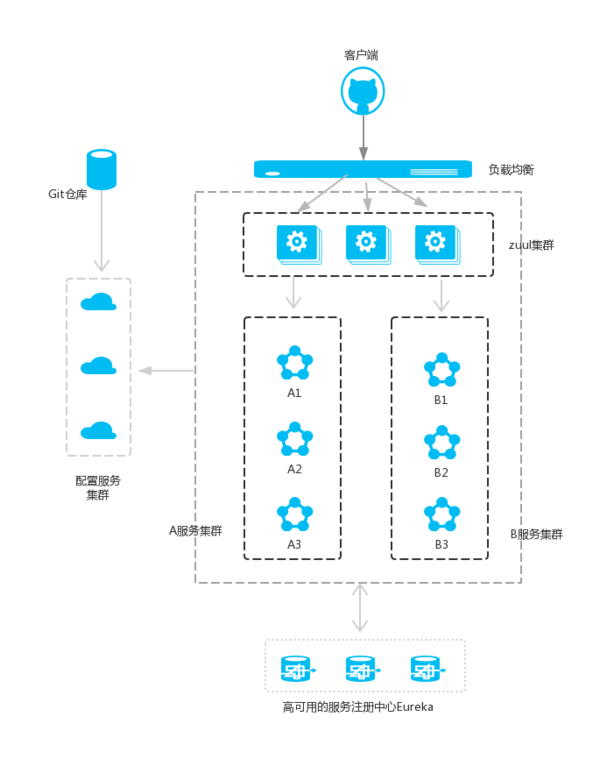
注意:A服务和B服务是可以相互调用的,作图的时候忘记了。并且配置服务也是注册到服务注册中心的。
在Spring Cloud微服务系统中,一种常见的负载均衡方式是,客户端的请求首先经过负载均衡(zuul、Ngnix),再到达服务网关(zuul集群),然后再到具体的服。,服务统一注册到高可用的服务注册中心集群,服务的所有的配置文件由配置服务管理(下一篇文章讲述),配置服务的配置文件放在git仓库,方便开发人员随时改配置。
一、Zuul简介
Zuul的主要功能是路由转发和过滤器。路由功能是微服务的一部分,比如/api/user转发到到user服务,/api/shop转发到到shop服务。zuul默认和Ribbon结合实现了负载均衡的功能。
zuul有以下功能:
- Authentication
- Insights
- Stress Testing
- Canary Testing
- Dynamic Routing
- Service Migration
- Load Shedding
- Security
- Static Response handling
- Active/Active traffic management
二、准备工作
继续使用上一节的工程。在原有的工程上,创建一个新的工程。
三、创建service-zuul工程
其pom.xml文件如下:
4.0.0 com.forezp service-zuul 0.0.1-SNAPSHOT jar service-zuul Demo project for Spring Boot com.forezp sc-f-chapter5 0.0.1-SNAPSHOT org.springframework.cloud spring-cloud-starter-netflix-eureka-client org.springframework.boot spring-boot-starter-web org.springframework.cloud spring-cloud-starter-netflix-zuul 在其入口applicaton类加上注解@EnableZuulProxy,开启zuul的功能:
@SpringBootApplication
@EnableZuulProxy
@EnableEurekaClient
@EnableDiscoveryClient
public class ServiceZuulApplication {public static void main(String[] args) {SpringApplication.run( ServiceZuulApplication.class, args );}
}
加上配置文件application.yml加上以下的配置代码:
eureka:client:serviceUrl:defaultZone: http://localhost:8761/eureka/
server:port: 8769
spring:application:name: service-zuul
zuul:routes:api-a:path: /api-a/**serviceId: service-ribbonapi-b:path: /api-b/**serviceId: service-feign
首先指定服务注册中心的地址为http://localhost:8761/eureka/,服务的端口为8769,服务名为service-zuul;以/api-a/ 开头的请求都转发给service-ribbon服务;以/api-b/开头的请求都转发给service-feign服务;
依次运行这五个工程;打开浏览器访问:http://localhost:8769/api-a/hi?name=forezp ;浏览器显示:
hi forezp,i am from port:8762
打开浏览器访问:http://localhost:8769/api-b/hi?name=forezp ;浏览器显示:
hi forezp,i am from port:8762
这说明zuul起到了路由的作用
四、服务过滤
zuul不仅只是路由,并且还能过滤,做一些安全验证。继续改造工程;
@Component
public class MyFilter extends ZuulFilter {private static Logger log = LoggerFactory.getLogger(MyFilter.class);@Overridepublic String filterType() {return "pre";}@Overridepublic int filterOrder() {return 0;}@Overridepublic boolean shouldFilter() {return true;}@Overridepublic Object run() {RequestContext ctx = RequestContext.getCurrentContext();HttpServletRequest request = ctx.getRequest();log.info(String.format("%s >>> %s", request.getMethod(), request.getRequestURL().toString()));Object accessToken = request.getParameter("token");if(accessToken == null) {log.warn("token is empty");ctx.setSendZuulResponse(false);ctx.setResponseStatusCode(401);try {ctx.getResponse().getWriter().write("token is empty");}catch (Exception e){}return null;}log.info("ok");return null;}
}
- filterType:返回一个字符串代表过滤器的类型,在zuul中定义了四种不同生命周期的过滤器类型,具体如下:
- pre:路由之前
- routing:路由之时
- post: 路由之后
- error:发送错误调用
- filterOrder:过滤的顺序
- shouldFilter:这里可以写逻辑判断,是否要过滤,本文true,永远过滤。
- run:过滤器的具体逻辑。可用很复杂,包括查sql,nosql去判断该请求到底有没有权限访问。
这时访问:http://localhost:8769/api-a/hi?name=forezp ;网页显示:
token is empty
访问 http://localhost:8769/api-a/hi?name=forezp&token=22 ;
网页显示:
hi forezp,i am from port:8762
本文源码下载:
https://github.com/forezp/SpringCloudLearning/tree/master/sc-f-chapter5
更多阅读
史上最简单的 SpringCloud 教程汇总
SpringBoot教程汇总
Java面试题系列汇总
五、参考资料:
http://blog.csdn.net/forezp/article/details/69939114
http://cloud.spring.io/spring-cloud-static/Finchley.RELEASE/single/spring-cloud.html

扫码关注有惊喜
(转载本站文章请注明作者和出处 方志朋的博客)
本文来自互联网用户投稿,文章观点仅代表作者本人,不代表本站立场,不承担相关法律责任。如若转载,请注明出处。 如若内容造成侵权/违法违规/事实不符,请点击【内容举报】进行投诉反馈!