Thymeleaf系列五 迭代,if,switch语法
1. 概述
这里介绍thymeleaf的编程语法,本节主要包括如下内容
- 迭代语法:th:each; iteration status
- 条件语法:th:if; th:unless
- switch语法:th:switch; th:case; *
下文演示以上语法的用法。
2. 演示以上语法的用法
2.1. 公共类
User
public class User {private String name;private boolean isAdmin;private String other;private int age;public User(String name, boolean isAdmin, String other, int age) {super();this.name = name;this.isAdmin = isAdmin;this.other = other;this.age = age;}// set/get略
}
ProgrammingCtl : control类
@Controller
@RequestMapping("/programming")
public class ProgrammingCtl {@RequestMapping("programming")public String iteration(ModelMap modeMap) {// IterationList userList = new ArrayList();userList.add(new User("son_1", true, "other_1", 11));userList.add(new User("son_2", false, "other_2", 22));userList.add(new User("son_3", true, "other_3", 33));userList.add(new User("son_4", false, "other_4", 44));modeMap.put("userList", userList);// ifelseUser userIf = new User("admin", true, "other_if", 11);modeMap.put("user", userIf);return "programming/programming";}
}
本请求转到页面programming.html,
2.2. 迭代语法:th:each; iteration status
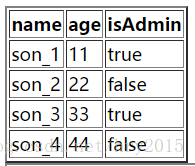
常用th:each用法:
<table border="2"><thead><tr><th>nameth><th>ageth><th>isAdminth>tr>thead><tbody><tr th:each="user : ${userList}"><td th:text="${user.name}">td><td th:text="${user.age}">td><td th:text="${user.isAdmin}">td>tr>tbody>
table>
运行结果如下:
迭代的对象
本例子中迭代的对象是java.util.List,除了List,还可以对以下对象进行迭代
- java.util.Iterable
- java.util.Enumeration
- java.util.Iterator
- java.util.Map,此时迭代返回的对象是java.util.Map.Entry
- 数组
获取迭代的中间的状态,定义在iterStat中
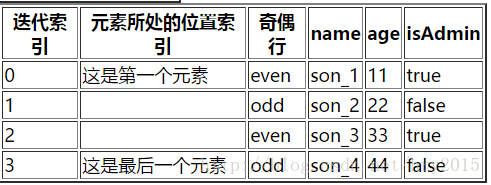
在迭代过程中,可以获取迭代的中间状态,详细如下:
- index :当前节点的索引,从0开始
- size : 迭代节点总数
- even/odd:当前是偶数/奇数行,boolean值
- first/last:当前是每天/最后一个元素
<t
able border="2"><thead><tr><th>迭代索引th><th>元素所处的位置索引th><th>奇偶行th><th>nameth><th>ageth><th>isAdminth>tr>thead><tbody><tr th:each="user,iterStat : ${userList}"><td th:text="${iterStat.index }">td><td th:text="${iterStat.first } ? '这是第一个元素':(${iterStat.last} ? '这是最后一个元素':'')" >td><td th:text="${iterStat.odd} ? 'odd' : 'even'" >td><td th:text="${user.name}">td><td th:text="${user.age}">td><td th:text="${user.isAdmin}">td>tr>tbody>
table>
运行结果如下:
2.3. 条件语法:th:if; th:unless
演示如下功能
- th:if:如果值是true,则打印整个节点
- th:unless: 和th:if是相反功能,如果值为false,则打印整个节点
<span th:if="${user.isAdmin}" th:text="${user.name} + '是管理员'"> span><br /><span th:unless="not ${user.isAdmin}" th:text="${user.name} + '是管理员'"> span><br />输出:
<span>admin是管理员span><br />
<span>admin是管理员span><br />
th:if条件判断
除了判断boolean值外,thymeleaf还认为如下表达式为true:
- 值非空
- 值是character,但是非0
- 值是非0数字
- 值是字符串,但是不是 “false”, “off” or “no”
- 值不是boolean值,数字,character 或 字符串
2.4. switch语法:th:switch; th:case; *
演示如下功能
- th:switch / th:case
- th:case=”*” : 类似switch中的default
<div th:switch="${user.name}"><p th:case="'admin'">User is an administratorp><p th:case="*">User is some other thingp>
div>
输出:
<div><p>User is an administratorp>
div>
3. 代码
代码详细见Github
本文来自互联网用户投稿,文章观点仅代表作者本人,不代表本站立场,不承担相关法律责任。如若转载,请注明出处。 如若内容造成侵权/违法违规/事实不符,请点击【内容举报】进行投诉反馈!