ArcEngine制作专题地图(上,标题、图例)(20190920)
1、需求
为地图添加地图的基本要素(图例、比例尺、指北针)及相关注记,并将地图导出为图片。
2、解决方案
(1)创建地图的基本要素主要用到IMapFrame接口中的CreateSurroundFrame方法;
(2)控制地图的基本要素主要用到IMapSurround接口;
(3)还有一个IMapSurroundFrame接口,这个是做什么的我也不知道怎么表达,代码中慢慢意会吧;
(4)通过一个标志变量来判断操作的类型,根据操作的类型来添加地图要素(文字、图例等)。
3、界面设计
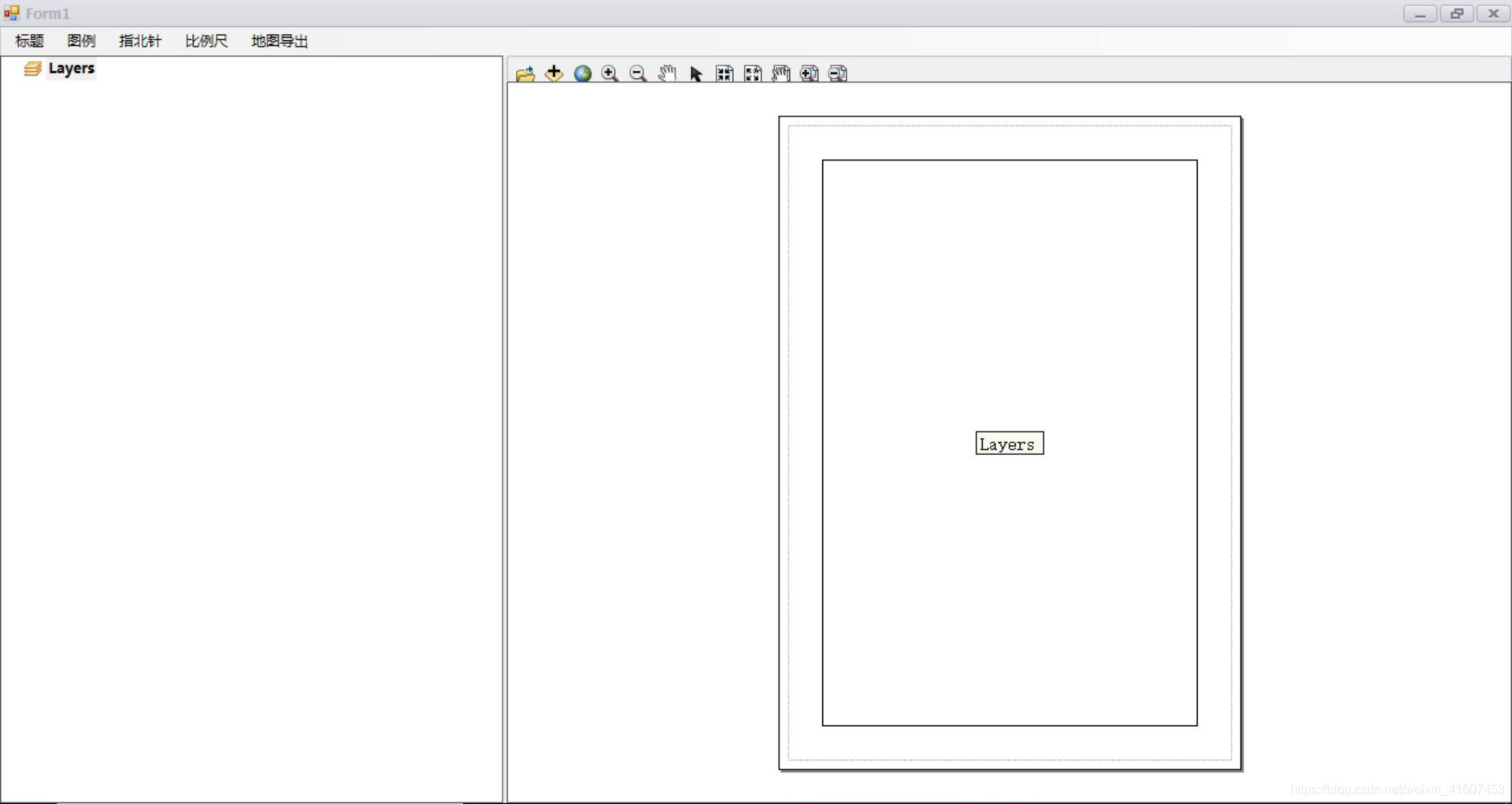
(1)主界面,主要由PageLayout控件、TOC控件、ToolBar控件组成,这里只通过ToolBar控件添加一些基本的缩放、平移等功能。
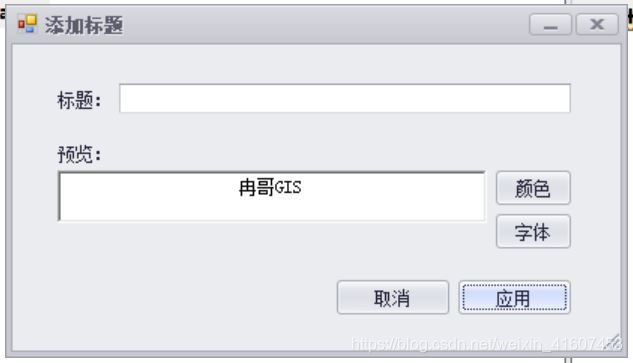
(2)添加标题,在文本框中输入地图名字,选择文字的颜色和字体后点击应用,在地图上拉框选择放置位置。
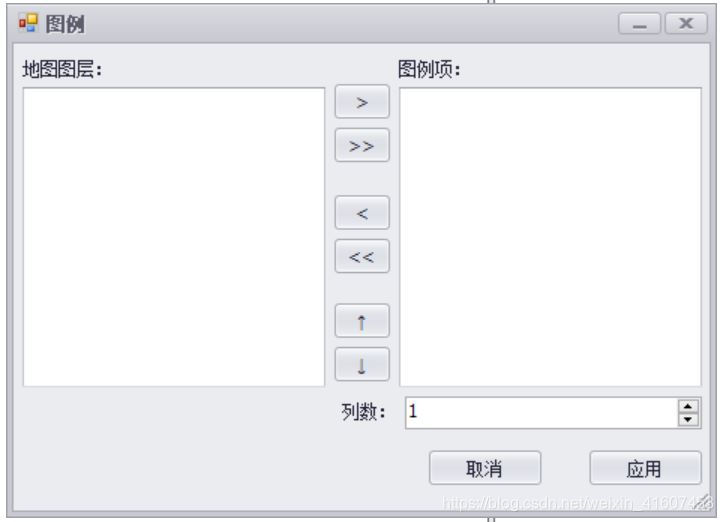
(3)添加图例界面,将需要添加至图例的图层由左侧添加至右侧,选择列数,点击应用后在地图中拉框选择放置位置。
4、代码实现
地图图框点击事件,通过一个int类型的变量tag来判断要添加地图元素的类型。
(1)定义的全局变量:
#region 定义通用变量int tag = 0;//记录操作的标签IMapSurround pMapSurround = null;UID pUid = null;string pElementTypeName = "";//记录创建元素的名称,图例?比例尺?...IMap pMap;#endregion#region 定义添加标题变量public string title = "";public ITextSymbol pTextSymbol = new TextSymbolClass();#endregion#region 定义添加图例变量public List pLenendItemsString = new List();ILegend2 pLegend2;public int pColumnCount = 1;//图例标题样式ITextSymbol pTitltTextSymbol = new TextSymbolClass();IFontDisp pTitltFont = new StdFont() as IFontDisp;//图例图层名样式ITextSymbol pLayerTextSymbol = new TextSymbolClass();IFontDisp pLayerFont = new StdFont() as IFontDisp;//图例标签样式ITextSymbol pLabelTextSymbol = new TextSymbolClass();IFontDisp pLabelFont = new StdFont() as IFontDisp;ILegendFormat pLenendFormat = new LegendFormat();#endregion
(2)点击地图图框事件
//点击地图框事件private void axPageLayoutControl1_OnMouseDown(object sender, ESRI.ArcGIS.Controls.IPageLayoutControlEvents_OnMouseDownEvent e){if (e.button == 1){IPageLayout pPageLayout = axPageLayoutControl1.PageLayout; ;IGraphicsContainer pGraphicsContainer = pPageLayout as IGraphicsContainer;IActiveView pActiveView = pPageLayout as IActiveView;IMapFrame pMapFrame;IMapSurroundFrame pMapSurroundFrame;IElement pElement;switch (tag){#region 添加标题case 1:ITextElement pTextElement = new TextElementClass();pTextElement.Text = title;pTextElement.Symbol = pTextSymbol;pElement = pTextElement as IElement;try{pElement.Geometry = axPageLayoutControl1.TrackRectangle();}catch{MessageBox.Show("请拉框选择范围!", "提示");return;}pGraphicsContainer.AddElement(pElement, 0);axPageLayoutControl1.Refresh();tag = 0;break;#endregion#region 添加图例case 2:pLegend2 = new LegendClass_2();pElement = axPageLayoutControl1.FindElementByName("legend");if (pElement != null){pGraphicsContainer.DeleteElement(pElement);}pElementTypeName = "lenend";pUid = new UIDClass();pUid.Value = "esriCato.Legend";if (pGraphicsContainer == null) return;pMapSurround = pLegend2 as IMapSurround;pMapSurround.Map = pActiveView.FocusMap;pMapFrame = pGraphicsContainer.FindFrame(pActiveView.FocusMap) as IMapFrame;if (pMapFrame == null) return;pMapSurroundFrame = new MapSurroundFrameClass();pMapSurroundFrame = pMapFrame.CreateSurroundFrame(pUid, null);pMapSurroundFrame.MapSurround = pMapSurround;pMapSurroundFrame.MapSurround.Name = pElementTypeName;pMapSurroundFrame.MapFrame = pMapFrame;pElement = pMapSurroundFrame as IElement;try{pElement.Geometry = axPageLayoutControl1.TrackRectangle();}catch{MessageBox.Show("请拉框选择范围!", "提示");return;}pElement.Activate(pActiveView.ScreenDisplay);pElement.Draw(pActiveView.ScreenDisplay, null);pGraphicsContainer.AddElement(pElement, 0);pActiveView.PartialRefresh(esriViewDrawPhase.esriViewGeography, null, null);//图例标题字体样式pLegend2.Title = "图例";pTitltFont.Name = "黑体";pTitltFont.Bold = true;pTitltFont.Size = 16;pTitltTextSymbol.Color = ColorToIColor(Color.Black);pTitltTextSymbol.Font = pTitltFont;pLenendFormat.TitleSymbol = pTitltTextSymbol;//图例图层名字体样式pLayerFont.Name = "仿宋_GB2312";pLayerFont.Size = 13;pLayerTextSymbol.Font = pLayerFont;//图例标签字体样式pLabelFont.Name = "仿宋_GB2312";pLabelFont.Size = 13;pLabelTextSymbol.Font = pLayerFont;for (int i = 0; i < pLenendItemsString.Count; i++){for (int j = 0; j < pLegend2.ItemCount; j++){if (pLenendItemsString[i].ToString() == pLegend2.get_Item(j).Layer.Name)pLegend2.RemoveItem(j);}}pLegend2.AdjustColumns(pColumnCount);pLegend2.Refresh();tag = 0;break;#endregion}}}
5、代码下载
github: ArcEngine实现专题图制作
本文来自互联网用户投稿,文章观点仅代表作者本人,不代表本站立场,不承担相关法律责任。如若转载,请注明出处。 如若内容造成侵权/违法违规/事实不符,请点击【内容举报】进行投诉反馈!