基于Vue3和Element Plus组件库实现一个完整的登录功能
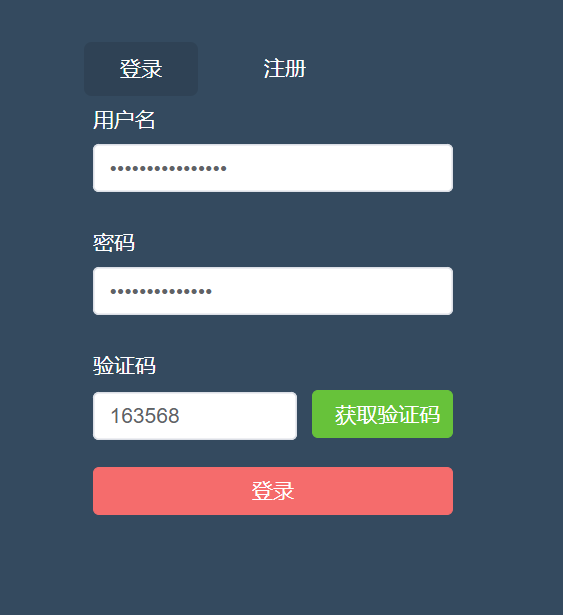
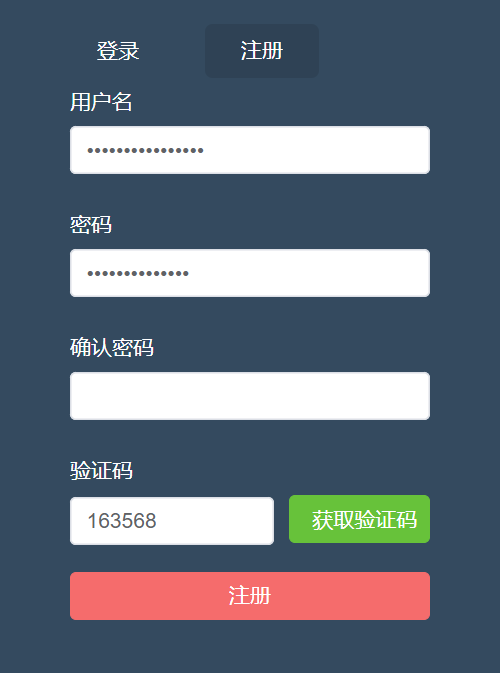
先看一下最终要实现的效果:
登录页面:
注册页面:
(1)引入element-plus组件库
引入组件库的方式有好多种,在这里我就在main.js全局引入了.
npm i element-plus -Smain.js中代码:
import { createApp } from "vue";
//element-plus
import ElementPlus from "element-plus";
import "element-plus/dist/index.css";
import App from "./App.vue";
import router from "./router";
import axios from "axios";
import store from "./store";
//创建实例
const app = createApp(App);
//全局应用配置
app.config.globalProperties.$axios = axios;app.use(ElementPlus).use(store).use(router).mount("#app");
引入之后自己可以用几个按钮测试一下是否引入成功.
(2)登录及注册页面
html部分
views/account/Login.vue
{{ data.code_button_text }} {{ data.current_menu === "login" ? "登录" : "注册" }} js部分
css部分(使用了scss)
(3)封装一些公共方法及样式
新建styles文件夹,然后新建几个样式文件:
normalize.scss
/*! normalize.css v8.0.1 | MIT License | github.com/necolas/normalize.css *//* Document========================================================================== *//*** 1. Correct the line height in all browsers.* 2. Prevent adjustments of font size after orientation changes in iOS.*//* div的默认样式不存在padding和margin为0的情况*/html, body, span, applet, object, iframe,h1, h2, h3, h4, h5, h6, p, blockquote, pre,a, abbr, acronym, address, big, cite, code,del, dfn, em, img, ins, kbd, q, s, samp,small, strike, strong, sub, sup, tt, var,b, u, i, center,dl, dt, dd, ol, ul,fieldset, form, legend,table, caption, tbody, tfoot, thead, tr, th, td,article, aside, canvas, details, embed, figure, figcaption, footer, header, hgroup, menu, nav, output, ruby, section, summary,time, mark, audio, video {margin: 0;padding: 0;font-size: 100%;font: inherit;vertical-align: baseline;}/* HTML5 display-role reset for older browsers */article, aside, details, figcaption, figure, footer, header, hgroup, menu, nav, section {display: block;}html {line-height: 1.15; /* 1 */-webkit-text-size-adjust: 100%; /* 2 */}/* Sections========================================================================== *//*** Remove the margin in all browsers.*/body {margin: 0;font-family: 'Microsoft YaHei';font-size: 14px;}/*** Render the `main` element consistently in IE.*/main {display: block;}/*** Correct the font size and margin on `h1` elements within `section` and* `article` contexts in Chrome, Firefox, and Safari.*//* Grouping content========================================================================== *//*** 1. Add the correct box sizing in Firefox.* 2. Show the overflow in Edge and IE.*/hr {box-sizing: content-box; /* 1 */height: 0; /* 1 */overflow: visible; /* 2 */}/*** 1. Correct the inheritance and scaling of font size in all browsers.* 2. Correct the odd `em` font sizing in all browsers.*/pre {font-family: monospace, monospace; /* 1 */font-size: 1em; /* 2 */}/* Text-level semantics========================================================================== *//*** Remove the gray background on active links in IE 10.*/a {background-color: transparent;text-decoration: none;}/*** 1. Remove the bottom border in Chrome 57-* 2. Add the correct text decoration in Chrome, Edge, IE, Opera, and Safari.*/abbr[title] {border-bottom: none; /* 1 */text-decoration: underline; /* 2 */text-decoration: underline dotted; /* 2 */}/*** Add the correct font weight in Chrome, Edge, and Safari.*/b,strong {font-weight: bolder;}/*** 1. Correct the inheritance and scaling of font size in all browsers.* 2. Correct the odd `em` font sizing in all browsers.*/code,kbd,samp {font-family: monospace, monospace; /* 1 */font-size: 1em; /* 2 */}/*** Add the correct font size in all browsers.*/small {font-size: 80%;}/*** Prevent `sub` and `sup` elements from affecting the line height in* all browsers.*/sub,sup {font-size: 75%;line-height: 0;position: relative;vertical-align: baseline;}sub {bottom: -0.25em;}sup {top: -0.5em;}/* Embedded content========================================================================== *//*** Remove the border on images inside links in IE 10.*/img {display: block;border-style: none;}/* Forms========================================================================== *//*** 1. Change the font styles in all browsers.* 2. Remove the margin in Firefox and Safari.*/button,input,optgroup,select,textarea {font-family: inherit; /* 1 */font-size: 100%; /* 1 */margin: 0; /* 2 */}/*** Show the overflow in IE.* 1. Show the overflow in Edge.*/button,input { /* 1 */overflow: visible;}/*** Remove the inheritance of text transform in Edge, Firefox, and IE.* 1. Remove the inheritance of text transform in Firefox.*/button,select { /* 1 */text-transform: none;}/*** Correct the inability to style clickable types in iOS and Safari.*/button,[type="button"],[type="reset"],[type="submit"] {-webkit-appearance: button;}/*** Remove the inner border and padding in Firefox.*/button::-moz-focus-inner,[type="button"]::-moz-focus-inner,[type="reset"]::-moz-focus-inner,[type="submit"]::-moz-focus-inner {border-style: none;padding: 0;}/*** Restore the focus styles unset by the previous rule.*/button:-moz-focusring,[type="button"]:-moz-focusring,[type="reset"]:-moz-focusring,[type="submit"]:-moz-focusring {outline: 1px dotted ButtonText;}/*** Correct the padding in Firefox.*/fieldset {padding: 0.35em 0.75em 0.625em;}/*** 1. Correct the text wrapping in Edge and IE.* 2. Correct the color inheritance from `fieldset` elements in IE.* 3. Remove the padding so developers are not caught out when they zero out* `fieldset` elements in all browsers.*/legend {box-sizing: border-box; /* 1 */color: inherit; /* 2 */display: table; /* 1 */max-width: 100%; /* 1 */padding: 0; /* 3 */white-space: normal; /* 1 */}/*** Add the correct vertical alignment in Chrome, Firefox, and Opera.*/progress {vertical-align: baseline;}/*** Remove the default vertical scrollbar in IE 10+.*/textarea {overflow: auto;}/*** 1. Add the correct box sizing in IE 10.* 2. Remove the padding in IE 10.*/[type="checkbox"],[type="radio"] {box-sizing: border-box; /* 1 */padding: 0; /* 2 */}/*** Correct the cursor style of increment and decrement buttons in Chrome.*/[type="number"]::-webkit-inner-spin-button,[type="number"]::-webkit-outer-spin-button {height: auto;}/*** 1. Correct the odd appearance in Chrome and Safari.* 2. Correct the outline style in Safari.*/[type="search"] {-webkit-appearance: textfield; /* 1 */outline-offset: -2px; /* 2 */}/*** Remove the inner padding in Chrome and Safari on macOS.*/[type="search"]::-webkit-search-decoration {-webkit-appearance: none;}/*** 1. Correct the inability to style clickable types in iOS and Safari.* 2. Change font properties to `inherit` in Safari.*/::-webkit-file-upload-button {-webkit-appearance: button; /* 1 */font: inherit; /* 2 */}/* Interactive========================================================================== *//** Add the correct display in Edge, IE 10+, and Firefox.*/details {display: block;}/** Add the correct display in all browsers.*/summary {display: list-item;}/* Misc========================================================================== *//*** Add the correct display in IE 10+.*/template {display: none;}/*** Add the correct display in IE 10.*/[hidden] {display: none;}ul, li { list-style: none; }elementui.scss(当时测试时用的)
.el-button-block{display: block;width: 100%;
}
新建main.scss(引入上方两个样式文件)
@import "./normalize.scss";
@import './elementui.scss'
vue.config.js配置一下样式文件
css: {// 是否使用css分离插件 ExtractTextPluginextract: true,// 开启 CSS source maps?sourceMap: false,// css预设器配置项loaderOptions: {scss: {additionalData: `@import "./src/styles/main.scss";`,},},// requireModuleExtension: true,},登录中封装的校验方法
新建utils文件夹,
a.validate.js
// 校验邮箱
export function validate_email(value) {let regEmail = /^([a-zA-Z]|[0-9])(\w|\-)+@[a-zA-Z0-9]+\.([a-zA-Z]{2,4})$/;return regEmail.test(value);
}// 校验密码
export function validate_password(value) {let regPassword = /^(?!\D+$)(?![^a-zA-Z]+$)\S{6,20}$/;return regPassword.test(value);
}// 校验验证码
export function validate_code(value) {let regCode = /^[a-z0-9]{6}$/;return regCode.test(value);
}
封装请求方法
npm i axios -S记得先在main.js中引入axios
import axios from "axios";utils中新建request.js
import axios from "axios";
//引入element-plus
import { ElMessage } from "element-plus";
console.log("11", process.env.VUE_APP_API); //undefined??//创建实例
const service = axios.create({baseURL: "/devApi", //请求地址timeout: 5000, //超时
});//添加请求拦截器
service.interceptors.request.use(function (config) {//在发送请求之前做些什么return config;},function (error) {console.log(error.request);const errorData = JSON.parse(error.request.response);if (errorData.message) {//判断是否具有message属性ElMessage({message: errorData.message,type: "error",});}//对请求错误做些什么return Promise.reject(errorData);}
);//添加响  应拦截器
service.interceptors.response.use(function (response) {//对响应数据做些什么console.log("响应数据", response);const data = response.data;if (data.resCode === 0) {return Promise.resolve(data);} else {ElMessage({message: data.message,type: "error",});return Promise.reject(data);}},function (error) {//对响应错误做些什么const errorData = JSON.parse(error.request.response);if (errorData.message) {//判断是否具有message属性ElMessage({message: errorData.message,type: "error",});}return Promise.reject(errorData);}
);//暴露service
export default service;
看下接口部分,src目录下新建api文件夹,新建account.js和common.js:
account.js
import instance from "@/utils/request";/*** 注册接口*/
export function Register(data = {}) {return instance.request({method: "POST",url: "/register/",data,});
}/** 登录 */
export function Login(data = {}) {return instance.request({method: "post",url: "/login/",data,});
}/** 登出 */
export function Logout() {return instance.request({method: "post",url: "/logout/",});
}
common.js
import instance from "@/utils/request";/*** 获取验证码*/
export function GetCode(data) {return instance.request({method: "POST",url: "/getCode/",data,});
}/*** http状态码异常演示接口*/
export function ErrorHttp(data) {return instance.request({method: "POST",url: "/error/",data,});
}
(4)配置环境变量
和项目根路径同级,新建几个文件:
.env.development
VUE_APP_API = '/devApi'可以自定义,但是必须是VUE_APP_XXX的格式
.env.production
VUE_APP_API = '/production'.env.test
VUE_APP_API = '/test'配置完后记得在axios文件中打印一下,看下能输出自己配置的环境变量吗.
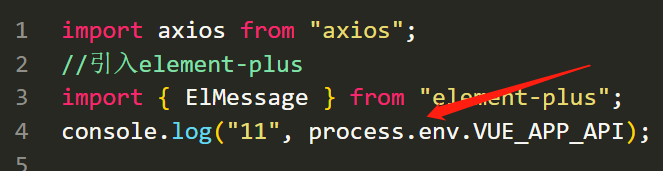
(5)配置代理(跨域)
基本大同小异,代理地址改成自己的就可以了.
devServer: {open: false, //编译完成是否自动打开网页host: "0.0.0.0", //指定使用地址,默认是localhost,0.0.0.0代表可以被外界访问port: 8080,proxy: {"/devApi": {target: "http://v3.web-jshtml.cn/api", //(必选)API服务器的地址changeOrigin: true, //(必选) 是否允许跨域ws: false, //(可选) 是否启用websocketssecure: false, //(可选) 是否启用https接口pathRewrite: {"^/devApi": "", //匹配开头为/devApi的字符串,并替换成空字符串},},},},登录基本上是完成了,还有优化的点,比如说登录放在vuex中,
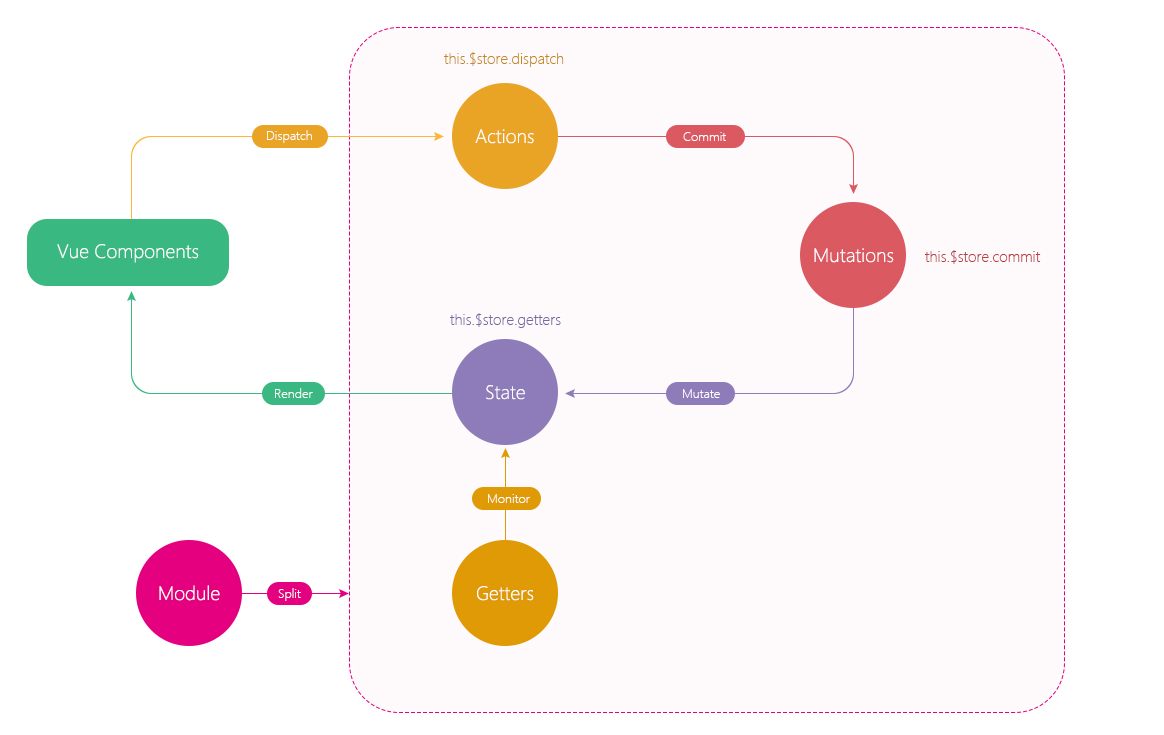
继续改造一下,把登录放在vuex中实现:
先看一下vuex的执行逻辑图:
store新建modules文件夹,新建app.js:
import { Login } from "@/api/account";const state = {count: 100,
};
const getters = {};
const mutations = {};
const actions = {loginAction(context, requestData) {return new Promise((resolve, reject) => {Login(requestData).then((response) => {resolve(response);}).catch((error) => {reject(error);});});},
};export default {namespaced: true,state,getters,mutations,actions,
};
登录页面改造:
import { useStore } from "vuex"; // storeconst store = useStore();注释掉之前的代码:
/** 登录 */// const login = () => {// const requestData = {// username: data.form.username,// password: sha1(data.form.password),// code: data.form.code,// };// data.submit_button_loading = true;// Login(requestData)// .then((response) => {// console.log("login", response);// data.submit_button_loading = false;// proxy.$message({// message: response.message,// type: "success",// });// reset();// })// .catch((error) => {// console.log("登录失败", error);// data.submit_button_loading = false;// });// };const login = () => {const requestData = {username: data.form.username,password: sha1(data.form.password),code: data.form.code,};data.submit_button_loading = true;store.dispatch("app/loginAction", requestData).then((response) => {proxy.$message({message: response.message,type: "success",});reset();}).catch((error) => {console.log("失败", error);});};好了,等有继续优化的地方我再继续完善.
(4)路由守卫
先来看一下总体的思路图:
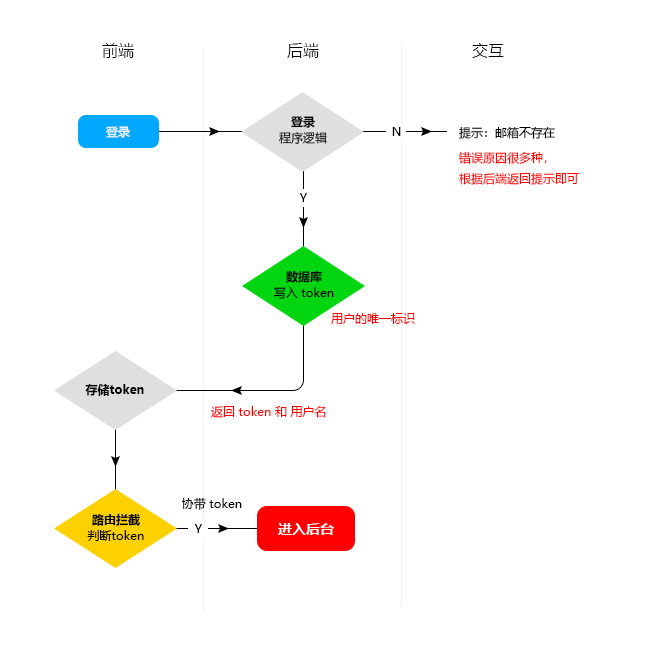
在router文件下新建permit.js:
import router from "./index";
//cookie
import { getToken } from "@/utils/cookies";//全局路由守卫
router.beforeEach((to, from) => {// console.log("from", from);//token不存在if (!getToken()) {console.log("to", to);if (to.name !== "Login") {return {name: "Login",};}}
});//全局后置守卫
router.afterEach((to, from) => {console.log(to);console.log(from);
});
引入到main.js中:
//路由守卫
import "./router/permit";
utils文件中新建cookies.js文件
先安装js-cookie:
npm i js-cookie -Scookies.js:
import Cookies from "js-cookie";//变量
const tokenKey = "tokenAdmin";
const usernameKey = "username";//获取token
export function getToken() {return Cookies.get(tokenKey);
}//写入token
export function setToken(value) {return Cookies.set(tokenKey, value);
}//删除token
export function removeToken() {return Cookies.remove(tokenKey);
}//写入 username
export function setUsername(value) {return Cookies.set(usernameKey, value);
}//获取 username
export function getUsername() {return Cookies.get(usernameKey);
}//删除 username
export function removeUsername() {return Cookies.remove(usernameKey);
}
vuex中改造一下:
store/app.js
import { Login, Logout } from "@a/account";
import {setToken,setUsername,getToken,getUsername,removeToken,removeUsername,
} from "@u/cookies";const state = {token: "" || getToken(),username: "" || getUsername(),collapse: JSON.parse(sessionStorage.getItem("collapse")) || false,
};
const getters = {};
const mutations = {SET_COLLAPSE(state) {state.collapse = !state.collapse;sessionStorage.setItem("collapse", JSON.stringify(state.collapse));},//设置tokenSET_TOKEN(state, value) {state.token = value;value && setToken(value); //当value存在时写入token},//设置用户名SET_USERNAME(state, value) {state.username = value;value && setUsername(value); //当value存在时写入token},
};
const actions = {//登录loginAction(context, requestData) {return new Promise((resolve, reject) => {Login(requestData).then((response) => {let data = response.data;context.commit(" SET_TOKEN", data.token);context.commit("  SET_USERNAME", data.username);resolve(response);}).catch((error) => {reject(error);});});},//退出logoutAction({ commit }) {return new Promise((resolve, reject) => {Logout().then((response) => {removeToken();removeUsername();commit(" SET_TOKEN", "");commit("  SET_USERNAME", "");resolve(response);}).catch((error) => {reject(error);});});},
};export default {namespaced: true,state,getters,mutations,actions,
};
主页有退出的话可以这么来触发:
//退出const handleLogout = () => {proxy.$confirm("确定退出管理后台", "提示", {confirmButtonText: "确定",cancelButtonText: "取消",type: "warning",}).then(() => {store.dispatch("app/logoutAction").then((res) => {proxy.$message({type: "success",message: res.message,});replace({name: "Login",});});}).catch(() => {// catch error});};记得引入和返回,不能忘记:
import { useStore } from "vuex";
import { ref, getCurrentInstance } from "vue";
import { useRouter } from "vue-router";
//获取实例上下文const { proxy } = getCurrentInstance();//引入routerconst { replace } = useRouter();const store = useStore(); return {handleLogout,};再来改造一下之前封装的axios方法:
import axios from "axios";
//引入element-plus
import { ElMessage } from "element-plus";
// console.log("11", process.env.VUE_APP_API); //undefined??
//cookies
+import { getToken, getUsername, removeToken, removeUsername } from "./cookies";
//引入路由
+import router from "@/router";//创建实例
const service = axios.create({baseURL: "/devApi", //请求地址timeout: 5000, //超时
});//添加请求拦截器
service.interceptors.request.use(function (config) {//在发送请求之前做些什么+ if (getToken()) {config.headers["Token"] = getToken(); //携带token Token可以和后端约定}+ if (getUsername()) {config.headers["Username"] = getUsername();//Username可以和后端约定}console.log("config", config);return config;},function (error) {console.log(error.request);const errorData = JSON.parse(error.request.response);if (errorData.message) {//判断是否具有message属性ElMessage({message: errorData.message,type: "error",});}//对请求错误做些什么return Promise.reject(errorData);}
);//添加响  应拦截器
service.interceptors.response.use(function (response) {//对响应数据做些什么console.log("响应数据", response);const data = response.data;+ if (data.resCode === 0) {return Promise.resolve(data);} else {ElMessage({message: data.message,type: "error",});return Promise.reject(data);}},function (error) {//对响应错误做些什么const errorData = JSON.parse(error.request.response);if (errorData.message) {//判断是否具有message属性ElMessage({message: errorData.message,type: "error",});}//token失效自动退出+ if (errorData.resCode === 1010) {router.replace({name: "Login",});removeToken();removeUsername();}return Promise.reject(errorData);}
);//暴露service
export default service;
再来优化一下目录别名这块:
vue.config.js
configureWebpack: (config) => {config.resolve = {// 配置解析别名extensions: [".js", ".json", ".vue"], // 自动添加文件名后缀alias: {"@": path.resolve(__dirname, "./src"),"@u": path.resolve(__dirname, "./src/utils"),"@a": path.resolve(__dirname, "./src/api"),"@c": path.resolve(__dirname, "./src/components"),},};},改完记得重启项目,所以之前的代码就这样写了:
import { Login, Logout } from "@a/account";
import {setToken,setUsername,getToken,getUsername,removeToken,removeUsername,
} from "@u/cookies";
本文来自互联网用户投稿,文章观点仅代表作者本人,不代表本站立场,不承担相关法律责任。如若转载,请注明出处。 如若内容造成侵权/违法违规/事实不符,请点击【内容举报】进行投诉反馈!