git常用的几个命令
git
- 为什么要使用git?
- 常用的指令
- git clone (推荐)
- git init + git remote add origin+仓库地址
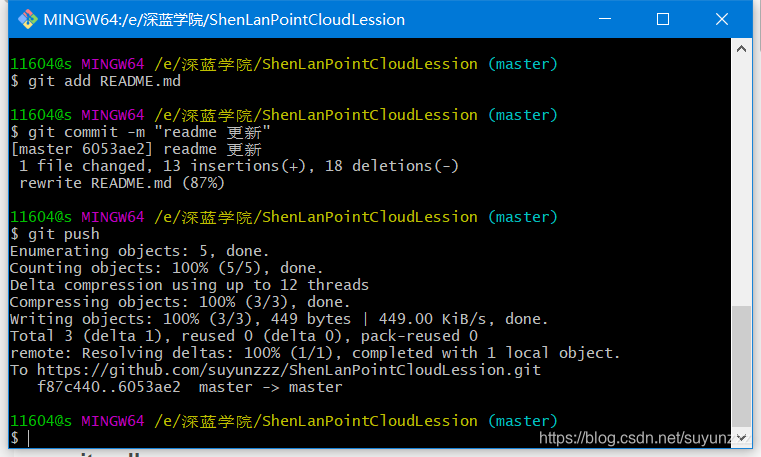
- git add + 修改的文件
- git commit -m "更新日志"
- git push
- git pull
- 常见错误
- 1
- 2、fatal: refusing to merge unrelated histories
- 3、Github文件夹灰色无法点击打开
- 4、Git第一次git commit提交时遇到 unable to auto-detect email address 错误
- 图说
- Reference
为什么要使用git?
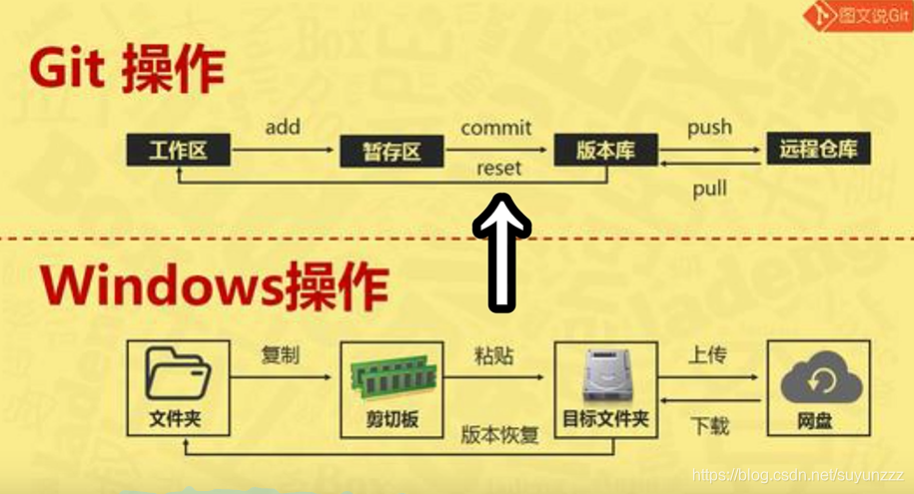
- 代码管理,写完代码之后需要把它备份到一个仓库
- 版本控制
- 团队协作
常用的指令
git clone (推荐)
- 从远程仓库复制项目同时也初始化
git init + git remote add origin+仓库地址
- 初始化&配置仓库地址
git add + 修改的文件
- 如果是全部的文件就是git add .
git commit -m “更新日志”
- 将代码放在clone后的文件夹下,在bash中输入这条命令就能实现文件上传到版本库
git push
- 版本库上传到远程仓库。
- 修改文件后上传
git pull
- 每次开发前都要pull一下,保证本地与远程仓库一样。
常见错误
1
error: failed to push some refs to 'git@github.com:....." Updates were rejected because the remote contains work that you do not have locally.This is usually caused by another repository pushing to
解决
参考这篇博客以及下面的评论

具体解决就是先pull合并,然后再push
$ git pull --rebase origin master
From https://github.com/suyunzzz/aiimooc_lesson* branch            master     -> FETCH_HEAD
Successfully rebased and updated refs/heads/master.
$ git push -u origin master
Enumerating objects: 27, done.
Counting objects: 100% (27/27), done.
Delta compression using up to 12 threads
Compressing objects: 100% (22/22), done.
Writing objects: 100% (25/25), 41.31 MiB | 2.08 MiB/s, done.
Total 25 (delta 5), reused 0 (delta 0), pack-reused 0
remote: Resolving deltas: 100% (5/5), completed with 2 local objects.
remote: warning: GH001: Large files detected. You may want to try Git Large File Storage - https://git-lfs.github.com.
remote: warning: See http://git.io/iEPt8g for more information.
remote: warning: File odometry_pic_and_video/ndt_map.pcd is 92.26 MB; this is larger than GitHub's recommended maximum file size of 50.00 MB
To https://github.com/suyunzzz/aiimooc_lesson.gitd6accd1..416617c master -> master
Branch 'master' set up to track remote branch 'master' from 'origin'.2、fatal: refusing to merge unrelated histories
这是因为远程仓库已经存在代码记录了,并且那部分代码没有和本地仓库进行关联,我们可以使用如下操作允许pull未关联的远程仓库旧代码:
git pull origin master --allow-unrelated-histories
然后我们可以push代码了
$ git pull origin  master
From https://github.com/suyunzzz/Airborn_PointCLoudGPF* branch            master     -> FETCH_HEAD
fatal: refusing to merge unrelated histories11604@s MINGW64 ~/Desktop/science_code/GPF_修改 (master)
$ git pull origin master --allow-unrelated-histories
From https://github.com/suyunzzz/Airborn_PointCLoudGPF* branch            master     -> FETCH_HEAD
error: The following untracked working tree files would be overwritten by merge:README.md
Please move or remove them before you merge.
Aborting11604@s MINGW64 ~/Desktop/science_code/GPF_修改 (master)
$11604@s MINGW64 ~/Desktop/science_code/GPF_修改 (master)
$ git pull origin master --allow-unrelated-histories
remote: Enumerating objects: 3, done.
remote: Counting objects: 100% (3/3), done.
remote: Total 2 (delta 0), reused 0 (delta 0), pack-reused 0
Unpacking objects: 100% (2/2), 585 bytes | 30.00 KiB/s, done.
From https://github.com/suyunzzz/Airborn_PointCLoudGPF* branch            master     -> FETCH_HEAD59035e0..50da614  master     -> origin/master
Already up to date!
Merge made by the 'recursive' strategy.11604@s MINGW64 ~/Desktop/science_code/GPF_修改 (master)
$ git pull11604@s MINGW64 ~/Desktop/science_code/GPF_修改 (master)
$ ^C11604@s MINGW64 ~/Desktop/science_code/GPF_修改 (master)
$ git push
fatal: The current branch master has no upstream branch.
To push the current branch and set the remote as upstream, usegit push --set-upstream origin master11604@s MINGW64 ~/Desktop/science_code/GPF_修改 (master)
$  git push --set-upstream origin masterEnumerating objects: 6, done.
Counting objects: 100% (6/6), done.
Delta compression using up to 12 threads
Compressing objects: 100% (5/5), done.
Writing objects: 100% (5/5), 1.21 MiB | 407.00 KiB/s, done.
Total 5 (delta 1), reused 0 (delta 0), pack-reused 0
remote: Resolving deltas: 100% (1/1), done.
To https://github.com/suyunzzz/Airborn_PointCLoudGPF.git50da614..8778f7b  master -> master
Branch 'master' set up to track remote branch 'master' from 'origin'.
3、Github文件夹灰色无法点击打开
参考
4、Git第一次git commit提交时遇到 unable to auto-detect email address 错误
参考:https://www.jianshu.com/p/173a4f784898
命令行 ll 输出所有文件 找到隐藏文件 .git
进入.git 目录找到config文件
再最后面添加
[user]
email=laochangbike@163.com
name=chy
图说
Reference
bilibili-入坑git,只要记住这5个指令 | 如何使用git进行代码管理
本文来自互联网用户投稿,文章观点仅代表作者本人,不代表本站立场,不承担相关法律责任。如若转载,请注明出处。 如若内容造成侵权/违法违规/事实不符,请点击【内容举报】进行投诉反馈!