Gameplay Ability 学习(二)
Gameplay Ability 学习(二)
- 实现用Gameplay Ability给角色绑定跳跃技能
- 给角色添加技能数组
- 重写BeginPlay
- 创建一个GameplayAbility的蓝图类
- 角色蓝图添加技能
- 使用GameplayTag调用技能
- 设置技能按键
- 角色调用技能
实现用Gameplay Ability给角色绑定跳跃技能
给角色添加技能数组
/* 技能数组 */
UPROPERTY(EditAnywhere,BlueprintReadWrite, Category = "Character Abilities")
TArray<TSubclassOf<class UGameplayAbility>> PreloadedAbilities;
重写BeginPlay
首先删除BeginPlay绑定输入的代码,保存编译运行,可以看到角色无法控制,也不能跳。
然后修改成如下代码:
void ARPGCharacterBase::BeginPlay()
{Super::BeginPlay();if(AbilitySystem != nullptr){if(PreloadedAbilities.Num() > 0){for(auto i =0;i < PreloadedAbilities.Num(); i++){if(PreloadedAbilities[i] != nullptr){// 实例化技能并传给AbilitySystemComp里面记录下来,那么当前角色掌握了该技能AbilitySystem->GiveAbility(FGameplayAbilitySpec(PreloadedAbilities[i].GetDefaultObject(),1,0));}}}// 每次添加新技能都要初始化技能信息AbilitySystem->InitAbilityActorInfo(this,this);}
}
创建一个GameplayAbility的蓝图类
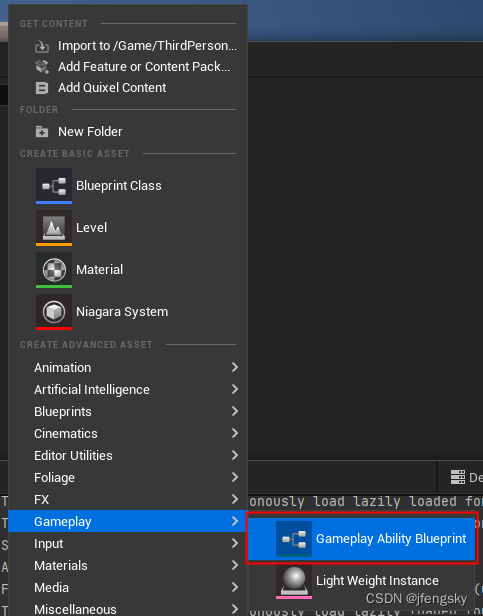
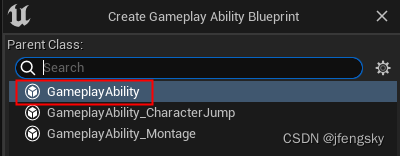
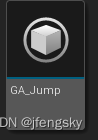
命名为GA_Jump
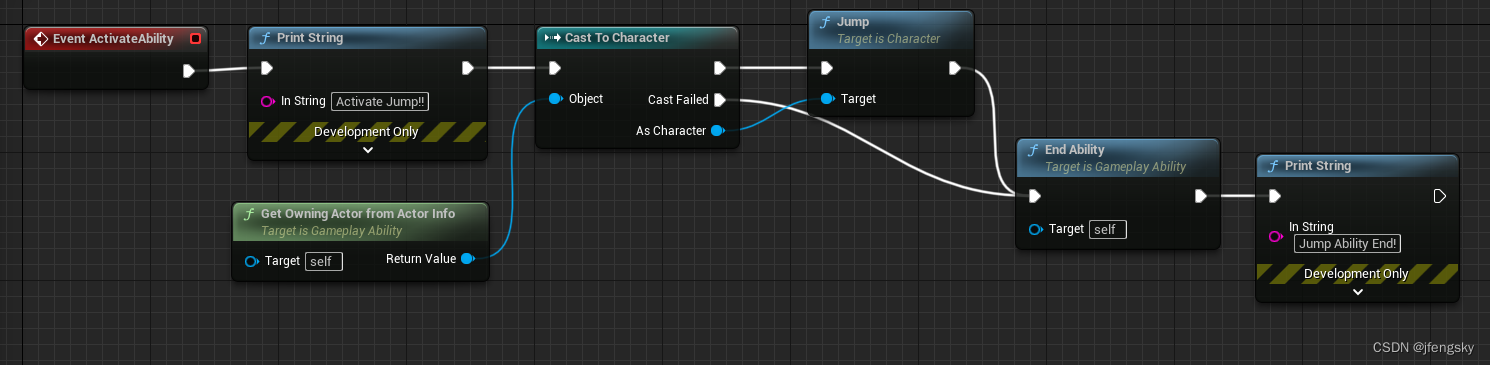
编辑该蓝图如下:
角色蓝图添加技能
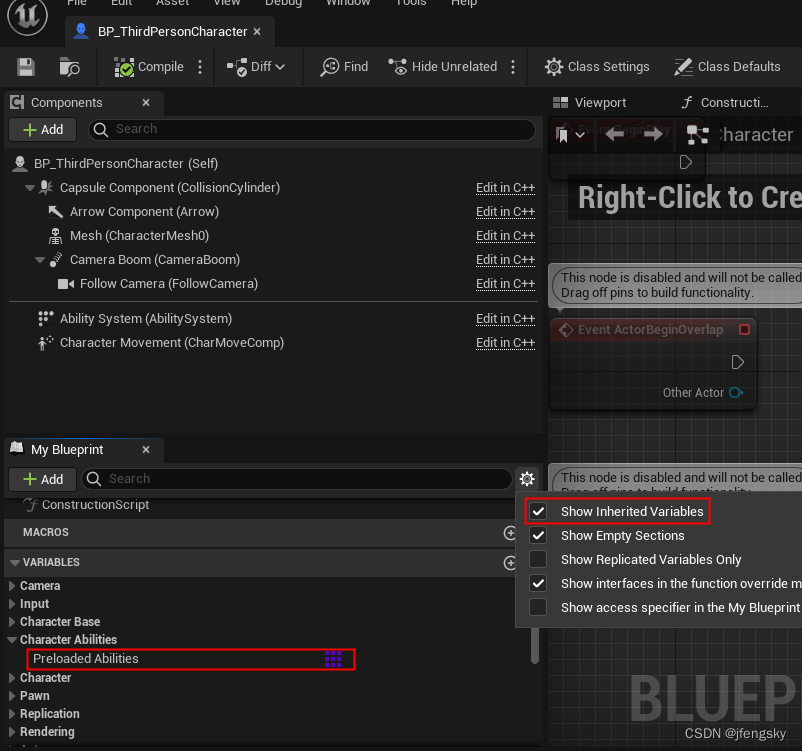
打开角色蓝图,勾选 显示继承变量,可以显示出PreloadedAbilities
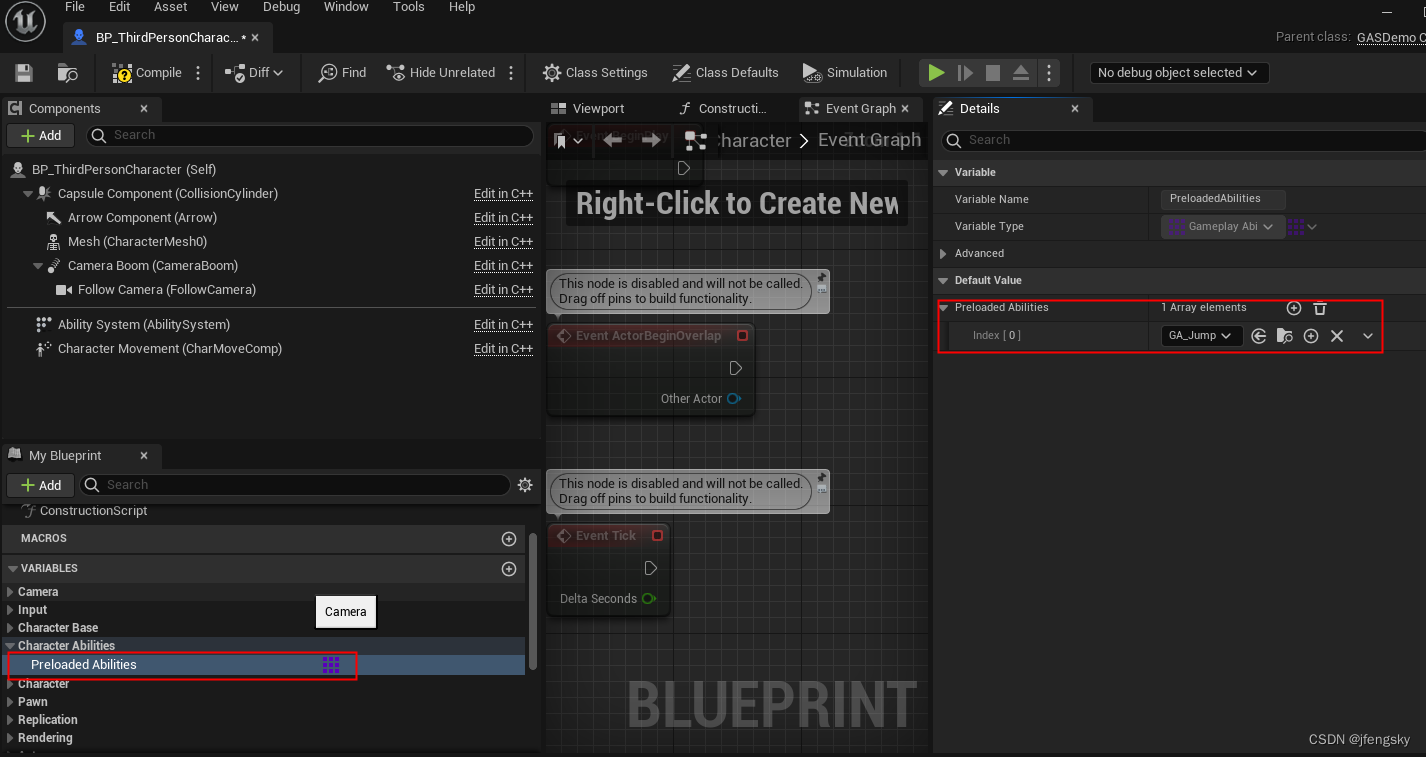
添加GA_Jump
使用GameplayTag调用技能
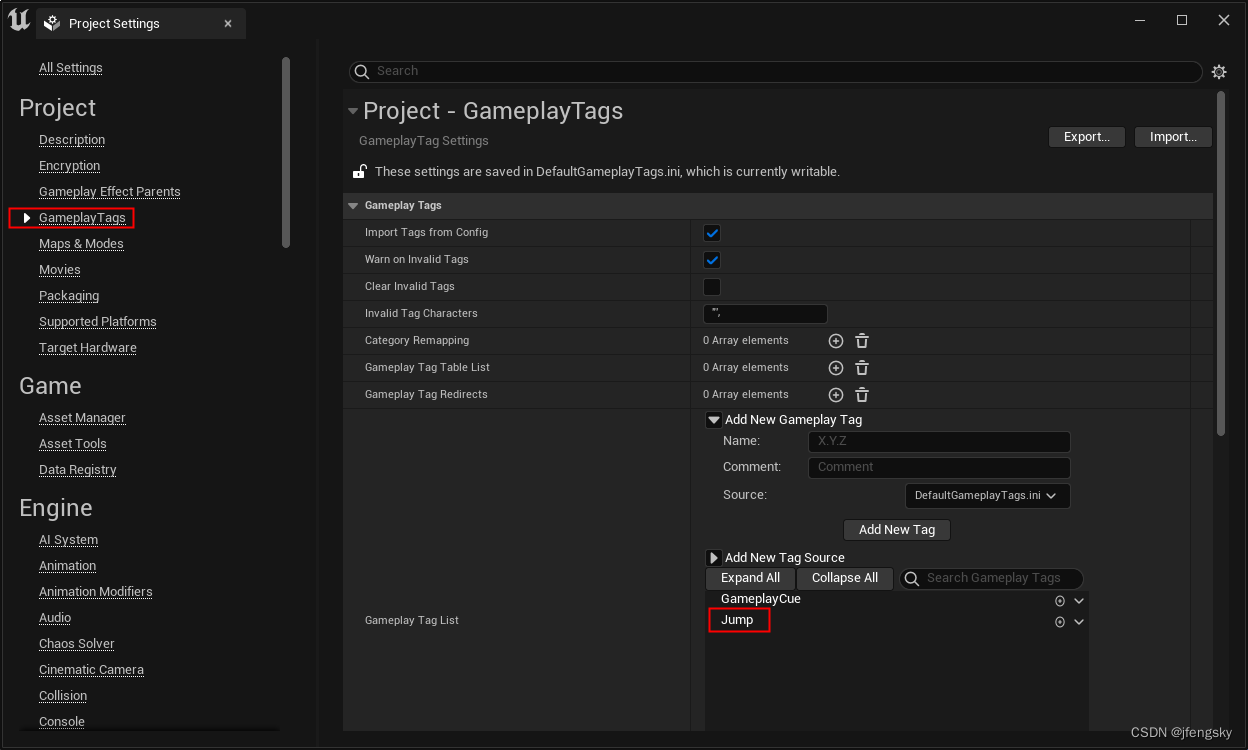
打开项目设置,选择GameplayTags,添加一个Jump标签
继续编辑GA_Jump蓝图,给技能绑定Jump Tag
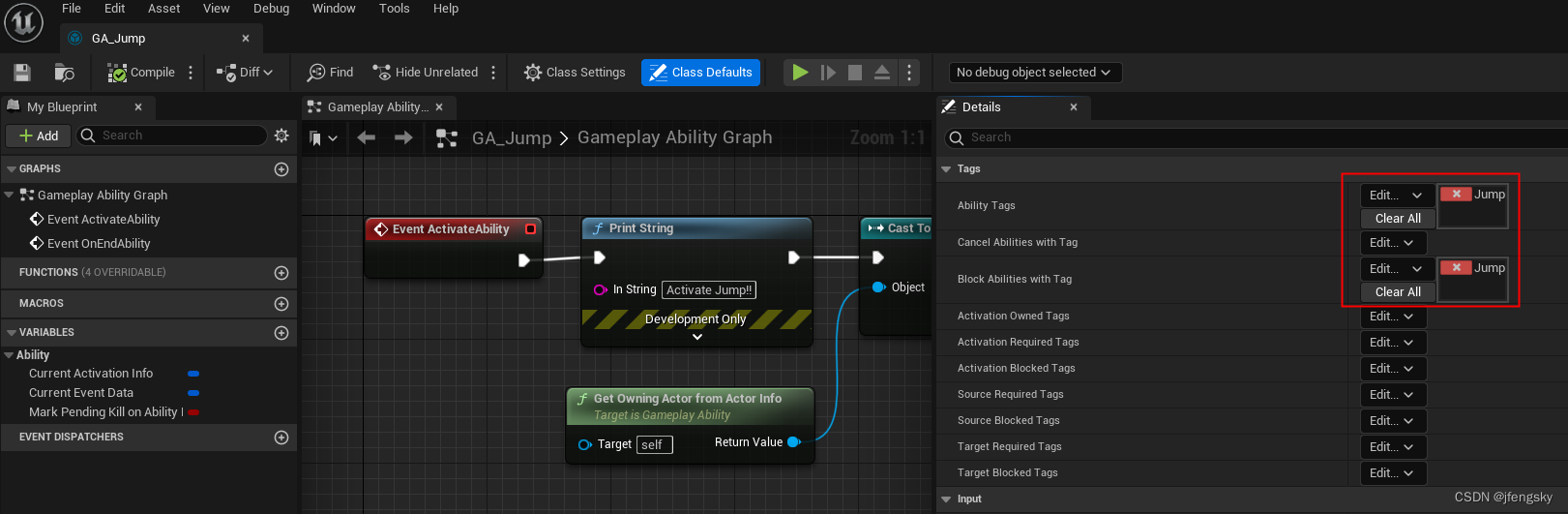
- Ability Tags: 召唤或取消这个技能所需的标签,可以理解为这个技能的名字或种类名。
- Block Abilities with Tag:是指当这个技能被激活时,拥有该标签的其它标签将不能被激活,我把它设为Jump是为了防止当一个跳跃技能未完成前再次触发一个跳跃技能。
设置技能按键
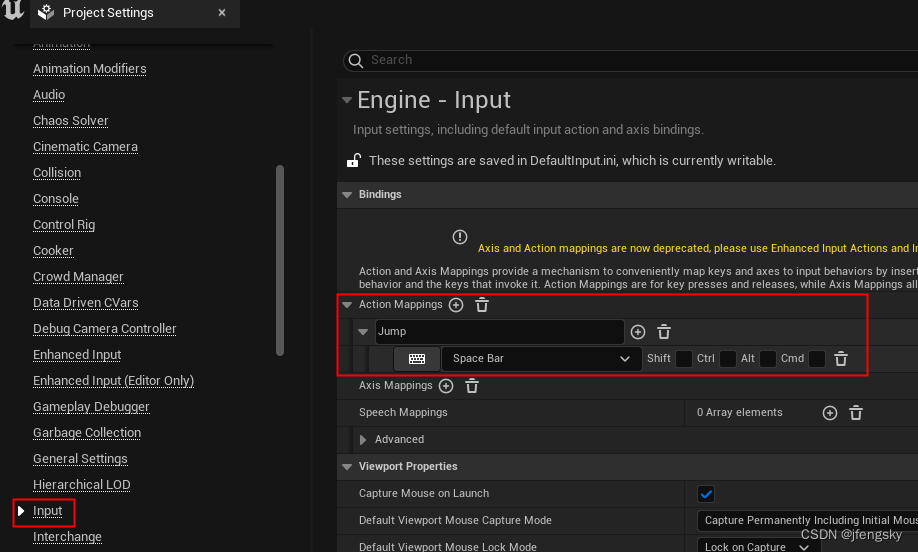
角色调用技能
进入角色蓝图,给技能按键调用技能
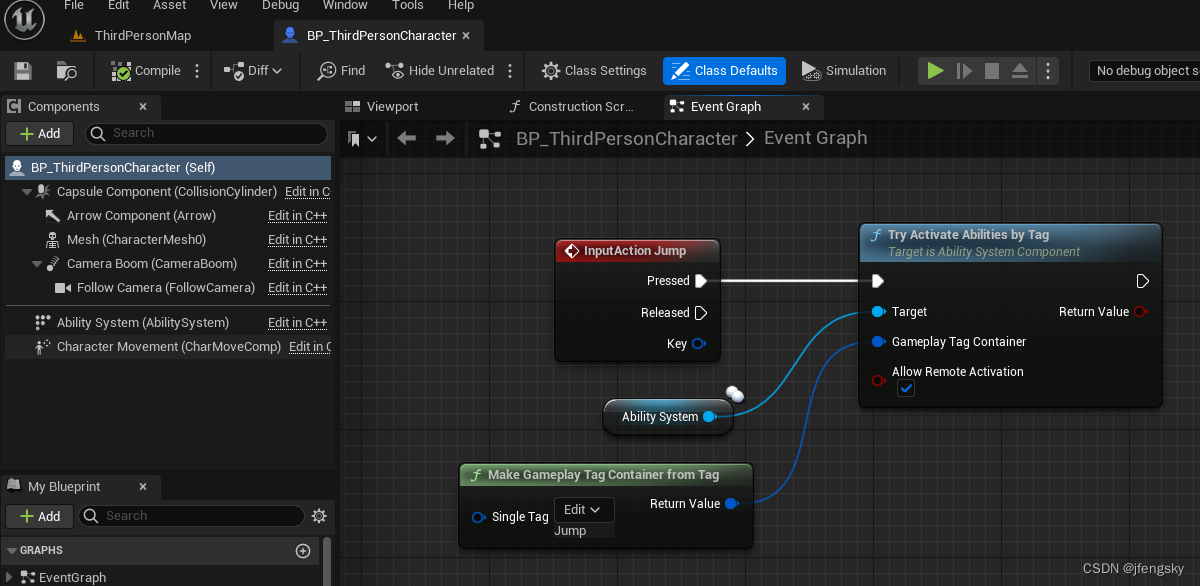
编译保存运行,可以看到触发绑定的按键角色跳起来了。
完整的GASDemoCharacter.h
// Copyright Epic Games, Inc. All Rights Reserved.#pragma once#include "CoreMinimal.h"
#include "GameFramework/Character.h"
#include "InputActionValue.h"
#include "AbilitySystemInterface.h"
#include "AbilitySystemComponent.h"
#include "GASDemoCharacter.generated.h"UCLASS(config=Game)
class AGASDemoCharacter : public ACharacter, public IAbilitySystemInterface
{GENERATED_BODY()/** Camera boom positioning the camera behind the character */UPROPERTY(VisibleAnywhere, BlueprintReadOnly, Category = Camera, meta = (AllowPrivateAccess = "true"))class USpringArmComponent* CameraBoom;/** Follow camera */UPROPERTY(VisibleAnywhere, BlueprintReadOnly, Category = Camera, meta = (AllowPrivateAccess = "true"))class UCameraComponent* FollowCamera;/** MappingContext */UPROPERTY(EditAnywhere, BlueprintReadOnly, Category = Input, meta = (AllowPrivateAccess = "true"))class UInputMappingContext* DefaultMappingContext;/** Jump Input Action */UPROPERTY(EditAnywhere, BlueprintReadOnly, Category = Input, meta = (AllowPrivateAccess = "true"))class UInputAction* JumpAction;/** Move Input Action */UPROPERTY(EditAnywhere, BlueprintReadOnly, Category = Input, meta = (AllowPrivateAccess = "true"))class UInputAction* MoveAction;/** Look Input Action */UPROPERTY(EditAnywhere, BlueprintReadOnly, Category = Input, meta = (AllowPrivateAccess = "true"))class UInputAction* LookAction;public:/** 添加AbilitySystem */UPROPERTY(EditAnywhere, BlueprintReadWrite, Category="CharacterBase")UAbilitySystemComponent* AbilitySystem;virtual UAbilitySystemComponent* GetAbilitySystemComponent() const;/* 技能数组 */UPROPERTY(EditAnywhere,BlueprintReadWrite, Category = "Character Abilities")TArray<TSubclassOf<class UGameplayAbility>> PreloadedAbilities;public:AGASDemoCharacter();protected:/** Called for movement input */void Move(const FInputActionValue& Value);/** Called for looking input */void Look(const FInputActionValue& Value);protected:// APawn interfacevirtual void SetupPlayerInputComponent(class UInputComponent* PlayerInputComponent) override;// To add mapping contextvirtual void BeginPlay() override;public:/** Returns CameraBoom subobject **/FORCEINLINE class USpringArmComponent* GetCameraBoom() const { return CameraBoom; }/** Returns FollowCamera subobject **/FORCEINLINE class UCameraComponent* GetFollowCamera() const { return FollowCamera; }};
完整的GASDemoCharacter.cpp
// Copyright Epic Games, Inc. All Rights Reserved.#include "GASDemoCharacter.h"
#include "Camera/CameraComponent.h"
#include "Components/CapsuleComponent.h"
#include "Components/InputComponent.h"
#include "GameFramework/CharacterMovementComponent.h"
#include "GameFramework/Controller.h"
#include "GameFramework/SpringArmComponent.h"
#include "EnhancedInputComponent.h"
#include "EnhancedInputSubsystems.h"//
// AGASDemoCharacterUAbilitySystemComponent* AGASDemoCharacter::GetAbilitySystemComponent() const
{return AbilitySystem;
}AGASDemoCharacter::AGASDemoCharacter()
{// Set size for collision capsuleGetCapsuleComponent()->InitCapsuleSize(42.f, 96.0f);// Don't rotate when the controller rotates. Let that just affect the camera.bUseControllerRotationPitch = false;bUseControllerRotationYaw = false;bUseControllerRotationRoll = false;// Configure character movementGetCharacterMovement()->bOrientRotationToMovement = true; // Character moves in the direction of input...	GetCharacterMovement()->RotationRate = FRotator(0.0f, 500.0f, 0.0f); // ...at this rotation rate// Note: For faster iteration times these variables, and many more, can be tweaked in the Character Blueprint// instead of recompiling to adjust themGetCharacterMovement()->JumpZVelocity = 700.f;GetCharacterMovement()->AirControl = 0.35f;GetCharacterMovement()->MaxWalkSpeed = 500.f;GetCharacterMovement()->MinAnalogWalkSpeed = 20.f;GetCharacterMovement()->BrakingDecelerationWalking = 2000.f;// Create a camera boom (pulls in towards the player if there is a collision)CameraBoom = CreateDefaultSubobject<USpringArmComponent>(TEXT("CameraBoom"));CameraBoom->SetupAttachment(RootComponent);CameraBoom->TargetArmLength = 400.0f; // The camera follows at this distance behind the character	CameraBoom->bUsePawnControlRotation = true; // Rotate the arm based on the controller// Create a follow cameraFollowCamera = CreateDefaultSubobject<UCameraComponent>(TEXT("FollowCamera"));FollowCamera->SetupAttachment(CameraBoom, USpringArmComponent::SocketName); // Attach the camera to the end of the boom and let the boom adjust to match the controller orientationFollowCamera->bUsePawnControlRotation = false; // Camera does not rotate relative to arm// Note: The skeletal mesh and anim blueprint references on the Mesh component (inherited from Character) // are set in the derived blueprint asset named ThirdPersonCharacter (to avoid direct content references in C++)AbilitySystem = CreateDefaultSubobject<UAbilitySystemComponent>("AbilitySystem");
}void AGASDemoCharacter::BeginPlay()
{// Call the base class  Super::BeginPlay();if(AbilitySystem != nullptr){if(PreloadedAbilities.Num() > 0){for(auto i =0;i < PreloadedAbilities.Num(); i++){if(PreloadedAbilities[i] != nullptr){// 实例化技能并传给AbilitySystemComp里面记录下来,那么当前角色掌握了该技能AbilitySystem->GiveAbility(FGameplayAbilitySpec(PreloadedAbilities[i].GetDefaultObject(),1,0));}}}// 每次添加新技能都要初始化技能信息AbilitySystem->InitAbilityActorInfo(this,this);}}//
// Inputvoid AGASDemoCharacter::SetupPlayerInputComponent(class UInputComponent* PlayerInputComponent)
{// Set up action bindingsif (UEnhancedInputComponent* EnhancedInputComponent = CastChecked<UEnhancedInputComponent>(PlayerInputComponent)) {//JumpingEnhancedInputComponent->BindAction(JumpAction, ETriggerEvent::Triggered, this, &ACharacter::Jump);EnhancedInputComponent->BindAction(JumpAction, ETriggerEvent::Completed, this, &ACharacter::StopJumping);//MovingEnhancedInputComponent->BindAction(MoveAction, ETriggerEvent::Triggered, this, &AGASDemoCharacter::Move);//LookingEnhancedInputComponent->BindAction(LookAction, ETriggerEvent::Triggered, this, &AGASDemoCharacter::Look);}}void AGASDemoCharacter::Move(const FInputActionValue& Value)
{// input is a Vector2DFVector2D MovementVector = Value.Get<FVector2D>();if (Controller != nullptr){// find out which way is forwardconst FRotator Rotation = Controller->GetControlRotation();const FRotator YawRotation(0, Rotation.Yaw, 0);// get forward vectorconst FVector ForwardDirection = FRotationMatrix(YawRotation).GetUnitAxis(EAxis::X);// get right vector const FVector RightDirection = FRotationMatrix(YawRotation).GetUnitAxis(EAxis::Y);// add movement AddMovementInput(ForwardDirection, MovementVector.Y);AddMovementInput(RightDirection, MovementVector.X);}
}void AGASDemoCharacter::Look(const FInputActionValue& Value)
{// input is a Vector2DFVector2D LookAxisVector = Value.Get<FVector2D>();if (Controller != nullptr){// add yaw and pitch input to controllerAddControllerYawInput(LookAxisVector.X);AddControllerPitchInput(LookAxisVector.Y);}
}
本文来自互联网用户投稿,文章观点仅代表作者本人,不代表本站立场,不承担相关法律责任。如若转载,请注明出处。 如若内容造成侵权/违法违规/事实不符,请点击【内容举报】进行投诉反馈!