Python difflib库实现文本文件的差异比较
difflib 是 Python 的标准库,用于对序列 (sequence) 进行比较,以便于人类理解的方式标记差异,也可以将差异输出到 html 文件,以高亮的方式显示差异。本篇讲述如何使用 difflib 库来比较文本文件的差异。
随手拿了 Hero 歌曲的歌词,故意改错了一些地方。有错误的内容保存为 f1.txt 文件,正确的保存为 f2.txt 文件。肉眼不容易看出区别:

通过 difflib 库中的 HtmlDiff 类,将差异输出到 HTML 文件中,代码如下:
from difflib import HtmlDiffdef get_file_content(file_path):lines = []with open(file_path, mode="r", encoding="utf8") as f:lines = f.read().splitlines()return lines def compare_file(file1, file2):lines1 = get_file_content(file1)lines2 = get_file_content(file2)# 找出差异输出到result(str)html_diff = HtmlDiff()result = html_diff.make_file(lines1, lines2)# 将差异写入html文件with open("comparison.html", "w", encoding="utf8") as f:f.write(result)if __name__ == "__main__":compare_file("f1.txt", "f2.txt")
根据 difflib 库的文档, make_file() 方法的语法和说明如下:
make_file(fromlines, tolines, fromdesc='', todesc='', context=False, numlines=5, *, charset='utf-8')
Compares fromlines and tolines (lists of strings) and returns a string which is a complete HTML file containing a table showing line by line differences with inter-line and intra-line changes highlighted.
- fromdesc and todesc are optional keyword arguments to specify from/to file column header strings (both default to an empty string).
- context and numlines are both optional keyword arguments. Set context to True when contextual differences are to be shown, else the default is False to show the full files.
- numlines defaults to 5. When context is True numlines controls the number of context lines which surround the difference highlights. When context is False numlines controls the number of lines which are shown before a difference highlight when using the “next” hyperlinks (setting to zero would cause the “next” hyperlinks to place the next difference highlight at the top of the browser without any leading context).
comparison.html 以高亮的方式显示差异:

difflib 库还提供了 Differ 类,该类的 compare() 方法将比较后的差异以生成器 (generator) 返回,我们对 generator 迭代,返回字符串。代码如下:
from difflib import Differdef get_file_content(file_path):lines = []with open(file_path, mode="r", encoding="utf8") as f:lines = f.read().splitlines()return lines text1 = get_file_content("f1.txt")
text2 = get_file_content("f2.txt")d = Differ()
result = "\n".join(d.compare(text1, text2))
print(result)
返回的结果比较长,我们截取一部分来说明差异是如何表示的:

以文件第一行来说,比较的内容变成了三行,- 号表示左边文件的内容,+ 号表示右边文件的内容,第 3 行显示增加了一个字母 h,在 h 字母的下面用了一个 + 号。
下图 highlight 的部分显示了右边文件增加的内容:

下图高亮部分显示了 yon 被修改成 you:
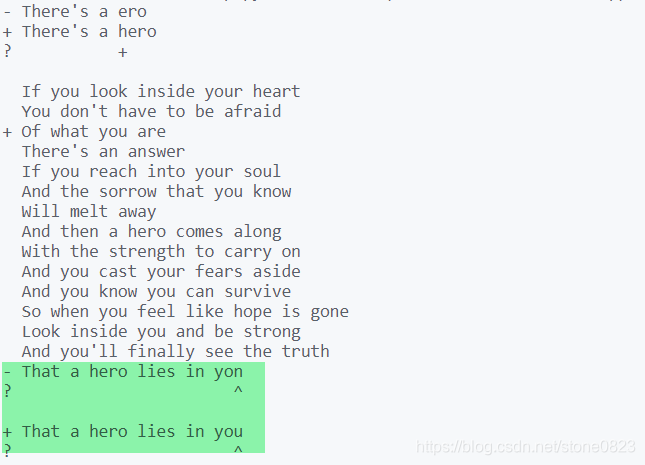
是不是很直观?
除了从文本文件中读取文本,也可以比较字符串,下面的代码演示了多行字符串的比较,并且用 pprint() 函数输出:
import difflib
from pprint import pprinttext1 = '''1. Beautiful is better than ugly.
2. Explicit is better than implicit.
3. Simple is better than complex.
4. Complex is better than complicated.
'''.splitlines(keepends=True)text2 = '''1. Beautiful is better than ugly.
3.   Simple is better than complex.
4. Complicated is better than complex.
5. Flat is better than nested.
'''.splitlines(keepends=True)d = difflib.Differ()
result = list(d.compare(text1, text2))
pprint(result)
程序运行的结果:
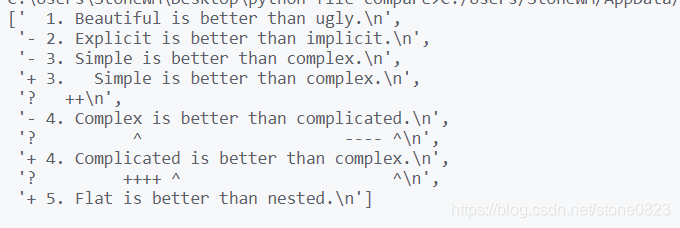
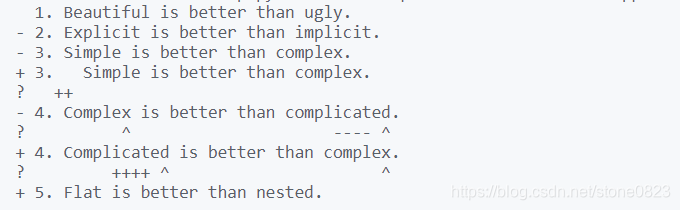
使用 sys.stdout.writelines() 方法输出更加直观:
源码
python text file comparison
参考
difflib — Helpers for computing deltas
本文来自互联网用户投稿,文章观点仅代表作者本人,不代表本站立场,不承担相关法律责任。如若转载,请注明出处。 如若内容造成侵权/违法违规/事实不符,请点击【内容举报】进行投诉反馈!