并发编程学习笔记 基于Python
并发编程学习 基于Python
- 学习笔记
- P1 python对并发编程的支持
- P2选择并发执行的方式
- P3 Python 全局解释器锁GIL
- P4 python多线程爬虫
- P5 生产者消费者模式爬虫
- P6 线程安全问题
- P7 线程池
- P8 在Web服务中使用线程池加速
- P9多进程
- P10 在Flask服务中使用进程池加速
- P11 asyncio
- P12 在异步IO中使用信号量使用信号量控制爬虫并发度
学习笔记
链接: bilibili
P1 python对并发编程的支持
那些程序提速方法:
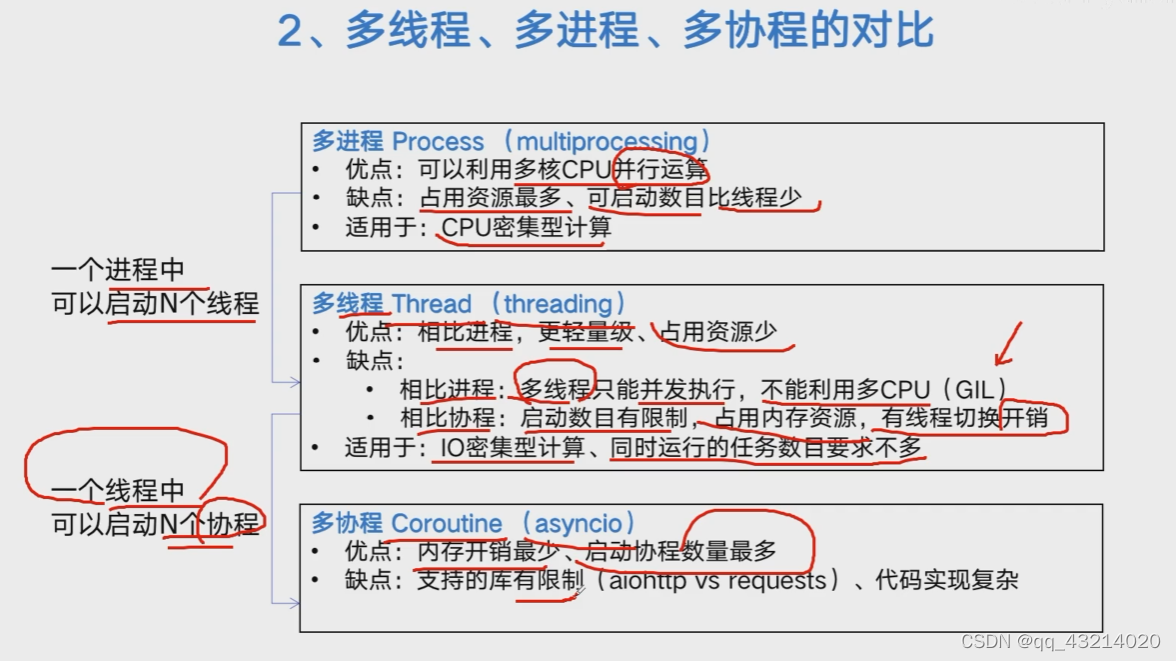
- 多线程threading ,利用CPU和IO可以同时执行的原理,让CPU不会干巴巴的等待IO完成;
- 多进程multiprocessing 利用多核CPU的能力,真正的并行执行任务;
- 异步IO asyncio 协程Coroutine在单线程利用CPU和IO同时执行的原理,实现函数异步执行;
实现方法:
- Lock使用Lock对资源加锁,防止访问冲突 ;
- Queue使用Queue实现不同线程/进程之间的数据通信,实现生产者-消费者模式;
- Pool使用线程/进程池Pool,简化进程线程的任务提交、等待结束、获取结果;
- subprocess使用subprocess启动外部程序的进程,并进行输入输出交互;
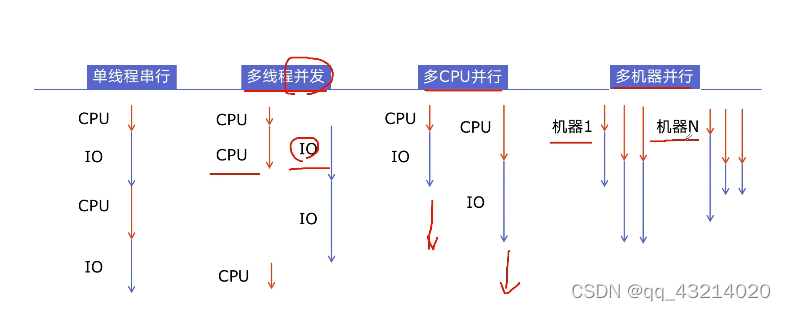
P2选择并发执行的方式
- 什么是CPU密集型计算、IO密集型计算
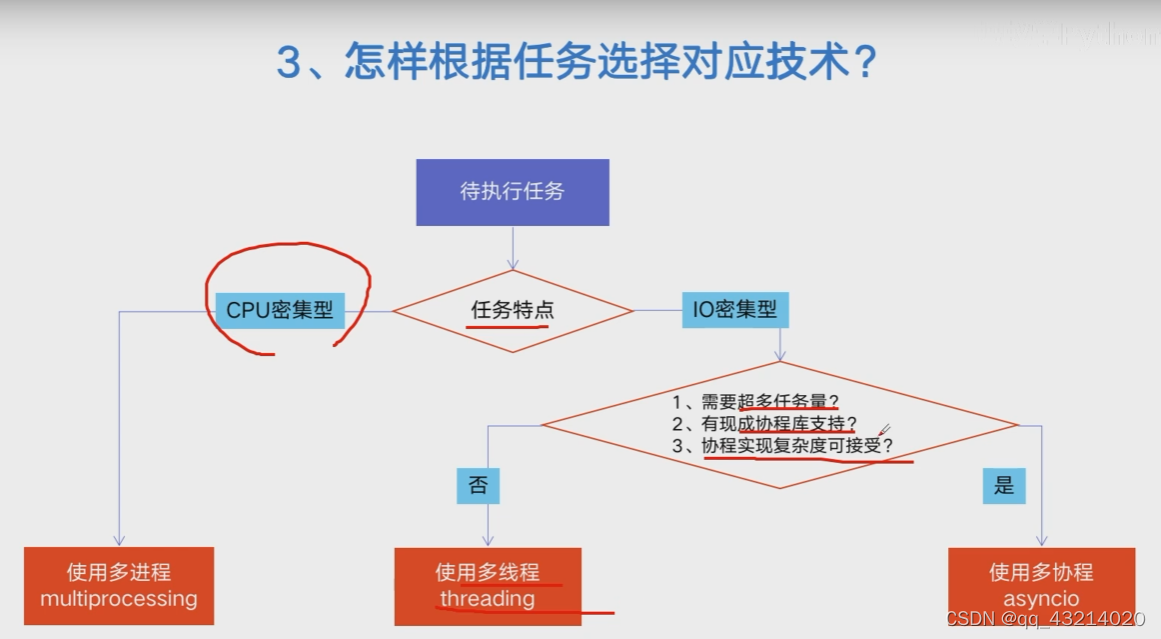
- CPU密集型(CPU-bound):
cpu密集型也叫计算密集型,是指IO在很短的时间就可完成,而cpu需要大量的计算和处理,特点是cpu占用率高。如,zip、unzip、正则表达式搜索 - IO密集型(IO-bound):
IO密集型指的是系统运作大部分状况是CPU等待IO的r/w操作,CPU的占用了比较低。如,文件处理、网络爬虫、读写数据库
- 多进程、多线程、多协程的对比
- 怎样根据任务选择对应的技术
P3 Python 全局解释器锁GIL
-
Python速度慢的两大原因
python相较于C/C++,java确实慢,在一些特俗场景下,速度相差100~200倍。
- 原因1,Python是动态类型语言,边解释边执行;
- 原因2,GIL导致无法利用多喝CPU并发执行; -
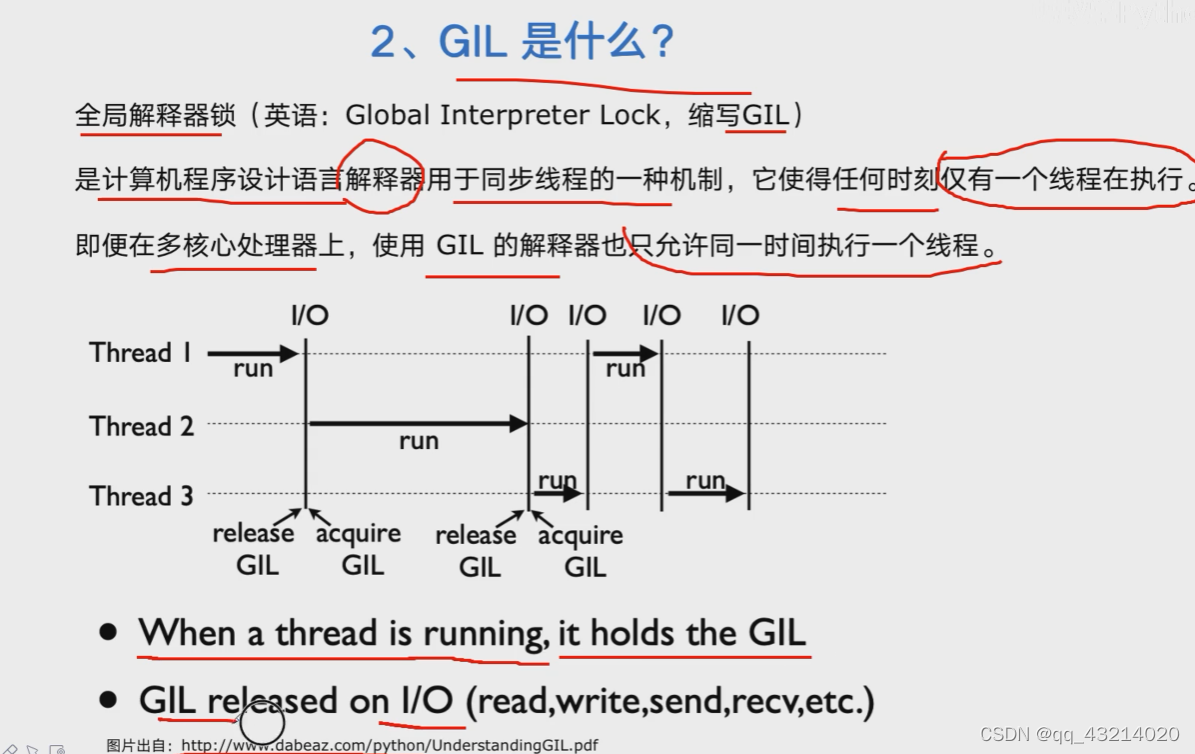
GIL是什么
全局解释器锁(Global Interpreter Lock,GIL),是计算机程序设计语言解释器用于线程同步的一种机制,它使任何时刻仅有一个线程在执行。即使在多核处理器上,GIL的计时器也只允许同一时间执行一个线程。
-
为何引入GIL
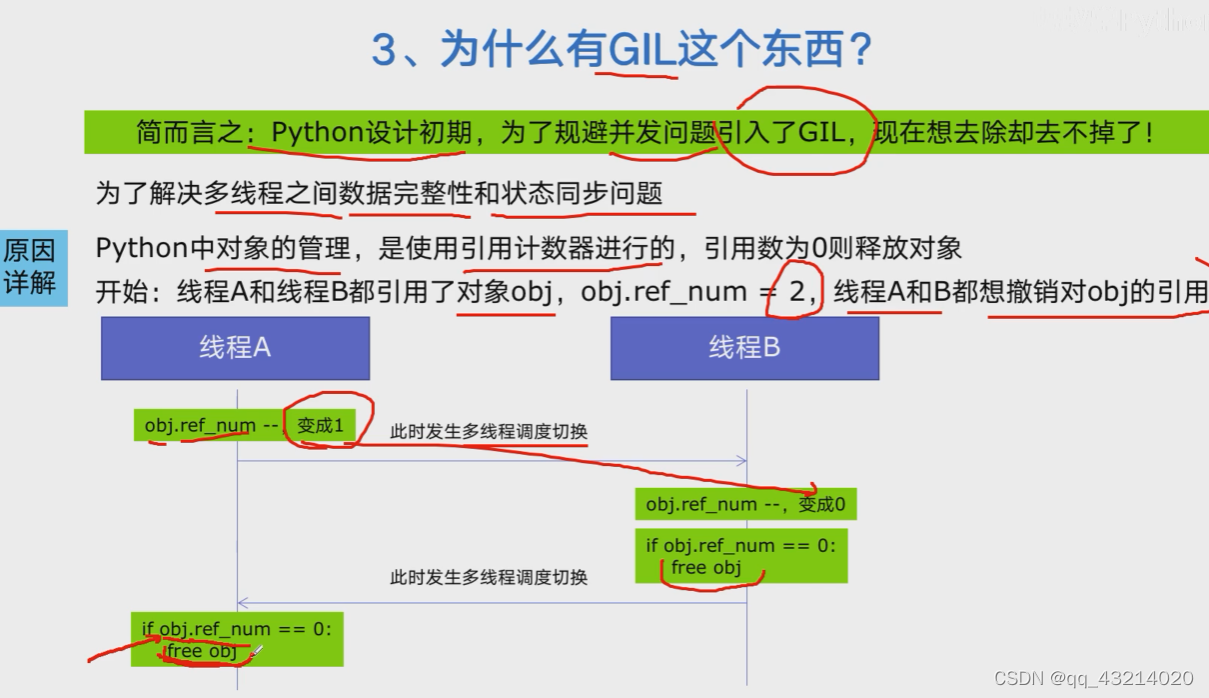
-
怎样规避GIL带来的限制
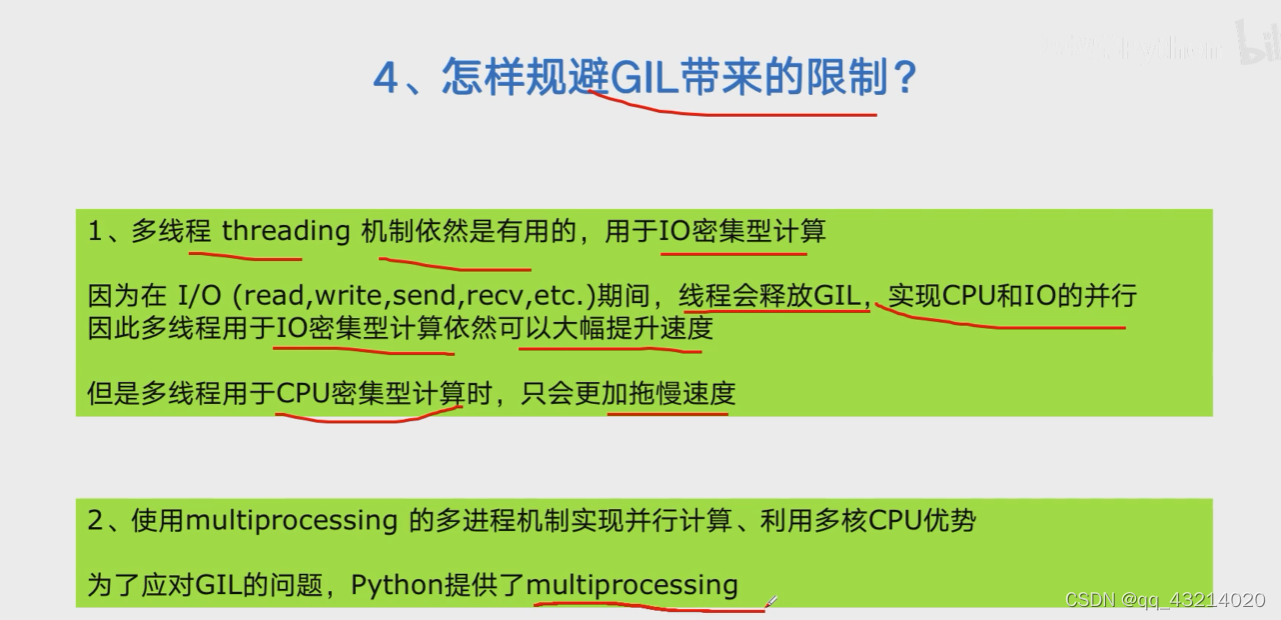
P4 python多线程爬虫
- Python创建多线程的方法
# 1.主备一个函数
def my_func(a, b):do_craw(a, b)
# 2.创建一个线程
import threading
t = threading.Thread(target = my_func, args = (100, 200))
# 3.启动线程
t.srart()
# 4.等待结束
t.join()
- 改写爬虫程序,单线程到多线程
# blog_spider.py
import requests
from bs4 import BeautifulSoup# 博客园url列表
urls = [f"https://www.cnblogs.com/#p{page}"for page in range(1, 50 + 1)
]# 获取网页信息,输出url+内容长度,返回网页内容
def craw(url):r = requests.get(url)print(url, len(r.text))return r.text# 下文生产者-消费者模式要用到的爬取信息处理函数
# def parse(html):
#     soup = BeautifulSoup(html, "html.parser")
#     links = soup.find_all("a", class_="post-item-title")
#     return [(link["href"], link.get_text()) for link in links]if __name__ == "__main__":for result in parse(craw(urls[2])):print(result)
# 01.multi_thread_craw.py
import blog_spider
import threading
import time# 单线程爬虫
def single_thread():print("single_thread begin")for url in blog_spider.urls:blog_spider.craw(url)print("single_thread end")# 多线程爬虫
def multi_thread():print("multi_thread begin")threads = []for url in blog_spider.urls:threads.append(threading.Thread(target=blog_spider.craw, args=(url,))# 不加括号是不调用)for thread in threads:thread.start()for thread in threads:thread.join()print("multi_thread end")if __name__ == "__main__":strat = time.time()single_thread()end = time.time()print("single thread cost:", end - strat, "sec")strat = time.time()multi_thread()end = time.time()print("multi thread cost:", end - strat, "sec")
- 速度对比:单线程爬虫V多线程爬虫
single_thread begin
single_thread end
single thread cost: 7.926880836486816 sec
multi_thread begin
multi_thread end
multi thread cost: 0.5494334697723389 sec
P5 生产者消费者模式爬虫
-
多组件的Pipeline技术架构
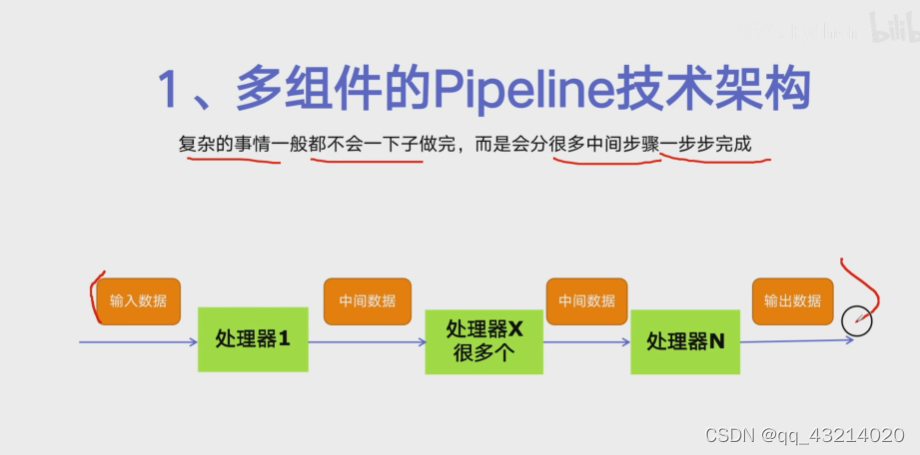
-
生产者消费者爬虫的架构
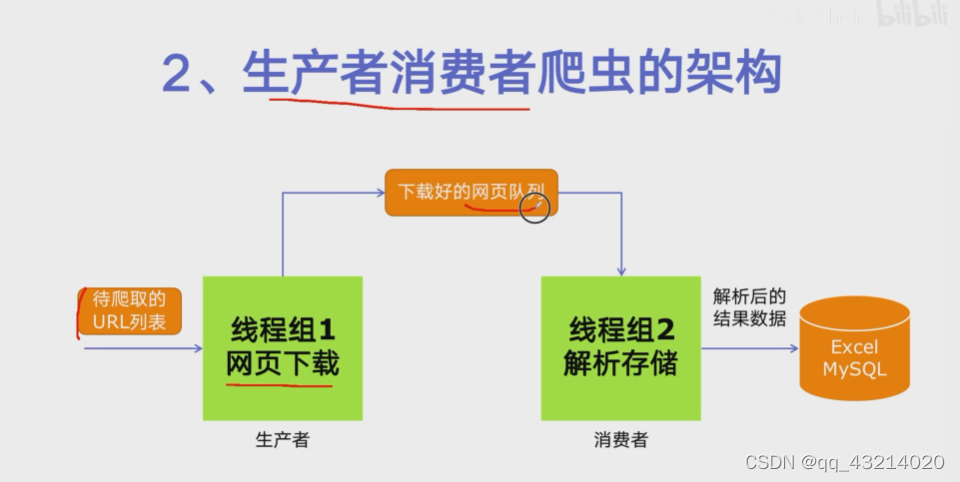
-
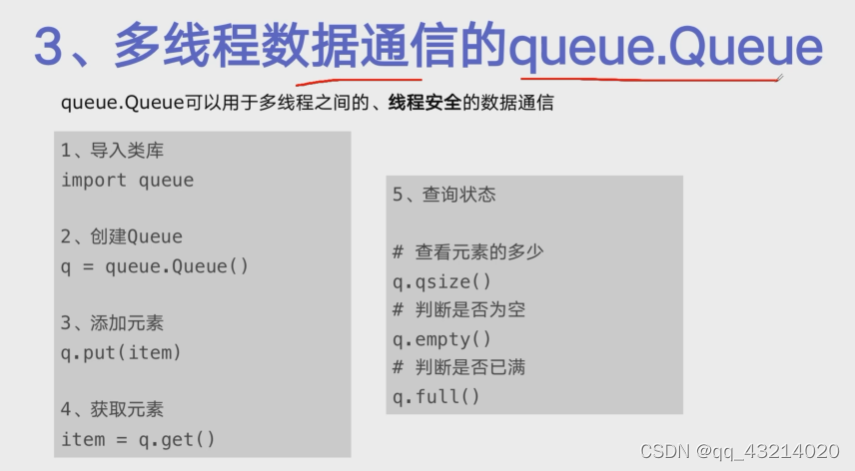
多线程数据通信的queue.Queue
-
代码编写实现生产者消费者爬虫
import queue
import blog_spider
import time
import random
import threading# 生产者函数
def do_craw(url_queue: queue.Queue, html_queue: queue.Queue):while True:url = url_queue.get()html = blog_spider.craw(url)html_queue.put(html)print(threading.current_thread().name, f"craw{url}","url_queue.size=", url_queue.qsize())time.sleep(random.randint(1, 2))# 消费者函数
def do_parse(html_queue: queue.Queue, fout):while True:html = html_queue.get()results = blog_spider.parse(html)for result in results:fout.write(str(result) + "\n")print(threading.current_thread().name, f"results.size",len(results), "html_queue.size=", html_queue.qsize())time.sleep(random.randint(1, 2))if __name__ == "__main__":url_queue = queue.Queue()html_queue = queue.Queue()for url in blog_spider.urls:url_queue.put(url)for idx in range(3):t = threading.Thread(target=do_craw, args=(url_queue, html_queue),name=f"craw{idx}")t.start()fout = open("02.data.txt", "w", encoding='utf-8')for idx in range(2):t = threading.Thread(target=do_parse, args=(html_queue, fout),name=f"parse{idx}")t.start()
P6 线程安全问题
-
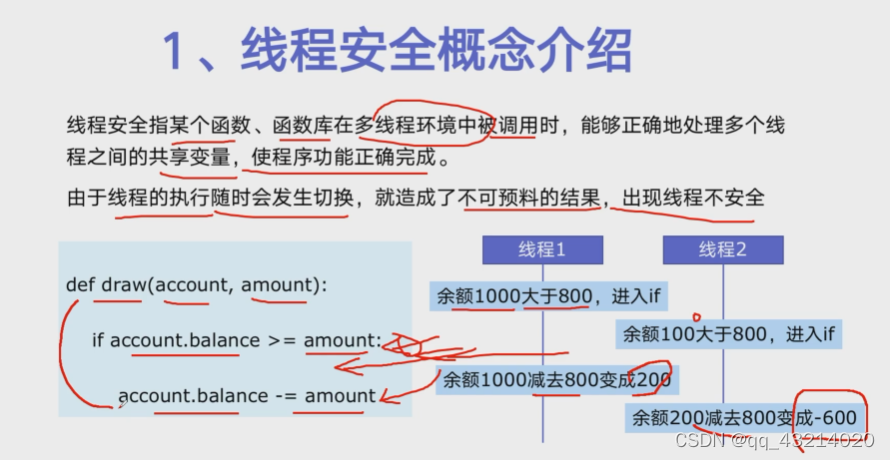
线程安全概念介绍
-
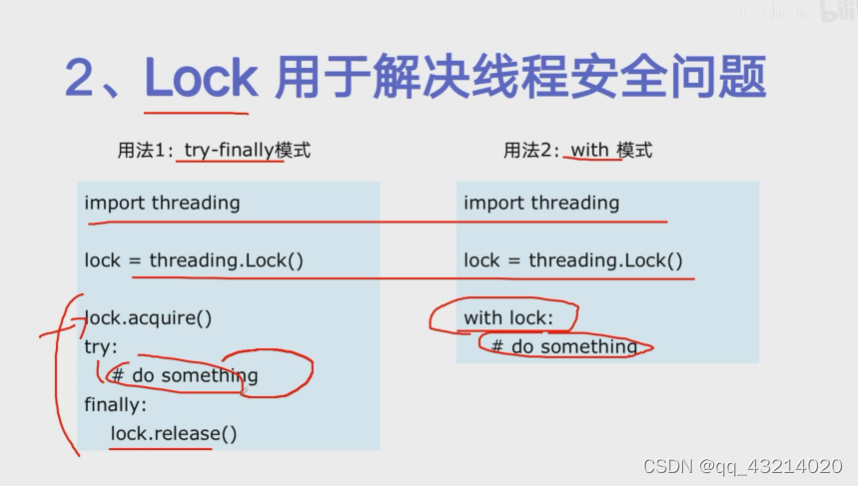
Lock用于解决线程安全问题
-
实例代码演示问题以及解决方案
# Lock_concurrent.py
import threading
import timelock = threading.Lock()class Account:  # 创建Circle类def __init__(self, balance):  # 约定成俗这里应该使用r,它与self.r中的r同名self.balance = balancedef draw(account, amount):with lock:if account.balance >= amount:time.sleep(0.1)print(threading.current_thread().name, "successful")account.balance -= amountprint(threading.current_thread().name, "balance", account.balance)else:print(threading.current_thread().name, "failed")if __name__ == "__main__":account = Account(1000)ta = threading.Thread(name="ta", target=draw, args=(account, 800))tb = threading.Thread(name="tb", target=draw, args=(account, 800))ta.start()tb.start()
P7 线程池
-
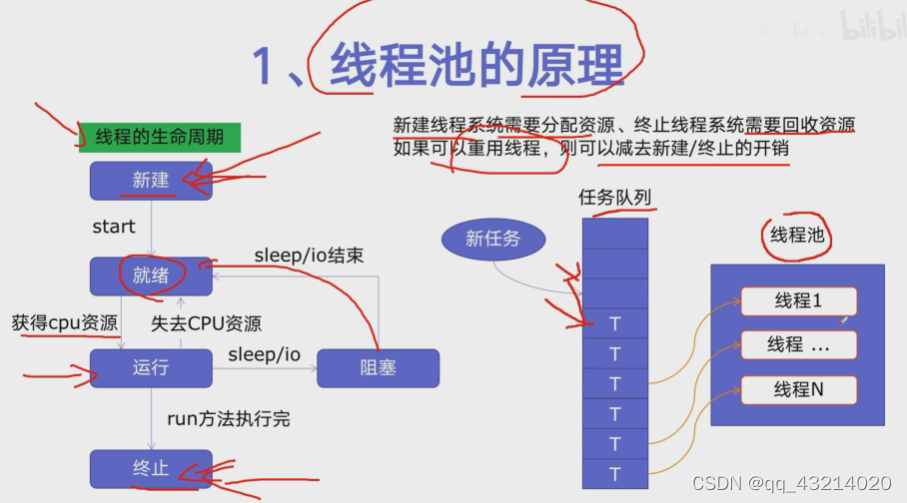
线程池的原理
-
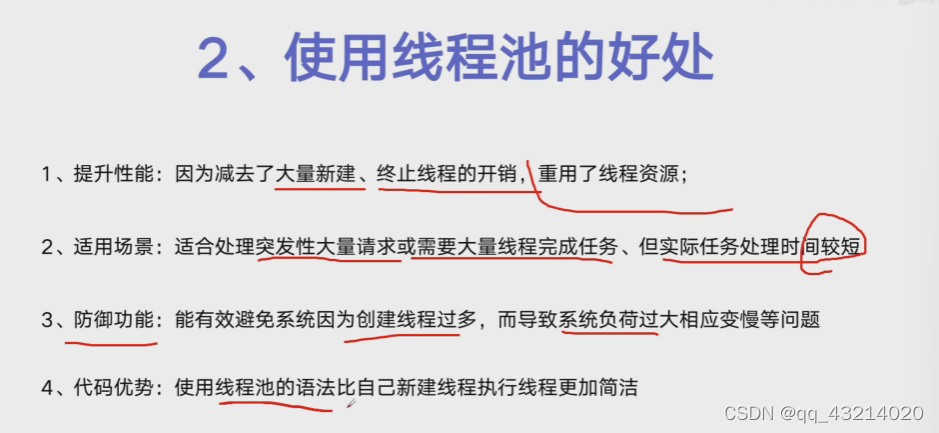
使用线程池的好处
-
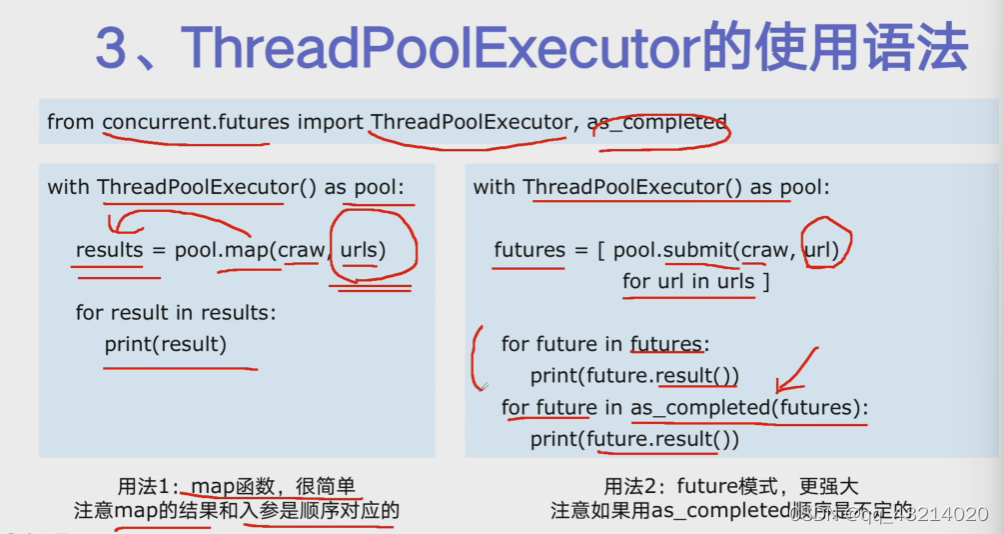
ThreadPoolExecutor的使用方法
-
使用线程池改造爬虫程序
# thread_pool.py
import concurrent.futures
import blog_spider# craw
with concurrent.futures.ThreadPoolExecutor() as pool:htmls = pool.map(blog_spider.craw, blog_spider.urls)htmls = list(zip(blog_spider.urls, htmls))for url, html in htmls:print(url, len(html))# futures = [pool.submit(blog_spider.craw, url) for url in blog_spider.urls]# for future in futures:#     print(future.result())# for future in as_completed(futures):#     print(future.result())print("craw over")# parse
with concurrent.futures.ThreadPoolExecutor() as pool:futures = {}for url, html in htmls:future = pool.submit(blog_spider.parse, html)futures[future] = urlfor future, url in futures.items():print(url, future.result())# for future in concurrent.futures.as_completed(futures):#     url = futures[future]#     print(url, future.result())
P8 在Web服务中使用线程池加速
-
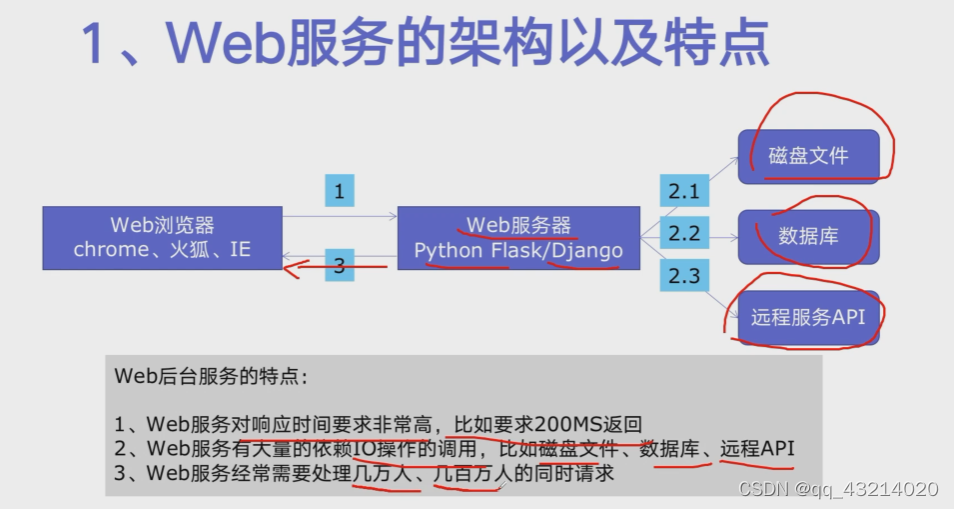
web服务的架构以及特点
-
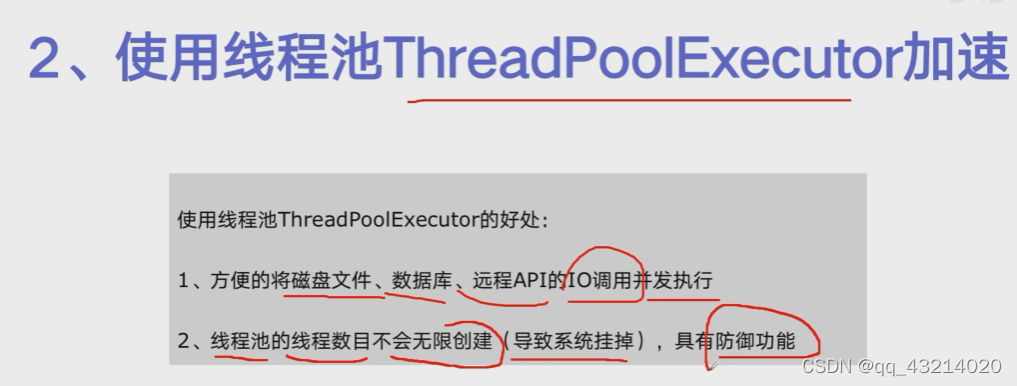
使用线程池Thread PoolExecutor加速
-
代码用Flask实现Web服务并实现加速
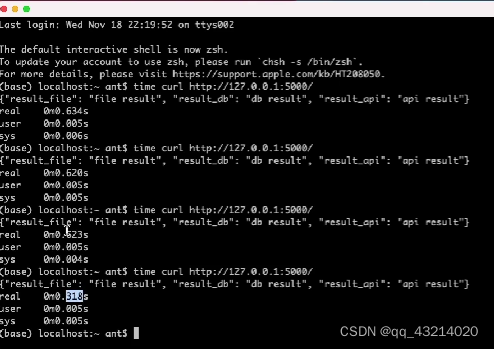
#flask_thread_pool.py
import json
import flask
import time
from concurrent.futures import ThreadPoolExecutorpool = ThreadPoolExecutor()
app = flask.Flask(__name__)def read_file():time.sleep(0.1)print('file')return "file result"def read_db():time.sleep(0.2)print('db')return "db result"def read_api():time.sleep(0.3)print('api')return "api result"@app.route("/")
def index():start = time.time()result_file = pool.submit(read_file)result_db = pool.submit(read_db)result_api = pool.submit(read_api)# result_file = read_file()# result_db = read_db()# result_api = read_api()end = time.time()return json.dumps({"result_file": result_file.result(),"result_db": result_db.result(),"result_api": result_api.result(),# "result_file": result_file,# "result_db": result_db,# "result_api": result_api,"time": end - start,})if __name__ == "__main__":app.run()
P9多进程
-
Why multiprocessing
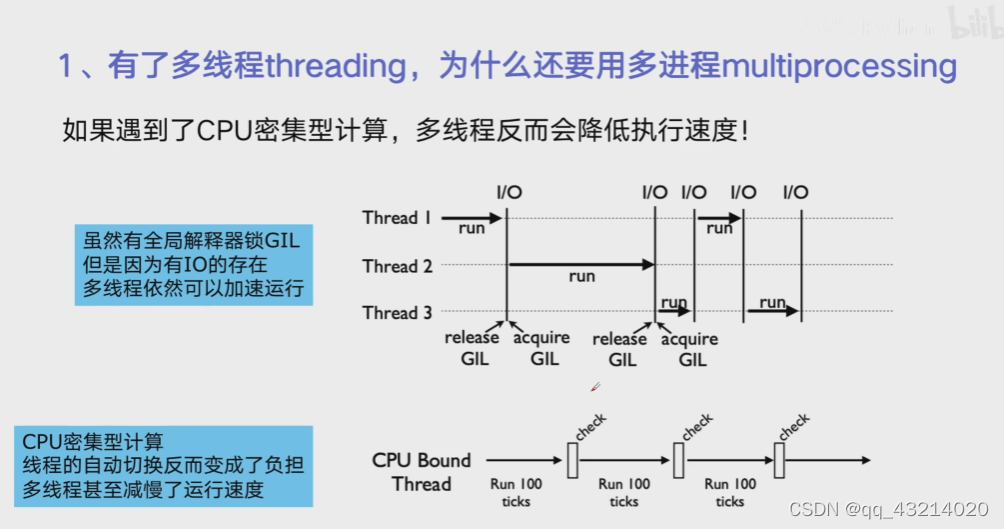
-
multiprocessing梳理
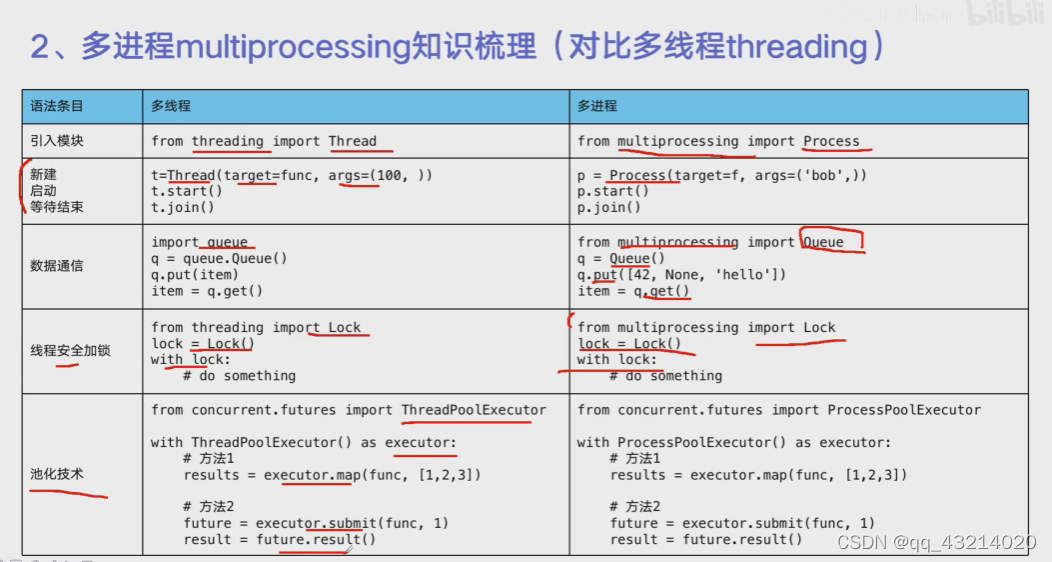
-
代码实战:单线程、多线程、多进程对CPU密集型计算速度的影响
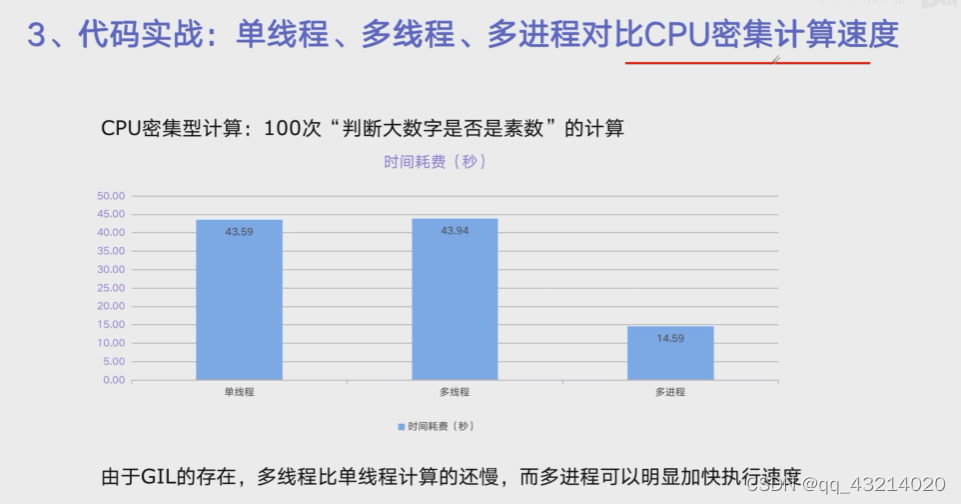
single_thread, cost: 36.88734722137451 sec
multi_thread, cost: 37.69435501098633 sec
multi_process, cost: 6.157953977584839 sec
#Thread_process_cpu_borad.py
import math
from concurrent.futures import ThreadPoolExecutor, ProcessPoolExecutor
import time# 导入100个大素数
PRIMRS = [112272535095293] * 100# 函数用来判断是否为素数
def is_prime(n):if n < 2:return Falseif n == 2:return Trueif n % 2 == 0:return Falsesqrt_n = int(math.floor(math.sqrt(n)))for i in range(3, sqrt_n + 1, 2):if n % i == 0:return Falsereturn Truedef single_thread():for number in PRIMRS:is_prime(number)def multi_thread():with ThreadPoolExecutor() as pool:pool.map(is_prime, PRIMRS)def multi_process():with ProcessPoolExecutor() as pool:pool.map(is_prime, PRIMRS)if __name__ == "__main__":start = time.time()single_thread()end = time.time()print("single_thread, cost:", end - start, "sec")start = time.time()multi_thread()end = time.time()print("multi_thread, cost:", end - start, "sec")start = time.time()multi_process()end = time.time()print("multi_process, cost:", end - start, "sec")
P10 在Flask服务中使用进程池加速
import flask
import math
import json
from concurrent.futures import ProcessPoolExecutorprocess_pool = ProcessPoolExecutor()
app = flask.Flask(__name__)# PRIMRS = [112272535095293] * 100def is_prime(n):if n < 2:return Falseif n == 2:return Trueif n % 2 == 0:return Falsesqrt_n = int(math.floor(math.sqrt(n)))for i in range(3, sqrt_n + 1, 2):if n % i == 0:return Falsereturn True# 接口
@app.route("/is_prime/" )def api_is_prime(numbers):number_list = [int(x) for x in numbers.split(",")]results = process_pool.map(is_prime, number_list)return json.dumps(dict(zip(number_list, results)))if __name__ == "__main__":process_pool = ProcessPoolExecutor()app.run()
P11 asyncio
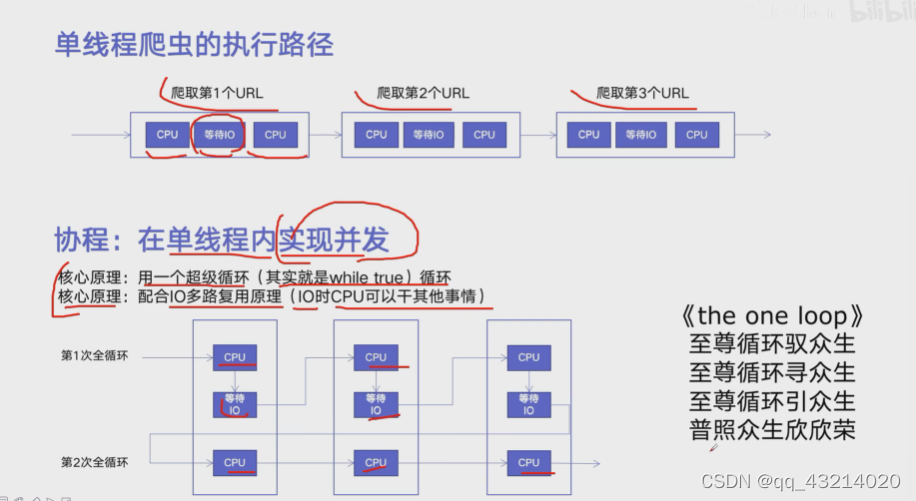
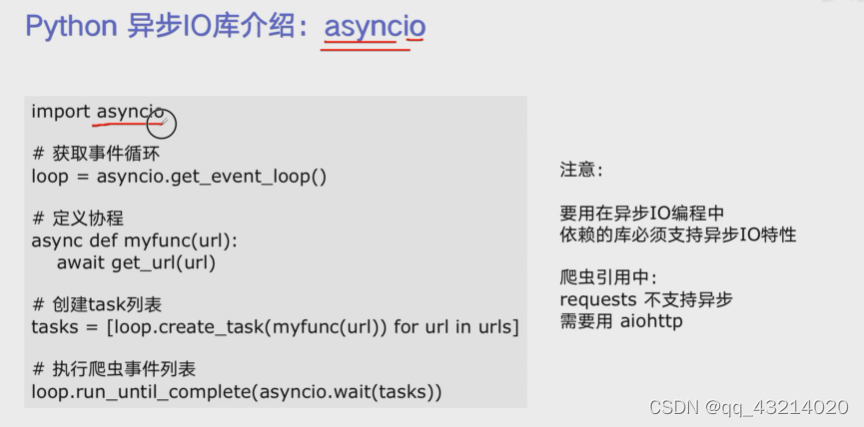
import asyncio
import aiohttp
import blog_spider
import timeasync def async_craw(url):print("craw url:", url)async with aiohttp.ClientSession() as session:async with session.get(url) as resp:result = await resp.text()print(f"craw url:{url}, {len(result)}")loop = asyncio.get_event_loop()
tasks = [loop.create_task(async_craw(url))for url in blog_spider.urls]start = time.time()
loop.run_until_complete(asyncio.wait(tasks))
end = time.time()
print("spend time:", end - start, "sec")
P12 在异步IO中使用信号量使用信号量控制爬虫并发度
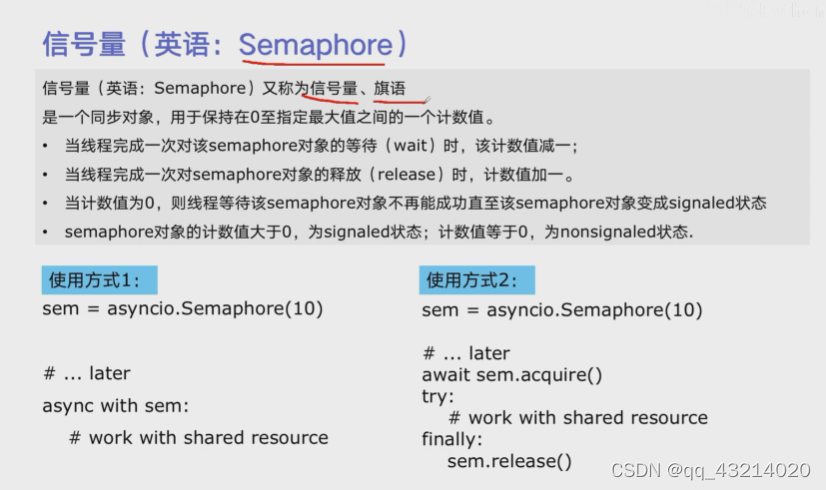
import asyncio
import aiohttp
import blog_spider
import timesemaphore = asyncio.Semaphore(1)async def async_craw(url):async with semaphore:print("craw url:", url)async with aiohttp.ClientSession() as session:async with session.get(url) as resp:result = await resp.text()print(f"craw url:{url}, {len(result)}")loop = asyncio.get_event_loop()
tasks = [loop.create_task(async_craw(url))for url in blog_spider.urls]start = time.time()
loop.run_until_complete(asyncio.wait(tasks))
end = time.time()
print("spend time:", end - start, "sec")
本文来自互联网用户投稿,文章观点仅代表作者本人,不代表本站立场,不承担相关法律责任。如若转载,请注明出处。 如若内容造成侵权/违法违规/事实不符,请点击【内容举报】进行投诉反馈!