中山大学软件工程-Unity HitUFO作业
一、 项目配置
-
首先创建一个新项目,选择3D模板
-
新项目的文件结构如下:
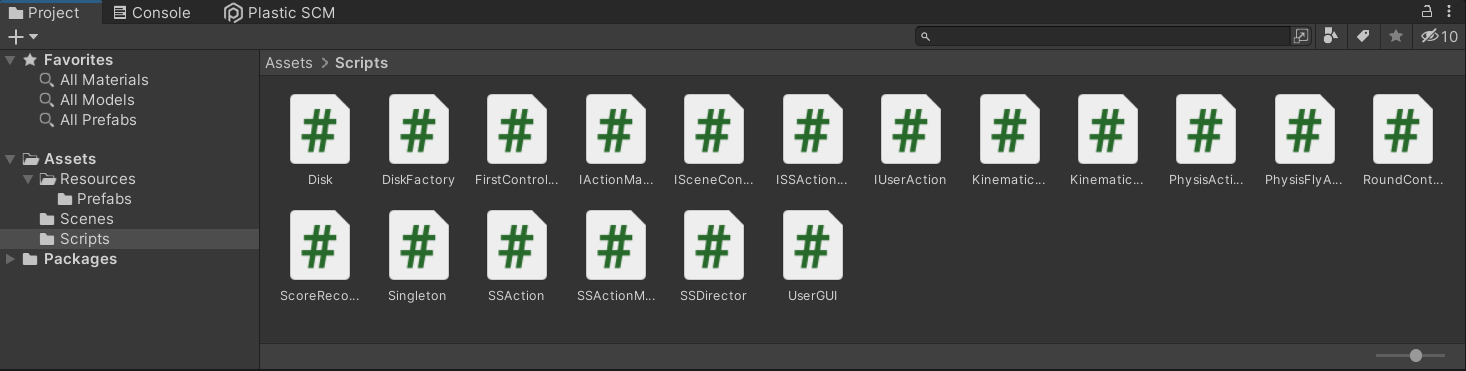
-
Assets/Resources下主要存放的是飞碟的预制

-
Assets/Scripts中则存放的是项目代码
-
-
最后将FirstController代码拖到Main Camera中,Ctrl+B即可运行。
二、 实现过程和方法
1. 总体设计思路
-
各个类之间的关系如下

-
此次作业同样是MVC架构,各个代码文件划分如下
-
model部分:主要是Disk类,存储着飞碟的信息,如速度,方向,分值等等。
-
view部分:主要是UserGUI类,负责游戏界面的呈现,以及接受用户的动作。
-
controller部分:按照职责分配原则,主要分为动作控制器(仍可以套用上一次作业的动作框架),场景控制器(仍可以套用前面用到的导演场记的框架),回合控制器RoundController,分数控制器ScoreController,再运用工厂模式、单例模式,结合对象池的思想,使用DiskFactory类负责Disk对象的生成和回收。
-
-
总的来说,此次作业大部分可以套用之前的框架,需要额外增加的是
-
运用工厂模式和对象池的思想实现对多个飞碟对象的管理
-
由于DiskFactory、UserGUI、RoundController等类在全局只需要一个实例,因此可以对它们应用单例模式,便于管理。
-
由于飞碟有两种飞行模式,因此可以通过适配器模式,让两个动作管理者类都去实现一个接口,在RoundController中便可通过该接口实现对动作管理者类的沟通,这个接口一方面起到了多态的效果,另一方面也作为一个适配器,任何动作管理者类只要实现了该接口便可与RoundController类之间实现沟通。
-
2. 模块分析
Model部分
-
Disk
-
DIsk类只是作为一个数据类存放了飞碟的一些基本属性
using System.Collections; using System.Collections.Generic; using UnityEngine; public class Disk : MonoBehaviour{public float speed; //水平初速度public int points; //分值public Vector3 direction; //初始方向 } -
View部分
-
UserGUI
-
此类负责显示游戏信息,并通过将用户的行为传递给控制器,从而修改model中的数据,并不断呈现最新的数据
using System.Collections; using System.Collections.Generic; using UnityEngine; public class UserGUI : MonoBehaviour{IUserAction userAction; //响应用户行为的接口,由FirstController实现string gameMessage; //游戏的提示信息string gameState; //显示游戏状态int points; //当前得分int flag; //标志位,用于控制Update函数float time; //计时FirstController controller; //场记int mode; //游戏模式 0-运动学 1-物理学 public void reset(){gameMessage = "";gameState = "";} public void setMessage(string gameMessage){this.gameMessage = gameMessage;} public void setPoints(int points){this.points = points;} void Start(){mode = 0;points = 0;flag = 0;time = 0;gameMessage = "";gameState = "";userAction = SSDirector.GetInstance().CurrentScenceController as IUserAction;controller = (FirstController)SSDirector.GetInstance().CurrentScenceController;} void Update(){//识别鼠标点击if (Input.GetButtonDown("Fire1")){userAction.Hit(Input.mousePosition);}// 开始计时,显示持续三秒的提示信息if(flag == 1){time += Time.deltaTime;if(time > 3f){time = 0;flag = 0;this.gameMessage = "";controller.setRCFlag(0);}}} public void pause(){this.gameMessage = "准备进入下一轮...";flag = 1;} public void gameOver(){this.gameState = "游戏结束";} void OnGUI(){GUIStyle style = new GUIStyle();style.normal.textColor = Color.white;style.fontSize = 30; GUIStyle titleStyle = new GUIStyle();titleStyle.normal.textColor = Color.white;titleStyle.fontSize = 50; GUIStyle messageStyle = new GUIStyle();messageStyle.normal.textColor = Color.red;messageStyle.fontSize = 60; GUI.Label(new Rect(720, 30, 50, 200), "Hit UFO小游戏", titleStyle);GUI.Label(new Rect(20, 30, 100, 50), "Points: " + points, style);GUI.Label(new Rect(20, 100, 100, 50), "Round: " + controller.getRound(), style);if(mode == 0){GUI.Label(new Rect(20, 240, 100, 50), "Mode: Kinematics", style);}else{GUI.Label(new Rect(20, 240, 100, 50), "Mode: Physis", style);}GUI.Label(new Rect(640, 80, 50, 200), gameMessage, messageStyle);GUI.Label(new Rect(720, 640, 50, 200), gameState, messageStyle); if (GUI.Button(new Rect(80, 180, 100, 40), "Restart")){userAction.restart();}if (GUI.Button(new Rect(20, 300, 100, 40), "Kinematics")){mode = 0;userAction.setFlyMode(false);}if (GUI.Button(new Rect(150, 300, 100, 40), "Physis")){mode = 1;userAction.setFlyMode(true);}} } -
Controller部分
-
动作部分
-
首先是一个动作基类SSAction,动作事件接口ISSActionEventType以及动作管理者基类SSActionManager此类的代码可以直接重用。
using System.Collections; using System.Collections.Generic; using UnityEngine; public class SSAction : ScriptableObject {public bool enable = true;public bool destroy = false; public GameObject gameObject { get; set; }public Transform transform { get; set; }public ISSActionCallback callback { get; set; } protected SSAction(){ } // Start is called before the first frame updatepublic virtual void Start(){throw new System.NotImplementedException();} // Update is called once per framepublic virtual void Update(){throw new System.NotImplementedException();} } using System.Collections; using System.Collections.Generic; using UnityEngine; public class SSActionManager : MonoBehaviour, ISSActionCallback {//动作集,以字典形式存在private DictionarywaitingAdd = new List ();//等待被删除的动作队列(动作已完成)private List waitingDelete = new List (); protected void Update(){//将waitingAdd中的动作保存foreach (SSAction ac in waitingAdd)actions[ac.GetInstanceID()] = ac;waitingAdd.Clear(); //运行被保存的事件foreach (KeyValuePair using System.Collections; using System.Collections.Generic; using UnityEngine; public enum SSActionEventType : int { Started, Completed } public interface ISSActionCallback{void SSActionEvent(SSAction source, SSActionEventType events = SSActionEventType.Completed,int intParam = 0, string strParam = null, Object objectParam = null); } -
接着需要一个动作管理者类的接口IActionManager,其就是adapter模式的运用,后续的两个具体的动作管理类都需要实现该接口,后面RoundController类便可通过该接口在两个动作管理类
using System.Collections; using System.Collections.Generic; using UnityEngine; public interface IActionManager{void Fly(GameObject disk, float speed, Vector3 direction); } using System.Collections; using System.Collections.Generic; using UnityEngine; public class KinematicsActionManager : SSActionManager, ISSActionCallback, IActionManager{ //飞行动作KinematicsFlyAction flyAction;//控制器FirstController controller; protected new void Start(){controller = (FirstController)SSDirector.GetInstance().CurrentScenceController;} public void Fly(GameObject disk, float speed, Vector3 direction){flyAction = KinematicsFlyAction.GetSSAction(direction, speed);RunAction(disk, flyAction, this);} //回调函数public void SSActionEvent(SSAction source,SSActionEventType events = SSActionEventType.Completed,int intParam = 0,string strParam = null,Object objectParam = null){//飞碟结束飞行后进行回收controller.freeDisk(source.gameObject);} } using System.Collections; using System.Collections.Generic; using UnityEngine; public class PhysisActionManager : SSActionManager, ISSActionCallback, IActionManager {//飞行动作PhysisFlyAction flyAction;//控制器FirstController controller; protected new void Start(){controller = (FirstController)SSDirector.GetInstance().CurrentScenceController;} public void Fly(GameObject disk, float speed, Vector3 direction){flyAction = PhysisFlyAction.GetSSAction(direction, speed);RunAction(disk, flyAction, this);} //回调函数public void SSActionEvent(SSAction source,SSActionEventType events = SSActionEventType.Completed,int intParam = 0,string strParam = null,Object objectParam = null){//飞碟结束飞行后进行回收controller.freeDisk(source.gameObject);} } -
最后,再分别实现两种飞行模式具体的动作类
using System.Collections; using System.Collections.Generic; using UnityEngine; public class KinematicsFlyAction : SSAction{float gravity; //重力加速度float speed; //水平速度Vector3 direction; //飞行方向float time; //时间 //生产函数(工厂模式)public static KinematicsFlyAction GetSSAction(Vector3 direction, float speed){KinematicsFlyAction action = ScriptableObject.CreateInstance();action.gravity = 9.8f;action.time = 0;action.speed = speed;action.direction = direction;return action;} public override void Start(){gameObject.GetComponent ().isKinematic = true;} public override void Update(){time += Time.deltaTime;transform.Translate(Vector3.down * gravity * time * Time.deltaTime);transform.Translate(direction * speed * Time.deltaTime);//如果飞碟到达底部,则动作结束,进行回调if (this.transform.position.y < -6){this.destroy = true;this.enable = false;this.callback.SSActionEvent(this);}} } using System.Collections; using System.Collections.Generic; using UnityEngine; public class PhysisFlyAction : SSAction {float speed; //水平速度Vector3 direction; //飞行方向 //生产函数(工厂模式)public static PhysisFlyAction GetSSAction(Vector3 direction, float speed){PhysisFlyAction action = ScriptableObject.CreateInstance();action.speed = speed;action.direction = direction;return action;} public override void Start(){gameObject.GetComponent ().isKinematic = false;//为物体增加水平初速度gameObject.GetComponent ().velocity = speed * direction;} public override void Update(){//如果飞碟到达底部,则动作结束,进行回调if (this.transform.position.y < -6){this.destroy = true;this.enable = false;this.callback.SSActionEvent(this);} } }
-
-
场景部分
-
首先,SSDirector、ISceneController类可以直接重用之前的代码
using System.Collections; using System.Collections.Generic; using UnityEngine; public class SSDirector : System.Object {private static SSDirector _instance;public ISceneController CurrentScenceController { get; set; }public static SSDirector GetInstance(){if (_instance == null){_instance = new SSDirector();}return _instance;} } using System.Collections; using System.Collections.Generic; using UnityEngine;public interface ISceneController{void loadResources(); } -
整个游戏场景的统筹主要是靠实现了ISceneController接口和IUserAction接口的FirstController类(IUserAction接口的功能是实现对用户动作的响应)
using System.Collections; using System.Collections.Generic; using UnityEngine;public interface ISceneController{void loadResources(); }using System.Collections; using System.Collections.Generic; using UnityEngine;public interface IUserAction{void setFlyMode(bool isPhysis);void Hit(Vector3 position);void restart(); }
-
-
飞碟控制部分
-
DiskFactory类实现对飞碟的生产和回收
using System.Collections; using System.Collections.Generic; using UnityEngine; public class DiskFactory : MonoBehaviour{ public GameObject disk_prefab;private Listused_list;private List free_list; // Start is called before the first frame updatevoid Start(){used_list = new List ();free_list = new List ();disk_prefab = GameObject.Instantiate (Resources.Load ("Prefabs/UFO"), Vector3.zero, Quaternion.identity);disk_prefab.SetActive(false);} public GameObject getDisk(int round){ GameObject disk;//若对象池中有飞碟,则直接从其中取出if(free_list.Count > 0){disk = free_list[0].gameObject;free_list.Remove(free_list[0]);}//若对象池中没有飞碟,则新建一个飞碟else{disk = GameObject.Instantiate (disk_prefab, Vector3.zero, Quaternion.identity);disk.AddComponent ();disk.AddComponent ();}//随机生成某个颜色的UFO,0~4黄色,5~7蓝色,8~9红色int level = UnityEngine.Random.Range(0, 10);if(level >= 0 && level <= 4){disk.GetComponent ().material.color = Color.yellow;disk.GetComponent ().points = 1;}else if(level >= 5 && level <= 7){disk.GetComponent ().material.color = Color.blue;disk.GetComponent ().points = 3;}else{disk.GetComponent ().material.color = Color.red;disk.GetComponent ().points = 5;} float size_inc = UnityEngine.Random.Range(0f, 1f);float speed_inc = UnityEngine.Random.Range(0f, 2f);//回合越往后,飞碟会越来越小且越来越快if(round > 0 && round < 4){disk.GetComponent ().localScale = new Vector3(3f+size_inc,0.12f+size_inc*0.04f,3f+size_inc);disk.GetComponent ().speed = 4.0f+speed_inc;}else if(round > 3 && round < 7){disk.GetComponent ().localScale = new Vector3(2f+size_inc,0.08f+size_inc*0.04f,2f+size_inc);disk.GetComponent ().speed = 5.0f+2*speed_inc;}else{disk.GetComponent ().localScale = new Vector3(1+size_inc,0.04f+size_inc*0.04f,1f+size_inc);disk.GetComponent ().speed = 6.0f+2*speed_inc;}//设置随机的初始方向disk.GetComponent ().direction = new Vector3(UnityEngine.Random.Range(-1f, 1f) > 0 ? 2 : -2, 1, 0);used_list.Add(disk.GetComponent ());return disk;} public void freeDisk(GameObject disk){foreach (Disk _disk in used_list){if (_disk.gameObject.GetInstanceID() == disk.GetInstanceID()){_disk.gameObject.SetActive(false);_disk.gameObject.GetComponent ().rotation = Quaternion.identity;free_list.Add(_disk);used_list.Remove(_disk);break;}}} } -
RoundController类负责从DiskFactory中获得飞碟,对飞碟对象的具体属性进行初始化后发送飞碟,并对回合进行更新。
using System.Collections; using System.Collections.Generic; using UnityEngine; public class RoundController : MonoBehaviour{FirstController controller; //场记IActionManager actionManager; //动作管理者DiskFactory diskFactory; //飞碟工厂ScoreRecorder scoreRecorder; //得分控制器UserGUI userGUI; //用户GUIint round; //游戏当前轮次int sendCnt; //当前已发送的飞碟数量float sendTime; //发送时间int sendNum; //用于确定同时发送飞碟的数量 int flag; //标志位 void Start(){controller = (FirstController)SSDirector.GetInstance().CurrentScenceController;//游戏开始默认为运动学模式actionManager = Singleton.Instance;//actionManager = Singleton .Instance;diskFactory = Singleton .Instance;scoreRecorder = new ScoreRecorder();userGUI = Singleton .Instance;sendCnt = 0;round = 1;sendTime = 0;sendNum = 0;flag = 0;} public int getRound(){return round;} public void setFlag(int _flag){flag = _flag;} public void reset(){sendCnt = 0;round = 1;sendTime = 0;flag = 0;scoreRecorder.reset();} public void record(Disk disk){scoreRecorder.record(disk);} public int getPoints(){return scoreRecorder.getPoints();} //设置游戏模式public void setFlyMode(bool isPhysis){actionManager = isPhysis ? Singleton .Instance : Singleton .Instance as IActionManager;} public void sendDisk(){//从工厂生成一个飞碟GameObject disk = diskFactory.getDisk(round);//设置飞碟的随机位置disk.transform.position = new Vector3(-disk.GetComponent ().direction.x * 7, UnityEngine.Random.Range(0f, 8f), 10);disk.SetActive(true);//设置飞碟的飞行动作actionManager.Fly(disk, disk.GetComponent ().speed, disk.GetComponent ().direction);} void Update(){sendTime += Time.deltaTime;//每隔一秒发送一次飞碟if(sendTime > 1 && flag == 0){sendTime = 0;sendNum = UnityEngine.Random.Range(1, 9);//八分之五的概率发送一只if(sendNum < 6){sendDisk();sendCnt++;}//八分之一的概率同时发出三只else if(sendNum > 7){for(int i = 0; i < 3;++i){sendDisk();sendCnt++;if(sendCnt == 10){break;}}}//八分之二的概率同时发出两只else{for(int i = 0; i < 2;++i){sendDisk();sendCnt++;if(sendCnt == 10){break;}}}if(sendCnt == 10){flag = 1;sendCnt = 0;round++;//游戏结束if(round == 11){round = 10;controller.gameOver();}//暂停发送飞碟,准备进入下一轮else{controller.pause();}}}} } -
ScoreRcorder负责游戏分数的管理
using System.Collections; using System.Collections.Generic; using UnityEngine; public class ScoreRecorder{int points; //游戏当前分数 public ScoreRecorder(){points = 0;} public void record(Disk disk){points += disk.points;} public int getPoints(){return points;}public void reset(){points = 0;} }
-
3. 核心算法
-
关于飞碟的生产,为了达到游戏回合与难度的匹配,DiskFactory在生产飞碟的时候以游戏回合作为参数,同时为了保证飞碟的生成有一定的随机性,通过UnityEngine.Random.Range()函数生成随机数,结合随机数和回合数来最终确定飞碟的大小和速度。
float size_inc = UnityEngine.Random.Range(0f, 1f);float speed_inc = UnityEngine.Random.Range(0f, 2f);//回合越往后,飞碟会越来越小且越来越快if(round > 0 && round < 4){disk.GetComponent().localScale = new Vector3(3f+size_inc,0.12f+size_inc*0.04f,3f+size_inc);disk.GetComponent ().speed = 4.0f+speed_inc;}else if(round > 3 && round < 7){disk.GetComponent ().localScale = new Vector3(2f+size_inc,0.08f+size_inc*0.04f,2f+size_inc);disk.GetComponent ().speed = 5.0f+2*speed_inc;}else{disk.GetComponent ().localScale = new Vector3(1+size_inc,0.04f+size_inc*0.04f,1f+size_inc);disk.GetComponent ().speed = 6.0f+2*speed_inc;} -
为了实现每个回合之间有一定的过渡时间,需要在一个回合的结束后暂停发送飞碟一段时间并在游戏界面显示“准备进入下一轮”的提示信息。一开始的想法是使用Thread.Sleep()函数,但发现这样会导致使得整个游戏进程暂停,如还在空中的飞碟会停在空中不动,也无法响应鼠标的点击。后来改用标志位再结合在Update()通过
time = time + Time.deltaTime计时的方式来实现延时。-
具体的实现为,但要进入下一轮的时候,RoundController会将标志位flag置为1,此时RoundController不再能够发送飞碟而只能等待flag被重新置为0。而能够将flag置为0的是FirstController(实际上是UserGUI,USerGUI通过通知FirstController,让FirstController去设置RoundController的标志为,观察FirstController的函数也可以发现,FirstController在UserGUI与RoundController、ScoreRecorder之间起到一个中介的作用,从而避免UserGUI与RoundController、ScoreRecorder的直接耦合。
-
当RoundController的flag置1之后,还会判断是游戏暂停还是游戏结束,若是暂停则调用FirstController的pause()函数,然后FirstController通知UserGUI游戏暂停,此时UserGUI也会将其标志位flag置1,然后设置显示“准备进入下一轮”的提示信息,UserGUI的标志位作用在于使得Update()函数开始通过
time = time + Time.deltaTime计时计时,当达到特定时间后就会重新将flag置0,并通知RoundController暂停已完成(实际上就是让FirstController将RoundController的标志位置回0),这个时候RoundController便可以继续发送飞碟。 -
RoundController
void Update(){sendTime += Time.deltaTime;//每隔一秒发送一次飞碟if(sendTime > 1 && flag == 0){sendTime = 0;sendNum = UnityEngine.Random.Range(1, 9);//八分之五的概率发送一只if(sendNum < 6){sendDisk();sendCnt++;}//八分之一的概率同时发出三只else if(sendNum > 7){for(int i = 0; i < 3;++i){sendDisk();sendCnt++;if(sendCnt == 10){break;}}}//八分之二的概率同时发出两只else{for(int i = 0; i < 2;++i){sendDisk();sendCnt++;if(sendCnt == 10){break;}}}if(sendCnt == 10){flag = 1;sendCnt = 0;round++;//游戏结束if(round == 11){round = 10;controller.gameOver();}//暂停发送飞碟,准备进入下一轮else{controller.pause();}}}} -
FirstController
public void pause(){userGUI.pause();}//设置roundcontroller的flagpublic void setRCFlag(int _flag){roundController.setFlag(_flag);} public void gameOver(){userGUI.gameOver();} -
UserGUI
void Update(){//识别鼠标点击if (Input.GetButtonDown("Fire1")){userAction.Hit(Input.mousePosition);}// 开始计时,显示持续三秒的提示信息if(flag == 1){time += Time.deltaTime;if(time > 3f){time = 0;flag = 0;this.gameMessage = "";controller.setRCFlag(0);}}}
-
三、总结
通过此次作业,又学到了几个设计模式的具体使用方法,比如单例模式,简单工厂模式,适配器模式,单例模式涉及到一个单一的类,该类负责创建自己的对象,同时确保只有单个对象被创建。这个类提供了一种访问其唯一的对象的方式,可以直接访问,不需要实例化该类的对象;简单工厂模式在创建对象时不会对客户端暴露创建逻辑;适配器模式作为两个不兼容的接口之间的桥梁。
同时,也体会到对象池思想的好处,通过对对象的回收利用,避免了每次都需要对象的创建和销毁,从而减少系统消耗。
再者,对于unity的用户交互机制也有了更进一步的了解,比如识别鼠标的点击,就是通过创建一个从摄像头到鼠标点击位置的射线,运用碰撞的机制,检测与射线碰撞的物体,将物体存放到一个数组中,最后对数组中的对象进行操作便可完成识别鼠标的点击。对于Time.deltaTime也有了进一步的了解,除了前面如在transform.Translate(0, 0, Time.deltaTime * 10)应用增量时间保证在不同帧数的条件下固定时间内物体可以移动固定的距离(一秒移动十米),在此次作业中,又通过应用了Time.deltaTime代表每一帧的时间,而Update()函数是每一帧执行一次的性质,来实现计时。
四、效果展示
游戏规则为:
一局有十个回合,每个回合会发出十个飞碟,有一定的几率同时发出两个或三个飞碟,回合越高难度越大,即飞碟的速度越快,尺寸越小。总共有三种飞碟,红色飞碟一个5分,蓝色飞碟一个3分,黄色飞碟一个1分,击落飞碟(鼠标点击到)便可获得相应分数。
[]: Unity3D作业-HitUFO演示视频_哔哩哔哩_bilibili
从演示视频可以看到,在游戏过程中可以随意地切换模式,当处于物理学模式,由于飞碟设置了刚体属性,可以看到飞碟之间会发生碰撞,且碰撞之后飞行轨迹会发生改变,而且飞碟会由于碰撞而旋转,若处于另外的模式飞碟的运动完全由一开始的初速度和加速度所决定,各个飞碟之间互不影响,且飞行轨迹和状态保持不变。
本文来自互联网用户投稿,文章观点仅代表作者本人,不代表本站立场,不承担相关法律责任。如若转载,请注明出处。 如若内容造成侵权/违法违规/事实不符,请点击【内容举报】进行投诉反馈!