anr原因一:inputDispatcher
本文基于android9.0源码分析。
android出现经常与四大组件有紧密联系,主要有四种情况1、activity界面输入事件超时 2、broadcastReceiver发送以及接收事件超时 3、service处理事务超时 4、contentProvider处理事务超时。
先透露一下,anr弹框最终会调用ProcessRecord的appNotResponding方法,搜索源码发现有四个地方调用了ProcessRecord.appNotResponding方法,这也验证了上面的说法。
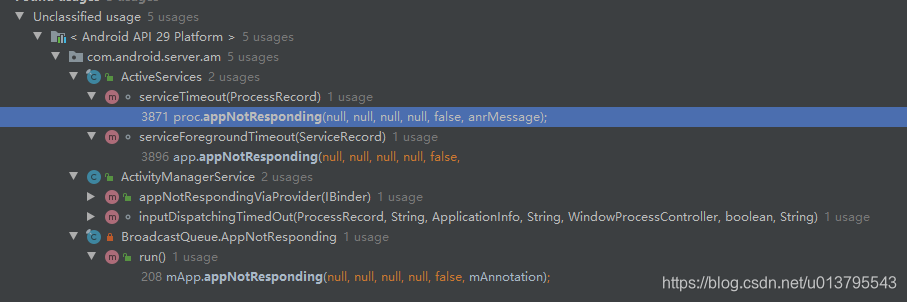
本文只分析activity相关的inputDispatcher导致的anr.
android底层Input事件传递流程一文梳理了应用层事件的底层来源,其中有说到native层事件分发者InputDispatcher.cpp在执行分发时会执行dispatchMotionLocked方法。dispatchMotionLocked方法中根据触摸事件和和轨迹球事件分别调用findTouchedWindowTargetsLocked和findFocusedWindowTargetsLocked去获取触摸窗口和 焦点窗口。
1.1 dispatchMotionLocked
//InputDispatcher.cpp
bool InputDispatcher::dispatchMotionLocked(nsecs_t currentTime, MotionEntry* entry, DropReason* dropReason, nsecs_t* nextWakeupTime) {
……// Identify targets.Vector inputTargets;bool conflictingPointerActions = false;int32_t injectionResult;if (isPointerEvent) {// Pointer event.  (eg. touchscreen)触摸事件injectionResult = findTouchedWindowTargetsLocked(currentTime,entry, inputTargets, nextWakeupTime, &conflictingPointerActions); //获取触摸窗口} else {// Non touch event.  (eg. trackball)轨迹球或者按键事件injectionResult = findFocusedWindowTargetsLocked(currentTime,entry, inputTargets, nextWakeupTime); //获取焦点窗口}
……dispatchEventLocked(currentTime, entry, inputTargets);return true;
}
在findTouchedWindowTargetsLocked和findFocusedWindowTargetsLocked这两个方法会对当前界面是否异常进行判断。
findTouchedWindowTargetsLocked方法根据变量mFocusedWindowHandle判断是否有焦点窗口,根据变量mFocusedApplicationHandle判断是否有焦点应用,如果这两个变量都为null,则代表窗口有异常。
findTouchedWindowTargetsLocked根据checkWindowReadyForMoreInputLocked方法查看窗口是否已暂停、未注册连接id、连接不正常、连接堵塞等情况,如果有则返回非空的异常信息。
//InputDispatcher.cpp
int32_t InputDispatcher::findFocusedWindowTargetsLocked(nsecs_t currentTime,const EventEntry* entry, Vector& inputTargets, nsecs_t* nextWakeupTime) {int32_t injectionResult;std::string reason;// If there is no currently focused window and no focused application// then drop the event.if (mFocusedWindowHandle == NULL) { //没有焦点窗口if (mFocusedApplicationHandle != NULL) { //没有焦点应用injectionResult = handleTargetsNotReadyLocked(currentTime, entry,mFocusedApplicationHandle, NULL, nextWakeupTime,"Waiting because no window has focus but there is a ""focused application that may eventually add a window ""when it finishes starting up.");goto Unresponsive;}ALOGI("Dropping event because there is no focused window or focused application.");injectionResult = INPUT_EVENT_INJECTION_FAILED;goto Failed;}……
}
……
int32_t InputDispatcher::findTouchedWindowTargetsLocked(nsecs_t currentTime,const MotionEntry* entry, Vector& inputTargets, nsecs_t* nextWakeupTime,bool* outConflictingPointerActions) {
……// Ensure all touched foreground windows are ready for new input.for (size_t i = 0; i < mTempTouchState.windows.size(); i++) {const TouchedWindow& touchedWindow = mTempTouchState.windows[i];if (touchedWindow.targetFlags & InputTarget::FLAG_FOREGROUND) {// Check whether the window is ready for more input.std::string reason = checkWindowReadyForMoreInputLocked(currentTime,touchedWindow.windowHandle, entry, "touched");//窗口是否准备好if (!reason.empty()) {//有异常信息代表没准备好injectionResult = handleTargetsNotReadyLocked(currentTime, entry,NULL, touchedWindow.windowHandle, nextWakeupTime, reason.c_str());goto Unresponsive;}}}
……
}
1.2 handleTargetsNotReadyLocked
handleTargetsNotReadyLocked方法先判断是不是系统原因导致的。
如果当前界面没有应用(applicationHandle == NULL)也没有窗口(windowHandle == NULL)那么就是系统原因,比如此时灭屏了、开机还没完成等等。如果是系统原因并且之前没有设置过系统未准备好等待标志INPUT_TARGET_WAIT_CAUSE_SYSTEM_NOT_READY,那么就设置mInputTargetWaitCause 为INPUT_TARGET_WAIT_CAUSE_SYSTEM_NOT_READY,并且设置提醒等待时间mInputTargetWaitTimeoutTime是一个很大值LONG_LONG_MAX,LONG_LONG_MAX是limits.h中的一个宏定义,具体值9223372036854775807ll。
如果不是系统原因那么就是应用原因了,先看下之前是否设置过应用未准备好等待标志INPUT_TARGET_WAIT_CAUSE_APPLICATION_NOT_READY,那么就设置mInputTargetWaitCause 为INPUT_TARGET_WAIT_CAUSE_APPLICATION_NOT_READY,并且设置等待时间为5s后。
等待超时时间mInputTargetWaitTimeoutTime是一个全局变量,如果mInputTargetWaitTimeoutExpired还没过期并且当前时间已经超过了mInputTargetWaitTimeoutTime, 则执行onANRLocked方法,并且将执行时间nextWakeupTime 设为最低,否则就设置执行时间为mInputTargetWaitTimeoutTime等待下次到这里重新判断。
//InputDispatcher.cpp// Default input dispatching timeout if there is no focused application or paused window
// from which to determine an appropriate dispatching timeout.
constexpr nsecs_t DEFAULT_INPUT_DISPATCHING_TIMEOUT = 5000 * 1000000LL; // 5 sec
……
int32_t InputDispatcher::handleTargetsNotReadyLocked(nsecs_t currentTime,const EventEntry* entry,const sp& applicationHandle,const sp& windowHandle,nsecs_t* nextWakeupTime, const char* reason) {if (applicationHandle == NULL && windowHandle == NULL) { //系统还没准备好,可能灭屏了if (mInputTargetWaitCause != INPUT_TARGET_WAIT_CAUSE_SYSTEM_NOT_READY) { 之前没有设置过 系统还没准备好标志INPUT_TARGET_WAIT_CAUSE_SYSTEM_NOT_READY
#if DEBUG_FOCUSALOGD("Waiting for system to become ready for input.  Reason: %s", reason);
#endifmInputTargetWaitCause = INPUT_TARGET_WAIT_CAUSE_SYSTEM_NOT_READY; //设置系统还没准备好标志INPUT_TARGET_WAIT_CAUSE_SYSTEM_NOT_READYmInputTargetWaitStartTime = currentTime;mInputTargetWaitTimeoutTime = LONG_LONG_MAX;//设置一个很大很大的值mInputTargetWaitTimeoutExpired = false; //此时超时事件刚产生,还没过期mInputTargetWaitApplicationHandle.clear();}} else {if (mInputTargetWaitCause != INPUT_TARGET_WAIT_CAUSE_APPLICATION_NOT_READY) { //之前没设置过 应用还没准备好标志INPUT_TARGET_WAIT_CAUSE_APPLICATION_NOT_READY
#if DEBUG_FOCUSALOGD("Waiting for application to become ready for input: %s.  Reason: %s",getApplicationWindowLabelLocked(applicationHandle, windowHandle).c_str(),reason);
#endifnsecs_t timeout;if (windowHandle != NULL) {timeout = windowHandle->getDispatchingTimeout(DEFAULT_INPUT_DISPATCHING_TIMEOUT);//input超时时间5s} else if (applicationHandle != NULL) {timeout = applicationHandle->getDispatchingTimeout(DEFAULT_INPUT_DISPATCHING_TIMEOUT); //input超时时间5s} else {timeout = DEFAULT_INPUT_DISPATCHING_TIMEOUT; //input超时时间5s}mInputTargetWaitCause = INPUT_TARGET_WAIT_CAUSE_APPLICATION_NOT_READY; //设置应用还没准备好标志INPUT_TARGET_WAIT_CAUSE_APPLICATION_NOT_READYmInputTargetWaitStartTime = currentTime;mInputTargetWaitTimeoutTime = currentTime + timeout; //设置超时等待时间5smInputTargetWaitTimeoutExpired = false; //此时超时事件刚产生,还没过期
……}if (mInputTargetWaitTimeoutExpired) {return INPUT_EVENT_INJECTION_TIMED_OUT; //事件已经过期则返回}if (currentTime >= mInputTargetWaitTimeoutTime) { //如果当前时间已过上次设置的超时时间则进行anr逻辑处理onANRLocked(currentTime, applicationHandle, windowHandle,entry->eventTime, mInputTargetWaitStartTime, reason);// Force poll loop to wake up immediately on next iteration once we get the// ANR response back from the policy.*nextWakeupTime = LONG_LONG_MIN; //将下次提醒时间设置很小很小return INPUT_EVENT_INJECTION_PENDING;} else {// Force poll loop to wake up when timeout is due.if (mInputTargetWaitTimeoutTime < *nextWakeupTime) {*nextWakeupTime = mInputTargetWaitTimeoutTime; //设置下次提醒时间}return INPUT_EVENT_INJECTION_PENDING;}
}
1.3 onANRLocked
“Application is not responding”在anr现场经常会遇到,原来是这里打印的。onANRLocked方法先抓取并记录ANR时的InputDispatcher状态,然后将InputDispatcher::doNotifyANRLockedInterruptible指令加入到链表中,看下doNotifyANRLockedInterruptible的具体实现吧
//InputDispatcher.cpp
void InputDispatcher::onANRLocked(nsecs_t currentTime, const sp& applicationHandle,const sp& windowHandle,nsecs_t eventTime, nsecs_t waitStartTime, const char* reason) {float dispatchLatency = (currentTime - eventTime) * 0.000001f;float waitDuration = (currentTime - waitStartTime) * 0.000001f;ALOGI("Application is not responding: %s.  ""It has been %0.1fms since event, %0.1fms since wait started.  Reason: %s",getApplicationWindowLabelLocked(applicationHandle, windowHandle).c_str(),dispatchLatency, waitDuration, reason);// Capture a record of the InputDispatcher state at the time of the ANR.time_t t = time(NULL);struct tm tm;localtime_r(&t, &tm);char timestr[64];strftime(timestr, sizeof(timestr), "%F %T", &tm);mLastANRState.clear();mLastANRState += INDENT "ANR:\n";mLastANRState += StringPrintf(INDENT2 "Time: %s\n", timestr);mLastANRState += StringPrintf(INDENT2 "Window: %s\n",getApplicationWindowLabelLocked(applicationHandle, windowHandle).c_str());mLastANRState += StringPrintf(INDENT2 "DispatchLatency: %0.1fms\n", dispatchLatency);mLastANRState += StringPrintf(INDENT2 "WaitDuration: %0.1fms\n", waitDuration);mLastANRState += StringPrintf(INDENT2 "Reason: %s\n", reason);dumpDispatchStateLocked(mLastANRState); //抓取记录ANR时的InputDispatcher状态CommandEntry* commandEntry = postCommandLocked(& InputDispatcher::doNotifyANRLockedInterruptible);//命令链表执行doNotifyANRLockedInterruptiblecommandEntry->inputApplicationHandle = applicationHandle;commandEntry->inputWindowHandle = windowHandle;commandEntry->reason = reason;
}
1.4 doNotifyANRLockedInterruptible
doNotifyANRLockedInterruptible主要调用了mPolicy的notifyANR方法,mPolicy是什么呢?查阅代码发现mPolicy是定义在InputDispatcher.h中的成员变量,在InputDispatcher构造函数中传递过来的InputDispatcher::InputDispatcher(const sp
jobject serviceObj, const sp
//InputDispatcher.cpp
void InputDispatcher::doNotifyANRLockedInterruptible(CommandEntry* commandEntry) {mLock.unlock();nsecs_t newTimeout = mPolicy->notifyANR(commandEntry->inputApplicationHandle, commandEntry->inputWindowHandle,commandEntry->reason); mLock.lock();
……
}
1.5 notifyANR
com_android_server_input_InputManagerService.cpp其实是InputManagerService.java的jni本地实现,在InputManagerService的构造函数中有调用nativeInit方法去初始化com_android_server_input_InputManagerService对象。这里的env->CallLongMethod就是jni的C++层到java层的调用,它调用了InputManagerService的notifyANR方法。
///frameworks/base/services/core/jni/com_android_server_input_InputManagerService.cpp
nsecs_t NativeInputManager::notifyANR(const sp& inputApplicationHandle,const sp& inputWindowHandle, const std::string& reason) {
……jlong newTimeout = env->CallLongMethod(mServiceObj,gServiceClassInfo.notifyANR, inputApplicationHandleObj, inputWindowHandleObj,reasonObj);
……return newTimeout;
}
现在终于调用到了java层的InputManagerService.notifyANR方法,mWindowManagerCallbacks是SystemServer.java的startOtherServices()方法中传递给InputManagerService的,实际上这个mWindowManagerCallbacks就是一个InputMonitor.java实例。
//InputManagerService.java
// Native callback.
private long notifyANR(IBinder token, String reason) {return mWindowManagerCallbacks.notifyANR(token, reason);
}
看下InputMonitor.java的notifyANR方法,如果是按键事件的话就执行controller.keyDispatchingTimedOut方法,如果是触摸事件就执行ActivityManager.getService().inputDispatchingTimedOut方法。跟进controller.keyDispatchingTimedOut里面可以看到最终也会调用AMS的三个参数的
inputDispatchingTimedOut方法。
///frameworks/base/services/core/java/com/android/server/wm/InputMonitor.java
/* Notifies the window manager about an application that is not responding.* Returns a new timeout to continue waiting in nanoseconds, or 0 to abort dispatch.** Called by the InputManager.*/
@Override
public long notifyANR(InputApplicationHandle inputApplicationHandle,InputWindowHandle inputWindowHandle, String reason) {……if (appWindowToken != null && appWindowToken.appToken != null) {// Notify the activity manager about the timeout and let it decide whether// to abort dispatching or keep waiting.final AppWindowContainerController controller = appWindowToken.getController();final boolean abort = controller != null&& controller.keyDispatchingTimedOut(reason,(windowState != null) ? windowState.mSession.mPid : -1); //按键事件处理if (!abort) {// The activity manager declined to abort dispatching.// Wait a bit longer and timeout again later.return appWindowToken.mInputDispatchingTimeoutNanos;}} else if (windowState != null) {try {// Notify the activity manager about the timeout and let it decide whether// to abort dispatching or keep waiting.long timeout = ActivityManager.getService().inputDispatchingTimedOut(windowState.mSession.mPid, aboveSystem, reason); //触摸事件处理if (timeout >= 0) {// The activity manager declined to abort dispatching.// Wait a bit longer and timeout again later.return timeout * 1000000L; // nanoseconds}} catch (RemoteException ex) {}}return 0; // abort dispatching
}
1.6 inputDispatchingTimedOut
三个参数的inputDispatchingTimedOut方法将ProcessRecord作为参数调用了五个参数的inputDispatchingTimedOut方法。五参数的inputDispatchingTimedOut方法进行了一个权限判断以及anr原因设置后调用ProcessRecord的appNotResponding方法。
//ActivityManagerService.java  boolean inputDispatchingTimedOut(ProcessRecord proc, String activityShortComponentName,ApplicationInfo aInfo, String parentShortComponentName,WindowProcessController parentProcess, boolean aboveSystem, String reason) {
……final String annotation;if (reason == null) {annotation = "Input dispatching timed out";} else {annotation = "Input dispatching timed out (" + reason + ")";}
……if (proc != null) {synchronized (this) {if (proc.isDebugging()) { //debug则不管return false;}……}proc.appNotResponding(activityShortComponentName, aInfo,parentShortComponentName, parentProcess, aboveSystem, annotation);}return true;}
1.7 appNotResponding
appNotResponding方法信息量很大,记录anr发生时的cpu信息,将anr打印到EventLog和main log中,并针对前台进程、后台进程、native都做了不同的记录处理,平时出现anr时main log中打印的关机关键字很多都可以在这个方法中找到,有兴趣可以详细的看下这个方法的源码。等所有的逻辑操作处理完了,方法的最后通过uihandler发送消息在主线程弹出anr框。
//ProcessRecord.java
void appNotResponding(String activityShortComponentName, ApplicationInfo aInfo,String parentShortComponentName, WindowProcessController parentProcess,boolean aboveSystem, String annotation) {ArrayList firstPids = new ArrayList<>(5);SparseArray lastPids = new SparseArray<>(20);mWindowProcessController.appEarlyNotResponding(annotation, () -> kill("anr", true));long anrTime = SystemClock.uptimeMillis();if (isMonitorCpuUsage()) {mService.updateCpuStatsNow();  //记录当前cpu使用情况}synchronized (mService) {// PowerManager.reboot() can block for a long time, so ignore ANRs while shutting down.if (mService.mAtmInternal.isShuttingDown()) { Slog.i(TAG, "During shutdown skipping ANR: " + this + " " + annotation);return;} else if (isNotResponding()) { //如果正在处理anr事件,则log打印并返回,避免同一事件的重复操作Slog.i(TAG, "Skipping duplicate ANR: " + this + " " + annotation);return;} else if (isCrashing()) {Slog.i(TAG, "Crashing app skipping ANR: " + this + " " + annotation);return;} else if (killedByAm) {Slog.i(TAG, "App already killed by AM skipping ANR: " + this + " " + annotation);return;} else if (killed) {Slog.i(TAG, "Skipping died app ANR: " + this + " " + annotation);return;} // In case we come through here for the same app before completing// this one, mark as anring now so we will bail out.setNotResponding(true); //设置正在处理anr事件,下次进入方法内先判断isNotResponding()// Log the ANR to the event log.EventLog.writeEvent(EventLogTags.AM_ANR, userId, pid, processName, info.flags,annotation); //将anr信息写入到event log// Dump thread traces as quickly as we can, starting with "interesting" processes.firstPids.add(pid); //添加进程pid// Don't dump other PIDs if it's a background ANRif (!isSilentAnr()) {int parentPid = pid;if (parentProcess != null && parentProcess.getPid() > 0) {parentPid = parentProcess.getPid();}if (parentPid != pid) firstPids.add(parentPid);if (MY_PID != pid && MY_PID != parentPid) firstPids.add(MY_PID);for (int i = getLruProcessList().size() - 1; i >= 0; i--) { //根据lru获取最近任务列表ProcessRecord r = getLruProcessList().get(i);if (r != null && r.thread != null) {int myPid = r.pid;if (myPid > 0 && myPid != pid && myPid != parentPid && myPid != MY_PID) {if (r.isPersistent()) {firstPids.add(myPid);if (DEBUG_ANR) Slog.i(TAG, "Adding persistent proc: " + r);} else if (r.treatLikeActivity) {firstPids.add(myPid);if (DEBUG_ANR) Slog.i(TAG, "Adding likely IME: " + r);} else {lastPids.put(myPid, Boolean.TRUE);if (DEBUG_ANR) Slog.i(TAG, "Adding ANR proc: " + r);}}}}}}// Log the ANR to the main log.将anr信息写入到main logStringBuilder info = new StringBuilder();info.setLength(0);info.append("ANR in ").append(processName);if (activityShortComponentName != null) {info.append(" (").append(activityShortComponentName).append(")");}info.append("\n");info.append("PID: ").append(pid).append("\n");if (annotation != null) {info.append("Reason: ").append(annotation).append("\n");}if (parentShortComponentName != null&& parentShortComponentName.equals(activityShortComponentName)) {info.append("Parent: ").append(parentShortComponentName).append("\n");}ProcessCpuTracker processCpuTracker = new ProcessCpuTracker(true);……synchronized (mService) {// mBatteryStatsService can be null if the AMS is constructed with injector only. This// will only happen in tests.if (mService.mBatteryStatsService != null) {mService.mBatteryStatsService.noteProcessAnr(processName, uid);}if (isSilentAnr() && !isDebugging()) {kill("bg anr", true);return;}// Set the app's notResponding state, and look up the errorReportReceivermakeAppNotRespondingLocked(activityShortComponentName,annotation != null ? "ANR " + annotation : "ANR", info.toString());// mUiHandler can be null if the AMS is constructed with injector only. This will only// happen in tests.if (mService.mUiHandler != null) {// Bring up the infamous App Not Responding dialogMessage msg = Message.obtain();msg.what = ActivityManagerService.SHOW_NOT_RESPONDING_UI_MSG;msg.obj = new AppNotRespondingDialog.Data(this, aInfo, aboveSystem); //anr弹框信息mService.mUiHandler.sendMessage(msg); //主线程去弹框}}
}
1.8 handleShowAnrUi
SHOW_NOT_RESPONDING_UI_MSG消息在AMS中的UiHandler中被处理,调用AppErrors的handleShowAppErrorUi方法。
//ActivityManagerService.java
final class UiHandler extends Handler {public UiHandler() {super(com.android.server.UiThread.get().getLooper(), null, true);}@Overridepublic void handleMessage(Message msg) {switch (msg.what) {
……case SHOW_NOT_RESPONDING_UI_MSG: {mAppErrors.handleShowAnrUi(msg);ensureBootCompleted();} break;
……
handleShowAnrUi方法先判断应用的进程信息proc是否存在,不存在则退出。然后判断anr弹框是否已经弹出,避免重复弹出anr框。如果可以显示异常框则创建AppNotRespondingDialog弹框并弹出。
//AppErrors.java
void handleShowAnrUi(Message msg) {Dialog dialogToShow = null;List packageList = null;synchronized (mService) {AppNotRespondingDialog.Data data = (AppNotRespondingDialog.Data) msg.obj;final ProcessRecord proc = data.proc;if (proc == null) { //没有进程信息则返回Slog.e(TAG, "handleShowAnrUi: proc is null");return;}if (!proc.isPersistent()) { //判断是否有mPersistent属性packageList = proc.getPackageListWithVersionCode();}if (proc.anrDialog != null) { //anr弹框是否已经弹出,避免重复弹框Slog.e(TAG, "App already has anr dialog: " + proc);MetricsLogger.action(mContext, MetricsProto.MetricsEvent.ACTION_APP_ANR,AppNotRespondingDialog.ALREADY_SHOWING);return;}boolean showBackground = Settings.Secure.getInt(mContext.getContentResolver(),Settings.Secure.ANR_SHOW_BACKGROUND, 0) != 0; //是否可以后台显示if (mService.mAtmInternal.canShowErrorDialogs() || showBackground) { //如果可以显示就创建AppNotRespondingDialog对象dialogToShow = new AppNotRespondingDialog(mService, mContext, data);proc.anrDialog = dialogToShow;} else {MetricsLogger.action(mContext, MetricsProto.MetricsEvent.ACTION_APP_ANR,AppNotRespondingDialog.CANT_SHOW);// Just kill the app if there is no dialog to be shown.mService.killAppAtUsersRequest(proc, null); //不能显示anr弹框则直接杀死应用进程}}// If we've created a crash dialog, show it without the lock heldif (dialogToShow != null) {dialogToShow.show(); //弹出anr弹框}// Notify PackageWatchdog without the lock heldif (packageList != null) {mPackageWatchdog.onPackageFailure(packageList);}
}
总结
inputDispatcher类型的anr是在native事件分发类InputDispatcher.cpp判断窗口是否准备好的方法handleTargetsNotReadyLocked时开始的,超时时间5s。
本文来自互联网用户投稿,文章观点仅代表作者本人,不代表本站立场,不承担相关法律责任。如若转载,请注明出处。 如若内容造成侵权/违法违规/事实不符,请点击【内容举报】进行投诉反馈!